1
Effects Chains
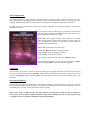
The configuration screen shows a list of all effects available and whether they are currently on or off. The
effects are routed in the order that they appear in the list. You can move any effect up or down in the chain
which can result in a very different sound. For instance, placing a Phaser before the overdrive will sound
totally different to placing the Phaser after the distortion.
You can move an effect by highlighting an effect in the list then pressing the ‘Move Up’ or ‘Move Down’
buttons. Pressing the ‘Default’ button will undo any effect ordering you may have made.
Pressing the ‘Edit Effect’ Button allows you to change the effect parameters. Pressing the ‘On/Off’ button
or double clicking an effect toggles it's status between on and off.
Navigating the Effects
The direction pad on your Pocket PC can be used to quickly move between the various StompBox screens.
Pressing the ‘left’ and ‘right’ arrows scroll between the following areas of the program.
Configuration <> Effects Pedals <> Load/Save Presets <> Metronome <> Loop Recorder
So from the configuration screen pressing the ‘right’ arrow will display the effects pedals screen. Pressing
‘right’ a second time displays the Load/Save Presets and so on.
Program Areas
Pressing the ‘up’ and ‘down’ buttons whilst an effects pedal is on display will allow you to move up and
down the all 9 effects in the chain. The order they appear is the order the sound is being processed.
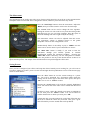
The following diagram represents the order of navigation using the direction pad. Pressing ‘left’ and ‘right’
move between program modes whilst ‘up’ and ‘down‘ to navigate the effects chain.
Previous Effect
Configuration
Effects Pedals
Next Effect
Load Presets
Metronome
Loop Recorder