1
DRS User Manual for Data Loading
Page 11 of 31
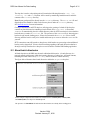
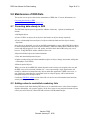
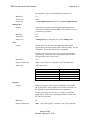
Subject: DRS LOAD REPORT (owner:<owner>, batch
dir:<batch_directory_name>, batch:<batch_name>
[DB:<batch_id>])
Batch Summary
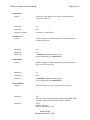
Digital Objects Added
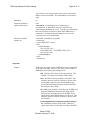
Relationships Added
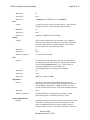
URNs Requested
Email Attachment (drsbatch_<batch_id>.txt):
Digital Objects Added
Relationships Added
URNs Requested
Click here to view a sample successful load report.
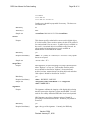
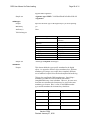
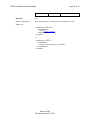
The Subject line of the email message contains basic information about the batch. The body of the
report contains a batch summary followed by three sections that describe the digital objects
added, relationships added, and URNs requested. These same three sections are also included in
a tab-delimited text file attached to the email message.
Within the Subject line of the report:
• owner is the DRS owner code, specified in the <owner> element of the batch.xml file.
• batch directory name is the name of the directory to which the batch was deposited.
• batch name is the name of the batch provided by the depositor in the <batch> element of the
batch.xml file.
• batch id is an internal identifier generated by the DRS for each deposited batch.
The Batch Summary section, which is only in the body of the email, includes the following
information about the batch:
• Batch directory name
• Batch name
• Batch id
• Owner(s)
• Batch drop off time
• Time waiting to start load
• Loading start time
• Loading end time
• Total load time
• Number of transactions
• Number of files deposited
• Batch size
Version 5.004
Revised: January 27, 2010