1
DRS User Manual for Data Loading
Sample Use
Page 21 of 31
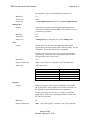
<successMethod value=”EMAIL” / >
<transaction>
Purpose
Marks the start and end of an individual operation in the DRS.
Mandatory
yes
Required attribute(s)
none
Optional attribute(s)
userval – this attribute is similar to the userval attribute provided
to you in the opening <batch> element. A unique comment can
be provided for each transaction. Currently, add is the only
operation enabled through the batch loader.
Elements contained
owner, add
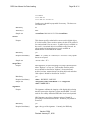
<owner>
Purpose
DRS owner code that specifies who owns the digital object
being deposited. This owner code should be given to you during
the owner registration process. Every transaction in the DRS
must be owned.
Mandatory
yes
Attribute(s)
none
Elements contained
none
Sample use
<owner>HUL.OWNER</owner>
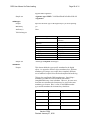
<add>
Purpose
Marks the start and end of an add operation within per
transaction. Currently, you can add digital objects, relationships
between objects, or request URNs for digital objects in the DRS.
Mandatory
yes
Attribute(s)
none
Elements contained
object, relationshipMap, urnMap
<relationshipMap>
Purpose
Defines a DRS relationship. A relationship map in the DRS
consists of three items:
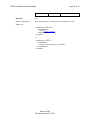
• reference to a DRS object
• relationship type
• reference to a DRS object
Version 5.004
Revised: January 27, 2010