1
ASTRO® XTL™ 1500 Digital Mobile
Radio with Control Head
Quick Reference Card
Product Safety and RF Exposure Compliance
!
Caution
Before using this product, read the operating instructions
for safe usage contained in the Product Safety and RF
Exposure booklet enclosed with your radio.
ATTENTION!
This radio is restricted to occupational use only to satisfy
FCC RF energy exposure requirements. Before using this
product, read the RF energy awareness information and
operating instructions in the Product Safety and RF
Exposure booklet enclosed with your radio (Motorola
Publication part number 6881095C99) to ensure
compliance with RF energy exposure limits.
BASIC OPERATION
Turning the Radio On and Off
Rotate the Volume knob clockwise to turn it on.
When the radio is powered on, the display shows XTL
1500. You will hear a high-pitched (good power-up)
tone.
If your radio shows an error on power-up, contact your
system manager for assistance.
Selecting the Zone and Mode
1 Press the ZNUP softkey or ZNDN softkey to scroll to the
desired zone.
2 Press CHAN and rotate the Mode knob to select the
mode.
Monitoring Conventional Modes
Press the preprogrammed Monitor button.
The display shows MON ON.
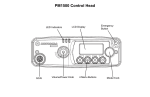
Speaker
LED Indicators
Emergency Button (T1)
GCAI
Cancelling Monitoring
Press the preprogrammed Monitor button.
The display shows MON OFF.
Receiving
1 Select the desired zone and mode.
2 Turn the Volume knob to adjust the volume.
Volume / Power
Knob
LCD Display
Transmitting (Conventional Modes)
4 Soft Menu Keys
Mode Knob
1 Select the desired zone and mode.
2 Rotate the Volume knob to adjust the volume.
3 When a mode becomes available, press and hold the
PTT button to transmit; release the PTT button to
receive.
Transmitting (Trunked Systems)
1 Select the desired zone and mode.
2 Rotate the Volume knob to adjust the volume.
3 Press and hold the PTT button to transmit; release
the PTT button to receive.
LED INDICATIONS
Action
LED
Condition
Meaning
Press the PTT
button to
transmit
Steady red
Normal transmission
Unlit
Not transmitting
Release the
PTT button to
receive
Steady
yellow
Channel activity is
present
Blinking
green
Call Received