1
Instruction Manual
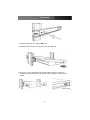
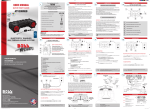
7. Install three screws on each side of the console:
8. Installation is now complete:
Connecting the console
To connect an LCD console to a computer, perform the following steps:
LCD console - Rear view
1. Turn off your computer.
2. Insert the video (VGA) connector of the KVM cable into the video card connector on
the rear panel of your computer.
3. Identify and connect the PS/2 mouse and PS/2 keyboard connector to the correct
PS/2 ports on the rear panel of your computer.
4. Connect the AC power cord to the power inlet on the console. Connect the remaining
end of the AC power cord to an available power outlet.
4