1
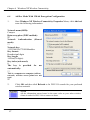
Copyrights © 2001 Compex Systems Pte Ltd
All Rights Reserved
This document contains information, which is protected by copyright. Reproduction,
adaptation or translation without prior permission is prohibited, except as allowed
under the copyright laws.
Trademark Information
Compex®, ReadyLINK® and MicroHub® are registered trademarks of Compex, Inc. Microsoft
Windows and the Windows logo are the trademarks of Microsoft Corp. NetWare is the
registered trademark of Novell Inc. All other brand and product names are trademarks or
registered trademarks of their respective owners.
Notice: Copyrights © 2001 by Compex, Inc. All rights reserved. Reproduction, adaptation, or
translation without prior permission of Compex, Inc. is prohibited, except as allowed under the
copyright laws.
Manual Revision by Christopher
Manual Number: U-0336-V1.1C Version 1.1, December 2001
Disclaimer
Compex, Inc. provides this manual without warranty of any kind, either expressed or
implied, including but not limited to the implied warranties of merchantability and
fitness for a particular purpose. Compex, Inc. may make improvements and/or changes
to the product and/or specifications of the product described in this manual, without
prior notice. Compex, Inc will not be liable for any technical inaccuracies or
typographical errors found in this guide. Changes are periodically made to the
information contained herein and will be incorporated into later versions of the
manual. The information contained is subject to change without prior notice.
Your Feedback
We value your feedback. If you find any errors in this user’s manual, or if you have suggestions
on improving, we would like to hear from you. Please contact us at:
Telephone :
Fax :
Email:
i
(65) 3810139
(65) 2809947
[email protected]
FCC NOTICE
This device has been tested and found to comply with the limits for a Class B digital
device, pursuant to Part 15 of the FCC Rules. These limits are designed to provide
reasonable protection against harmful interference in a residential installation. This
device generates, uses and can radiate radio frequency energy and, if not installed and
used in accordance with the instructions, may cause harmful interference to radio
communications. However, there is no guarantee that interference will not occur in a
particular installation. If this device does cause harmful interference to radio or
television reception, the user is encouraged to try to correct the interference by one or
more of the following measures:
Reorient or relocate the receiving antenna.
Connect the computer into an outlet on a circuit different from that to which the
receiver is connected.
Increase the separation between the computer and receiver.
Consult the dealer or an experienced radio/TV technician for help.
Caution: Any changes or modifications not expressly approved by the grantee of this device
could void the user's authority to operate the equipment.
FCC Compliance Statement: This device complies with Part 15 of the FCC Rules.
Operation is subject to the following two conditions:
This device may not cause harmful interference, and
This device must accept any interference received, including interference that may
cause undesired operation.
Declaration of Conformity
Compex, Inc. declares the following:
Product Name: Compex iWavePort 11Mbps Wireless LAN USB Adapter
Model No.: WLU11A conforms to the following Product Standards:
Radiated Emission Standards: EN55022A, FCC Part 15 Class B; Conducted Emission
Standards: EN60555Pt2 conducted emission; EN55022A conducted emission, FCC Part 15
Class B; Immunity Standards: IEC 801-2; IEC 801-3; IEC 801-4.
Therefore, this product is in conformity with the following regional standards:
FCC Class B - following the provisions of FCC Part 15 directive;
CE Mark - following the provisions of the EC directive.
28 December 2001
ii
Technical Support Information
The warranty information and registration form are found in the Quick Install Guide.
For technical support, you may contact COMPEX or its subsidiaries. For your convenience, you
may also seek technical assistance from the local distributor, or from the authorized
dealer/reseller that you have purchased this product from. For technical support by email, write
to [email protected].
Refer to the table below for the nearest Technical Support Centers:
Technical Support Centers
Contact the technical support center that services your location.
U.S.A., Canada, Latin America and South America
* Write
( Call
Fax
Compex, Inc.
4051 E. La Palma, Unit A
Anaheim, CA 92807, USA
Tel:
(714) 630-7302 (8 a.m.-5 p.m. Pacific time)
Tel:
(800) 279-8891 ext.122 Technical Support
Fax:
(714) 630-6521
BBS:
(714) 630-2570 (24-hour access)
Europe
* Write
( Call
Fax
ReadyLINK Networktechnology Gmbh
Albert Einstein Straβe 34 / M21
63322 Rödermark, Germany
Tel:
+49 (0) 6074 - 98017 (8 a.m.-5 p.m. local time)
Fax:
+49 (0) 6074 - 90668
BBS:
+49 (0) 6074 - 93974 (24-hour access)
Asia, Australia, New Zealand, Middle East
and the rest of the World
* Write
( Call
Fax
Internet
access/
Website:
iii
Compex Systems Pte Ltd
135, Joo Seng Road #08-01, PM Industrial Building
Singapore 368363
Tel:
(65) 286-1805 (8 a.m.-5 p.m. local time)
Tel:
(65) 286-2086 ext.199 Technical Support
Fax:
(65) 283-8337
BBS:
(65) 282-8854 (24-hour access)
E-mail:
[email protected]
FTPsite:
ftp.compex.com.sg
http://www.cpx.com or http://www.compex.com.sg
About This Document
The product described in this document, Compex iWavePort Series, WLU11A is a licensed
product of Compex Systems Pte Ltd. This document contains instructions for installing,
configuring and using the WLU11A. It also gives an overview of the key applications and the
networking concepts with respect to the product.
This documentation is for both Network Administrators and the end user who possesses some
basic knowledge and expertise in the networking structure and protocols.
It makes a few assumptions that the host computer has already been installed with TCP/IP and
already up & running and accessing the Internet. Procedures for Windows 95/98/2000/NT
operating systems are included in this document. However, for other operating system, you may
need to refer to your operating system’s documentation for networking.
How to Use this Document
The document is written in such a way that you as a user will find it convenient to find
specific information pertaining to the product. It comprises of chapters that explain in
details on the installation and configuration of WLU11A.
Conventions
In this document, special conventions are used to help and present the information clearly. The
Compex iWavePort 11Mbps Wireless LAN USB Adapter is often referred to as WLU11A in
this document. Below is a list of conventions used throughout.
NOTE
This section will consist of important features or instructions
CAUTION
This section concerns risk of injury, system damage or loss of data
WARNING
This section concerns risk of severe injury
Menu Commands, Button/Dialog
Buttons,
Product Indicators
iv
Will appear as follows in Bold
Eg . Reboot System and Save
Eg. MODEM 1 port or STATUS LED indicator.
Table of Contents
Copyrights © 2001 Compex Systems Pte Ltd............................................................ i
Trademark Information .............................................................................................. i
Disclaimer .............................................................................................................. i
Your Feedback ........................................................................................................... i
FCC NOTICE ........................................................................................................... ii
Declaration of Conformity ........................................................................................ ii
Technical Support Information ................................................................................ iii
About This Document .............................................................................................. iv
How to Use this Document ...................................................................................... iv
Conventions ............................................................................................................ iv
Chapter 1
1.1
1.2
1.3
1.4
1.5
1.6
Introduction .................................................................................................... 1
Overview ........................................................................................................ 1
Features and Benefits...................................................................................... 1
1.3.1 IEEE 802.11b and USB 1.1 Specifications compliant ........................ 1
1.3.2 Supports 1, 2, 5.5 and 11Mbps Data Rates.......................................... 1
1.3.3 Wired Equivalent Privacy (WEP) 64/128-bit data encryption ............ 2
Applications.................................................................................................... 2
1.4.1 When do you need wireless LAN........................................................ 2
1.4.2 Networking scenarios for WLU11A ................................................... 2
Panel Views and Descriptions ........................................................................ 4
1.5.1 Top View............................................................................................. 4
1.5.2 Front View .......................................................................................... 4
1.5.3 Panel Description ................................................................................ 5
Technical Specifications ................................................................................. 6
Chapter 2
2.1
2.2
3.3
Getting Started ..............................................................7
Package Content ............................................................................................. 7
Setup Considerations ...................................................................................... 7
2.2.1 Software requirements......................................................................... 7
2.2.2 Hardware requirements ....................................................................... 7
Chapter 3
3.1
3.2
Product Overview .........................................................1
Hardware and Software Installation...........................8
WLU11A Hardware Installation..................................................................... 8
WLU11A Driver Installation .......................................................................... 9
3.2.1 Windows 98/98SE/2000 WLU11A Driver Installation....................... 9
3.2.2 Windows XP Driver Installation Guide ............................................ 13
Configuration Utility Installation.................................................................. 16
Table of Contents
3.3.1 Windows 98,98SE, ME and Windows 2000 ..................................... 16
3.3.2 Windows XP Configuration .............................................................. 21
Chapter 4
4.1
4.2
4.3
4.4
4.5
4.6
4.7
Start the utility .............................................................................................. 22
Architecture configuration............................................................................ 23
4.2.1 Infrastructure Architecture Configuration ......................................... 26
4.2.2 Ad-Hoc Architecture Configuration.................................................. 27
Statistics........................................................................................................ 28
Site Survey.................................................................................................... 30
Security......................................................................................................... 32
4.5.1 Ad-Hoc 64-bit Encryption Configuration.......................................... 34
Advanced configuration................................................................................ 35
Version checking .......................................................................................... 37
Chapter 5
5.1
5.2
8.3
Troubleshooting ..........................................................48
Encounter IP Address Conflicts.................................................................... 48
7.1.1 For Windows 98/98SE/ME ............................................................... 48
7.1.2 For Windows 2000/XP...................................................................... 49
Chapter 8
8.1
8.2
Windows XP Wireless Connectivity..........................40
Start Windows XP Wireless Connection Properties Menu........................... 40
Windows XP Wireless Connectivity Properties Menu ................................. 43
Infrastructure Mode With 64-bit Encryption Configuration ......................... 46
Ad Hoc Mode With 128-bit Encryption Configuration ................................ 47
Chapter 7
7.1
Un-installation for Utility and drivers ......................38
To Un-install Utility ..................................................................................... 38
Drivers Un-Installation ................................................................................. 39
Chapter 6
6.1
6.2
6.3
6.4
Client Utility Configuration .......................................22
Appendix......................................................................50
Adding TCP/IP network protocol for Windows 98/98SE/ME...................... 50
Windows 98/98SE/ME Configuration of TCP/IP network protocol for DHCP
server ........................................................................................................... 53
Windows XP Configuration of TCP/IP network protocol for DHCP server 55
NOTES
......................................................................................58
Chapter 1 Product Overview
Chapter 1 Product Overview
1.1
Introduction
Wireless network is a convenience to everyone. Whether you are a home user or an
office network administrator, you are going to enjoy the benefits of the wireless
network.
As a home user, you can enjoy the freedom to roam around your house and maintain
connection to your network. Now you can surf the web, send e-mail or download a
program while in the garden or near your swimming pool. Wireless network will
change the way you live. No more unsightly cables and wiring with the
implementation of a wireless network.
Many new offices in consideration of fast implementation and easy maintenance of the
network has upgraded/expanded to a wireless network.
1.2
Overview
Compex iWavePort WLU11A is a handy card-sized 11Mbps Wireless Adapter with
USB (Universal Serial Bus) interface in compliant to IEEE 802.11b industry standard.
It offers the convenience of a plug and play by just simply connecting to a USB
interface of your PC or notebooks.
1.3
Features and Benefits
Compex WLU11A is designed to give you all the supPort features you need in a
wireless network to establish a wireless client. The following features are included as
part of the benefits of owning a WLU11A.
1.3.1
IEEE 802.11b and USB 1.1 Specifications compliant
The WLU11A can interoperate with any other wireless devices that comply with
IEEE802.11b Direct Sequence Spread Spectrum (DSSS) and interpretable with most
notebooks and desktop computers, in compliance to USB 1.1 specifications.
1.3.2
Supports 1, 2, 5.5 and 11Mbps Data Rates
WLU11A works at a maximum speed of 11Mbps on the wireless interface; and is
backward compatible to support older wireless products with lower speeds of 1, 2
Mbps.
1
Chapter 1 Product Overview
1.3.3
Wired Equivalent Privacy (WEP) 64/128-bit data encryption
For data privacy, Compex iWavePort WLU11A uses a 64-bit or 128-bit private
encryption key – WEP to lock your information which are transmitted over the air.
Only wireless clients configured with the same WEP key will have access to the data.
1.4
Applications
The Compex WLU11A facilitates wireless connections to other hosts on a network.
1.4.1
When do you need wireless LAN
Installing the Compex WLU11A will be an advantage when you have the following
situation:
•
Demanding High Mobility at your Home or Office
•
Where time is a scare source
•
Structural restriction in the building
•
Cost effectiveness against laying of cables
•
Easy scalability and expansion of existing network
1.4.2
Networking scenarios for WLU11A
WLU11A can be configured for 2 types of wireless architectures – Infrastructure and
Ad-Hoc. In the Infrastructure architecture, all the wireless clients communicate
through the access point, which is a device that acts as a base station for all wireless
communication. It is the single point of all wireless communication. The data packets
from the wireless clients will be transferred to the access point before transmitting to
other hosts on the network.
In an Ad-Hoc architecture, the wireless clients communicate directly with one another.
There is no single point of communication. No access point exists on the wireless
LAN. Each wireless client transfers their data packets to the other.
2
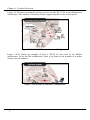
Chapter 1 Product Overview
Figure 1.4.2a shows an example of how you can use the WLU11A in an infrastructure
architecture. The number of wireless clients support depends on the access point.
Figure 1.4.2a Infrastructure Architecture Configuration
Figure 1.4.2b shows an example of how a WLU11A can work in an Ad-Hoc
architecture. In an Ad-Hoc architecture, there is no limit to the number of wireless
clients you can connect.
Figure 1.4.2b Ad-Hoc Architecture Configuration
3
Chapter 1 Product Overview
1.5
Panel Views and Descriptions
1.5.1
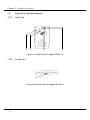
Top View
4
2
3
1
Figure 1.5.1a Top View of Compex WLU11A
1.5.2
Front View
5
Figure 1.5.2a Front View of Compex WLU11A
4
Chapter 1 Product Overview
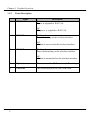
1.5.3
1
Panel Description
Name
PWR LED
Description
Red
Power is supplied to WLU11A.
Off
No power is supplied to WLU11A
2
RX LED
Blinking Green
Data is receiving on the wireless interface.
Off
No data is received on the wireless interface.
3
TX LED
Blinking Green
Data is transmitting on the wireless interface.
Off
No data is transmitted on the wireless interface.
4
Dipole Antenna
The antenna is for RF Transmission/Receiving.
5
USB Port
The connection port for your USB cable.
5
Chapter 1 Product Overview
1.6
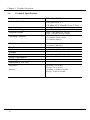
Technical Specifications
Model
Industry Standards
iWavePort WLU11A
Interface
Radio Technology
Frequency Band
One Type B USB interface
Direct Sequence Spread Spectrum (DSSS)
2400 ~ 2483.5MHz (US, Canada)
2400 ~ 2497MHz (Europe, Japan)
4 Channels (France)
11 Channels (US & Canada)
13 Channels (Europe)
IEEE 802.11 & 802.11b DSSS
USB Specification v1.1
CE Mark, FCC Class B, Gost, C-Tick
Operating Channels
Media Access Method
Data Rate
Modulation
Antenna
Data Privacy
Power Consumption
Net Weight
Dimension(L x W x H)
Environmental Requirement
Temperature
Humidity
6
Carrier Sense Multiple Access with Collision
Avoidance (CSMA/CA)
11Mbps, 5.5Mbps, 2Mbps, 1Mbps
CCK, BPSK, QPSK
Dipole Antenna
64-bit or 128-bit WEP (selectable)
5V, 250mA TX, 150mA RX, 30mA Standby
About 130 g
101mm x 65 mm x 14 mm
Operating : 0°C to 40°C
Storage : -20°C to 70°C
Operating : 10%RH to 70%RH
Storage : 5%RH to 90%RH
Chapter 2 Getting Started
Chapter 2 Getting Started
This chapter outlines the basic requirement needs before you begin any installation
and configuration on the Compex WLU11A.
2.1
Package Content
Thank you for purchasing the Compex WLU11A. The package should contains the
following:
WLU11A Adapter
USB Cable
Quick Install Guide with warranty card
CD User manual and software drivers and utilities
2.2
•
•
Setup Considerations
Check your Local Area Network configurations. Check if it is Dynamic or
Static IP addressing.
Check the TCP/IP protocols and IP address settings of the PCs/Clients or
Ethernet Hub/Switch in your LAN.
2.2.1
•
•
Software requirements
Windows 98/98SE/ME/2000/XP
2 MB of hard disk space
2.2.2
•
Hardware requirements
Computers with USB port that complies with USB specification 1.1
7
Chapter 3 Hardware and Software Installation
Chapter 3 Hardware and Software Installation
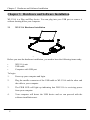
WLU11A is a Plug and Play device. You can plug into your USB port or remove it
without shutting down your computer.
3.1
WLU11A Hardware Installation
Figure 3.1a WLU11A Connections
Before you start the hardware installation, you need to have the following items ready.
•
•
•
WLU11A unit
USB cable
Computer with USB port
To begin
1.
Power up your computer and login.
2.
Plug the smaller connector of the USB cable to WLU11A and the other end
the cable to your computer.
3.
The PWR LED will light up indicating that WLU11A is receiving power
from your computer.
4.
Your computer will detect the USB device and we can proceed with the
software installation next.
8
Chapter 3 Hardware and Software Installation
3.2
WLU11A Driver Installation
This section is similar to the Quick Install Guide. The driver and client utility
installations will be shown in following pages.
3.2.1
Windows 98/98SE/2000 WLU11A Driver Installation
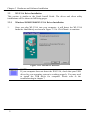
1.
Once you plug WLU11A into your computer, it will detect the WLU11A
hardware immediately as shown in Figure 3.2.1a. Click Next > to continue.
Figure 3.2.1a USB Device detection
NOTE
If your computer does not detect the WLU11A, check that your USB
driver for your operating system is working properly. You may need
to install the USB driver for computer. Please refer to the
troubleshooting in chapter 7.
9
Chapter 3 Hardware and Software Installation
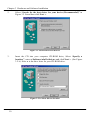
2.
Select “Search for the best driver for your device (Recommended)” in
Figure 3.2.1b and then click Next >.
Figure 3.2.1b Search for new drivers
3.
Insert the CD into your computer CD-ROM drive; Select “Specify a
location:”, enter x:\Software\wlu11a\drivers and click Next >. (See Figure
3.2.1c) Note: x is the drive letter for your CD-ROM drive.
Figure 3.2.1c Select drivers location
10
Chapter 3 Hardware and Software Installation
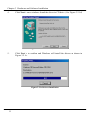
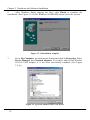
4.
Click Next > once windows found the driver in CD drive. (See Figure 3.2.1d)
Figure 3.2.1d Drivers confirmation
5.
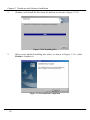
Click Next > to confirm and Windows will install the drivers as shown in
Figure 3.2.1e.
Figure 3.2.1e Drivers Installation
11
Chapter 3 Hardware and Software Installation
6.
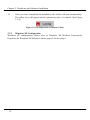
After Windows finish copying the files, click Finish to complete the
installation. (See Figure 3.2.1f) For Windows 98/98SE/ME please reboot the system.
Figure 3.2.1f Installation complete
7.
Go to My Computer, use right mouse button and click on Properties. Select
Device Manager then Network adapters. You will be able to find Wireless
802.11b USB Adapter if it has been successfully installed. (See Figure
3.2.1g)
Figure 3.2.1g Check status of WLU11A driver
12
Chapter 3 Hardware and Software Installation
3.2.2
1.
Windows XP Driver Installation Guide
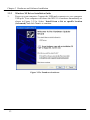
Power up your computer. Connect the USB male connector to your computer
USB port. Your computer will detect the WLU11A hardware immediately as
shown in Figure 3.2.2.a. Select “Install from a list or specific location
(Advanced)”and click Next > to continue.
Figure 3.2.2a Found new hardware
13
Chapter 3 Hardware and Software Installation
2.
Insert the CD into your CD-ROM drive; Select “Include this location in the
search:”, enter x:Software\wlu11a\drivers and click Next > as shown in
Figure 3.2.2b. Windows will detect the drivers for you. Click Continue
Anyway to proceed. Note: x is the drive letter of your CD-ROM drive.
Figure 3.2.2b Windows logo test
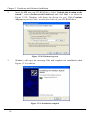
3.
Windows will copy the necessary files and complete the installation when
Figure 3.3.2c is shown.
Figure 3.3.2c Installation complete
14
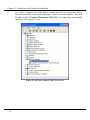
Chapter 3 Hardware and Software Installation
Go to My Computer, use right mouse button and click on Properties. Select
Hardware and then click Device Manager. Select Network adapters. You will
be able to find “Compex iWavePort WLU11A” if it has been successfully
installed. (See Figure 3.2.2d)
4.
Figure 3.2.2d Check status of WLU11A driver
15
Chapter 3 Hardware and Software Installation
3.3
Configuration Utility Installation
3.3.1
Windows 98,98SE, ME and Windows 2000
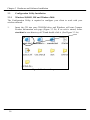
The Configuration Utility is required to configure your client to work with your
wireless network.
1.
Insert the CD into your CD-ROM drive and Windows will start Compex
Product Information web page (Figure 3.3.1b). If no web is started, locate
start.html at root directory of CD and double click it. (See Figure 3.3.1a)
Figure 3.3.1a Locate Setup.exe
16
Chapter 3 Hardware and Software Installation
2.
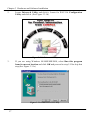
Locate Drivers & Utility and click it. Locate for WLU11A Configuration
Utility and click it. (See Figure 3.3.1b)
Figure 3.3.1b Drivers & Utility
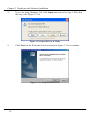
3.
If you are using Windows 98/98SE/ME/2000, select Run this program
from its current location and click OK and proceed to step 5. Else skip this
step.(See Figure 3.3.1c)
Figure 3.3.1c Run Drivers & Utility
17
Chapter 3 Hardware and Software Installation
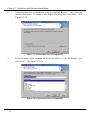
4.
If you are using Windows XP, click Open and proceed to step 5. Else skip
this step. (See Figure 3.3.1d)
Figure 3.3.1d Open Drivers & Utility
5.
Click Next> in the Welcome Screen as shown in Figure 3.3.1e to continue.
Figure 3.3.1e Setup welcome screen
18
Chapter 3 Hardware and Software Installation
6.
Select the directory to install the utility by clicking Browse… and select the
various directories. To install in the default directory just click Next>. (See
Figure 3.3.1f)
Figure 3.3.1f Select directory to setup utility
7.
Enter the name of the program folder for the utility. To use the default - just
click Next>. (See Figure 3.3.1g)
Figure 3.3.1g Select directory to setup utility
19
Chapter 3 Hardware and Software Installation
8.
Windows will install the files from the diskette as shown in Figure 3.3.1h.
Figure 3.3.1h Installing files
9.
When setup finished installing the utility as shown in Figure 3.3.1i, clicks
Finish to complete it.
Figure 3.3.1i Installation Completion
20
Chapter 3 Hardware and Software Installation
10.
Once you have completed the installation, the utility will start automatically.
The utility icon will appear on the system tray once it is started. (See Figure
3.3.1j)
Figure 3.3.1j Configuration & Monitor Utility
3.3.2
Windows XP Configuration
Windows XP configuration, please refer to Windows XP Wireless Connectivity
Properties for Windows XP Software. (Refer page 40 for the setup).
21
Chapter 4 Client Utility Configuration
Chapter 4 Client Utility Configuration
The client utility you have just installed allows you to configure WLU11A easily without
having to reboot your operating system.
4.1
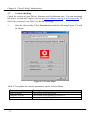
Start the utility
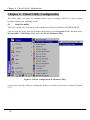
There are various ways you can start the configuration utility in Windows 98/98SE/2000/XP
You can start the utility from the Windows Start menu, select Programs folder and then select
Wireless 802.11 USB Utility folder and click WLAN Monitor Utility.
Figure 4.1a Start Configuration & Monitor Utility
You can also start the utility by clicking the Utility icon on the system tray as shown in Figure
3.3.1j.
22
Chapter 4 Client Utility Configuration
4.2
Architecture configuration
WLU11A can be configured to work in Infrastructure or Ad-Hoc architecture mode.
For more information about Infrastructure or Ad-Hoc architecture, please refer to
section 1.4.2.
To configure the Architecture do the following:
1.
Start the client utility. Click Status menu and the following screen will be
shown in Figure 4.2a.
Figure 4.2a Start Configuration & Monitor Utility
23
Chapter 4 Client Utility Configuration
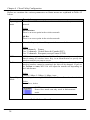
Before we continue the various parameters on Status menu are explained in Table 4.2
below.
Parameters
Description
Operating
mode
Select the Ad-Hoc or Infrastructure architecture for your wireless
network.
Values
Infrastructure
There is an access point in the wireless network.
Ad-Hoc
There is no access point in the wireless network.
Channel
Select the frequency channel for your wireless network client.
Values
1 to 4 channels France
1 to 11 channels United States & Canada (FCC)
1 to 13 channels European, except France (ETSI)
SSID
Tx Rate
Power Mgmt
Mode
SSID is the acronym for Service Set Identifier. It is a unique name that is
shared among all wireless hosts. Key in an Identification to specify the
wireless network you want to access.
Set the transfer rate for the wireless interface. If the transfer rate for your
wireless interface cannot be sustained, the link will be dropped. If you set
the Tx Rate to Auto, WLU11A will adjust the transfer rate depending on
the Link distance.
Values
1 Mbps, 2 Mbps, 5.5 Mbps, 11 Mbps, Auto.
To enable power saving for WLU11A select Power Save else select Active.
Values
Power Save, Active
NOTE
Power Save mode can only work in Infrastructure
mode.
Table 4.2 Status Menu Parameters
24
Chapter 4 Client Utility Configuration
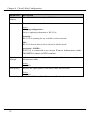
Parameters
Description
MAC
Address
Shows the MAC address of your WLU11A.
Status
Shows the various status of wireless connection
Values
Changing configuration…
Utility is updating information to WLU11A.
Scanning…
WLU11A is scanning for any available wireless network.
OK…
WLU11A detects other wireless clients in Ad-Hoc mode.
Associated – BSSID:…
WLU11A is connected to an Access Point in Infrastructure mode.
The BSSID is shown in HEX numbers.
Signal
Strength
Indicates the signal strength of data packets from the access point in
infrastructure mode.
Link Quality
Values
0 to 100%
Indicates the signal quality of the link to other wireless hosts.
Values
0 to 100%
Table 4.2 Status Menu Parameters (Continue)
25
Chapter 4 Client Utility Configuration
4.2.1
1.
Infrastructure Architecture Configuration
Start the client utility. Click Status menu and then click Change and
configure the following parameters.
Operating Mode:
Infrastructure
SSID:
Compex
Tx Rate:
Auto
Power Mgmt Mode:
Active
Figure 4.2.1a Example of Infrastructure Mode
2.
Click Submit and WLU11A will search for any access point.
3.
Click Exit to close the program.
NOTE
All the information entered must be the same value as your access point in
order for WLU11A to connect to it.
26
Chapter 4 Client Utility Configuration
4.2.2
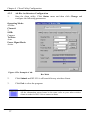
1.
Ad-Hoc Architecture Configuration
Start the client utility. Click Status menu and then click Change and
configure the following parameters.
Operating Mode:
Ad-Hoc
Channel:
3
SSID:
Compex
Tx Rate:
Auto
Power Mgmt Mode:
Active
Figure 4.2.2a Example of AdHoc Mode
2.
Click Submit and WLU11A will search for any wireless clients.
3.
Click Exit to close the program.
NOTE
All the information entered must be the same value as your other wireless
clients in order for WLU11A to connect to them.
27
Chapter 4 Client Utility Configuration
4.3
Statistics
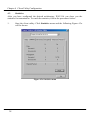
After you have configured the desired architecture, WLU11A can show you the
statistics for transmission. To watch the statistics, follow the procedures below:
1.
Start the client utility. Click Statistics menu and the following Figure 4.3a
will be shown.
Figure 4.3a Statistics menu
28
Chapter 4 Client Utility Configuration
Table 4.3 explains the various parameters on the Statistics Menu.
Parameters
Data
Successful Tx/Rx
Unsuccessful Tx/Rx
Description
The number of data packets successfully transmitted or
received.
The number of data packets unsuccessfully transmitted or
received.
Management
Successful Tx/Rx
The number of management
transmitted or received.
Unsuccessful Tx/Rx
The number of management packets unsuccessfully
transmitted or received.
Rejected packets
TX/RX
Number of rejected transmitted/received packets
Table 4.3 Statistic Menu Parameters
29
packets
successfully
Chapter 4 Client Utility Configuration
4.4
Site Survey
The Site Survey shows the wireless hosts that are detected by WLU11A.
To check the wireless hosts around WLU11A do the following.
1.
Start the client utility. Click Site Survey menu and the following Figure 4.4a
will be shown.
Figure 4.4a Site Survey Menu
2.
30
To scan the wireless hosts click Re-Scan. During the scanning, you can end
it by clicking Cancel.
Chapter 4 Client Utility Configuration
Table 4.4 explains the various parameters on the Site Survey Menu.
Parameters
Description
BSSID
A hex number that identifies the wireless host.
SSID
SSID is the acronym for Service Set Identifier. It is a unique
name that is shared among all wireless hosts in the same
wireless network.
Signal
Shows the signal strength to the device.
Channel
The frequency channel that is set on the respective wireless
host.
Encryption
Shows whether Encryption is turned on or off on the
respective wireless host.
BSS
BSS is the acronym for Basic Service Set. It indicates the
mode (Infrastructure or Ad-Hoc) this BSSID is working in.
Table 4.4 Site Survey Menu Parameters
31
Chapter 4 Client Utility Configuration
4.5
Security
As air is the medium of transmission, any users with a wireless enabled computer can
eardrop the data transmitted easily. For protection of your data from unauthorized
users, you need to encrypt the data before they are transmitted. WLU11A offers two
types of encryption – 64-bit WEP and 128-bit WEP. To secure your data do the
following:
1.
Start the client utility. Click Encryption menu and select 64 bit under
Encryption parameters and the following Figure 4.5a will be shown.
Figure 4.5a Encryption Menu
32
Chapter 4 Client Utility Configuration
Table 4.5 explains the various parameters on the Encryption Menu.
Parameters
Description
Encryption
Select Disabled, 64 bit or 128 bit WEP encryption.
Values
Disabled
Encryption is disabled.
64 bit:
You need to key in 10 Hex numbers for your secret key to encrypt the
data transmitted. Each key needs to have 10 Hex numbers.
KEY#1
KEY#2
KEY#3
KEY#4
128 bit
You need to key in 26 Hex numbers for your secret key to encrypt the
data transmitted. Each key needs to have 26 Hex numbers.
Enter your Encryption Key here.
NOTE
You can enter up to 4 Encryption Key.
However, only 1 key will be used at a time.
Default Key
Select one of the four keys to use for encryption.
Mode
Select the mode for the encryption key
Values
Optional
Encryption key does not depend on the Encryption key selected.
Authentication
Type
Mandatory
Encryption also depends on the Encryption key selected.
Select how the wireless client authenticate with the access point.
Values
Open system
Wireless client does not need to share the same Encryption key to
authenticate with access point.
Shared Key
Wireless client need to share the same Encryption key to authenticate
with access point.
Table 4.5 Site Survey Menu Parameters
33
Chapter 4 Client Utility Configuration
4.5.1
1.
Ad-Hoc 64-bit Encryption Configuration
Start the client utility. Click Encryption menu and configure the following
parameters.
Encryption
64 bit
Key #1
0123456789
Key #2
ABCDEF0000
Key #3
0000000000
Key #4
0000000000
Default Key
Key #1
Mode
Mandatory
Authentication Type
Open System
Figure 4.5.1a 64-bit Encryption Configuration
2.
Click Submit for changes to take effect.
NOTE
All the information entered must be the same value as that of your wireless
network in order for WLU11A to connect to it.
34
Chapter 4 Client Utility Configuration
4.6
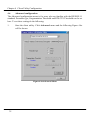
Advanced configuration
The Advanced configuration menu is for users who are familiar with the IEEE802.11
standard. Preamble type, Fragmentation Threshold and RTS/CTS Threshold can be set
here. To set these setting do the following:
1.
Start the client utility. Click Advanced menu and the following Figure 4.6a
will be shown.
Figure 4.6a Advanced Menu
35
Chapter 4 Client Utility Configuration
Table 4.6 explains the various parameters on the Advanced Menu.
Parameters
Description
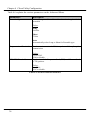
Preamble Type
Select Long or Short Preamble for the length of the
preamble
Values
Long
144 bits.
Short
72 bits
Auto
Automatically select Long or Short for Preamble type.
Fragmentation Threshold
RTS/CTS Threshold
Set the maximum size the RF data packet will be split up for
transmission.
Values
256 to 2345
2346 to disable.
Set the size of the Request to Send (RTS) and Clear to Send
(CTS) packets.
Values
1 to 2346
2347 to disable.
Table 4.6 Advanced Menu Parameters
36
Chapter 4 Client Utility Configuration
4.7
Version checking
Check the version of your Driver, firmware and Application here. You can download
the newer version on Compex web site at www.compex.com.sg or www.cpx.com. To
check the version of your WLU11A do the following:
1.
Start the client utility. Click Version menu and the following Figure 4.7a will
be shown.
Figure 4.7a Version Menu
Table 4.7b explains the various parameters on the Version Menu.
Parameters
Driver Version
Firmware Version
Application Version
37
Description
The version of the driver used.
The version of the firmware in WLU11A.
The version of the Client Utility.
Table 4.7b Version Menu Parameters
Chapter 5 Un-installation for drivers and Utility
Chapter 5 Un-installation for Utility and drivers
This chapter provides instructions for you to un-install the drivers and utility.
5.1
To Un-install Utility
If you want to install a new client utility, you need to un-install the present client
utility first.
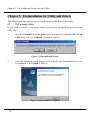
1.
Start the Uninstall; Select Programs folder and then select Wireless 802.11 USB
Utility folder and click Uninstall. Click OK to continue.
Figure 5.1a InstallShield Wizard
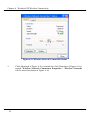
2.
Once the following screen (Figure 6.1b) is shown, the un-installation process
is completed. Click Finish to close it.
Figure 5.1b Maintenance Complete
38
Chapter 5 Un-installation for drivers and Utility
5.2
Drivers Un-Installation
If the drivers are corrupted, you can remove the drivers by following the procedures
below.
1.
Search for the Un98wlua.bat file in the CD-ROM under the directory
software/wlu11a/drivers and Run it.
Figure 5.2a Un98wlua.bat
NOTE
This batch file only works for Windows 98/98SE and ME.
2. A Dos batch will run. Press Enter key twice to uninstalled the drivers. Figure
6.2b shows the results of the un-installation.
Figure 6.2b Uninstallation successful
39
Chapter 6 Windows XP Wireless Connectivity
Chapter 6 Windows XP Wireless Connectivity
Windows XP comes with the support for wireless Network. You can use Windows XP
Wireless Connectivity to connect your WLU11A to your wireless network.
6.1
1.
Start Windows XP Wireless Connection Properties Menu
Once you have installed the drivers for WLU11A, Windows XP will detect
WLU11A and a Wireless Network Connection icon will be seen on the
system tray. Click it.(See Figure 6.1a)
Figure 6.1a Wireless Network Connection icon
2.
If wireless client is not connected to any wireless network Figure 6.1b will be
shown else Figure 6.1c will be shown.
Figure 6.1b Connect to Wireless Network
40
Chapter 6 Windows XP Wireless Connectivity
Figure 6.1c Wireless Network Connection Status
3.
41
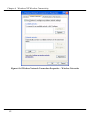
Click Advanced if Figure 6.1b is started else click Properties if Figure 6.1c is
started. Wireless Network Connection Properties – Wireless Networks
will be started as shown in Figure 6.1d.
Chapter 6 Windows XP Wireless Connectivity
Figure 6.1d Wireless Network Connection Properties – Wireless Networks
42
Chapter 6 Windows XP Wireless Connectivity
6.2
Windows XP Wireless Connectivity Properties Menu
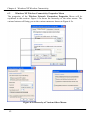
The properties of the Wireless Network Connection Properties Menu will be
explained in this section. Figure 6.2a shows the hierarchy of the other menus. The
various buttons will bring you to the various menus as shown in Figure 6.2a.
Figure 6.2a Hierarchy of Various Other Menus
43
Chapter 6 Windows XP Wireless Connectivity
Table 6.2a explains the various parameters on the Wireless Network Connection
Properties Menu.
Parameters
Description
Use Windows to configure
my wireless network
settings
Available Networks
Preferred Networks
Specify whether to use Windows wireless Connection or
WLU11A utility to configure WLU11A.
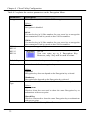
Display the wireless network detected by WLU11A.
Configure the priority of wireless network to connect to
WLU11A.
Table 6.2a Wireless Network Connection Properties Menu Parameters
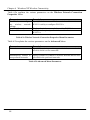
Table 6.2b explains the various parameters on the Advanced Menu.
Parameters
Description
Networks to access
Specify the priority on the types of wireless network the
wireless client is to be connected.
Automatically connect to
non-preferred networks
Specify whether to connect to wireless network that are not
specified in the preferred networks.
Table 6.2b Advanced Menu Parameters
44
Chapter 6 Windows XP Wireless Connectivity
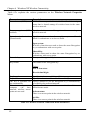
Table 6.2c explains the various parameters on the Wireless Network Properties
Menu.
Parameters
Description
Network name(SSID)
SSID is the acronym for Service Set Identifier. It is a unique
name that is shared among all wireless hosts in the same
wireless network.
Data encryption
enabled)
(WEP
Specify whether to use Encryption when connecting to
wireless network.
Network Authentication
(Shared mode)
Specify whether wireless client use Open system or Shared
Mode to authenticate to an Access Point.
Open system
Wireless client does not need to share the same Encryption
key to authenticate with access point.
Network key
Shared Key
Wireless client need to share the same Encryption key to
authenticate with access point.
Enter your Encryption Key here.
Key format
The format of the encryption key.
Values
ASCII characters
Hexadecimal digits
Key Length
Key index
The key is provided for
me automatically
This is a computer-tocomputer
(ad
hoc)
network; wireless access
points are not used
Specify whether to use 64-bit or 128-bit encryption.
Specify the location of the of the Network key.
Specify whether to use the Encryption key is automatically
provided by the preferred network.
Specify whether to set this network for ad-hoc or
Infrastructure mode.
Infrastructure
There is an access point in the wireless network.
Ad-Hoc
There is no access point in the wireless network.
Table 6.2c Wireless Network Connection Menu Parameters
45
Chapter 6 Windows XP Wireless Connectivity
6.3
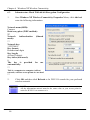
Infrastructure Mode With 64-bit Encryption Configuration
1.
Start Windows XP Wireless Connectivity Properties Menu, click Add and
enter the following information.
Network name(SSID):
Compex
Data encryption (WEP enabled):
R
Network
mode):
Authentication
(Shared
*
Network key:
1122334455
Key format:
Hexadecimal digits
Key length:
40 bits(10 digits)
Key index (advanced):
0
The key is provided
automatically:
for
me
*
This is a computer-to-computer (ad hoc)
network; wireless access points are not used
*
2.
Click OK and then click Refresh to let WLU11A search for your preferred
wireless network.
NOTE
All the information entered must be the same value as your access point in
order for WLU11A to connect to it.
46
Chapter 6 Windows XP Wireless Connectivity
6.4
Ad Hoc Mode With 128-bit Encryption Configuration
1.
Start Windows XP Wireless Connectivity Properties Menu, click Add and
enter the following information.
Network name(SSID):
Compex
Data encryption (WEP enabled):
R
Network
mode):
Authentication
(Shared
*
Network key:
11223344556677889900aabbcc
Key format:
Hexadecimal digits
Key length:
104 bits(26 digits)
Key index (advanced):
0
The key is provided for
automatically:
me
*
This is a computer-to-computer (ad hoc)
network; wireless access points are not
used
R
2.
Click OK and then click Refresh to let WLU11A search for your preferred
wireless network.
NOTE
All the information entered must be the same value as your other wireless
clients in order for WLU11A to connect to them.
47
Chapter 7 Troubleshooting
Chapter 7 Troubleshooting
This chapter explains how to perform some basic troubleshooting when you encounter
problems while installing the Compex WLU11A.
7.1
Encounter IP Address Conflicts
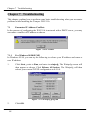
In the process of configuring the WLU11A in network with a DHCP server, you may
encounter a conflict of IP address as shown.
Figure 7.1a IP conflict
7.1.1
For Windows 98/98SE/ME
In Windows 95/98, you can try the following to release your IP address and renew a
new IP address:
1.
Click Start, point to Run, and enter in winipcfg. The Winipcfg screen will
then appear as shown. Click Release All button. The Winipcfg will then
release your current TCP/IP configuration to 0.0.0.0.
Figure 7.1.1a Winipcfg program
2.
48
Click OK.
Chapter 7 Troubleshooting
3.
And Restart your computer.
7.1.2
For Windows 2000/XP
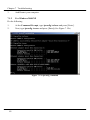
Do the following
1.
2.
At the Command Prompt, type ipconfig /release and press [Enter].
Next, type ipconfig /renew and press [Enter].(See Figure 7.12a)
Figure 7.1.2a ipconfig command
49
Chapter 8 Appendix
Chapter 8 Appendix
This chapter provides some additional information that may be useful to you when
setting up the WLU11A. Basic Networking configurations for network adapters are
covered here. The configurations here assumed that a DHCP server exist in your
network.
8.1
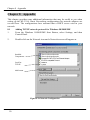
1.
Adding TCP/IP network protocol for Windows 98/98SE/ME
From the Windows 98/98SE/ME Start Button, select Settings, and then
Control Panel.
2.
Double-click on the Network icon and a Network screen will appear as:
Installed
Components
Look for
TCP/IP
Add button
Figure 8.1a Network Configuration
50
Chapter 8 Appendix
3.
Check your list of Network Components in the Network window
Configuration tab. If TCP/IP is not installed, select Add button to start the
installation
4.
Select Protocol and click Add button.
Figure 8.1b Select Network Component Type
5.
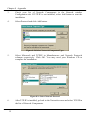
Select Microsoft and TCP/IP in Manufacturers and Network Protocols
columns respectively. Click OK. You may need your Windows CD to
complete the installation.
Figure 8.1c Select Network Protocol
6.
51
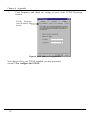
After TCP/IP is installed, go back to the Network screen and select TCP/IP in
the list of Network Components.
Chapter 8 Appendix
7.
Click Properties, and check the settings in each of the TCP/IP Properties
window.
TCP/IP Properties
Tabs (IP address Tab
shown)
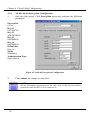
Figure 8.1d IP Address Configuration
Now that you have your TCP/IP installed, you may proceed to
section 7.2 to configure the TCP/IP.
52
Chapter 8 Appendix
8.2
Windows 98/98SE/ME Configuration of TCP/IP network protocol for
DHCP server
1.
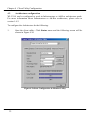
Click on IP Address Tab and select Obtain an IP address automatically.
Figure 8.2a IP Address Configuration
2.
Click on Bindings Tab and select Client for Microsoft Networks and File
and printer sharing for Microsoft Networks, and click OK
Figure 8.2b Binding
53
Chapter 8 Appendix
3.
Click the Gateway and make sure all fields are blank.
Figure 8.2c Gateway
4.
Click on DNS Configuration Tab and select Disable DNS
Figure 8.2c Gateway
54
Chapter 8 Appendix
5.
Click OK to accept these settings and reboot the PC.
8.3
Windows XP Configuration of TCP/IP network protocol for DHCP
server
For Windows XP, you do not need to install the TCP/IP protocol as it is installed
when you install a network card. Therefore only the configuration for TCP/IP is
shown.
1.
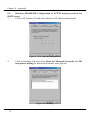
From the Windows XP Start menu - click Control Panel, then click Network
and Internet Connections. Then click Network Connections to open Figure
8.3a below.
Figure 8.3a Network Connections
55
Chapter 8 Appendix
2.
Right click the network connections you want to edit and click Properties.
Figure 8.3b will be opened as shown.
Figure 8.3b WLU11A Network Connection
56
Chapter 8 Appendix
3.
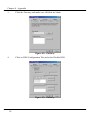
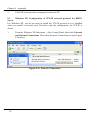
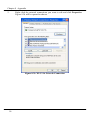
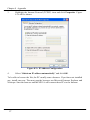
Highlight the Internet Protocol (TCP/IP) item and click Properties. Figure
8.3c will be shown.
Figure 8.3c IP Address Configuration
4.
Select “Obtain an IP address automatically” and click OK.
To be able to browse the Net, the PC usually runs a browser. If you have not installed
any, install one now. The most popular browsers are Microsoft Internet Explorer and
Netscape. Start the browser and the NP11A will connect these PCs to the Internet.
57
NOTES
58