1
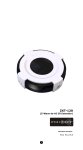
Setup and Operations Before using the ZXT‐120, please read the [INSTALLATION] if you need to mount the ZXT‐120 to a wall. Power up the ZXT‐120 by the USB Power 5Vdc or Dry battery AAA x 3pcs. Plug‐in 5Vdc power into the USB socket if operated at Always Listening mode. Or Install 3xAAA batteries if operated at FLiRS mode. Please refer to the section of [MOUNTING PROCEDURE]. Remove the battery cover on the back of your ZXT‐120 battery chassis. Mount the battery cover into the main unit with 2 screws. Check the polarity of the batteries and the "+/‐" marks inside the battery compartment. Insert the batteries. Push the battery cover and main unit back in place. CAUTION (battery and power adaptor safety) Use new batteries of the recommended type and size only. Never mix used and new batteries together. To avoid chemical leaks, remove batteries from the ZXT‐120 if you do not intend to use the remote for an extended period of time. Dispose of used batteries properly; do not burn or bury them. (Please carefully read through the following then store the manual for future reference.) 7