1
Troubleshooting (continued)
Problem:
Small text is hard to read in VGA mode.
I can’t get my desktop to appear in VGA mode.
Getting started
Solution:
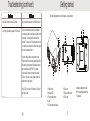
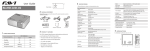
The following diagrams point out the features of your projector:
Set your desktop resolution to 800x600 or lower.
To rule out connection issues, try shutting down
your computer, and connecting the projector as the
only display. Your computer should detect the
projector. If you see your OS startup screen but not
your desktop, your resolution or refresh rate may be
set to an incompatible mode.
If you are using a laptop, some laptops have a
“Projector mode” that must be enabled before they
will output to your projector. Other laptops have a
key combination, usually FN+F5, that needs
to be pressed in order to activate their external
VGA port. If you are not sure, please contact the
manufacturer of your laptop.
If the LED-2 is not set to VGA mode, its VGA port
will not be active.
14
1
2
9 10
6
7
11
3
5•
8
4
1: Power button
2: Indicator LED
3: Front ventilation slots
4: Lens
5: A/V and power input panel.
6: IR sensor
7: Rear ventilation slots
8: VGA input
3
9: Keystone adjustment wheel
10: Front height adjustment foot
11: Speakers