1
4 • Troubleshooting
4.14 Error Message: Not Enough Light to Perform
Operation
•
Light signal is not reaching the data processor
Make sure that at least one lamp is turned on.
•
Low light throughput
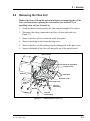
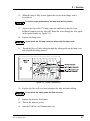
Remove the cell from the optical bench (see Section 5.4). Insert a business
card into the cell mounting location and check that bright light is shining onto
the card.
If you can see bright light shining onto the business card, remove the card
from the optical bench, run the lamp intensity calibration (see
Section 3.6), and then autozero the detector. If no error message is
displayed, flush the cell with eluent and/or clean the cell as instructed in
(see Section 5.2). Reinstall the cell in the optical bench and autozero the
detector again to verify that the problem has been resolved. If the error
message appears again, contact Dionex Technical Support for assistance.
If you see a weak light (or no light at all) shining onto the business card,
the lamp intensity is too low. Check that the flange of the new lamp is
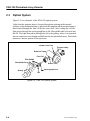
aligned with the two locating pins in the optical bench (see Figure 5-3); if
the flange is aligned, the lamp is defective and should be replaced. (For
lamp replacement instructions, see Section 5.7 or Section 5.8 for the
deuterium lamp or tungsten lamp, respectively.) If the error message
appears again, contact Dionex Technical Support for assistance.
•
Blockage or low light transmission in cell
Flush the cell with eluent.
Doc. 031644-02 9/03
4-13