1
700i Evolution Series
Front Panel Controls
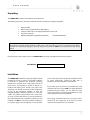
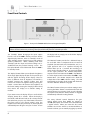
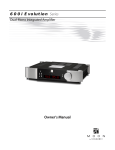
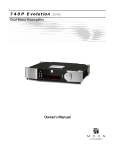
Figure 1: Front panel of MOON 700i dual-mono Integrated Amplifier
The front panel will look similar to Figure 1 (above). The large display window normally indicates the current
volume level and, whenever you change the input, it will briefly show the selected input label.
The “Standby” button disengages the input section
from the rest of the 700i’s circuitry and turns off the
digital display. However, when in “Standby” mode all
audio circuitry remains powered up to help maintain
optimal performance. When switching back from
“Standby”, both the ‘input’ and volume settings are reestablished from the previous listening session. The
blue pilot LED will not be illuminated when the 700i is
in “Standby” mode.
The “Display” button allows you to adjust the brightness
of the large digital display window. It also provides you
with the option of turning off the display. There are
three (3) different levels of brightness; The default is
medium. Pressing the “Display” button once will
increase the level to the highest setting. Pressing the
button a second time will decrease the brightness to
the lowest setting. Pressing the “Display” button a third
time returns the display to its default setting of
medium.
If you want to turn the display off, press and hold the
“Display” button for 2 seconds. When the display is
turned off, it will still come back on for a short period of
time whenever you press any of the buttons located on
the front panel or the remote control, using the
brightness level that was previously set; the display will
automatically turn off again once you are done. To turn
8
the display back on, simply press and hold the “Display”
button for 2 seconds.
The “Monitor” button provides for a dedicated loop to
be used with either a component that can record &
playback (Cassette Deck, DAT, CD-Recorder, etc.) or a
signal processor such as an equalizer. Pressing this
button allows you to 1) monitor the recording as it
occurs on the recording device or 2) engage the effects
of the signal processor. The monitor component’s
outputs must be connected to the 700i’s “Tape Monitor
In” and its inputs must be connected to the 700i’s “Tape
Monitor Out”. The monitor output level is fixed and
independent of the 700i’s volume setting. The LED
immediately to the right of this button will illuminate
when the “Monitor” function is engaged.
The “Mute” button reduces your volume setting to zero.
Pressing the “Mute” button a second time will return the
output volume to its previous level. As well, adjusting
the volume level while the “Mute” function is engaged
will effectively defeat the muting function.
The rotary “volume” control determines the gain
setting, which ranges from ‘0.0dB’ (no output) to
’80.0dB’ (full output). This control does not function like
a typical volume: When you rotate the dial, either
clockwise to raise the volume or counter-clockwise to
lower the volume, you are actually engaging a precision