1
Temptron 616 User's Manual
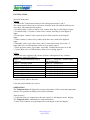
Each day the room temperature will be reduced by 0.3 C. At day 7 - the room
temperature will be 29 C.
Group 2-3 days reducing of 1.5 C. Each day the room temperature will be reduced by
0.5 C. At day 10 the room temperature will be 27.5 C. and so on.
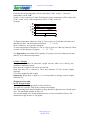
Example:
T
e
m
p
32
31
30
29
28
27
26
25
G1
G2
To Enter temperature reduction of 2 C in 7 days, press on 7 and than on 2 than on 0
and than on enter. On the display will appear :
7 2.0 G1
Press on data key, next group will appear.
To enter temperature reduction of 1.5 C in 3 days, press on 3 than on 1 than on 5 then
on enter. On the display will appear:
3 1.5 G2.
It is important to enter data in all 9 groups. If a group is not in use than put one day
and 0 C. as a reduction temperature
65. Day 1 Weight
It is possible to enter an automatic weight increase table to be used by the
minimum ventilation system.
Enter here the weight of one bird at one day old.
Each time day one is entered at Grow day (function 75) the current weight
(function
23) will be updated to this weight
Important: When Day is equal to 1 it is not possible to change current weight
(function 23).
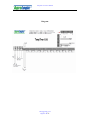
Weight increase table
66-74. Weight Graph
The weight increase graph (table) works as follows:
The table has 9 groups. Each group contains two settings.
The first setting represents the number of days that the weight increase will take place
over. The maximum number of days is 9.
The second setting is the actual weight increase over the set number of days. The
maximum weight increase is 990 grams
[email protected]
Page 15 of 21