1
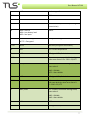
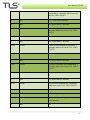
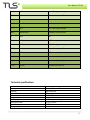
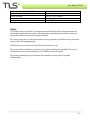
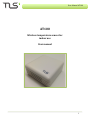
User Manual AT100 Usage Mobile phones with NFC (Near Field Communication) can be used to gain information about the current temperature by tagging or touching the unit with the back of the mobile phone. Mobile phones with NFC function 1. Activate the NFC through the phone settings 2. Drag the back of the phone slowly towards the unit. As the antennas align, a link will open on the phone, showing the temperature reading. Communication The unit regularly sends wireless messages with current temperature in a settable interval; the messages are in conformity with the Wireless M-‐Bus standard EN 13757-‐4 in T1 Mode. Each message includes: ·∙ Average temperature since the previous message ·∙ 1 hour continuous Average/Max/Min ·∙ 24 hours continuous Average/Max/Min ·∙ Serial number of the unit ·∙ MBUS Unique Identification Number ·∙ Battery status ·∙ Electronic seal Message formats The messages below are described in plain text. Fields marked with green will be encrypted if encryption is activated. For detailed information see EN 13757-‐4. Byte Value (default) Description 0 0xnn L-‐field 1 0x44 C-‐field 2-‐3 0x5193 Manufacturer ”TLS” 4-‐7 0xnnnnnnnn MBUS Identification Number 8 0x01 Protocol version number 6