1
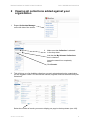
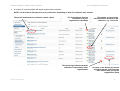
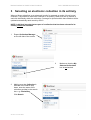
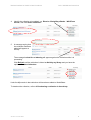
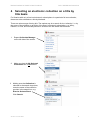
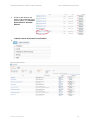
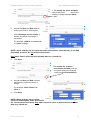
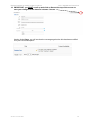
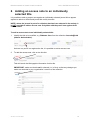
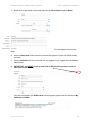
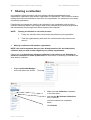
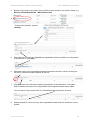
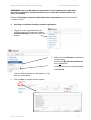
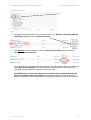
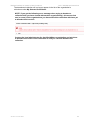
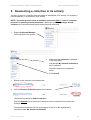
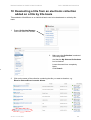
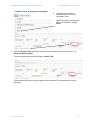
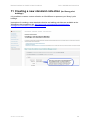
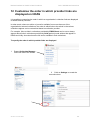
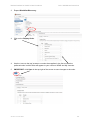
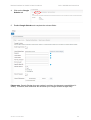
National Institute for Health & Care Excellence OCLC WorldShare Instructions OCLC WorldShare Maintaining local library electronic and print collections Version 2: June 2015 1 National Institute for Health & Care Excellence OCLC WorldShare Instructions Table of contents 1 Logging in to OCLC WorldShare.......................................................................... 3 2 Viewing all collections added against your organisation ...................................... 5 3 Selecting an electronic collection in its entirety .................................................... 7 4 Selecting an electronic collection on a title by title basis ...................................... 9 5 Amending coverage for an individually selected title.......................................... 12 6 Adding an access note to an individually selected title ..................................... 15 7 Sharing a collection............................................................................................ 17 8 Deselecting a shared collection ......................................................................... 21 9 Deselecting a collection in its entirety ................................................................ 25 10 Deselecting a title from an electronic collection added on a title by title basis ... 26 11 Creating a new standard collection (for library print holdings) ........................... 28 12 Customise the order in which provider links are displayed on HDAS................. 29 13 Checking that changes made to WorldShare have taken effect ........................ 31 14 Google Scholar .................................................................................................. 32 15 Support .............................................................................................................. 34 16 Acknowledgements ............................................................................................ 35 Version 2: June 2015 2 National Institute for Health & Care Excellence 1 OCLC WorldShare Instructions Logging in to OCLC WorldShare Log in to OCLC WorldShare using the unique URL and log-in details assigned to the OpenAthens organisation against which the collection changes are to be made: 1 Go to the unique OCLC Service Configuration URL for the OpenAthens organisation: https://nhsxxxx.share.worldcat.org/wms For example, the unique log-in URL for a NHS Foundation Trust: http://nhs1234567.share.worldcat.org/wms nhs1234567 is the unique identifier (1234567 is the OpenAthens org ID for that Trust) 2 Enter the relevant administrator User Name and Password associated with the URL and click Sign In. 3 Click on the organisation in the select branch pop-up so that it his highlighted and click OK. Check the box against Make selected branch the default for this workstation to set this organisation as the default and so avoid the pop-up on subsequent log-in. Version 2: June 2015 3 National Institute for Health & Care Excellence OCLC WorldShare Instructions NOTE: the processes covered in this manual assume that you have: 1 Accessed WorldShare from a compatible browser, i.e. Internet Explorer 9 and above Google Chrome Firefox and 2 Logged in to the correct URL for your OpenAthens organisation with the associated OCLC username and password. Version 2: June 2015 4 National Institute for Health & Care Excellence 2 1 OCLC WorldShare Instructions Viewing all collections added against your organisation Expand Collection Manager on the left side of the screen. 2 Make sure that Collection is selected in the drop-down. And that the My Selected Collections box is checked. Leave the search box completely blank. Click Search. 3 This will bring up a list of all the collections currently selected against the organisation you are logged in under. This will include national, regional and local electronic and print collections. Select the number of results you want to display per page in the drop-down (max 100). Version 2: June 2015 5 National Institute for Health & Care Excellence 4 OCLC WorldShare Instructions A number of icons and labels will appear against each collection. NOTE: not all of them will appear for every collection, depending on how the collection was created. The pencil means that the collection can be edited The tick indicates that the collection is in your organisation’s holdings The green logo indicates that the collection is shared with other organisations Version 2: June 2015 This shows you how many titles have been selected in the collection, e.g. 12 of 7,621 An entry in the Shared by column indicates that the collection has been shared with you by the organisation listed 6 National Institute for Health & Care Excellence 3 OCLC WorldShare Instructions Selecting an electronic collection in its entirety Where a library subscribes to an electronic bundle, for example an entire full text journal collection, it is possible to select this collection in its entirety, rather than set up access to each title individually within the collection. Coverage for journals within that collection will be updated automatically each month by OCLC. NOTE: individual journals that are part of a collection that has been selected in its entirety cannot be amended. 1 Expand Collection Manager on the left side of the screen. 2 3 Make sure that the My Selected Collections box is unchecked. Making sure that Collection is selected in the search drop down, enter the name of the collection provider in the search box, e.g. ClinicalKey. Click Search. Version 2: June 2015 7 National Institute for Health & Care Excellence OCLC WorldShare Instructions 4 Identify the collection to be added, e.g. Elsevier ClinicalKey eBooks - WAYFless access, and click Select Collection. 5. A message saying that the collection has been added will appear at the top. The message Locked for re-indexing will appear against the collection while it is processing. Click Refresh until the collection is ticked as Held by my library and you have the option to Deselect Collection. Links for all journals in that collection will have been added to WorldShare. To deselect the collection, refer to 9 Deselecting a collection in its entirety. Version 2: June 2015 8 National Institute for Health & Care Excellence 4 OCLC WorldShare Instructions Selecting an electronic collection on a title by title basis For libraries with only a few local electronic subscriptions in a particular full text collection, these can to be selected on a title by title basis. There are various ways of doing this. The easiest way is to search for the ‘collection’, i.e. by the name of the publisher or provider of the library’s electronic subscription, e.g. Wiley, Elsevier, or Ovid, and manually switch on access to the title within that collection. 1 Expand Collection Manager on the left side of the screen. 2 Make sure that the My Selected Collections box is unchecked. 3 Making sure that Collection is selected in the search drop-down, enter the name of the collection provider in the search box, e.g. Elsevier ScienceDirect. Click Search. Version 2: June 2015 9 National Institute for Health & Care Excellence 4 Scroll to and click on the name of the collection in the search results, e.g. Elsevier ScienceDirect Journals Athens. 5 This takes you to what is referred to by OCLC as the ‘concertina’ view. OCLC WorldShare Instructions When searching for a particular title in the collection, make sure that Titles is expanded. Version 2: June 2015 10 National Institute for Health & Care Excellence 6 OCLC WorldShare Instructions Enter the name of the journal title you want to select in the Search within box, e.g. American Heart Journal. Click Search. This will only search for the title within this collection, i.e. Elsevier ScienceDirect Journals Athens. The title you want to select should appear in the results list: 7 Click the Select Title against the title to select it. The screen will refresh so that the collection is ticked as Held by my library and you have the option to Deselect Title. 8 Repeat steps 6 to 7 above for other titles in the same collection. Version 2: June 2015 11 National Institute for Health & Care Excellence 5 OCLC WorldShare Instructions Amending coverage for an individually selected title When selected in WorldShare, access to a journal title is automatically set up to run from the earliest archive available in the collection until the current issue. However, it is possible to override the coverage for an individually selected electronic title to reflect a library’s actual coverage under its local subscription. NOTE: where the journal is part of a collection that has been selected in its entirety, it is NOT possible to override the coverage. Only titles with the pencil icon against them can be edited. To modify coverage against an electronic title: 1 Identify the title to be modified, e.g. Diabetes Care from the collection Journals@Ovid (Athens Authorization). As there is a pencil icon against the title, it is possible to amend the coverage for both a) the years available and b) volume and issue numbers available. 2 To modify coverage, click on the title link. This will launch the bibliographic information for this title. IMPORTANT: make sure that Local is selected (i.e. in blue) so that any changes you make are restricted to your organisation’s version of the collection. 3. Version 2: June 2015 Scroll down to view Coverage for the title (Dates / Enumerations): 12 National Institute for Health & Care Excellence OCLC WorldShare Instructions 4 To modify the years available, click on the pencil next to the existing coverage beneath Dates. 5 Amend the Start and End dates to reflect your library’s subscription. Check Embargo on new issues to specify the period of embargo, if necessary. For example, 1998-01 to current with a 1 years embargo. NOTE: where a library has a current electronic subscription, leave the entry in the End field blank, as above. Do not add the current date. Only add a date to reflect the last available date for a closed run. 6 Click Save. 7 To modify the volumes and issues available, click on the pencil next to the existing years beneath Enumerations. 8 Amend the Start and End volumes and issues to reflect the library’s access. For example, Start Volume: 21; Issue: 1 9 Click Save. NOTE: Where a library has a current electronic subscription, leave the End Volume and Issues blank, as above. Do not add the current volume and issue. Only add a volume or issue to reflect the last available date for a closed run. Version 2: June 2015 13 National Institute for Health & Care Excellence OCLC WorldShare Instructions 10 IMPORTANT: you MUST scroll up and click on Save at the top of the screen to save your changes to the date and volumes / issues. Having clicked Save, you will see that the coverage against the title has been modified to fit your local subscription: Version 2: June 2015 14 National Institute for Health & Care Excellence 6 OCLC WorldShare Instructions Adding an access note to an individually selected title It is possible to add an access note against an individually selected journal title to appear against an article on HDAS and journal title on My Journals. NOTE: where the journal is part of a collection that has been selected in its entirety, it is NOT possible to add an access note. Only titles with the pencil icon against them can be edited. To add an access note to an individually selected title: 1 Identify the title to be modified, e.g. Diabetes Care from the collection Journals@Ovid (Athens Authorization). As there is a pencil icon against the title, it is possible to add an access note 2 To add the access note, click on the title link. This will launch the bibliographic information for this title. IMPORTANT: make sure that Local is selected (i.e. in blue) so that any changes you make are restricted to your organisation’s version of the collection. Version 2: June 2015 15 National Institute for Health & Care Excellence 3. OCLC WorldShare Instructions Scroll down to the bottom of the page and click on Show Details against Notes. This will display various notes fields. 4 Use the Public Note field to enter the note that will appear to users via HDAS and My Journals. 5 Use the Staff Note field for a note that will only appear to you, logged in as WorldShare administrator. 6 IMPORTANT: you MUST scroll up and click on Save at the top of the screen to save your access note(s). Only the note added in the Public Note field will appear against links for the title on My Journals and HDAS. Version 2: June 2015 16 National Institute for Health & Care Excellence 7 OCLC WorldShare Instructions Sharing a collection It is possible to share electronic and print holdings collections added against one OpenAthens organisation with another organisation on WorldShare. This is ideal for libraries making their resources available to more than one organisation, for example an acute and a community organisation. Provided that no changes are made to the collection by the organisation with which the collection has been shared, any changes made to the collection by the sharing organisation will automatically filter through to all shared copies of the collection. NOTE: 1 Sharing a collection is a two-fold process: 1 Firstly, the collection has to be selected and shared by an organisation 2 Then the organisation(s) with which the collection has been shared must select it Sharing a collection with another organisation NOTE: this section assumes that you have already searched for and selected the collection that you wish to share against your primary organisation. Please refer to 3 Selecting an electronic collection in its entirety and 4 Selecting an electronic collection on a title by title basis for instructions on selecting a collections and titles within a collection. 1 Expand Collection Manager on the left side of the screen. 2 Make sure that Collection is selected in the drop-down. And that the My Selected Collections box is checked. Leave the search box completely blank. Click Search. Version 2: June 2015 17 National Institute for Health & Care Excellence OCLC WorldShare Instructions 3 Browse to and click on the name of the collection to be shared in the search results, e.g. Elsevier ClinicalKey eBooks - WAYFless access 4 This takes you to what is referred to by OCLC as the ‘concertina’ view. To share the collection, expand Sharing. 5 Start typing the name of the OpenAthens organisation that the collection is to be shared in the text box, e.g. Frimley… 6 When the name of the organisation appears beneath the text box, select it so that just the OCLC reference number appears in the box. 7 Click Add next to the text box to add the organisation to the shared list. It will take a while to add but the name of the organisation should appear beneath when added. You may have to log out and back in to WorldShare before the name is listed. 8 Repeat steps 5 to 7 above for any other organisations with which the collection is to be shared. Version 2: June 2015 18 National Institute for Health & Care Excellence OCLC WorldShare Instructions REMEMBER: the local WorldShare administrator for the organisation(s) with which the collection has been shared must now log in to select the collection before the share is complete. Refer to 2 Selecting a collection shared by another organisation below for instructions on how to do this. 2 Selecting a collection shared by another organisation 1 Logged in as the organisation that the collection has been shared with, expand Collection Manager on the left side of the screen. 2 Make sure that Collection is selected in the drop-down. And that the My Selected Collections box is unchecked. Leave the search box completely blank. Click Search. This will list all collections on WorldShare, so you will have to filter to just those shared with your organisation. 3 Click on Filter to expand the filter options. Version 2: June 2015 19 National Institute for Health & Care Excellence OCLC WorldShare Instructions 4 Check the Collections shared with me box to filter to only those collections that have been shared with your organisation, including those that you have yet to select. 5 Locate the shared collection that you want to select, e.g. Elsevier ClinicalKey eBooks - WAYFless access, and click Select Collection. 6 Click Refresh until the collection is ticked as Held by my library and you have the option to Deselect Collection. The collection has now been shared successfully and will appear in the list of collections under My Library Holdings for a) the organisation sharing the collection and b) all organisations with which the collection has been shared. Provided that no changes are made to the collection by the organisation(s) with which the collection has been shared, any changes made to the collection by the sharing organisation will automatically filter through to all shared copies of the collection. Version 2: June 2015 20 National Institute for Health & Care Excellence 8 OCLC WorldShare Instructions Deselecting a shared collection Where a library has cancelled its subscription to an electronic collection that was added to WorldShare and shared with other organisations, the collection must be 1) deselected by all of the organisations it has been shared with before 2) it is deselected by the sharing organisation. NOTE: the below process refers to shared collections ONLY. There is a separate process for deselecting all other collections. Please refer to 9 Deselecting a collection in its entirety and 10 Deselecting a title from an electronic collection added on a title by title basis. 1 Deselecting a collection shared by another organisation 1 Expand Collection Manager on the left side of the screen. 2 Make sure that Collection is selected in the drop-down. And that the My Selected Collections box is checked. Leave the search box completely blank. Click Search. This will list all the collections selected against your organisation on WorldShare, so filter to just those shared with your organisation. Version 2: June 2015 21 National Institute for Health & Care Excellence 3 OCLC WorldShare Instructions Click on Filter to expand the filter options. 4 5 Check the Collections shared with me box to filter to only those collections that have been shared with your organisation, including the one you want to deselect. Locate the shared collection that you want to deselect, e.g. Elsevier ClinicalKey Books – WAYFless access, and click Deselect Collection. The option will change to Select Collection: NOTE: the collection will remain as a shared collection to select until the sharing organisation deselects its version of the collection (refer to 2 Removing a collection shared with another organisation overleaf on page 23). Version 2: June 2015 22 National Institute for Health & Care Excellence OCLC WorldShare Instructions 6 Repeat steps 1 to 5 above logged in to OCLC WorldShare as each of the remaining organisations with which the collection is shared. 2 Removing a collection shared with another organisation(s) Once all of the organisations with which the collection has been shared have deselected the collection, the administrator responsible for sharing the collection can deselect it. 1 Expand Collection Manager on the left side of the screen. 2 Make sure that Collection is selected in the drop-down. And that the My Selected Collections box is checked. Leave the search box completely blank. Click Search. This will list all the collections selected against your organisation, including the shared collection that is to be deselected. 3 Browse to the shared collection to be deselected and click on Deselect Collection. 4 The option will change to Select Collection. 5 Click the Refresh link to remove the collection from the onscreen list and save the changes. Version 2: June 2015 23 National Institute for Health & Care Excellence OCLC WorldShare Instructions The deselected collection will no longer appear in the list of the organisation’s collections under My Selected Collections. NOTE: if you get the following error message when trying to deselect a collection that you have shared with another organisation(s), this means that one (or more) of the organisations you have shared the collection with have yet to deselect their version. Contact the local administrator for that WorldShare organisation and ask them to deselect their share of the collection so that you can then deselect the collection. Version 2: June 2015 24 National Institute for Health & Care Excellence 9 OCLC WorldShare Instructions Deselecting a collection in its entirety The way to remove a collection that was added to WorldShare in its entirety, for example a full text database, is to deselect it in its entirety. NOTE: The below process refers to unshared collections ONLY. There is a separate process for removing shared collections. Please refer to 8 Deselecting a shared collection for instructions dealing with deleting shared collections. 1 Expand Collection Manager on the left side of the screen. 2 Make sure that Collection is selected in the drop-down. And that the My Selected Collections box is checked. Leave the search box completely blank. Click Search. 3 Browse to the collection to be deselected. 4 Click on Deselect Collection against the collection. The option will change to Select Collection. Click the Refresh link to remove the collection from the onscreen list and save the changes. The deselected collection will no longer appear in the list of the organisation’s collections under My Selected Collections. Version 2: June 2015 25 National Institute for Health & Care Excellence OCLC WorldShare Instructions 10 Deselecting a title from an electronic collection added on a title by title basis Titles added to WorldShare on an individual basis need to be deselected on a title by title basis. 1 Expand Collection Manager on the left side of the screen. 2 Make sure that Collection is selected in the drop-down. And that the My Selected Collections box is checked. Leave the search box completely blank. Click Search. 3 Click on the name of the collection containing the title you want to deselect, e.g. Elsevier ScienceDirect Journals Athens. Version 2: June 2015 26 National Institute for Health & Care Excellence OCLC WorldShare Instructions 4 This takes you to what is referred to by OCLC as the ‘concertina’ view. When searching for a particular title in the collection, expand Titles. 5 Click on Deselect Title against the title you want to deselect from this collection, e.g. American Heart Journal. The option against the title will change to Select Title. The deselected title will no longer appear in the onscreen list of selected titles for this collection. Version 2: June 2015 27 National Institute for Health & Care Excellence OCLC WorldShare Instructions 11 Creating a new standard collection (for library print holdings) It is possible to create a custom collection on WorldShare to represent your library’s print holdings. Instructions for creating a new standard collection and adding print titles are available at the WorldShare documentation site: http://www.oclc.org/support/services/collectionmanager/documentation/create-custom.en.html Version 2: June 2015 28 National Institute for Health & Care Excellence OCLC WorldShare Instructions 12 Customise the order in which provider links are displayed on HDAS It is possible to customise the order in which an organisation’s collection links are displayed on HDAS and My Journals. In other words, where an article or journal is available from more than one of the organisation’s selected collections, the order in which links to the article in the various collections appear can be customised based on collection provider. For example, links to titles in collections provided by EBSCOhost can be set to always appear above links in collections provided by Ovid against journal articles that appear in HDAS and in My Journals where the full text is available in both collections. To specify the order in which provider links are displayed 1 Expand Collection Manager on the left side of the screen. 2 Click on Settings to reveal the concertina view. Version 2: June 2015 29 National Institute for Health & Care Excellence OCLC WorldShare Instructions 3 Expand WorldCat Discovery: 4 Click on the Display Order tab: 4 Use the ‘move to the top’ arrows to re-order the suppliers in the list to create the preferred order in which links will appear to your users on HDAS and My Journals. 5 IMPORTANT: click Save in the top right of the screen to save changes to the order. Version 2: June 2015 30 National Institute for Health & Care Excellence OCLC WorldShare Instructions 13 Checking that changes made to WorldShare have taken effect The best way to check whether changes made to an organisation’s collections on WorldShare have taken effect is to: Log in to NHS Evidence with an OpenAthens account registered under that organisation and View journals or articles from those collections via HDAS or My Journals In particular, check that links for a journal that has been added or amended actually work and that it is possible to access the full text being linked to. REMEMBER: if a link does not work, it is possible that the journal has been added but under the wrong collection or provider to which the organisation does not have access! Version 2: June 2015 31 National Institute for Health & Care Excellence OCLC WorldShare Instructions 14 Google Scholar Google Scholar is available to use with OCLC WorldShare. Libraries will need to set this up locally in the WorldShare settings and complete with their local details. To access the Google Scholar settings: 1 Expand Collection Manager on the left side of the screen. 2 Click on Settings to reveal the concertina view. 3 Expand Proxy and Authentication: Version 2: June 2015 32 National Institute for Health & Care Excellence OCLC WorldShare Instructions 4 Click on the Google Scholar tab. 5. Enable Google Scholar and complete the relevant fields: Please note: Google Scholar does not update in real time, but harvests new additions biweekly. Therefore, new collections will not show up in Google Scholar straight away. Version 2: June 2015 33 National Institute for Health & Care Excellence OCLC WorldShare Instructions 15 Support All queries regarding WorldShare should be reported to OCLC’s UK helpdesk at: [email protected] Tel: 0114 267 7502 or 0845 267 7502 local rate. The OCLC UK helpdesk is open from 9.00am – 5.30pm, Monday to Friday except UK public holidays. OCLC will require the following information in order to deal with a query: Name of the OpenAthens organisation with the problem and WorldShare address, e.g. Kent, Surrey and Sussex http://nhs4223437.share.worldcat.org/wms OpenAthens Organisation ID for the organisation with the problem: e.g. 5527709 An OpenAthens user account to test access via HDAS and My Journals. Version 2: June 2015 34 National Institute for Health & Care Excellence OCLC WorldShare Instructions 16 Acknowledgements Document developed by: Jane Wroe Electronic Services Officer KSS Library and Knowledge Services Health Education Kent Surrey and Sussex. Michael Heath Senior Service Development and Contracts Manager National Institute for Health & Care Excellence. Version 2: June 2015 35