1
Smart TV Function
Smart TV Function
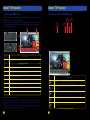
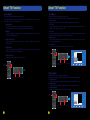
Sound Menu
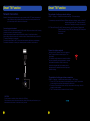
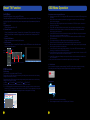
Time Menu
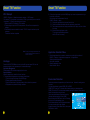
Press MENU Button to display the main menu.
Press Left and Right to enter the SOUND page, it will highlight the first option, then
press OK Button to enter the sub-menu.
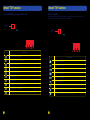
Press MENU Button to display the main menu.
Use Up and Down to enter TIME page, it will highlight the first option.
1. Current Time:
Can not be selected, but it can automatically obtain the network time.
2. Off Time:
Press Up and Down to select Off time, the press OK Button to enter the sub-menu,
press OK and adjust it into On or Off.
3. On Time:
Press Up and Down to select On Time, then press OK Button to enter the sub-menu,
press OK to proceed with the On and Off time settings.
4. Sleep Timer:
Press Up and Down Button to select Sleep Timer, then press OK to confirm, press
Left and Right to adjust.
5. Time Zone:
You can choose different location by operating this item.
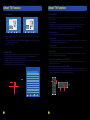
1. Sound Mode:
Press OK and then press Left and Right to adjust Sound Mode.
You can change the value of Treble and Bass under user mode.
2. Balance:
Press Up and Down to select Balance, then press OK Button to enter sub-menu,
press Left and Right adjust.
3. Auto Volume (AVC):
Press Up and Down to select Auto Volume, then press OK and Left and Right to
select On or Off.
4. SPDIF Mode:
Press Up and Down to select SPDIF Mode, then press OK and Left and Right
Button to select PCM, Off or Bitstream.
TIME
Curent Time 08/10/2010 04:05:53
Off Time
Off
On Time
OK Button
FN Button and Left, Right, Up or Down Buttons
at the same time.
MENU
Button
LOCK
CHANNEL
PICTURE
SOUND
OPTION
TIME
5. Power On Music:
Press Left and Right Button to set On or Off.
OK Button
MENU
Button
Off
Sleep Timer
Off
Time Zone
NSW/ACT
Select
Comfirm
Exit
Returm
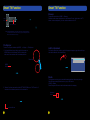
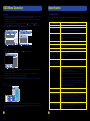
Option Menu
FN Button and Left, Right, Up or Down Buttons
at the same time.
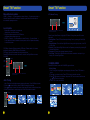
Press MENU Button to display the main menu.
Press Left and Right to enter OPTION page, it will highlight the first option.
1. OSD Time Out:
Press OK and then press Left and Right Button to set the OSD Time Out.
2. PVR Settings:
Press OK button to display the related functions included in this item.
3. Restore Default:
Operate this item to resume all the initial settings.
OK Button
MENU
Button
OPTION
PICTURE
SOUND
OPTION
TIME
LOCK
OPTION
OSD Time Out
Off
PVR Settings
Restore Default
FN Button and Left, Right, Up or Down Buttons
at the same time.
35
36
Select
Comfirm
Exit
Returm