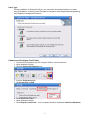
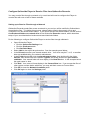
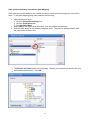
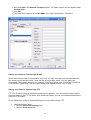
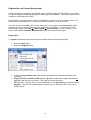
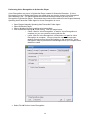
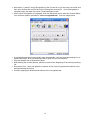
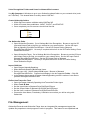
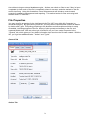
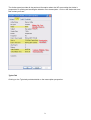
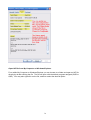
1
Quikscribe Player User Manual Overview....................................................................................................................................................5 About the Quikscribe System...............................................................................................................5 Quikscribe Workflow .............................................................................................................................5 Voice Recognition Option .....................................................................................................................6 Requirements for System (Quikscribe Recorder and Player) Installation ...........................................6 System Requirements (Minimum Recommended) ............................................................................6 Installing Quikscribe Player......................................................................................................................7 Install Quikscribe Player Software .......................................................................................................7 Setup Type .........................................................................................................................................8 Connect and Configure Foot Pedal .....................................................................................................8 Configure Quikscribe Player to Receive Files from Quikscribe Recorder........................................9 Setting up to Receive Files through a Network ...............................................................................9 UNC (Universal Naming Convention) Path Mapping....................................................................11 Setting up to Receive Files through E-mail ...................................................................................12 Setting up to Receive Files through FTP .......................................................................................12 Registration and License Management.............................................................................................14 Registration ......................................................................................................................................14 Deregister and Move License to another Computer .....................................................................18 Change Quikscribe User Name......................................................................................................18 To change the user name do the following within Quikscribe Recorder. .......................................18 Connect Headphone ...........................................................................................................................18 Check the Sound Level.......................................................................................................................18 Using the Quikscribe Player ..................................................................................................................20 Main Interface......................................................................................................................................20 Detailed View.......................................................................................................................................21 Playback Methods ...............................................................................................................................22 Quikscribe Foot Switch....................................................................................................................22 Reverse the FWD and REW Actions on a Triple Action Foot Switch ......................................22 Playback Controls ............................................................................................................................23 Hotkeys.............................................................................................................................................23 Listen to the Quikscribe Player Tutorial ............................................................................................24 Open and Transcribe an Audio File ...................................................................................................25 Paste the Contents of a Recorder Marker ........................................................................................25 The User Interface – Detailed Description............................................................................................26 Open a New Audio File...............................................................................................................26 Pending, Completed and All Files ..................................................................................................26 Display Locked Files........................................................................................................................28 Settings .............................................................................................................................................28 Colours ..........................................................................................................................................28 Path Maps .....................................................................................................................................29 Table View........................................................................................................................................29 1 Open Default Word Processor Program ..................................................................................30 Display File Properties................................................................................................................31 Playback Controls ........................................................................................................................32 Play Rate.......................................................................................................................................32 Seek Speed ..................................................................................................................................32 Back Space...................................................................................................................................32 Playback in Tape Mode ...............................................................................................................32 Play Audio on FF or RW ..............................................................................................................32 Volume ..........................................................................................................................................32 Closes Current Audio File...........................................................................................................33 Completes Current File..............................................................................................................33 Quikscribe Settings ......................................................................................................................33 Prompt for Profile on Startup ..........................................................................................................34 Lock...................................................................................................................................................34 Reset All ...........................................................................................................................................34 Settings Tab .....................................................................................................................................34 Working Folder .............................................................................................................................35 Default Folder ...............................................................................................................................35 Completed Folder.........................................................................................................................36 Downloaded Folder ......................................................................................................................36 Archive Path .................................................................................................................................36 Reports Path.................................................................................................................................36 Profile File .....................................................................................................................................36 Word Processor............................................................................................................................36 Default Template ..........................................................................................................................36 Hot Keys Tab ...................................................................................................................................37 Default Hotkey Settings ...............................................................................................................37 Add or Delete Hotkeys .................................................................................................................38 Typist Details Tab ............................................................................................................................39 Email..............................................................................................................................................40 SMTP Setting................................................................................................................................40 Preferences Tab ..............................................................................................................................41 Reverse Footswitch (triple action only) ......................................................................................42 Copy file then Open File (for slow networks) .............................................................................42 Automatically open “Word Processor” when a file is opened ...................................................42 Auto-name new document with audio filename .........................................................................42 Prompt “Get next file” when a file is completed .........................................................................42 Scan all mapped directories........................................................................................................42 Always prefer next file from last selected directory ...................................................................42 Limit Browse .................................................................................................................................43 Check for new files every (xxx) seconds ....................................................................................43 Play audible prompt when files are available.............................................................................43 Start QSP when files are available .............................................................................................43 Automatically Convert Scanned Files.........................................................................................43 Automatically delete files older than 'x' days .............................................................................43 Rename.........................................................................................................................................43 Locked Files..................................................................................................................................43 Comm Port....................................................................................................................................43 Playback Device ...........................................................................................................................44 Key ................................................................................................................................................44 Set Path Maps ..............................................................................................................................44 Display Option Tab ..........................................................................................................................46 Display interface “Always on top” ...............................................................................................47 2 Remember screen position .........................................................................................................47 Hide date/time required prefix from filename .............................................................................47 Display Fields ...............................................................................................................................47 Voice Recognition Tab ....................................................................................................................48 Menu Selections ..................................................................................................................................48 File Menu..........................................................................................................................................48 Import Audio .................................................................................................................................49 Next Audio ....................................................................................................................................49 Move Files.....................................................................................................................................49 Save As .........................................................................................................................................50 Normalize Audio (Amplify Audio) ................................................................................................51 Export Audio .................................................................................................................................51 Perform Voice Recognition..........................................................................................................51 Link/Unlink Document ..................................................................................................................51 Add Attachment ............................................................................................................................51 View Attachment ..........................................................................................................................51 Player Levels ................................................................................................................................52 Set Encryption Password ............................................................................................................52 Add Comment...............................................................................................................................52 Comment History..........................................................................................................................52 Change Profile (Select a Profile or Add a Profile) .....................................................................52 Exit.................................................................................................................................................53 Markers Menu ..................................................................................................................................53 Using Markers Created by the Quikscribe Recorder ................................................................54 Inserting Markers with Quikscribe Player...................................................................................54 How to Insert Markers..................................................................................................................55 Add Marker ...................................................................................................................................56 Paste Clipboard within Marker ....................................................................................................56 Marker & Paste Clipboard ...........................................................................................................56 Remove Marker ............................................................................................................................56 Go To Previous Marker................................................................................................................56 Go To Next Marker.......................................................................................................................56 Copy Markers Contents ...............................................................................................................56 View Marker Contents..................................................................................................................56 Display Marker View ....................................................................................................................56 Enable Marker Notification ..........................................................................................................56 Help Menu ........................................................................................................................................56 Quikscribe Player Help ................................................................................................................57 Play Tutorial..................................................................................................................................57 Import Compressed Files ............................................................................................................57 License Info ..................................................................................................................................57 Register.........................................................................................................................................57 Check For Latest Version............................................................................................................57 Request Technical Support .........................................................................................................57 Log.................................................................................................................................................60 About Quikscribe Player ..............................................................................................................60 File Delivery Notification..................................................................................................................61 Quikscribe FileMonitor .....................................................................................................................61 Quikscribe File Completer ..............................................................................................................62 Percentage Completed...........................................................................................................................63 Demo Mode .............................................................................................................................................63 File Queue based on File Priority ..........................................................................................................63 How to open a .wav or .dss Audio File .................................................................................................64 Attach File or Word Document ..............................................................................................................64 How to Extract a File Attachment ..........................................................................................................64 How to Move or Forward an Audio File to another Typist ...................................................................65 3 FTP Download ........................................................................................................................................65 Quikscribe Voice Recognition................................................................................................................65 Transcription Agent .........................................................................................................................66 AutoTranscribe Folder Agent Task for Voice Recognition Occurring on Author’s or Transcriptionist’s PC ....................................................................................................................66 Selecting Voice Recognition in Quikscribe Recorder ...................................................................67 Quikscribe Player Text Production if Voice Recognition is Performed in Quikscribe Recorder68 Performing Voice Recognition in Quikscribe Player .....................................................................69 Voice Recognition Folders and Users for Network Environment ................................................71 Create Quikscribe folders ............................................................................................................71 Set Quikscribe Paths ...................................................................................................................71 Import DNS User ..........................................................................................................................71 Define AutoTranscribe Task........................................................................................................71 File Management ....................................................................................................................................71 File Properties .........................................................................................................................................72 General Tab ..................................................................................................................................72 Author Tab ....................................................................................................................................72 Typist Tab .....................................................................................................................................73 Open IAF file from My Computer or Windows Explorer............................................................74 Settings to Specify and Engage Document Templates .......................................................................75 Quikscribe Enterprise Manager .............................................................................................................76 Troubleshooting ......................................................................................................................................77 Quikscribe Is Not Playing Any Audio .................................................................................................77 Automatic File Notification shows purple or green, but there are no files to be transcribed.........77 Foot pedal doesn’t work. ....................................................................................................................78 Registration (Licensing) Problems.....................................................................................................78 Automatic File Notification is Wrong Color........................................................................................78 Can’t Export MP3 File .........................................................................................................................78 File Displays in My Computer Folder but not in Quikscribe Open Audio Panel.............................79 Index ........................................................................................................................................................79 4 Overview The Quikscribe Transcription System consists of two separate components – the Quikscribe Recorder and the Quikscribe Player, using the IAF (Intelligent Audio File) format. The Quikscribe Player can also operate independently as a general transcription player for other types of audio files (.wav, .dss, .mp3, etc.). A tape-based system uses a machine to record audio to a tape. The tape is generally filled, then taken to a typist who plays the tape back and types a document. Quikscribe Digital transcription uses the QS Recorder application to record audio to a computer file on a PC. The file is then sent via a network to the QS Player. There are several advantages to this: Since there are no tapes, a thirty-minute tape does not have to be filled before being sent to the typist. A document as short as thirty-seconds can be dictated and sent, and worked on immediately. Instructions to the typist are imbedded in the document when it is sent. No tape also means that a tape cannot be lost or destroyed. And if a file is misplaced on the network, a copy always exists back on the original recording computer. When transcription is completed, the typist prints the document or forwards it back to the author for checking. Both the Quikscribe Recorder and Player can operate while other applications are being used. About the Quikscribe System Quikscribe’s sophisticated technology provides new benefits for businesses and training institutions around the world. Quikscribe has developed a breakthrough in programming with its new ‘intelligent audio file’ (.iaf). This unique format has given Quikscribe the ability to design numerous innovative features for digital audio recording, transcription and file management. The Quikscribe Digital Transcription System is being used by a cross section of organizations including the legal industry, medical practitioners, police, government departments, accountants, transcription companies, secretarial services, organizations for the visually impaired, and educational and training institutions. Apart from dictation and transcription, the Quikscribe Transcription System is also used for technical writing, to send voice instructions, for compiling reports and as a management and training tool. With Quikscribe there are no tapes or tape machines so maintenance and distribution costs are significantly reduced. Additionally since ‘tapes’ are now files on a network, efficiency increases providing genuine time savings. The reduction in expenses and increase in efficiency greatly benefit most businesses that use transcription as part of their daily activities. The Quikscribe Transcription System has an unconditional 30-day guarantee. Specific information about the features and functions of the Quikscribe Recorder and the Quikscribe Player follows. Quikscribe Workflow The Quikscribe process streamlines your dictation and transcription processes. Document production workflow would proceed as follows. Dictate your document using the Quikscribe Recorder software. Transmit your completed file across your network, or by email, or send on a disk to the typist. Quikscribe Player notifies the typist of the arrival of your document. The typist transcribes the document. 5 This is very similar to a tape system and the Quikscribe Recorder controls are similar in function to allow you to start dictating straight away. The Quikscribe digital Transcription system is also designed to assist you in documentation and file management, which will be described later in this document. Quikscribe is designed to decrease your production time and improve your file management and documentation. Voice Recognition Option The Voice Recognition option will automatically produce a draft text document, either before or after the transcriptionist receives the audio file. Voice Recognition software is additional and is required for this option to function. Please note that “The Voice Recognition option should only be enabled if the optional voice recognition software is installed and configured properly. Otherwise files that are sent to transcription will not reach the intended destination.” Requirements for System (Quikscribe Recorder and Player) Installation The following are needed for the complete workflow system: The Quikscribe Recorder software must be installed and configured on the author’s computer. See Quikscribe Recorder Manual. The driver software for the appropriate hand control must be installed on the author’s computer. The Quikscribe Player software must be installed and configured on the typist’s computer. The soundcard must be tested as operational on the typist’s computer. If files are to be transferred across a network between computers, the network must be checked as functional and appropriate folder permissions must be set. Meet minimum system requirements as listed below. System Requirements (Minimum Recommended) PC with Pentium 200 MHz (or greater) 256 MB Ram (minimum) Sound Card (preferably Sound Blaster) Windows 2000, XP, or Vista USB 1.0 or greater (for foot pedal control) 20 Meg of free disc space CD-ROM drive Microsoft Word (or other Windows word processor or entry application) Internet Access (optional) Network Card (optional) 6 Installing Quikscribe Player There are several steps to the installation and configuration of the Quikscribe Player. Install Quikscribe Player software. Connect the foot pedal to the PC using the USB and configure Quikscribe Player to recognize the foot pedal. Configure Quikscribe Player to receive files from the QS Recorder. Register software. Connect your headphone, if using one, to your PC. Check the sound level through your headphone or speakers. Install Quikscribe Player Software You may install the Quikscribe Player from an installation CD or online. If you are using Windows 2000, XP or Vista, make sure you are logged in with Administrator rights; otherwise you may encounter problems with the installation. To check if you have Administrator rights, click start control panel user accounts on your computer. Your account will indicate computer administrator if you have Administrator rights. To install the Quikscribe Player software from the online download link, open the online download link and follow the screen prompts. If installing from a CD, follow the menu prompts to install the software. Below is an explanation if you have any questions as you follow the CD menu prompts. Close all Windows applications Insert the Quikscribe installation CD in the appropriate CD-ROM drive. If the CD does not auto-start within 10 seconds, double click on My Computer on the desktop, and then double click the CD or Removable Storage Icon. If the Quikscribe menu does not appear, double-click the “autorun.exe” file to initiate the menu interface. In Main Menu click INSTALL In next menu click Quikscribe Player. Follow the on-screen instructions. 7 Setup Type During installation of Quikscribe Player, you may select the desired options to include during installation, including Voice Recognition integration with Dragon NaturallySpeaking and integrated management features. Connect and Configure Foot Pedal Connect the foot pedal to the PC using the USB or serial connection. Open Quikscribe Player. Click the Quikscribe Settings icon. Click the Preferences tab. Set Comm Port to USB. Close Quikscribe Player. Open Quikscribe Player. Click Help License Info. Your foot pedal should be listed after Attached Hardware. 8 Configure Quikscribe Player to Receive Files from Quikscribe Recorder You may receive files through a network or by e-mail and will need to configure the Player to receive files with one or both of these methods. Setting up to Receive Files through a Network Quikscribe Recorder sends files across a network to you and you will be notified by Quikscribe to transcribe the files. To initialize this process, shared folders need to be properly set-up and configured. You will access these folders. If you cannot access the shared folders, see the section Create shared folders on network drive in the Quikscribe Recorder manual, which describes setup of your send destination locations and associated sub-folders. Do the following to configure Quikscribe Player to receive files through a Network: Open Quikscribe Player. Click the Quikscribe Settings icon. Click the Preferences tab. Click Set Path Maps. Select LAN in the top left drop-down box. See the example panel below. In the Drives box select your shared network drive. Your drive may be F: or Q: or another letter as established by your network administrator. In the Folder box double-click the shared network drive, then double-click the folder QsFiles, then double-click the subfolder Typists, and finally double-click your named subfolder. Your named folder will now display in the New Site box. In the example below the typist name is Jane. Click Add. Your name will now display in the Current Sites box. If you access the files of other typists or share duties with them, you may add their names to Current Sites. Click OK to close the Network Locations panel. Click OK again to close the Settings panel. 9 In the example above the location of the files waiting to be transcribed is C:\QsFiles\Typists\Jane. Your location would be similar. Your network drive may be F: or Q: or another letter, and, of course, your name would be used instead of Jane. If you have a large organization, your named subfolder may be in another subfolder under QsFiles, such as Staff, Estates, Dr_Doe, or Division2. 10 UNC (Universal Naming Convention) Path Mapping UNC paths provide the ability to use a network resource without formally mapping to it as a drive letter. To set path mapping using UNC paths do the following: Open Quikscribe Player. Click the Quikscribe Settings icon. Click the Preferences tab. Click Set Path Maps. Select LAN in the top left drop-down box. See the example panel below. Click the UNC button in the Network Locations panel. The panel is displayed below with the UNC button circled in red. The Browse for Folder panel will now display. Browse your network and double-click your preferred send destination. Click OK. 11 Next click Add in the Network Locations panel. The folder chosen will now appear under Current Sites. Click OK. The folder will be defined as a Path Name in the Open Audio panel. See below. Setting up to Receive Files through E-mail When audio files are sent for transcription via e-mail, you may manually open the attached audio files as they arrive through e-mail. Save the files to the location where your files wait to be transcribed. The location would be, for example, F:\QsFiles\Typists\Jane, Q:\QsFiles\Typists\Joe, or W:\QsFiles\Typists\Sally, with your name being used instead of Jane, Joe, or Sally. Setting up to Receive Files through FTP FTP (File Transfer Protocol) target directories are set intuitively. You can easily browse to define the exact folder on the FTP file server. With Quikscribe Player you can now download files directly from your FTP folders. Do the following to configure Quikscribe Player to receive files through FTP: Open Quikscribe Player. Click the Quikscribe Settings icon. Click the Preferences tab. 12 Click Set Path Maps. Select FTP in the top left drop-down box. See the example panel below. Click FTP Manager. Fill in the requested information. 13 Registration and License Management A single license key is used for all installed copies of QS Recorder and QS Player in your office. You do not need individual license keys for each copy of the software. You will have one license number for QSR and one for QSP. Please register your software within 30 days of installation; otherwise it will go into DEMO mode. If the software goes into DEMO Mode, you will only be able to transcribe for up t o 30 seconds. If you are using Windows 2000, XP or Vista, make sure you are logged in with Administrator rights; otherwise you may encounter problems with the registration process below. To check if you have Administrator rights, click start control panel user accounts on your computer. Your account will indicate computer administrator if you have Administrator rights. Registration To register Quikscribe Player do the following within either the Quikscribe Player. Select the Help menu. Select the Register option. Locate the registration code (with dashes) provided for the Quikscribe Player upon purchase. Copy (CTRL-C) and Paste (CTRL-V) this registration code into the space provided or type the code into the entry panel. The code is not case sensitive. IMPORTANT: Type the user id or PC identification in the User ID panel, and then select Register. The User ID field should be a unique entry to identify the PC for any future license issues. 14 Select ‘Register’ to confirm the entries: 15 The following panel will appear confirming the registration for the PC: 16 Along with the above panel a request to restart Quikscribe Player will appear. At this stage your software should be registered. Check the status of your registration with these last two steps. Within Quikscribe select the Help menu. Select the menu option 'License Info'. Your license level should be “Full Quikscribe Player License”. If you do not get “Full Quikscribe Player License”, close and restart Quikscribe Player once again. If you encounter a problem with the above process, please refer to the topic Registration (Licensing) Problems. The same QSR or QSP registration code is used for all PCs purchased under your account, according to the number of licenses purchased. 17 Deregister and Move License to another Computer The registration method allows you to easily transfer a license from one PC to another. You may Deregister the software and move the license to another computer using the same registration code (without intervention from Digital Technology). To deregister, do the following within Quikscribe Player. Select the Help menu. Select the License Info option. Click the button Go Online. Print or copy your license number so you can paste it to or enter it in another computer. Click the button Deregister. Once more … Click the button Deregister Click close. Click ok. If you no longer want to use Quikscribe Player on this PC, then uninstall Quikscribe Player. You may leave Quikscribe Player installed on the PC, however, when you next open Quikscribe Player on this computer, demo mode will be operational which will allow only 30 second dictations. You may now install Quikscribe Player on another computer. Follow the registration instructions above to register Quikscribe Player on the other computer. Change Quikscribe User Name To change the user name do the following within Quikscribe Recorder. Select the Help menu. Select the License Info option. Click the button Go Online. Click the button Change Computer ID . Enter the new user name in the box above the license number. Click the button Rename. Click Close. Connect Headphone You may connect your headphone directly into the sound output port of your computer or to a headphone port of your computer. If your headphone comes with a headphone connector or adapter, you may connect the headphone to the connector or adapter. Then plug the connector into the sound output port or headphone port of your computer. The adapter will allow you to easily switch from using the headphone to using the speakers for sound. Check the Sound Level To check the sound level open a file that you know has good audio levels within it. The Quikscribe Tutorial has good sound level, so to check the sound level: Open Quikscribe Player. Select Help. 18 Select Play Tutorial. Click Play Tutorial. If you cannot hear any audio being played, here are four possible reasons: Your speakers or headphone may not be correctly connected. Make sure they are securely plugged into the correct output jack. If your sound card is color coded, green normally represents the sound output. Your speakers or headphone may not be working. If sound flows through the speakers but not the headphone, your headphone may not be working, and vice versa. To check, plug in a known working set and test again. Your output volume level may be too low, which means you will have to adjust the audio level of your sound card. To adjust the volume on your sound card, open Quikscribe Player, select File, and then select Player Levels. Adjust the Volume slider to a higher level. It is possible that your sound card in your computer is not working, not installed or incorrectly installed. To resolve this issue, contact your Network Administrator to reinstall or replace your sound card or sound card drivers. If you can hear the Tutorial but cannot hear a file that has been sent to you for transcription, the author of the dictation may need to increase the recording volume for the Recorder hand control. 19 Using the Quikscribe Player Main Interface Open the Quikscribe Player. You will see the main interface as shown below. Below is the main interface as it appears during playback. File and playback information is labeled. The file name of the current recording is shown in the top bar of the screen. The bar at the bottom of the screen shows the status of the recording. Please review the interface. The user interface has been designed to be relatively simple to use and understand. 20 The Icon Toolbar is shown below with the function of each toolbar labeled. Detailed View You may display a detailed view of a file by checking display fields in the Display Option tab of Quikscribe Settings. The image below shows the fields you may select to display. These fields appear in the bottom panel of the Quikscribe Player display, and may include Subject, Matter Number, Document Name, Document Type, Date/Time Created, Date/Time Sent, and Date/Time Required. 21 Playback Methods Three methods are available for playback of audio files. The three methods, which are described below, are: The Quikscribe foot switch Playback Controls Quikscribe Hotkeys You will probably use one method for a majority of your playback but may want to use some features of the other methods. After you rewind, fast forward or move between markers, Quikscribe Player will stop. You will then need to activate the PLAY control from one of the methods to continue. Quikscribe Foot Switch To use the Triple Action Foot Switch: Hold the PLAY pedal down to PLAY. Release the PLAY pedal to STOP. Hold the REW pedal down to REWIND. Release the REW pedal when you want to STOP. Hold the FWD pedal down to FAST FORWARD. Release the FWD pedal when you want to STOP. When the audio file is STOPPED, Quikscribe will automatically BACKSPACE a fixed distance. To alter the Backspace distance, click on the Playback Controls icon and vary the Backspace distance. Reverse the FWD and REW Actions on a Triple Action Foot Switch On the Triple Action Foot Switch you press down on the right pedal to REWIND and the left pedal to FAST FORWARD. If you would like to reverse these actions, click the Quikscribe Settings icon, then select the Preferences tab. Within the Preferences tab, check the Reverse Footswitch box. The REWIND function will then be on the left pedal and the FAST FORWARD will be on the right. 22 Playback Controls The slider bar and play controls allow you to control your position in the file, and the current action of Quikscribe Player. Slider Bar Play Controls You may click the Play Controls to play, rewind, and fast forward dictation. The actions of the play controls from left to right are listed below. The slider bar may be moved using the mouse from the beginning of the file to the end of the file and to any position in-between. Beginning of file Rewind File Play File Pause File Stop File Forward File End of File Hotkeys Quikscribe Player functions are usually managed with a foot pedal controller. Hotkeys or keyboard shortcuts for the Quikscribe Player may be used to control playback functions instead of, or in addition to, the foot pedal and the playback controls. Hotkeys provide fewer keystrokes (without using a mouse) for actions such as ‘complete file’ and ‘load next file’. The hotkeys can be defined for ‘global’ actions (engaged for QSP no matter what Windows application is active) or ‘local’ (engaged only if QSP is the active application). To view the Hotkeys click the Quikscribe Settings icon and then select the Hotkeys tab. 23 You may change these settings to keys you prefer. If you change the settings and then would like to restore the default settings, select Reset Default. For further information about Hotkeys see the section Hotkeys Tab. Listen to the Quikscribe Player Tutorial One way to become familiar with Quikscribe Player is to listen to the tutorial. To open and listen to the tutorial: Open Quikscribe Player Click the Help icon. Select Play Tutorial. Follow the audio instructions. Mark the Tutorial as “Completed” when you finish listening to it. 24 Open and Transcribe an Audio File You are now ready to open and transcribe an audio file. If you receive files through a network, you will be notified that a file is ready to be transcribed by the file Delivery Notification speaker in the top left hand corner of the Quikscribe Player interface. A green, red, or purple speaker indicates that a file is waiting to be transcribed. A yellow speaker indicates that no files are waiting to be transcribed. For more details about the Delivery Notification speaker, see the section File Delivery Notification. If you receive files through email, you may open the iaf file attached to the email or save the iaf file to the location from which you transcribe files. You may use either your headset or your speakers to listen to an audio file. To open and transcribe an audio file that you have received: Open Quikscribe Player. Click the Open a New Audio File icon. A panel labeled Open Audio displays. Click your named folder in the Path Name box. Next click the file you want to transcribe in the Select an audio file box. An audio preview of the file will play and pertinent information about the file, such as who sent it and when the transcription of it is due, will display in the right side of the panel. Click Open or double-click the file. The file will now open in Quikscribe Player and the name of the file appears at the top of the Quikscribe Player interface. Now click the Open the Default Word “W” icon. A new document will open for typing the dictation. Use the footswitch, the interface playback controls, or the Hotkeys to play the file. Type the dictation into the word processor document. When finished transcribing, save the word processor document. Click the File Completed icon. If the author of the dictation wants notification upon completion of the document or a printout of the document, a message will display when the File Completed icon is clicked. The word processor file you typed is located in your named folder and the audio file has been moved to the Completed subfolder within your named folder. Paste the Contents of a Recorder Marker A Recorder Marker can contain either text or a picture that has been copied and pasted into the audio file by the author. When a Recorder Marker occurs in the file, you will hear a musical prompt. The prompt means that there is either text waiting to be pasted into your document at this point. To paste the contents of the marker within your document - press CTRL V on the keyboard. Whatever is in the marker will be pasted directly into the document you are working on. It is possible to have multiple Recorder Markers within an audio file. Therefore each time you hear the musical prompt you should press CTRL V. 25 The User Interface – Detailed Description The User Interface of the Quikscribe Player provides interaction with the software controls using the PC display monitor and computer mouse. An overview of the interface was discussed above. This section will discuss details of the features of the interface. Open a New Audio File The Open a New Audio File icon allows you to open audio files that are waiting to be transcribed or audio files that have already been transcribed. Click View at the top left corner of the Open Audio File to toggle between Normal and Detailed views. The image below shows Normal view. You may select Pending, Completed, or All at the top of the panel. Pending, Completed and All Files Select Pending to see files waiting to be transcribed. Then select a folder from the box Path Name. You may open files from the folders listed. Generally, you will open files for dictation from your named dictation folder. Any folder that is mapped to you in Settings Preferences Set Path Maps will be listed. Click on the folder name to list all the files waiting to be transcribed within that folder. If you do not see your folder, review the section: 26 Setting up to Receive Files through a Network. Default and Downloaded are folders defined by the Quikscribe system. Next review the files listed in the box Select an audio file. After you select a folder you may open a file by double-clicking the file name or by pointing to the file name and then clicking Open. Thus to select a waiting audio file you wish to transcribe do the following: Select Pending. Select the desired folder from Path Name. Select the file you wish to open by pointing to it in Select an audio file. Click Open or double-click the file name. The Quikscribe Player main interface will now appear with the file name at the top. When a file is selected, (but before it is opened) the Quikscribe Player will show the file properties in the Create New Document box. If the little yellow speaker near the Refresh button is enabled, you can preview the audio file before opening it. If you do not wish to listen to files before opening them, simply click on the little yellow speaker to mute the sound. Clicking the speaker toggles it off or on. The file properties include the date and time the file is due to be completed in the Due by line. As you can see in the example above other details of the file, such as Subject and Matter No, are displayed. Inclusions show the number of attachments and markers in the file. An author’s comments and the typist history of the file may be viewed by clicking the button Comments / History which will display an image as shown below. The open panel also gives you the options to delete files, to display a specified number of files, and to refresh the display. Selecting Completed lists all the audio files in your mapped folders that have been marked as completed and moved to a Completed folder. A file is marked as completed after you finish transcribing it and click the Completes Current File icon on the Player interface. If you need to listen to the file again, you could open it by selecting Completed in the Open panel. If you attempt to open a file in the completed folder, you will be prompted as follows regarding opening the file. 27 Selecting All lists all the audio files waiting to be transcribed in all your mapped folders. Clicking the Browse button at the bottom of the panel allows you to open an audio file stored in another folder on your computer or network. You may delete a file by pointing to the file name and then clicking Delete. If you delete a file in Quikscribe Player, a copy of the deleted file is placed in the Windows Recycle Bin, allowing later recovery if necessary. You will receive the following prompt when you choose to delete a file. Display Locked Files The Quikscribe Player locks a file if it is open, in order to prevent other users from opening the same file. If you select ‘Display Locked Files’, you may view files that are open by other users that have mapped directories listed on your Quikscribe Player. You may copy the locked file in order to open and play it. Settings Selecting Settings allows you to change the color scheme for files waiting to be transcribed and to change the path maps for the location of the files waiting to be transcribed. Colours Selecting Colours displays the color scheme for the files waiting to be transcribed. You may change the color for files that are urgent, overdue, due in same day, due in 4 hours, or due in 24 28 hours. You may also change the default file color. Double-click on a color entry to display the color selection panel. Path Maps Selecting Path Maps allows you to change or add folders from which you want to transcribe files. You may add a location or a folder to Current Sites by double-clicking a drive or folder name until the folder name you want displays in New Site and then selecting Add to include the folder in Current Sites. You may transcribe dictation from the folders listed in Current Sites. You may remove a folder from Current Sites by selecting the folder and then selecting Remove. Table View The image below displays Table view. You may toggle between normal and table views by clicking view at the top left of the open file panel. The image at the top of this section shows Normal view. Select the folder to view from the pull-down box at the bottom left of the panel. See above for explanations of the various folders. Clicking on a column or field heading will sort the table by the heading. For example, by clicking Date/Time Sent the table will sort by that field. Clicking on the field heading toggles between ascending and descending sort. 29 Open Default Word Processor Program The Open Default Word Processor icon loads your word processor program when selected. The default setting is for Microsoft Word, but if you are using Word Perfect or any other Windowsbased program, you can change the default setting by selecting the Quikscribe Settings icon and changing the Word Processor path. Click the folder to the right of the default word processor path and browse in C:\Program Files and its subfolders to locate the program application file that is used to execute the desired word processing program. 30 Display File Properties Click the Display File Properties icon to view the file properties for the current audio file that is open in Quikscribe Player. Displayed in the File Details tab are Subject, Matter No, Doc Name, Doc Type, Date Sent, and Comments. The Author Details tab shows information such as the author’s name, company, telephone number, and email address. You my make changes and corrections to the File Details and add Comments. You may not, however, change the Author Details. 31 Playback Controls The Playback Controls icon allows you to adjust the playback of the audio file. For example, you may speed up or slow down the file. See below for allowed adjustments and explanations of each feature. To make an adjustment click on the slider bar or hold down the slider control by pressing the left mouse button and then move the slider control to the desired position on the slider bar. When you adjust the controls, the changes remain until you make another adjustment. Play Rate This slider control speeds-up or slows-down the audio file without varying the pitch. The range is 40% to +60% with 1% increments Seek Speed This slider control sets the Fast Forward and Rewind speed. The range is 1 second to 10 seconds with 1 second increments. Back Space This slider control determines how far the Quikscribe Player jumps back when the typist stops the audio. The range is 0.0 second to 10.0 seconds with 0.1 second increments. Playback in Tape Mode Playback occurs in digital mode. If you speed up or slow down the Play Rate, the audio pitch is not altered. However, in some environments, you may notice a slight warble when slowing down the Play Rate. Changing to “Playback in Tape Mode” will simulate a tape player, so that slowing down the Play Rate will also result in a lower audio pitch. Play Audio on FF or RW If checked, audio feedback is provided on fast forward and rewind. Volume Selecting this button produces the Windows pop-up panel for audio volume controls . 32 Closes Current Audio File The Closes Current Audio File icon saves all markers, attachments and current file position within the audio file, and then closes the file. If the audio file is reopened, Quikscribe Player will open the file at the exact position where it was closed. This feature allows you to stop transcribing, do something else, and then reopen your file at the position it was when you stopped. When you reopen the file and activate play, the file will backspace a few seconds, per your settings in the Playback Controls. The document can also be linked to the audio file. See the section Link/Unlink Document on page 51. A copy of your current document can also be saved within the audio file. Completes Current File Click this icon when you finish transcribing a file. The Completes Current File icon saves all Markers, Attachments and the current File Position within the audio file and then closes the file. It then moves this file into the Completed Folder (as set under the Settings Icon). The file will remain here for 14 days (default duration, under SettingsPreferences) before being deleted. The default duration may be altered to your preference. If the author has requested notification via e-mail upon completion of the document associated with the file, a prompt like below will pop-up. You may browse to attach the document and then select Send Email. Quikscribe Player will send the e-mail. You will also receive a prompt if the author requests that you call the author or the author’s secretary upon completion of the document. Quikscribe Settings The Quikscribe Settings icon allows you to configure the Quikscribe Player to your personal preferences. The Settings panel provides five panels with tab headings of Settings, Hotkeys, Typist Details, Preferences, Voice Recognition, and Display Option. 33 Each tab contains the following three options in the lower left corner: Prompt for Profile on Startup, Lock, and Reset All. Explanations for these three items follow. Then explanations of the five tabs under the Quikscribe Settings icon follow. Prompt for Profile on Startup Profiles are used for environments where multiple users are sharing a transcription station. If multiple users share your transcription station, please review the section Change Profile. If your environment would benefit by multiple profiles, then create profiles and check this option. Otherwise, leave this option ‘unchecked’. Lock The Settings Icon allows you to change many of the default settings for the Quikscribe Player. When these settings have been configured, they can be locked and password protected and not changed without permission. Clicking on the ‘Lock’ button will produce the following pop-up panel, to enter and confirm the password: Quikscribe Player settings can be locked with the Lock Button so users cannot change the settings. Once locked, settings cannot be changed unless unlocked. CAUTION: If you use the password lock feature – you must have the password in your possession to change the settings at a future time. Remember the password! Reset All Clicking the Reset All button will recall all the default initial settings of Quikscribe Player. The following image will display when you click the Reset All button. Settings Tab The Settings Tab allows you to set the File Locations for Quikscribe Player. For most installations, the default settings are recommended. To change the file path, click on the folder icon on the right side of each entry line. 34 Working Folder Default name is C:\QsFiles. This is the folder where the Player creates its working subfolders. At installation these folders are created on your computer’s hard disk to maximize access speed and system performance. The working folder is the default location where all audio files (i.e., .iaf files) are copied and managed. Note: Although you can change the QsFiles folder under the File Management tab, it is highly recommended that it be left as a local folder on your computer. Because writing audio data is a very time sensitive procedure, latencies common to most networks can cause gaps in the recorded audio file. A warning will display if you attempt to set the working folder to a non-fixed drive. Default Folder The default folder is the location where the Quikscribe Player opens its audio files. Using the setting of “c:\qsfiles\default” or other location on your hard drive optimizes the performance Quikscribe Player. If you change the setting to a network drive, then you may experience latency issues during playback, such as playback continuing for an extra second or more when the foot pedal is released to stop a recording. You will receive the following warning regarding changes to the default folder. 35 Completed Folder This is where the Quikscribe Player saves completed audio files. Files remain here for 14 days (default) before being automatically deleted. For an office-wide enterprise solution, this path mapping should be set to a shared network folder. That way, files may searched using the Quikscribe Manager toolkit. Downloaded Folder Files selected and opened from a defined FTP folder are transferred from the FTP site to the local PC. If the file is closed using QS Player, the downloaded file is placed in the Download folder, and can be opened at a later time (by selecting the Download folder in the Open File dialog panel). Imported files are also placed in the Downloaded Folder. Archive Path Designates the folder where archive files will be stored. The archive function is engaged automatically when the author has selected the archive option in the Quikscribe Recorder when sending a file. When the file is marked completed in Quikscribe Player, a copy of the file is saved in .wav format in the designated Archive folder. For an office-wide enterprise solution, this path mapping should be set to a shared network folder. Reports Path A log file for each transcribed file is saved here. This data can then be used for management purposes using Microsoft Access and other report generation programs. For an office-wide enterprise solution, this path mapping should be set to a shared network folder to in order to use the Report Generator function in the Quikscribe Manager toolkit. Profile File This is where your profile files will be stored. The default profile file is ‘player.plr’, which contains all personal preferences for the system settings. Profile templates are loaded from the Current Profile folder. For an office-wide enterprise solution, this path mapping should be set to a shared network folder. Centralized storage of user profiles allows for management of the user profiles, including use of the Profile Editor in the Quikscribe Manager toolkit. Word Processor This lets you set the path for your preferred Word Processor. The default is MS Word. To use another word processing program, select the folder icon on the right, then browse to the Windows folder that contains the program file for your desired word processor. Select the program name for the desired word processor. Default Template This sets the default template file and folder. Other templates, besides the default template, are stored in this same folder. If the option 'Automatically open Word Processor when a file is opened' is checked under the Preferences tab in Settings, then QS Player will automatically engage the template/document specified in the DocType field by the author. This feature will work with any word processor program or other program that creates a file (such as a spreadsheet). 36 Hot Keys Tab The Hot Keys tab sets the hotkeys or keyboard shortcuts for the Quikscribe Player, to control playback functions using the keyboard instead of (or in addition to) the foot pedal and the playback controls. To view the Hotkeys click the Quikscribe Settings icon and then select the Hotkeys tab. The hotkeys can be defined for ‘global’ actions (engaged for QSR no matter what Windows application is active) or ‘local’ (engaged only if QSR is the active application). Default Hotkey Settings The default hotkey settings are: Quikscribe Function Rewind Audio Play/Stop Audio Fast Forward Paste File Time to Clipboard Move to Previous Marker Insert Blank Marker Move to Next Marker Complete File Keyboard Stroke Ctrl + 1 Ctrl + 3 Ctrl + 0 Ctrl + T Ctrl + 5 Ctrl + 7 Ctrl + 7 Ctrl + Shift + C 37 Global Local X X X X X X X X Open Next File Display Audio Levels View Marker Contents Open File Open Next File Display Help Ctrl + Shift + N Ctrl + L Ctrl + M Ctrl + O Ctrl + N Ctrl + F1 Ctrl + Ctrl + Ctrl + Ctrl + Ctrl + X X X X X X Add or Delete Hotkeys You may change the default settings to keys you prefer. You may add or delete hotkeys by clicking Add New or Delete, respectively. If you change the settings and then would like to restore the default settings, select Reset Default. You may add hotkey selections by: Clicking the Add New button on the hotkeys panel. You will see a panel like the following image. Press Ctrl, Alt or Shift, plus any other desired keys simultaneously to define the keystrokes you want to use. Select the Local or Global function. Local will apply only if Quikscribe is the active window. Global will apply behind any other application. Press Create to save the new hotkey. 38 Typist Details Tab The field contents of the Typist Details tab are used to automatically save the typist’s details within every audio file transcribed. This data can be used by management and is also useful for authors wanting to know the status of their file. Entering your Name and E-mail address here will also automate the process of requesting Email support. 39 Enter the appropriate data, such as name, department, and field, in the Typist Details fields, as necessary or as requested by your organization. Email Proper user email settings are required to use the automatic notification features where an author request email notification for the completed document to be returned automatically by the QS Player. Select either ‘Use SMTP Server’ or your default email client. In the example above the default email client is Microsoft Outlook. Usually you may select your default email client. Using the default email client (such as MS-Outlook) is the easiest option to select, as your mail client should have all the inbound/outbound definitions already defined and configured. However, if you generate an email using the QS Recorder send via Email function, Outlook may prompt you for permission each time you send a file, and the file will not be sent unless you grant permission. SMTP Setting Below is a copy of the panel for SMTP Settings. Your SMTP Server address for your Internet Service Provider (ISP) is used in certain situations when the ISP requires account authentication in order to send outgoing email messages You must enter your SMTP (outgoing) server name, which has a format such as mail.yourisp.com or smtp.yourisp.com. In addition, enter your SMTP 40 (outgoing) server port number, which often is 25. You generally may locate your server name and port number via your email settings. Otherwise, check with your ISP to obtain the correct SMTP address. If your Internet Service Provider requires user authentication, check the box Server requires name and password. Then enter your email Username and password. Your server name is required in order to enter you username and password. Click OK when finished entering settings. Preferences Tab The items on the Preferences Tab provide options for performance and personal preferences: 41 Reverse Footswitch (triple action only) Select this option to change the functions of the left and right foot pedal buttons. The default functions place the ‘fast forward’ button on the left, and the ‘rewind’ button on the right. Selecting this option places the ‘rewind’ button on the left, and the ‘fast forward’ button on the right. Copy file then Open File (for slow networks) This option improves playback performance in certain situations. If the foot pedal functions do not respond immediately, and you experience delays, select this option. Automatically open “Word Processor” when a file is opened This option will execute the default word processor program when an audio file is opened. The word processing program is specified under Settings. Auto-name new document with audio filename This option will name the word processor document with the same name as the audio file. Prompt “Get next file” when a file is completed Upon completing a file, a prompt will appear asking to load the next file in the queue. Selecting ‘yes’ will load that file. This feature selects or prefers files from your selected folder first. If a file is unable to be opened in a Quikscribe Player session, the file is marked so it will not be tested again with a next file command. The file will be tested in the next Quikscribe Player session. Scan all mapped directories Notification for new files that are waiting to be transcribed will occur for the default folder only, unless this option is selected. All mapped folders (selected under ‘Set Path Maps’) will be scanned automatically to identify new files waiting to be transcribed. Notification will be provided via the folder icon in the task bar, or via the panel. delivery notification icon in the top left of the Quikscribe Player Scanning directories also requires the additional setting “Check for new files every __ seconds” (described below). Always prefer next file from last selected directory If this is checked, then the next file to load will come from the same folder as the previous file, until the files in that folder are exhausted. Then the next file will come from the next folder with the highest priority file in the queue. If this option is NOT checked, then the 'Get next file' function will pull the next file with the highest priority from all of the mapped folders. 42 Limit Browse The ‘Limit Browse’ feature will disable the Browse button on the Open Audio panel: This function is useful to limit file access only to the assigned folders for the transcriptionist. If the Browse function is disabled, you should also use the ‘Lock’ function to password-protect the settings (see below). Check for new files every (xxx) seconds This function enables the automated scanning of mapped folders for new files that have been delivered, and allows you to modify the time period between each scan. The default time period is 120 seconds (2 minutes), where the Quikscribe Player will search all mapped folders for new files that have been sent by the Quikscribe Recorder. CAUTION: Using a value less than 120 seconds may increase processing overhead on your computer, resulting in performance delays with your QS Player application. Play audible prompt when files are available If selected, an audible prompt will play when dictation is available for transcription. This feature may also be selected from the file monitor icon in the system tray. Quikscribe will check for dictation based on the time entered in the feature Check for new files every xxx seconds. Start QSP when files are available If this feature is selected, Quikscribe Player will automatically open when dictation is sent. Quikscribe will check for dictation based on the time entered in the feature Check for new files every xxx seconds. Automatically Convert Scanned Files This function allows a non-IAF file to be automatically converted to an IAF file. Automatically delete files older than 'x' days When transcription is finished, the typist selects Completed to move the audio file into the Completed folder. It will then be automatically deleted after the selected number of days (default 14 days). Note: When a file is Completed, a data file containing a complete history of the file is exported and stored for management purposes. Rename Locked Files If selected, this feature will change the extension of a file that is locked, allowing you to continue to transcribe the file. In some office network environments, this feature may help with locking files so that there are no sharing violations with multiple transcriptionists trying to access files from the same shared folder. Comm Port The Comm Port setting is used for the Quikscribe Foot Switch. The default is USB. If a specific Comm Port is required, select the drop down menu and your preferred setting. If you make changes, the QS Player has to be shut down to activate the new settings. 43 Playback Device You may select the Playback Device for playing recordings from various devices that are installed in your computer. Key Selecting the Key button produces the Set Encryption Passphrase panel to enter the encryption passphrase: To enable encryption, enter a passphrase that will be used by both the QS Recorder and QS Player. The passphrase should be the same on all copies of the QS Recorder and QS Player for the entire organization. Set Path Maps Set Path Maps allows you to define the network locations for the folders containing files sent by the author using the Quikscribe Recorder. 44 You may have as many folders mapped as desired. Usually each mapped folder represents a name for the transcriptionist (or typist). A systems administrator normally creates these folders on the network server. If you cannot access the shared folders, see the section Create shared folders on network drive in the Quikscribe Recorder manual, which describes setup of your send destination locations and associated sub-folders. If you need further information on how to set up network drive mappings, please contact www.digidictate.com. Selecting Set Path Maps produces the following pop-up panel to enter and define the network location for the folder: To add the folder from which you will transcribe files, please do the following: In the Drives box select your shared network drive. Your drive may be F: or Q: or another letter as established by your network administrator. In the Folder box double-click the shared network drive, then double-click the folder QsFiles, then double-click the subfolder Typists, and finally double-click your named subfolder. Your named folder will now display in the New Site box. In the example below the typist name is Jane. Click Add. Your name will now display in the Current Sites box. If you access the files of other typists or share duties with them, you may add their names to Current Sites. Click OK to close the Network Locations panel. Click OK again to close the Settings panel. 45 In the example above the location of the files waiting to be transcribed is C:\QsFiles\Typists\Jane. Your location would be similar. Your network drive may be F: or Q: or another letter, and, of course, your name would be used instead of Jane. If you’re part of a large organization, your named subfolder may be in another subfolder under QsFiles, such as Staff, Estates, Dr_Doe, or Division2. Display Option Tab 46 Display interface “Always on top” This option will place the Quikscribe Player in the Windows foreground for constant viewing. If you use the playback controls to transcribe dictation, constant viewing may be beneficial to you. Remember screen position Checking this option will allow the Quikscribe Player interface to open in the same position on your screen as when you last closed it. Hide date/time required prefix from filename Checking this option will remove the date/time prefix from the filename in the title bar of the Quikscribe Player interface. See the image below. Hiding the date/time prefix more easily identifies the author and the file number of the file that is being transcribed. Display Fields Any Display Fields checked will display in the main Quikscribe Player interface when a file is opened. Quikscribe Player must be closed and reopened after making a change in the Display Fields. With all fields checked as below the main Quikscribe Player interface would display as below. All Display Fields checked: Main Quikscribe interface with Display Fields: 47 Voice Recognition Tab See the section Voice Recognition for detailed information about this feature. Menu Selections Three Menu Selections are available in Quikscribe Player. The three are File, Markers, and Help. Each is described below. You may access them by clicking the selection with the mouse or through the keyboard with Alt F, Alt M, or Alt H. File Menu The File Menu contains some of the features of the icons and includes several additional features that are not available through the icons of Quikscribe. 48 The features of the icons that are also available in the file menu and have previously been described in this document are: Open Audio: Select to open an audio file. See Open a New Audio File on page 14. Close Audio: Select to close the current audio file. See Play Rate This slider control speeds-up or slows-down the audio file without varying the pitch. The range is -40% to +60% with 1% increments Seek Speed This slider control sets the Fast Forward and Rewind speed. The range is 1 second to 10 seconds with 1 second increments. Back Space This slider control determines how far the Quikscribe Player jumps back when the typist stops the audio. The range is 0.0 second to 10.0 seconds with 0.1 second increments. Playback in Tape Mode Playback occurs in digital mode. If you speed up or slow down the Play Rate, the audio pitch is not altered. However, in some environments, you may notice a slight The additional features are described below. Import Audio You may import audio files created from other sources, i.e., sources other than Quikscribe. The imported audio file is converted to IAF format when importing and is stored in the Downloaded folder. The original file is deleted from the source, but a copy of the file in the original format is stored in the Import folder. The Import folder is created when Quikscribe Player is installed and is a subfolder of the Working Folder. The Working Folder name may be found in Quikscribe Settings. Next Audio Automatically loads the next audio file based on priority. Move Files The Move Files feature allows files to be easily moved from one transcription queue to another. This is handy for situations when a transcriptionist is not working that day, or to shift the workload from one transcriptionist to another. Selecting ‘Move Files’ produces the following pop-up panel: 49 In the example above files will be moved from Jane to Joe. Below are the directions to accomplish the move. 1. Select the Parent folder that lists the folders for the Typists. In this example the parent folder is C:\QsFiles\Typists. Your network drive may be F: or Q: or another drive instead of C:. 2. Under Source Files, select the folder containing the files you want to move. 3. Under Destination, select the folder where you want to move the files. 4. Click the check box on each file listed under Source Files, or else click on ‘Select All’ to select all the files in the folder. 5. Click Move File to move the files from the Source File folder to the Destination folder. Save As The save as feature allows you to save the current .iaf with a new name or to a new location. If you save it to a new location for another typist to transcribe, you will need to close the file before the other typist can access the file. 50 Normalize Audio (Amplify Audio) This feature will normalize or amplify your audio file to its maximum. When audio is recorded, the audio level is often very low which makes the task of transcription difficult. With Quikscribe Player, the audio can be "Normalized" (electronically amplified) as illustrated below. Audio that has been recorded at 30% volume Same audio that has now been normalized Quikscribe Player scans the audio file and calculates the maximum volume (peak) within the file. If the maximum peak is 30%, the file can be amplified by an extra 70%. Quikscribe Player then resamples the audio file and amplifies it by this amount. Although, normalizing is not a perfect solution (as any background noise will also be amplified), a poor recording can be enhanced. Export Audio You may Export Audio files to a .wav format to be played by those who do not have the Quikscribe Recorder or Player. Perform Voice Recognition You may perform Voice Recognition for a file received from Quikscribe Recorder. See the section Quikscribe Voice Recognition. Link/Unlink Document With the Link Document feature you may link your current audio file to a Word document. The benefit of linking the audio file to the document is that if the audio file being transcribed is closed, the name of the associated document being typed is linked to the audio file. When the same or another typist reopens the audio file, the linked document automatically opens up in the word processor. In lieu of or in addition to this feature, you may use the Add Comment feature to add and view information about your transcription document. After you link an audio file to a document, this feature will change from Link Document to Unlink Document. The Unlink Document feature allows you to unlink your audio file and word processing document. Add Attachment Add Attachment allows you to add a file or document as an attachment within the current .iaf. The number of attachments is displayed as #0, #1, #2, etc. in the lower left corner of the Quikscribe Player interface. View Attachment Allows you to View, Export, or Remove files or attachments from within an .iaf audio file. 51 Player Levels Player Levels brings up the Windows Volume Control dialogue box. From here you may adjust the volume level of the dictation. You may also access the volume control by clicking the Playback Controls icon and then clicking Volume. Set Encryption Password To enable encryption, enter a passphrase that will be used by both the QS Recorder and QS Player. The passphrase should be the same on all copies of the QS Recorder and QS Player for the entire organization. See the section Playback Device You may select the Playback Device for playing recordings from various devices that are installed in your computer. Key on page 44 for more information on the encryption key feature. Add Comment Allows you to add a comment related to the transcription job. You would use this feature if you need to close a mid-file (not completed). When you select this option a Comments dialogue box appears, allowing you to enter a comment. When this file is opened again by either you or another typist, a Comments History will appear detailing date and time the file was opened and closed last, the previous typist’s name, and any comments or instructions. As a result, multiple typists can work on the same file over a period of time and a complete history of who has done what and when is maintained within the file. Comment History Comment history displays a list showing typing duration, date, start time, typist name, and any added comments. Thus, a complete history of who has done what and when is maintained within the file. Change Profile (Select a Profile or Add a Profile) Profiles are used for environments where multiple users are sharing a transcription station. When multiple users share a transcription station, each user may have a different profile. This allows each user to establish and maintain settings preferences. Selecting Change Profile produces the following pop-up panel: To select a profile: Select File. Select Change Profile. 52 Click the drop-down arrow in the box on the left under Select Profile and Action and select the desired user profile. Click the drop-down arrow in the box on the right under Select Profile and Action and select the action Load Profile. Click OK to load the profile. If you work in an environment where multiple users are sharing a transcription station you may elect to have the above panel open when Quikscribe Player is opened. You may load your profile at startup with that feature. To enable selection of profile at startup check Prompt for profile on startup in the Typist Details panel under the Quikscribe Settings icon. To create a new profile: Change the settings you prefer in the Quikscribe Player. Select File. Select Change Profile. Type the name for the new profile over the existing entry in the box on the left under Select Profile and Action. This will enable the Add Profile button. See the example below: Click the Add Profile button and the new profile will be added. Your previous profile will be maintained, so you may now choose between the new and the previous profile. You may also delete profiles through the change profile feature. However, if the default profile file, which is named player.plr, is accidentally deleted, the Quikscribe Player will automatically make a new one using the default settings. A Quikscribe Player profile is a text file that records your settings preferences and has the extension .plr. The profiles are stored in the ... c:/Documents and Settings/<user id>/Application Data/Quikscribe/Quikscribe Player folder and can be manually edited with a text editor such as Notepad (where <user id> represents the user’s login id for Windows). For larger installations, working with the profile files may ease the installation process. Please contact www.digidictate.com for more information. Exit Exit closes the Quikscribe Player. Markers Menu Quikscribe has the unique ability to embed markers at any point in the audio file, in order to insert text, images, or file attachments. The advantage of this powerful feature allows a variety of supplemental documentation to be included within the dictation file. Note: You must use the numbers above the alphabetical letters on the keyboard for the Marker default hotkeys. Do not use the numbers on the numerical keypad on the right side of the keyboard. 53 Using Markers Created by the Quikscribe Recorder When a dictation file is created in Quikscribe Recorder, reference material from sources with an electronic format e.g. a Word Document, Web Sites or CD-ROM, can be copied and pasted into the dictation file since the file is an .iaf (Intelligent Audio File). The example below contains two markers which can easily be pasted into a word processing document. Click the triangle in the lower right side of the Quikscribe Player to display markers that are in a dictation file. Double click a specific marker to view its contents. View Markers When Quikscribe Player finds one of these markers (as illustrated in the above screen shot), Quikscribe Player: Automatically stops playing the current audio file. Copies the attachment (text or image) within the Marker to the Windows clipboard. Provides an audio prompt, signifying that an attachment has been found and copied to the Windows clipboard. At this stage, the attachment (text or image) can be pasted into the current document by pressing CTRL V (paste). This feature not only decreases overall dictation and transcription time but also significantly reduces the chance for introduced errors. Note: The best way to fully appreciate this unique feature is to complete the 13 minute built-in interactive typing tutorial, which has both a text attachment and an image attachment within it. Inserting Markers with Quikscribe Player Quikscribe Player is also able to insert location markers anywhere within an audio file. This is a great timesaving feature if you need clarification on a point, or require more information from the author. 54 The example below contains two markers which were created in Quikscribe Player and two that were created in Quikscribe Recorder. View Markers How to Insert Markers Markers are like electronic bookmarks. They can be inserted within the audio file using Hotkeys and instantly accessed by using the ‘Next’ and the Previous’ hotkeys. To insert a marker: While an audio file is playing, press CTRL 6, the Default Hotkey to insert a Marker. Once you have inserted a location marker, double-click the marker to add a label or a comment to the marker. To move forward and backwards to the different marker positions, press CTRL 5 (the Default Hotkey for Previous Marker) and CTRL 7 (the Default Hotkey for Next Marker). The markers menu is displayed below and a description of each feature follows. 55 Add Marker Adds a Marker within the audio file. The default Hotkey for this function is CTRL 6. Paste Clipboard within Marker Will paste the clipboard contents into the marker. You may highlight text with your mouse, and then use CTRL-C or right-click to copy the text, and then select Paste Clipboard within selected Marker. Marker & Paste Clipboard Creates a marker and automatically pastes the contents of the last Windows Clipboard entry. Remove Marker Removes a Marker from the audio file. Go To Previous Marker Jumps backward within the audio file to a Previous Marker. The default Hotkey for this function is CTRL 5. Go To Next Marker Jumps forward to the Next Marker in the audio file. The default Hotkey for this function is CTRL 7. Copy Markers Contents Copies the contents of the Marker file to the Windows clipboard. View Marker Contents Allows you to view the contents of a Marker file. If there is text in the Marker file, it can be edited and then updated by pressing the Update button. Display Marker View Opens and closes the drop-down box for the markers. Enable Marker Notification If enabled (ticked), the Quikscribe Player will notify you when it finds a Marker created by the Quikscribe Recorder. If disabled (no tick), the Quikscribe Player will NOT notify you when it finds a Marker created by the Quikscribe Recorder. Help Menu The features on the Help Menu are shown below and a description of each feature follows. 56 Quikscribe Player Help Provides basic online information and assistance for Quikscribe Player features, including icons and menu options. Play Tutorial Starts the Quikscribe Player tutorial, which explains how the Quikscribe Player works and includes interactive exercises. Import Compressed Files License Info Shows license level, attached hardware used by Quikscribe Player, to whom Quikscribe Player is registered, client license number, and ending date of software maintenance agreement. Maintenance Period will display “Maintenance Expired” if user does not have a current maintenance agreement. After the Player has been registered the license level will display Full Quikscribe Player License. Clicking the Go Online button allows you do Deregister Quikscribe Player. Register Used for Quikscribe online registration. (Menu item is not displayed after registration is complete). Check For Latest Version Checks for and install software updates automatically. This feature will provide incremental software patches and enhancements for the current software version, providing you have a valid subscription to the Quikscribe Support Plan. When prompted, close the icons in your system tray and close Quikscribe Player. Icons in the system tray that you may need to close are: Request Technical Support Displays pop-up panel with entry fields so that you can describe a performance issue with the Quikscribe software. An image of the support request panel is shown below. 57 . . Fill in the information and click Send to request support. You will get confirmation like below after clicking send. Your confirmation will use your windows default email address. Requests are submitted online through a SmartController server. 58 Upon submission, the request will include copies of the user profile and log files to assist with investigating and troubleshooting the issue. A confirmation email will be sent to you. The files that are attached to the email are located in the folder C:\Documents and Settings\USER\Application Data\Quikscribe\QSPlayer. The following files, if present, will be compressed into a zip file and attached to the email: FileMonitor.txt QSP_Registration.irf QSP_log.txt PlayerManager.txt Player.plr (and any other profiles in your profile folder) Player.pft (profile template) Special Folder redirection registry keys If the Send function does not complete, send an email to [email protected]. Click the Send Via Email button, and a panel will display with the path and the file name of the compressed (zip) file containing the Quikscribe Player log and other files needed by technical support. Describe your issues and attach the QSP zip file to your email. 59 Log View Log provides viewing access to activities log and is useful for troubleshooting performance issues if they arise. The log includes the QSP version, the File monitor version, your license number, and sound card information as well as your recent Quikscribe activity. Enable Detailed Log provides additional troubleshooting information for technical support. Selecting Enable Detailed Log will toggle it on and off. A check appears next to it when it is enabled. About Quikscribe Player Displays the Software Version Number. 60 File Delivery Notification File delivery notification is displayed IN the top left hand corner of the Quikscribe Player interface with a small speaker. This Application Icon notifies the typist by changing color when a new or an urgent file arrives. The speaker will turn Green when a new file arrives and is waiting to be typed. The speaker will turn Red if an urgent file arrives and is waiting to be transcribed. If the Quikscribe Player is open but not in use, the speaker will flash either Green or Red to attract attention if files are waiting to be transcribed. The Quikscribe Player has an option under the Preferences Tab of the Quikscribe Settings icon to automatically notify the typist when new files arrive. If the option for automatic notification is checked, Quikscribe Player displays one of the following messages. Yellow speaker indicates that no files are currently waiting to be transcribed Green stable speaker indicates that a file is currently open (being transcribed) and that one or more files are currently waiting to be transcribed Green flashing speaker indicates no file is currently open (being transcribed) but one or more files are currently waiting to be transcribed Purple stable speaker indicates that a file is currently open (being transcribed) and that one or more Overdue files are currently waiting to be transcribed Purple flashing speaker indicates no file is currently open (being transcribed) but one or more Overdue files are currently waiting to be transcribed Red stable speaker indicates that a file is currently open (being transcribed) and that one or more Urgent files are currently waiting to be transcribed Red flashing speaker indicates that no file is currently open (being transcribed) and but one or more Urgent files are currently waiting to be transcribed Note: The message received also depends on the current status of the Quikscribe Player and the type of file that has arrived. Quikscribe FileMonitor 61 The FileMonitor is a feature of Quikscribe Player that is in your system tray. Placing your mouse over the FileMonitor will allow you to see the number of files waiting for transcription in addition to the status of the files. Below is an image of the menu of the Quikscribe Player FileMonitor. Right click on the FileMonitor to display the menu. You may start Quikscribe Player from the FileMonitor by selecting Start Quikscribe Player. If the feature Play Audible Prompt when files are available is checked in the Preferences tab of Quikscribe Player settings, you may elect to hear an audible prompt when a file is waiting for transcription. You may toggle the prompt on and off by selecting Enable Audible Notification from the FileMonitor. Selecting Shutdown FileMonitor will remove the FileMonitor from your system tray temporarily. If you uncheck Check for new files every (xxx) seconds in the Preferences tab of Quikscribe Player settings the FileMonitor will not display in the system tray. Click Close Menu to close the FileMonitor menu. Quikscribe File Completer The QS File Completer agent runs automatically as a background process when the PC is started. It’s purpose is to provide management of the file completion process, so that the user does not have to wait for a completed file to be moved from the work-in-process folder to the Completed folder before opening a new file to transcribe. When a Network connection is slow or unavailable, the Quikscribe File Completer temporarily holds completed files. In the example below the Completed folder was not available, so the file that was completed is held temporarily in the PendingCompleted folder. Files held in the PendingCompleted folder will be moved to the Completed folder when the Network is available. The PendingCompleted folder is created by Quikscribe during installation and will usually reside in the folder C:\QsFiles. The file completer is green when the mapped Completed folder is available to the user, but is red when the mapped Completed folder is not available. 62 Quikscribe Player will attempt to send finished files to the defined Completed Folder if the File Completer is not in the system. Percentage Completed The Quikscribe Player displays the Percentage Completed in the task bar while transcribing. The Percentage Completed is continually updated in the file header. This means that a manager or the author can determine the current status of the file at any time in Quikscribe Recorder. Demo Mode If the Quikscribe Player is not registered after the 30-day trial period has expired, it will automatically go into DEMO mode. This means audio files can only play for a maximum length of 30 seconds. File Queue based on File Priority Files are automatically queued based on priority. A file sent from the Quikscribe Recorder is automatically queued in Quikscribe Player based on the file’s priority. When the Open a New Audio File icon is clicked in Quikscribe Player, the files display in the order of due date and time. When a file is sent by a Quikscribe Recorder author, the author has the ability to set a “Required in” time or due date for the file to be completed. For example, if 4 hours was selected, Quikscribe Recorder adds 4 hours to the current date and time and saves the due date to the beginning of name of the file being sent for transcription. As a result, the name of the file sent has a prefix added, as illustrated below. This expanded filename is the name that appears in Quikscribe Player. Creation of expanded filename Original File Name in Quikscribe Recorder: Bill Smith 123.iaf Date & Time Sent: 15th March 2002 at 10 am Requested turnaround time: 4 hours Date & time due: 15th March 2002 at 2 pm Filename in Quikscribe Player: 020315_1400_Bill Smith 123.iaf Explanation of components of expanded filename 020315_1400_Bill Smith 123.iaf Year 02 020315_1400_Bill Smith 123.iaf Month March 020315_1400_Bill Smith 123.iaf Day 15th 020315_1400_Bill Smith 123.iaf Time (24 hour time) 14:00 (2PM) 63 020315_1400_Bill Smith 123.iaf Original File Name in Quikscribe Recorder Bill Smith 123.iaf If a file is sent as urgent, Quikscribe Recorder automatically sets the year value to “00”. As a result, when listed within a folder, an Urgent file always appears first in the queue. The file notification for a waiting urgent file is red. Also an urgent file is displayed in red text. If multiple urgent files are sent, the file that was sent first occupies the first position in the queue. If a file’s requested turnaround time is overdue, the file will display in Quikscribe Player as overdue. In addition, If a file is overdue, the file notification flashes red and the filename is displayed in red text. How to open a .wav or .dss Audio File To open a .wav or .dss (Digital Speech Standard) file: Click on the Open Audio Icon. From within the Open Audio Dialogue Box, select the Browse button. Browse your Hard Drive or Network to find the file you want to open. Select Open. Quikscribe will then open the audio file in Quikscribe. The audio file is converted to IAF format when opened and is stored in the Downloaded folder. The original file is deleted from the source, but a copy of the file in the original format is stored in the Import folder. The Import folder is created when Quikscribe Player is installed and is a subfolder of the Working Folder. The Working Folder name may be found in Quikscribe Settings. Attach File or Word Document Both the Quikscribe Recorder and Quikscribe Player have the ability to insert or exact files or documents from an .iaf (Intelligent Audio File). From a typist perspective, it means that rather than just leave a Comment for the next typist, it is possible save the current Word document that has been transcribed so far and insert this into the file as an attachment plus add a Comment. That way, typists can do a completed hand over. The next typist to open the file up will automatically see the Comments history, detailing everything that has been done so far and any other instructions upon completion, the audio file will automatically open up at its last position within the file, and the actual document that was being transcribed can be found within the file as an attachment. If you wish to Attach a file or word document, do the following: Select the File menu. Select Add Attachment. Select the file you want to add. Select Open. How to Extract a File Attachment Quikscribe .iaf files can contain other files and documents within them. If Quikscribe does have attached files, you will notice a small # with a number beside it in the bottom left hand corner of the Quikscribe interface. If you wish to Extract a file, do the following: 64 Select the File menu. Select View Files. Select the file you want to extract. Select Extract. Chose a location where you would like to extract the file to. Select Save. Then open this file to work on it. How to Move or Forward an Audio File to another Typist If you wish to move or forward an audio file onto another typist, do the following. Select File Move Files. Please refer to the section Move Files on page 49 for further information about moving files. FTP Download QS Player has the ability to download files directly from one or more defined website locations using the FTP (File Transfer Protocol) method. You can easily define a combination of source locations on your network or various FTP sites, and “quikly” move from one queue to another. FTP is preferred over the email send method, as transfer rates are faster, and there is better reliability and security. Quikscribe Voice Recognition This unique feature will automatically produce a draft text document, either before or after the transcriptionist receives the audio file. A video demonstration of the Quikscribe Voice Recognition feature is available at www.DigiDictate.com. Please note that “The Voice Recognition option should only be enabled if the optional voice recognition software is installed and configured properly. Otherwise files that are sent to transcription will not reach the intended destination.” The author’s style of dictation is not impacted by the Voice Recognition feature. The author may dictate as usual using the Quikscribe Recorder and portable recorders without changing speech pattern or tempo. When the file is sent to transcription, Voice Recognition is triggered to interpret the audio file (according to the appropriate user profile) and produce the draft text document. If the author does not select Voice Recognition within Quikscribe Recorder, the transcriptionist may enable Voice Recognition within Quikscribe Player. The transcriptionist would need to employ the appropriate user profile when enabling Voice Recognition for a file. If you have Dragon NaturallySpeaking, files are processed in the background with the Dragon NaturallySpeaking AutoTranscribe Folder Agent to produce a draft text document. The transcriptionist will then review the document for accuracy, making the necessary corrections in the word processor (or entry screen) while listening to the dictation audio file. 65 Transcription Agent The AutoTranscribe Folder Agent must be open in order for Voice Recognition to occur. Dragon NaturallySpeaking must be closed when the AutoTranscribe Folder Agent is open. Voice Recognition can occur on the author’s PC, the transcription PC, or a separate process server supporting multiple users. The AutoTranscribe Folder Agent is of tool of Dragon NaturallySpeaking and may be opened by clicking Start All Programs Dragon Naturally Speaking Dragon Naturally Speaking Tools AutoTranscribe Folder Agent. For ease of use the AutoTranscribe Folder Agent may be either pinned to the Start Menu or sent to the desktop. Opening the Agent will display an icon like the image below in your system tray. AutoTranscribe Folder Agent.lnk Selecting open again will display the Agent panel. An image of the panel is shown on the following page. A task must be defined for the Agent to synchronize with Quikscribe. The image of the Agent on the following page shows one task. To define a task for the Agent to coordinate with Quikscribe please follow the steps below. The steps that are described below assume Voice Recognition occurs on the author’s or the transcriptionist’s PC. See the section below regarding network setup if Voice Recognition occurs on your network drive. AutoTranscribe Folder Agent Task for Voice Recognition Occurring on Author’s or Transcriptionist’s PC Open the Dragon Naturally Speaking AutoTranscribe Folder Agent. Select Task New. Set the Input folder to C:\QsFiles\VR\Input. Set the Output folder to C:\QsFiles\VR\Output. Set the User Location to: C:\Documents and Settings\User\Application Data\Nuance\NaturallySpeaking9\Users\. This is the default setting, so clicking the default button will insert this User Location. Choose the Dragon NaturallySpeaking User Name, Vocabulary, & dictation source that will be used with Quikscribe. 66 Selecting Voice Recognition in Quikscribe Recorder Within Quikscribe Recorder the Voice Recognition option may be selected when a file is created, when a file is sent, or as a default setting for all audio files. 67 Quikscribe Player Text Production if Voice Recognition is Performed in Quikscribe Recorder The draft document is produced automatically in Quikscribe Recorder. Dragon NaturallySpeaking produces the text file, and Quikscribe merges the text back into the Intelligent Audio File as the contents of a marker. The transcriptionist receives notification of a new dictation audio file. The Quikscribe Player alerts the transcriptionist a new file has arrived and is ready to be transcribed, including priority notification if selected by the author. The marker table in the bottom portion of the QS Player displays the list of markers in the file. The first marker shows content labeled “Voice recognised text”, indicating the marker contains text generated by the voice recognition process. See the image below with a marker labeled “Voice recognized text.” When playing the audio file, the QS Player provides an audible alert that a marker is present. By simply pressing CTRL-V, the contents of the marker are pasted automatically into the word processing document. The transcriptionist then listens to the audio file and makes the necessary corrections on the screen. 68 Performing Voice Recognition in Quikscribe Player Voice Recognition may occur in Quikscribe Player instead of Quikscribe Recorder. If Voice Recognition occurs in Quikscribe Player, the author does not need to choose Voice Recognition when dictating a file. The transcriptionist would follow the steps below to perform Voice Recognition in Quikscribe Player. Remember that a task must be defined in the Dragon Naturally Speaking AutoTranscribe Folder Agent for Voice Recognition to occur. Open Dragon Naturally Speaking AutoTranscribe Folder Agent. Open Quikscribe Player. Open a dictation file that is waiting to be transcribed. Click Quikscribe Settings Voice Recog. See the image below. o Check “Wait for Voice Recognition” to wait for Voice Recognition to complete, so you can continue working with the file. o Leave “Wait for Voice Recognition” unchecked to not wait for Voice Recognition to complete. You may close the current file and open another file and perform Voice Recognition on the second file. Voice Recognition may be performed in the background as you complete other dictation or tasks. Select File Perform Voice Recognition. 69 Now either (1) wait for Voice Recognition for the current file or (2) close the current file and then open another file and Perform Voice Recognition on that file. Voice Recognition is complete when the state of the Auto Transcribe Agent is Idle. When Voice Recognition is completed, click the drop-down arrow under the Volume Meter. You will see a marker with label of “Voice recognised text”. See the image below. If a word processing document didn’t open automatically, click the word processing icon in Quikscribe Player, so a new document will be open for your transcription. Play the dictation file in Quikscribe Player. After hearing the musical prompt, place the cursor at the beginning of the word processing file. Now press Ctrl V, which will paste the contents of the Voice recognized text marker in the word processing document. Continue playing the dictation and edit the Voice recognized text. 70 Voice Recognition Folders and Users for Network Environment Use My Computer in Windows to go to your Quikscribe shared folder on your network drive (such as F:\QsFiles). This shared folder is usually named “QSFiles”. Create Quikscribe folders Within QsFiles create a subfolder called \QSFiles\VR Within VR create three subfolders: INPUT, OUPUT, and PROFILE. Once completed your file structure should look like this. Set Quikscribe Paths Open Quikscribe Recorder. Go to Settings Voice Recognition. Browse to set the VR Input and Output Path to the files you created on your network drive. Set the VR Input Path to [Network Drive]\QsFiles\VR\Input. Set the VR Output Path to [Network Drive]\QsFiles\VR\Output. No entry is required at this time in the VR Profile Setting. Close Quikscribe Recorder. Open Quikscribe Player. Go to Settings Voice Recognition. Browse to set the VR Input and Output Path to the files you created on your network drive. Set the VR Input Path to [Network Drive]\QsFiles\VR\Input. Set the VR Output Path to [Network Drive]\QsFiles\VR\Output. No entry is required at this time in the VR Profile Setting. Close Quikscribe Player. Import DNS User Open Dragon NaturallySpeaking. Select NaturallySpeaking Manage Users. Point to your user. Select Advanced Import. Browse to [Network Drive]\QsFiles\VR\Profile. Profile should display in the box opposite Folder. Click OK. In the Manage Users panel of Dragon NaturallySpeaking set the Location of user files to [Network Drive]\QsFiles\VR\Profile. Define AutoTranscribe Task Open the Dragon Naturally Speaking AutoTranscribe Folder Agent. Select Task New. Set the Input folder to [Network Drive]\QsFiles\VR\Input. Set the Output folder to [Network Drive]\QsFiles\VR\Output. Set the User Location to [Network Drive]\QsFiles\VR\Profile. Choose the User Name, Vocabulary, & dictation source that you will be using with Quikscribe. File Management Quikscribe Recorder and Quikscribe Player have an integrated file management agent that updates file properties to track progress of work-in-progress. This feature is accomplished real 71 time without using an external database engine. Authors can check on files to see if they’ve been completed (or how much of the file is completed), where it was sent, and who worked on the file and for how long. Using this foundation, future enhancements will include a central control console for enterprise management and reporting. This method works for files sent using both Network and FTP methods. File Properties You may view file properties for the Intelligent Audio File (IAF) from within My Computer (or Windows Explorer). By right-clicking on an IAF you may select Properties and view all file details by Author and Typist. Everything pertaining to the dictation and transcription activities is easily accessible, including progress of the file, history of who opened and worked on the file, and captured billable time. With any other type of audio file, all you’ll see under Properties is the “General” tab, which gives you very basic information such as when the file was created. With the IAF, you’ll get two additional tabs - “Author” and “Typist”. General Tab Author Tab 72 The Author panel provides all the pertinent information about the IAF surrounding the Author’s perspective of creating and sending the dictation file to transcription. Click on the Author tab, and this is what you’ll see: Typist Tab Clicking on the Typist tab provides details on the transcription perspective. 73 Open IAF file from My Computer or Windows Explorer From within My Computer or Windows Explorer you can browse to a folder and open an IAF file directly by double-clicking the file. The file will open with the default program assigned (QSR or QSP). You may also right-click on the file, and then select the desired option. 74 Settings to Specify and Engage Document Templates The QSP user profile has a .plr extension. For an enterprise installation with multiple users, central locations on network folders are recommended for storing the user profile files, instead of the default location under c:\documents and settings\...\. See the QSR manual for further information for setup of the network folders. To use templates in Quikscribe Player go to the Settings tab of QSP settings. Specify the correct Word Processor program in the file location Word Processor. Specify the location for the Default Template in the file location Default Template. 75 In the Preferences tab check ‘Automatically open “Word Processor…”. When you open an IAF file, and the DocType field contains a file name that corresponds to a template stored in the Default Template folder, QSP will engage the Windows application associated with that file name extension. For example, if the file name ‘billing.xls’ is specified in DocType, then QSP will engage MS-Excel and open the billing spreadsheet. Quikscribe Enterprise Manager The Quikscribe Enterprise Manager provides easy administration, monitoring, and management of the dictation files and folders waiting to be transcribed. The Manger contains specific tools designed to assist an Office Manager or IT Administrator. Office Manager Tools include: Enterprise-wide file monitoring and management. Ability to change file status or assign priority. Ability to reassign file workload from one transcription queue to another. A robust file search tool. Report generator for statistical analysis. 76 IT Administrator tools include: A menu-based install script generator that provides fast deployment of Quikscribe Recorder and Player programs. Online licensing management; easy to move licenses from one PC to another. Centralized user profile editors; provides easy manipulation of user configuration settings without touching each user PC. Centralized profile editor for Philips Digital Pocket Memo portable recorders, including ability to link individual DPM recorder to QS Recorder user profile; this provides automated detection of DPM when docked with PC to download files and process instructions according to QS Recorder user profile settings. Global template settings for user profiles for both QS Recorder and Player programs. Ability to define priority table list and keyword table lists for organization. The new QSManager not only provides tools to make installation and configuration tasks easier, but also provides a snapshot view of all file folders holding work-in-process. The dynamic File Monitor allows you to Reassign files from one transcription folder to another Change priority Change Date/time required Change file status to Locked, Unlocked, or Completed Search for files based on author name, typist name, matter number, subject, document type, document name, or key dates Change file completion instructions (notify author/secretary, provide printout, store archive file) Create productivity reports based on desired criteria The QS Enterprise Manager toolkit is designed to help firms that have multiple people who dictate and transcribe. The larger the organization; the greater the need for the Manager. Firms with 5, 10 or more people will find the Manager very useful. Troubleshooting Following are some troubleshooting guidelines. Quikscribe Is Not Playing Any Audio If Quikscribe is not playing audio files: Make sure an audio file is loaded into the Quikscribe Player. The easiest way to do this is to click on the Help file and then click on Play Tutorial. This will automatically open the Tutorial audio file. Ensure the position indicator is moving while the file is being played. If not, then Quikscribe is not playing the file. The Foot Pedal may not be plugged in. Make sure foot pedal is securely connected to PC. Go to Help License Info. Attached hardware should note your footswitch. Ensure your headset is plugged in and the volume is turned up. Review the topic Check the Sound Level. Contact your network administrator for assistance if the above does not help. Automatic File Notification shows purple or green, but there are no files to be transcribed. Open the Player Tutorial (Help Play Tutorial). 77 If you haven’t already done so, review the contents of the Tutorial until you get to the end. If you have listened to the Tutorial, move the file indicator to the end of the slider bar. Click the Completes Current File icon. Check for locked files. Select 'Display Locked Files' in the open file dialog and the file will display in gray. Delete it from the queue (after making sure it is already transcribed), and the file monitor status should be the expected color. Foot pedal doesn’t work. Try these fixes in the order listed. If one item fixes the problem, do not continue with further fixes. Check connection to PC. Make sure foot pedal is securely connected to PC. Go to Help License Info. Attached hardware should note your footswitch. Go to System Settings, then Preferences, and change the Comm Port setting to “USB”. Close and re-open Quikscribe Player Restart PC. Set Default Folder in Quikscribe Player Settings to C:\QsFiles\Default. If USB foot pedal, disconnect foot pedal from the PC and connect to a different USB port, if available. Disconnect your foot pedal from your PC. If available, connect another foot pedal in your office to your PC. If the other foot pedal functions on your PC, you may need a new foot pedal. Contact your network administrator for assistance if the above does not help. Registration (Licensing) Problems If Quikscribe Player displays that your license has expired and you are in Demo Mode, click Help and select Register. Enter your license number and User ID. If you have a hardware malfunction, Quikscribe may be able to recover your license. Click Help and select Register. Then click Recover Registration. For problems with registration or licensing, please send a Technical Support Request or email [email protected]. In the email include your name and phone number, the company’s name, and the Quikscribe user’s name. Describe your registration issues. If you are re-registering Quikscribe, describe the issues that initiated re-registration. Include any screenshots of warnings or messages you received as you attempted to register Quikscribe. Screenshots may be copied by pressing Alt<>Print Screen when the warning or message displays and pasting to an email by pressing Ctrl<>V. Automatic File Notification is Wrong Color Check for "old" locked file, meaning the file appears to be still open. Select 'Display Locked Files' in the open file dialog and the file will display. Delete it from the queue (after making sure it is already transcribed), and the file monitor status should be the expected color. Can’t Export MP3 File An iaf file cannot be exported in mp3 format. Export the iaf file to wav format. Then convert the wav file to mp3 format with other software. 78 File Displays in My Computer Folder but not in Quikscribe Open Audio Panel Check if file is locked by checking “Display Locked Files” in Quikscribe Open Audio Panel. If file is locked it will display in gray. To unlock the file do the following in the order listed. Restart PC. If restarting the PC does not unlock the file, go to next step. Recall file in Quikscribe Recorder and resend the file. Index .iaf, 5, 35, 36, 49, 50, 53, 63 .wav, 5, 36, 50, 63 Administrator rights, 7, 14 Attachment, 50 audible prompt, 42 Author Details, 31 Automatic File Notification, 76, 77 Closes Current Audio File, 33 Comm Port, 8, 42, 77 comment, 51, 54 completed audio files, 36 Complete File, 77 Complete File, 33 default folder, 35 delete files, 42 Deregister, 18 Display Option Tab, 45 Downloaded Folder, 36 encryption, 43, 51 Enterprise Manager, 75 Export Audio, 50 foot pedal, 76 File Completer, 61 File delivery notification, 60 File Management, 70 File Menu, 47 file properties, 27, 31 File Properties, 71 FileMonitor, 60 filename, 41, 62, 63 foot pedal, 7, 8, 23, 35, 36, 41, 76, 77 Foot Switch, 22 Forward, 23, 37 FTP, 12, 64 Get next file, 41 headphone, 7, 18, 19 Help Menu, 55 Hide date/time, 46 Hotkeys, 22, 23, 25, 33, 36, 54 installation, 6, 7 Intelligent Audio File, 5, 53 Key, 43 Link Document, 50 Lock’, 34, 42 locked, 78 locked file, 28 Locked Files, 77 log, 36, 59 main interface, 20 marker, 25, 53, 54, 55 markers, 22, 33, 52, 53, 54, 55 Move Files, 48, 64 mp3, 77 normalize, 50 Open Audio File, 25, 62 Open Audio File, 26 Overview, 5 passphrase, 43, 51 Path Maps, 9, 11, 13, 41, 43, 44 Play, 19, 23, 24, 37, 76 playback, 20, 22, 23, 25, 32, 35, 36, 41, 46 Playback Device, 43, 51 Player Levels, 19, 51 player.plr’, 36 preferences, 33, 36, 40, 52 profile files, 36, 52 Profiles, 34, 51 Quikscribe Settings icon, 8, 9, 11, 12, 22, 23, 30, 33, 34, 36, 52, 60 receive files, 7, 9, 12, 25 register, 14 Registration, 14, 77 Rename, 42 Reverse Footswitch, 22 Rewind, 23, 37 save as, 49 Sent audio directory, 27 Settings Tab, 34 shared folders, 9, 44 SMTP, 39 sound level, 7, 18 speaker, 25, 27, 60 System requirements, 6 Table View, 29 templates, 74 Toolbar, 21 troubleshooting, 59, 76 tutorial, 24, 53, 56 Typist Details, 33, 38, 39, 52 UNC, 11 79 User Interface, 26 Voice Recognition, 64, 68 Volume, 19, 51 word processor, 6, 25, 30, 36, 41, 50 Workflow, 5 Working Folder, 35 word processor, 25, 30, 36 80