1
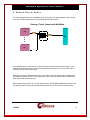
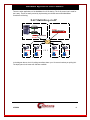
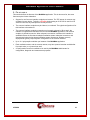
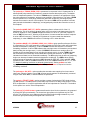
MULTIMATE POLYMORPHIC MEDIATION INTERFACE APPLICATION USER'S MANUAL RELEASE 2.X 102 SW Orange Blossom Lake City, Florida 32025-1613 phone: 386-754-5700 email: [email protected] http://www.trdcusa.com MultiMate Application User's Manual CONTENTS 1. INTRODUCTION............................................................................................................................... 4 2. SAMPLE DEPLOYMENTS .............................................................................................................. 5 3. FEATURES ....................................................................................................................................... 10 4. TCP PORTS ...................................................................................................................................... 11 5. MULTIMATE REQUIRED CONFIGURATION ......................................................................... 12 6. APPLICATIONS COMMANDS ..................................................................................................... 13 5.1 INPUT CONVENTIONS.......................................................................................................................... 13 5.2 LOGIN ................................................................................................................................................. 13 5.3 LOGOUT.............................................................................................................................................. 13 5.4 CHANGE PASSWORD ........................................................................................................................... 14 5.5 HELP................................................................................................................................................... 14 5.6 VERSION ............................................................................................................................................. 14 5.7 PLACING COMPONENTS IN SERVICE ................................................................................................... 14 5.8 TAKING COMPONENTS OUT OF SERVICE ............................................................................................ 15 5.9 ENDPOINT CONNECTIVITY CONFIGURATION ...................................................................................... 15 5.10 ENDPOINT PROTOCOL CONFIGURATION ............................................................................................ 16 5.11 DISPLAY MEASUREMENTS ................................................................................................................ 18 5.12 VERIFY CONFIGURATION .................................................................................................................. 18 5.13 DISPLAYING CURRENT CONNECTIONS .............................................................................................. 18 5.14 SNOOPING TRAFFIC .......................................................................................................................... 18 5.15 PROMPT LABELS ............................................................................................................................... 19 5.16 APPLICATION COMMENTS ................................................................................................................ 19 5.17 CLOSED USER GROUPS ..................................................................................................................... 19 5.18 CONSOLE SECURITY .................................................................................................................. 20 7. MULTIMATE MEASUREMENTS AVAILABLE ....................................................................... 21 8. SUPPORT FOR X.3 PAD PARAMETER VALUES..................................................................... 22 9. END-USER LICENSE AGREEMENT FOR SOFTWARE ......................................................... 24 SOFTWARE LICENSE ................................................................................................................................. 24 INTELLECTUAL PROPERTY RIGHTS ........................................................................................................... 24 SOFTWARE SUPPORT ................................................................................................................................ 24 EXPORT RESTRICTIONS............................................................................................................................. 24 LIMITED WARRANTY ................................................................................................................................ 24 NO OTHER WARRANTIES.......................................................................................................................... 25 07/25/08 2 MultiMate Application User's Manual LIMITATION OF LIABILITY ........................................................................................................................ 25 SPECIAL PROVISIONS ................................................................................................................................ 25 10. SALES & DISTRIBUTION ............................................................................................................. 26 11. AUTHOR........................................................................................................................................... 26 07/25/08 3 MultiMate Application User's Manual 1. INTRODUCTION There has always been a need to share the precious resources of certain network elements. With some protocols, this was accomplished with a port sharing device and a spider network of cabling. Other more complicated protocols required an eternal PAD and even more cabling. Although the expense was high, there was no other way to share the resource. The MultiMate application was designed to eliminate the wasteful expense of external PADs and port sharing devices. In addition, strategies for redundancy and disaster recovery became available through the judicious use of MultiMate. The Multimate application is polymorphic. That is, it can mediate between different types of endpoints, even using different protocol sets, and thereby create a cohesive sharing environment where none was previously possible. Please note the deployment examples. If there are any questions as to the applicability of MultiMate to any deployment; these should be addressed to the author at [email protected]. 07/25/08 4 MultiMate Application User's Manual 2. SAMPLE DEPLOYMENTS The most straightforward use of MultiMate is for the sharing of an administrative console. Some uses are for sharing between an OS and a dedicated access terminal. Sharing a Telnet Console with MultiMate OS IP MultiMate IP Polymorphic Mediation Telnet Console NE OS IP In the diagram above, each OS has access to the telnet console of the network element. If the network element had a serial console, there would be an access device, such as a DT-xx8x, to make the TCP/IP to serial connection. Each OS may have a different protocol set, or no protocol set. If no protocol set is utilized; data forwarding is based on a timer. In such situations, if there is frame oriented data; the Multimate does allow timed exclusive access. Many network elements use TL1 as their base protocol. The MultiMate application provides a full virtual pad to each OS in such a situation that avoids the use of timers and exclusive access. 07/25/08 5 MultiMate Application User's Manual Some network elements use (B)X.25 as its native interface. In these, the stream to be shared is a single virtual circuit on an X.25 line. In the past, this was done with an expensive rube Goldberg solution with a PAD, a port sharing device and no less than three ports. The MultiMate solution is elegant as follows: Sharing an X.25 VC with MultiMate OS IP DT-xx8x MultiMate IP Multiplex & Multi-Cast VC 1 X.25 VC N NE OS IP •X.25 Terminated & Mediated on the DT-xx8x. •Selected VC is transported to DT-6xxx MultiMate application. •The selected is then Multiplexed to unique TCP ports. •Servers connect individually to the DT-6xxx MultiMate. •Any Data from NE is sent to Both OS Servers. •Data from ANY OS Server is sent to the NE. •Up to 64 connection points. In the above, it is evident that there are no wires other than the single X.25 connection to the network element. Rather than being able to share a simple 2:1, the solution allows up to a 16:1 sharing concentration. By replacing the external PAD and port sharing devices, and the elimination of the extraneous ports, the MultiMate application saves considerable expenditures. 07/25/08 6 MultiMate Application User's Manual The elegance of the MultiMate application can be used for disaster recovery purposes. In the following two diagrams, the logical and physical view of a redundant system is depicted with emphasis on fault recovery. Disaster Recovery - Logical View Server X (Location A) IP DT-xx8x MultiMate IP Server Y (Location B) IP VC 1 X.25 Polymorphic Mediation VC N MultiMate DT-xx8x IP Polymorphic Mediation DMS VC 1 X.25 VC N The logical view above shows that each operation system has simultaneous access to the network element. Although the disaster recovery is an active-standby approach, the solution does have an active-active potential. The physical deployment may be varied, but generally each location would have its own DT-6xxx hardware with the MultiMate Application. If a third site were used for DR, then it would also replicate the configuration. The MultiMate allows for a 16-way deployment that could easily accommodate any disaster recovery deployment. 07/25/08 7 MultiMate Application User's Manual There are other applications of the MultiMate from X.25 sharing. The X.42 protocol set is used for the Lottery. These are easily carried by implementing a multicast network with MultiMate. Consider the following: X.42 Multi-Drop via IP Central Data Center Any Location DT-6xxx MultiMate Application Polling Controllers DT-xx8x IP Remote Location DT-9480 Remote Location DT-9480 Remote Location DT-9480 Remote Location DT-9480 In the diagram above, the X.42 polling controllers share up to 16 remote locations per polling link. The deployment is the most cost effective available. 07/25/08 8 MultiMate Application User's Manual The X.42 example is not unique. The same could be done of any other protocol. The following is a bisynchronous protocol example. BiSync Multi-Drop via IP Central Data Center Any Location DT-6xxx MultiMate Application Polling Controllers DT-4x8x IP Remote Location Remote Location DT-4xxx DT-4xxx Cluster Controllers Cluster Controllers In essence, the MultiMate application can be used to create any multidrop network in a virtual fashion. 07/25/08 9 MultiMate Application User's Manual 3. FEATURES This section defines the features of the MultiMate application. This is done as a list, but some features require further elaboration. • Support for one Common Interface endpoint per instance. The TCP stream in common may originate from any device. Typically, a DT-xx8x implementing an X.25 PAD is used for X.25 virtual circuits. But, any other protocol set may be used. • The common interface endpoint may be inbound, or outbound. The typical configuration is for this interface to be outbound. • The common interface endpoint connection may be static or dynamic. When static, the interface is originated and maintained as soon as the MultiMate application, and common endpoint, is placed into service. When a dynamic connection is selected, the interface is established when the first shared endpoint mediation stream makes the connection, and disconnected when the last shared mediation stream disconnects. Disaster recovery deployments typically require dynamic configuration of the common interface. • Up to 16:1 polymorphic mediation per instance of the MultiMate application. • Each mediation stream, and the common stream, may have protocol sets that are dissimilar from each other; or no protocol set at all. • A Configuration Console is available to be used by the MultiMate administrator for configuration, diagnostic and measurement purposes. 07/25/08 10 MultiMate Application User's Manual 4. TCP PORTS The TCP Numbers associated with a MultiMate application instance are listed in the table below and depend on the instance number. It should be noted that the common interface to MultiMate is typically an outbound connection. The table shows the TCP port if the common connection is configured as inbound. Outbound TCP port numbers are dynamic and not shown in this table. 07/25/08 # Sharing Common MultiMate Admin 1 2 3 4 5 6 7 8 9 10 11 12 13 14 15 16 17 18 19 20 21 22 23 24 25 26 27 28 29 30 30001 - 30016 30201 - 30216 30401 - 30416 30601 - 30616 30801 - 30816 31001 - 31016 31201 - 31216 31401 - 31416 31601 - 31616 31801 - 31816 32001 - 32016 32201 - 32216 32401 - 32416 32601 - 32616 32801 - 32816 33001 - 33016 33201 - 33216 33401 - 33416 33601 - 33616 33801 - 33816 34001 - 34016 34201 - 34216 34401 - 34416 34601 - 34616 34801 - 34816 35001 - 35016 35201 - 35216 35401 - 35416 35801 - 35816 36001 - 36016 30000 30200 30400 30600 30800 31000 31200 31400 31600 31800 32000 32200 32400 32600 32800 33000 33200 33400 33600 33800 34000 34200 34400 34600 34800 35000 35200 35400 35800 36000 10001 10002 10003 10004 10005 10006 10007 10008 10009 10010 10011 10012 10013 10014 10015 10016 10017 10018 10019 10020 10021 10022 10023 10024 10025 10026 10027 10028 10029 10030 11 MultiMate Application User's Manual 5. MULTIMATE REQUIRED CONFIGURATION The MultiMate defaults each of the Sharing connection protocol parameters to common values associated with the TL1 protocol. If these are sufficient, then no further configuration is needed. The MultiMate has a default Common connection as an outbound. The default configuration does not define the IP address, and TCP port of the common connection. This connection consequently defaults to an ‘Out of Service’ state. The connectivity parameters associated with the common interface must always be configured. The MultiMate defaults the Common connection protocol parameter to common values associated with the TL1 protocol. If these are sufficient, then no further configuration is needed. The MultiMate is a polymorphic application and the protocol parameters of each interface does not need to match. In the event that the interfaces differ, the MultiMate will provide the mediation logic to assure connectivity. Check with the author to verify that the exact permutation desired is currently supported in the MultiMate release level to be utilized. 07/25/08 12 MultiMate Application User's Manual 6. APPLICATIONS COMMANDS The DT-6xxx software is composed of two components. One component, called the Infrastructure, exists to support all applications. The second component is comprised of the individual application(s). The Infrastructure provides Operating System functions, selected interfaces, protocol stacks, SNMP functions, and system OA&M while each application uses the services of the resident Infrastructure. 5.1 INPUT CONVENTIONS All parameters may be given on the command line. Parameters of the form name=<value> may be given in any order. For several complex commands, listed below, missing parameters, or corrections of errors in given parameters, of the form name=<value> are collected by prompting the console user. The user responds to a prompt for the name by typing the required <value> followed by newline. Defaults are supplied in some cases, so the user need only enter newline. Commands may be entered in upper or lower case. Parameters of the form name=value may use upper or lower case for name. Default values, if any, are shown in parenthesis as part of the prompt. Case is preserved for values. When a password is being requested by a prompt, input is not echoed. Backspace erases one character and @ deletes the current line of input. Most commands are killed by del key. 5.2 LOGIN Syntax: login PASSWD=<password> (The default password is “initial”) The login command is used to allow access to the other configuration commands. The PASSWD parameter is not echo suppressed. However, if the PASSWD parameter is not provided, the console prompts for a password; the response is an asterisk echo in this case. If the password is valid, the user is placed in the logged in mode. Once the console user is logged in, the balance of the commands are accessible. Note: Each application instance is allowed to be assigned a different password. 5.3 LOGOUT Syntax: logout The logout command is only allowed if the console user is logged in. It requires no arguments. It will set the console to the logged out mode. 07/25/08 13 MultiMate Application User's Manual Passwords are up to seven characters in length. The characters are alphanumeric and special characters are not allowed. 5.4 CHANGE PASSWORD Syntax: chgpass PASSWD=<old> NEWPASS=<new> CONFIRM=<new> The chgpass command is used to change a user password on the system console. The command is only allowed if the user is logged in. All three parameters must be given on the same line as the command. None of those entries are echo-suppressed. If the current password is valid, and the two entries for the new password match, the password is changed to the new value. 5.5 HELP Syntax: help [ Command ] The help command is always visible. The help command displays the currently allowed commands for the mode that the unit is currently entered. If the optional [ Command ] is provided, the displayed help will be limited to that command. 5.6 VERSION Syntax: ver The version command is only visible when the application is logged in. The command has no arguments. It displays the current build, software version, and database version of the MultiMate application. 5.7 PLACING COMPONENTS IN SERVICE Syntax: rs <PT_ID> The restore command is only visible when the application is logged in. The command is used to place the common endpoint, or any of the sharing endpoints, into service. A TCP connection is not available until the component is placed into service. At least one argument is required. That argument is the component type to be placed into service. The common endpoint may be abbreviated with the letter ‘C’. The sharing endpoints are in the range of 1 through 16 inclusive. Once the component is brought into service, it will await a TCP session if the connection type is rcv. If the connection type is orig, a TCP session will be established with the endpoint specified in the component configuration. 07/25/08 14 MultiMate Application User's Manual 5.8 TAKING COMPONENTS OUT OF SERVICE Syntax: rm <PT_ID> The remove command is only visible when the application is logged in. The command is used to place the common endpoint, or any of the sharing endpoints, out of service. Any TCP connection using those components is automatically taken down when the component is removed from service. Depending on the options specified, other related connections may be taken down and enter the ‘Ready for Service’ statue as a consequence of a remove operation. For example, removing the common endpoint will disconnect all of the sharing endpoints and make them ‘Ready for Service’. At least one argument is required. That argument is the component type to be removed from service. The <PT_ID> parameter is a ‘C’ for the common endpoint or a number in the range of 1 through 16 inclusive for each of the sharing endpoints. 5.9 ENDPOINT CONNECTIVITY CONFIGURATION Syntax: endpt <PT_ID> [type=<ORIG|RCV>] [dest=<IP Address>] [dport=<TCP Port>] [cug=[+|-]<cug num>] [conn=<STATIC | DYNAMIC>] This command configures an individual endpoint. The <PT_ID> parameter is a ‘C’ for the common endpoint or a number in the range of 1 through 16 inclusive for each of the sharing endpoints. The [type=<ORIG|RCV>] option specifies the direction of the endpoint connection. An endpoint that waits for an incoming connection ( [type=rcv] ), or an originator of a connection ( [type=orig] ). The destination for an originating endpoint is defined by dest=<ipaddr> and dport=<tcp_port>. The TCP port assigned to an incoming call is fixed on a per endpoint basis and listed in the interface table. The [cug=[+|-]<CUG_num>] option allows the inclusion or deletion of a Closed User Group in the list of CUGs assigned to the user port. The “+” will add the <CUG_num> to the CUG list. The “-” is used to delete the <CUG_num> from the list. The [conn=<STATIC | DYNAMIC>] is an option that only has relevance for the common endpoint. When set to STATIC, the common endpoint is immediately connected upon a restore to service. When set to DYNAMIC, the common endpoint is connected when the first sharing endpoint connection is made. It then continues to stay connected as long as at least one sharing endpoint remains connected. If all sharing endpoints disconnect for any reason, the common endpoint connection is terminated. This feature is used for disaster recovery connectivity notice propagation. 07/25/08 15 MultiMate Application User's Manual 5.10 ENDPOINT PROTOCOL CONFIGURATION Syntax: vpad <PT_ID> [ svc=< PAD | MAC | RBP >] [ padecho=< ON | OFF > ] [ paderase=< NONE | BS | <HEX BYTE> ] [ padidle=< #X.3 Ticks > ] [ padparity=< TRANS | EVEN | ODD > ] [ padcrlf=< NONE | RMT | PT | BOTH > ] [ padfwd=< NONE | CR | CRDROP | SEMI | ALL | GRPx > ] [ padcmap=< ON | OFF > ] [ padapi=< TELNET | RAW > ] [ padcug=[+|-]<CUG Number>] This command configures an individual endpoint protocol options. The <PT_ID> parameter is a ‘C’ for the common endpoint or a number in the range of 1 through 16 inclusive for each of the sharing endpoints. The svc=< PAD | RBP | MAC > option determines the type of protocol service for the endpoint. The <PT_ID> must have been specified on the command line. When set to the value of PAD, the endpoint is terminated in an X.3 PAD. When a value of MAC is selected, a special interface for the MacStar operation system is used. When a value of RBP is selected, the Record Boundary Preservation protocol is selected. Other interfaces can be included, see the last section of this document for contact information. The padecho=< ON | OFF > refers to reference #2 in the X.3 parameter list. When set to OFF, the PAD will not echo characters back to the IP endpoint. When set to the value of ON, all characters are to be echoed back to the IP source. The paderase=< NONE | BS | <HEX BYTE> > option specifies reference #16 in the X.3 parameter list. It is used with manual telnet connections to an endpoint. It sets the buffer editing “erase” character. When the special “erase” character is received by the MultiMate for a specific endpoint, the previous character in the packet accumulation buffer is deleted. If the padecho option was also enabled, a “Backspace Blank Backspace” sequence is emitted to the user. When the paderase option is set to NONE, the PAD will not have a special “erase” character. When the value is BS, it is set to the ASCII backspace character 0x08. Otherwise, any character may be entered as a hexadecimal byte in 0xXX notation. This option is only valid on endpoints configured with the PAD interface. The padidle=<#X.3 ticks> parameter refers to reference #4 of the X.3 parameter list. This is the time forwarding condition. When it expires, it will forward any data collected to the endpoint. The timer is reset to the specified timer value whenever a forwarding condition is reached. The value is based on ticks of 1/20th of a second each per the X.3 specification. 07/25/08 16 MultiMate Application User's Manual The padparity=< TRANS | EVEN | ODD > parameter is not present in the X.3 parameter list. It allows special parity treatment for interface to network elements that require parity. The default value is transparent operation. The value of TRANS sets the operation to be transparent. When the parity treatment is transparent, the data is not modified in either direction. The value of EVEN sets the operation to be even parity towards the destination endpoint(s), and stripped parity towards the connection source of this endpoint. The value of ODD sets the operation to be odd parity towards the destination endpoint(s), and stripped parity towards the connection source of this endpoint. The padcrlf=<NONE | RMT | PT | BOTH> parameter refers to reference #13 of the X.3 parameter list. This is the action to be taken when a CR is received in the data stream from the remote IP endpoint. A value of NONE indicates that there is to be no LF (line feed) insertion. A value of RMT will insert an LF following a CR whenever it is sent towards the remote IP endpoint. A value of PT will insert an LF following a CR whenever it is sent towards the destination endpoint(s). A value of BOTH will insert an LF following a CR in either direction. The padfwd=<NONE | CR | CRDROP | SEMI | ALL | GRPx> option specifies reference #3 of the X.3 parameter list. This is the forwarding condition (outside the PAD timer) which will forward data towards the destination endpoint(s). A value of NONE indicates that there are no character forwarding conditions. A value of CR indicates that a carriage return will forward any accumulated data (including the carriage return). A value of CRDROP indicates that a carriage return will forward any accumulated data (but not including the carriage return). A value of SEMI indicates that a semicolon will forward any accumulated data including the semicolon. A value of ALL indicates that all data is to be forwarded immediately. The ALL option has the effect of generating single user character forwards towards the destination endpoint(s). The GRPx values specify selected groups of forwarding characters. GRP1 forwards on ESC, BEL, ENQ, and NAK. GRP2 forwards on DEL, CAN, DC2. GRP3 forwards on ETX, EOT. GRP4 forwards on HT, LF, VT, and FF. Multiple forwarding conditions are allowed simultaneously. Setting padfwd to a value aggregates with the previous value of padfwd. The padfwd=none is required to clear the forwarding conditions. The padcmap=< ON | OFF > option provides the automatic case mapping from lower case to upper case. When the option is set to ON, all lower case characters are automatically converted to upper case. When OFF, no transformations are performed. The padapi=< TELNET | RAW > option provides a means of selecting the PAD virtual circuit to use raw protocol. The raw protocol is essentially asynchronous, but without the benefit of Telnet RFC encapsulation. It is used for applications that do not implement the Telnet RFC. The default for this option is to use the Telnet encapsulation. The padcug=[+|-]<CUG Number> parameter allows the virtual circuit connection to be protected by closed user group membership. The closed user group feature is significant only for PAD service. The closed user group address entries are defined with the cug command. Any or all closed user group entries may be assigned with a virtual circuit. 07/25/08 17 MultiMate Application User's Manual 5.11 DISPLAY MEASUREMENTS Syntax: dmeas < PT_ID > The dmeas command is only visible when the application is logged in. The command is used to display the current measurements on any endpoint. A <PT_ID> with a value of ‘C’ will display the measurement information for the common endpoint being supported by this instance of the application. A <PT_ID> with a value of 1 through 16 inclusive will display the measurement information for a particular sharing endpoint. A <PT_ID> with a value of ALL will display an aggregate of all the measurement data. 5.12 VERIFY CONFIGURATION Syntax: vfy [ all | app | <PT_ID> | cug ] The vfy command is only visible when the application is logged in. The command is used to display the configured options on the X.25 link, or a virtual circuit resident on the X.25 link. The <PT_ID> parameter will display the configuration information for the endpoint specified. The common endpoint is represented by a ‘C’, and the sharing endpoints are specified by a number in the range of 1 through 16 inclusive. The APP parameter will display information about the application instance. This includes user comments, and the instance identifier. The CUG parameter will display information about the configuration of the closed user groups. 5.13 DISPLAYING CURRENT CONNECTIONS Syntax: dc The dc command is used to display all of the current connections into the MultiMate application. This includes the common endpoint, and any of the sharing endpoints. The command will issue a report that shows the connection peer for each active connection. 5.14 SNOOPING TRAFFIC Syntax: snoop [OFF | ALL | SW | <PT_ID Range>] [ verbose ] The MultiMate application has a diagnostic ability to snoop on any of the endpoints. This is done with the snoop command. All output is directed to the OA&M connection. If the command is invoked with no arguments, it produces a report of all active snooper configurations. If the command is invoked with the OFF option, all of the snooper configurations are disabled. 07/25/08 18 MultiMate Application User's Manual If the command is invoked with a <PT_ID> of ‘C’, the common endpoint is snooped. Output is displayed on the OA&M session. If the command is invoked with a <PT_ID Range> of one through 16 inclusive, or a range of those values, the sharing endpoints associated will be snooped. Output is displayed on the OA&M session. If the command is invoked with the SW option, then the internal switch of the MultiMate application has its operation snooped. Output is displayed on the OA&M session. If the command is invoked with the ALL option, then all the endpoint snooper functions are enabled simultaneously. The additional parameter of [verbose] will display all of the data bytes in addition to the standard decoding. The output of this option may become quite voluminous. 5.15 PROMPT LABELS Syntax: label [ “Any Label” | NONE ] The prompt on the application console may be customized with a label up to sixty characters in length. Spaces and special characters are allowed within the double quotes. The double quotes are required on this command. The value of none deletes any existing label on the prompt. The current configuration is displayed during a verify configuration, by invoking the label command without arguments, or merely by the prompt display. 5.16 APPLICATION COMMENTS Syntax: comment [ L1=”Any Comment”] [ L2=”Any Comment”] [ L3=”Any Comment”] The application may have comments which are displayed with the verify configuration command. Up to three lines of comments are available. Each line may have a comment up to 64 characters in length. Each comment is double quoted to allow for spaces to be embedded. A comment with no characters (i.e. “”) is used to delete a comment which is not desired. It is not necessary to delete prior to adding a new comment. The new comment shall replace the existing comment at the line specified. 5.17 CLOSED USER GROUPS Syntax: cug <CUG Number> [ipaddr=<IP Address>] [submask=<IP Mask>] The CUG command allows the definition of address sets to create multiple closed user groups. The address sets are then used by the link, console, and virtual circuits in creating individual closed user groups. The <CUG Number> has a range of one through sixteen. 07/25/08 19 MultiMate Application User's Manual 5.18 CONSOLE SECURITY Syntax: console [cug=[+|-]<CUG Number>] The CONSOLE command allows the assignment of a closed user group to the administration session. The closed user group must include the current administrator to prevent accidental lockout. This restriction is enforced. 07/25/08 20 MultiMate Application User's Manual 7. MULTIMATE MEASUREMENTS AVAILABLE This appendix itemizes the measurements available using the display measurements (dmeas) command. The base measurements are always displayed, and the error and exception counters are only displayed if nonzero. The measurements available are as follows: Measurement Description Type Number of Frames Received Base Number of Frames Transmitted Base Number of Bytes Received Base Number of Bytes Transmitted Base A Frame is loosely defined in MultiMate as a group of data where a forwarding condition was met. For example, when the RBP protocol is specified; a frame would be each RBP message. When a TL1 PAD were specified as the endpoint protocol; a frame would be each time a semicolon caused a forward of a message. 07/25/08 21 MultiMate Application User's Manual 8. SUPPORT FOR X.3 PAD PARAMETER VALUES The MultiMate application supports the relevant X.3 PAD parameters. Since the MultiMate application is not a physical device, some of the parameters are not readily applicable. Responses via X.29 will carry default values if queried. The table below will indicate all the X.3 parameters, and the support of these parameters by the MultiMate application. Ref # 1 PAD recall 0 – None 2 Echo 3 Data Forwarding Characters 4 Idle Delay 0 – No Echo 1 – Echo 0 – None 2 – CR 126 – All Characters 0-255 5 Ancillary Device Control 0 – None 6 Control of PAD service signals and PAD command signals. Operation of PAD on receipt of break from IP 0 – No PAD service signals are transmitted. 7 Description Supported Options 0 – Nothing 1 – Send X.25 Interrupt 2 – Send X.25 Reset 4 – X.29 “Indication of Break” 0 – Normal Data Delivery 0 – No Padding after CR 0 – No line folding 18 – 64000bps 0 – No use of X-ON and X-OFF 8 9 10 11 12 Discard Output Padding after CR Line Folding Binary Speed Flow Control of the PAD 13 LineFeed Insertion after CR 14 Padding after Linefeed 0 – No Linefeed Insertion 1 – Insert Linefeed after CR towards IP. 2 – Insert Linefeed after CR from IP 0 – No Padding after LF 15 Editing 0 – No use of editing. 07/25/08 Note User Command session provided by Datakit CC or DT-xxxx or DT-2020. Config No Yes Yes Ticks are in 1/20th of a second. Configured on DT-4000 or SAM/DT-2020 port configuration DT-4000 or SAM is DTE service center. Yes No No Yes For Reporting Only These are functions of the DT-4000 and SAM devices. No No No No No Yes No User command session performed via the DK CC, No 22 MultiMate Application User's Manual the DT-4000, and the DT2020. User command session performed via the DK CC, the DT-4000, and the DT2020. User command session performed via the DK CC, the DT-4000, and the DT2020. User command session performed via the DK CC, the DT-4000, and the DT2020. 16 Character Delete None 17 Line Delete None 18 Line Display None 19 0 - None No 20 Editing PAD service signals Echo Mask 0 - None No 21 Parity Parity performed by DT4000 or SAM. 22 Page Wait 0 – No generation or checking. 0 - Disabled 23 Input field size 0 - Undefined 24 End of Frame Signals 0 – Undefined Size User command session performed via the DK CC, the DT-4000, and the DT2020. EOF is determined and encoded per the RFC since this is an IP application. 25 Extended Data Forwarding Signals Display Interrupt 0 – No extended Data No 0 – No display interrupt No 0 – No display interrupt confirmation. 0 – Basic Coding No No 0 – No Extended Echo Mask No 26 27 28 29 Display Interrupt Confirmation Diacritic Character Coding Extended Echo Mask 07/25/08 No No No No No No No 23 MultiMate Application User's Manual 9. END-USER LICENSE AGREEMENT FOR SOFTWARE This License Agreement ("License") is a legal contract between you and the manufacturer ("Manufacturer") of the system ("HARDWARE") with which you acquired software product(s) identified above ("SOFTWARE"). The SOFTWARE may include printed materials that accompany the SOFTWARE. Any software provided along with the SOFTWARE that is associated with a separate end-user license agreement is licensed to you under the terms of that license agreement. By installing, copying, downloading, accessing or otherwise using the SOFTWARE, you agree to be bound by the terms of this LICENSE. If you do not agree to the terms of this LICENSE, Manufacturer is unwilling to license the SOFTWARE to you. In such event, you may not use or copy the SOFTWARE, and you should promptly contact Manufacturer for instructions on return of the unused product(s) for a refund. SOFTWARE LICENSE You may only install and use one copy of the SOFTWARE on the HARDWARE (unless otherwise licensed by Manufacturer). The SOFTWARE may not be installed, accessed, displayed, run, shared or used concurrently on or from different computers, including a workstation, terminal or other digital electronic device (“Devices”). Notwithstanding the foregoing and except as otherwise provided below, any number of Devices may access or otherwise utilize the services of the SOFTWARE. You may not reverse engineer, decompile, or disassemble the SOFTWARE, except and only to the extent that such activity is expressly permitted by applicable law notwithstanding this limitation. The SOFTWARE is licensed as a single product. Its component parts may not be separated for use on more than one HARDWARE. The SOFTWARE is licensed with the HARDWARE as a single integrated product. The SOFTWARE may only be used with the HARDWARE as set forth in this LICENSE. You may not rent, lease or lend the SOFTWARE in any manner. You may permanently transfer all of your rights under this LICENSE only as part of a permanent sale or transfer of the HARDWARE, provided you retain no copies, you transfer all of the SOFTWARE (including all component parts, the media and printed materials, any upgrades, this LICENSE and, if applicable, the Certificate(s) of Authenticity), and the recipient agrees to the terms of this LICENSE. If the SOFTWARE is an upgrade, any transfer must also include all prior versions of the SOFTWARE. Without prejudice to any other rights, Manufacturer may terminate this LICENSE if you fail to comply with the terms and conditions of this LICENSE. In such event, you must destroy all copies of the SOFTWARE and all of its component parts. INTELLECTUAL PROPERTY RIGHTS The SOFTWARE is licensed, not sold to you. The SOFTWARE is protected by copyright laws and international copyright treaties, as well as other intellectual property laws and treaties. You may not copy the printed materials accompanying the SOFTWARE. All title and intellectual property rights in and to the content which may be accessed through use of the SOFTWARE is the property of the respective content owner and may be protected by applicable copyright or other intellectual property laws and treaties. This LICENSE grants you no rights to use such content. All rights not expressly granted under this LICENSE are reserved Manufacturer and its licensors (if any). SOFTWARE SUPPORT SOFTWARE support is not provided by Manufacturer, or its affiliates or subsidiaries separate from the HARDWARE. For SOFTWARE support, please contact your supplier of the HARDWARE. Should you have any questions concerning this LICENSE, or if you desire to contact Manufacturer for any other reason, please refer to the address provided in the documentation for the HARDWARE. EXPORT RESTRICTIONS You agree that you will not export or re-export the SOFTWARE to any country, person, or entity subject to U.S. export restrictions. You specifically agree not to export or re-export the SOFTWARE: (i) to any country to which the U.S. has embargoed or restricted the export of goods or services, which as of March 1998 include, but are not necessarily limited to Cuba, Iran, Iraq, Libya, North Korea, Sudan and Syria, or to any national of any such country, wherever located, who intends to transmit or transport the products back to such country; (ii) to any person or entity who you know or have reason to know will utilize the SOFTWARE or portion thereof in the design, development or production of nuclear, chemical or biological weapons; or (iii) to any person or entity who has been prohibited from participating in U.S. export transactions by any federal agency of the U.S. government. LIMITED WARRANTY Manufacturer warrants that (a) the SOFTWARE will perform substantially in accordance with the accompanying written materials for a period of ninety (90) days from the date of shipment from TeleComp R&D or a designated manufacturer. Software support is limited to the hours of 9AM to 5PM ET Monday through Friday excluding TeleComp R&D observed holidays. An extended warranty may be purchased at additional cost. Any implied warranties on the SOFTWARE are 07/25/08 24 MultiMate Application User's Manual limited to ninety (90) days. Some states/jurisdictions do not allow limitations on duration of an implied warranty, so the above limitation may not apply to you. Manufacturer's and its suppliers' entire liability and your exclusive remedy shall be, at Manufacturer's option, either (a) return of the price paid, or (b) repair or replacement of the SOFTWARE that does not meet this Limited Warranty and which is returned to Manufacturer with a copy of your receipt. This Limited Warranty is void if failure of the SOFTWARE has resulted from accident, abuse, or misapplication. Any replacement SOFTWARE will be warranted for the remainder of the original warranty period or thirty (30) days, whichever is longer. NO OTHER WARRANTIES TO THE MAXIMUM EXTENT PERMITTED BY APPLICABLE LAW, MANUFACTURER AND ITS SUPPLIERS DISCLAIM ALL OTHER WARRANTIES, EITHER EXPRESS OR IMPLIED, INCLUDING, BUT NOT LIMITED TO IMPLIED WARRANTIES OF MERCHANTABILITY, FITNESS FOR A PARTICULAR PURPOSE AND NONINFRINGEMENT, WITH REGARD TO THE SOFTWARE AND THE ACCOMPANYING WRITTEN MATERIALS. THIS LIMITED WARRANTY GIVES YOU SPECIFIC LEGAL RIGHTS. YOU MAY HAVE OTHERS, WHICH VARY FROM STATE/JURISDICTION TO STATE/JURISDICTION. LIMITATION OF LIABILITY To the maximum extent permitted by applicable law, in no event shall Manufacturer or its suppliers be liable for any damages whatsoever (including without limitation, special, incidental, consequential, or indirect damages for personal injury, loss of business profits, business interruption, loss of business information, or any other pecuniary loss) arising out of the use of or inability to use this product, even if Manufacturer has been advised of the possibility of such damages. In any case, Manufacturer's and its suppliers' entire liability under any provision of this License shall be limited to the amount actually paid by you for the SOFTWARE and/or the HARDWARE. Because some states/jurisdictions do not allow the exclusion or limitation of liability for consequential or incidental damages, the above limitation may not apply to you. SPECIAL PROVISIONS The SOFTWARE and documentation are provided with RESTRICTED RIGHTS. Use, duplication, or disclosure by the United States Government is subject to restrictions as set forth in subparagraph (c)(1)(ii) of the Rights in Technical Data and HARDWARE Software clause at DFARS 252.227-7013 or subparagraphs (c)(1) and (2) of the Commercial HARDWARE Software-Restricted Rights at 48 CFR 52.227-19, as applicable. Manufacturer is TeleComp R&D or it’s designee manufacturer., 102 SW Orange Blossom, Lake City, Florida, 32025. If you acquired the SOFTWARE in the United States of America, this Software License are governed by the laws of the State of Florida, excluding its choice of laws provisions. If you acquired the SOFTWARE outside the United States of America, local law may apply. This LICENSE constitutes the entire understanding and agreement between you and the Manufacturer in relation to the SOFTWARE and supercedes any and all prior or other communications, statements, documents, agreements or other information between the parties with respect to the subject matter hereof. 07/25/08 25 MultiMate Application User's Manual 10. SALES & DISTRIBUTION CBM of America, Inc. Mr. Mike Stephens 1455 West Newport Center Drive Deerfield Beach, Florida 33442 800-881-8202 954-698-9104 Fax: 954-360-0682 www.cbmusa.com Datatek Applications, Inc. Mr. Dan Conklin 379 Campus Drive, Suite 100 Somerset, New Jersey 08873 732-667-1080 Fax: 732-667-1091 www.datatekcorp.com 11. AUTHOR Comments and Questions regarding this document or the products covered within this document should be addressed to the author Angel Gomez via email at [email protected] or via telephone at 386-754-5700. ©Copyright 2002, 2008 TeleComp Research & Development Corp. ©Copyright 1998, 2002 TeleComp Inc. All Rights Reserved Printed in USA Datakit and StarKeeper II NMS are registered trademarks of Lucent Technologies. 07/25/08 26