1
34
at 23.98 fps, the MXO2 main channel will be set to the compatible 720p at
59.94 fps output format.
¦
$
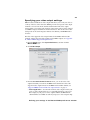
SD Sets the main channel’s video output to SD. This will be either
NTSC or PAL, depending on your project’s video output frame rate. For
example, a 720p at 23.98 fps project will be output as NTSC, and a 720p
at 25 fps project will be output as PAL.
$
720p
$
1080
$
1080i 59.94 from 23.98
Sets the main channel’s video output to 720p at a frame rate
compatible with your project’s video output frame rate.
Sets the main channel’s video output to a 1080i or 1080PsF
format, depending on your project’s video output format.
Use this option when your project’s video
output has a frame rate of 23.98 fps, and you want to set the main
channel’s video output to 1080i at 59.94 fps (a pulldown will be applied to
the video output).
Note When a pulldown is required to convert 23.98 fps video for output,
you can select the pulldown method that you want to use (see step 5).
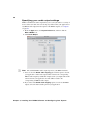
4 Under Channel Selection, select the video channel (main or SD) that you
want for your MXO2 analog (composite, S-Video, and component) and SDI
outputs:
$
Main channel Outputs your project’s video as defined for the main
channel (see step 3).
$
SD channel
Outputs your project’s video as NTSC or PAL, depending
on your project’s video output frame rate.
Remarks
$
The HDMI output always outputs the main channel. To output SD on the
HDMI output, you must define the main channel in step 3 as SD.
$
The SD channel is not available when outputting 1080PsF at 23.98 fps on
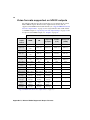
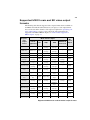
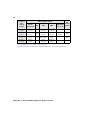
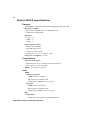
the main channel (see “Supported MXO2 main and SD video output
formats” on page 73).
5 Under Channel Behavior, select the Pulldown method that you want to
be applied to the video output when required to convert 23.98 fps video. For
information on the available pulldown methods, see Appendix A,
“Understanding Pulldown.”
6 Under Channel Behavior, select the 16:9 to SD aspect ratio conversion
option to be used when downconverting 16:9 material to SD, or when
outputting SD 16:9 material:
$
Letterbox Outputs the widescreen 16:9 picture in letterbox mode by
adding black bars at the top and bottom of the picture for display on a
standard 4:3 television screen.
Chapter 5, Installing Your MXO2 Software and Configuring Your System