1
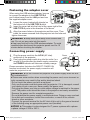
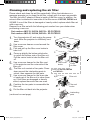
Please insert batteries (batteries not included) into the remote control before using
it. If the remote control appears to malfunction, replace the batteries first. Remove
the batteries from the remote control and store them in a safe place when the
remote will not be used for a length of time.
1
3
Holding the hook part of the battery
cover, remove it.
Align and insert two AA batteries
(HITACHI MAXELL or HITACHI
MAXELL ENERGY, Part No.LR6 or
2
R6P) according to their plus and minus
terminals as indicated in the remote
control.
Replace the battery cover in the direction of the arrow and snap it back into
place.
1.
2.
ENGLISH
Preparing for the remote control
3.
WARNING ►Always handle the batteries with care and use them only as
directed. Improper use may result in battery explosion, cracking or leakage,
which could result in fire, injury and/or pollution of the surrounding environment.
• When replacing the batteries, replace both of the batteries with new batteries
of the same type. Do not use a new battery with a used battery.
• Only use the batteries specified. Do not use batteries of different types at the
same time. Do not mix a new battery with used one.
•M
ake sure the plus and minus terminals are correctly aligned when loading a battery.
• Keep a battery away from children and pets.
• Do not recharge, short circuit, solder or disassemble a battery.
•D
o not place a battery in a fire or water. Keep batteries in a dark, cool and dry place.
• If you observe battery leakage, wipe out the leakage and then replace a battery.
If the leakage adheres to your body or clothes, rinse well with water immediately.
• Obey the local laws when disposing of batteries.
5
IN513x_IN514x_CO_EN.indd 5
4/26/2012 10:46:35 AM