1
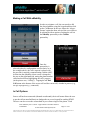
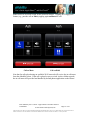
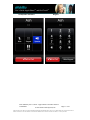
User‟s Guide Apple iPhoneTM and iPod TouchTM Making a Call With uMobility In order to originate a call, the user needs to dial the desired number using the keypad and then click on the Call Button. In the case where the „Always Prompt‟ option has been selected, the user will next be presented with an option of routing the call via the uMobilty personality or the Cellular personality. Once the personality is selected (either by configuration or menu choice as in the example above), the call is request is placed with the provider‟s network (communicating with the uMC). At that time the uMobility client screen is changed to the one on the right-hand side, noting the phone number called and text below highlighting the call‟s progress (in the picture case, “Calling”). Tapping the red End Call button at the bottom of the screen will end the current call, whether in process (e.g., set-up) or progress (e.g., connected). In Call Options Once a call has been connected (inbound or outbound), the in-call menu allows the user to put the call on mute/hold/activate loudspeaker or access keypad for sending DTMF. The user can also access the volume hard keys or silence ringer of the phone. Each Title: uMobility User‟s Guide – Apple iPhoneTM and iPod TouchTM Confidential 2003-2009 Varaha Systems, Inc. Page 15 of 25 THIS DOCUMENT AND THE DATA DISCLOSED HEREIN OR HEREWITH IS PROPRIETARY AND IS NOT TO BE REPRODUCED, USED OR DISCLOSED IN WHOLE OR IN PART TO ANYONE WITHOUT THE WRITTEN PERMISSION OF VARAHA SYSTEMS. COPYRIGHT, © Varaha Systems 2008