1
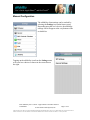
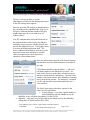
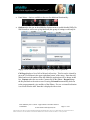
User‟s Guide Apple iPhoneTM and iPod TouchTM Introduction uMobility was designed to enhance the mobile experience by bringing features and functionalities from office or residential services right to the smart phone. uMobility enables the user to: Answer the office or home phone (depending on the type of uMobility service) from the smart phone – anytime, anywhere Make calls from the smart phone that uses the office or home’s default number Enjoy greatly improved cell phone coverage inside the office or home Never miss an important call again while away from the desk or home Talk on the smart phone and not use any cellular network minutes when in a Wi-Fi hotspot Access work or home voice mail from the smart phone Stop juggling between the cell phone and the office phone or home phone iPhone or iPod Touch Use Cases Please note the uMobility client software can be used in one of several ways in both the iPhone as well as the iPod Touch. Examples of these usage methods are as follows: The client for iPhone or Touch can be used in conjunction with the network based uMobility controller (uMC). This method would be supported by the communications carrier of your choice. The user will receive a few pieces of registration information via email to be entered as Settings for the uMobility client. These settings will complete the installation of the client software on the device and get you up and calling in no time. The client can also be used along with a uMobility Controller (uMC) with a number of IP PBXes (e.g., Toshiba Strata CIX, NEC 8100, 8500) or Call Managers (e.g., Cisco CUCM). Please contact your solution provider (e.g., dealer) or Systems Administrator (SysAdmin) to find out if the iPhone/iPod Touch is supported in your network as well as for further information on how to set up and register the device in that network. Finally, the uMobility client can be used as a stand-alone Wi-Fi dialer when connected to an open source IP PBX (e.g., Asterisk) or Toshiba IP PBX (Strata CIX). Please NOTE that this implementation scenario is done entirely at the user‟s risk and is not a directly supported by Varaha or its sales channels. Title: uMobility User‟s Guide – Apple iPhoneTM and iPod TouchTM Confidential 2003-2009 Varaha Systems, Inc. Page 3 of 25 THIS DOCUMENT AND THE DATA DISCLOSED HEREIN OR HEREWITH IS PROPRIETARY AND IS NOT TO BE REPRODUCED, USED OR DISCLOSED IN WHOLE OR IN PART TO ANYONE WITHOUT THE WRITTEN PERMISSION OF VARAHA SYSTEMS. COPYRIGHT, © Varaha Systems 2008