1
B
目rstlum on the mdoor m°
f do notˇ ˇ
ant to reoeive the visitor after seeing the video,ho operation or
p∞ ss
the曰
buu。 nt° tum offthe sc∞en and then enter hb针
Indoor monitor enterinto the standby mode after30seconds if no any。 ρerauon
Note∶
fy° u use muⅢ ple indoor monitors,please keep distanoe be咖
choose photos,press<,)bu廿 on
oen indoor
lB) m° n:tor
曰
bu廿 on
on∞ to Wake up the hdoor monitoⅡ
n for2se∞ nds,tllen tum on the
N
D Pair
ng from the outdoor oamera,and the ho∞ rm° nitors in standby
bu廿 on again to enter mon改
butt°
tO choose yes or n° to de ete the a"pictures
Υ
For one outdoor camera or more outdoor Cameras with one indoor mon"oG if
mode Vser Can press the G彐
勤
Delecte AII?
mon tors to avoid afecting taIk effed
there'is no caⅢ
n浞 o1pres亚
囱 bu众 on for1seconds,press<,) bu廿 on lo Cheok photos,press踵 3bu廿 on
andby mode
one0utdoor camera amd oneindoor mon"or system
‘ ’
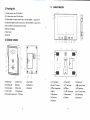
Press‘ par butt。 n of ouldoor camera( pa“ butlon in
press
or mode and monitorthe outdoor as Iong as you"ke,
ndicaung"ght1ash,press E口
mon"or signaI wⅡ I display on the screen Press目 彐 butt。 n again to qu"and cIose
bu廿 on
ofindoor mon"or汛
sucoeeds,the video from outdoorcamera WⅢ
the screen
the baCk oftlle outdoorl,
tlle same
Ⅱme,f pair
be shoWn n tho sc∞ en ofindoor
mon"or
F∝ several outdoor cameras W改 h one indoor mon"oG in mon"or mode, press
曰 bu饿 on shoW theimage from the GAM1,CAM2,CAM3,CAM4(f the system has)
m sequence; Atthe hst outdoor oamera,press曰
bu迁 on ag蓟 nto qu改
and dose
9,Working Enˇironment
the sCreen
(1) W° rkng temperature∶
(4)Charge
The n甲 Ⅱbe
u阝 to act vate扪 e"th um batte%aft吖
charged mom man5h°
charge3hours every犭 me,up b80hours ofstandby ume
that
11.NOtices
C piCture
(1)
(1)Take pictures
When has Mdeo from ou旧 ∞ r camem,p蹿 sses E勋
butt。
n№
妇ke a Ⅱctu岭
press one mme fgr° ne ucture
If the user isn.tin or no any operation,aⅡ
R wⅢ rep|aoe△
rst picture f exceed avai|able memory when take a new ρdure
pictures
Press座口 button,then press<,>bullon lo browse tho stored Ⅱctures Press
、 bu扭 on to exit
(3)Delete pictures
PIease don’ t cover anythtng on the M Crophone°
conVersa刂
,
r speaker when there is
on
(2) Please a ways use the speoined electHc souroe power suppIier adaptor,or that
witll the same type lsame standard Vo"age and e ect冖 c cur渖 nt) Using the
indoor mon⒒ ors save the image from
outdoor automat caˇ after1o se∞ nds
(zl Br° wse
15℃ _+55℃
⒓) W° rkng humd ty‘ ss%
adaptor unspec ned may ead to the damage ofthe oiⅡ
u"and component of
the produd
(3) D。 not auemptto service th s product yourser as。 pen ng orremoV ng covers
may expose you to dangerous Vcl"age or other hazards Refer a"servicing to
qua"】 ed serVice personne
(4) PIease str ctly fo"ow1he user manual before nstaⅢ ng and tes刂 ng tho product
r there is any quest on,pIease contact ourtech suppod and customer serv ce;