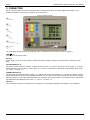
1
Elspec
Portable Power Quality Analyzer User Manual
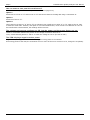
8. TROUBLESHOOTING
The secret to troubleshooting is to examine the evidence you have, gain as much information as you can, and
eliminate the possibilities one by one. In most cases, the source of the problem will soon become clear.
below:
See common problems and solutions
T he PPQ do es n't pow er up
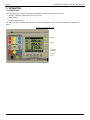
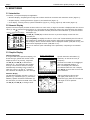
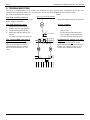
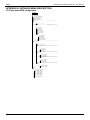
Figure 12: CT Connection Example
Make sure that the PPQ is connected to
power supply is functional.
the power supply and that the external
T he P PQ dis p la ys a z e ro
c ur re nt r ea d in g
1.
Check the CTs connections.
2.
Confirm the CTs type (page 7).
3.
Verify the PPQ setup for the
4.
Make sure that the cable or the
current.
the edge of the bus bar where no
T he cu rren t R M S r ea d in gs of
a re d if f e ren t f r o m t ho se
Check for improper setting of the CT
input is surrounded by the CTs. A
parallel transformers or multiple
the CT is set to position "A", the
value.
9
89
Good - Option 1
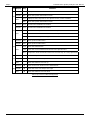
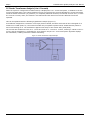
Figure 13: Parallel CT connection
Bad
Good - Option 2
A
C
21
B
clamps type.
bus bar being measured carries
Tip: The PPQ may be measuring
current is flowing (see Figure 12).
a ll ph ase s a re similar , bu t th e y
e xp ecte d
ratio, or verify that ALL the power
typical bad connection is one with two
feeders. For example, in Figure 13, if
current will read 50% of the actual