Download
Timed Camera User Manual - CF Software Consultants, Inc.
1
2
3
4
5
Transcript
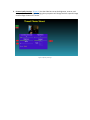
3. Camera Quality Settings. (Figure 3) Use the slider bars to set the brightness, contrast, and
zoom properties of the image. Changing these properties will change both the captured image
and the image shown on the screen.
Figure 3 Quality Settings