1
7.4 Removing and Mounting the Terminal Card
7.4
Removing and Mounting the Terminal Card
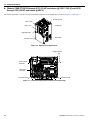
The terminal card can be removed and mounted without disconnecting the control wiring.
Note: Always confirm that input power is removed and the Charge LED is not lit before removing or mounting the terminal
card.
◆ Removing the Terminal Card
1.
2.
3.
4.
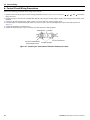
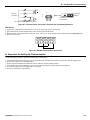
Remove the terminal cover on the iQpump drive.
Remove the digital operator and front cover on the iQpump drive.
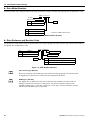
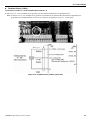
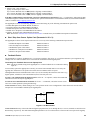
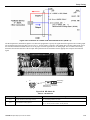
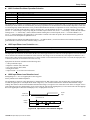
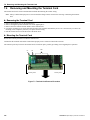
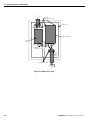
Remove the wires connected to FE and NC on the terminal card.
Loosen the mounting screws on the left and right sides of the terminal card until they are free. It is not necessary to remove the
mounting screws completely since they are captive and self-rising.
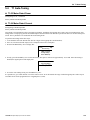
5. Pull the terminal card out in the direction of the block arrow.
◆ Mounting the Terminal Card
Reverse the removal procedure to mount the terminal card.
Confirm that the terminal card and the Control PCB properly meet at connector CN8 before insertion.
The connector pins may be bent if the terminal card is forced into place, possibly preventing correct iQpump drive operation.
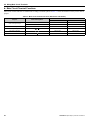
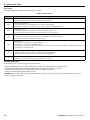
Figure 7.4
FE
NC
Mounting Screw
CN8
Mounting Screw
Figure 7.3 Terminal Card Removal Procedure
164
YASKAWA TM.iQp.06 iQpump Controller User Manual