1
QoRTs Package User Manual
53
Alternatively, the merger can be performed for a single sample directly, via the command:
java -jar /path/to/jarfile/QoRTs.jar mergeCounts
./SAMP1_RG1/,./SAMP1_RG2/,./SAMP1_RG3/
./merged/SAMP1/
The list of QC data directories must be separated by commas and contain no whitespace.
More information and a full accounting of all parameters and options can be found in the online
documentation7 , or by using the commands:
java -jar /path/to/jarfile/QoRTs.jar mergeAllCounts--man
and
java -jar /path/to/jarfile/QoRTs.jar mergeCounts --man
9.3
Generating genome browser tracks
In addition to the standard QC plots, which examine the data as a whole, it is sometimes desirable to be
able to query and examine coverage information at specific genetic loci. In particular, when identifying
candidate genes via genome-wide analyses, it is often vital to examine the locus for artifacts before
carrying out costly and time-consuming validation experiments.
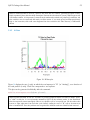
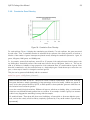
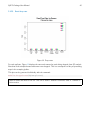
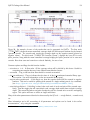
Figure 36 is just one example of the tracks that can be produced with QoRTs. A full description of how
this particular splice junction track can be generated can be found in the example dataset walkthrough,
which is linked to on the QoRTs github site.
9.3.1
Generating wiggle tracks
QoRTs includes a utility to generate ”.wig”, or ”wiggle plot” files. These wiggle plot files include counts
for the mean coverage for each equal-sized window across the whole genome. These files are designed
to be used with the UCSC browser or similar interfaces, and allow easy and intuitive visualization of
your data.
java -jar /path/to/jarfile/QoRTs.jar bamToWiggle
infile.bam
trackName
chromLengthFile
outfilePrefix
The chromLengthFile is a simple tab-delimited text file that includes each chromosome in the first
column and the chromosome’s length (in base-pairs) in the second column. If the wiggle file is intended
for use with a standard genome on the UCSC genome browser, then the UCSC utility fetchChromSizes
should be used to generate this file. (see http://genome.ucsc.edu/goldenPath/help/bigWig.
html for more information on fetchChromSizes, as well as information on how to compress your wig
files into smaller and more efficient bigWig files). It also takes
7
Found here: http://hartleys.github.io/QoRTs/jarHtml/index.html