1
FALCOM ECOS SDK USER GUIDE
2
VERSION 1.01
Installing the SDK
To install the eCos SDK insert the CD into the CD drive and follow step-bystep instructions below:
1. Make sure that you have removed any previous installation of eCos
and Java Runtime Enviroment that are already installed. Then run the
installation program of software distributions.
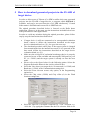
2. Run \win32\ecos_sdk_setup.exe by double click on its icon (eClips
IDE, GNU toolchain, eCos repository, Documentation, Demos etc. are
also included in this file and will be saved under the intallation
directory). On the next appeared window click the Next button.
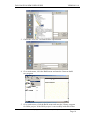
3. Select the destination directory by clicking the Browse button where
the eCos SDK should be installed.
4. Select listed components, which you need.
This confidential document is the property of FALCOM GmbH and may not be copied or circulated without permission.
Page 6