1
Installing or replacing headphone batteries
The wireless headphones use (2) AAA batteries (not included), which are located
in one of the earphone housings.
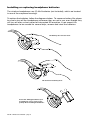
To replace the batteries, follow the diagrams below. To conserve battery life, please
be sure to turn off the headphones whenever they are not in use, even though they
will turn off after a short period of interrupted IR reception. If you expect the
headphones to be unused for several days, remove and store the batteries.
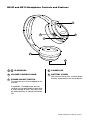
Lift battery door release latch.
Lift and remove battery door.
Insert two AAA type batteries (not
included). Be sure to note proper
polarity when installing the batteries.
HS-IR • HP10 User’s Manual - page 6