1
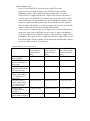
of the base set. - Plug one end of flat cord to line jack of the phone and the other end to the wall jack - Open the battery compartment cover, install 4pcs AA batteries or - Connect the 9V adapter to the DC jack of the unit Note: 1. Adapter and batteries are not included for the unit 2. When inserting or replacing batteries, pick up the handset first, then replace the batteries, otherwise, all settings and memory will be lost. HANGING THE PHONE ON THE WALL Drill two holes vertically one above the other, 83mm apart, and leave the screws protruding from the wall by 5mm. 1. Press and lift out the handset holder. Rotate 180o and snap it into place so it will hold the handset in place when the phone is mounted on the wall. 2. Insert the mounting bracket‟s two tabs into the matching slots opposite the keyhole slot on the underside phone‟s base. Then press down and slide the bracket upward until the tab snap into place. 3. Plug one end of the telephone line cord into the TEL LINE jack at the back of the base. 4. Plug the cord‟s other end into the wall plate jack, then align the base‟s keyhole slots with the screws and slide the phone downward to secure it. DESCRIPTION OF DISPLAY A. 3 line LCD displaying, upper line displays the basic information, middle line displays the number of in-coming call and bottom line displays the name of caller “NEW” appears when there are new incoming calls “CALL #” means the total amount of incoming calls “REPEAT” means the repeat of the incoming call “VOICE” means voice reporting indicator “SOS” means emergency calls indicator “XX:XX AM/PM XX/XX” means Hour:Minute Morning/Afternoon Month/Date respectively B. If the time and date of incoming call is different from the Telephone Company, the telephone will adjust the time and date automatically according to Telecom Provider when receiving calls. C. If there is no operation or no incoming calls more than 20 seconds, LCD only displays time and date, total amount of received calls and amount of new incoming calls D. This telephone can store up to 60 incoming calls. If there is a new call after the 60th call, the oldest one will be erased automatically and the new call will be stored.