1
FLYING
Up
rd
wa
For
Rotate Right
ht
Rig
Rotate Left
t
Lef
Down
rd
wa
ck
Ba
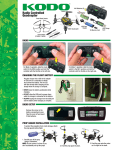
FLYING BASICS
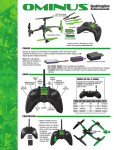
1. Take off by “slowly” advancing the left
stick until the quad takes off.
Up
Forward
2. Control altitude using the left stick.
Rotate Left
Rotate Right
Down
3. Use the right stick to move left, right,
forward, or backward.
4. Use the left stick (left/right) rotate or
spin left or right.
Right
Left
Backward
5. Always use small movements until you
learn how the model behaves.
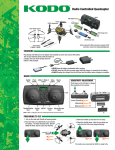
DUAL RATES
The low rate sensitivity will always be 25% less than the high rate.
The overall controls can be adjusted by
Control sensitivity can be changed by pushing down on the right stick on
the controller. The controller will make a short, low-pitched beep.
This mode should be used when flying indoors or when learning
how to fly. The controller will make a short, high-pitched beep
when changing to high rates. This mode should be used when
flying outdoors or when more agility is desired.
1. Holding down the right stick until the controller starts beeping.
2. Continue holding down the right stick and advance the throttle
to the desired setting.
3. Release the right stick and return the throttle to 0%.
The default setting is when the throttle stick is at 50% (midstick).
FLIGHT MODE
Flight Mode Flight Mode Button Dual Rate
To toggle between the normal and expert flight
(accelerometers off) modes, press the Flight Mode Button.
When the accelerometers are off, the flight controller will
make the Ominus more agile, but also it is easier to crash.
Easy
Normal
Advanced
Expert
OFF
OFF
ON
ON
Low
High
Low
High
FLIGHT MODES (FLIGHTMODE)
Push down on right top button and
release. Audible low and high tone.
Flight Mode LEDs steady on: Easy and normal flight (accelerometers on)
Flight Mode LEDs flashing: Advanced and expert flight (accelerometers off)
LOW BATTERY INDICATOR
The LEDs on the Ominus will flash slowly when the battery voltage is low. The Ominus FPV should be landed as soon as possible to avoid damaging the battery.
Always unplug the battery after flight. The battery needs to be charged before the quadcopter is stored.