1
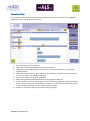
Consultant View
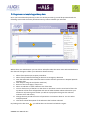
The consultant view will automatically populate with the data for the consultant who is logged in
providing access to personalised information.
2
1
1
3
4
8
5
7
8
6
1. Shows the name of the consultant
2. Shows the corresponding GMC number for the consultant
3. Change the time period the counts of operations or outcomes relate to. You can select
multiple periods
4. Shows the pathways there is data relating to the consultant. It defaults to show all activity
but you can select to an individual pathway
5. Select from Laproscopic or Open procedures
6. Select from procedures following an elective or emergency admission
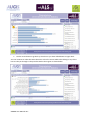
7. If the consultant has performed surgery in more than one provider there will be two charts
shown. A total activity and a breakdown by provider. If a consultant has performed surgery
in one provider one larger chart will appear for that provider
8. Allows you to quickly view groups of other indicators groups.
SWORD User Manual v0.1