1
Final Cut Pro 3
Tutorials
K Apple Computer, Inc.
© 2001 Apple Computer, Inc. All rights reserved.
Under the copyright laws, this manual may not be copied, in whole or in part, without the written consent of Apple.
Your rights to the software are governed by the accompanying software license agreement.
The Apple logo is a trademark of Apple Computer, Inc., registered in the U.S. and other countries. Use of the
“keyboard” Apple logo (Option-Shift-K) for commercial purposes without the prior written consent of Apple may
constitute trademark infringement and unfair competition in violation of federal and state laws.
Every effort has been made to ensure that the information in this manual is accurate. Apple is not responsible for
printing or clerical errors.
Apple Computer, Inc.
1 Infinite Loop
Cupertino, CA 95014-2084
408-996-1010
www.apple.com
Apple, the Apple logo, Final Cut Pro, FireWire, Mac, Macintosh, PowerBook, and QuickTime are trademarks of
Apple Computer, Inc., registered in the U.S. and other countries. Power Mac is a trademark of Apple Computer, Inc.
Adobe is a trademark of Adobe Systems Incorporated or its subsidiaries and may be registered in certain
jurisdictions.
Other company and product names mentioned herein are trademarks of their respective companies. Mention of
third-party products is for informational purposes only and constitutes neither an endorsement nor a
recommendation. Apple assumes no responsibility with regard to the performance or use of these products.
Simultaneously published in the United States and Canada.
Contents
Preface
About the Tutorials
5
Getting Started 5
Using the Tutorials 5
Installing the Tutorials 6
Working in Real Time 6
1
Acquiring Media
9
Beginning the “Acquiring Media” Tutorial 9
Device Control and Capturing Media 9
Setting Up for Capture 10
Changing Settings Using Easy Setup 12
Setting Scratch Disk Preferences 13
Creating a New Project 15
Capturing Clips Now 16
What’s Next? 20
Logging Clips 20
Doing a Batch Capture 28
2
Basic Editing
33
Beginning the “Basic Editing” Tutorial 33
Organizing Your Media in the Browser 35
Doing Basic Overwrite Editing 42
Doing a Three-Point Edit 44
Adding Multiple Clips at One Time 51
Adding a Clip at a Specific Timecode 53
3
Doing a Slip Edit 54
Doing a Roll Edit 59
Doing a Match Frame Edit 62
Locating a Clip Using the Find Command
Applying and Editing a Transition 66
3
Compositing and Effects
65
73
About the “Compositing and Effects” Tutorial 73
Beginning the “Compositing and Effects” Tutorial 73
Doing a Superimpose Edit 74
Adding a Drop Shadow 76
Adding the Dancers 79
Adding a Blue Screen Filter 80
Cropping and Resizing the Dancers 83
Resizing a Clip and Adding a Cross Dissolve 88
Working With Graphic Layers 89
Applying a Motion Path 92
Changing Opacity Over Time 98
Copying a Motion Path to Another Clip 100
Editing One Sequence Into Another Sequence 103
Editing an Animated Video Clip 103
Doing an Insert Edit 105
Adding Text to a Clip 105
4
Audio Editing
113
About the “Audio Editing” Tutorial
Adjusting Audio Over Time 116
Adding a Final Touch 119
5
Distributing Media
113
123
About the “Distributing Media” Tutorial 123
Exporting a Sequence for Multimedia or the Web
Printing to Videotape 127
Moving Forward in Final Cut Pro 130
4
Contents
123
P R E F A C E
About the Tutorials
This set of tutorials is designed to give you a hands-on introduction to acquiring, creating,
and distributing media.
In “Acquiring Media,” you’ll learn how to bring your own media into Final Cut Pro. In “Basic
Editing,” you’ll use a variety of editing techniques to create a short video, “Swing Dance
Today,” using media provided on the tutorial CD. Then, in “Compositing and Effects,” you’ll
create an animated graphic introduction. In “Audio Editing,” you’ll lay in a music track and
adjust audio levels over time.
When you’re done, in “Distributing Media,” you’ll output your movie to videotape or save it
as a QuickTime file for use on the World Wide Web.
Final Cut Pro is designed to support a variety of working styles. We’ll be showing you one way
to utilize its tools and features; you’ll also find other methods, shortcuts, and keyboard
commands in the Final Cut Pro manual and in the onscreen help.
Getting Started
Before you begin, it is helpful to become familiar with the Final Cut Pro interface. To do
this, you can check the onscreen help or see the Final Cut Pro user’s manual, Volume 1,
Chapter 4, “Learning About the Interface.”
Using the Tutorials
The three editing tutorials are meant to be done in order. (“Basic Editing” takes approximately
one hour to complete; “Compositing and Effects” takes two hours; and “Audio Editing” about a
half-hour.) However, you can stop and save your work at any point and continue later.
5
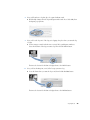
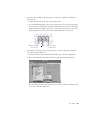
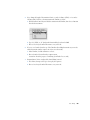
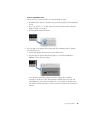
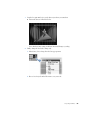
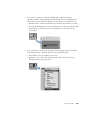
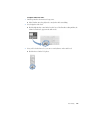
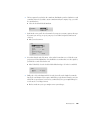
Many of the illustrations, like the example below, have a thumbnail picture to help you locate
the featured item on the screen.
Installing the Tutorials
Before you can use the tutorials, you need to install them (if you haven’t already done so).
The tutorial files require about 310 megabytes (MB) of free space on your hard disk.
To install the tutorials:
1
Copy the Tutorial folder from the Final Cut Pro Tutorial CD to your hard disk.
2
After you’ve installed the files, open the Final Cut Pro program.
Working in Real Time
Qualified Power Mac and PowerBook G4 computers are capable of real-time effects,
including some transitions, motion effects, and filters. If your computer is capable of
G4 real-time effects playback, you will be able to skip certain steps in this tutorial in which
rendering is required.
For more information about real-time effects playback, see Chapter 1 in the Final Cut Pro
addendum—What’s New in Final Cut Pro.
6
Preface
Acquiring Media
1
Beginning the “Acquiring Media” Tutorial
Device Control and Capturing Media
Setting Up for Capture
Setting Scratch Disk Preferences
Capturing Clips Now
What’s Next?
20
Logging Clips
20
Doing a Batch Capture
9
10
Changing Settings Using Easy Setup
Creating a New Project
9
15
16
28
12
13
C H A P T E R
1
1
Acquiring Media
Beginning the “Acquiring Media” Tutorial
Before you can start a movie project in Final Cut Pro, the first thing you need is some
footage. Next, you need to get your source footage from your camcorder or deck onto your
computer. This is called capturing, and you’ll learn how to do it in this part of the tutorial.
To do the tutorial, you need a DV-format camcorder or deck with a FireWire port. (If you’re
using a non-DV system, you can learn how to capture video by using the onscreen help or
looking in the Final Cut Pro user’s manual, Volume 1, Chapter 8, “Logging and Capturing
Media.”)
Device Control and Capturing Media
There are two ways to capture media in Final Cut Pro:
m When you use the Capture Now feature, you bring in clips one at a time as they play on
your video equipment.
m When you do a batch capture, you bring in a group of clips all at once.
The way you can capture media depends on whether your video equipment has a feature
called device control. If you have device control, you can control your video equipment right
from Final Cut Pro, using keyboard commands or the buttons in the interface. This means
you can easily start and stop playback and capture clips as you go without having to press the
buttons on your camcorder.
As you view the tape, you can enter detailed information about each clip using Final Cut Pro’s
logging feature. When you log your clips, they’ll appear in the Browser as “offline” clips,
which means the actual media hasn’t yet been captured onto your hard disk. Logging might
seem time-consuming, but it can save you a lot of editing time and hard disk space. Once
you’ve logged your clips, you can sit back while Final Cut Pro automatically captures the clips
all at once as a batch capture.
9
If you don’t have device control, you’ll still enter information about your clips, but you’ll then
capture them one at a time while the tape is playing using Capture Now. You won’t be able to
use the logging feature or do a batch capture.
Even if you have device control, don’t skip the “Capturing Clips Now” section of the tutorial.
When you need to capture a clip quickly, the Capture Now feature is an easy way to do it.
How do you find out if you have device control? Before you begin, go to the Final Cut Pro
Web site at www.apple.com/finalcutpro and check whether Final Cut Pro supports device
control for your DV-format camcorder or deck, and if you need any extra items (such as
cables or software) to use your video equipment.
Setting Up for Capture
If you’ve already shot some footage with your DV-format camcorder, you’re all set. Otherwise
you’ll need to record some video. But remember, you’re not shooting your first feature. You
only need a few minutes of footage for the tutorial.
Once you’ve finished shooting your video, you’re ready to connect your DV camcorder or
deck to your computer. To make sure you’re working with the correct settings for your
camcorder or deck, your equipment needs to be connected to your computer and turned on
before you open Final Cut Pro.
To connect your DV camcorder or deck to your computer:
1
First, make sure you’ve got the right cable. To connect DV devices to your computer, you
need a 4-to-6-pin FireWire cable. You can get one at an electronics store or an Appleauthorized retailer.
m Connect the 6-pin connector on the FireWire cable to the FireWire port on your computer
and the 4-pin connector on the cable to the FireWire port on the camcorder or deck.
On some devices, this port may be labeled “IEEE 1394,” “i.LINK,” or “DV IN/OUT.”
Make sure you align the connector and port properly by matching the indent on the
connector to the indent in the port. Don’t force the two together.
Note: Some PAL cameras can’t use DV input. If your PAL camera doesn’t support DV input,
then you won’t be able to output your finished cut to videotape using the Print to Video
command.
10
Chapter 1
2
You can also connect an NTSC or PAL monitor to your camcorder or deck, so you can
preview your video full-screen as you work.
a Position the NTSC or PAL monitor so you can comfortably view it while using your
computer and display.
b Connect the video output port on the camcorder or deck to the video input port on the
monitor using the appropriate cable.
For more information about connecting your equipment, see the documentation that came
with your camcorder or deck.
3
Depending on whether your monitor has speakers, do one of the following to enable audio:
m If the NTSC or PAL monitor doesn’t have speakers and you want to use external speakers,
connect the external speakers to the audio output port on your camcorder or deck using
the appropriate cable.
m If the NTSC or PAL monitor has speakers, connect the audio output port of your
camcorder or deck to the audio input port on your NTSC or PAL monitor using the
appropriate cable.
For more information about connecting your equipment, see the documentation that came
with your camcorder or deck.
4
Now you need to turn on the camcorder or deck and set it to VCR mode. When the
camcorder is in VCR mode, it works like a playback/recording deck and uses FireWire for
input and output, so it can “talk” to Final Cut Pro and transfer video data back and forth.
If the camcorder is in Camera mode, it works like a camera, getting video and audio through
its image sensor and built-in microphone, not through FireWire.
a Turn your camcorder or deck on.
b If you are using a camcorder, switch it to VCR mode (sometimes labeled VTR).
Acquiring Media
11
Changing Settings Using Easy Setup
Now you need to make sure your capture settings are correct. The first time you opened
Final Cut Pro, you entered the preferences and settings you wanted to use with your system.
Final Cut Pro will use these settings automatically.
If you don’t have your camcorder or deck connected and turned on before you open
Final Cut Pro, or if you changed your system configuration, you’ll have to select the settings
you want to use again. But don’t worry: you can do this quickly using the Easy Setup window.
Besides picking the right settings for your camcorder or deck, it’s also important to select the
correct video format. NTSC and PAL are two widely used formats. NTSC (National Television
Standards Committee), which has a frame rate of 29.97 frames per second, is used in the
United States and Japan. Most of Western Europe, the United Kingdom, Australia, and South
Africa use PAL (Phase Alternating Line), which has a frame rate of 25 frames per second.
Because the frame rates of the two standards differ, media recorded in one format cannot be
played back in the other. So be sure to select the right format for your source media.
To select capture settings for your camcorder:
1
First, select the proper capture settings for your camcorder or deck.
a Make sure your equipment is connected to your computer and turned on and that
Final Cut Pro is open.
b Choose Easy Setup from the Edit menu.
c Choose the format of your DV camcorder or deck (DV-NTSC or DV-PAL) from the pop-up
menu, then click Setup.
The new Easy Setup you select is now your configuration, and all new projects and
sequences will use those settings until you change them again.
12
Chapter 1
2
Now, do the following to make sure your camcorder or deck is communicating properly:
m Choose Log and Capture from the File menu.
m If you have device control and your camcorder or deck is connected properly, you’ll
see “VTR OK” in the Preview section of the Log and Capture window.
m If you don’t have a videotape in your camcorder or deck, you’ll see black in the
device status area and the words “Not Threaded.”
m If Final Cut Pro can’t establish device control, then you’ll see the words “No
Communication.”
For more information about device status messages, see the Final Cut Pro manual or use the
onscreen help.
Setting Scratch Disk Preferences
You’re almost ready to start capturing. But first you need to set a scratch disk, which is
the hard disk and folder where you want your captured media and render files stored.
Final Cut Pro uses the disk it’s installed on as the default scratch disk, unless you select
another disk.
When you’re selecting a scratch disk, keep two key things in mind: speed and disk space.
Digital video and audio demand high data transfer rates, so you should select your fastest
hard disk as the scratch disk. (For DV, it’s best if your disk has a sustained transfer rate of at
least 7-8 MB/second.)
How much disk space do you need? It depends on the length of your finished projects. For DV
video, one minute requires 216 megabytes (MB) of storage space. This means a five-minute
video would require 1080 MB, which is approximately one gigabyte (GB) of storage space.
In addition to the space needed for captured files and project files, you need space for
render files, extra copies, and test files that you may use while working. So, if you’re going to
cut a feature film, you’re going to need a heck of a lot of space.
For best performance, you should also avoid setting your startup disk (where the System
Folder is located) as the scratch disk. A storage disk set aside just for your media provides
plenty of space and doesn’t contain any system software or other applications and files that
could interfere with the continuous flow of video and audio to and from the hard disk.
Acquiring Media
13
To set scratch disk preferences:
14
Chapter 1
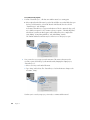
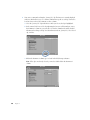
1
When you first opened Final Cut Pro, you used the Choose Setup window to select a scratch
disk. So let’s open the Log and Capture window and take a look at your current scratch disk
settings.
m If the Log and Capture window isn’t already open, choose Log and Capture from the File
menu, then click the Capture Settings tab.
2
Look at the Device Control and Capture/Input pop-up menus; the choices there reflect your
current Easy Setup.
3
Now look at the area next to the Scratch Disks button. The Free Space shows the amount of
available storage space you have. The amount of capture time available depends partly on the
capture setting selected in the Capture/Input menu.
4
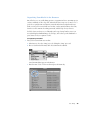
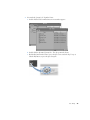
Now you’ll check the location, preferences, and available storage space for each individual
scratch disk.
a Click the Scratch Disks button.
Make sure there’s enough space for your media on the specified scratch disk or disks. If
there isn’t, you need to select a different scratch disk.
b To change a scratch disk, click the Set button and select a new disk or folder.
If you’re using more than one scratch disk, you can specify what kind of files go on each
disk by clicking the Audio, Video, or Render checkbox next to the scratch disk name.
(Capturing audio and video on separate disks isn’t recommended for DV, but it may
improve performance for high data rate configurations.)
c When you’re done, click OK.
Creating a New Project
To log and capture video, you need to have a project open. So in this step, you’ll create a new
project to use for this tutorial.
The Browser is the central storage area for all the media in your project. It lets you organize
your media just the way you want and get quick access to your files.
A project, which is represented by a tab in the Browser, stores references to all of the media
files used in making a project, your sequence (or “edited cut”), and the settings for any
effects you apply to clips in the project. You can have multiple projects open in Final Cut Pro,
each with its own tab.
To create a new project:
1
Open a new project in Final Cut Pro.
m Choose New Project from the File menu.
A new project tab named “Untitled Project” appears in the Browser. The project contains
an empty sequence.
2
Now, save your project with a new name.
m Choose Save Project As from the File menu. Enter “Acquisition Project” as the new project
name and select the location where you want to store your project, then click Save.
The “Untitled Project” tab in the Browser changes to the new name, “Acquisition Project.”
Whenever you save a project, Final Cut Pro saves the arrangement of project items in the
Browser window, the sequences within the project, and any settings that have been applied
to clips.
Acquiring Media
15
Capturing Clips Now
Capturing each clip before reviewing it or logging it is known as “capturing now.” If your DV
equipment doesn’t have device control, you can still capture video in Final Cut Pro by using
the controls on your DV camcorder or deck to play through your videotape and find the
footage you want to capture.
In this section, you’ll learn how to capture a clip using Capture Now, add the captured clip to
your current project, and save the clip.
To capture a clip using Capture Now:
1
Do the following steps:
a First, make sure your video equipment is properly connected and turned on and that
Final Cut Pro is open.
b Next, insert the videotape that includes the clips you want to capture.
c If the Log and Capture window isn’t already open, choose Log and Capture from the
File menu.
2
Before capturing your clip, you need to enter information that identifies the source videotape.
m Click the Logging tab and enter the name of the current source tape in the Reel field.
Every clip that is logged or captured must have a reel name. If there is no reel name,
you’ll be prompted to enter one.
3
16
Chapter 1
Next, decide which clip you want to capture.
m Locate the footage you want to capture by using the camcorder or deck’s controls. (If
your camcorder or deck has device control, use the transport controls in the Preview
section of the Log and Capture window.)
4
Now, you’ll enter information about your clip and specify whether you want this information
to be included in the clip’s name. The resulting name (which appears in the Log and Capture
window, in the Name column of the Browser, and as the filename) will include each of the
fields you select with underscores between them.
Note: Clip names can be a maximum of 25 characters long.
m Enter information about the clip in the Description, Scene, and Shot/Take fields, then
check the box to the right of each field to include that information in the Name field.
5
Next, you’ll specify the type of media and the audio channels you want to capture.
a Click the Clip Settings tab in the Log and Capture window. The image quality controls you
see at the top of the tab are inactive and will have no effect on DV capture (even though
you can still move them). You’d use these controls to adjust the incoming video signal if
you were using an analog capture card.
b The only settings in the Clip Settings tab that affect DV capture are Capture and Audio
Format. First, choose the type of media you want to capture—audio only, video only, or
both—from the Capture pop-up menu.
Acquiring Media
17
6
Next, you’ll choose the channels of audio you want to capture. (If you’re capturing video
only, you can skip this step. The audio options will still be available, but if you’re capturing
video only, any choices you make here will be ignored.)
m Choose the channels of audio you want to capture from the Audio Format pop-up menu.
See below for a description of the options in this menu.
m Ch 1 + Ch 2: Captures the two audio channels as separate, linked channels that can
be adjusted independently of one another. Pan is centered for both channels. (Pan is
the distribution of sound between left and right channels.)
m Ch 1 (L): Captures only Channel 1 of the source media. Pan is centered.
m Ch 2 (R): Captures only Channel 2 of the source media. Pan is centered.
m Stereo: Captures both channels as a stereo pair. Stereo pairs are always linked and
must be the same length. Any levels or effects applied to one channel are also applied
to the other channel.
m Mono Mix: Captures both channels of audio and mixes them in a single track.
7
You’re ready to cue up the tape and capture your clip.
a Using the camcorder or deck’s controls, rewind the tape to a point that’s seven to ten
seconds before the place where you want the capture to begin. (If your camcorder or
deck has device control, use the transport controls in the Preview section of the Log and
Capture window.) Then press the Play button on the equipment.
b Three to five seconds before the first frame of the clip is shown, click the Capture Now
button in the Log and Capture window.
c To stop recording, press the Esc key on your keyboard, then press the Stop button on
your video equipment. (If you have device control, only press the Esc key.)
18
Chapter 1
8
Review the footage you just captured to make sure you got what you wanted.
m Click the Play button in the Viewer or press the Space bar to play the captured clip. To
stop it, click the Play button, or press the Space bar again.
9
Once you’re sure you’ve captured the footage you want, you can add the captured clip to
your current project and save the clip.
a To add the captured clip to your current project, press and hold the mouse button in the
Viewer, then drag the small translucent image of the clip from the Viewer to the Browser.
b In the Save dialog box, verify the clip name and select the location where you want to
store the clip, then click Save.
Acquiring Media
19
What’s Next?
If your camcorder or deck doesn’t have device control, you’re finished with the “Acquiring
Media” tutorial. You can go on to the next tutorial, “Basic Editing,” on page 29.
If your equipment does have device control, continue with the rest of this tutorial, where
you’ll learn how to log detailed information about clips as you view a tape, then capture the
logged clips all at once as a batch capture.
Logging Clips
Logging is the process of reviewing all of the media for a project and then entering detailed
information about it before you capture it from videotape. Logging information includes
things such as the reel name, shot and take number, and log notes.
When you log a clip, Final Cut Pro creates an “offline” clip, or placeholder, and stores it in the
designated logging bin (which is like a folder) in the Browser. The offline clip is merely a
reference to a media file that you haven’t yet captured, so it doesn’t take up any space on
your hard disk. When you capture a clip, the clip is stored on your scratch disk and is
considered ”online” because it is now linked to captured media on your hard disk.
When you capture video, the timecode and video signals are sent separately from the video
deck to the computer. Because the signals are separate, they can arrive at different times,
which causes incorrect timecode values to be recorded. For information on how to correct
this, use the onscreen help to learn how to calibrate the timecode signal or see the
Final Cut Pro user’s manual, Volume 1, Chapter 8, “Logging and Capturing Media.”
20
Chapter 1
To log clips:
1
Do the following steps:
a First, make sure your video equipment is properly connected and turned on and that
Final Cut Pro is open.
b Next, insert the videotape that includes the clips you want to log and capture.
c If the Log and Capture window isn’t already open, choose Log and Capture from the
File menu.
2
Now, you need to create a new logging bin in the Browser for your project. The logging bin is
the location where all logged clips are saved. By default, the logging bin is set to the top level
of the last opened or created project.
a Select your project’s tab (“Acquisition Project”) in the Browser.
b Choose New from the File menu, then choose Bin from the submenu. A new folder
named “Bin 1” appears.
c With “Bin 1” still highlighted, choose Set Logging Bin from the File menu. A slate icon
appears next to the bin, indicating that it is the current logging bin.
(Later, when you edit your own projects, you can rename the logging bin by selecting the
name and typing a new one. For now, leave it as Bin 1.) There can be only one logging bin
at a time, no matter how many projects are open.
Acquiring Media
21
3
You can also use the New Bin button to create a new logging bin. Let’s give it a try.
a Select your project’s tab in the Browser.
b Click the Up button in the Log and Capture window until you reach the top level of the
project. At this point, the Up button dims, and the slate icon appears at the top level of
your project.
This makes your project your current logging bin; clips logged into any bin or folder in
the project will be captured when you do a batch capture.
22
Chapter 1
4
Now you’ll create another new bin within the project and make it the logging bin.
m Click the New Bin button.
A new bin, “Bin 2,” is created and selected as the current logging bin (as indicated by the
slate icon).
5
Next, you’ll enter information that uniquely identifies the source videotape.
m Click the Logging tab and enter the name of the current source tape in the Reel field.
Every clip that is logged or captured must have a reel name. If there is no reel name,
you’ll be prompted to enter one.
6
Now, decide which clip you want to capture. You can look through your footage in three
different ways:
m Use the transport controls in the Preview section of the Log and Capture window to
locate the clip you want to log.
m Use the shuttle control, located to the left of the transport controls, to move backward
(rewind) or forward (fast-forward) through the tape at different speeds. The jog control,
located to the right of the transport controls, lets you move forward or backward a few
frames at a time.
Acquiring Media
23
m Use the J, K, and L keys on your keyboard to fast-forward and rewind your tape as you
look for appropriate In and Out points to mark. To go forward playing the tape at 1x
speed, press the L key once. Pressing the L key repeatedly increases the speed at which
the tape plays back from 1x to 2x to 4x to 8x. Press K to pause playback at any time. To
play the tape in reverse at 1x speed, press the J key once. Pressing the J key repeatedly
increases the speed of reverse playback from 1x to 2x to 4x to 8x.
> Moves through
reverse speeds
7
24
Chapter 1
Pause
. Moves through
forward speeds
Now, you’ll enter information describing the clip and then specify how you want this
information to be combined into the clip name.
m Enter information about the clip in the Description, Scene, and Shot/Take fields, then
check the box to the right of each field to include that information in the Name field.
8
Next, you’ll learn how to log this clip to be captured without sound.
m Click the Clip Settings tab in the Log and Capture window and choose Video Only from
the Capture pop-up menu.
9
Next, you’ll set the “In point” of the clip you’re logging—the place where you want the clip
to begin.
m Use the transport controls in the Preview section of the Log and Capture window to
locate the first frame of the clip you want to log. Then click the Mark In button.
The timecode location for the frame is displayed next to the Mark In button.
10
Now, you’ll set the Out point, or end, of the footage you want to log.
m Locate the frame where you want the clip to end, then click the Mark Out button.
The timecode location for the frame is displayed next to the Mark Out button.
Acquiring Media
25
11
Now, you’ll set Final Cut Pro to let you verify or rename your clip before it’s captured.
m Click the Logging tab in the Log and Capture window.
The Prompt box should be selected by default. If it isn’t, click to select it. This way, before
your clip is captured, an alert message will appear prompting you to verify the clip name
or give it a new name.
12
You’re ready for Final Cut Pro to log your clip.
a Click the Log Clip button.
b When prompted, verify or change the clip’s name.
Your logged clip now appears in the Browser in the selected logging bin. The clip icon has
a red slash across it, indicating that the clip is offline and hasn’t been captured.
Note: If you expand the Browser by dragging the bottom-right corner of the window to the
right, you’ll see the timecode for the first frame of the clip in the Media Start column of the
Browser. The timecode for the last frame is displayed in the Media End column. You can
return the Browser to its original size by dragging the bottom-right corner to the left.
26
Chapter 1
13
Now let’s select a different logging bin.
m Select “Bin 1” in the Browser and choose Set Logging Bin from the File menu.
A slate icon appears next to Bin 1 in the Browser to indicate that it is the current
logging bin.
14
This time, let’s log a clip that has both audio and video. Because the last clip you logged had
the capture settings set to video only, you need to adjust the capture settings to include both
audio and video. Otherwise, Final Cut Pro will use the settings you used for the last clip.
a Click the Clip Settings tab and choose Audio+Video from the Capture pop-up menu.
b Choose Ch 1 + Ch 2 from the Audio Format pop-up menu.
This captures the two audio channels as separate, linked channels that can be adjusted
independently of each other. Pan is centered for both channels. (Pan is the distribution of
sound between right and left channels.)
15
Now you need to locate the footage you want to log.
a Use the transport controls in the Preview section of the Log and Capture window to
locate the first frame of the clip you want to log.
b When you have located the first frame, click the Mark In button to set the start frame.
c Then, use the transport controls to locate the last frame of the clip you want to log.
d When you have located the last frame, click the Mark Out button.
16
Next, enter information about the clip and name it.
m Click the Logging tab and enter information about the clip in the Description, Scene, and
Shot/Take fields. Then check the box to the right of each field to include that information
in the Name field.
If you changed your source tape, be sure to enter a new reel name.
Acquiring Media
27
17
Now, you’re ready for Final Cut Pro to log the clip.
m Click the Log Clip button. When prompted, verify or enter a new name for the clip.
Your logged clip now appears in Bin 1 in the Browser.
Doing a Batch Capture
After you review and log all the media on an entire source tape, or reel, you can capture all
the clips you want from that tape in one batch operation. A batch capture is great because it’s
automated; you can go get some coffee while Final Cut Pro does all the work. However, you
can only do an automated batch capture if your video equipment supports device control.
Since batch capture is an automated process, make sure your capture and scratch disk
preferences are correct before starting.
To do a batch capture:
1
28
Chapter 1
Do the following steps:
a First, make sure your video equipment is properly connected and turned on and that
Final Cut Pro is open.
b Next, insert the videotape that includes the clips you want to capture.
c If the Log and Capture window isn’t already open, choose Log and Capture from the
File menu.
2
Right now, you have offline clips in both bins, and you want all of them captured. If the slate
icon is next to either Bin 1 or Bin 2, only clips logged in that bin will be captured. So, you
need to set the logging bin at the top level of the project to capture clips in both Bin 1 and
Bin 2.
m In the Log and Capture window, click the Up button until it dims. A slate icon appears
next to the project name to indicate that the project is the current logging bin. Offline
clips in any bin in the project will now be captured.
3
Now you need to tell Final Cut Pro which clips to batch capture. You’ll want to capture all the
offline clips you just logged.
a Click the Batch Capture button in the Log and Capture window.
b In the Batch Capture dialog box, choose Offline Items in Logging Bin from the Capture
pop-up menu.
If all items in the logging bin are offline, then All Items in Logging Bin will be the only
choice in the Capture pop-up menu. (The items in the pop-up menu change to reflect the
capture choices available for the logging bin you’ve selected in the Browser.)
Acquiring Media
29
4
You also need to select options for the batch capture.
a To combine clips that overlap, check the Coalesce Overlapping Clips box. Overlapping
clips still appear as separate items in the Browser, but they all reference the same media
file on your hard disk, which saves disk space and cuts down on capture time.
b To capture clips using the settings you specified for individual clips in the Clip Settings
tab, check the Use Logged Clip Settings box.
c To capture additional frames, called “handles,” before and after the In and Out points of a
clip, check the Add Handles box. Then enter a length for the handles in the timecode
field.
5
Make sure your capture format is set correctly.
m Check the format in the Capture Preset pop-up menu and make sure it’s set to the format
of your DV camcorder or deck (DV-NTSC 48KHz Capture or DV-PAL 48KHz Capture).
6
Finally, you should make sure you have enough space on your scratch disk to store all the
clips you logged.
m At the very bottom of the Batch Capture window, compare the total disk space needed to
the total disk space available.
If you need more disk space, select a different scratch disk using the Clip Settings tab of
the Log and Capture window.
7
You’re ready to start your batch capture.
a Click OK.
b When the Insert Reel dialog box appears, make sure the selected reel is correct and click
Continue.
c To stop a batch capture, press the Esc key on your keyboard.
8
30
Chapter 1
Congratulations! You’ve just completed the “Acquiring Media” tutorial.
m Close the Log and Capture window by clicking the close box in the upper-left corner.
Basic Editing
2
Beginning the “Basic Editing” Tutorial
Doing Basic Overwrite Editing
Doing a Three-Point Edit
42
44
Adding Multiple Clips at One Time
Adding a Clip at a Specific Timecode
Doing a Slip Edit
54
Doing a Roll Edit
59
Doing a Match Frame Edit
33
51
53
62
Applying and Editing a Transition
66
C H A P T E R
2
2
Basic Editing
Beginning the “Basic Editing” Tutorial
To use this tutorial, you need to select a video format (NTSC or PAL) and create a new project.
Selecting a Video Format
NTSC and PAL are two widely used video standards, or formats. NTSC (National Television
Standards Committee), which has a frame rate of 29.97 frames per second, is used in the
United States and Japan. Most of Western Europe, the United Kingdom, Australia, and South
Africa use PAL (Phase Alternating Line), which has a frame rate of 25 frames per second.
Because the frame rates of the two standards differ, media recorded in one format cannot be
played back in the other. To play back NTSC video in PAL format, you have to convert the
material to PAL.
To use this tutorial, you must have selected either DV-NTSC or DV-PAL when you chose your
initial configuration. The format you choose for the tutorial should match whatever format
you selected. If you need to double-check or change your configuration, choose Easy Setup
from the Edit menu.
Creating a New Project
Next, you need to create your own project in the Browser.
The Browser is the central storage area for all the media in your project. It lets you organize
your media just the way you want and get quick access to your files.
A project, which is represented by a tab in the Browser, stores all of the reference to media
files used in making a project, your sequence (or “edited cut”), and the settings for any
effects applied to clips in the project.
33
To create a new project:
1
You’ll use “Tutorial Project 1,” a file that came with the tutorial, as a starting point.
m Choose Open from the File menu. Locate the Tutorial folder on your hard disk, then open
the Projects folder inside it. Select NTSC Tutorial or PAL Tutorial, then select the file
“Tutorial Project 1” and click Open.
A tab named “Tutorial Project 1” appears in the Browser. The tab contains the clips you’ll
use to build your sequence. It also contains a reference sequence, “The Lindy Hop Final,”
which shows you what your final sequence will look like when you’ve completed the
“Basic Editing,” “Compositing and Effects,” and “Audio Editing” tutorials.
The Timeline and Canvas windows may close if there are no other projects open.
2
Now, you need to save your project with a new name. This ensures that your work is
saved in a separate file and keeps you from inadvertently changing the original project,
“Tutorial Project 1.”
a Choose Save Project As from the File menu.
b Type “Swing” and click Save. The “Tutorial Project 1” tab in the Browser changes to the
new name, “Swing.”
Now that you’ve created your project, you’re ready to continue with the tutorial.
34
Chapter 2
Organizing Your Media in the Browser
One of the keys to a successful editing experience is organization. Even a one-minute project
can have a multitude of video clips, stills, and audio files that can get out of control, so it’s a
good idea to spend the time and organize your media in the Browser right from the start.
In this section you’ll create and name two new bins, sort the tutorial media into these bins,
learn how to add comments describing your media, and label clips for easy reference.
You’ll also learn several ways to scroll through your footage, change from list view to icon
view (which displays thumbnail images of your clips), and set these specific thumbnails or
poster frames for easy recognition of a shot.
To organize your media:
1
First, you’ll create and name two new bins.
a In the Browser, select the “Swing” project by clicking the “Swing” project tab.
b Choose New from the File menu, then choose Bin from the submenu.
A new bin named Bin 1 appears in the Browser.
c Enter the name “Video” for the new bin and press the Return key.
Basic Editing
35
d Create another bin the same way and name it “Audio.”
2
36
Chapter 2
Next, sort the clips into their appropriate bins. Audio clips are represented by a speaker icon
and video clips by a filmstrip icon.
a Select the audio file “Jumptown” and drag it into the Audio bin.
b Press and hold down the Command key while clicking all six video clips (do not include
“The Lindy Hop – Final” sequence), then drag them into the Video bin.
3
Now watch the “Jeremy Solo” clip in the Viewer.
a Double-click the Video bin in the Browser. A new window appears.
b Double-click the clip named “Jeremy Solo.” The clip opens in the Viewer.
c Click the Play button in the Viewer or press the Space bar to watch the clip. To stop it,
click the Play button, or press the Space bar again.
Basic Editing
37
4
Next, write a comment describing the “Jeremy Solo” clip. The Browser is currently displayed
in list view, which allows you to see columns of information specific to each clip. You need to
be in list view in order to add comments to these columns.
a Select the “Jeremy Solo” clip in the Browser. After you select it, the clip is highlighted.
b In the current Video bin, scroll to the right using the bottom scroll bar until you come to
the Comment 1 column. As you scroll, take a look at the column heads and the detailed
information describing each clip. Note that information about “Jeremy Solo,” the selected
clip, is in blue.
c Click in the Comment 1 column, type “red suit” in the field, then press Return.
Note: If the clip is not already selected, you need to double-click in the Comment 1
column.
38
Chapter 2
5
Now, watch the “Rob Dialog” clip and use the J, K, and L keys to shuttle back and forth at
various speeds.
a Double-click the “Rob Dialog” clip to open it in the Viewer.
b To go forward playing the tape at 1x speed, press the L key once. Press the L key repeatedly
to increase the speed at which the tape plays back from 1x to 2x to 4x to 8x. Press K to pause
playback at any time. To play the tape in reverse at 1x speed, press the J key once. Press the
J key repeatedly to increase the speed of reverse playback from 1x to 2x to 4x to 8x.
> Moves through
reverse speeds
6
Pause
. Moves through
forward speeds
Next, label the “Rob Dialog” clip as an interview shot so you can easily pick it out from the
rest of the shots in the Video bin.
a Hold down the Control key and click the “Rob Dialog” clip. A shortcut menu appears.
b Choose Label from the shortcut menu, then choose Interviews from the submenu.
The “Rob Dialog” clip icon is now lavender. If you scroll over to the Label column, you will
see the clip described as an Interview.
Basic Editing
39
7
Now organize your clips visually by setting the Browser to display your clips in icon view.
a Hold down the Control key and click anywhere in the Name column (or any place in the
Video bin other than an icon), then choose View as Large Icons from the shortcut menu.
b Scroll down in the window and you’ll see thumbnail images of all of your clips. The
“Rob Dialog” clip is still distinguished by a lavender label. The small speaker icon in the
lower-right corner indicates that audio is attached to this clip.
The thumbnail image that you see representing each clip is typically the start of the clip, and
is referred to as the poster frame. However, this frame may not help you distinguish the
content of the clip, particularly if a clip starts with a countdown, slate, or is black. In cases like
these, you can set a different image to appear as the poster frame.
40
Chapter 2
8
In this step, you’ll change the poster frame for the “Bloomies” clip.
a Scroll back up to the “Bloomies” clip.
b Place the pointer over the thumbnail for the “Bloomies” clip and press the Control and
Shift keys. The Scrub Video tool, which looks like a hand, becomes active.
c Drag to the right to scrub forward and to the left to scrub backward. When you find the
frame you want, release the mouse button first and then the Control and Shift keys. That
image is now the new poster frame.
Basic Editing
41
9
Finally, set up the Browser so you can see all of your media that is available for editing.
a Click the close box of the Video bin window.
b In the “Swing” project, click the disclosure triangles to open the Video and Audio bins.
Doing Basic Overwrite Editing
In this section, you’ll learn how to create a new sequence, then add the interview shot for
your project by doing a basic overwrite edit.
In many documentaries, the interview shot is the main clip of a project. That’s because you
use all of its audio but cover up some of the picture, or “talking head,” with more interesting
visuals (called B-roll). That’s exactly what we’ll do in this project: “Rob Dialog,” which you’ve
already labeled, is your interview shot, and the footage of the dancers will be your B-roll.
To create a new sequence and add a clip:
1
42
Chapter 2
First, create your new sequence.
a Choose New from the File menu, then choose Sequence from the submenu. A new
numbered sequence appears in the Browser.
b Rename the sequence “Dance” by typing in the highlighted box, then double-click it. The
sequence opens black in the Canvas window because you haven’t added any clips to it yet.
2
Next, open the clip you’ll be adding to your sequence—“Rob Dialog”—and play it in the Viewer.
a Double-click the “Rob Dialog” clip. The clip opens in the Viewer.
b Click the Play button in the Viewer or press the Space bar to watch the clip. To stop it,
click the Play button, or press the Space bar again.
3
Now, add the clip to your sequence.
a Place the pointer anywhere in the Viewer over the video image, then press and hold the
mouse button. A small translucent thumbnail image of Rob appears.
b Drag the image from the Viewer to the Canvas. When the Edit Overlay appears, position
the image in the Overwrite section and release the mouse button. The clip’s one video
track and two audio tracks appear in the Timeline.
Basic Editing
43
4
Suppose you’re not sure about an edit or action you just performed in the tutorial and you’d
like to step back and do it again. Or later, when you’re editing one of your own projects, you
want to try something different.
Final Cut Pro can undo every action you perform in your projects, sequences, and clips. You can
also redo actions you have undone. You can set Final Cut Pro to remember up to 99 actions.
a Choose Undo from the Edit menu.
The clip “Rob Dialog” disappears from the Timeline.
b Now, choose Redo from the Edit menu. The clip “Rob Dialog” reappears.
5
Play your new sequence to see how it looks.
a Click in the Canvas to make it active, then press the Home key on your keyboard to
position the playhead at the beginning of your sequence.
b Press the Space bar to play the sequence.
Doing a Three-Point Edit
Now, we’ll get a little fancier and do a three-point edit. In three-point editing, you define any
three points of an edit, and Final Cut Pro figures out the fourth point.
In our example, you’ll mark the “In and Out” points (the places where you want the edit to
begin and end) on a clip in the Canvas. Then you’ll mark just the Out point on a new source clip
in the Viewer. This is called backtiming the edit: you know exactly where you want your new
clip to end once you add it to your sequence, but the In point for the clip is totally flexible.
When you drag the new clip from the Viewer to the Canvas, Final Cut Pro calculates how
much of the new clip is needed to fit the section you marked in the sequence, and then sets
the In point for the new clip.
In our example, Final Cut Pro figures out the In point for the clip in the Viewer. But you
could just as easily mark In and Out points on that clip, and let Final Cut Pro define one of
the edit points on the clip in the Canvas. Here’s the main thing you need to remember: to
do a three-point edit, you select any combination of three edit points, and Final Cut Pro does
the rest.
44
Chapter 2
To do a three-point edit:
1
First, position the playhead at the beginning of the clip.
m Click in the Canvas to make it active, then press the Home key on your keyboard. The
playhead in the Timeline will move to the beginning of your sequence, as shown below.
2
Now, move the playhead to the place in the clip where you want the edited section to
begin—the “In” point.
a Press the Space bar to begin playing the clip.
b When you hear Rob say “the Lindy Hop,” press the Space bar to stop the clip after the
word “Hop.”
3
Set the In point where you stopped the clip.
m Click the Mark In button (in the lower-right) or press I to mark the In point.
Basic Editing
45
4
Now, check to make sure you set your In point at the right frame. Each frame of video has a
unique numerical identifier called a “timecode number,” which marks the frame by hour,
minute, second, and frame. The Current Timecode field shows the timecode of the frame
where the playhead is currently positioned.
m NTSC: Check the timecode in the Current Timecode field in the upper-right corner of the
Canvas. It should be approximately 01:00:01;23. Don’t worry if you didn’t mark the point
exactly; you’ll learn to adjust it later.
m PAL: Check the timecode in the Current Timecode field in the upper-right corner of the
Canvas. It should be approximately 01:00:01:13. Don’t worry if you didn’t mark the point
exactly; you’ll learn to adjust it later.
5
46
Chapter 2
Now, move the playhead to where you want the clip you are editing to end.
a Press Home to position the playhead at the beginning of the clip. Then, press the Space
bar to begin playing the clip.
b When you hear Rob say “constantly moving,” press the Space bar to stop the clip after the
word “moving.”
6
Set the Out point where you stopped the clip.
m NTSC: Click the Mark Out button (in the lower-right) or press O to mark the Out point.
The current time should be approximately 01:00:05;15.
m PAL: Click the Mark Out button (in the lower-right) or press O to mark the Out point. The
current time should be approximately 01:00:05:05.
7
Now, follow the instructions below to adjust the In point to match the specific timecode
01:00:01;23 (1 second 23 frames) for NTSC and 01:00:01:13 (1 second 13 frames) for PAL.
m NTSC: Click in the Canvas to make it active. Then type “123” and you’ll see the number
appear in the Current Timecode box in the upper-right corner of the Canvas. (Notice you
don’t need to type a colon between 1 second and 23 frames.) Press Return.
The playhead moves to 01:00:01;23. Click the Mark In button to set the In point to its
new position.
Basic Editing
47
m PAL: Click in the Canvas to make it active. Then type “113” and you’ll see the number
appear in the Current Timecode box in the upper-right corner of the Canvas. (Notice you
don’t need to type a colon between 1 second and 13 frames.) Press Return.
The playhead moves to 01:00:01:13. Click the Mark In button to set the In point to its
new position.
8
Next, adjust the Out point by entering the duration of the shot: 3 seconds 22 frames for
NTSC and 3 seconds 17 frames for PAL.
m NTSC: Type “+322” and the number appears in the Current Timecode box. ( You are
telling Final Cut Pro to advance 3 seconds 22 frames into the clip.)
Press Return. The playhead jumps to 01:00:05;15. Click the Mark Out button to set the
new Out point.
m PAL: Type “+317” and the number appears in the Current Timecode box. ( You are telling
Final Cut Pro to advance 3 seconds 17 frames into the clip.)
Press Return. The playhead jumps to 01:00:05:05. Click the Mark Out button to set the
new Out point.
48
Chapter 2
9
In a moment, you’ll overwrite the part of “Rob Dialog” that you just marked with another
video clip.
You want to cover up Rob with a new video clip, but you still want to hear his voice.
To do that, you’ll need to turn off audio targeting for both the audio tracks of “Rob Dialog.”
Targeting determines where your source clips go in the Timeline. If targeting is turned off for
an audio track, Final Cut Pro won’t add any audio to that track, and your original audio (in
this case, Rob’s voice) will remain in the sequence.
m In the Timeline, click the Target Track control (a double speaker) for tracks A1 and A2.
When you click the side of the speaker that’s yellow and contains a number, targeting is
turned off and the number and color in the icon disappear. (Clicking a speaker that
doesn’t contain a number turns targeting on for the track.) Notice that video targeting
(the yellow filmstrip) is still on.
10
Now, open another clip, “Bloomies.” You’ll be using part of this clip to replace the section
you marked in the first clip.
a Double-click “Bloomies” in the Browser. The clip opens in the Viewer.
b Press Home to position the playhead at the beginning of the clip.
Basic Editing
49
11
In this step, you’ll set the Out point in “Bloomies.”
m NTSC: Type +500 (5 seconds and no frames) and press Return, then click the Mark Out
button (or press O on your keyboard) to set the Out point.
As you type, the number “+500” appears in the Current Timecode box. When you press
Return, the timecode in the window will read 02:12:07;17 and the playhead will move to
the position corresponding to 5 seconds and no frames into the clip.
m PAL: Type +501 (5 seconds and 1 frame) and press Return, then click the Mark Out
button (or press O on your keyboard) to set the Out point.
As you type, the number “+501” appears in the Current Timecode box. When you press
Return, the timecode in the window will read 02:12:07:17 and the playhead will move to
the position corresponding to 5 seconds and 1 frames into the clip.
50
Chapter 2
12
Now you’re ready to edit the new clip.
m Drag the “Bloomies” clip from the Viewer to the Canvas. When the Overwrite section is
highlighted, release the mouse button.
13
Play your edited sequence to see how it looks.
a Click in the Canvas, then press Home.
b Click the Play button or press the Space bar to play the sequence.
Adding Multiple Clips at One Time
In this task, you’ll add two more clips to the sequence and learn how to adjust the position of
the playhead in the sequence.
Edit points are the points where two clips meet. You can use the Previous Edit and Next Edit
buttons in the interface to move the playhead from one edit point to another.
You can also use the Up and Down Arrow keys on the keyboard to move the playhead.
Up moves the playhead to the previous edit point; Down moves the playhead to the next
edit point.
Basic Editing
51
To add two clips:
52
Chapter 2
1
First, position the playhead at the end of “Bloomies,” the clip you just added to your sequence.
m Click in the Timeline. Click the Next Edit or Previous Edit button in the Canvas, or use the
Up or Down Arrow key to move the playhead backward or forward to the end of “Bloomies.”
2
Now, you’ll select the two clips and add them to your project.
a First, in the Browser, click the clip “Johnny n Cari.” Then press the Command key and
click “Round n Round.” Both clips are now highlighted.
b Drag the selected clips from the Browser to the Canvas. When the Overwrite section is
highlighted, release the mouse button.
3
Your sequence now begins and ends with Rob talking onscreen, with three different clips of
dancers in between. Play the sequence to see how it looks.
a Click in the Canvas.
b Press Home, then press the Space bar to play the sequence.
Adding a Clip at a Specific Timecode
To provide a greater focus on the dancers at the end of the sequence, you’ll add one more
clip at a specific timecode near the end of your sequence.
To add a clip at a specific timecode:
1
Do one of the following steps, depending on whether you have NTSC or PAL:
m NTSC: First, set the position of the playhead where you want to add the clip, at 20 seconds
and no frames from the beginning of the sequence. Click in the Canvas and press Home.
Type “20.” (Be sure to type the period after 20; that indicates that it should be 20 seconds,
not 20 frames.) Then press Return. This number appears in the Current Timecode field, and
the playhead moves to 01:00:20;00.
m PAL: First, set the position of the playhead where you want to add the clip, at 20 seconds
and no frames from the beginning of the sequence. Click in the Canvas and press Home.
Type “20.” (Be sure to type the period after 20; that indicates that it should be 20 seconds,
not 20 frames.) Then press Return. This number appears in the Current Timecode field,
and the playhead moves to 01:00:20:00.
Basic Editing
53
2
Now, add the clip.
m Drag the clip “Overhead” from the Browser to the Canvas. When the Overwrite section is
highlighted, release the mouse button.
The clip covers the last portion of “Rob Dialog.”
3
Play your sequence to see how it looks.
a Press Home, then press the Space bar to play the sequence.
b Choose Save Project from the File menu to save your work.
Doing a Slip Edit
Now that you’ve assembled your sequence, it’s time to start fine-tuning it.
When you look at the “Bloomies” clip in your sequence, you decide it would look better if the
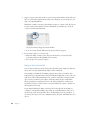
shot started out with the couple holding hands and swinging around, as in the shot below.
To make this adjustment, but not change the clip’s duration, you’ll do a slip edit. A slip edit lets
you change the In and Out points of a clip that’s already in the Timeline without changing its
duration or location in the sequence. Essentially, you’re using a different section of the clip,
but with the same duration. This means that the rest of your sequence won’t be affected by
the change.
54
Chapter 2
To do a slip edit:
1
First, make sure snapping is turned off. This way, the playhead won’t snap to the nearest edit
point, so it’s easier to make small movements.
m Look at the Snapping control in the Timeline.
If the control is yellow, snapping is turned on. Click the control to turn snapping off.
2
Move the playhead to the head of the “Bloomies” clip.
m In the Canvas, use the Next and Previous Edit buttons (or the Up and Down Arrow keys)
to position the playhead at the beginning of “Bloomies” (the second clip in the sequence).
Basic Editing
55
3
Now, play the sequence.
m Press the Space bar to play the sequence. Notice the dancers are not clasping hands as
they swing around. They clasp hands again at approximately 01:00:02;20 (NTSC) or
01:00:02:10 (PAL).
If you have trouble seeing the missed hand clasp, drag the shuttle control in the Canvas to
move slowly through the clip.
Or, move frame by frame using the Right and Left Arrow keys on your keyboard.
4
Now, select the Slip Item tool.
m Click the Slip Item tool in the Tool palette to select it.
5
Now you’re ready to do the slip edit. You’ll place the Slip Item tool on “Bloomies” in the
Timeline, then press the mouse button. When you do, you’ll see the Canvas shows the “head”
(or beginning) of the clip on the left and the “tail” (end) on the right with their timecodes.
In the Timeline, a small yellow box will show the number of frames you are “slipping the
edit.” (–00:00:01 means one frame earlier in the clip, +00:00:01 means one frame later.)
56
Chapter 2
m NTSC: In the Timeline, place the Slip Item tool on “Bloomies.” Press the mouse button
and drag to the left. Using the two images in the Canvas as a reference, slip the edit
approximately 26 frames earlier, then release the mouse button. (As you drag, press the
Command key for more precise control.)
m PAL: In the Timeline, place the Slip Item tool on “Bloomies.” Press the mouse button and
drag to the left. Using the two images in the Canvas as a reference, slip the edit
approximately 21 frames earlier, then release the mouse button. (Press the Command key
as you drag for more precise control.)
Basic Editing
57
6
Now, follow the steps below to check your edit.
m NTSC: With the Slip Item tool still selected, press and hold the mouse button. The
timecode numbers for the head and tail frames displayed in the reference windows
should be approximately 02:12:04;21 and 02:12:08;13.
m PAL: With the Slip Item tool still selected, press and hold the mouse button. The
timecode numbers for the head and tail frames displayed in the reference windows
should be approximately 02:12:04:21 and 02:12:08:13.
7
58
Chapter 2
You’re ready to play your movie and save your work.
a Click in the Canvas. Press Home, then press the Space bar to play the sequence.
b Choose Save Project from the File menu to save your work.
Doing a Roll Edit
When you watch the cut again, you notice that in the next clip, “Johnny n Cari,” the male
dancer looks upward, directly into the camera. It would look better if he didn’t.
So, let’s change it by doing a roll edit. When you do a roll edit, the overall duration of the
project doesn’t change, but the location of the edit point does. A roll edit subtracts frames
from a clip on one side of an edit point and compensates for the lost frames by adding the
same number of frames to a clip on the other side of the edit point.
To do a roll edit:
1
First, zoom in for a closer look. Zooming in makes the view of each clip longer in the
Timeline, providing a better view of the clips and the points where they meet.
a Click the Zoom In tool in the Tool palette.
b In the Timeline, double-click “Bloomies” to zoom in two levels on that area of the sequence.
Basic Editing
59
2
Next, select the Selection tool.
m Click the Selection tool in the Tool palette.
3
Now, focus on the edit point.
m In the Timeline, click the edge between the second and third clips (“Bloomies” and
“Johnny n Cari”). The pointer changes to indicate that it is over an edit point.
Be careful not to double-click the edit point, because this opens the Trim Edit window. If this
happens, just click the close box in the upper-left corner of the Trim Edit window or click in
the scrubber bar in the Timeline.
4
60
Chapter 2
Select the Roll Edit tool.
m Click the Roll Edit tool in the Tool palette.
5
Now you’re ready to do a roll edit.
a In the Timeline, position the Roll Edit tool over the selected edit point, then press and
hold down the mouse button and drag to the right.
In the Canvas, a small window for each clip displays the frame points and adjustments in
the clip.
b Drag to the right until the male dancer’s eye contact with the camera is edited out of
“Johnny n Cari” in the right window (about ten frames), then release the mouse button.
This subtracts from “Johnny n Cari” and adds to the previous clip.
m NTSC: The timecode numbers for the head and tail frames should be approximately
02:12:08;23 and 02:41:43;07.
m PAL: The timecode numbers for the head and tail frames should be approximately
02:12:08:23 and 02:41:43:07.
6
You’re ready to play your movie and save your work.
a Press Home, then press the Space bar to play the sequence.
b Choose Save Project from the File menu to save your work.
Basic Editing
61
Doing a Match Frame Edit
In your sequence, you’d like to align the voiceover where Rob says “stops” with the frame in
the sequence where a dancer actually stops.
In Final Cut Pro, you can easily match a visual to an audio cue. It’s called match frame editing.
Let’s give it a try.
To do a match frame edit:
1
First, make the Timeline smaller by zooming out.
a Click the Zoom In tool in the Tool palette, then move left and select the Zoom Out tool.
b Click in the Timeline until you can see your whole sequence.
2
62
Chapter 2
Identify the exact frame where Rob says “stops.”
a Click the Selection tool in the Tool palette.
b Press Home to go to the beginning of the sequence.
c Press the Space bar to play the sequence. When Rob says “there’s a lot of stops”
(approximately 01:00:12;21 for NTSC, 01:00:12:07 for PAL), press the Space bar again to
stop the sequence.
3
Now, place a marker at the point where you stopped the sequence.
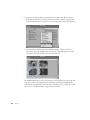
a In the Canvas, click the Add Marker button. A green marker appears in the Timeline and
in the Canvas at the point you marked.
b After you’ve set the marker, press the Space bar to continue to play the sequence. Notice
that the male dancer jumps to a stop at a point after Rob says “stops.”
4
Now, position the playhead exactly on the marker you added, and give the marker a name.
a When the sequence is not playing, position the playhead on the marker by pressing
Shift-M (to move to the next marker) or Option-M (to move to the previous marker).
b Choose Markers from the Mark menu, then choose Edit from the submenu.
c Name the marker “Stops,” add the comment “Rob says stop,” then click OK.
5
Now, you can set up your match frame edit.
m Click the Match Frame button in the Canvas.
A copy of the marked clip opens in the Viewer, cued to the frame displayed in the
Canvas window.
Basic Editing
63
6
Find the video you want to match to your audio cue, “stops.”
m In the Viewer, use the jog control to locate the frame where the dancer lands from his
jump. The timecode is at approximately 02:12:25;10 (NTSC) or 00:00:07:00 (PAL) when
the dancer lands.
7
You’re ready to do a replace edit. With this type of edit, the frame where the playhead is
positioned in the Viewer will end up where the position of the playhead is in the Timeline,
and the duration of the clip will remain the same.
m Drag the clip from the Viewer to the Canvas. When the Edit Overlay appears, position the
pointer in the Replace section and release the mouse button.
The image in the Canvas now matches the Viewer. You’ve lined up the frame where the
dancers stop to the location in the sequence where Rob says “stop.”
8
64
Chapter 2
Check your work, then save what you’ve done.
a Click in the Canvas, then click the Previous Edit button or press the Up Arrow key to
move back one or two edits.
b Press the Space bar to watch the completed edit.
c Choose Save Project from the File menu to save your work.
Locating a Clip Using the Find Command
Sometimes during editing you can remember watching a clip but don’t remember its name.
And that’s the clip you need for your project right now. In this instance, it’s the guy dancing
in the “red suit.”
If you’ve organized your clips in the Browser, it’s easy. You can quickly locate the clip in
question using the Find command.
1
First, make the Browser active by clicking anywhere in the Browser window. Then choose
Find from the Edit menu.
2
Next, enter your search criteria and select your search options.
a Notice the Search default is for the project you are already working in, “Swing.” Within
this project you can search for All Media, Unused Media, or Used Media. Leave it at
All Media.
b The next three criteria get more specific. The first pop-up menu allows you to search Any
Column or a specific column in the Browser. Leave it at the default, Any Column.
c In the Find dialog box, type “red” in the field as illustrated. Leave the modifier in the
pop-up menu to the left of the field as Contains. (In this case, you could also choose
Starts With.)
Basic Editing
65
d Click Find All. A Find Results bin appears with the “Jeremy Solo” clip.
3
Finally, make sure it’s the right clip.
a Open the clip in the Viewer and play it by pressing the Space bar.
b Close the Find Results bin.
Applying and Editing a Transition
A transition between two clips can make an edit appear less abrupt and visually more
interesting. Final Cut Pro has several video transitions available in the Effects tab of the
Browser.
You can add transitions automatically, or apply them to edit points after you’ve assembled
your sequence. Transitions appear on a track in the Timeline. After you’ve applied a
transition, you can always go back later and modify it.
66
Chapter 2
To apply and edit a transition:
1
In this task, you’ll add a clip with a transition.
a If the “Jeremy Solo” clip is not already opened in the Viewer, open it by double-clicking it
in the Browser.
b In the Timeline, position the playhead at the end of “Round n Round.”
You may want to turn on snapping to help position the playhead. To do so, click the
Snapping control in the Timeline.
2
Now, add a transition at the same time you add the new clip to the sequence.
m Drag the clip “Jeremy Solo” from the Viewer to the Canvas. When the Edit Overlay
appears, position the pointer in the “Overwrite with Transition” section and release the
mouse button.
The icon for a transition appears in the Timeline between the clips “Round n Round” and
“Jeremy Solo.”
Basic Editing
67
3
The transition you added is the default transition, a cross dissolve.
m Position the playhead over the transition in the Timeline to see the effect in the Canvas.
Note: Notice that the render bar over the transition in the Timeline is red. This indicates
that this part of the sequence must be rendered before you can see the transition. Rendering
is the process of combining raw clips of media with filters, transitions, or other effects to
produce a new file (the render cache file).
If your computer is capable of real-time effects playback, the render bar may be green or
yellow, indicating that these effects can be played without rendering.
4
68
Chapter 2
Before you render, apply a different transition: a center wipe.
a In the Timeline, position the playhead anywhere in the transition.
b Choose Video Transitions from the Effects menu, choose Wipe from the submenu, and
then choose Center Wipe from the second submenu. You’ll see the transition change in
the Canvas.
5
Now, change the length of the transition from 1 second to 20 frames (NTSC) or 1 second to
16 frames (PAL). You’ll use a shortcut menu in the Timeline to do this.
a Hold down the Control key and click the transition in the Timeline, then choose Duration
from the shortcut menu.
b Type “20” (NTSC) or “16” (PAL) in the Duration dialog box, then click OK.
c Choose Save Project from the File menu to save your work.
6
If you see a red render bar at the top of the Timeline after adding the transition, you need to
render the transition in the sequence in order to view the results.
a In the Timeline, click the transition to select it.
b Choose Render Selection from the sequence menu.
A status bar shows the progress of rendering. (It will take a few seconds.)
7
Congratulations! You’ve completed the “Basic Editing” tutorial.
a Press Home, then press the Space bar to play the sequence.
b Choose Save Project from the File menu to save your work.
Basic Editing
69
Compositing and Effects
3
About the “Compositing and Effects” Tutorial
73
Beginning the “Compositing and Effects” Tutorial
Doing a Superimpose Edit
Adding a Drop Shadow
Adding the Dancers
74
76
79
Adding a Blue Screen Filter
80
Cropping and Resizing the Dancers
83
Resizing a Clip and Adding a Cross Dissolve
Working With Graphic Layers
Applying a Motion Path
73
88
89
92
Changing Opacity Over Time
98
Copying a Motion Path to Another Clip
100
Editing One Sequence Into Another Sequence
Editing an Animated Video Clip
Doing an Insert Edit
105
Adding Text to a Clip
105
103
103
C H A P T E R
3
3
Compositing and Effects
About the “Compositing and Effects” Tutorial
Before you begin, you should have completed the “Basic Editing” tutorial.
In this section, you’ll explore Final Cut Pro’s effects and compositing features by building an
animated introduction for the “Swing Dance” video.
We’ve all been to the movies, so we know effects can help enhance a project. But just what is
compositing? It’s a process that takes multiple layers of video, usually along with effects and a
variety of digital alterations, and combines them into one seamless layer in the finished
project to make the unbelievable believable.
Because of their complexity, these sequences need to be rendered before they can be played
back in real time. You’ll render your sequence at the end of this tutorial.
Final Cut Pro is designed to support a variety of working styles. As in the “Basic Editing”
tutorial, we’ll show you one way to utilize the tools and features. You’ll find other methods,
shortcuts, and keyboard commands in the Final Cut Pro manual and in the onscreen help.
Beginning the “Compositing and Effects” Tutorial
To begin this tutorial, you’ll create your own project. Then, you can start building your
animated introduction. But where do you start?
The first edit you’ll do is a simple overwrite edit to bring a blue background clip into your
project. This background will be the one consistent clip throughout the entire sequence.
Everything else happens on top of the blue curtain.
At the end, when you play the sequence, you’ll notice that the blue background doesn’t
move. That’s because it’s not video. It’s a PICT file that was created by a graphic artist and
imported into Final Cut Pro. Let’s start by bringing it into a new sequence.
73
To begin a new project:
1
To create your new project, you’ll use “Tutorial Project 2,” a file that came with the tutorial, as
a starting point.
a Choose Open from the File menu.
b Locate the Tutorial folder on your hard disk, then open either the NTSC or PAL Tutorial
folder.
c Select the file “Tutorial Project 2” and click Open.
2
Now, you need to save your project with a new name.
a Choose Save Project As from the File menu.
b Type “Swing Intro” and click Save.
3
Now, create your new sequence.
a Choose New from the File menu, then choose Sequence from the submenu. A new
numbered sequence appears in the Browser.
b In the Browser, rename the sequence “Intro” by typing in the highlighted box, then
double-click the sequence. The sequence opens black in the Canvas window because you
haven’t added any clips to it yet.
4
Next, open the “background” clip and insert it in your new sequence. This clip will be the
foundation on which the opening animation is built.
a Double-click the clip named “background” in the Browser. The clip opens in the Viewer.
The In and Out points have already been marked for this clip.
b Drag “background” from the Viewer to the Canvas. When the Overwrite section of the
Edit Overlay is highlighted, release the mouse button.
Doing a Superimpose Edit
Now that the blue curtain is established on screen, it’s time to start getting fancy. You’ll add a
blue triangle, which was created by a graphic artist in a 3D program, and make it look like the
triangle is floating right on top of the blue curtain.
To accomplish this, you’ll do a superimpose edit, which places the source clip, “Triangle,” on
a new video track above the target track. When there’s no track above the target track (as in
this case), Final Cut Pro automatically creates a video track.
74
Chapter 3
To do a superimpose edit:
1
First, you need to set an In point where you want the triangle to appear.
a Click in the Canvas, then press the Home key to position the playhead at the beginning of
the clip.
b Type “+20” (NTSC) or “+16” (PAL) and press Return. The playhead moves ahead the
number of frames you specified.
c Click the Mark In button in the Canvas.
2
Now, superimpose the triangle on the background. (The In and Out points for “Triangle”
have already been set.)
a Double-click “Triangle” in the Browser to open it in the Viewer.
b Drag the clip to the Canvas. When the Superimpose section of the Edit Overlay is
highlighted, release the mouse button.
Notice that the In point did not disappear from the sequence after you did the
superimpose edit. Because you’ll often superimpose multiple layers at the same edit
point, Final Cut Pro leaves the In point where it is so you won’t have to mark the point
later. You’ll use this In point again, so we’ll leave it for now, but later in the tutorial you’ll
remove it.
Compositing and Effects
75
3
Next, adjust the Timeline so you can easily view all the video tracks.
a Click in the Timeline, then double-click the Zoom tool in the Tool palette. The Timeline
zooms out to fit the window.
b Now click the Selection tool again. If you don’t see both clips in the Timeline, drag the
horizontal gray bar between the video and audio tracks until both are visible.
Adding a Drop Shadow
You’ve probably noticed that your triangle looks flat (or two-dimensional) on the blue
curtain. You can create the illusion of depth by adding a new video effect, a drop shadow, to
the triangle.
Remember: When you add a clip from the Browser to a sequence in the Timeline, you place
a copy of the clip in the sequence. In essence, you create a new clip.
So, when you want to modify a clip by adding a video effect (such as a drop shadow), you
need to open the clip from the Timeline. If you modify the original clip in the Browser, your
changes won’t appear in the clip in the Timeline.
76
Chapter 3
You can tell a clip has been opened from the Timeline if there are small dots in the scrubber
bar in the Viewer. (If a clip is opened from the Browser there are no small dots.)
So, before adding any effect to a clip, always check for the dots.
To add a drop shadow:
1
First, open the “Triangle” clip.
m Double-click “Triangle” in the Timeline. It opens in the Viewer.
The dots in the bottom of the Viewer window indicate that this clip was opened from the
Timeline.
The turquoise box in the Canvas shows which clip is selected in the Timeline.
2
Next, add a drop shadow.
a Click the Motion tab in the upper-left corner of the Viewer.
You’ll see a list of motion properties. If you click the triangle next to each property, you
see controls you can use to adjust the settings for that property.
b Select the checkbox labeled “Drop Shadow” to add your drop shadow.
Compositing and Effects
77
3
Now, you’ll adjust the appearance of the drop shadow. First, change the offset, which is the
shadow’s distance from the clip.
a Click the arrow next to the Drop Shadow checkbox to show the drop shadow controls.
Remember, you can use these controls to adjust the settings for each motion property.
b Drag the Offset slider to 5. The shadow slides closer to the triangle.
4
Next, adjust the softness, which controls the amount of blending at the edge of the drop
shadow. You can also numerically adjust motion property settings, rather than using the
sliders. So that’s what you’ll do here.
a Click in the field next to the Softness slider and type “80,” then press Return.
b Choose Save Project from the File menu to save your work.
78
Chapter 3
Adding the Dancers
Next, you’ll add the dancers. But first, step back and think about what you’ve built so far.
You’ve got two layers, the background and the triangle. Now, you need to place the dancers
on top of the triangle. An easy superimpose edit, right?
It is, as long as you choose the right target track. Remember, a superimpose edit places the
new clip over the target track. So if your target track is V1 (where the background is), the
dancers will appear between the background and the triangle. The triangle will be on top of
the dancers.
But if you target V2, the dancers will appear in front (or on top) of the triangle. That’s what
you’ll do.
To add the dancers:
1
First, select the correct video track as the target.
a In the Timeline, click the Target Track control for track V2 to target that video track for the
edit. The filmstrip icon turns yellow.
b Press Home, then press the Down Arrow key to move the playhead to the beginning of
“Triangle.”
2
Next, superimpose the dancers on the triangle. You’ll use the In point you marked earlier,
when you superimposed the triangle.
m Drag the “Blue Dance” clip from the Browser to the Canvas. When the Superimpose
section of the Edit Overlay is highlighted, release the mouse button. “Blue Dance”
appears next to V3 in the Timeline.
3
Now, zoom out so you can see the entire sequence.
a Click anywhere in the Timeline, then double-click the Zoom Out tool.
b Then, click the Selection tool again so you can continue editing.
Compositing and Effects
79
Adding a Blue Screen Filter
The dancers were filmed in front of a blue screen (sometimes green is also used) so that the
blue color could be “keyed out,” or removed from the video, using a blue screen filter.
Once the blue is keyed out, you can insert anything in its place. So, the dancers can be
superimposed over any clip you choose. They could be dancing on Jupiter or Mars. But
you’re going to put them on the blue triangle.
To add a blue screen filter:
80
Chapter 3
1
To see whether a filter has been applied to a clip, you turn on the clip keyframes. A green bar
indicates that filters have been applied. A blue bar indicates that motion has been applied.
m Click the Clip Keyframes control in the Timeline.
2
You’re ready to apply the blue screen video filter to the dancers.
a In the Timeline, double-click “Blue Dance.” The clip opens in the Viewer (note the small
dots in the scrubber bar).
b Choose Video Filters from the Effects menu, choose Key from the submenu, and then
choose Blue and Green Screen from the last submenu.
A green bar appears beneath the clip, showing that a filter has been applied.
3
Now, adjust some of the parameters for the blue screen key. You’ll do this in the Filters tab.
m Click the Filters tab in the Viewer.
Notice that Blue and Green Screen is already selected under Video Filters. Also, the Key
Mode is set to Blue. (Blue is the default, and it’s correct in this case since the dancers are on
a blue background. If the background were green, the Key Mode should be set to Green.)
4
Before you change the other preferences, switch your view so you can see the effect your
changes have before you render.
m In the Filters tab in the Viewer, open the View pop-up menu and choose “Source, Matte,
Final.”
Three screens appear in the Canvas. The top-left image is the Source—the original image.
The top-right image is the Matte. It’s still white because you haven’t adjusted any filter
parameters yet. The bottom-left image is Final—what the image will look like with the filter
applied. (The bottom-right image cuts through to the full-screen image on the Canvas.)
Compositing and Effects
81
5
Next, you’ll adjust the Color Level (the intensity of the color that’s being cut out) and the
Color Tolerance (the range being cut out on the color wheel). You’ll also define the Edge
Thin (the hard line edge between the object and the place where the filter is applied) and
Edge Feather (the smoothing out of this edge).
m Before you select your final values, play around with the sliders and see how your changes
affect the blue background behind the dancers. Remember, the bottom-left image is your
final output.
6
Now set these values:
a Drag the Color Level slider to 35, and drag the Color Tolerance slider to 15.
b Drag the Edge Thin slider to 20, and the Edge Feather slider to 3.
7
Next, you’ll add a “spill suppressor.” Often, blue light from the background bounces onto the
subject matter—in this case, the dancers. The spill suppressor works to remove this.
m Choose Video Filters from the Effects menu, choose Key from the submenu, and then
choose Spill Suppressor Blue from the last submenu.
In the Viewer, you’ll see Spill Suppressor appear in the Video Filters list.
8
Now, view the dancers full screen in the Canvas.
a In the Filters tab in the Viewer, choose Final from the View pop-up menu.
b Finally, choose Save Project from the File menu to save your work.
82
Chapter 3
Cropping and Resizing the Dancers
Looking at the sequence, it’s obvious the blue screen still needs some adjustments. The
dancers are too big, so you need to make them smaller. You also need to move them so
they’re dancing right in the spotlight; and you need to remove the white smudges and other
inconsistencies on the screen.
Making these changes is a breeze. Video and still-image clips have a set of associated motion
properties that determine the size of each clip, its position in the canvas, its rotation, and its
shape. You can change all of these by using Wireframe mode.
In Wireframe mode, the clip is represented as a rectangle on a black background. There is no
video image (only the outline), but it always plays back in real time. Image + Wireframe mode
combines the Wireframe with the clip’s image. This means that you may have to render clips
with motion effects applied to them unless you have a computer capable of real-time effects
playback. But it’s useful because you can see how layered images affect one another.
In the next few steps, you’ll change the clip’s motion properties by removing the white edges
using the Crop tool. You’ll make the dancers smaller by resizing them, and you’ll move the
entire image into the spotlight.
Compositing and Effects
83
To crop and resize the dancers:
1
First, switch to Image + Wireframe mode.
a Make sure “Blue Dance” is selected in the Timeline. Click the Previous Edit or Next Edit
button to position the playhead at the beginning of the “Blue Dance” clip.
b Choose Image + Wireframe from the View pop-up menu in the Canvas.
A white border and a large white X appear over the image in the Canvas.
2
84
Chapter 3
Next, select the Crop tool.
m Click the Crop tool in the Tool palette.
3
Now crop the image to remove the white smudge from the left edge of frame.
m Position the pointer over the left edge of the screen. Drag toward the center until the
white smudge is gone.
4
Next, remove the smudge from the right side and crop the top and bottom of the frame.
a Position the pointer over the right edge of the screen and drag toward the center until the
white smudge is gone.
b Crop the top and bottom of the frame to match the illustration below. Don’t crop too
much; remember, the dancers need room to move around.
Compositing and Effects
85
5
Now, you can make the dancers smaller by following the steps below.
When the Selection tool is selected, you’ll notice that your pointer changes shape depending
on where you move it in the Canvas. The pointer on the far left (below) is used to rotate
images; the pointer in the middle is used to move images; and the one on the right is used to
change the scale of a clip.
a Click the Selection tool in the Tool palette, then click the Motion tab in the Viewer. Look
at the controls under Basic Motion; you’ll see the Scale is currently set to 100%.
b In the Canvas, position the crosshair pointer at any corner of the turquoise box, then drag
toward the center.
c As you drag, the dancers become smaller and the Scale for Basic Motion decreases in the
Viewer. Resize until the scale is about 75%.
6
Now, reposition the dancers so they are dancing in the left center of the lower spotlight on
the triangle.
a In the Canvas, place the pointer inside the turquoise box and press the mouse button, so
the pointer looks like this:
b Drag the box up and to the right and release the mouse button. The dancers move where
you dragged.
86
Chapter 3
7
Drag the box again until you’ve got the dancers just where you want them.
m Position the dancers as illustrated below.
Notice that the Center settings in the Basic Motion tab change as you drag.
8
Finally, change the View back to Image only.
a In the Canvas, choose Image from the View pop-up menu.
b Choose Save Project from the File menu to save your work.
Compositing and Effects
87
Resizing a Clip and Adding a Cross Dissolve
You’ll notice there’s a pink marker on the “Triangle” clip. This marker indicates the point at
which the triangle starts to move. When it does, the dancers need to fade away, or they’ll be
dancing on thin air.
To make the dancers disappear at the right time, you’ll resize the “Blue Dance” clip to the
marker on the “Triangle” clip. Then, so the dancers don’t simply pop on and off screen, you’ll
apply a cross dissolve.
To resize a clip and add a cross dissolve:
1
First, resize the “Blue Dance” clip.
a Make sure snapping is turned on. Position the Selection tool over the end of the “Blue
Dance” clip so it looks like two lines and two arrows.
b Drag left to the marker on the “Triangle” clip and release the mouse button. “Blue Dance”
is shortened.
2
88
Chapter 3
Now, add a cross dissolve at the end of “Blue Dance” so the dancers fade away. But, instead
of adding it from the menu bar, add the transition using the Browser.
a Click the Effects tab in the Browser. Open the Video Transitions bin, then open the
Dissolve bin.
b Drag the Cross Dissolve transition to the Timeline and position it so it ends at the end of
the “Blue Dance” clip.
3
Next, you’ll change the duration of the dissolve.
m NTSC: Hold down the Control key and click anywhere on the transition, then choose
Duration from the shortcut menu. Type “10” in the Duration dialog box, then click OK.
m PAL: Hold down the Control key and click anywhere on the transition, then choose
Duration from the shortcut menu. Type “8” in the Duration dialog box, then click OK.
4
Now you’ll add two more cross dissolves at the beginning of both “Blue Dance” and
“Triangle” so they come on screen gradually.
a Hold down the Command key and select the In points of both “Blue Dance” and
“Triangle” so they are both highlighted.
b Choose Video Transitions from the Effects menu, choose Dissolve from the submenu,
then choose Cross Dissolve from the last submenu.
5
Finally, change the duration of each transition to 10 frames (NTSC) or 8 frames (PAL).
a Hold down the Control key and click the edge of the first transition, then choose
Duration from the shortcut menu. Type “10” (NTSC) or “8” (PAL) in the Duration dialog
box, then click OK.
b Now change the duration of the second transition to 10 frames (NTSC) or 8 frames (PAL)
as well.
c Choose Save Project from the File menu to save your work.
Working With Graphic Layers
Now, you’ll start working on the dance names that fly through the screen at the beginning of
the animated introduction. To do this, you’ll work in a new sequence named “Dances.psd.”
When you’re done, you’ll edit it back into your main sequence.
First, you’ll open “Dances.psd,” a layered Photoshop document that contains the four dance
names. When you open a layered Photoshop file, Final Cut Pro preserves the layers and
imports the file as a sequence.
In this case, each layer (or dance name) is represented as a separate clip in the sequence. If
you want to import a layered Photoshop document as a clip instead of as a sequence, you
need to flatten the image in Photoshop before importing it.
In the next steps, you’ll specify the length of time each dance name should be on screen.
Then, so all the names don’t come on screen at once, you’ll space them out over time.
Compositing and Effects
89
To work with graphic layers:
90
Chapter 3
1
First, open the “Dances.psd” file, which contains the graphics of the dance names.
m Double-click “Dances.psd” in the Browser.
When the file opens in the Canvas, the four names are jumbled together. However, in the
Timeline, you can see they are on four different video tracks. When you import a layered
graphic file, Final Cut Pro automatically puts each layer on a different track.
2
Next, select all the dances and give them the same duration.
a Hold down the Command key and click all four dance names so they’re highlighted, then
release the Command key.
b With the clips still highlighted, hold down the Control key and click any of the names,
then choose Duration from the shortcut menu.
m NTSC: Type “120” (1 second 20 frames) in the Duration dialog box, press Return to set
the number, then click OK.
m PAL: Type “115” (1 second 15 frames) in the Duration dialog box, press Return to set
the number, then click OK.
3
The clips are now very small, so you should zoom in to see all the clips in the Timeline.
m Double-click the Zoom tool or press Shift-Z.
4
Now, do the following to make the dance names appear onscreen at different times.
m NTSC: Click the Selection tool in the Tool palette. Command-click LINDY HOP to deselect
it. You’ll leave it where it is, at the very beginning.With the top three dance names still
selected, type “+25” and you’ll see a small box appear in the Timeline, indicating that
you’re about to move the clips 25 frames ahead. Press Return.
m PAL: Click the Selection tool in the Tool palette. Command-click LINDY HOP to deselect
it. You’ll leave it where it is, at the very beginning.With the top three dance names still
selected, type “+20” and you’ll see a small box appear in the Timeline, indicating that
you’re about to move the clips 20 frames ahead. Press Return.
5
Move the next two clips ahead 25 frames (NTSC) or 20 frames (PAL).
a Command-click CAROLINA SHAG to deselect it.
b Type “+25” (NTSC) or “+20” (PAL) and press Return. The two highlighted clips move
forward.
6
Now move the last clip.
a Command-click BOOGIE WOOGIE to deselect it.
b Type “+25” (NTSC) or “+20” (PAL) and press Return. The last clip, JITTERBUG!, moves
forward.
c Deselect this last clip. Press Shift-Z to zoom to fit in the Timeline. You can see the clips
staggered at 25-frame intervals (NTSC) or 20-frame intervals (PAL).
d Choose Save Project from the File menu to save your work.
Compositing and Effects
91
Applying a Motion Path
Now, you’re ready to animate the first name, LINDY HOP. You want the name to start out very
small and grow over time. To make this happen, you’ll create a “motion path” for the name.
To define the clip’s scale (or size) and its location on the screen at specific moments in time,
you’ll use keyframes.
Keyframes are like edit points; they mark a change in the value of a parameter (settings that
define a clip). You’ll use them here to apply a motion path, but they’re also used to change
filters over time, sculpt audio levels, or simply fade to black.
In the next few steps, you’ll be setting two keyframes, one when the clip comes on screen
and another just before it goes off screen. Then you’ll define the clip’s scale and position at
those moments.
To apply a motion path:
1
First, isolate LINDY HOP by hiding the other tracks. This makes it easier to see what happens
when you apply motion to LINDY HOP.
m Position the playhead at the beginning of the project by pressing the Home key. In the
Timeline, hold down the Option key and click the Track Visibility control for track V1.
The other three tracks are grayed out in the Timeline and become invisible in the Canvas.
92
Chapter 3
2
Now, select LINDY HOP and change the view so you can create the motion path.
m In the Timeline, click LINDY HOP once to select it. In the Canvas, choose Image +
Wireframe from the View pop-up menu.
White crosshairs appear in the Canvas, with the selected track’s number above the center point.
Compositing and Effects
93
3
Now, turn on the Clip Keyframes control to prepare to apply keyframes.
m Click the Clip Keyframes control. A blue line appears beneath all the clips, indicating the
motion you have already applied.
4
Next, add a keyframe at the beginning of the clip so you can control where the name starts its
motion path.
m Make sure the playhead is still at the beginning of the clip. If it’s not, reposition it. Then,
click the Add Keyframe button.
The white crosshairs in the Canvas turn green and a dot appears at the beginning of the
blue line beneath the clip in the Timeline, indicating a keyframe has been added.
5
94
Chapter 3
To control where the name ends its motion path, add another keyframe one frame before the
end of the clip.
a Press the Down Arrow key to move to the end of the clip, then press the Left Arrow key
to go back one frame.
b Click the Add Keyframe button to add another keyframe.
6
When the dance names appear onscreen, you want them to start small, get larger, then fade
away. But some video monitors display video images differently, so you have to be careful not
to make the names so large that parts of them get cut off when they’re viewed. To keep the
names from being cut off, you set a “title safe” boundary before you enlarge the names.
m Choose Title Safe from the View pop-up menu in the Canvas.
7
Now you can enlarge LINDY HOP.
a In the Canvas, position the pointer over the green dot in any corner so it becomes a
crosshair pointer:
b Drag the dot outward until the size of the graphic matches the graphic below.
Compositing and Effects
95
8
Now, go back to the beginning of the clip and scale it down.
m Press the Home key. Position the crosshair pointer over a green dot in any corner and
drag toward the center until LINDY HOP is tiny, but still there.
9
Since the dancers will appear in the middle of the screen, move the small LINDY HOP title to
the lower-left part of the screen.
a Position the pointer inside the turquoise box, so it looks like this:
b Drag the box to the left and down.
96
Chapter 3
10
The purple line is the motion path, and the green dot, which remains in the center of the
screen, marks the center point of the clip at the end of its motion path. The dots along the
purple line represent where the clip is at different intervals of time.
m Press the Right Arrow key to scroll through the clip and see the motion you applied to
LINDY HOP.
11
Remember that the dancers are dancing in the center of the screen. So, you also need to move
the end of the motion path lower to make LINDY HOP end in the lower part of the screen.
m Press Home, then drag the green dot in the center of the screen down to the lower third
of the screen.
12
Next, you’ll set a control so the motion eases in and eases out.
m Hold down the Control key and click the green dot at the end of the motion path, then
choose Ease In/Ease Out from the shortcut menu.
Compositing and Effects
97
13
You can get a quick preview of how the motion path will play.
a In the Canvas, choose Wireframe from the View pop-up menu. Deselect LINDY HOP by
pressing Command-D.
b Press Home to position the playhead at the beginning of the clip, then press the Space bar.
c Choose Save Project from the File menu to save your work.
Changing Opacity Over Time
When the dance names come in, you don’t want them to just pop on screen. It will look
better if they fade in, reach full color, and then fade out at the end.
Basically, it’s another job for keyframes. You want to change an attribute over time (in this
case, the opacity). So, you need to lay down three keyframes at the beginning, middle, and
end, then adjust the opacity to start out translucent (or 0), reach 100 percent in the middle,
and go back to 0 at the end.
To change the opacity over time:
1
First you’ll turn on the clip overlays. This lets you see the changes you make in the opacity.
m Choose Image + Wireframe from the View menu. Then, click the Clip Overlays control in
the Timeline.
A black line appears at the top of each dance name clip in the Timeline.
98
Chapter 3
2
Select the Pen tool so you can add your keyframes.
m Click the Pen tool in the Tool palette.
3
Next, add keyframes at the beginning, middle, and end of LINDY HOP.
a Add one keyframe just before CAROLINA SHAG comes in by clicking the black line with
the Pen tool.
b Add another keyframe at the beginning, and another at the end. The keyframes are
represented by black dots.
4
You want the dance names to fade in at the beginning and fade out at the end. So, you need
to lower the opacity at the first and last keyframes. To adjust the opacity, you’ll work right in
the Timeline.
m Drag the first and last keyframes down to the bottom of the clip.
Compositing and Effects
99
5
The clip reaches full opacity at the center keyframe. To make the effect look better, smooth
out the effect at the center point. You do this by adding Bezier handles, which slow the rate
of change around the keyframe and result in a visual effect that’s less jarring and smoother
over time.
a Hold down the Control key and click the center keyframe, then choose Smooth from the
shortcut menu. Bezier handles (two blue dots) appear.
b Choose Save Project from the File menu to save your work.
Copying a Motion Path to Another Clip
Now that you’ve set a motion path for your first clip, LINDY HOP, you can easily apply the
same basic motion and opacity to another dance name by copying and pasting LINDY HOP’s
motion properties to the next clip. To do this, you use Final Cut Pro’s Paste Attributes feature.
Copying and pasting attributes is an easy way to apply settings you’ve already defined for one
clip to others. When you paste attributes, you don’t have to make an exact replica of the
original clip; you can pick and choose the settings you want.
If the clip you are copying to is a different size, don’t worry. If you select the Scale Attributes
option, Final Cut Pro adjusts the settings to fit the new clip.
Since your clips are the same length, this won’t be an issue. However, you’ll need to make a few
other adjustments so that all the dance names don’t fly in from the same point on the screen.
100
Chapter 3
To copy a motion path to another clip:
1
First, make all the tracks visible, then copy the motion path you created for LINDY HOP.
a Click the Selection tool. In the Timeline, hold down the Option key and click the Track
Visibility control for track V1. This makes all the tracks visible.
b Select the LINDY HOP clip and choose Copy from the Edit menu.
2
Now, you’ll paste the motion and opacity for LINDY HOP onto the next clip, CAROLINA SHAG.
a Select CAROLINA SHAG. Choose Paste Attributes from the Edit menu.
b Select Basic Motion and Opacity in the dialog box, then click OK.
3
Although you can use the same motion path for CAROLINA SHAG and LINDY HOP, you don’t
want the names to appear in the same place on the screen—it would look messy. So, make
CAROLINA SHAG start in the upper third of the screen.
a Position the playhead at the beginning of CAROLINA SHAG and choose Wireframe from
the View pop-up menu.
b Hold down the Option key and click the Track Visibility control for track V2. Drag the
turquoise box to the upper third of the screen.
Compositing and Effects
101
102
Chapter 3
4
Now, move the end keyframe so the clip ends higher in the screen, too.
m Position the playhead at the beginning of the clip. In the Canvas, drag the green dot to the
upper third of the screen.
5
Since you just repositioned CAROLINA SHAG, you need to reset the ease in/ease out effect;
the original one was based on the coordinates of the previous keyframe.
a Hold down the Control key and click the green dot at the end of the motion path, then
choose Make Corner Point from the shortcut menu to set new end point coordinates.
b Hold down the Control key and click the green dot, then choose Ease In/Ease Out from
the shortcut menu.
6
Make all the tracks visible again.
m Hold down the Option key and click the Track Visibility control for track V2.
7
Now that you have repositioned CAROLINA SHAG, you can copy the motion path and
opacity from the first two dance names onto the last two names. Because the clips will
appear staggered, you can copy the same motion settings from the first to the third clip, and
from the second to the fourth clip.
a Select the first clip, LINDY HOP, and choose Copy from the Edit menu. Select the third
clip, BOOGIE WOOGIE, and choose Paste Attributes from the Edit menu. Select Basic
Motion and Opacity in the dialog box and click OK.
b Select the second clip, CAROLINA SHAG, and choose Copy from the Edit menu. Select
the fourth clip, JITTERBUG!, and choose Paste Attributes from the Edit menu. Select Basic
Motion and Opacity in the dialog box and click OK.
8
Now, preview the motion paths for all the dance names.
a In Wireframe mode, press the Home key to position the playhead at the beginning of the
sequence. Then press the Space bar.
b Choose Save Project from the File menu to save your work.
Editing One Sequence Into Another Sequence
It’s time to bring the sequence containing the dance names back into your main sequence by
doing a superimpose edit. This time, you’ll drag “Dances.psd” directly into the Timeline.
To edit one sequence into another sequence:
1
First, get back to your main sequence.
m Click the Intro tab in the Timeline.
2
Now, edit the dance names sequence into the main sequence by dragging it directly into the
Timeline.
a Drag “Dances.psd” from the Browser over “Blue Dance” and under the Timeline ruler. A
gray area drops down from the ruler. Place “Dances.psd” in the gray area, as shown below.
This is another way to do a superimpose edit.
b Choose Save Project from the File menu to save your work.
Editing an Animated Video Clip
The last edit you’ll do to the title sequence is adding an animated video clip. The clip was
created by an animator in a 3D program, so your job is easy: just do another superimpose
edit, and then render your sequence.
To edit an animated video clip:
1
First, bring in the animated video clip “Composited text end.”
a Position the playhead at the marker in the clip “Triangle.” Click Mark In to create an In point.
b Click the Target Track control for track V4.
2
Now, do a superimpose edit.
m Drag “Composited text end” from the Browser to the Canvas. When the Superimpose
section of the Edit Overlay is highlighted, release the mouse button.
Compositing and Effects
103
(If you don’t see the clip you’ve added in the Timeline, drag the scroll box on the right side
of the Timeline to see all the video tracks, or drag the horizontal gray bar between the video
and audio tracks down until all the video tracks are visible.)
104
Chapter 3
3
Next, you’ll clear the In point. Remember, Final Cut Pro leaves edit points intact after you do
a superimpose edit, just in case you need to add more layers. Since you don’t need to add
any more layers, you can remove the In point.
m Hold down the Control key and click the scrubber bar in the Canvas. Choose Clear In
from the shortcut menu.
4
Finally, if a red render bar is at the top of the Timeline, you need to render the sequence
before you can see the results.
a Choose Render All from the Sequence menu. A status bar shows the progress of
rendering.
b Sit back and relax. When rendering is complete, press the Space bar to play the sequence.
c Save your work. You’ve just finished building your first effects sequence.
Doing an Insert Edit
In this task, you’ll place the animated introduction you just completed at the beginning of
the “Dance” sequence, which you edited in the “Basic Editing” tutorial. To do this, you’ll do
an insert edit.
You use an insert edit when you want to add a clip at the very beginning or at any specific
point within an existing sequence in the Timeline. An insert edit pushes back the rest of the
clips in the Timeline so they come after the inserted clip.
To do an insert edit:
1
Select your original sequence in the Timeline.
m In the Timeline, click the Dance tab and press the Home key to move the playhead to the
beginning of the sequence.
(If you’ve done the tutorial in separate stages, you might need to reopen the “Swing”
project. Then, in the Browser, double-click “Dance.”)
2
Now, you’ll insert your animated intro sequence into the “Dance” sequence.
m Drag the sequence named “Intro” from the Browser to the Canvas. When the Edit Overlay
appears, position the pointer in the Insert section and release the mouse button.
The clip is inserted at the beginning of the sequence, and all the items to the right of the
playhead are moved further to the right and further out in time.
Adding Text to a Clip
Now that you’re back in the “Dance” sequence, there’s one last task to do. In many
documentaries, it’s customary to identify a person speaking on screen by superimposing the
person’s name and title over the image. Usually, the name appears the first time the person
appears on camera.
When you add a name and title, you may need to make adjustments to the picture. For
example, the person watching your project has to have enough time to read the text you
add, so you may need to adjust the length of the video clip.
In this next task, you’ll superimpose Rob’s name and title using the Text generator. And
you’re lucky: you’re only using his first name, so the clip is long enough.
Compositing and Effects
105
To add text to a clip:
106
Chapter 3
1
First, position the playhead at the point when Rob first appears.
a Click in the Canvas, then press the Home key.
b Click the Next Edit button. The playhead moves to the beginning of Rob’s first
appearance on camera.
2
Next, open the Text generator in the Viewer.
m Open the Generator pop-up menu in the Viewer and choose Text.
3
Now, open the Text generator controls.
m Click the Controls tab in the Viewer.
4
Next, you’ll create the text to superimpose over Rob.
a Click in the text field, type “Rob,” and press Return.
b On the second line, type “Dance Instructor.”
The default font is Geneva. You can select another font by choosing it from the Font
pop-up menu.
The size is also set to the default (36 points), which should work well for your sequence.
Compositing and Effects
107
108
Chapter 3
5
Look again at the clip of Rob in the Canvas, and think about where you’d like to superimpose
his name and title. It will probably look best if they’re aligned to the left side of frame.
m Choose Left from the Alignment pop-up menu.
6
Now, look over what you’ve done to make sure there are no typos and the alignment is correct.
m Click the Video tab in the Viewer.
7
Next, you’ll do a superimpose edit without marking an In or Out point. When you
superimpose without setting In and Out points, Final Cut Pro uses the In and Out points of
the clip on the target track where the playhead is located. In this case, it will be Rob’s clip.
a Click in the Canvas. Position the playhead at any point in the clip when Rob is on camera.
b Next, drag the thumbnail image of your text from the Viewer to the Canvas. When the Edit
Overlay appears, position the pointer over the Superimpose section and release the
mouse button.
8
Now, you’ll prepare to reposition the superimposed clip by turning on title safe boundaries
and switching to Image + Wireframe mode. You can do both in the Canvas.
a In the Timeline, select the superimposed “text” clip.
b In the Canvas, choose Title Safe from the View pop-up menu. Then choose Image +
Wireframe from the View pop-up menu.
Compositing and Effects
109
9
Finally, move Rob’s name and title to the lower-left part of the screen, but within the title
safe boundaries.
a Position the pointer inside the turquoise box, so it looks like this:
b Drag the box until Rob’s name and title match the picture below.
110
Chapter 3
10
Finally, if you see a red render bat at the top of the Timeline, you need to render the
sequence before you can see the results.
a Click in the Timeline to deselect the superimposed text clip.
b Choose Render All from the Sequence menu.
11
Now, play and save your project. You’ve completed the “Compositing and Effects” tutorial.
a In the Timeline, press Home to move to the new starting point for the sequence.
b Press the Space bar to play.
c Choose Save Project from the File menu to save your work.
Audio Editing
4
About the “Audio Editing” Tutorial
Adjusting Audio Over Time
Adding a Final Touch
113
116
119
C H A P T E R
4
4
Audio Editing
About the “Audio Editing” Tutorial
Before you begin, you need to have completed the “Basic Editing” and “Compositing and
Effects” tutorials.
In this tutorial, you’ll give the “Dance” sequence a lively introduction by adding a music file.
You’ll also adjust the volume over time, so the music fades to the background when Rob
starts speaking.
When editing a music clip, you should always try to end the clip at a natural ending point in
the music, just as you wouldn’t cut off a speaker in mid-sentence. To do this, sometimes you
may need to adjust the picture to match it to the length of your music. You’ll tackle that here,
too.
Final Cut Pro can use up to 99 tracks of audio, which you can edit and adjust without leaving
the application. It displays separate waveforms for left and right audio tracks and offers
independent fade controls, panning controls, and a variety of audio filters.
113
To add an audio introduction:
1
First, open the audio file in the Swing project.
m In the Browser, click the Swing tab, then double-click “Jumptown” to open it in the Viewer.
Notice that when you open an audio file, audio controls become available in the Viewer.
2
Now you’ll set the duration of the music so it ends at the end of a musical phrase. Entering
this new duration sets an Out point for the audio clip.
m NTSC: Press the Tab key to select the Clip Duration field (in the upper-left corner of the
Viewer). Type “36.13” (indicating 36 seconds and 13 frames), and press Return.
m PAL: Press the Tab key to select the Clip Duration field (in the upper-left corner of the
Viewer). Type “36.10” (indicating 36 seconds and 10 frames), and press Return.
114
Chapter 4
3
Now, insert two additional audio tracks in the Timeline for the music tracks.
a Click the Dance tab in the Timeline to make it active.
b Hold down the Control key and click anywhere on track A2 (in the area shown below),
then choose Add Track from the shortcut menu.
Audio track A3 appears.
c Repeat this step to add audio track A4.
4
Next, specify the target tracks for the edit. The target tracks determine where your audio
goes when you edit it in.
m In the Timeline, click the left side of the Target Track control (a dual speaker icon) for
audio track A3 (the left side turns yellow and the number 1 appears); then click the right
side of the Target Track control for audio track A4 (the right side turns yellow and the
number 2 appears).
Audio Editing
115
5
Now, you’re ready to bring in the new audio. When you do, you’ll notice the audio clip is
longer than Rob’s voice and the movie.
a Click in the Timeline and press Home to position the playhead at the start of the sequence.
b Use the Hand tool in the upper-right area of the Viewer to drag the audio clip to the
Canvas. When the Overwrite section is highlighted, release the mouse button.
6
Watch the sequence and see if the audio needs any more adjustments.
m Click in the Timeline and press Home to position the playhead at the start of the
sequence. Then press the Space bar to play it.
Adjusting Audio Over Time
You’ve probably noticed that the volume of the music is too loud when Rob starts talking. So
you should set the volume to lower automatically when he begins.
To do this, you need to set some keyframes on the audio levels. Again, keyframes are like edit
points that mark a change in the value of any parameter. You’ll use them here to change the
volume of the audio.
In the next few steps, you’ll be setting two keyframes a few seconds before Rob comes on
screen, and another just before he starts talking. Then you’ll lower the audio level at the
second keyframe, which will automatically produce an audio fade between the two keyframes.
116
Chapter 4
To adjust audio over time:
1
Find the point where the interview footage starts.
m In the Timeline, move the playhead to exactly where Rob starts talking.
2
Now, display the audio levels.
m Click the Clip Overlays control in the lower-left area of the Timeline. A thin pink line, the
volume level indicator, appears in the audio tracks.
3
Next, you’ll select the Pen tool so you can set some keyframes on the audio levels.
m Click the Pen tool in the Tool palette.
Audio Editing
117
4
Set the first keyframe.
m In the audio clip “Jumptown” on track A3, click the volume level indicator (the pink line) to
set a keyframe about 2 seconds before the “Rob Dialog” audio clip begins (at approximately
6 seconds). A small diamond appears on tracks A3 and A4, designating the keyframe.
5
Now, set the second keyframe.
m Move about 2 seconds further, to where the “Rob Dialog” audio clip actually begins, and
set another keyframe at approximately 8 seconds.
6
Now you can adjust the volume levels.
m Drag the second keyframe (the diamond at 8 seconds) down to adjust the volume level to
about –8 dB (that’s –8 decibels).
If you can’t set an exact value, choose a number between –8 and –10 if possible. (Holding
down the Command key while you drag the keyframe gives you more precise control.)
7
118
Chapter 4
Now, play your project and listen to the audio levels.
m Press Home, then press the Space bar to play the sequence with the audio mixed in
real time.
Adding a Final Touch
After you add audio to a sequence, you’ll often need to make a few minor adjustments.
Since you set the length of your music clip to finish at the end of a musical phrase, the audio
is now longer than the image. The easiest and most appropriate way to fix this is to stretch
out the last clip and add a transition to black at the end of it.
In choosing a transition, you’ll pick one that fits the singer’s last words, “Man, don’t be no
square.”
To add the final touches to your movie:
1
Right now, the movie isn’t long enough to match the length of the music. You need to stretch
the “Overhead” clip to the same length as the audio.
a Click the Selection tool. Position the playhead at the end of the audio clip, “Jumptown.”
b Position the pointer over the end of the “Overhead” clip so it looks like two lines and
arrows. Press the mouse button and drag to the right until the clip is the same length as
the audio clip.
2
Now you’ll add a final effect—a spin slide—that will transition the movie to black.
a In the Browser, click the Effects tab and open the Video Transitions bin, then open the
Slide bin.
b Drag the Spin effect to the Timeline and place the transition so that it ends at the end of
“Overhead.”
Audio Editing
119
120
Chapter 4
3
Finally, change the duration of the transition to 2 seconds and render the sequence.
a Hold down the Control key and click the transition, then choose Duration from the
shortcut menu.
b Type “200” in the Duration dialog box, then click OK.
c If you see a red render bat at the top of the Timeline, you need to render the sequence
before you can see the results. Choose Render All from the Sequence menu.
4
Congratulations! You’ve just finished your first Final Cut Pro project.
a Press Home, then press the Space bar to play the sequence.
b Choose Save Project from the File menu to save your work.
Distributing Media
5
About the “Distributing Media” Tutorial
123
Exporting a Sequence for Multimedia or the Web
Printing to Videotape
127
Moving Forward in Final Cut Pro
130
123
C H A P T E R
5
5
Distributing Media
About the “Distributing Media” Tutorial
When the editing is done, it’s time to send your project out for the world to see. And with
Final Cut Pro, you’ve got a lot of different options.
You can output a sequence or clip to videotape by using the Print to Video command, or (if
you have device control) you can use the Edit to Tape feature.
Another option is to export for use on the Web or CD-ROM disc. Final Cut Pro has a variety of
movie and audio formats using QuickTime, plus you can also export still images, or just the
audio portion of a clip or sequence.
You’ll try two different options in this tutorial: exporting a sequence as a QuickTime movie
to attach to an email to a friend, and printing to videotape so you can watch your project
on TV.
Exporting a Sequence for Multimedia or the Web
QuickTime is a popular and widely used format for delivering video on the Web and in
multimedia presentations. In this section, you’ll export your “Swing Dance” sequence as a
QuickTime movie.
Before you export, you need to think about exactly how you want to use your movie. Is it
going to be distributed on a CD-ROM disc, or are you streaming it on the Web? Basically, you
need to think about the file size.
If you were going to put your movie on a CD, it could have a larger file size. But you want to
send your exported sequence to a friend as an email attachment. That means the movie
needs to have a small file size, or your friend could be downloading for quite awhile.
123
That’s where codecs come in. Compression is a process that minimizes the size or storage
space needed for a movie. Then, another process undoes the compression, or decompresses
the file, so you or your friend can view the file as you originally created it. The technology
that makes both processes happen is known as a codec (which stands for “compression/
decompression”).
It sounds like magic, but there’s something you always need to remember about
compression: it’s a compromise. When you start squashing the size of your movie,
you’re going to give up some quality. That’s just the way it is. Let’s get started.
To export a sequence as a QuickTime movie:
124
Chapter 5
1
First, locate the sequence you’re going to export as a QuickTime movie. You’ll export the
entire sequence, but if you wanted to, you could export a segment of the sequence by
marking In and Out points in the Timeline.
m Click the Dance tab in the Timeline. (If you’ve done the tutorial in stages, you may need
to reopen the “Swing” project and then open the “Dance” sequence.)
2
Now, you’ll name your movie and decide where to save it.
a Choose Export from the File menu, then choose QuickTime from the submenu.
b In the dialog box, find the location where you want to save the movie, then enter “Swing
Dance” as the name of the movie.
3
Notice that the Format pop-up menu is already set to the default setting, QuickTime Movie.
But there are many other formats that you can export.
m Open the Format pop-up menu to take a look at all your choices. Then choose QuickTime
Movie (that’s what you want for this tutorial).
4
Next, you’ll define the compression settings.
The Use pop-up menu is a quick way to define compression settings based on two criteria: how
you’re going to use your movie and what’s happening in your project. Is there a lot of fast
motion? Or are there a lot of static shots and talking heads (which would be low motion)? Is
there music? Or is it mostly people talking?
Since you’ll be attaching the movie to an email, you’ll definitely choose one of the streaming
options. But just what are “kbps,” and what setting should you use? 20? 40? 100?
Kbps (or kilobytes per second) refers to how much data is delivered per second. If your
friend has a fast modem or a DSL line, more data can pass through the connection per
second, and you can pick a higher number. But, if you know your friend has a slow modem,
you might choose 40 kbps.
Here’s the tradeoff: the smaller the number of kilobytes per second, the more compression
is applied to your movie. And remember, compression is always a compromise between size
and quality. If you choose a smaller size, you’ll lose quality.
In this tutorial, you’ll go with 100 kbps.
m Open the Use pop-up menu to see your choices, then choose “Streaming 100kbps –
Music – High Motion.”
5
Next, you’ll customize your QuickTime movie even more using the Movie Settings dialog box.
m Click the Options button. The Movie Settings dialog box appears.
6
There are three areas in the dialog box. In the Video area, there’s a summary of the video
settings that are already applied to the movie. If you want to set additional video compression
options, you can press the Settings button. Take a look at your choices, but for this tutorial
you’ll stay with the settings you’ve got.
The Filter button lets you add a filter over your entire movie. You can add anything from lens
flare to film scratches, or you can make your movie black and white.
a Press the Filter button. Pick a filter from the list and adjust it to see how it looks.
b If you like what you see in the preview window, click OK. The filter will appear in the
summary of video settings.
Distributing Media
125
7
To help keep the file size of the movie small (so you can easily send it over email), you’ll
change the dimensions of the movie to 240 pixels by 180 pixels.
a Click the Size button, then choose “use Custom size.”
b Enter 240 in the Width field and 180 in the Height field. Click OK.
8
That covers the video settings. Now, take a look at the Sound section of the Movie Settings
dialog box. You’ll see a summary of the sound settings that are already applied.
a Make sure there’s a checkmark in the box next to Sound.
b Click the Settings button. A dialog box appears, in which you can select additional options
for the audio compression.
For the tutorial, stick with the default settings.
9
The last section of the Movie Settings dialog box is Internet Streaming. You’d select this
option if you were going to use your QuickTime movie on a Web page. The default setting,
Fast Start, means users don’t need to wait for the entire movie to download before it starts
playing. (For more information about streaming settings, check your Final Cut Pro manual.)
You’ll be attaching your movie to an email, so it won’t be streamed on the Internet.
a Make sure there is no checkmark in the box next to Prepare for Internet Streaming.
b Then, click OK to close the Movie Settings box.
10
126
Chapter 5
That’s our tour through exporting a QuickTime movie for the Web. So, let’s go ahead and do
the export.
m Click Save.
A status bar appears, so you can see the progress of the export.
Printing to Videotape
Now it’s time to record your project to videotape using the Print to Video command. You can
do this even if your DV camcorder or deck doesn’t have device control.
In this process, you’ll attach production elements before and after the sequence you are
outputting. You can add a leader at the head of your project and a trailer at the end. You can
also decide if you’d like your sequence to loop or repeat several times.
Before you begin, make sure of three things:
m Even if you have a computer capable of real-time effects playback, you will probably need
to render your effects prior to using the Print to Video command. For more information,
see the Final Cut Pro user’s manual, Volume 1, Chapter 12, “Recording to Videotape.”
m Your DV camcorder or deck is properly connected to your computer using FireWire and is
turned on.
m Final Cut Pro is configured correctly to export video to your system. To check this, choose
Easy Setup from the Edit menu and make sure the option selected matches your system.
To print a sequence to video:
1
You’ll set up your entire sequence to print to video. But remember: it’s also possible to print
only a segment of a sequence or clip by marking In and Out points in the Timeline.
m Click the Swing tab in the Browser, then double-click the “Dance” sequence to open it.
2
Next, you’ll set the render quality of the sequence you’re going to output. The quality of the
image you now see in the Canvas is the quality you’ll see on videotape.
Final Cut Pro provides four quality levels. Of these four, Hi Res produces the highest image
and motion quality. (See the Final Cut Pro manual for more information on rendering levels.)
The rendering quality you choose affects not only the quality of the output and the size of
the render file, but also the time it takes to render. Hi Res is obviously the best quality, and
the one you’ll choose for your final output.
m Click the Render Quality button. Choose Hi Res from the pop-up menu.
Distributing Media
127
3
Now, you’ll open the Print to Video dialog box, which is divided into four sections. In each
section you’ll find different formatting options that you can set for the video you’re
outputting to tape.
m Choose Print to Video from the File menu.
The Print to Video dialog box appears.
4
Now, you’ll build a leader, which will be recorded to your videotape before your sequence. A
leader usually starts with color bars and a tone, so people viewing the movie can adjust their
monitor for picture and sound.
a Select the checkbox labeled Color Bars. Leave the default at 60 seconds and the Tone level
at 0 do. (To learn how to calibrate tone for your system, see the Final Cut Pro manual.)
b Click the Preview button to hear the tone.
c Select the checkbox labeled Black. Notice there’s a 10 in the field next to Black; this
means 10 seconds of black will appear after the leader.
5
Next, you’ll attach a slate. There are three choices: you can use the default (which is the
clip’s name), create a custom slate, or use another file, such as a company logo.
You’ll create a slate that includes the name and total running time (TRT) of your project.
a Select the checkbox labeled Slate. Open the pop-up menu and choose Text.
m NTSC: Type “Swing Dance Today” and press Return, then type “TRT 36:13”.
m PAL: Type “Swing Dance Today” and press Return, then type “TRT 36:10”.
b Select the checkbox labeled Black.
128
Chapter 5
6
The last segment of your leader is the countdown. Final Cut Pro provides a built-in 10-second
countdown. However, if you had a custom countdown with your company’s logo, you could
also attach that here.
m Select the checkbox labeled Countdown.
7
In the Media section, you’ll choose how much of your project you want to print to videotape.
If you want, you can loop (or repeat) your project several times and put black in between
each loop.
m Make your selection now.
8
Now, what about the end of the movie, or the trailer? It’s much nicer to see black after your
project instead of the brilliant blue color that fills the screen when there’s no video signal. So,
you’ll add 60 seconds of black to the end.
m In the Trailer field, select the checkbox labeled Black and type “60” in the Seconds field.
9
Finally, take a look at the Duration field. Not only does it tell you the length of your media,
but also the total duration of the sequence with all the post-production elements you’ve just
added. This is a great feature, because it lets you find out if you’ve got enough blank tape to
record onto. It’s a real drag to run out.
m Check to make sure you’ve got enough room on your videotape.
Distributing Media
129
10
You’re ready to print to video.
a Click OK. If the sequence wasn’t rendered or you’ve added any post-production elements,
they’ll be rendered now.
b When a message appears telling you to start your video recorder, press the Record button
on your DV camcorder or deck.
c Then click OK in the dialog box, and sit back and relax.
Moving Forward in Final Cut Pro
Now that you’ve completed the tutorials, you should feel comfortable using the basic
features of Final Cut Pro. For more detailed information and examples, see the Final Cut Pro
user’s manuals:
m Volume 1: Getting Started, Input, and Output
Covers everything you need to know to start working with Final Cut Pro including setting
up your computer, capturing and importing media, exporting to videotape, and creating
QuickTime movies.
m Volume 2: Editorial
Discusses basic and advanced editing techniques, using transitions, trimming your media,
and working with audio.
m Volume 3: Effects and FXScript
Contains detailed information about motion effects, video filters, generators, and the
details of rendering.
You’ll also want to review What’s New in Final Cut Pro, a separate book that covers new
features and functionality in Final Cut Pro 3.0. If you prefer to view content onscreen or don’t
have your user’s manuals handy, you can use the Final Cut Pro onscreen help system,
available from the Help menu.
Additional resources will also help you become a Final Cut Pro expert:
m Apple’s Final Cut Pro Web site (www.apple.com/finalcutpro)
m Apple’s Service and Support Web site (www.apple.com/support)
m Other Apple Web sites for QuickTime, FireWire, and creative and educational solutions
(For Web site URLs, see Volume 2, Preface, “Getting Started With Editing.”)
m Final Cut Pro user groups and Web sites
130
Chapter 5