1
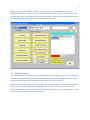
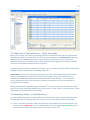
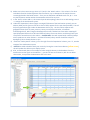
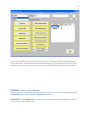
13 b) Make sure in that same row you insert a ‘0’ (zero) in the ‘INDIV’ column. This column is for other individuals found in the burial/feature after excavation, say in subsequent lab analysis that are commingled within that burial feature – Thus you can add other individuals such as A, B, C … N to any burial feature number within the osteoware GUI itself at any time. c) In the ‘Prefix’ column add a P, this means Physical Anthropology rather than an Archaeology record – a vestige of the Smithsonian system. d) Under the ‘RepatSeries’ column (again a vestigial field name of the Smithsonian system) you can add any label you like (you can see this is where TEST1 appears for the test data provided). This will help to organize data right inside the Osteoware GUI for you. Use this field to separate one geographical unit (such as state, province, county et cetera)from another, or between archaeological sites, OR if a large archaeological site itself is divided into some other meaningful spacial/temporal division then all burial features/catkeys from one division could simply have your site-‐specific nomenclature in this column – PLEASE NOTE: do NOT repeat burial numbers/catkeys across quadrants or other divisions-‐-‐ each burial feature/catkey number should be unique!!! Apologies if this is already obvious to you. e) Under the ‘Catkey Active’ column, just to the right from the ‘RepatSeries’ column, put a ‘Y’, another vestige of the Smithsonian system. f) Refresh the table to double check your entries by hitting the curved arrow button (yellow arrow), this will update the table on your display screen. g) Also, as mentioned, there are a number of other vestigial columns in the database from the Smithsonian version (such as Case Officer…), you do not have to fill these in, BUT do not delete them either, it may affect the Osteoware GUI at this time.