1
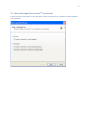
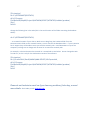
16 Simply copy and paste the ProtData folder to a new location, preferably another drive, external drive, or network drive. You should do this regularly, perhaps as often as every day or after particularly intense data entry sessions. SECTION 5: Installing the latest beta release As happens with all software beta releases, bugs in the software get resolved on an ongoing basis. As our project programmer, Dr. Steve Ousley, resolves bugs a new beta release of Osteoware will be made available at the Mercyhurst FTP site: http://math.mercyhurst.edu/~sousley/Software/Osteoware/?C=N;O=D 5-‐1 Back up your database folder: Back up your Protdata database folder to another location as outlined in SECTION 4 above. 5-‐2 Delete your old beta install: Simply drag the C:\Osteoware\ folder to the trash can of your computer. You backed up the Protdata database folder first, right? See Section 4 above. 5-‐3 Replace your old beta install: Download the latest Osteoware beta build and repeat Section 1, the Basic Installation. In brief: unzip the download, drag the unpacked Osteoware folder to your C:\ drive, where the old install was. It is that simple. PLEASE NOTE: You DO NOT have to reinstall Advantage Data ArchitectTM ever again, but may be prompted to update the software on occasion. 5-‐4 Replace your Protdata database folder If you have saved data in your backed up Protdata folder, then simply copy the Protdata folder and replace the C:\Osteoware\ ProtData folder you just installed; it simply contains the default test data. SECTION 6: Working with Osteoware on the network The Osteoware database can be placed on a networked drive and accessed by up to five computers at a time (a limit of the Advantage Data ArchitectTM). To network the database open the Protocol.ini file that resides in the Osteoware main folder. As an aside, Protocol is the name of the original SI version that has become the public release Osteoware. The Protocol.ini contains the following stock code when downloaded and unzipped: