1
Gigaset E490/E495 / AUS / A31008-M2105-C401-1-7619 / starting.fm / 22.01.2009
First steps
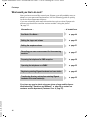
What would you like to do next?
Now you have successfully started your Gigaset, you will probably want to
adapt it to your personal requirements. Use the following guide to quickly
locate the most important subjects.
If you are unfamiliar with menu-driven devices such as other Gigaset telephones you should first read the section entitled "Using the phone"
¢ page 15.
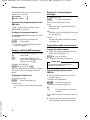
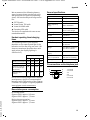
Information on ...
Eco Mode / Eco Mode +
Setting the ringer and volume
Setting the earpiece volume
Recording your own announcement for the answering
machine
Preparing the telephone for SMS reception
Operating the telephone on a PABX
Registering existing Gigaset handsets to a base station
Transferring directory entries from existing Gigaset
handsets to the new handset(s)
... is located here.
g
g
g
g
g
g
g
g
¢ page 44
¢ page 52
¢ page 51
¢ page 37
¢ page 29
¢ page 55
¢ page 45
¢ page 25
Version 4, 16.09.2005
If you have any queries about using your phone, please read the tips on
troubleshooting ("Questions and Answers" ¢ page 58) or contact our
customer service department (Customer Care ¢ page 57).
14