1
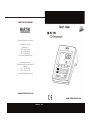
Instruction Manual Mi 190 DO Bench Meter
www.milwaukeeinst.com
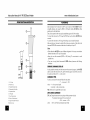
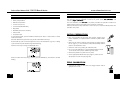
FUNCTIONAL DESCRIPTION
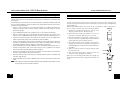
TROUBLESHOOTING
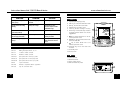
SYMPTOMS
PROBLEM
SOLUTION
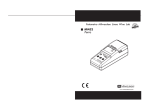
FRONT PANEL
1. Liquid Crystal Display (LCD)
Reading fluctuates up and
down (noise).
DO probe not properly
connected.
Insert the probe.
Display shows DO reading
blinking.
Reading out of range.
Recalibrate the meter;
Check the sample is within
measurable range;
3. MR key, to enter/exit recall mode
4. ACCEPT key, to confirm value
Meter fails to calibrate or
gives faulty readings.
Broken DO probe.
Replace the probe.
At startup the meter displays
all LCD tags permanently
One of the keys is blocked.
Check the keyboard or
contact your dealer.
6. SETUP key, to enter/exit setup mode or
to toggle between delete one and all
logged data
"Err xx" message displayed at Internal error.
start up.
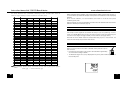
ACCESSORIES
2. CAL key, to enter/exit calibration mode
Contact your dealer or any
Martini Instruments Service
Center.
5. LOG key, to store reading in memory
7.
key, to select SETUP item or to decrease parameter value
8. RANGE key, to select measurement unit/
switch focused data
9.
key, to select SETUP item or to
increase parameter value
MARTINI
instruments
1
11
2
10
3
9
4
8
7
5
6
10. ON/OFF key, to turn the meter ON
and OFF
MA 9070
Zero Oxygen Solution, 230 ml
MA 9071
Refilling Electrolyte Solution, 30 ml
MA 9311
115VAC to 12VDC converter
MA 9310
230VAC to 12VDC converter
MA 840/2
Spare probe with 2 meters (6.7') cable
MA 840/10
Spare probe with 10 meters (33') cable
MA 840/20
Spare probe with 20 meters (67') cable
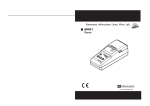
15. Power supply socket
MA 841
5 spare membranes
16. DIN connector for probe
MA 5200
Windows® compatible software application
13
MA 9350
9-pin PC connection cable
14
11. Secondary LCD
12. Primary LCD
REAR PANEL
13. USB connector
14. RS232 connector
15
26
12
USB
RS232
16
Power
12Vdc
3