1
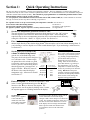
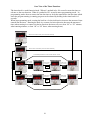
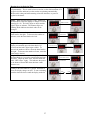
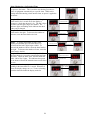
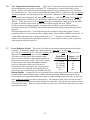
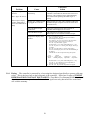
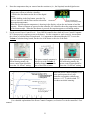
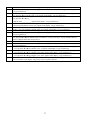
19. 20. 21. 22. 23. 24. 25. 26. 27. 28. 29. 30. 31. 32. 33. Press the ▼ key until the word “LEVL” appears in the display. First hold in the ‘*’ key, then while holding in the ‘*’ key press the ▲ key until “3” appears in the display. Let go of all the keys. Press the ▲ key until “rEU.d” appears in the display. Next, hold in the ‘*’ key, then while holding in the ‘*’ key press the ▲ key until the value “1r.2r” appears in the display. Let go of all the keys. Press the ▲ key until “ZEro” appears in the display. Next, hold in the ‘*’ key, then while holding in the ‘*’ key press the ▼ or ▲ key until the value ____________ appears in the display. Let go of all the keys. Press the ▲ key until the word “VEr” appears in the display. Next, hold in both the ▼ and ▲ keys for about 8 seconds until the word “LoCY” appears in the display. Let go of all the keys. Press the ▼ key until the word “no.AL” appears in the display. Next, hold in the ‘*’ key, then while holding in the ‘*’ key press the ▲ key until the value “on” appears in the display. Let go of all the keys. Press the ▼ key until the word “LEVL” appears in the display. First hold in the ‘*’ key, then while holding in the ‘*’ key press the ▼ key until “1” appears in the display. Let go of all the keys. Press the key until “SEt.2” appears in the display. Next, hold in the ‘*’ key, then while holding in the ‘*’ key press the or keys until the value 5.0 is entered. Let of go of all keys. If your controller does not have a USB port on the back, skip to step 33. Press the ▼ key until the word “LEVL” appears in the display. First hold in the ‘*’ key, then while holding in the ‘*’ key press the ▼ key until “C” appears in the display. Let go of all the keys. Press the ▲ key and “Addr” will appear in the display. Next, hold in the ‘*’ key, then while holding in the ‘*’ key press the ▼ or ▲ key until the value “1” appears in the display. Let go of all the keys. Press the ▲ key and “bAud” will appear in the display. Next, hold in the ‘*’ key, then while holding in the ‘*’ key press the ▼ or ▲ key until the value “9600” appears in the display. Let go of all the keys. Press the ▲ key and “dAtA” will appear in the display. Next, hold in the ‘*’ key, then while holding in the ‘*’ key press the ▼ or ▲ key until the value “18n1” appears in the display. Let go of all the keys. Press and hold in both the and keys until the temperature appears in the display, then release both keys. The word “PArk” in the display will go away when a set point is entered. 37