1
4.2
Configuring the Oracle Server................................................................................................... 4-2
4.2.1 Install librtirtc_oracleq.so ............................................................................................. 4-2
4.2.2 Install libnddsc.so and libnddscore.so ....................................................................... 4-2
4.2.3 Create an Oracle Account............................................................................................. 4-2
4.3
Creating a Data Source for Oracle............................................................................................. 4-3
4.4
Creating a Configuration File for Database Integration Service........................................... 4-3
4.5
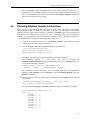
Starting the Database Integration Service for Oracle Daemon ............................................. 4-4
4.6
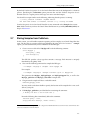
Storing Samples from Publishers .............................................................................................. 4-4
4.7
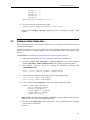
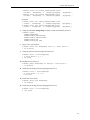
Publishing Database Updates to Subscribers .......................................................................... 4-6
5 Database Integration Service for Oracle 11g on Windows Systems
5.1
Installation .................................................................................................................................... 5-1
5.2
Configuring the Oracle Server................................................................................................... 5-2
5.2.1 Install rtirtc_oracleq.dll................................................................................................. 5-2
5.2.2 Install nddsc.dll and nddscore.dll............................................................................... 5-2
5.2.3 Create an Oracle Account............................................................................................. 5-2
5.3
Creating a Data Source for Oracle............................................................................................. 5-3
5.4
Creating a Configuration File for Database Integration Service........................................... 5-3
5.5
Using Database Integration Service as a Windows Service................................................... 5-4
5.5.1 Enabling Database Integration Service to Run as a Windows Service .................. 5-4
5.5.2 Running Database Integration Service as a Windows Service................................ 5-4
5.5.3 Disabling Database Integration Service from Running as a Windows Service .... 5-4
5.6
Starting the Database Integration Service for Oracle Daemon ............................................. 5-5
5.7
Storing Samples from Publishers .............................................................................................. 5-5
5.8
Publishing Database Updates to Subscribers .......................................................................... 5-7
6 Database Integration Service for TimesTen with Oracle In-Memory Database
Cache
6.1
Installation .................................................................................................................................... 6-1
6.2
Creating Oracle Accounts........................................................................................................... 6-2
6.3
Creating an Oracle TimesTen Database.................................................................................... 6-2
6.4
Creating Oracle TimesTen Accounts......................................................................................... 6-2
6.5
Creating a Data Source for Oracle In-Memory Database Cache........................................... 6-3
6.6
Starting Database Integration Service for Oracle TimesTen .................................................. 6-3
6.7
Creating an Oracle Table............................................................................................................. 6-4
6.8
Creating a Cache Group and Start the Replication Agent..................................................... 6-4
6.9
Storing Samples from a Publisher into the TimesTen Table .................................................. 6-5
6.10
Shutting Down ............................................................................................................................. 6-5
7 Database Integration Service for MySQL on UNIX-based Systems
7.1
Installation .................................................................................................................................... 7-1
7.2
Configuring the MySQL Server................................................................................................. 7-2
7.2.1 Install librtirtc_mysqlq.so............................................................................................. 7-2
7.2.2 Install libnddsc.so and libnddscore.so ....................................................................... 7-3
7.3
Creating a MySQL Account ....................................................................................................... 7-3
7.4
Creating a Data Source for MySQL........................................................................................... 7-3
v