1
PROFIBUS USER MANUAL
Leine & Linde AB
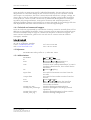
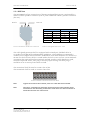
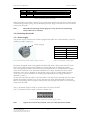
5.4 Parameterization, DPV0
The PROFIBUS-DPV0 device is parameterized by means of the operating parameters.
The values selected in the configuration tool are saved in the DP master and are
transferred to the PROFIBUS-DP slave each time the network is started.
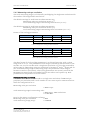
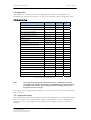
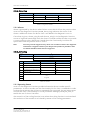
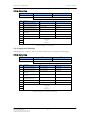
The following table lists all available parameters:
Parameters
Data type
Parameter
octet number
Device
class
Code sequence
Bit
9
1
Class 2 functionality
Bit
9
2
Commissioning diagnostics
Bit
9
Optional
Scaling function control
Bit
9
2
Measuring units per revolution
Unsigned 32
bits
10 – 13
2
Total measuring range in measuring units Unsigned 32
bits
14 – 17
2
Manufacturer specific functions
Bit
26 – 28
Optional
Velocity control
2 bit
39
2 ext.
Table 11 Operating parameters in DPV0
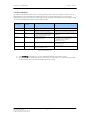
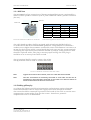
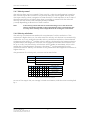
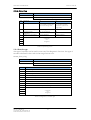
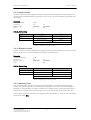
The parameters described in octet 9 are defined bit by bit as follows:
Octet
9
Bits
7–0
Data
27 – 2 0
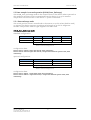
Operating parameters
Bits
Definition
=0
=1
0
Code sequence
Clockwise (CW)
Increasing position values
when rotated clockwise (seen
from flange side)
Counter clockwise (CCW)
Increasing position values
when rotated counter
clockwise (seen from flange
side)
1
Class 2 functionality
Disable
Enable
2
Commissioning diagnostics
No
Yes
3
Scaling function control
Disable scaling
Enable scaling
Scaling parameters are taken
into octets 10 to 17.
4
Reserved
for future
applications
...
7
Table 12 Octet 9, Parameter definition
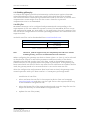
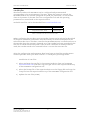
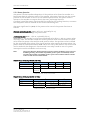
5.4.1 Code sequence
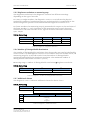
The code sequence defines whether the absolute position value should increase
during clockwise or counter clockwise rotation of the encoder shaft seen from flange
side. The code sequence is by default set to increase the absolute position value when
the shaft is turned clockwise (0).
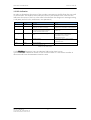
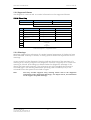
Note:
The position value will be affected when the code sequence is changed during
operation. It might be necessary to perform a preset after the code sequence
has been changed.
Part Id: 740590-01
Document Id: 740590 Ver. 01
Publication date: 2010-06-01
21