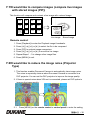
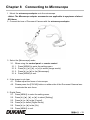
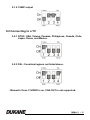
1
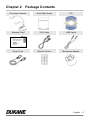
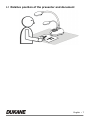
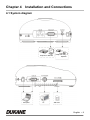
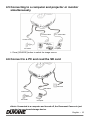
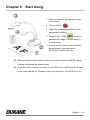
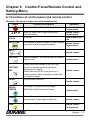
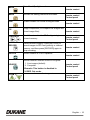
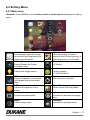
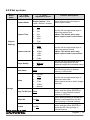
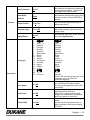
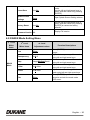
Camera 336B Document Camera User Manual - English English Table of Contents Chapter 1 Precautions .............................................................................................3 Safety Precautions ....................................................................................... 4 FCC Warning................................................................................................ 4 EN55022 (CE Radiation) Warning ............................................................... 4 Chapter 2 Chapter 3 Package Contents .......................................................................................5 Product Overview .......................................................................................6 3.1 Relative position of the presenter and document ...........................................7 Chapter 4 Installation and Connections .....................................................................8 4.1 System diagram .............................................................................................8 4.2 Installation and setup .....................................................................................9 4.3 Connecting to a projector or monitor ..............................................................9 4.4 Connecting to a computer and use B-Works 2...............................................9 4.5 Connecting to a computer and projector or monitor simultaneously ............10 4.6 Connect to a PC and read the SD card ........................................................ 10 4.7 Connecting to an Interactive Whiteboard (IWB) ........................................... 11 4.8 Connecting to an HDTV ............................................................................... 11 4.9 Connecting to a speaker ..............................................................................12 4.10 Connecting to a Computer with RS232 ........................................................ 12 4.11 Connecting to a TV ...................................................................................... 13 4.12 Installing application software ......................................................................13 Chapter 5 Start Using .................................................................................................14 Chapter 6 Control Panel/Remote Control and Setting Menu ..................................15 6.1 Functions of control panel and remote control .............................................15 6.2 Setting Menu ................................................................................................ 17 Chapter 7 Descriptions of major functions .............................................................. 22 7.1 I would like to automatically adjust the image to have the best brightness and focusing performance ..................................................................................22 7.2 I would like to switch image sources ............................................................ 22 7.3 I would like to switch the image mode .......................................................... 22 7.4 I would like to make text clearer and photos more colorful .......................... 22 7.5 I would like to zoom in/out images ............................................................... 23 7.6 I would like to use the auto focus .................................................................23 English - 1 7.7 I would like to adjust the brightness ............................................................. 23 7.8 I would like to turn on/off the lamp ............................................................... 23 7.9 I would like to freeze images ........................................................................24 7.10 I would like to rotate the image ....................................................................24 7.11 I want to capture images ..............................................................................24 7.12 I would like to record videos .........................................................................25 7.13 I would like to view captured/recorded images.............................................26 7.14 I would like to delete the captured/recorded images ....................................27 7.15 I would like to automatically delete the stored images whenever it is turned off (Auto Erase) ............................................................................................ 27 7.16 I would like to enlarge a part of the image (PAN) .........................................27 7.17 I would like to use the MASK and Spotlight function ....................................28 7.18 I would like to play the slides (Slide Show) ..................................................29 7.19 I would like to compare images (compare live images with stored images (PIP)) ...........................................................................................................30 7.20 I would like to reduce the image noise (Projector Type) ............................... 30 7.21 I would like to resume the factory default settings (Factory Reset) ..............31 7.22 I would like to change the splash screen ..................................................... 31 7.23 I would like to use a SD card........................................................................32 Chapter 8 Connecting to Microscope .......................................................................33 Chapter 9 DIP Switch Settings ..................................................................................34 9.1 Connecting to a projector or monitor ............................................................ 34 9.2 Connecting to a TV ...................................................................................... 35 Chapter 10 Software instructions ................................................................................36 10.1 System Requirements ..................................................................................36 10.2 Installation & Function ..................................................................................36 Chapter 11 Troubleshooting ...................................................................................... 37 English - 2 Chapter 1 Precautions Always follow these safety instructions when setting up and using the Document Camera: 1. Do not place Document Camera in tilted position. 2. Do not place the Document Camera on an unstable trolley, stand or table. 3. Do not use the Document Camera near water or source of heat. 4. Use attachments only as recommended. 5. Use the type of power source indicated on the Document Camera. If you are not sure of the type of power available, consult your dealer or local electricity company for advice. 6. Place the Document Camera on a place that it can be unplugged easily. 7. Always take the following precautions when handling the plug. Failure to do so may result in sparks or fire. Ensure the plug is free of dust before inserting it into a socket. Ensure that the plug is inserted into the socket securely. 8. Do not overload wall sockets, extensions leads or multi-way plug boards as this may cause fire or electric shock. 9. Do not place the Document Camera where the cord can be stepped on as this may result in fraying or damage to the lead or the plug. 10. Unplug the projector form the wall socket before cleaning. Use a damp cloth for cleaning. Do not use liquid or aerosol cleaners. 11. Do not block the slots and openings in the case. They provide ventilation and prevent the Document Camera from overheating. Do not place the Document Camera on a sofa, rug or other soft surface or in a built-in installation unless proper ventilation is provided. 12. Never push objects of any kind through cabinet slots. Never allow liquid of any kind to spill into the Document Camera. 13. Except as specifically instructed in this User’s Manual, do not attempt to operate this product by yourself. Opening or removing covers may expose you to dangerous voltages and other hazards. Refer all servicing to licensed service personnel. 14. Unplug the Document Camera during thunderstorms or if it is not going to be used for an extended period, do not place the Document Camera or remote control on top of beat-emitting equipment or heated objects such as a car and etc. 15. In the following situations, unplug the Document Camera from the wall outlet and refer servicing to licensed service personnel: If the power cable or plug becomes damaged or frayed. English - 3 If liquid is spilled into it or the Document Camera has been exposed to rain or water. Safety Precautions Warning: To reduce the risk of fire or electric shock, do not expose this appliance to rain or moisture. This Document Camera has a 3 wire AC line Plug. This is a safety feature to ensure that the plug will fit into the power outlet. Do not try to defeat this safety feature. If the Document Camera will not be used for an extended time, unplug it from the power outlet. CAUTION RISK OF ELECTRIC SHOCK Caution: To reduce the risk of electric shock. Do not remove the cover (or back). No user-serviceable parts inside. Refer servicing to licensed service Personnel. This symbol indicates that This symbol indicates that dangerous voltage there are important operating constituting a risk of electric and maintenance instructions shock is present within this in this User’s Manual with this unit. unit. FCC Warning This Document Camera has been certified to comply with the limits for a Class A computing device, pursuant to Subpart J of Part 15 of FCC Rules. These limits are designed to provide reasonable protection against a harmful interference when the equipment is operated in a commercial environment. EN55022 (CE Radiation) Warning This product is intended for use in a commercial, industrial, or educational environment. It is not intended for residential use. This is a Class A product. In a domestic environment it may cause radio interference, in which case the user may be required to take adequate measures. The typical use is in a conference room, meeting room or auditorium. English - 4 Chapter 2 Package Contents Document Camera Quick Start Guide CD Warranty Card VGA Cable USB Cable Power Cord Remote Control Microscope Adapter English - 5 Chapter 3 Product Overview 1. Gooseneck 2. AF button 3 Lamp 4. Control panel 5. LED indicator 6. Built-in Microphone 7. Remote sensor 8. Lens 9. LED lamp 10. DIP Switch Settings (Bottom) English - 6 3.1 Relative position of the presenter and document English - 7 Chapter 4 Installation and Connections 4.1 System diagram Projector or Monitor Computer TV Earphone or Speaker SD Card English - 8 4.2 Installation and setup 1. Please set up the DIP Switch Settings first. Refer to Chapter 9 DIP Switch Settings in the DC190 User Manual. 4.3 Connecting to a projector or monitor VGA Cable Power Cord Monitor or Projector AC Outlet 4.4 Connecting to a computer and use B-Works 2 USB Cable Projector Power Cord VGA Cable AC Outlet Computer English - 9 4.5 Connecting to a computer and projector or monitor simultaneously VGA Cable VGA Cable Power Cord Monitor or Projector AC Outlet Computer Press [SOURCE] button to switch the image source. 4.6 Connect to a PC and read the SD card SD Card USB Cable Power Cord AC Outlet Computer <Note> Connected to a computer and turned off, the Document Camera is just regarded as an external storage device. English - 10 4.7 Connecting to an Interactive Whiteboard (IWB) Projector USB Cable VGA Cable Power Cord USB Cable Computer AC Outlet 4.8 Connecting to an HDTV Power Cord HDMI Cable AC Outlet HDTV English - 11 4.9 Connecting to a speaker Power Cord Earphone or Speaker AC Outlet 4.10 Connecting to a Computer with RS232 EXTENDER Adapter Power Cord RS232 Adapter AC Outlet Computer After connecting to the RS232 cable, you can use RS232 commands to control Document Camera. English - 12 4.11 Connecting to a TV DIP Switch Settings EXTENDER Adapter Power Cord C-Video Cable AC Outlet NTSC: USA, Canada, Mexico, Panama, Chile, Japan, Taiwan, Korea, and Philippines. PAL: Countries/regions not listed above. <Note> You should unplug and reconnect the power cord, and then restart the machine for DIP Switch Settings to take effect. Once C-VIDEO is on, VGA OUT is not supported. <Note> Only the live image can be displayed in C-Video Out mode. 4.12 Installing application software The application software installed on the computer enables you to: Control the Document Camera. Capture and record images. Annotate the image, highlight important details and save it. Support the full screen function. <Note> Please refer to B-Works 2 software user manual for installation steps and software operation. English - 13 Chapter 5 Start Using 1. Place an object to be displayed under the camera. 2. Turn on Power . 3. Adjust the gooseneck and lens to the appropriate positions. 4. Press [AUTO TUNE] button to optimize the image. You are ready to teach/present. Each time the camera head is moved, please locate it and then press [FOCUS] to refocus the lens. When using the remote control, aim at the remote sensor on the Document Camera, and press the power button. Once Document Camera is turned on, the LED on the control panel will flash a few times and stay lit. Please contact your distributor if the LED is not on. English - 14 Chapter 6 Control Panel/Remote Control and Setting Menu 6.1 Functions of control panel and remote control <Remark> The below functions are listed alphabetically. Name Function Descriptions Turn on and off the Document Camera. ,,, FOCUS Move up, down, left or right to select the needed function. AF Button. Operation Remote control /Control panel Remote control /Control panel Either sides of the lens AUTO TUNE Automatically adjust the image to have the best Remote control brightness and focusing performance. /Control panel BRT+/- Adjust the brightness of the image. Remote control / CAPTURE CAPTURE /DEL ENTER Capture images to SD card (priority) or internal Control panel memory card. Capture and save images to the SD Card (priority) or internal memory card while displaying live images. Delete files from the SD Card (priority) or internal memory while reading the stored files (in Playback mode). Enter/Activate functions. Remote control Remote control ENTER / FREEZE Live image: Freeze the current image OSD Mode: Enter/Activate functions Control panel FREEZE Freeze the current image to remain temporarily Remote control on the screen. Press again to defreeze. LAMP Lamp mode toggle switch. Remote control /Control panel English - 15 Enter Mask/Spotlight mode. MASK Remote control MENU Activate the setting menu/exit the menu. PAN Enable/Disable the Partial Enlarged mode. Remote control /Control panel Remote control PIP Image comparison (to compare live images with stored image files). Remote control PLAYBACK Read files stored in the SD Card (priority) or internal memory. / RECORD ROTATE Record motion images. Press [RECORD] to record images to SD Card (priority) or internal memory, and then press [RECORD] again to stop recording. Remote control /Control panel Remote control Screen rotation 0°/180°/Flip/Mirror Remote control SOURCE Switch between different sources of signals: 1. Live images (default). 2. Computer. Remote control /Control panel <Remark> This button is disabled in C-VIDEO Out mode. ZOOM +// Increase or decrease the image size. Remote control /Control panel English - 16 6.2 Setting Menu 6.2.1 Main menu <Remark> Press [MENU] on the remote control or control panel to display the setting menu. Auto Tune Automatically adjust the image to have the best brightness and focusing performance. PAN Enable/Disable the Partial Enlarged mode. Slide Show Show the photos or videos stored in the SD card (priority) or internal memory in slide mode. Manual Focus AF Button. LAMP Lamp mode toggle switch. Rotate Screen rotation 0°/180°/Flip/Mirror PIP Image comparison (to compare live images with stored image files). BRT Adjust the brightness of the image. Settings Set up various functions. Mask Activate the mask mode. Zoom Increase or decrease the image size. Mode Select image mode. Spotlight Activate the spotlight mode. Photo/Text Select Photo/Text/Gray Mode. English - 17 6.2.2 Set up menu 1st Level Major Items 2nd Level Minor Items Capture Mode Capture Time Capture Settings Capture Interval Image Quality Slide Show Delay 3rd Level Adjustment values Single Capture / Time Lapse / Record / Disable Function Descriptions Press left and right arrow keys to select capture mode. 1. 1 hr 2. 3. 4. 5. 6. 7. 2 hr 4 hr 8 hr 24 hr 48 hr 72 hr 1. 2. 3 Sec 5 Sec 3. 4. 5. 6. 7. 10 Sec 30 Sec 1 Min. 2 Min. 5 Min. Use the left and right arrow keys to select the capture interval. <Note> This will be active only when capture mode is set to timer 1. 2. High Medium 3. Low Use the left and right arrow keys to select the image quality for the captured images and recorded videos Enter 1. 2. 0.5 Sec 1 Sec 3. 4. 5. 6. 3 Sec 5 Sec 10 Sec Manual Storage Copy To SD Card Enter Delete All Yes/No Format Yes/No Use the left and right arrow keys to select the capture time. <Note> This will be active only when capture mode is set to timer Show the photos or videos stored in the SD card (priority) or internal memory in slide mode. Use the left and right arrow keys to select the delay time. Select manual mode to switch images manually. Use the left and right arrow keys to select, and then press [ENTER] to confirm to copy files from internal memory to SD Card. Use the left and right arrow keys to select, press [ENTER] to confirm the deletion of all images from the SD Card (priority) or internal memory. Use the left and right arrow keys to select, and then press [ENTER] to format the SD Card (priority) or internal memory. English - 18 Auto Exposure Auto White On/Off Enter Balance Control Regardless of outside environment, the machine will adjust the brightness to the optimal condition. Use the left and right arrow keys to select. Regardless of outside light or color, the machine will adjust the color to the optimal condition; Press [ENTER] to activate. Audio Volume 0~A~Max Use the left and right arrow keys to adjust the volume. Projector Type DLP/LCD Use the left and right arrow keys to select the projector type and reduce image noise. Digital Zoom On/Off Use the left and right arrow keys to turn on/off digital zoom. Language Advanced 1. 2. 3. 4. 5. 6. 7. 8. 9. 10. 11. 12. 13. 14. 15. 16. 17. 18. 19. English 繁體中文 简体中文 Deutsch Français Español Русский Nederlands Suomi Polski Italiano Português Svenska dansk ČESKY English 繁體中文 简体中文 Deutsch Français Español Русский Nederlands Suomi Polski Italiano Português Svenska dansk ČESKY العربية العربية 日本語 한국의 ελληνικά 日本語 한국의 ελληνικά Use the left and right arrow keys in the Language option to select the preferred language. Use the left and right arrow keys to turn on/off the lock down function. You can set the password when [On] is selected. Use the left and right arrow keys to enable/disable Auto Erase. When [On] is selected, the stored images will automatically be deleted when the system is turned off. Read the value of the current image mode. Use the left and right arrow keys to select, and then confirm by pressing [ENTER]. Lock Down On/Off Auto Erase On/Off Preset Load Yes/No English - 19 Preset Save Splash Screen Yes/No Read the value of the current image mode. Use the left and right arrow keys to select, and then confirm by pressing [ENTER]. Enter Open Splash Screen Setting window Yes/No Use the left and right arrow keys to select, and then confirm by pressing [ENTER] to restore the factory defaults. Settings Factory Reset Firmware Version NA Display FW version 6.2.3 MASK Mode Setting Menu 2nd Level Major Items MASK Mode 3rd Level Minor Items 4th Level Adjustment values Function Descriptions Live Enter Press [ENTER] to return to live image. Transparency 0~2~3 Adjust the transparency of the mask using left and right arrow keys. Step Large/Medium/Small Select the step distance of the mask using left and right arrow keys. V Size 0~A~Max Adjust the vertical height of the mask using left and right arrow keys. H Size 0~A~Max Adjust the horizontal length of the mask using left and right arrow keys. Exit Enter Press [ENTER] key to confirm your selection and exit the mask mode OSD menu. English - 20 6.2.4 Spotlight Mode Setting Menu 2nd Level Major Items Spotlight 3rd Level 4th Level Adjustment values Minor Items Function Descriptions Press [ENTER] to return to live image. Live Enter Shape Ellipse /Rectangle Transparency 0~2~3 Adjust the transparency of the border in the Spotlight mode using left and right arrow keys. Step Large/Medium/Small Select the step distance of the spotlight zone using left and right arrow keys. V Size 0~A~Max Adjust the height of the spotlight zone using left and right arrow keys. H Size 0~A~Max Adjust the width of the spotlight zone using left and right arrow keys. Exit Enter Press [ENTER] key to confirm your selection and exit the spotlight mode OSD menu. Mode 6.2.5 Splash Setting Windows 2nd Level Major Items Splash Screen Setting 3rd Level Minor Items Power On Image Setting Power On Logo Show Time 4th Level Adjustment values Function Descriptions Default/Custom Select to use default Power On Video or custom Power On Image 4 ~ 30 seconds Set up Image display time Power On Image Select Enter Exit Enter Select Power On Image. Only pictures in JPEG format are supported Press [ENTER] key to confirm your selection and exit Splash Screen Settings window. English - 21 Chapter 7 Descriptions of major functions 7.1 I would like to automatically adjust the image to have the best brightness and focusing performance Use the remote control or control panel: 1. Press [AUTO TUNE] for the optimal brightness and focal length. 7.2 I would like to switch image sources Live image is the default image source. Press [SOURCE] on the remote control or control panel to have Document Camera switch among the following images sources: 1. Live images (default). 2. Computer. <Remark> This image switch applies to VGA OUT only. 7.3 I would like to switch the image mode Use the remote control or control panel: 1 Press [MENU] to enter the setting menu. 2 Press [], [], [], or [] to select [Image mode]. 3 Press [] or [] to the [Normal/Film/Slide/Microscope]. 4 Press [MENU] to exit. 7.4 I would like to make text clearer and photos more colorful 7.4.1 Photo/Text mode descriptions The default [Photo/Text] mode is in Photo (Photo mode). To change this setting, please use the remote control or the control panel to enter the Options of the Setting Menu. [Photo] (default): for viewing photos or text with photos, making photos more colorful. [Text]: for viewing text files, making the text clearer. [Gray]: for viewing black & white photos which will make the grayscale differentiation distinct. English - 22 7.4.2 Setting Photo/Text mode To change the settings, please use the remote control or the control panel: 1. Press [MENU] to enter the setting menu. 2. Press [], [], [], or [] to select [Photo/Text]. (Please refer to 7.4.1 Photo/Text mode descriptions to make the best choice.) 3. Press [ENTER] key to enter. 4. Press [] or [] to select the [Photo/Text/Gray]. 5. Press [MENU] to exit. 7.5 I would like to zoom in/out images 1. Press [ZOOM+] on the remote control or control panel to zoom in images. 2. Press [ZOOM-] on the remote control or control panel to zoom out images. 7.6 I would like to use the auto focus 1. Press the [FOCUS] AF button on the right side of the lens. 7.7 I would like to adjust the brightness Remote control: 1. Press [BRT +] to make it brighter. 2. Press [BRT -] to make it darker. Control panel: 1. Press [MENU] to enter the setting menu. 2. Press [], [], [], or [] to select [Brightness]. 3. Press [ENTER] key to enter. 4. Press [] or [] to adjust the brightness. 5. Press [MENU] to exit. 7.8 I would like to turn on/off the lamp The default of the lamp is OFF. When using the remote control or control panel: 1. Press [LAMP] to switch ON/OFF. (The sequence of switching is: OFF/Arm 繁體中文 - 23 light/Dual light/Head light) 7.9 I would like to freeze images 1. Press [FREEZE] on the remote control or control panel to freeze the current image on the screen. Press again to defreeze. 7.10 I would like to rotate the image Remote control: 1. Press [ROTATE] key to turn the screen. (The sequence of switching is: 0°/180°/Flip/Mirror) Control panel: 1. Press [MENU] to enter the setting menu. 2. Press [], [], [], or [] to select [Rotate]. 3. Press [ENTER] key to enter. 4. Press [] or [] to toggle switch rotation model. (The sequence of switching is: 0°/180°/Flip/Mirror) 5. Press [MENU] to exit. 7.11 I want to capture images 7.11.1 Capture and save images 1. Press [CAPTURE] on the remote control or control panel to capture and save images. You cannot capture images when the capture mode is set to [Disable]. If it is set to [Continuous], you can capture images continuously. Press [Capture] to start capturing continuously, or press [Capture] again to exit. To change the quality of captured images, please refer to 7.11.2 Setting the quality of captured images. To change the settings of captured images, please refer to 7.11.3 Setting continuous capture. 7.11.2 Setting the quality of captured images 1. Press [Menu] on the remote control or control panel to enter the setting 繁體中文 - 24 menu. 2. Press [], [], [], or [] to select [Setting]. 3. Press [ENTER] key to enter. 4. Press [] or [] to the [Capture Settings] menu. 5. Press [] to find [Image Quality]. 6. Press [] or [] to select among [High/Medium/Low]. 7. Press [Menu] to exit. 7.11.3 Setting continuous capture 1. Press [MENU] on the remote control or control panel to enter the setting menu. 2. Press [], [], [], or [] to select [Setting]. 3. Press [ENTER] key to enter. 4. Press [] or [] to the [Capture Settings] menu. 5. Press [] to the [Capture Mode]. 6. Press [] or [] to select [Timer]. 7. Press [] to find [Capture Time]; Press [] or [] to set capture time. 8. Press [] to find [Capture Interval]; Press [] or [] to set interval time. 9. Press [MENU] to exit. 7.12 I would like to record videos 7.12.1 Recording motion images <Remark> You may not be able to capture or record images when [Capture Mode] is set to [Disable]. Remote control: 1. Press [RECORD] on the remote control to start recording videos. 2. Record sounds with the built-in microphone of the control panel. 3. Press [RECORD] again to stop recording. Control panel: 1. Press and hold [CAPTURE] for about 2 seconds to start recording videos. 2. Press [CAPTURE] again to stop recording. 繁體中文 - 25 7.12.2 Setting the quality of captured images 1. Press [Menu] on the remote control or control panel to enter the setting menu. 2. Press [], [], [], or [] to select [Setting]. 3. Press [ENTER] key to enter. 4. Press [] or [] to the [Capture Settings] menu. 5. Press [] to find [Image Quality]. 6. Press [] or [] to select among [High/Medium/Low]. 7. Press [Menu] to exit. 7.12.3 Recording setup 1. Press [MENU] on the remote control or control panel to enter the setting menu. 2. Press [], [], [], or [] to select [Setting]. 3. Press [ENTER] key to enter. 4. Press [] or [] to the [Capture Settings] menu. 5. Press [] to the [Capture Mode]. 6. Press [] or [] to select [Record]. 7. Press [MENU] to exit. <Remark> When [Capture Mode] is set to [Record], the function of [CAPTURE] on the Control Panel is changed to Image Recording. 7.12.4 Playing videos For playing videos, please refer to 7.13 I would like to view captured/recorded images. 7.13 I would like to view captured/recorded images 1. Press [PLAYBACK] on the remote control or control panel to display thumbnails of all stored files. 2. Press [], [], [], or [] to select the thumbnail you want to play. 3. Press [ENTER] for full-screen play. 4. When the Video is played, it can be Paused/Played by pressing [Freeze]. 5. Press [] or [] to select the next or previous Audio/Video File. 繁體中文 - 26 6. Press [] or [] to adjust the volume of the video. 7. Press [PLAYBACK] to return to the Thumbnail Mode to select other Audio/Video Files, or press [MENU] to exit. <Note> An external speaker must be connected to AUDIO OUT to play sound when you use VGA OUT. 7.14 I would like to delete the captured/recorded images Use Remote control: 1. Press [PLAYBACK] to show the thumbnails of all stored files. 2. Press [], [], [], or [] to select the file you want to delete. 3. Pressing [DELETE] will open a [Delete File] window. 4. Press [] or [] to select [Yes]. 5. Press [ENTER] to delete the selected file. 6. Press [MENU] to exit. 7.15 I would like to automatically delete the stored images whenever it is turned off (Auto Erase) Use the remote control or control panel: 1. Press [MENU] to enter the setting menu. 2. Press [], [], [], or [] to select [Setting]. 3. Press [ENTER] key to enter. 4. Press [] or [] to the [Advanced] menu. 5. Press [] or [] to [Auto Erase]. 6. Press [] or [] to select [On]. 7. Press [MENU] to exit. 7.16 I would like to enlarge a part of the image (PAN) Remote control: 1. Press [PAN] to enter the Partial Enlarged mode. 2. Press [], [], [], or [] to move and view the partial enlarged images. 3. Press [PAN] to exit the partial enlarged mode. Operate with Menu: 繁體中文 - 27 1. Press [MENU] to enter the setting menu. 2. Press [], [], [], or [] to select [PAN]. 3. Press [ENTER] to activate. 4. Press [], [], [], or [] to move and view the partial enlarged images. 5. Press [MENU] to exit the partial enlarged mode. 7.17 I would like to use the MASK and Spotlight function 7.17.1 I would like to use the MASK or Spotlight mode Use Remote Control: 1. Press [MASK] key to enter the Mask/Spotlight mode menu. Press [] or [] to select mode. 2. Press [] or [] or [] or [] to move the zone position. 3. Press [MASK] again to exit and return to the live image screen. Operate with Menu: 1. Press [MENU] to enter the setting menu. 2. Press [] or [] or [] or [] to select [Mask], Press [ENTER] to enter mask mode or select [Spotlight] and press [ENTER] key to enter Spotlight mode. 3. Press [MENU] to enter the image OSD menu. 4. Press [] or [] to select [Live]. 5. Press [ENTER] to return to Live Image. 7.17.2 I would like to set the size of Mask I would like to use the Remote under the mask mode: 1. Press [MENU] to enter the image OSD menu. 2. Press [] or [] to select the item to be modified [Transparency/Step/V Size/H Size]. (For details, please refer to 6.2 Setting Menu.) 3. Press [] or [] to perform the modification. 4. Press [MENU] to exit the image OSD menu and return to the Mask mode. 7.17.3 I would like to set Spotlight function Use the Remote under Spotlight mode: 繁體中文 - 28 1. Press [MENU] to enter the image OSD menu. 2. Press [] or [] to select the item to be modified [Shape/Transparency/Step/V Size/H Size]. (For details, please refer to 6.2 Setting Menu.) 3. Press [] or [] to perform the modification. 4. Press [MENU] to exit the image OSD menu and return to Spotlight mode. 7.18 I would like to play the slides (Slide Show) 7.18.1 Setting delay time 1. Press [MENU] on the remote control or control panel to enter the setting menu. 2. Press [], [], [], or [] to select [Setting]. 3. Press [ENTER] key to enter. 4. Press [] or [] to the [Storage] menu. 5. Press [] to find [Delay]. 6. Press [] or [] to select image switch mode between [0.5 Sec/1 Sec/3 Sec/5 Sec/10 Sec/Manual]. 7. Press [MENU] to exit. 7.18.2 Activating/Pausing/Stopping the slide show <Note> Upper Limit: The maximum size of single photo is 7 MB. If you use the remote control or the control panel 1. Press [MENU] to enter the setting menu. 2. Press [], [], [], or [] to select [Slide Show]. 3. Press [ENTER] to play. 4. Press [ENTER] again to Pause/Play. 5. Press [MENU] to exit. 繁體中文 - 29 7.19 I would like to compare images (compare live images with stored images (PIP)) This function will compare and contrast a live image with a stored image. C1 C2 C3 C4 C5 C6 C7 C8 C10 C11 C12 Live image Stored image Remote control: 1. Press [Playback] to enter the Playback image thumbnails. 2. Press [], [], [], or [] to select the file to be compared. 3. Press [PIP] to activate image comparison. 4. Press [], [], [], or [] to move the live image. 5. Repeat Steps 1 - 3 to change other image files. 6. Press [MENU] to exit. 7.20 I would like to reduce the image noise (Projector Type) 1. This function enables Document Camera to automatically clear image noise. The noise is especially obvious when Document Camera is connected to a DLP projector. You can set the DLP projector to improve the image quality. 2. If there is special noise when VGA out is connected, please set DLP option to improve the image quality. 2.1. Press [MENU] on the remote control or control panel to enter the setting 繁體中文 - 30 menu. 2.2. Press [], [], [], or [] to select [Setting]. 2.3. Press [ENTER] key to enter. 2.4. Press [] or [] to select [Control]. 2.5. Press [] to enter [Projector Type]. 2.6. Press [] or [] to select [LCD/DLP]. 2.7. Press [MENU] to exit. 7.21 I would like to resume the factory default settings (Factory Reset) 7.21.1 Using OSD menu 1. Press [MENU] on the remote control or control panel to enter the setting menu. 2. Press [], [], [], or [] to select [Setting]. 3. Press [ENTER] key to enter. 4. Press [] or [] to select [Advanced] menu. 5. Press [] to select [Factory Reset]. 6. Press [] or [] to select [Yes]. 7. Press [ENTER] to activate. 7.21.2 Use Compound Key 1. Use the Control panel, and press [ENTER] + [MENU] simultaneously to restore the initial value. <Note> Before using the compound keys, please remove all VGA-IN devices. 7.22 I would like to change the splash screen <Note> The splash file must be less than 5 MB and in JPEG format. 1. Press [Menu] on the remote control or control panel to enter the setting menu. 2. Press [], [], [], or [] to select [Setting]. 3. Press [ENTER] key to enter. 4. Press [] or [] to select [Advanced] menu. 5. Press [] to select [Splash Screen Settings]. 6. Press [ENTER] key to enter. 7. Press [] or [] to enter the [Power On Image Setting] menu and press [] or [] to select [Default/Custom]. 繁體中文 - 31 8. Press [] or [] to enter the [Power On Logo Show time] menu and press [] or [] to set up display time span. 9. Skip to Step 12 if your select [Default] in Step 7. 10. Press [] or [] to enter the [Power On Image Select] menu and press [ENTER] to read selected file. 11. Select [YES] to confirm the modification. 12. Press [] to display the [Exit] dialog box and press [ENTER] key to exit. 7.23 I would like to use a SD card 1. After the SD card is inserted, the [Copy To SD Card] dialog box will be displayed for you to select to copy files in Document Camera to SD card. Press [] or [] on the remote control or control panel to select. Copy To SD Yes No 繁體中文 - 32 Chapter 8 Connecting to Microscope 1 Mount the microscope adapter onto the microscope. <Note> The Microscope adapter accessories are applicable to eyepieces of about Ø 28.4mm. 2 Connect the lens of Document Camera with the microscope adaptor 3 Select the [Microscope] mode 3.1. When using the control panel or remote control 3.1.1. Press [MENU] to enter the setting menu. 3.1.2. Press [], [], [], or [] to select [Image mode]. 3.1.3. Press [] or [] to the [Microscope]. 3.1.4. Press [MENU] to exit. 4 If the image is not clear 4.1. Please adjust the focus of microscope. 4.2. Please press the [FOCUS] button on either side of the Document Camera lens to activate the auto focus. 5 Digital Zoom 5.1. Press [MENU] to enter the setting menu. 5.2. Press [], [], [], or [] to select [Setting]. 5.3. Press [] or [] to the [Control]. 5.4. Press [] to select [Digital Zoom]. 5.5. Press [] or [] to the [On]. 5.6. Press [MENU] to exit. 繁體中文 - 33 Chapter 9 DIP Switch Settings <Note> You should unplug and reconnect the power cord, and then restart the Document Camera for all DIP Switch Settings to take effect. 9.1 Connecting to a projector or monitor 9.1.1 XGA output (default values): 9.1.2 SXGA output 9.1.3 WXGA output 繁體中文 - 34 9.1.4 1080P output 9.2 Connecting to a TV 9.2.1 NTSC: USA, Taiwan, Panama, Philippines, Canada, Chile, Japan, Korea, and Mexico. 9.2.2 PAL: Countries/regions not listed above. <Remark> Once C-VIDEO is on, VGA OUT is not supported. 繁體中文 - 35 Chapter 10 Software instructions Using the Camera with a computer. After installing the B-WORKS 2, you can use the software to: Control the Camera 336B. Capture and record images. Annotate images, highlight important details and save them for later use. Use the full-screen function. 10.1 System Requirements Windows XP Min CPU: P4 2.8 GHz Min Memory: 512MB Direct X 9 Compatible Min Resolution: 1024x768 500MB Min Disc Space Windows XP SP2 and above Windows Vista / Windows 7 / Windows 8 Min CPU: P4 2.8 GHz Min Memory: 1GB (32-bits) /2GB(64-bits) Direct X 9 Compatible Min Resolution: 1024x768 500MB Min Disc Space MAC OS X 10.4 / 10.5 / 10.6 / 10.7 / 10.8 Min CPU: PowerPC G4 866MHz or Intel Pentium® 1.83GHz Intel Core 2 Duo Min Memory: 512MB Min resolution 1024x768 24-bit color display monitor 1GB Min Disc Space Min QuickTime 7.4.5 10.2 Installation & Function Please refer to the B-WORKS 2 user manual in the CD for installation instructions and functions using. 繁體中文 - 36 Chapter 11 Troubleshooting This chapter describes problems you may encounter while using Document Camera. If you have questions, please refer to related chapters and follow all the suggested solutions. If the problem still occurred, please contact our distributors or service center. No. Problems Solutions 1 Boot without power Make sure you have plugged in the power cord. signal 2 There is no image 1. Check the power. output from 2. Check all cable connections. Refer to Chapter 4 Document Camera Installation and Connections in this manual. 3. Check the [Source], refer to 7.2 I would like to switch image sources of Chapter 7 Descriptions of major functions. 4. Check the settings for the source of the projector. For the appropriate input selection of the projector, refer to the projectors user manual. 5. Check if DIP Switch is properly set. Refer to Chapter 9 DIP Switch Settings for related settings. 3 Unable to focus Probably the document is too close. Press [ZOOM -] on the remote control or control panel. Or pull away the lens from the document to increase the distance, and then press the [FOCUS] button on the right side of the lens. 4 The image is Check the Auto Image setting of your projector. Please refer incomplete to the user manual of the projector or check for the DIP SWITCH settings. Dukane Document Camera、B-Works 2 and other 5 Dukane Document Camera、 B-Works 2 applications cannot be executed simultaneously. Only one and other application can be executed at a time. Please close the applications cannot currently running applications and then execute the be used application to be used. simultaneously 6 When the unit is Please make sure the arm lamp is set to “OFF”. For the turned on, the switch-on or -off of arm lamp, please refer to 7.9 I would auxiliary floodlight like to turn on/off the lamp of Chapter 7 Descriptions of do not light major functions. 7 Document Camera 1. Check to see if the stored data have reached the fails to store images maximum size of the USB device (priority) or internal or react memory. 2. Please make sure if the Capture function is set to Continuous mode or the time for capture is set to be long. For the related setting, refer to 7.11 I would like 繁體中文 - 37 8 9 10 The images outputted from Document Camera are too bright, dark or vague Unable to record images How to unlock the locked device to capture images of Chapter 7 Descriptions of major functions. Press [AUTO TUNE] to automatically adjust to the optimal brightness and focal length. Check to see if the stored data have reached the maximum size of the SD Card (priority) or internal memory. 1. Press [Menu] on the remote control or control panel to enter the setting menu. 2. Press [], [], [], or [] to select [Setting]. 3. Press [ENTER] key to enter. 4. Press [] or [] to select [Advanced] menu. 5. Press [] to [Lock Down]. 6. Press [] or [] to select [Off] and deactivate the password setting function. 繁體中文 - 38 Information in this Guide may change due to product improvements. To obtain the latest manuals, literature, and software please visit the Dukane web site at; www.dukane.com/av and look at the specific model SUPPORT or DOWNLOADS section. DUKANE CORP AV SERVICE DEPT 2900 Dukane Drive St Charles, IL 60174 800-676-2487 / 630-762-4032 Fax 630-584-5156 [email protected] www.dukane.com/av