1
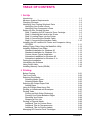
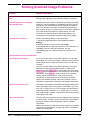
3 Using the HP LaserJet Companion
Before Using the HP LaserJet Companion . . . . .
Using the Direct Copy Feature . . . . . . . . . . .
Using the HP LaserJet Companion Copier Software
Scanning Documents to Your Computer . . . . . .
Using Fax Links . . . . . . . . . . . . . . . . . . .
Using Electronic Folders . . . . . . . . . . . . . .
Filing Items in Folders . . . . . . . . . . . . . .
Displaying Items in Folders . . . . . . . . . . .
Creating Folders . . . . . . . . . . . . . . . . .
Editing Scanned Images Using OCR Links . . . . .
Adjusting Copy and Scan Quality . . . . . . . . . .
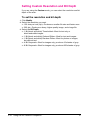
Setting Custom Resolution and Bit Depth . . . .
.
.
.
.
.
.
.
.
.
.
.
.
.
.
.
.
.
.
.
.
.
.
.
.
.
.
.
.
.
.
.
.
.
.
.
.
.
.
.
.
.
.
.
.
.
.
.
.
.
.
.
.
.
.
.
.
.
.
.
.
.
.
.
.
.
.
.
.
.
.
.
.
.
.
.
.
.
.
.
.
.
.
.
.
.
.
.
.
.
.
.
.
.
.
.
.
. 3-1
. 3-2
. 3-4
. 3-7
. 3-8
. 3-9
. 3-9
3-10
3-10
3-11
3-13
3-14
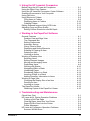
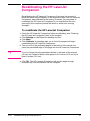
4 Working in the PaperPort Software
General Features . . . . . . . . . . . . . .
Desktop View and Page View . . . . . .
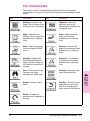
The Command Bar . . . . . . . . . . .
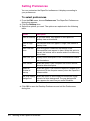
Setting Preferences . . . . . . . . . . .
Automatic Saving . . . . . . . . . . . .
Giving Titles to Items . . . . . . . . . .
Displaying and Hiding Elements . . . . .
Rotating or Flipping an Item . . . . . . .
Deleting an Item . . . . . . . . . . . . .
Undoing an Action . . . . . . . . . . . .
Working in Desktop View . . . . . . . . . .
Selecting Items . . . . . . . . . . . . .
Editing Scanned Images . . . . . . . . .
Moving and Arranging Items . . . . . . .
Duplicating Items . . . . . . . . . . . .
Working with Stacks . . . . . . . . . . .
Navigating Within a Stack . . . . . . . .
Unstacking Pages . . . . . . . . . . . .
Reordering Pages in a Stack . . . . . .
Inserting a Page in a Stack . . . . . . .
Adding Summary Information to Items .
Working in Page View . . . . . . . . . . . .
Changing the Display Size of an Item . .
Panning an Item . . . . . . . . . . . . .
Inverting an Image . . . . . . . . . . . .
The PaperPort Viewer . . . . . . . . . . . .
Obtaining Copies of the PaperPort Viewer
.
.
.
.
.
.
.
.
.
.
.
.
.
.
.
.
.
.
.
.
.
.
.
.
.
.
.
.
.
.
.
.
.
.
.
.
.
.
.
.
.
.
.
.
.
.
.
.
.
.
.
.
.
.
.
.
.
.
.
.
.
.
.
.
.
.
.
.
.
.
.
.
.
.
.
.
.
.
.
.
.
.
.
.
.
.
.
.
.
.
.
.
.
.
.
.
.
.
.
.
.
.
.
.
.
.
.
.
.
.
.
.
.
.
.
.
.
.
.
.
.
.
.
.
.
.
.
.
.
.
.
.
.
.
.
.
.
.
.
.
.
.
.
.
.
.
.
.
.
.
.
.
.
.
.
.
.
.
.
.
.
.
.
.
.
.
.
.
.
.
.
.
.
.
.
.
.
.
.
.
.
.
.
.
.
.
.
.
.
.
.
.
.
.
.
.
.
.
.
.
.
.
.
.
.
.
.
.
.
.
.
.
.
.
.
.
.
.
.
.
.
.
.
.
.
.
.
.
.
.
.
.
.
.
.
.
.
.
.
.
.
.
.
.
.
.
.
.
.
.
.
.
.
.
.
.
.
.
.
.
.
.
.
.
.
.
.
.
.
.
.
.
.
.
.
.
.
.
.
.
.
.
.
.
.
.
.
.
.
.
.
.
.
.
.
.
.
.
.
.
.
.
.
.
.
.
.
.
.
.
.
.
.
.
.
.
.
.
.
.
.
.
.
.
. 4-1
. 4-1
. 4-3
. 4-4
. 4-5
. 4-5
. 4-5
. 4-6
. 4-6
. 4-7
. 4-8
. 4-8
. 4-8
. 4-9
. 4-9
4-10
4-11
4-11
4-12
4-12
4-13
4-14
4-15
4-15
4-15
4-16
4-16
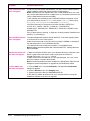
Check Here First . . . . . . . . . . . . . . .
HP LaserJet 6L Printer Operation Problems .
Printing a Self-Test Page . . . . . . . . .
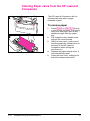
Clearing Paper Jams from Your Printer . .
Paper Will Not Feed into the Printer . . . .
Printer Messages . . . . . . . . . . . . .
HP LaserJet Companion Operation Problems
Scanner Will Not Scan . . . . . . . . . . .
.
.
.
.
.
.
.
.
.
.
.
.
.
.
.
.
.
.
.
.
.
.
.
.
.
.
.
.
.
.
.
.
.
.
.
.
.
.
.
.
.
.
.
.
.
.
.
.
.
.
.
.
.
.
.
.
.
.
.
.
.
.
.
.
.
.
.
.
.
.
.
.
.
.
.
.
.
.
.
.
.
.
.
.
.
.
.
.
.
.
.
.
.
.
.
.
5 Troubleshooting and Maintenance
Contents-2
5-1
5-2
5-2
5-3
5-4
5-5
5-8
5-8
EN