1
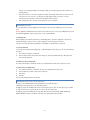
SD card, Total space and Available space
Lists the amount of space on any SD card installed in your WeWeb
and the amount you have used to store photos, videos, music, and other files.
Unmounts the SD card from your WeWeb so that you can format the card or safely remove it
Unmount SD card
when the unit is on. This setting is dimmed if there is no SD card installed, if you have already unmounted it, or if you
have mounted the SD card on your computer.
Format SD card Permanently erases everything on an SD card and prepares it for use with your WeWeb. You must
unmount an SD card before you can format it.
Internal storage, Available space The amount of internal storage used by the operating system, its components,
applications (including those you downloaded there), and their permanent and temporary data.
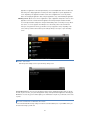
LANGUAG E & KEYBOARD SETTINGS
Use the Language & Keyboard settings to select the language for the text and for configuring the onscreen keyboard,
including words that you’ve added to its dictionary.
Opens the Language screen, where you can select the language to use for the text.
Select language
Select input method You can select the input method to use for typing the text.
Android Keyboard settings screen
The correction and capitalization features affect only the English version of the keyboard.
Auto-capitalization
Check to have the onscreen keyboard automatically capitalize the first letter of the first word
after a period, the first word in a text field, and each word in name fields.
Input languages
Opens the Input Languages screen, where you can check the languages you want to have
available when using the onscreen keyboard.
Quick fixes
Check to automatically correct some common misspellings as you type.
Show suggestions
Auto-complete
Check to show suggested words in a strip above the onscreen keyboard as you type.
Check to automatically enter a suggested word, highlighted in orange in the strip above the
keyboard, when you enter a space or punctuation.
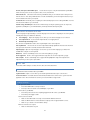
DATE & TIME
Use the Date & Time settings to set date, time zone, time, time format, date format.
ABOUT MACHINE
About Machine includes information about your WeWeb.
Legal information Opens a screen where you can obtain legal information about open source licenses.
Version information Lists details about the model number, Android version, Kernel version, system version and
application version. These information are useful if you need to work with our support team.
Troubli ng s hooti ng
1.No signal on the HDTV
•
Check if the HDMI cable is securely connected.
•
Check if you have selected the correct HDMI input on your HDTV.
2.Cannot turn on your WeWeb.
•
Check if the power connector has completely plugged into the DC socket of your WeWeb.
•
Check if the power supply is stable.
3.Cannot connect to network
•
Make sure the network cable is securely connected and the Ethernet works well.
•
Make sure Wi-Fi network is connected and the security key for the encrypted network is correct.
•
Make sure you select the correct IP address settings.
4.Remote control does not respond.
•
Make sure the batteries are good.