1
Normal
display
Reverse
display
4-5 Change the ℃, ℉ unit
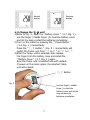
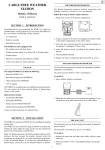
1)Refer to Fig. 3 , open the " Battery Cover " ( 3-7, Fig. 1 ),
use the finger ( middle finger ) to hold the battery cover
and let the snap contact the batteries completely.
2)Turn on the meter by pressing the " Power Button "
( 3-3, Fig. 1 ) momentarily.
Press the " ℃, ℉ Button " ( Fig. 3 ) momentarily will
switch the Temp. unit from " ℃ to ℉ " or " ℉ to ℃ ".
3)After the Temp. unit is selected, then release
the finger from the battery snap and install the
" Battery Cover " ( 3-7, Fig. 1 ) again..
Now the Temp. unit is selected and with default.
If power on the meter again, the selected Temp.
unit will present.
℃, ℉ Button
Fig. 3
Use the finger ( middle
finger ) to hold the
battery cover and let the
snap contact the
batteries completely.
7