1
(1) Setting in MHz
For setting 2450MHz, input the following data.
“2456M”CR
In this case, all the data below 100KHz is set to “0”.
(2) Setting in KHz
For setting 2450002KHz, input the following data.
“2456002K”CR
Also the following expression is allowed.
“2456002”CR
7-3-2. READ command
By entering “READ”CR, the currently set frequency is output.
“READ”CR is entered, the response is as shown below.
“ffffffffKHz”CR LF
“fffffff” is the frequency of currently outputting in KHz unit.
7-3-3. Caution for setting data consecutively
In case of switching frequency at high speed, data may drop out because the PCK3GF-1 does not perform
flow control. Upon completion of processing by sending a frequency setting command in 6-3-1, the prompt
“*” is returned; therefore, confirm the receiving of this prompt, and then send the next frequency setting
command.
8. Control by SPI serial data
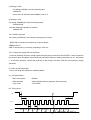
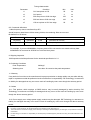
How to set using SPI interface is explained below.
8-1. SPI specification
Max. clock speed
500KHz
Data bits width
24bits (22bits frequency data bits, 2bits reserved )
Logic Level
3.3V CMOS
8-2. Timing chart
t1
/CS
t2
t5
CLK
t4
t3
SDI
D23
D22
D21
D20
D19
D18
8
D19
D2
D1
D0
DST 2012-7-11 REV1.2