1
MAY 2006
LGB1001A
LGB1002A
LGB1003A
8-, 16-, and 24-Port 1000BASE-TX L2
Managed Ethernet Switches
CUSTOMER
SUPPORT
INFORMATION
Order toll-free in the U.S.: Call 877-877-BBOX (outside U.S. call 724-746-5500)
FREE technical support 24 hours a day, 7 days a week: Call 724-746-5500 or fax 724-746-0746
Mailing address: Black Box Corporation, 1000 Park Drive, Lawrence, PA 15055-1018
Web site: www.blackbox.com • E-mail: [email protected]
FCC AND IC RFI STATEMENTS/CE NOTICE/CAUTION
FEDERAL COMMUNICATIONS COMMISSION
AND
INDUSTRY CANADA
RADIO FREQUENCY INTERFERENCE STATEMENTS
This equipment generates, uses, and can radiate radio-frequency energy, and if not installed and used
properly, that is, in strict accordance with the manufacturer’s instructions, may cause interference to radio
communication. It has been tested and found to comply with the limits for a Class A computing device in
accordance with the specifications in Subpart B of Part 15 of FCC rules, which are designed to provide
reasonable protection against such interference when the equipment is operated in a commercial
environment. Operation of this equipment in a residential area is likely to cause interference, in which
case the user at his own expense will be required to take whatever measures may be necessary to correct
the interference.
Changes or modifications not expressly approved by the party responsible for compliance could void the user’s
authority to operate the equipment.
This digital apparatus does not exceed the Class A limits for radio noise emission from digital apparatus set out in the Radio
Interference Regulation of Industry Canada.
Le présent appareil numérique n’émet pas de bruits radioélectriques dépassant les limites applicables aux appareils numériques
de la classe A prescrites dans le Règlement sur le brouillage radioélectrique publié par Industrie Canada.
EUROPEAN UNION DECLARATION OF CONFORMITY
This equipment complies with the requirements of the European EMC Directive 89/336/EEC.
CAUTION
Circuit devices are sensitive to static electricity, which can damage their delicate
electronics. Dry weather conditions or walking across a carpeted floor may cause you
to acquire a static electrical charge.
To protect your switch, always:
• Touch your computer’s metal chassis to ground the static electrical charge before
you pick up the switch.
• Pick up the switch by holding it on the left and right edges only.
1
8-, 16-, AND 24-PORT 1000BASE-TX L2 MANAGED ETHERNET SWITCHES
INSTRUCCIONES DE SEGURIDAD (Normas Oficiales Mexicanas Electrical Safety Statement)
1. Todas las instrucciones de seguridad y operación deberán ser leídas antes de que el aparato eléctrico sea operado.
2. Las instrucciones de seguridad y operación deberán ser guardadas para referencia futura.
3. Todas las advertencias en el aparato eléctrico y en sus instrucciones de operación deben ser respetadas.
4. Todas las instrucciones de operación y uso deben ser seguidas.
5. El aparato eléctrico no deberá ser usado cerca del agua—por ejemplo, cerca de la tina de baño, lavabo, sótano
mojado o cerca de una alberca, etc..
6. El aparato eléctrico debe ser usado únicamente con carritos o pedestales que sean recomendados por el fabricante.
7. El aparato eléctrico debe ser montado a la pared o al techo sólo como sea recomendado por el fabricante.
8. Servicio—El usuario no debe intentar dar servicio al equipo eléctrico más allá a lo descrito en las instrucciones de
operación. Todo otro servicio deberá ser referido a personal de servicio calificado.
9. El aparato eléctrico debe ser situado de tal manera que su posición no interfiera su uso. La colocación del aparato
eléctrico sobre una cama, sofá, alfombra o superficie similar puede bloquea la ventilación, no se debe colocar en
libreros o gabinetes que impidan el flujo de aire por los orificios de ventilación.
10. El equipo eléctrico deber ser situado fuera del alcance de fuentes de calor como radiadores, registros de calor, estufas
u otros aparatos (incluyendo amplificadores) que producen calor.
11. El aparato eléctrico deberá ser connectado a una fuente de poder sólo del tipo descrito en el instructivo de
operación, o como se indique en el aparato.
12. Precaución debe ser tomada de tal manera que la tierra fisica y la polarización del equipo no sea eliminada.
13. Los cables de la fuente de poder deben ser guiados de tal manera que no sean pisados ni pellizcados por objetos
colocados sobre o contra ellos, poniendo particular atención a los contactos y receptáculos donde salen del aparato.
14. El equipo eléctrico debe ser limpiado únicamente de acuerdo a las recomendaciones del fabricante.
15. En caso de existir, una antena externa deberá ser localizada lejos de las lineas de energia.
16. El cable de corriente deberá ser desconectado del cuando el equipo no sea usado por un largo periodo de tiempo.
17. Cuidado debe ser tomado de tal manera que objectos liquidos no sean derramados sobre la cubierta u orificios de
ventilación.
18. Servicio por personal calificado deberá ser provisto cuando:
A: El cable de poder o el contacto ha sido dañado; u
B: Objectos han caído o líquido ha sido derramado dentro del aparato; o
C: El aparato ha sido expuesto a la lluvia; o
D: El aparato parece no operar normalmente o muestra un cambio en su desempeño; o
E: El aparato ha sido tirado o su cubierta ha sido dañada.
2
TRADEMARKS USED IN THIS MANUAL
TRADEMARKS USED IN THIS MANUAL
ST is a registered trademark of AT&T.
BLACK BOX and the Double Diamond logo are registered trademarks of BB Technologies, Inc.
VT100 is a trademark of Digital Equipment Corporation.
DB2 and IBM are registered trademarks of International Business Machines Corporation.
Linux is a registered trademark of Linus Torvalds.
Internet Explorer, Microsoft, Windows, and Windows NT are registered trademarks of Microsoft Corporation.
Netscape is a registered trademark of Netscape Communications Corporation.
Telnet is a trademark of Telnet Communications, Inc.
UNIX is a registered trademark of UNIX System Laboratories, Inc.
Any other trademarks mentioned in this manual are acknowledged to be the property of the trademark owners.
3
8-, 16-, AND 24-PORT 1000BASE-TX L2 MANAGED ETHERNET SWITCHES
Contents
Chapter
Page
1. Specifications ......................................................................................................................................................7
1.1 Hardware...................................................................................................................................................7
1.2 Management Software .............................................................................................................................8
1.3 Null-Modem Cable ...................................................................................................................................9
2. Overview............................................................................................................................................................10
2.1 Introduction ...........................................................................................................................................10
2.2 What’s Included......................................................................................................................................11
2.3 Hardware Description............................................................................................................................12
2.3.1 8-Port Version............................................................................................................................12
2.3.2 16-Port Version..........................................................................................................................14
2.3.3 24-Port Version..........................................................................................................................16
2.4 Optional SFP Fiber Transceiver Modules.............................................................................................18
3. Installation ........................................................................................................................................................19
3.1 Installation Instructions .........................................................................................................................19
3.2 Installing the Chassis in a 19-Inch Wiring Closet Rail .........................................................................20
3.3 Cabling Requirements ...........................................................................................................................21
3.3.1 Twisted-Pair Ports......................................................................................................................21
3.3.2 Fiber Transceiver Ports .............................................................................................................21
3.3.3 Switch Cascading ......................................................................................................................21
3.4 Configuring the Management Agent....................................................................................................25
3.4.1 Via the Serial RS-232 Console Port..........................................................................................26
3.4.2 Via the Ethernet Port................................................................................................................28
3.5 IP Address Assignment...........................................................................................................................29
3.5.1 IP Address..................................................................................................................................29
3.5.2 Subnet Mask ..............................................................................................................................30
3.5.3 Default Gateway ........................................................................................................................31
3.5.4 DNS............................................................................................................................................31
3.6 Typical Applications ...............................................................................................................................31
3.6.1 Remote Site/Central Site Connection....................................................................................32
3.6.2 Peer-to-Peer Network Connection...........................................................................................33
3.6.3 Office Network Connection.....................................................................................................33
4. Web-Based Management..................................................................................................................................34
4.1 Home Overview ......................................................................................................................................35
4.2 System ....................................................................................................................................................35
4.2.1 System Information ..................................................................................................................35
4.2.2 IP Configuration .......................................................................................................................37
4.2.3 Time Configuration..................................................................................................................38
4.2.4 Account Configuration.............................................................................................................40
4.2.5 Management Policy ..................................................................................................................41
4.2.6 Virtual Stack ..............................................................................................................................42
4.3 Port Configuration .................................................................................................................................43
4
CONTENTS
Chapter
4.4
4.5
4.6
4.7
4.8
4.9
4.10
4.11
4.12
4.13
4.14
4.15
4.16
4.17
Page
4.3.1 Status..........................................................................................................................................43
4.3.2 Configuration............................................................................................................................46
4.3.3 Simple Counter.........................................................................................................................47
4.3.4 Detail Counter ..........................................................................................................................48
Mirror......................................................................................................................................................50
Bandwidth Management........................................................................................................................51
Quality of Service (QoS) Configuration...............................................................................................52
4.6.1 Per Port Priority ........................................................................................................................53
4.6.2 VLAN Tag Priority.....................................................................................................................53
4.6.3 IP ToS Classification .................................................................................................................54
4.6.4 IP TCP/UDP Port Classification..............................................................................................55
4.6.5 IP DiffServ Classification ..........................................................................................................57
SNMP Configuration..............................................................................................................................57
IGMP Snooping......................................................................................................................................59
Maximum Packet Length ......................................................................................................................60
DHCP Boot .............................................................................................................................................61
VLAN.......................................................................................................................................................61
4.11.1 VLAN Mode ..............................................................................................................................62
4.11.2 Tag-Based Group.......................................................................................................................63
4.11.3 Port-Based Group .....................................................................................................................64
4.11.4 Tag Rule.....................................................................................................................................65
MAC Table ..............................................................................................................................................67
4.12.1 MAC Table Information ...........................................................................................................67
4.12.2 MAC Table Maintenance..........................................................................................................68
4.12.3 Static Forward ...........................................................................................................................68
4.12.4 Static Filter ................................................................................................................................69
4.12.5 MAC Alias ..................................................................................................................................69
GVRP Configuration ..............................................................................................................................70
4.13.1 GVRP Config .............................................................................................................................71
4.13.2 GVRP Counter ..........................................................................................................................72
4.13.3 GVRP Group Information........................................................................................................73
STP Configuration .................................................................................................................................74
4.14.1 STP Status..................................................................................................................................74
4.14.2 STP Configuration....................................................................................................................75
4.14.3 STP Port Configuration............................................................................................................77
Trunking Configuration ........................................................................................................................79
4.15.1 Port Setting/Status ...................................................................................................................80
4.15.2 Aggregator View........................................................................................................................81
4.15.3 LACP System Priority................................................................................................................82
802.1x Configuration ............................................................................................................................82
4.16.1 802.1x State Setting ..................................................................................................................85
4.16.2 802.1x Mode Setting.................................................................................................................85
4.16.3 Port Security Management.......................................................................................................86
4.16.4 Parameter Setting .....................................................................................................................86
Alarm Configuration..............................................................................................................................88
4.17.1 Events Configuration................................................................................................................88
4.17.2 Email/SMS Configuration .......................................................................................................89
5
8-, 16-, AND 24-PORT 1000BASE-TX L2 MANAGED ETHERNET SWITCHES
Contents (continued)
Chapter
Page
4.18 Configuration .........................................................................................................................................90
4.18.1 Save/Restore .............................................................................................................................90
4.18.2 Config File .................................................................................................................................91
4.19 Diagnostics ..............................................................................................................................................91
4.19.1 Diag............................................................................................................................................91
4.19.2 Loopback Test ...........................................................................................................................92
4.19.3 Ping Test ....................................................................................................................................92
4.20 TFTP Server ............................................................................................................................................92
4.21 Log...........................................................................................................................................................93
4.22 Firmware Upgrade .................................................................................................................................93
4.23 Reboot ....................................................................................................................................................94
4.24 Logout ....................................................................................................................................................94
5. CLI Management..............................................................................................................................................95
5.1 Login .......................................................................................................................................................95
5.2 Commands..............................................................................................................................................95
5.2.1 Global CLI Commands.............................................................................................................96
5.2.2 Local CLI Commands ............................................................................................................101
6. Troubleshooting .............................................................................................................................................177
6.1 Resolving a No Link Condition...........................................................................................................177
6.2 Problems/Solutions .............................................................................................................................177
6.3 Calling Black Box .................................................................................................................................178
6.4 Shipping and Packaging ......................................................................................................................178
6
CHAPTER 1: Specifications
1. Specifications
1.1 Hardware
Standards: IEEE 802.3, 802.3ab, 802.3z, 802.3u, 802.1v protocol-based VLAN classification, 802.3x port-based
network access control, 802.1q tag-based VLAN, 802.1d Spanning Tree Protocol, 802.1w Rapid Spanning Tree
Protocol, 802.1p Class of Service with 2-level priority queuing, 802.1ad port trunking with flexible load
distribution and failover function
Compatible Fiber Transceiver Modules: Ports 7 and 8, or 15 and 16 or 23 and 24 are TP/SFP fiber dual-media
ports with autodetection function; Optional SFP module (LGB200C-MLC, LGB200C-SLC10, LGB200C-SLC30,
LGB204C, LGB205C) supports LC or BiDi LC transceiver
Network Interface: 10/100/1000-Mbps Gigabit twisted-pair (ports 1–8 for LGB1001A, ports 1–16 for
LGB1002A, or ports 1–24 for LGB1003A), or 1000BASE-LX duplex multimode, duplex single-mode, or singlestrand single-mode LC or WDM (BiDi LC) (ports 7–8 for LGB1001A, 15–16 for LGB1002A, or 23–24 for
LGB1003A)
Transmission Mode: 10-/100-Mbps support for full or half-duplex; 1000-Mbps support for full duplex only
Speed: 10/100/1000 Mbps for twisted pair; 1000 Mbps for fiber
Forwarding/Filtering Packet Rate: 1,488,000 pps at 1000 Mbps; 148,800 pps at 100 Mbps; 14,880 pps at 10 Mbps
MAC Address and Self-Learning: 8K MAC address, 4K VLAN table entries
Buffer Memory: Embedded frame buffer: LGB1001A: 144 KB; LGB1002A: 272 KB; LGB1003A: 400 KB
Flow Control: IEEE 802.3x compliant for full duplex; Backpressure flow control for half-duplex
Cable Type and Maximum Length: Twisted-pair: CAT5 UTP cable, up to 328 feet (100 m) (ports 1–8 for
LGB1001A, ports 1–16 for LGB1002A, or ports 1–24 for LGB1003A);
Single-mode single-strand fiber, up to 12.4 miles (20 km): 1000BASE-LX single-strand single-mode WDM (BiDi)
SFP for LGB204C and LGB205C (slots 7 and 8 for LGB1001A, 15 and 16 for LGB1002A, or 23 and 24
for LGB1003A);
Multimode fiber, up to 1804.4 feet (550 m) for LGB200C-MLC;
Single-mode duplex fiber, up to 6.2 miles (10 km) for LGB200C-SLC10;
Single-mode duplex fiber up to 18.6 miles (30 km) for LGB200C-SLC30
User Controls: (1) Reset button
Connectors: LGB1001A: (8) RJ-45, (2) LC;
LGB1002A: (16) RJ-45, (2) slots for fiber media converter modules;
LGB1003A: (24) RJ-45, (2) slots for fiber media converter modules;
LGB200C-MLC, LGB200C-SLC10, LGB200C-SLC30: (2) LC;
LGB204C, LGB205C: (1) LC
Indicators: All: System LEDs: (1) Power, (1) CPU;
LGB1001A: (8) 10/100/1000 Mbps TP and (8) Link/Act for ports 1–8, (2) SFP (Link/Act) for ports 7–8;
LGB1002A: (16) 10/100/1000 Mbps TP and (16) Link/Act for ports 1–16, (2) SFP (Link/Act) for ports 15–16;
LGB1003A: (24) 10/100/1000 Mbps TP and (24) Link/Act for ports 1–24, (2) SFP (Link/Act) for ports 23–24
7
8-, 16-, AND 24-PORT 1000BASE-TX L2 MANAGED ETHERNET SWITCHES
Temperature Tolerance: 32 to 104°F (0 to 40°C)
Humidity: 5 to 90%, noncondensing
Power: 100–240 VAC, 50–60 Hz, 13 W
Size: LGB1001A: 1.8"H x 8.5"W x 5.2"D (4.6 x 21.6 x 13.2 cm);
LGB1002A, LGB1003A: 1.8"H x 17.4"W x 8.2"D (4.6 x 44.2 x 20.8 cm)
1.2 Management Software
System Configuration: Autonegotiation support on 10/100/1000BASE-TX ports; Web browser or console
interface can set transmission speed (10/100/1000 Mbps) and operation mode (full/half-duplex) on each
port, enable/disable any port, set VLAN group, set trunk connection
Management Agent: SNMP support; MIB II, Bridge MIB, RMON MIB
Spanning Tree Algorithm: IEEE 802.1d
VLAN Function: Port-based/802.1q tagged allows up to 256 VLANs in one switch
Trunk Function: Port trunk connections allowed
IGMP: IP multicast filtering by passively snooping on the IGMP query
Bandwidth Control: Supports by-port Egress/Ingress rate control
Quality of Service (QoS): Referred to as Class of Service (CoS)by the IEEE 802.1p standard; classification of
packet priority can be based on either a VLAN tag on a packet or user-defined per-port QoS; Two queues per
port; IP ToS classification, TCP/UDP port classification, IP DiffServe classification
Port Security: Limited number of MAC addresses learned per port; static MAC addresses in the filtering table
stay in the filtering table
Internetworking Protocol: Bridging: 802.1d spanning tree; IP Multicast: IGMP snooping; Maximum of 256
active LANs and IP multicast sessions
Network Management: (1) RS-232 port as local control console, Telnet™ remote-control console; SNMP agent:
MIB-2 (RFC 1213), Bridge MIB (RFC 1493), RMON MIB (RFC 1757)-statistics; VLAN MIN (802.1q); Web
browser support based on HTTP server and CGI parser TFTP software-upgrade capability
8
CHAPTER 1: Specifications
1.3 Null-Modem Cable
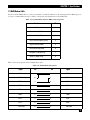
Use the included DB9 cable to connect a terminal or terminal emulator to the managed switch’s RS-232 port to
access the command-line interface. Table 1-1 shows the pin assignments for the DB9 cable.
Table 1-1. Command-line interface DB9 connector pinout.
Function
Pin
Carrier (CD)
1
Receive Data (RXD)
2
Transmit Data (TXD)
3
Data Terminal Ready (DTR)
4
Signal Ground (GND)
5
Data Set Ready (DSR)
6
Request To Send (RTS)
7
Clear To Send (CTS)
8
Table 1-2 shows the pinout for the null-modem cable.
Table 1-2. Null-modem cable pinout.
Signal
Pin
Pin
Signal
CD
1
4
DTR
DSR
6
1
CD
DTR
4
6
DSR
RXD
2
3
TXD
TXD
3
2
RXD
GND
5
5
GND
RTS
7
8
CTS
CTS
8
7
RTS
Not used
9
9
Not used
9
8-, 16-, AND 24-PORT 1000BASE-TX L2 MANAGED ETHERNET SWITCHES
2. Overview
2.1 Introduction
The 8-, 16-, and 24-Port 1000BASE-TX L2 Managed Ethernet Switches (LGB1001A, LGB1002A, and
LGB1003A) are standard switches that meet all IEEE 802.3/u/x/z Gigabit and Fast Ethernet specifications.
Manage the switch via an async console directly connected to the switch’s RS-232 port, or through an Ethernet
port using CLI or SNMP.
This standalone off-the-shelf switch provides comprehensive hardware features. Each switch has (depending on
the model) 8, 16, or 24 RJ-45 twisted-pair ports and two STP fiber transceiver module slots (for STP fiber [LC or
BiDi LC] modules). The 1000-Mbps SFP fiber transceiver is used for high-speed connection expansion. These
ports autodetect whether the 10/100/1000-Mbps TP or the 1000-Mbps SFP fiber port is used. On the 8-port
switch, ports 7 and 8 can be twisted-pair or Ethernet. On the 16- and 24-port switches, these option ports are 15
and 16 or 23 and 24. Multimode or single-mode fiber transceiver modules plug into these two ports. (See
Section 2.4 for more information about the fiber transceiver modules.)
The LGB1001A has a 144 KB on-chip frame buffer, the LGB1002A features a 272 KB buffer, and the LGB1003A
uses a 400 KB buffer. All the switches feature jumbo frame support, programmable classifier for QoS (Layer
4/Multimedia), 8K MAC address and 4K VLAN support (IEEE 802.1a), per-port shaping, policing, and
Broadcast Storm Control, IEEE 802.1q-in-q nested VLAN support, full-duplex flow control (IEEE 802.3x) and
half-duplex backpressure, and extensive front-panel diagnostic LEDs.
Software features include port status and configuration, per-port traffic monitoring counters, system
information snapshot upon login, port mirroring, static trunk, and 802.1q VLAN. The switch also supports user
management and limits three users to login to enhance security. The maximum packet length can be up to
9208 bytes for a jumbo frame application. More features include DHCP broadcasting suppression to avoid a
suspended or crashed network, sending trap event for monitored events, default configuration that can be
restored to overwrite the current configuration working on either a Web browser or CLI, online plug/unplug
SFP modules, port mirror function with Ingress traffic, rapid spanning tree (802.1w RSTP), 802.1x port security
on a VLAN, user management, and only the first login administrator can configure the device.
With the SNMP agent, the network administrator can log in to the switch to monitor, configure, and control
each port’s activity. The overall network management is enhanced and the network efficiency is also improved
to accommodate high-bandwidth applications. In addition, the switch features comprehensive and useful
functions such as QoS (Quality of Service), Spanning Tree, VLAN, Port Trunking, Bandwidth Control, Port
Security, SNMP/RMON, and IGMP Snooping capability via the intelligent software. These functions are
described below and on the next page. The switch is suitable for both metro-LAN and office applications.
• QoS complies with the IEEE 802.1p standard. There are two priority queue and packet transmission
schedules.
• Spanning Tree complies with IEEE 802.1d and IEEE 802.1w (RSTP: Rapid Spanning Tree Protocol)
standards.
• The switch also supports port-based VLAN and IEEE 802.1a tag VLAN, with 256 active VLANs and VLAN
IDs from 1–4094. It also handles static port trunking and IEEE 802.3ad LACP port trunking.
• Supports Ingress and Egress per port bandwidth control.
10
CHAPTER 2: Overview
• Port Security: Support allowed, denied forwarding, and port security with MAC address.
• SNMP/RMON: SNMP agent and RMON MIB. In the device, the SNMP agent is client software that’s
operating over the SNMP protocol used to receive the command from an SNMP manager (server site) and
echo the corresponding data (MIB object). The SNMP agent actively issues TRAP information.
• RMON is the abbreviation for Remote Network Monitoring and is a branch of the SNMP MIB.
• The device supports MIB-2 (RFC 1213), Bridge MIB (RFC 1493), RMON MIB (RFC 1757)-statistics Group
1, 2, 3, and 9, Ethernet-like MIB (RFC 1643), and Ethernet MIB (RFC 1643).
• IGMP Snooping: Supports IGMP version 2 (RFC 2236): IGMP snooping establishes the multicast groups
that forward multicast packets to the member ports. This avoids wasting the bandwidth while IP multicast
packets are running over the network.
2.2 What’s Included
Your package should contain the following items. If anything is missing or damaged, please contact Black Box
at 724-746-5500.
• 8-, 16-, or 24-Port 1000BASE-TX L2 Managed Ethernet Switch
• CD-ROM containing this user’s manual in PDF format
• A printed Quick Start Guide
• AC power cord
• DB9 female to DB9 female RS-232 cable
• Rackmount kit (16- and 24-port switches only)
• (4) rubber feet
11
8-, 16-, AND 24-PORT 1000BASE-TX L2 MANAGED ETHERNET SWITCHES
2.3 Hardware Description
2.3.1 8-PORT VERSION
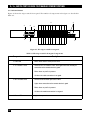
Figure 2-1 shows the 8-port switch. The numbered components in the figure are described in Table 2-1.
③
②
①
⑥
④
⑦
⑧
⑤
Figure 2-1. The 8-port switch’s front panel.
Table 2-1. The 8-port switch’s front-panel components.
Component
Description
① Power LED
Lights when power is on.
② SFP Link/Act LEDs
SFP7 and SFP8 fiber port status LEDs.
Lights when connection to the remote device is good.
Blinks when any traffic is present.
Off when the module connection isn’t good.
③ CPU LED
Blinks when there is activity on the CPU.
④ TP Link/ACT LEDs
There are eight TP Link/ACT LEDs. Each lights when the twisted-pair
connection to the remote device is good.
Blinks when any traffic is present.
Off when the cable connection isn’t good.
⑤ Gigabit Ethernet ports
12
Eight 10/100/1000-Mbps autosensing ports.
CHAPTER 2: Overview
Table 2-1 (continued). The 8-port switch’s front-panel components.
Component
Description
⑥ 10/100/1000 TP LEDs
There are eight LEDs. Each lights green when 1000-Mbps speed is active.
Lights amber when 100-Mbps speed is active.
Off when 10-Mbps speed is active.
⑦ SFP Fiber Ports
SFP fiber port module slots.
⑧ Reset button
Resets the management system.
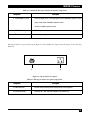
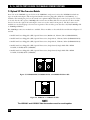
The 8-port switch’s rear panel is shown in Figure 2-2. The numbered components in the figure are described in
Table 2-2.
⑨
⑩
Figure 2-2. 8-port switch’s rear panel.
Table 2-2. The 8-port switch’s rear panel components.
Component
Description
⑨ DB9 connector
RS-232 serial console port for configuration or management.
⑩ Power connector
Connects to a 100–240-VAC, 50/60-Hz AC power line.
13
8-, 16-, AND 24-PORT 1000BASE-TX L2 MANAGED ETHERNET SWITCHES
2.3.2 16-PORT VERSION
Figure 2-3 shows the 16-port switch. The numbered components in the figure are described in Table 2-3.
⑦
⑥
②
①
③
④
⑧
⑤
⑥
Figure 2-3. The 16-port switch’s front panel.
Table 2-3. The 16-port switch’s front-panel components.
Component
Description
① CPU LED
Blinks when there is activity on the CPU.
② TP Link/ACT LEDs
There are 16 TP Link/ACT LEDs. Each lights when the twisted-pair
connection to the remote device is good.
Blinks when any traffic is present.
Off when the cable connection is not good.
③ SFP Link/Act LEDs
SFP15 and SFP16, fiber port status LEDs.
Lights when connection to the remote device is good.
Blinks when any traffic is present.
Off when the module connection is not good
④ Power LED
Lights when power is on.
⑤ 10/100/1000 TP LEDs
There are 16 LEDs. Each lights green when 1000-Mbps speed is active.
Lights amber when 100-Mbps speed is active.
Off when 10-Mbps speed is active.
⑥ Gigabit Ethernet ports
14
16 10/100/1000-Mbps autosensing ports.
CHAPTER 2: Overview
Table 2-3 (continued). The 16-port switch’s front-panel components.
Component
Description
⑦ SFP Fiber Ports
SFP fiber port module slots.
⑧ Reset button
Resets the management system.
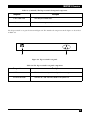
The 16-port switch’s rear panel is shown in Figure 2-4. The numbered components in the figure are described
in Table 2-4.
⑩
⑨
Figure 2-4. 16-port switch’s rear panel.
Table 2-4. The 16-port switch’s rear panel components.
Component
Description
⑨ DB9 connector
RS-232 serial console port for configuration or management.
⑩ Power connector
Connects to a 100–240-VAC, 50/60-Hz AC power line.
15
8-, 16-, AND 24-PORT 1000BASE-TX L2 MANAGED ETHERNET SWITCHES
2.3.3 24-PORT VERSION
Figure 2-5 shows the 24-port switch’s front panel. The numbered components in the figure are described in
Table 2-5.
⑦
⑥
②
①
③
④
⑧
⑤
⑥
Figure 2-5. The 24-port switch’s front panel.
Table 2-5. The 24-port switch’s front-panel components.
Component
Description
① CPU LED
Blinks when there is activity on the CPU.
② TP Link/ACT LEDs
There are 24 TP Link/ACT LEDs. Each lights when the twisted-pair
connection to the remote device is good.
Blinks when any traffic is present.
Off when the cable connection is not good.
③ SFP Link/Act LEDs
SFP23 and SFP24 fiber port status LEDs.
Lights when connection to the remote device is good.
Blinks when any traffic is present.
Off when the module connection is not good
④ Power LED
16
Lights when power is on.
CHAPTER 2: Overview
Table 2-5 (continued). The 24-port switch’s front-panel components.
Component
Description
⑤ 10/100/1000 TP LEDs
There are 24 LEDs. Each lights green when 1000-Mbps speed is active.
Lights amber when 100-Mbps speed is active.
Off when 10-Mbps speed is active.
⑥ Gigabit Ethernet ports
24 10/100/1000-Mbps autosensing ports.
Blinks when any traffic is present.
⑦ SFP Fiber Ports
SFP fiber port module slots.
⑧ Reset button
Resets the management system.
The 24-port switch’s rear panel is shown in Figure 2-6. The numbered components in the figure are described
in Table 2-6.
⑩
⑨
Figure 2-6. 24-port switch’s rear panel.
Table 2-6. The 24-port switch’s rear panel components.
Component
Description
⑨ DB9 connector
RS-232 serial console port for configuration or management.
⑩ Power connector
Connects to a 100–240-VAC, 50/60-Hz AC power line.
17
8-, 16-, AND 24-PORT 1000BASE-TX L2 MANAGED ETHERNET SWITCHES
2.4 Optional SFP Fiber Transceiver Modules
Ports 7–8 on the LGB1001A, ports 15–16 on the LGB1002A, and ports 23–24 on the LGB1003A include two
types of media: twisted-pair (TP) and optional small form factor pluggable (SFP) fiber (LC, BiDi LC, etc.)
modules. The twisted-pair ports are the switch’s two rightmost RJ-45 twisted-pair connectors (ports 7–8, 15–16,
or 23–24). For the fiber option, 1000-Mbps fiber transceiver modules slide into the switch’s two fiber module
slots (located to the right of the twisted-pair connectors on the switch’s front panel). The fiber transceiver
modules are used for high-speed connection expansion. The two fiber ports autodetect 10/100/1000-Mbps TP
or 1000-Mbps SFP fiber.
Five 1000-Mbps transceiver modules are available. These modules are described below and shown in Figures 2-7
and 2-8.
• Small Form Factor Pluggable (SFP) Optical Transceiver, Multimode, 850-nm, 550 m (LGB200C-MLC)
• Small Form Factor Pluggable (SFP) Optical Transceiver, Single-Mode, 1310-nm, 10 km (LGB200C-SLC10)
• Small Form Factor Pluggable (SFP) Optical Transceiver, Single-Mode, 1550-nm, 30 km (LGB200C-SLC30)
• Small Form Factor Pluggable (SFP) Optical Transceiver, Single-Strand, Single-Mode Fiber WDM
1550 TX/1310 RX, 20 km (LGB204C)
• Small Form Factor Pluggable (SFP) Optical Transceiver, Single-Strand, Single-Mode Fiber WDM
1310 TX/1550 RX, 20 km (LGB205C)
Figure 2-7. LGB200C-MLC, LGB200C-SLC10, or LGB200C-SLC30 module.
Figure 2-8. LGB204C or LGB205C module.
NOTE
The LGB204C and LGB205C fiber transceivers must be used together.
18
CHAPTER 3: Installation
3. Installation
3.1 Installation Instructions
CAUTION
Wear a grounding device to avoid damage from electrostatic discharge.
Be sure that the power switch is OFF before you connect the power cord to the power
source.
Installing Optional SFP Fiber Transceivers in the Switch
NOTE
If you do not plan to install SFP fiber transceivers in the switch’s ports 7–8, 15–16, or
23–24, skip this section.
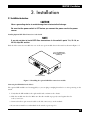
Slide the fiber transceiver module into one of the two open module slots in the switch as shown in Figure 3-1.
8-Port 1000BASE-TX L2
Managed Ethernet Switch
(LGB1001A)
SFP Fiber
Transceiver Module
Figure 3-1. Installing the optional SFP fiber transceiver module.
Connecting the SFP Module to the Chassis
The optional SFP modules are hot-swappable, so you can plug or unplug them before or after powering on the
switch.
1. Verify that the SFP module is the right model and conforms to the chassis.
2. Slide the module into the slot. Make sure that the module is properly seated against the slot
socket/connector.
3. Connect the fiber optic network cable to the LC connector(s) on the module.
4. If you want to install a second module in the switch, repeat steps 1–3.
19
8-, 16-, AND 24-PORT 1000BASE-TX L2 MANAGED ETHERNET SWITCHES
Installing the Rubber Feet
For the 8-port switch, install the rubber feet and place it on a desktop. For the 16- or 24-port switch, install the
rubber feet and place it on a desktop, or install the switch in the rack with mounting hardware (see Section
3.2).
TP Port and Cable Installation
1. The switch’s twisted-pair (TP) ports support MDI/MDI-X auto-crossover, so either type of cable (straightthrough or crossover) can be used for each TP port.
2. Use Category 5 grade RJ-45 TP cable to connect to a switch TP port at one end and a Gigabit device (for
example, a workstation or server) at the other end.
3. Repeat the above steps, as needed, for each RJ-45 port to be connected to a Gigabit 10/100/1000 TP
device.
The switch is now ready to operate.
Power On
The switch supports a 100–240-VAC, 50–60-Hz power supply. The power supply will automatically convert the
local AC power source to DC power. It does not matter whether any network device (such as a workstation or
server) or fiber transceiver module is plugged into the switch or not when powered on. After the power is on,
all LED indicators will light up immediately and then all LEDs except the power LED go off. This resets the
system.
Firmware Loading
After resetting, the bootloader will load the firmware into the memory. This will take about 30 seconds, then all
switch LEDs will flash once as the switch automatically performs a self-test.
3.2 Installing the Chassis in a 19-Inch Wiring Closet Rail
CAUTION
Allow proper spacing and air ventilation for the cooling fan on both sides of the
chassis.
Wear a grounding device for electrostatic discharge.
Only 16- and 24-port switches are rackmountable via the included rackmount kit.
1. Using two screws (included), attach the rackmount ears to the switch’s left and right sides. See Figure 3-2.
2. Line up the mounting holes on the switch assembly (the switch with rackmount ears installed) with the
mounting holes on a 19" wiring closet rack. Install two screws (included) to hold the switch in place in the
rack.
20
CHAPTER 3: Installation
Rackmount
brackets
19" rack
8-Port 1000BASE-TX L2
Managed Ethernet Switch
(LGB1001A)
Figure 3-2. Installing the switch chassis in a 19" rack.
3.3 Cabling Requirements
3.3.1 TWISTED-PAIR PORTS
For Fast Ethernet or Gigabit Ethernet twisted-pair (TP) connections, use CAT5 or CAT5e cable up to 328 feet
(100 m) long.
3.3.2 FIBER TRANSCEIVER PORTS
For Gigabit Ethernet fiber transceiver ports, use fiber optic cable as described below.
• 62.5/125-µm multimode Gigabit fiber with multimode LC SFP module (LGB200C-MLC).
• 9/125-µm single-mode Gigabit fiber with single-mode LC SFP module (LGB200C-SLC10 or
LGB200C-SLC30).
• 9/125-µm single-strand single-mode Gigabit fiber with BiDi LC 1310-nm SFP module (LGB204C).
• 9/125-µm single-strand single-mode Gigabit fiber with BiDi LC 1550-nm SFP module (LGB205C).
3.3.3 SWITCH CASCADING
Theoretically, the switch partitions the collision domain for each port in switch cascading so that you may uplink an unlimited number of switches. In practice, the network extension (cascading levels and overall
diameter) must comply with the IEEE 802.3/802.3u/802.3z and other 802.1 series protocol specifications,
which limit the timing requirement from physical signals defined by the Media Access Control (MAC) and PHY
802.3 series specification, and timer from some OSI layer 2 protocols such as 802.1d, 802.1q, and LACP.
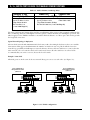
The fiber, TP cables, and devices’ bit-time (round-trip) delay are as described in Table 3-1.
21
8-, 16-, AND 24-PORT 1000BASE-TX L2 MANAGED ETHERNET SWITCHES
Table 3-1. Cable’s bit-time (round-trip) delay.
1000BASE-X TP, Fiber
Round-Trip Delay: 4096
Cat. 5 TP Wire: 11.12/m
Fiber Cable: 10.10/m
Bit Time Unit: 1 ns
(1 sec./1000 Mega bit)
100BASE-TX TP
100BASE-FX Fiber
Round-Trip Delay: 512
Cat. 5 TP Wire: 1.12/m
Fiber Cable: 1.0/m
TP to Fiber Converter: 56 kbps
Bit Time Unit: 0.01 ms (1 sec./100 Mega bit)
The sum of all elements’ bit-time delay and the overall bit-time delay of wires/devices must be within the bittime (round-trip) delay in a half-duplex network segment (collision domain). For full-duplex operation, this
will not apply. Use the TP-Fiber module to extend the TP node distance over fiber optic cable and to provide
the long-haul connection.
Typical Network Topology in Deployment
A hierarchical network with minimum switch levels may reduce the timing delay between the server and the
client station. This approach will minimize the number of switches in any one path. It will also lower the
network loop possibility and will improve network efficiency. If more than two switches are connected in the
same network, select one switch as the Level 1 switch and connect all other switches to it at Level 2. We
recommend that you connect a server/host to the Level 1 switch.
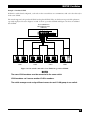
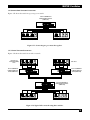
Example 1: Same LAN.
All switch ports are in the same local area network. Every port can access each other (see Figure 3-3).
8-Port 1000BASE-TX L2
Managed Ethernet Switch
(LGB1001A)
8-Port 1000BASE-TX L2
Managed Ethernet Switch
(LGB1001A)
PCs
PCs
Figure 3-3. No VLAN configuration.
22
Server/host
CHAPTER 3: Installation
Example 2: Port-Based VLAN
If VLAN is enabled and configured, each node in the network that can communicate with each other directly is
in the same VLAN.
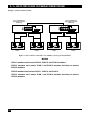
The switch supports both port-based VLAN and tag-based VLAN. They are different in practical deployment,
especially in physical location. Figures 3-4 and 3-5 show a port-based VLAN and Figure 3-6 shows an attributebased VLAN.
8-Port 1000BASE-TX L2
Managed Ethernet Switch
(LGB1001A)
VLAN 1
VLAN 2
VLAN 3
VLAN 4
Figure 3-4. One switch connected to four VLANs in a port-based VLAN.
NOTES
The same VLAN members must be connected to the same switch.
VLAN members can’t access another VLAN’s members.
The switch manager must assign different names for each VLAN group at one switch.
23
8-, 16-, AND 24-PORT 1000BASE-TX L2 MANAGED ETHERNET SWITCHES
Example 3: Another Port-Based VLAN
8-Port 1000BASE-TX L2
Managed Ethernet Switch
(LGB1001A)
8-Port 1000BASE-TX L2
Managed Ethernet Switch
(LGB1001A)
VLAN 1
VLAN 2
VLAN 3
VLAN 4
Figure 3-5. Two switches connected to two VLANs, each in a port-based VLAN.
NOTES
VLAN 1 members can’t access VLAN 2, VLAN 3, and VLAN 4 members.
VLAN 2 members can’t access VLAN 1 and VLAN 3 members, but they can access
VLAN 4 members.
VLAN 3 members can’t access VLAN 1, VLAN 2, and VLAN 4.
VLAN 4 members can’t access VLAN 1 and VLAN 3 members, but they can access
VLAN 2 members.
24
CHAPTER 3: Installation
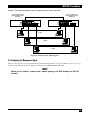
Example 4: The Same VLAN Members can be at Different Switches with the Same VID
8-Port 1000BASE-TX L2
Managed Ethernet Switch
(LGB1001A)
8-Port 1000BASE-TX L2
Managed Ethernet Switch
(LGB1001A)
VLAN 1
VLAN 2
VLAN 3
Figure 3-6. Attribute-based VLAN diagram.
3.4 Configuring the Management Agent
There are two ways to start up the switch management function: RS-232 console and Ethernet port. Use one to
monitor and configure the switch. Follow the instructions in Sections 3.4.1 and 3.4.2.
NOTE
Modify the IP address, subnet mask, default gateway, and DNS through the RS-232
console.
25
8-, 16-, AND 24-PORT 1000BASE-TX L2 MANAGED ETHERNET SWITCHES
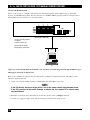
3.4.1 VIA THE SERIAL RS-232 CONSOLE PORT
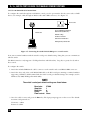
To configure the switch through its serial RS-232 console port, the port must be directly connected to a DCE
device (for example, a PC, through an RS-232 cable with a DB9 connector). See Figure 3-7.
AC line outlet
8-Port 1000BASE-TX L2 Managed
Ethernet Switch (LGB1001A)
RS-232 cable
Default IP setting:
IP address: 192.168.1.1
Subnet mask: 255.255.255.0
Default gateway: 192.168.1.254
Serial console PC
Figure 3-7. Connecting the switch’s RS-232 DB9 port to a serial console.
Next, run a terminal emulator with the switch’s serial port’s default setting. Using this, you can communicate
with the switch.
The RS-232 interface only supports a 57.6-kbps baud rate with 8 data bits, 1 stop bit, no parity check, and no
flow control.
To configure the switch:
1. Attach the included DB9 female cable’s connector to the switch’s male serial RS-232 DB9 connector.
2. Attach the other end of the serial RS-232 DB9 cable to the PC’s serial port, running a terminal emulator
supporting a VT100™/ANSI terminal with the switch’s serial port default settings. For example, use the
Windows® 98/2000/XP HyperTerminal utility.
NOTE
The switch’s serial port default settings are listed below:
Baud rate:
Stop bits:
Data bits:
Parity:
Flow control:
57600
1
8
N
None
3. Once the cable is connected, press the Enter key. The login prompt appears on the screen. The default
username and password are:
Username = admin
Password = admin
26
CHAPTER 3: Installation
Set IP Address, Subnet Mask, and Default Gateway IP Address
The switch’s default IP address, gateway, and subnet mask are listed in Table 3-2.
Table 3-2. The switch’s default and revised network settings.
Parameter
Default Value
Sample Network Setting
IP Address
Subnet
Default Gateway
192.168.1.1
255.255.255.0
192.168.1.254
10.1.1.1
255.255.255.0
10.1.1.254
NOTE
There are no default DNS settings. DNS addresses are assigned by the network
administrator.
You can first either configure your PC’s IP address or change the switch’s IP address, then change the default
gateway’s IP address and subnet mask.
For example, suppose your network address is 10.1.1.0, and the subnet mask is 255.255.255.0. You can change
the switch’s default IP address 192.168.1.1 to 10.1.1.1 and set the subnet mask to 255.255.255.0. Then, choose
the default gateway’s address (for example 10.1.1.254).
After completing these settings, reboot it so the configuration takes effect. After this step, operate the
management through the network, either from a Web browser or Network Management System (NMS).
See Figure 3-8.
Copyright (c) 1981–2005 Black Box Corp.
L2 Managed Switch
LGB1001A
Login: admin
Password:
LGB1001A
Figure 3-8. The CLI login screen for the LGB1001A.
27
8-, 16-, AND 24-PORT 1000BASE-TX L2 MANAGED ETHERNET SWITCHES
3.4.2 VIA THE ETHERNET PORT
There are three ways to configure and monitor the switch through the switch’s Ethernet port: CLI, Web
browser, and SNMP management. The user interface for SNMP is NMS dependent and is not described here.
CLI and Web browser interfaces are described below.
8-Port 1000BASE-TX L2 Managed
Ethernet Switch (LGB1001A)
Assign a reasonable IP address,
for example:
IP address: 192.168.1.100
Subnet mask: 255.255.255.0
Default gateway: 192.168.1.254
Ethernet
LAN
PC
Figure 3-9. Connecting the Ethernet LAN PC to the switch for network management through an Ethernet port.
Managing the Switch via the Ethernet Port
Before you communicate with the switch, you must first configure or identify the switch’s IP address. Next,
follow the steps listed below.
1. Connect the switch and PC together via UTP CAT5 cable with RJ-45 connectors.
NOTE
If the PC directly connects to the switch, set up the same subnet mask between them.
If the PC connects to the switch through a remote site, the remote PC’s subnet mask
may be different.
2. Run CLI or a Web browser and follow the menus. For details, refer to Chapters 4 and 5.
3. A login screen appears. Type in the switch’s username and password in this screen.
28
CHAPTER 3: Installation
3.5 IP Address Assignment
For IP address configuration, you will need the switch’s IP address, subnet mask, default gateway, and DNS.
3.5.1 IP ADDRESS
The network device’s address is used for internetworking communication. The 32-bit address consists of a
network identifier and a host identifier. It’s split into predefined address classes or categories.
Each class has its own network range between the network identifier and host identifier in the 32-bit address.
Each IP address has two parts: network identifier (address) and host identifier (address). The network address
is the network where the addressed host resides, and the host identifier indicates the individual host in the
network that the host address refers to. The host identifier must be unique in the same LAN.
The IP address is divided into three classes: class A, class B, and class C. The rest of the IP addresses are used for
multicast and broadcast. The network prefix’s bit length is the same as that of the subnet mask and is denoted
as IP address/X, for example, 192.168.1.0/24. The address range for each class is described below.
Class A
The address is less than 126.255.255.255. A total of 126 networks can be defined. (The address 0.0.0.0 is
reserved for default route and 127.0.0.0/8 is reserved for loopback function.)
Class B
The IP address ranges between 128.0.0.0 and 191.255.255.255. Each class B network has a 16-bit network prefix
followed by a 16-bit host address. There are 16,384 (214)/16 networks that can be defined with a maximum of
65534 (216 -2) hosts per network.
Class C
The IP address ranges between 192.0.0.0 and 223.255.255.255. Each class C network has a 24-bit network prefix
followed by an 8-bit host address. A total of 2,097,152 (221)/24 networks can be defined with a maximum of 254
(28 -2) hosts per network.
Class D and E
Class D is a class with the first 4 MSBs (Most Significant Bits) set to 1-1-1-0 and is used for IP Multicast. See also
RFC 1112. Class E is a class with the first 4 MSBs set to 1-1-1-1 and is used for IP broadcast.
According to IANA (Internet Assigned Numbers Authority), three specific IP address blocks (called a private IP
address) are reserved for extending an internal network. They are listed below.
Class A
10.0.0.0---10.255.255.255
Class B
172.16.0.0---172.31.255.255
Class C
192.168.0.0---192.168.255.255
Refer to RFC 1597 and RFC 1466 for more information. These documents are available at www.faqs.org.
29
8-, 16-, AND 24-PORT 1000BASE-TX L2 MANAGED ETHERNET SWITCHES
3.5.2 SUBNET MASK
Subnet mask is the sub-division of a class-based network or a CIDR block. The subnet is used to determine how
to split an IP address to the network prefix and the host address. It’s designed to use an IP address more
efficiently to manage an IP network.
For a class B network, 128.1.2.3, the default subnet mask may be 255.255.0.0. The first two bytes are all 1s. This
means more than 60 thousands of nodes in flat IP addresses will be on the same network. It’s too large to
manage practically. If we divide it into smaller networks by extending the network prefix from 16 bits to, say 24
bits, the network uses its third byte to subnet this class B network. The subnet mask is 255.255.255.0; each bit of
the first three bytes is 1. The first two bytes are used to identify the class B network, the third byte is used to
identify the subnet within this class B network, and the last byte is the host number.
Not all IP addresses are available in the subnetted network. Two special addresses are reserved. They are the
addresses with all zeros and all ones host number.
As shown in the table below, the subnet mask with a 25-bit long, 255.255.255.128 address contains 126 members
in the subnetted network. The network prefix length equals the bit number with 1s in that subnet mask. Use
this table to count the number of IP addresses matched.
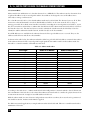
Table 3-3. Subnet mask values.
Prefix Length
/32
/31
/30
/29
/28
/27
/26
/25
/24
/23
/22
/21
/20
/19
/18
/17
/16
Number of IPs Matched
1
2
4
8
16
32
64
128
256
512
1024
2048
4096
8192
16384
32768
65536
Number of Addressable IPs
–
–
2
6
14
30
62
126
254
510
1022
2046
4094
8190
16382
32766
65534
According to the table above, a subnet mask 255.255.255.0 will partition a network with the class C. This means
that a maximum of 254 effective nodes exist in this subnetted network and it’s considered a physical network in
an autonomous network. A sample network IP address is 168.1.2.0.
With the subnet mask, for more than two independent networks in a worknet, the network can be partitioned
into smaller networks. A subnet mask must be applied.
For different network applications, a sample subnet mask is 255.255.255.240. This is for a small network with a
maximum of 15 nodes.
30
CHAPTER 3: Installation
3.5.3 DEFAULT GATEWAY
For the routed packet, if the destination is not in the routing table, all the traffic is put into the device with the
designated IP address, known as the default router. Only the switch uses the gateway setting for Trap Events
Host.
When assigning an IP address to the switch, first check to see what an existing switch on the same network uses
as a network address. Use the same network address and append your host address to it.
Once you type in the username and password in the login screen, the IP Configuration screen appears. Options
in this screen include DHCP Setting, IP Address, Subnet Mask, Default Gateway, DNS Server, and the Apply
button.
Type in the IP address in the format 192.168.1.x on your PC.
For the subnet mask, enter 255.255.255.0. Any subnet mask such as 255.255.255.x is allowed.
3.5.4 DNS
The Domain Name Server translates a human-readable machine name to an IP address. Every machine on the
Internet has a unique IP address. A server generally has a static IP address. To connect to a server, the client
needs to know the server’s IP. However, a user generally uses the name to connect to the server. Thus, the
switch DNS client program (such as a browser) will ask the DNS to find the named server’s IP address.
3.6 Typical Applications
The 1000BASE-TX L2 Managed Ethernet Switch has 8, 16, or 24 Gigabit Ethernet TP ports with auto MDI-X
and two slots for the removable LC and BiDi-LC SFP fiber transceiver modules.
Use the switch for the following applications.
• Central site/remote site application for carrier or ISP (see Figure 3-10).
• Peer-to-peer application is used in two remote offices (see Figure 3-11).
• Office network (see Figure 3-12).
31
8-, 16-, AND 24-PORT 1000BASE-TX L2 MANAGED ETHERNET SWITCHES
3.6.1 REMOTE SITE/CENTRAL SITE CONNECTION
Figure 3-10 shows a system-wide basic reference connection diagram. It shows how the switch connects to other
network devices and hosts.
8-Port 1000BASE-TX L2
Managed Ethernet Switch
(LGB1001A)
PCs
Converter
chassis
Copper twistedpair cable
Fiberoptic cable
Fiberoptic cable
8-Port 1000BASE-TX L2
Managed Ethernet Switch
(LGB1001A)
8-Port 1000BASE-TX L2
Managed Ethernet Switch
(LGB1001A)
Managed Media
Converter
Managed Media
Converter
Fiberoptic cable
Fiberoptic cable
Fiberoptic cable
8-Port 1000BASE-TX L2
Managed Ethernet Switch
(LGB1001A)
Copper twistedpair cable
Copper twistedpair cable
Financial office
MIS office
PCs
Figure 3-10. Network connection between a remote site and the central site.
32
CHAPTER 3: Installation
3.6.2 PEER-TO-PEER NETWORK CONNECTION
Figure 3-11 shows the switch in a peer-to-peer network.
8-Port 1000BASE-TX L2
Managed Ethernet Switch
(LGB1001A)
Financial office
MIS office
Figure 3-11. Connecting two peer networks together.
3.6.3 OFFICE NETWORK CONNECTION
Figure 3-12 shows the switch in an office network.
Research and
development (R&D)
office
Sales office
8-Port 1000BASE-TX
L2 Managed Ethernet
Switch (LGB1001A)
8-Port 1000BASE-TX
L2 Managed Ethernet
Switch (LGB1001A)
8-Port 1000BASE-TX L2
Managed Ethernet Switch
(LGB1001A)
Financial office
MIS office
Figure 3-12. Typical office network using three switches.
33
8-, 16-, AND 24-PORT 1000BASE-TX L2 MANAGED ETHERNET SWITCHES
4. Web-Based Management
This chapter explains how to configure and manage the switch through the Web user interface. Via one switch
port, you can easily access and monitor the switch’s status, including MIBs, port activity, spanning tree, port
aggregation, multicast traffic, VLAN and priority, and even a record of illegal access to the network.
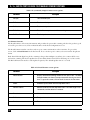
The switch’s default values are listed in Table 4-1.
Table 4-1. Default settings.
Parameter
Setting
IP Address
192.168.1.1
Subnet Mask
255.255.255.0
Default Gateway
192.168.1.254
Username
admin
Password
admin
NOTE
Before accessing the managed switch via a network port, you must first configure the
switch in its command-line interface (CLI) from the connected async serial COM/
RS-232 interface. For details, see Chapter 5.
Once you configure the switch, type in the IP address (for example, http://192.168.1.1) in the address
row in a browser. The login screen appears. Table 4-2 lists the screen options.
Table 4-2. Login screen parameters.
Parameter
Description
Username
admin
Password
admin
Login
Click on this button to log in.
Cancel
Click on this button to cancel the log in.
Forget Password
Click on this button to choose a new password.
Type in the username and password. (The default username and password are both admin.) The first time you
log in, type in the default username and password, then click on the Login button.
34
CHAPTER 4: Web-Based Management
If you forget the password, press the Ctrl button, then type Z in the CLI login screen. The system then displays a
serial number. Write down this serial number and contact Black Box—we’ll give you a temporary password.
Type in this new password as ID and Password, and the system will allow you to temporarily log into the system
with manager authority. This password allows you to login to the system only one time, so modify your password
immediately after you log into the system successfully.
To modify your password, type in the complete new username and password. The switch will not give you a
shortcut to the username automatically. This looks inconvenient, but it provides additional system security.
The switch supports a simple user management function, allowing only one administrator to configure the
system at a time. If two or more users use the administrator’s identity, the switch will allow only the one who logs
in first to configure the system. Other users, even with an administrator’s identity, can only monitor the system.
Users who have no administrator’s identity can only monitor the system. A maximum of three users can log in
simultaneously.
To optimize the display effect, we recommend using Microsoft® Internet Explorer® version 6.0 or above,
Netscape® V7.1 or above, or FireFox V1.00 or above with a resolution of 1024 x 768. The switch supports a
neutral Web browser interface.
4.1 Home Overview
Once you log into the switch, the Home screen appears.
At the top of the screen, the switch’s front-panel diagram appears. The linked ports display green, and the
unlinked ports appear dark. The slot shows only a coverplate if no module exists, and it shows a module if a
module is present. The module image depends on the one that’s installed in the switch. If disconnected, the
port will appear dark; if linked, it will be green.
Simply click on the ports in the switch diagram to browse the information for a specific port. An information
window appears, containing Link, State, Auto Negotiation, Speed/Duplex, Flow Control, Ingress All State,
Ingress All Rate, Ingress Storm State, Egress All State, Egress All Rate, Tx Byte, Rx Byte, Tx Packet, Rx Packet,
Tx Collision, RX Error Packet, and the Close button.
In the left top corner of the screen, a pull-down list appears for Auto Logout. This is a security function meant
to prevent illegal users from accessing the switch. If you select ON, the system will log out automatically when
there is no action on the device for three minutes. If you select OFF, the screen will remain visible to the user.
The default setting is ON.
On the left side of the screen, the main menu tree for the Web is listed. Options (in a vertical list on the left
side of the screen) include System, Port, Mirror, Bandwidth, QoS, SNMP, IGNP Snooping, Max. Packet Length,
DHCP Boot, VLAN, MAC Table, GVRP, STP, Trunk, 802.1x, Alarm, Configuration, Diagnostics, TFTP Server,
Log, Firmware Upgrade, Reboot, and Logout. These options are described in Sections 4.2 through 4.24.
4.2 System
4.2.1 SYSTEM INFORMATION
Click on System in the Home screen, and the System Information screen appears. This screen’s settings are
described in Table 4-3.
35
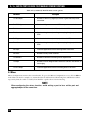
8-, 16-, AND 24-PORT 1000BASE-TX L2 MANAGED ETHERNET SWITCHES
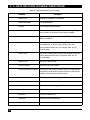
Table 4-3. System Information screen settings.
Parameter
36
Description
Model Name
LGB1001A, LGB1002A, or LGB1003A.
System Description
L2 Managed Switch.
Location
The user-defined switch location.
Contact
This is the contact name and phone number for help. Configure
this parameter via the switch’s user interface or SNMP.
Device Name
The user-defined switch’s name. 1000BASE-TX L2 Managed
Switch is the default.
System Up Time
Time in days, hours, and minutes accumulated since the switch
was powered on. Its format is day of week, month, day,
hours:minutes:seconds, year. For example, Wed., Apr. 26,
12:10:10, 2006.
Current Time
The switch’s system time. Its format is day of week, month, day,
hours:minutes:seconds, year. For example, Wed., Apr. 26,
12:10:10, 2006.
BIOS Version
The switch’s BIOS version.
Firmware Version
The switch’s firmware version.
Hardware-Mechanical Version
The electrical and mechanical switch version. The figure before
the hyphen is the electronic hardware version; the one after the
hyphen is the mechanical hardware version.
Serial Number
The switch’s serial number; assigned by the manufacturer.
Host IP Address
The switch’s IP address.
Host MAC Address
The switch’s management agent’s Ethernet MAC address.
Device Port
Displays all types and numbers of switch ports.
RAM Size
The switch’s DRAM size.
Flash Size
The switch’s Flash memory size.
Apply button
Click on this button to apply the selections.
CHAPTER 4: Web-Based Management
4.2.2 IP CONFIGURATION
IP configuration is one of the most important switch configurations. Without the proper setting, the network
manager will not be able to manage or view the device. The switch supports both manual IP address setting and
automatic IP address setting via a DHCP server. When the IP address is changed, you must reboot the switch for
the setting to take effect and to use the new IP to browse for Web management and CLI management. To get to
the IP Configuration screen, click on IP in the System menu. Then, set the switch’s IP address, subnet mask,
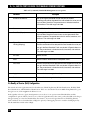
default gateway, and DNS. Table 4-4 describes the IP Configuration screen parameters.
Table 4-4. IP Configuration screen options.
Parameter
DHCP Setting
Description
Dynamic Host Configuration Protocol (DHCP) can be ON or OFF.
Select Enable or Disable from the drop-down menu.
The switch supports a DHCP client that’s used to get an IP address
automatically if you set this function to Enable. When enabled, the
switch will issue the request to the DHCP server residing in the
network to get an IP address. If the DHCP server is down or does not
exist, the switch will issue the request and show the IP address as
requesting, until the DHCP server is up. Before getting an IP address
from the DHCP server, the device will not continue booting procedures. If this field is set to Disable, you must type in the IP address
manually. For more details about IP address and DHCP, see
Section 3.5.
The default setting is Disable.
IP address
If DHCP is set to Disable, you can type in new IP settings. Then click
on the Apply button.
When DHCP is disabled, the default setting is 192.168.1.1.
If DHCP is enabled, this field is filled by the DHCP server and will not
allow you to manually type it in.
Subnet mask
An IP device in a network must own its IP address, composed of a
Network address and a Host address; otherwise, it can’t communicate
with other devices. Subnet mask is designed to provide more network
addresses. The network classes A, B, and C are all too large to fit for
almost all networks; subnet mask solves this problem. The subnet
mask uses some bits from the host address and makes an IP address
look like a network address, subnet mask number, and host address.
This reduces the total IP number that a network can support, by the
amount of 2 power of the bit number of subnet number
(2[bit number of subnet number]).
37
8-, 16-, AND 24-PORT 1000BASE-TX L2 MANAGED ETHERNET SWITCHES
Table 4-4 (continued). IP Configuration screen options.
Parameter
Subnet mask (continued)
Description
Subnet mask sets the subnet mask value, which should be the same
value as that of the other devices residing in the same network that
the switch is attached to. For more information, see Section 3.5.
Default: 255.255.255.0
Default gateway
Set an IP address for a gateway to handle those packets that do not
meet the routing rules predefined in the device. If a packet does not
meet the criteria for another pre-defined path, it must be forwarded to
a default router on a default path. This means any packet with an
undefined IP address in the routing table will be sent to this device
unconditionally.
Default: 192.168.1.254
DNS
Domain Name Server translates the IP address and name address.
The switch supports the DNS client function to re-route the mnemonic
name address to the DNS server to get its associated IP address for
accessing the Internet. Specify a DNS IP address for the switch. With
this, the switch can translate a mnemonic name address into an IP
address.
There are two ways to specify the DNS IP address. Fixed mode
manually specifies its IP address, and dynamic mode is assigned by
the DHCP server while DHCP is enabled. DNS can help you easily
remember the mnemonic address name with meaningful words. The
default is no DNS address assignment.
Default: 0.0.0.0
Apply button
Click on this button to save the settings.
4.2.3 TIME CONFIGURATION
In the System menu, click on Time Configuration (see Table 4-5). The switch provides manual and automatic
ways to set the system time via NTP*. The manual setting is simple—just type in the year, month, day, hour,
minute, and second within the valid value range indicated in each item. If you type in an invalid value (for
example, 61 in minutes), the switch changes the figure to 59.
*NTP is a well-known protocol used to synchronize the switch system time clock over a network. NTP, an Internet draft standard formalized in
RFC 1305, has been adopted on the system as version 3 protocol. The switch provides four built-in NTP server IP addresses residing in the
Internet and a user-defined NTP server IP address. The time zone is Greenwich-centered (Greenwich Mean Time or GMT), using the form
GMT+/- xx hours.
38
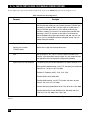
CHAPTER 4: Web-Based Management
Table 4-5. Time Configuration screen options.
Parameter
Description
Time
Type in the system time or set it by syncing from Time servers. The
function also supports daylight savings time for different areas’ time
adjustment.
Current Time
Shows the current system time.
Manual
Adjust the time manually. Type in the valid figures in the Year, Month,
Day, Hour, Minute, and Second fields respectively, then click on the
Apply button to adjust the time. The valid figures for the parameter
Year, Month, Day, Hour, Minute, and Second are >=2000, 1–12,
1–31, 0–23, 0–59, and 0–59 respectively. If you type in an invalid
figure and press the Apply button, the device will reject the time
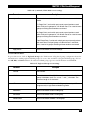
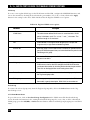
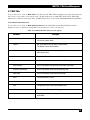
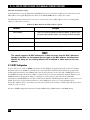
adjustment request. There is no time zone setting in Manual mode.
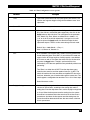
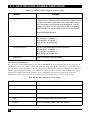
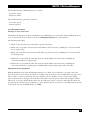
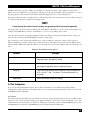
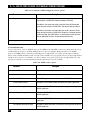
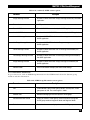
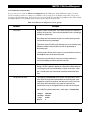
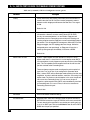
Default: Year = 2000, Month = 1, Day = 1,
Hour = 0, Minute = 0, Second = 0
NTP
NTP is Network Time Protocol and is used to sync the network-timebased Greenwich Mean Time (GMT). If you use the NTP mode and
select a built-in NTP time server or manually specify a user-defined
NTP server as well as Time Zone, the switch will sync the time after
you press the Apply button. Though it synchronizes the time
automatically, NTP does not update the time periodically without user
processing.
Time Zone is an offset time of GMT. From the drop-down menu,
select the time zone first and then perform time sync via NTP. The
switch will combine this time zone offset and update NTP time to the
local time; otherwise, you will not be able to get the correct time. The
switch supports a configurable time zone from -12 to +13 in 1-hour steps.
Default time zone: +8 Hrs.
Daylight Saving
If set for daylight savings time, the switch will adjust the time lag or
advance in units of hours, according to the starting date and the
ending date. From the drop-down menu, set the daylight savings time
to 1 hour. When the time passes over the starting time, the system
time will be increased one hour after one minute at the time since it
passed over. And when the time passes over the ending time, the
system time will be decreased one hour after one minute at the time
since it passed over.
39
8-, 16-, AND 24-PORT 1000BASE-TX L2 MANAGED ETHERNET SWITCHES
Table 4-5 (continued). Time Configuration screen options.
Parameter
Description
Daylight saving (continued)
The switch supports valid configurable daylight savings time of -5 to
+5 step one hour. The zero for this parameter means it does not have
to adjust current time; it’s equivalent to activating daylight saving. In
this case, you don’t have to set the starting/ending date. If you set
daylight saving to be non-zero, you have to set the starting/ending
dates; otherwise, the daylight saving function will not be activated.
Default for Daylight Saving: 0
Daylight Saving Start
This defines when to start performing the daylight saving time.
Mth: Range is 1–12. Default: 1
Day: Range is 1–31. Default: 1
Hour: Range is 0–23. Default: 0
Daylight Saving End
Set this to stop performing the daylight saving time.
Mth: Range is 1–12. Default: 1
Day: Range is 1–31. Default: 1
Hour: Range is 0–23. Default: 0
Apply button
Click on this button to apply the settings.
4.2.4 ACCOUNT CONFIGURATION
To get to the Account Configuration screen, click on Account in the System menu. Only the user logged in as
administrator can create, modify, or delete the username and password. The administrator can modify other
guest identities’ passwords without confirming the password but must also modify the administrator-equivalent
identity. A guest-equivalent identity can modify his own password only. You must confirm administrator/guest
identity in the Authorization field in advance before configuring the username and password. Only one
administrator is allowed to exist and can’t be deleted. Up to four guest user accounts can be created.
Table 4-6. Account configuration screen settings.
Parameter
40
Description
Account Name
Type in the name.
Authorization
Select administrator or guest user from the drop-down menu.
Create New
Click on this button to create a new guest user account.
Edit
Click on this button to edit a guest user account.
Delete
Click on this button to delete a guest user account.
CHAPTER 4: Web-Based Management
The default setting for administrator user account is:
Username: admin
Password : admin
The default setting for guest user account is:
Username: guest
Password: guest
4.2.5 MANAGEMENT POLICY
Limiting User Access to the Switch
Through the management security configuration, the administrator can control the switch and limit the user’s
access to this switch. To get to this screen, click on Management Policy in the System menu.
The following rules apply:
1. When no lists exist, then the switch will accept all connections.
2. When only “accept lists” exist, then the switch will deny all connections, excluding the connection inside
the accepting range.
3. When only “deny lists” exist, then the switch will accept all connections, excluding the connection inside
the denying range.
4. When both “accept and deny” lists exist, then the switch will deny all connections, excluding the
connection inside the accepting range.
5. When both “accept and deny” lists exist, then the switch will deny all connections, excluding the
connection inside the accepting range and NOT inside of the denying range at the same time.
Management Security Configuration
With the Management Security Configuration function (see Table 4-7), the manager can easily control the
user’s mode when connecting to the switch. According to the mode, users can be classified into two types: those
who are able to connect to the switch (Accept) and those who are unable to connect to the switch (Deny).
Some restrictions also can be placed on the user mode while connecting to the switch. For example, a VLAN
VID can be accepted or denied by the switch, the user’s IP range can be accepted or denied by the switch, the
port that the user is allowed or not allowed to connect with the switch, or the way of controlling and connecting
to the switch can vary (via HTTP, Telnet, or SNMP).
41
8-, 16-, AND 24-PORT 1000BASE-TX L2 MANAGED ETHERNET SWITCHES
Table 4-7. Management Security Configuration settings.
Parameter
Description
Name
A name is composed of any letter (A–Z, a–z) and digit (0–9) with a
maximum of 8 characters.
VID
VID supports two buttons for managed valid VLAN VID: Any and
Custom. The default is the Any button. When you click on the
Custom button, you can type in the VID number. The valid VID range
is 1–4094.
IP Range
The switch supports two options for the managed valid IP Range: Any
and Custom. The default is the Any button. When you click on the
Custom button, you can type in an effective IP range. The valid range
is 0.0.0.0–255.255.255.255.
Incoming Port
The switch supports options for managed valid Port Range: Any and
Custom. The default is the Any button. When you click on the
Custom button, you can check the box(es) next to the ports that you
would like to be restricted in the management security configuration.
Access Type
The switch supports two options for managed valid Access Type: Any
and Custom. The default is the Any button. When you click on the
Custom button, you can check the box next to the option you want to
use to access and manage the switch. The three options include
HTTP, Telnet, and SNMP.
Action
The switch supports two options for managed valid Action Type: Deny
and Accept. The default is the Deny button. When you choose Deny,
you can’t manage the switch. If you click on the Accept button, you
can manage the switch.
Edit/Create
Click on this button to create a new management security entry, or to
modify an existing entry.
Delete
Click on this button to remove the selected management security
configuration entry from the management security table.
4.2.6 VIRTUAL STACK
Virtual Stack Management (VSM) is the group management function. To get to this option, click on Virtual
Stack in the System menu. Through the proper configuration of this function, switches in the same LAN will be
grouped automatically. Among these switches, one switch will be a master machine, and the others in this group
will become the slave devices.
VSM offers a simple centralized management function. You don’t have to remember all devices’ addresses,
since the administrator can manage the network with knowing only the Master machine’s address. Instead of an
42
CHAPTER 4: Web-Based Management
SNMP or Telnet user interface, VSM is only available in a Web user interface (UI). While one switch is the
Master, two rows of buttons for a group device will appear on the top of its Web UI. Press the buttons to connect
the group devices’ Web UI in the same window without logging in to the corresponding devices.
The top-left button is only for the Master device. The background color of the button you press will be changed
to represent that the device is under your management.
NOTE
If you log into the switch via the console, the grouping will be removed temporarily.
The group device is shown as station address (the last number of IP Address) + device name on the button (for
example, 196_LGB1001A); otherwise it will display “----” if no corresponding device exists.
Once the devices join the group successfully, then they can only be managed via the Master device, and a user
won’t be able to manage them individually via Telnet/console/Web.
Up to 16 devices can be grouped for VSM; however, only one Master is allowed to exist in each group. For
Master redundancy, you may configure more than two devices as the Master device; however, the Master device
with the smaller MAC value will be the Master one. All 16 devices can become a Master device and back up each
other.
Table 4-8. Virtual Stack screen options.
Parameter
Description
State
Activates or de-activates VSM. Select Enable or Disable from the
drop-down menu. The default is Enable.
Role
The role that the switch plays in the virtual stack. Select Master or
Slave from the drop-down menu. The default is Master.
Group ID
Type in the group identifier (GID) to indicate a VSM. Valid letters are
A–Z, a–z, 0–9, “-” and “_” characters. The maximum length is 15
characters.
Apply button
Click on this button to apply the settings.
4.3 Port Configuration
To get to the Port Configuration menu, click on Port in the Home screen. This menu contains Status,
Configuration, Simple Counter, and Detail Counter for port monitoring and management. They are described
in Sections 4.3.1 through 4.3.4.
4.3.1 STATUS
The function Port Status gathers the information of all ports’ current status and reports it by port number, link
status, port state, auto-negotiation status, speed/duplex, and flow control. To get to the Port Status screen, click
on Port Status in the Port menu (see Table 4-9). Media type information for the module LGB1001A ports 7 and
8, LGB1002A ports 15 and 16, and LGB1003A ports 23 and 24 is listed in Table 4-10.
43
8-, 16-, AND 24-PORT 1000BASE-TX L2 MANAGED ETHERNET SWITCHES
Table 4-9. Port Configuration menu options.
Parameter
Description
Port Status
Report the latest updated status of all switch ports. When any one of
the ports in the switch changes its parameter displayed in the page,
the port status will automatically refresh about every 5 seconds.
Port No.
Display the port number. The number is 1–8, 1–16, or 1–24. Both
ports 7 and 8, 15 and 16, or 23 and 24 are optional modules.
Media
Shows the media type used in all ports. Ports 7 and 8, 15 and 16, or
23 and 24 support either fiber or UTP media with either Gigabit
Ethernet (1000-Mbps) or 10/100-Mbps Fast Ethernet ports.
Link
Shows if the link on the port is active or not. If the link is connected to
a device that is working properly, the Link will show the link Up;
otherwise, it will show Down. Both connected devices determine the
link value.
No default value.
State
Shows that the port’s communication function is Enabled or Disabled.
When it’s enabled, traffic can be transmitted and received via this port.
When it’s disabled, no traffic can be transferred through this port. The
Port State is configured by the user.
Default: Enabled.
Auto Negotiation
Shows the Ethernet MAC’s exchange mode. The switch supports two
modes: auto-negotiation mode Enabled and forced mode Disabled.
When in Enabled mode, this switch automatically negotiates the best
speed and duplex values at both ends of the connection. When in
Disabled mode, both parties must have the same speed and duplex
settings; otherwise, they won’t be linked. In this case, the link result is
Down.
Default: Enabled
Speed/Duplex Mode
Displays all ports’ speed and duplex settings. Three speeds (10 Mbps,
100 Mbps, and 1000 Mbps) are supported for TP media, and halfduplex and full duplex are supported. If the media is 1-Gbps fiber,
1000-Mbps is supported. The speed/duplex mode status is
determined by 1) the negotiation of both local port and link partner in
Auto Speed mode or 2) user setting in Force mode. The local port has
to preset its capability.
Default: None, depends on the negotiation result.
44
CHAPTER 4: Web-Based Management
Table 4-9 (continued). Port Configuration menu options.
Parameter
Description
Flow Control
Shows each port’s flow control status. There are two types of flow
control in Ethernet: backpressure for half-duplex operation and pause
flow control (IEEE 802.3x) for full duplex operation. The switch
supports both.
Default: Disabled
Wait State
For 10/100-Mbps ports, this setting has no effect.
For Gigabit ports, setting Wait State will remove the issue with ignored
pause frames but the minimum interframe gap will be at least 14 bytes
instead of the usual 12 bytes. This applies to uncongested traffic as
well. The larger interframe gap will result in throughput rates less than
100%. For example, a stream of 64-byte frames and a stream of
1518-byte frames have maximum throughput of 97.7% and 99.9%
respectively.
Table 4-10. Ports 7 and 8, 15 and 16, or 23 and 24.
Parameter
Description
Connector Type
Displays the connector type—for example, UTP, SC, ST®, or LC.
Fiber Type
Displays the fiber mode—for example, multimode or single-mode.
Tx Central Wavelength
Displays the fiber optic transmitting central wavelength—for example,
850-nm, 1310-nm, or 1550-nm.
Baud Rate
Displays the fiber module’s maximum supported baud rate—for
example, 10M, 100M, or 1G.
Vendor OUI
Displays the Manufacturer's OUI code that’s assigned by IEEE.
Vendor Name
Displays the module manufacturer’s company name.
Vendor P/N
Displays the manufacturer’s switch’s part number.
Vendor Rev (Revision)
Displays the module revision.
Vendor SN (Serial Number)
Shows the manufacturer-assigned serial number.
Date Code
Shows the date this SFP module was made.
45
8-, 16-, AND 24-PORT 1000BASE-TX L2 MANAGED ETHERNET SWITCHES
Table 4-10 (continued). Ports 7 and 8, 15 and 16, or 23 and 24.
Parameter
Description
Temperature
Shows the SFP module’s current temperature.
Vcc
Shows the SFP module’s working DC voltage.
Mon1(Bias) mA
Shows the SFP module’s bias current.
Mon2(TX PWR)
Shows the SFP module’s transmit power.
Mon3(RX PWR)
Shows the SFP module’s receiver power.
Close button
Click on this button to close the window.
4.3.2 CONFIGURATION
Use the Configuration menu to change each port’s setting. To get to this screen, click on Config in the Port
menu. In this menu, you can set/reset the following functions. All are described in detail in Table 4-11.
Table 4-11. Configuration screen options.
Parameter
Description
Port Configuration
Used to set each port’s operation mode. The switch supports three
parameters for each port: state, mode, and flow control.
Port No.
Displays the port number.
State
From the drop-down menu, set the port’s communication capability to
Enabled or Disabled. When enabled, traffic can be transmitted and
received via this port. When disabled, the port is blocked and no traffic
can be transferred through this port. Port State is configurable by the
user. If you set a port’s state to Disable, then that port is prohibited
from passing any traffic.
Default: Enable.
Mode
From the drop-down menu, select the port’s speed and duplex. If the
media is 1 Gbps fiber, the speed is always 1000 Mbps and the duplex
is full only. If the media is TP, the Speed/Duplex is made up of the
combination of speed mode (10/100/1000 Mbps) and duplex mode
(full duplex and half duplex). Media functions are summarized below.
Media Type NWay
1000M TP
ON/OFF
1000M Fiber ON/OFF
46
Speed
Duplex
10/100/1000M Full for all, Half for 10/100
1000M
Full
CHAPTER 4: Web-Based Management
Table 4-11 (continued). Configuration screen options.
Parameter
Description
Mode (continued)
In auto-negotiation mode, there is no default value. In forced mode,
the default value depends on your setting.
Flow Control
There are two modes to choose from in the drop-down menu: Enable
and Disable. If flow control is set Enable, both parties can send a
Pause frame to the transmitting device(s) if the receiving port is too
busy to handle it. When it is set to Disable, there will be no flow control
in the port. The port drops the packet if it’s too much to handle.
Default: Enable
Wait State
Select Enable or Disable from the drop-down menu. For more details
about this parameter refer to Section 4.3.1.
Default: Disable
Apply
Click on this button to save the settings.
4.3.3 SIMPLE COUNTER
Simple Counter collects any information and provides the port traffic counting, whether the packet is good or
bad. To get to this screen, click on Simple Counter in the Port Configuration screen.
The Simple Counter window can show all ports’ counter information at the same time. To get to this screen,
click on Simple Counter in the Port menu. Each data field is 20 digits long. If the count is more than 20
(overflow), the counter will reset and restart counting. The data is updated every time a user defines an
interval. The valid range is 3 to 10 seconds. The Refresh Interval sets the update frequency. The default update
time is 3 seconds.
Table 4-12. Simple Counter screen options.
Parameter
Description
Simple Counter
Displays each port’s traffic summary counting, including Tx Byte, Rx
Byte, Tx Packet, Rx Packet, Tx Collision, and Rx Error Packet.
Refresh Interval
Select a number (in seconds) from the drop-down menu.
Reset button
Click on this button to reset the simple counter.
Port No.
The port number.
Tx Byte
Total transmitted bytes.
47
8-, 16-, AND 24-PORT 1000BASE-TX L2 MANAGED ETHERNET SWITCHES
Table 4-12 (continued). Simple Counter screen options.
Parameter
Description
Rx Byte
Total received bytes.
Tx Packet
Total transmitted packets.
Rx Packet
Total received packets.
Tx Collision
Total collisions experienced while transmitting frames.
Rx Error Packet
Total bad packets received.
4.3.4 DETAIL COUNTER
The Detail Counter collects any information and provides the port traffic counting, whether the packet is good
or bad. To get to this screen, click on Detail Counter in the Port Configuration screen.
The Detail Counter window can show only one port counter information at the same time. To get to this
screen, click on Detail Counter in the Port menu. To see another port’s counter, select it from the drop-down
menu.
Each data field is 20 digits long. If the counting is longer than 20 digits (overflows), the counter will be reset
and restart counting. The data is updated every user-defined time interval. The valid range is 3 to 10 seconds.
The Refresh Interval is used to set the update frequency. The default update time is 3 seconds.
Table 4-13. Detail Counter screen options.
Parameter
48
Description
Detail Counter
Displays the detailed counting number of each port’s traffic. The Detail
Counter window can show all counter information of each port at one
time. To get to this screen, click on Detail Counter in the Port menu.
Select
Choose the port number from the drop-down menu.
Refresh Interval
Select the interval from the drop-down menu. The valid range is 3 to
10 seconds, and the default is 3 seconds.
Reset button
Click on this button to reset the choices.
Rx Packets
Total packets received.
Rx Octets
Total received bytes.
CHAPTER 4: Web-Based Management
Table 4-13 (continued). Detail Counter screen options.
Parameter
Description
Rx High Priority Packets
Total Rx packets classified as high priority.
Rx Low Priority Packets
Total Rx packets classified as low priority.
Rx Broadcast
Total received broadcast packets.
Rx Multicast
Total received multicast packets.
Tx Packets
Total packets transmitted.
TX Octets
Total transmitted bytes.
Tx High Priority Packets
Total Tx packets classified as high priority.
Tx Low Priority Packets
Total Tx packets classified as low priority.
Tx Broadcast
Total transmitted broadcast packets.
Tx Multicast
Total transmitted multicast packets.
Rx 64 Bytes
Number of 64-byte frames in good and bad packets received.
Rx 65–127 Bytes
Number of 65–126-byte frames in good and bad packets received.
Rx 128–255 Bytes
Number of 127–255-byte frames in good and bad packets received.
Rx 256–511 Bytes
Number of 256–511-byte frames in good and bad packets received.
Rx 512–1023 Bytes
Number of 512–1023-byte frames in good and bad packets received.
Rx 1024-Bytes
Number of 1024-max_length-byte frames in good and bad packets
received.
Tx 64 Bytes
Number of 64-byte frames in good and bad packets transmitted.
Tx 65–127 Bytes
Number of 65–126-byte frames in good and bad packets transmitted.
Tx 128–255 Bytes
Number of 127–255-byte frames in good and bad packets transmitted.
Tx 256–511 Bytes
Number of 256–511-byte frames in good and bad packets transmitted.
Tx 512–1023 Bytes
Number of 512–1023-byte frames in good and bad packets
transmitted.
49
8-, 16-, AND 24-PORT 1000BASE-TX L2 MANAGED ETHERNET SWITCHES
Table 4-13 (continued). Detail Counter screen options.
Parameter
Description
Tx 1024-Bytes
Number of 1024-max_length-byte frames in good and bad packets
transmitted.
Rx CRC/Alignment
Number of Alignment errors and CRC error packets received.
Rx Undersize
Number of short frames (<64 Bytes) with valid CRC.
Rx Oversize
Number of long frames (according to max_length register) with valid
CRC.
Rx Fragments
Number of short frames (< 64 bytes) with invalid CRC.
Rx Jabber
Number of long frames (according to max_length register) with invalid
CRC.
Rx Drops
Frames dropped because the receiving buffer is too small.
Rx Errors
Number of error packets received.
Tx Collisions
Number of collisions transmitting frames experienced.
Tx Drops
Number of frames dropped due to excessive collision, late collision, or
frame aging.
Tx FIFO Drops
Frames dropped because the transmitting buffer is too small.
4.4 Mirror
Mirror Configuration monitors the network traffic. To get to the Mirror Configuration screen, click on Mirror
in the Home menu. For example, we assume that Port A and Port B are Monitoring Port and Monitored Port
respectively, thus, the traffic received by Port B will be copied to Port A for monitoring.
NOTE
When configuring the mirror function, avoid setting a port to be a sniffer port and
aggregated port at the same time.
50
CHAPTER 4: Web-Based Management
Table 4-14. Mirror Configuration screen settings.
Parameter
Description
Mode
Activates or deactivates the Port Mirror function. Choose Enable or
Disable from the drop-down menu. The default is disable.
Monitoring Port
From the drop-down menu, select the port for monitoring. A valid port
is Port 1–8, and the default is Port 1.
Monitored Port
Set up the port to be monitored. Check the box beside the port you
want to monitor. A valid port is Port 1–8.
Apply button
Click on this button to apply the settings.
4.5 Bandwidth Management
The Bandwidth Management function sets each port’s Ingress and Egress bandwidth limit. To get to this screen,
click on Bandwidth in the Home menu.
NOTE
Each switch port owns a 16KB packet buffer. The packet buffer size is reduced when
the bandwidth rate limitation is enabled, so jumbo frames can’t be forwarded.
Don’t enable jumbo frame and bandwidth rating functions at the same time.
Table 4-15. Bandwidth Management screen options.
Parameter
Description
Port Number
From the drop-down menu, choose the port that you want this function
to work on. The valid range is port 1–8, 1–16, or 1–24.
Ingress Rate Limiting (Policing)
Set up the Ingress bandwidth limit for the port you choose.
Traffic
Monitors the traffic transmitted or received by the port.
All Traffic
Monitors all traffic.
State
Select Enable or Disable from the drop-down menu.
Data Rate (Mbps)
Incoming traffic will be discarded if the rate exceeds the value you set
up in the Data Rate field. Pause frames are also generated if flow
control is enabled. The packet format limit is unicast, broadcast, and
multicast. The valid range is 0–1000.
51
8-, 16-, AND 24-PORT 1000BASE-TX L2 MANAGED ETHERNET SWITCHES
Table 4-15 (continued). Bandwidth Management screen options.
Parameter
Description
Broadcast & Multicast
Set up the Ingress bandwidth limit for the port you choose.
Incoming traffic will be discarded if the rate exceeds the value you set
up in the Data Rate field. The packet format is limited to broadcast
and multicast. The valid range is 0–1000.
State
Select Enable or Disable from the drop-down menu.
Data Rate (Mbps)
Incoming traffic will be discarded if the rate exceeds the value you set
up in the Data Rate field. Pause frames are also generated if flow
control is enabled. The packet format limit is unicast, broadcast, and
multicast. The valid range is 0–1000.
Egress Rate
Limiting (Shaping)
Set up the Egress bandwidth limit for the port you choose.
Packet transmission will be delayed if the rate exceeds the value you
set up in the Data Rate field. Traffic may be lost if Egress buffers are
full. The packet format is limited to unicast, broadcast, and multicast.
The valid range is 0–1000.
All Traffic
Select all traffic.
State
Select Enable or Disable from the drop-down menu.
Data Rate
Packet transmission will be delayed if the rate exceeds the value you
set up in the Data Rate field. Traffic may be lost if Egress buffers are
full. The packet format is limited to unicast, broadcast, and multicast.
The valid range is 0–1000.
Apply button
Click on this button to apply the settings.
Back button
Click on this button to go back to the previous screen.
4.6 Quality of Service (QoS) Configuration
The switch offers five QoS functions: Per Port Priority, VLAN Tag Priority, IP ToS Classification, IP TCP/UDP
Port Classification, and IP DiffServ Classification. These are described in Sections 4.6.1 through 4.6.5. To get to
the QoS screen, click on QoS in the Home screen.
In the Quality of Service (QoS) Configuration screen, there is one option named Default Class and five
configuration options. When you select one of the five QoS functions, then some packets that did not belong to
this QoS setting are viewed as Default Class. For instance, if you set the QoS function as VLAN Tag Priority
mode and then choose Default Class as High, the priority of untagged packets is considered as High priority.
The Default Class’ initial value is High.
52
CHAPTER 4: Web-Based Management
4.6.1 PER PORT PRIORITY
The Per Port Priority option lets you assign each port to a different precedence. To get to the Port Priority
screen, click on Per Port Priority in the QoS menu.
Table 4-16. Per Port Priority screen options.
Parameter
Description
Per Port Priority
You can assign QoS Priority, including High and Low for each port.
For example, if the switch transmits IP packets from Port 2 and Port 3
at the speed of 1 Gbps to Port 1 and you set the Class of Port 2 as
High and Port 3 as Low, then the Port 3 packets will be dropped when
congestion occurs. This is because Port 2 owns a higher precedence
of transmitting packets.
Port No.
From the drop-down menu, choose the ports (1–8, 1–16, or 1–24) with
Priority Class on the Per Port Priority function.
Class
From the drop-down menu, set High Priority or Low Priority for each
port.
Apply button
Click on this button to save the settings.
4.6.2 VLAN TAG PRIORITY
To get to the VLAN Tag Priority screen, click on VLAN Tag Priority in the QoS menu.
In VLAN tag, three bits belong to priority. According to these three bits, we could arrange eight traffic
patterns—V0 0 0, 0 0 1, 0 1 0, 0 1 1, 1 0 0, 1 0 1, 1 1 0, 1 1 1. Set High priority or Low priority for each traffic
class. For instance, set VLAN-Tagged priority 0 0 0 to High priority and VLAN-tagged priority 0 0 1 to Low
priority, and include ports 1, 2, and 3 in the VLAN 2. The packets that have the value 0 0 0 in the VLAN-Tagged
field and VID 2 from port 2 are high priority. The packets that have the value 0 0 1 in the VLAN-Tagged field
and VID 2 from port 3 are low priority. The two kinds of packets are transmitted for port 1 until the port
becomes congested. The result is that the packets will be dropped partially from port 3 because the packets
belong to Low priority. To activate the VLAN Tag Priority function, press the Configure button.
53
8-, 16-, AND 24-PORT 1000BASE-TX L2 MANAGED ETHERNET SWITCHES
Table 4-17. VLAN Tag Priority screen options.
Parameter
Description
Quality of Service (QoS)
VLAN Tag Configuration
Sets up the QoS that belongs to a VLAN.
Port
Set ports (1–8, 1–16, or 1–24) to support the VLAN Tag QoS function.
To set up all ports at a time, choose All in the drop-down menu.
Bit 0, Bit 1, Bit 2
According to the arrangement of VLAN-tagged priority, 8 traffic
patterns are possible (0 0 0, 0 0 1, 0 1 0, 0 1 1, 1 0 0, 1 0 1, 1 1 0, and
1 1 1).
Class
Supports 8 kinds of traffic as mentioned above. From the drop-down
menu, select High Priority or Low Priority for each port.
Apply
Click on this button to save the settings.
4.6.3 IP TOS CLASSIFICATION
Another QoS function is the application of Layer 3 on the network framework. Consider the IP header’s ToS
field. There are three bits in the ToS field. You will use the ToS field’s bits 5–7. According to these 3 bits, you
can arrange eight traffic patterns—V0 0 0, 0 0 1, 0 1 0, 0 1 1, 1 0 0, 1 0 1, 1 1 0, or 1 1 1. As long as we change
bits 5–7 of ToS field of IP header, we will create the 8 traffic packets just assigned. Set High priority or Low
priority for each traffic class. For instance, if ToS 0 0 0 is set to High priority and ToS 0 0 1 is set to Low priority,
packets that have bits 5–7 of ToS Field are 0 0 0 from port 2 and the packets that have bit 5–7 of ToS Field are 0
0 1 from port 3. The two kinds of packets are transmitted from port 1 until the port results in congestion. The
packets will be dropped partially from port 3 because those packets belong to Low priority.
To get to the IP ToS Classification screen, click on ToS in the QoS menu.
Table 4-18. IP ToS Classification screen options.
Parameter
54
Description
Quality of Service (QoS)
ToS Configuration
Set up the QoS in Layer 3.
Port
Set up the port (1–8, 1–16, or 1–24) for the ToS QoS function. To set
up all ports once, choose All from the drop-down menu to simplify the
configuration.
Bit 0, Bit 1, Bit 2
Bits 5–7 in the IP header’s ToS Field can form eight traffic patterns
(0 0 0, 0 0 1, 0 1 0, 0 1 1, 1 0 0, 1 0 1, 1 1 0, and 1 1 1).
CHAPTER 4: Web-Based Management
Table 4-18 (continued). IP ToS Classification screen options.
Parameter
Description
Class
For the eight traffic patterns mentioned previously, select High Priority
or Low Priority for each port from the drop-down menu.
Apply button
Click on this button to save the settings.
4.6.4 IP TCP/UDP PORT CLASSIFICATION
The L4 QoS option consists of two screens: simple and advanced. In L4 QoS Configuration, enter one of these
special network transmission events. For example, use Down prioritize Web browsing, e-mail, FTP, and new L4
QoS Configuration. Click on the Apply button, then click on the Advance button. Special TCP/UDP ports 80,
280, 443, 25, 110, 20, 21, 69, 119, and 2009 already exist, but you can modify this pre-defined TCP/UDP port
with another port number that you prefer. In Down prioritize Web browsing, e-mail, FTP, and new L4 QoS
Configuration with default settings, a special defined TCP/UDP port has lower QoS traffic than Default class
(all other TCP/UDP ports such as port 81, 82, 83, 84, 85, etc.). For example, the switch transmits TCP packets
with port number 80 at port 2 and port number 81 at port 3 to port 1 until the congestion occurs. The packets
from port 3 will be dropped by port 1 because the TCP packets have the port number 80 set to high priority
and will have higher precedence to be sent out from port 80 than port 1.
Table 4-19. Simple configuration.
Parameter
Disable IP TCP/UDP Port
Classification
Description
Belongs to the QoS in L4. Click on this option and press the Apply
button for this function to take effect. Then, click on the Advance
button to set up a special TCP/UDP port for QoS.
Down prioritize Web browsing,
e-mail, FTP and news
Prioritize IP Telephony (VoIP)
Prioritize iSCSI
Prioritize Web browsing, e-mail,
FTP transfers and news
Prioritize Streaming Audio/Video
Prioritize Databases (Oracle,
IBM® DB2®, SQL, Microsoft)
55
8-, 16-, AND 24-PORT 1000BASE-TX L2 MANAGED ETHERNET SWITCHES
To also display the options described in Table 4-20, click on the Advanced option in the L4 QoS screen.
Table 4-20. Advanced Configuration.
Parameter
Description
Advanced Mode
Display the TCP/UDP port number in L4 QoS. In Disable IP TCP/UDP
Port Classification mode, you can randomly choose a TCP/UDP port
number that L4 QoS will affect. For other special L4 QoS events, a
Special TCP/UDP port number is active. Add or modify the port
number at random. For instance, if we choose Down prioritize Web
browsing, e-mail, FTP and news as the QoS of L4 and enter the
Advanced Mode, some special port numbers (80, 280, 443, 25, 110,
20, 21, 69, 119, and 2009) have been configured already. You can
modify these port numbers.
Special TCP/UDP class
From the drop-down menu, choose from two modes: Low and High.
Default class (all other
TCP/UDP ports)
Select Low or High from the drop-down menu.
Port
Set up the port (1–8, 1–16, or 1–24) for a special TDP/UDP class
function. If you would like to set up all ports at a time, choose All from
the drop-down menu to simplify the configuration procedure.
Special UDP/TCP Port Selection
The following are port numbers defined by six specific networks in L4:
Down prioritize Web browsing, e-mail, FTP and news: port number 80,
280, 443, 25, 110, 20, 21, 69, 119, 2009
Prioritize IP Telephony (VoIP): 1718, 1719, 1720
Prioritize iSCSI: 3225, 3260, 3420
Prioritize Web browsing, e-mail, FTP transfers and news: 80, 280,
443, 25, 110, 20, 21, 69, 119, 2009
Prioritize Streaming Audio/Video: 2979, 1755, 7070, 7071, 554, 8000
Prioritize Databases (Oracle, IBM DB2, SQL, Microsoft): 66, 1571,
1575, 523, 118, 156, 3306, 1232, 1433, 1434
The Advanced mode screen shows the L4 port numbers. To return to the original QoS screen, press the Simple
button.
56
CHAPTER 4: Web-Based Management
4.6.5 IP DIFFSERV CLASSIFICATION
In the late 1990s, the IETF redefined the meaning of the 8-bit Service Type field to accommodate a set of
differentiated services (DS). Under the differentiated services interpretation, the first six bits are a codepoint,
which is sometimes abbreviated DSCP, and the last two bits are left unused. To get to the IP DiffServ
Classification screen, click on IP DiffServ in the QoS menu.
IP DiffServ Classification function can form a total 64 (0–63)traffic classes based on the arrangement of a 6-bit
field in the IP packet’s DSCP. Set these 64 classes to High or Low priority.
Table 4-21. IP DiffServ Classification screen options.
Parameter
Description
IP Differentiated Services
(DiffServ) Configuration
Sets up the IP Differentiated Services Configuration QoS.
DiffServ
Displays 64 (0–63) DiffServ Priority items.
Class
64 kinds of traffic. From the drop-down menu, choose High Priority or
Low Priority for each port.
4.7 SNMP Configuration
Any Network Management System (NMS) running the Simple Network Management Protocol (SNMP) can
manage the managed devices equipped with an SNMP agent, provided that the Management Information Base
(MIB) is installed correctly on the managed devices. The SNMP is a protocol that governs the transfer of
information between SNMP manager and agent and traverses the Management Information Base (MIB)’s
Object Identity (OID), described in SMI syntax. The SNMP agent is running on the switch to respond to the
request issued by the SNMP manager.
Basically, SNMP is passive except for issuing the trap information. The switch can turn on or off the SNMP
agent. If you set the field SNMP to Enable, the SNMP agent will start up. All supported MIB OIDs, including
RMON MIB, can be accessed via SNMP manager. If the field SNMP is set to Disable, the SNMP agent will be deactivated, and the related Community Name, Trap Host IP Address, Trap, and all MIB counters will be ignored.
57
8-, 16-, AND 24-PORT 1000BASE-TX L2 MANAGED ETHERNET SWITCHES
Table 4-22. SNMP Configuration screen options.
Parameter
Description
SNMP Configuration
This function is used to configure SNMP settings, community name,
trap host, and public traps. An SNMP manager must pass the
authentication by identifying both community names, then it can
access the target device’s MIB information. Both parties must have
the same community name. After choosing the setting, click on the
Apply button and the setting will take effect.
SNMP
SNMP used here indicates whether SNMP is activated or deactivated. Click on the Enable button or the Disable button. The
default value is Enable.
Get/Set/Trap Community
Community name is used as password for authenticating if the
requesting network management unit belongs to the same community
group. If they both don’t have the same community name, they don’t
belong to the same group. The requesting network management unit
can’t access the device with a different community name via SNMP
protocol; if both have the same community name, they can talk to
each other.
Community name is user-definable with a maximum length of 15
characters and is case-sensitive. The community name string can’t
include blank characters. Any printable character is allowed.
The community name for each function works independently. Each
function has its own community name. For example, the community
name for GET only works for the GET function and can’t be applied to
other functions such as SET and Trap.
Default SNMP function: Enable (select from the drop-down menu)
Default community name for GET: public
Default community name for SET: private
Default community name for Trap: public
Default Set function: Enable
Default trap host IP address: 0.0.0.0
Default port number: 162
58
CHAPTER 4: Web-Based Management
Table 4-22 (continued). SNMP Configuration screen options.
Parameter
Trap
Description
The switch supports 6 trap hosts. Each has its own community name
and IP address and is user-definable. To set up a trap host means to
create a trap manager by assigning an IP address to host the trap
message. In other words, the trap host is a network management unit
with the SNMP manager receiving the trap message from the
managed switch with the SNMP agent issuing the trap message. Six
trap hosts can prevent the switch from losing an important trap
message.
For each public trap, the switch supports the trap event Cold Start,
Warm Start, Link Down, Link Up, and Authentication Failure Trap.
They can be enabled or disabled individually. When enabled, the
corresponding trap will actively send a trap message to the trap host
when a trap happens. If all public traps are disabled, no public trap
message will be sent. The Enterprise (no. 6) trap is classified as a
private trap.
Default for all public traps: Enable
Community
Displays public or private.
Apply button
Click on this button to save the settings.
4.8 IGMP Snooping
To get to the IGMP Snooping screen, click on IGMP Snooping in the Home screen. IGMP Snooping forwards
the multicast packets to the member ports, without wasting bandwidth caused by multicast packets running
over the network. A switch that does not support IGMP or IGMP Snooping can’t tell a multicast packet from a
broadcast packet, so it can only treat them all as broadcast packets. Without IGMP Snooping, when the switch
forwards packets it does not differentiate between multicast packets and broadcast packets.
A switch supports IGMP Snooping with query, report, and leave functions. Packets exchanged between an IP
Multicast Router/Switch and an IP Multicast Host can be updated in the Multicast table when a member (port)
joins or leaves an IP Multicast Destination Address. With this function, once a switch receives an IP multicast
packet, it will forward the packet to the members who joined in a specified IP multicast group before.
The packets will be discarded by the IGMP Snooping if the user transmits multicast packets to the multicast
group that wasn’t built up in advance.
59
8-, 16-, AND 24-PORT 1000BASE-TX L2 MANAGED ETHERNET SWITCHES
Table 4-23. IGMP Snooping screen options.
Parameter
Description
IGMP Snooping
IGMP is used to snoop the status of IP multicast groups and display
its associated information in both tagged VLAN and non-tagged VLAN
networks. Enabling IGMP with either passive or active mode, you can
monitor the IGMP snooping information (this contains the multicast
member list with the multicast groups, VIDs, and member ports).
IGMP snooping mode
The switch supports three kinds of IGMP Snooping status: Disable,
Active, and Passive. Click on the button next to the option you want to
choose.
Disable: Set Disable mode to disable IGMP Snooping function. This is
the default.
Active: In Active mode, an IGMP snooping switch will periodically
issue the Membership Query message to all hosts attached to it and
gather the Membership report message to update the multicast table
database. This also reduces unnecessary multicast traffic.
Passive: In Passive Snooping mode, the IGMP snooping will not
periodically poll the hosts in the groups. The switch will send a
Membership Query message to all hosts only when it has received a
Membership Query message from a router.
IP Address
Shows all multicast groups’ IP addresses that are registered on this
device.
VLAN ID
Shows a VLAN ID for each multicast group.
Member Port
Shows member ports that join each multicast group. A member port
may be one or more.
Apply button
Click on this button to apply the settings.
Refresh button
Click on this button to view the latest saved settings.
4.9 Maximum Packet Length
To get to this screen, click on Max. Packet Length in the Home screen. The switch handles 9K Jumbo Frames,
suitable transmission for a large amount of data in the network environment.
Set up the maximum packet length that each switch port can accept. The maximum length can be up to 1532
bytes or 9208 bytes. The default is 1532 bytes.
60
CHAPTER 4: Web-Based Management
Table 4-24. Max. Packet Length screen options.
Parameter
Description
Port No.
The selected port’s number.
Max. frame size
From the drop-down menu, select the maximum packet length that
each switch port can accept. The maximum length can be up to 1532
bytes or 9208 bytes. The default is 1532 bytes.
Apply button
Click on this button to save the settings.
4.10 DHCP Boot
To get to this screen, click on DHCP Boot in the Home menu. The DHCP Boot function spreads the request
broadcast packet into a bigger time frame to prevent traffic congestion.
The switch supports a random delay time for DHCP and boot delay for each device. This suppresses the
broadcast storm while all devices are at booting stage at the same time. The maximum user-defined delay time
is 30 seconds. If the DHCP Broadcasting Suppression function is enabled, the delay time is set randomly,
ranging from 0 to 30 seconds, because the exact delay time is computed by the switch itself. The default is Disable.
Table 4-25. DHCP Boot screen options.
Parameter
Description
DHCP Broadcast Suppression
Select Disable or Enable from the drop-down menu.
Delay Time
Type in the number of seconds to delay. This can be 1–30 seconds.
Apply
Click on this button to apply the settings.
4.11 VLAN
To get to this screen, click on VLAN in the Home menu. The switch supports Tag-based VLAN (802.1q) and
Port-based VLAN (256 active VLANs with VLAN IDs 1–4094). VLAN configuration is used to partition your
LAN into small ones as needed. This improves security and increases performance while greatly reducing
VLAN management.
61
8-, 16-, AND 24-PORT 1000BASE-TX L2 MANAGED ETHERNET SWITCHES
4.11.1 VLAN MODE
To get to this screen, click on VLAN Mode in the VLAN menu. The VLAN Mode Selection function includes
five modes: Port-based, Tag- based, Metro Mode, Double-tag, and Disable. Choose one from the drop-down
menu. Then, click on the Apply button for the settings to take effect immediately.
Table 4-26. VLAN Mode screen settings.
Parameter
VLAN Mode
Description
When you select Disable from the drop-down menu, this stops the
switch’s VLAN function. In this mode, no VLAN is applied to the
switch. This is the default setting.
Port-based: Port-based VLAN is defined by port. When you select
Port-based from the drop-down menu, any packet coming in or going
out from any one port of a port-based VLAN will be accepted. No
filtering criterion applies in port-based VLAN. The only criterion is the
physical port you connect to. For example, a port-based VLAN named
PVLAN-1 contains port members 1–4. If you are on port 1, you can
communicate with ports 2–4. If you are on the port 5, then you can’t
talk to them. Each port-based VLAN you build must be assigned a
group name. This switch can support up to eight port-based VLAN
groups.
Tag-based: Tag-based VLAN identifies its member by VID. This is
quite different from port-based VLAN. When you select Tag-based
from the drop-down menu, if there are any more rules in the Ingress
filtering list or Egress filtering list, the packet will be screened with
more filtering criteria to determine if it can be forwarded. The switch
supports a supplement of 802.1q. Each tag-based VLAN you build
must be assigned a VLAN name and VLAN ID. Valid VLAN IDs are
1–4094. User can create a total of up to 64 Tag VLAN groups.
Metro Mode: The Metro Mode is a quick configuration VLAN
environment method used on a Port-based VLAN. When you select
Metro Mode from the drop-down menu, it will create 6 or 7 Port-based
VLAN groups.
Double-tag: Double-tag mode belongs to the tag-based mode, but it
treats all frames as untagged. When you select Double-tag from the
drop-down menu, tags with PVID will be added to all packets. Then,
these packets will be forwarded as Tag-based VLAN packets.
Incoming tagged packets will become the double-tagged packets.
62
CHAPTER 4: Web-Based Management
Table 4-26 (continued). VLAN Mode screen settings.
Parameter
Up-link Port
Description
This function is enabled only when Metro Mode is chosen in VLAN
mode.
7: Except Port 7, each switch port cannot transmit packets to each
other. Each port is grouped as a VLAN with Port 7, so a total of seven
groups consisting of two members are formed.
8: Except Port 8, each switch port cannot transmit packets to each
other. Each port is grouped as a VLAN with Port 8, so a total of seven
groups consisting of two members are formed.
7&8: Except Ports 7 and 8, each switch port cannot transmit packets
with each other. Each port groups a VLAN with Port 7 and Port 8;
thus, a total of six groups consisting of three members are formed.
Apply button
Click on this button to save the settings.
4.11.2 TAG-BASED GROUP
To get to this screen, click on Tag-based Group in the VLAN menu. A Tag-based group configuration shows the
information for existing tag-based VLAN groups. To create, edit, and delete a Tag-based VLAN group, click on
the Add, Edit, and Delete buttons. To add a new VLAN group, type in a new VLAN name and VLAN ID.
Table 4-27. Tag-based Group screen settings.
Parameter
Description
Port No.
Port number.
VLAN Name
The administrator-defined VLAN name is associated with a VLAN
group. Valid letters are A–Z, a–z, 0–9, “-” and “_” characters. The
maximum length is 15 characters.
VID
VLAN identifier. Each tag-based VLAN group has a unique VID.
It appears only in tag-based and double-tag mode.
Add button
Click on this button to add a VLAN group.
Edit button
Click on this button to edit a VLAN group.
Delete button
Click on this button to delete a VLAN group.
63
8-, 16-, AND 24-PORT 1000BASE-TX L2 MANAGED ETHERNET SWITCHES
Add Group
To create a new tag-based LAN, type in the VLAN name and the VID, configure the SYM-VLAN function, and
choose the member by checking the box beside the port number (1–8, 1–16, or 1–24). Click on the Apply
button for the setting to take effect. Table 4-28 describes the Tag-based VLAN screen options.
Table 4-28. Tag-based VLAN screen options.
Parameter
Description
VLAN Name
The administrator-defined VLAN name is associated with a VLAN
group. Valid letters are A–Z, a–z, 0–9, “-” and “_” characters. The
maximum length is 15 characters.
VID
VLAN identifier. Each tag-based VLAN group has a unique VID.
It appears only in tag-based and double-tag mode.
SYM-VLAN
While the group’s SYM-VLAN function is enabled, all packets with this
group VID will be dropped if they are transmitted from the ports that do
not belong to this group.
Member
When set to Enable, a port is a VLAN member. Check the box beside
the port x to enable it.
Add group
Click on this button to create a new Tag-based VLAN. Type in the
VLAN name as well as the VID, configure the SYM-VLAN function,
and choose the member by checking the box beside the port number.
Then click on the Apply button so the setting takes effect.
Delete Group
Click on the Delete button to remove the selected group entry from
the Tag-based group table.
Edit a group
Select a group entry from the drop-down menu, press the Edit button,
then modify a group’s description, SYM-VLAN, and member set.
Delete Group
To remove the selected group entry from the Tag-based group table, click on the Delete button in the Tagbased Group screen.
4.11.3 PORT-BASED GROUP
To get to this screen, click on Port-based Group Configuration in the VLAN menu. The Port-based Group
screen shows the information for the existing Port-based VLAN groups. To create, edit, or delete a Port-based
VLAN group, press the Add, Edit, or Delete function buttons. Add a new VLAN group by typing in a new VLAN
name.
64
CHAPTER 4: Web-Based Management
Table 4-29. Port-Based Group screen options.
Parameter
Description
VLAN Name
The administrator-defined VLAN name associated with a VLAN group.
Valid letters are A–Z, a–z, 0–9, “-” and “_” characters. The maximum
length is 15 characters.
Member
Enables or disables whether a port is a member of the new added
VLAN. Enable means it is a member of the VLAN. Check the box
beside the port x to enable it.
Add Group
Create a new port-based VLAN. Type in the VLAN name and choose
the member by checking the box beside the Port No., then, press the
Apply button for the setting to take effect.
Delete Group
Click on the Delete button to remove the selected group entry from
the Port-based group table.
Edit a group
Select a group entry and press the Edit button. Then you can modify a
group’s description and member set.
4.11.4 TAG RULE
To get to this screen, click on Tag Rule in the VLAN menu. In the VLAN Tag Rule Setting screen, you can enter
a VID number to each port. The VID numbers range from 1 to 4094. You also can choose Ingress filtering rules
for each port. There are two Ingress filtering rules that can be applied to the switch. Ingress filtering rule 1 is
“forward only packets with VID matching this port’s configured VID.” Ingress filtering rule 2 is “drop untagged
frame.” You can also select each port’s role as Access, Trunk, or Hybrid.
Table 4-30. Tag Rule screen options.
Parameter
Description
Port 1–8, 1–16, or 1–24
Port number.
PVID
This PVID range is 1–4094. Before you set a number x as PVID, you
must create a Tag-based VLAN with VID x. For example, if port x
receives an untagged packet, the switch will apply the PVID (assume
it’s VID y) of port x to tag this packet. The packet then will be
forwarded as the tagged packet with VID y.
65
8-, 16-, AND 24-PORT 1000BASE-TX L2 MANAGED ETHERNET SWITCHES
Table 4-30 (continued). Tag Rule screen options.
Parameter
Description
Rule 1
Options are Disabled or Enabled. When enabled, the switch will
forward only packets with VID matching this port’s configured VID.
You can apply Rule 1 as a way to a given port to filter unwanted
traffic. In Rule 1, a given port checks if the given port is a member of
the VLAN on which the received packet belongs to, to determine
whether to forward it or not. For example, if port 1 receives a tagged
packet with VID=100 (VLAN name=VLAN100), and if Rule 1 is
enabled, the switch will check if port 1 is a member of VLAN100. If
yes, the received packet is forwarded; otherwise, the received packet
is dropped.
Rule 2
Options are Disabled or Enabled. When enabled, the switch will drop
an untagged frame. You can configure a given port to accept all
frames (Tagged and Untagged) or just receive tagged frames. If the
former is the case, then the packets with tagged or untagged frames
will be processed. If the latter is the case, only the packets carrying a
VLAN tag will be processed; the rest of the packets will be discarded.
NOTE
If Rule 1 is enabled and port 1 receives an untagged packet, the switch will apply port
1’s PVID to tag this packet. The packet then will be forwarded. If the port 1’s PVID is
100 and port 1 is not a member of VLAN 100, the packet will be dropped.
Table 4-31. More Tag Rule options.
Parameter
66
Description
Rule
This is a port Egress rule. Choose Access, Trunk, or Hybrid. Trunk
means the outgoing packets must carry a VLAN tag header. Access
means the outgoing packets carry no VLAN tag header. If packets
have double VLAN tags, one will be dropped and the other will still be
left. Hybrid is similar to Trunk, and both of them will tag-out. When the
port is set to Hybrid, its packets will be untagged if the VID of the
outgoing packets with tag is the same as the VID in the port’s Untag
VID field.
Untag VID
Valid range is 0–4094. It works only when Role is set to Hybrid.
Edit button
Click on this button to edit the settings.
CHAPTER 4: Web-Based Management
4.12 MAC Table
To get to this screen, click on MAC Table in the Home menu. MAC Table Configuration groups many functions
that can’t be categorized to some function type. Included functions are MAC Table Information, MAC Table
Maintenance, Static Forward, Static Filter, and MAC Alias. They are described in Sections 4.12.1 through 4.12.5.
4.12.1 MAC TABLE INFORMATION
To get to this screen, click on MAC Table Information in the MAC Table menu. MAC Table Information
displays the static or dynamic learning MAC entry and the state for the selected port.
Table 4-32. MAC Table Information screen options.
Parameter
Description
Port
Check box 1–8, 1–16, or 1–24 or Select/Unselect All to select the port
you want to inquire about.
Search
Set up the MAC entry you want to inquire about.
The default is blank (no numbers).
MAC
Display the MAC address of one entry you selected from the searched
MAC entries table.
Alias
Type in the Alias for the selected MAC entry.
Set Alias
Click on this button to save the alias of the MAC entry you set up.
Search button
Click on this button to find the entry that meets your setup.
Previous Page button
Click on this button to move to the previous page.
Next Page
Click on this button to move to the next page.
Alias
The searched entry’s alias.
MAC Address
The searched entry’s MAC address.
Port
The port that exists in the searched MAC entry.
VID
The searched MAC entry’s VLAN group.
State
Displays the method for building this MAC entry—Dynamic MAC or
Static MAC.
67
8-, 16-, AND 24-PORT 1000BASE-TX L2 MANAGED ETHERNET SWITCHES
4.12.2 MAC TABLE MAINTENANCE
To get to this screen, click on MAC Table Maintenance in the MAC Table menu. This function allows the user
to set up the MAC table’s processing mechanism. An idle MAC address exceeding MAC Address Age-out Time
will be removed from the MAC Table. The range of Age-out Time is 10–65535 seconds, and the time setup has
no effect on static MAC addresses.
Table 4-33. MAC Table Maintenance screen options.
Parameter
Description
Aging Time
Select Enable or Disable from the drop-down menu. If you select
Enable, the switch will delete a MAC address idling for a period of time
from the MAC Table. This will not affect the static MAC address. Type
in the MAC address. The range of MAC Address Aging Time is
10–65535 seconds. The default Aging Time is 300 seconds.
Apply button
Click on this button to apply the settings.
Flush button
Click on this button to remove all entries that do not belong to the
static Mac entry from the MAC Table.
4.12.3 STATIC FORWARD
Static Forward is a function that allows the user in the Static Forward table to access a specified switch port. A
Static Forward table associated with a switch’s specified port is set up by manually typing in a MAC address and
its alias name. To get to the Static Forward screen, click on Static Forward in the MAC Table menu.
When a MAC address is assigned to a specific port, all of the switch’s traffic sent to this MAC address will be
forwarded to this port.
To add a MAC address entry in the allowed table, simply fill in four parameters: MAC address, associated port,
VID, and Alias. Select the existing MAC address entry you want. Click on the Delete button to remove it.
Table 4-34. Static Forward screen options.
Parameter
68
Description
MAC
A six-byte-long Ethernet hardware address that’s usually expressed
by hex and separated by hyphens. (For example, 00-40-C7-D6-00-01.)
Port No.
The switch’s port number (1–8).
VID
VLAN identifier. This will be filled only when tagged VLAN is applied.
Valid range is 1–4094.
Alias
MAC alias name that you assign.
Add button
Click on this button to add the settings.
Delete button
Click on this button to delete the settings.
CHAPTER 4: Web-Based Management
4.12.4 STATIC FILTER
To get to this menu, click on Static Filter in the MAC Table menu. Static Filter is a function that denies the
packet forwarding if the packet’s MAC Address is listed in the Static Filter table. Maintain the table by typing in
MAC Address, VID (VLAN ID), and Alias fields individually. Click on the Delete button to delete the existing
entry.
Table 4-35. Static Filter menu options.
Parameter
Description
MAC
Type in a six-byte-long Ethernet hardware address expressed in
hexadecimal notation.
VID
Type in the VLAN identifier. This will be filled only when tagged
VLAN is applied. Valid range is 1–4094.
Alias
MAC alias name you assign.
Add button
Click on this button to add a setting.
Delete button
Click on this button to delete the entry.
4.12.5 MAC ALIAS
The MAC Alias function lets you assign a plain English name to a MAC address. This will help you tell which
MAC address belongs to which user in the illegal access report. To begin with, this function shows all pairs of
existing alias names and MAC addresses.
There are three MAC alias functions in this menu: MAC Alias Add, MAC Alias Edit, and MAC Alias Delete. You
can click on the Create/Edit button to add/modify a new or an existing alias name for a specified MAC
address, or to mark an existing entry to delete it. The alias name must be composed of A–Z, a–z, and 0–9 only
and has a maximum length of 15 characters.
Table 4-36. MAC Alias screen options.
Parameter
Description
MAC Alias Add
Click on the Create/Edit button to add a new alias name for a
specified MAC address.
MAC Alias Edit
Click on the Create/Edit button to modify an existing alias name for a
specified MAC address.
MAC Alias Delete
Click on the Delete button to delete a MAC address’ alias name.
69
8-, 16-, AND 24-PORT 1000BASE-TX L2 MANAGED ETHERNET SWITCHES
MAC Alias Create/Edit or Delete
In the MAC Alias screen, the MAC Alias Add/Edit function lets you add or modify an association between the
MAC address and a plain English name. Click on the Create/Edit button to add/revise a name.
The MAC Alias Delete function lets you remove an alias name from a MAC address. Select an existing MAC
address or alias name to remove.
Table 4-37. MAC Alias Create/Edit or Delete options.
Parameter
Description
MAC Address
Type in a six-byte-long Ethernet hardware address. Its format is hex
characters separated by hyphens. For example, 00-40-C7-D6-00-01.
Alias
Type in the MAC alias name.
Create/Edit button
Click on this button to create or edit the settings.
Delete button
Click on this button to delete the settings.
NOTE
The switch supports 8K MAC addresses. If there are more than 8K MAC addresses
already in the table, we recommend that you type in the MAC address and alias name
directly; by doing so, an existing address will be deleted to make room for the new
address.
4.13 GVRP Configuration
To get to this screen, click on GVRP in the Home menu. GVRP is an application based on Generic Attribute
Registration Protocol (GARP). It’s mainly used to automatically and dynamically maintain the group VLAN
membership information. The GVRP provides the VLAN registration service through a GARP application. It
uses GARP Information Declaration (GID) to maintain the ports associated with their attribute database and
GARP Information Propagation (GIP) to communicate among switches and end stations. With GID
information and GIP, GVRP state machines maintain the Dynamic VLAN Registration Entries contents for each
VLAN. They also propagate this information to other GVRP-aware devices to set up and update their
knowledge database, the set of VLANs associated with currently active members, and through which ports these
members can be reached.
The three GVRP Configuration functions include GVRP Config, GVRP Counter, and GVRP Group.
70
CHAPTER 4: Web-Based Management
4.13.1 GVRP CONFIG
To get to this screen, click on GVRP Config in the GVRP menu. GVRP Config is used to configure each port’s
GVRP operation mode.
Table 4-38. GVRP Configuration screen options.
Parameter
Description
GVRP State Setting
This function allows you to enable or disable the GVRP function. From
the drop-down menu, choose Enable or Disable. Then click on the
Apply button, and the setting will take effect immediately.
Join Time
Used to declare the Join Time in centiseconds. The valid time range is
20–100 centiseconds; the default value is 20 centiseconds.
Leave Time
Declare the Leave Time in centiseconds. The valid time range is
60–300 centiseconds; the default value is 60 centiseconds.
Leave All Time
A time period for announcing that all registered devices are going to
be de-registered. If there is already a device that joins the network that
is about to be de-registered, a rejoin request from the same device will
be considered a new join. It will be kept in the switch and not deregistered. The valid range is 1000–5000 centiseconds; the default
value is 1000 centiseconds.
Default Applicant Mode
Choose from normal participant mode and non-participant mode.
Normal: In this mode, the switch participates normally in GARP
protocol exchanges. The default setting is Normal.
Non-Participant: In this mode, the switch does not send or reply to any
GARP messages. It just listens to messages and reacts for the
received GVRP BPDU.
Default Registrar Mode
The mode here means the registrar type. Choose from normal
registrar, fixed registrar, and forbidden registrar.
Normal: The registrar responds normally to incoming GARP
messages. The default setting is Normal.
Fixed: The registrar ignores all GARP messages, and all members
remain in the registered (IN) state.
Forbidden: The Registrar ignores all GARP messages, and all
members remain in the unregistered (EMPTY) state.]
71
8-, 16-, AND 24-PORT 1000BASE-TX L2 MANAGED ETHERNET SWITCHES
Table 4-38 (continued). GVRP Configuration screen options.
Parameter
Restricted Mode
Description
This function restricts a dynamic VLAN from being created when this
port receives a GVRP PDU. Select Disabled or Enabled.
Disabled: In this mode, the switch’s dynamic VLAN will be created
when this port receives a GVRP PDU. The default setting is Normal.
Enabled: In this mode, the switch does not create a dynamic VLAN
when this port receives a GVRP PDU. Except for a received dynamic
VLAN message, the GVRP PDU is an existing static VLAN; this port
will be added into the static VLAN members dynamically.
Apply button
Click on this button to apply the changes.
4.13.2 GVRP COUNTER
To get to this screen, click on GVRP Counter in the GVRP menu. All GVRP counters are divided into Received
and Transmitted categories. Actually, GVRP packets are Generic Attribute Registration Protocol (GARP)
packets. Via GVRP packets, end stations and bridges in a bridged LAN can register and de-register attribute
values (such as VLAN identifiers) with each other. The attributes are propagated to devices in the bridged LAN,
and these devices form a “reachability” tree that’s a subset of an active topology. For a bridged LAN, the active
topology is normally created and maintained by the Spanning Tree Protocol (STP).
Table 4-39. GVRP counter options.
Parameter
72
Description
Counter Name
Type in the name.
Received
GVRP packets received.
Total GVRP Packets
The GVRP application receives the total GVRP BPDU.
Invalid GVRP Packets
Number of invalid GARP BPDU received by the GARP application.
LeaveAll Message Packets
Number of GARP BPDU with Leave All messages received by the
GARP application.
JoinEmpty Message Packets
Number of GARP BPDU with Join Empty message received by the
GARP application.
JoinIn Message Packets
Number of GARP BPDU with Join In message received by the GARP
application.
LeaveEmpty Message Packets
Number of GARP BPDU with Leave Empty message received by the
GARP application.
CHAPTER 4: Web-Based Management
Table 4-39 (continued). GVRP counter options.
Parameter
Description
Empty Message Packets
Number of GARP BPDU with Empty message received by the GARP
application.
Transmitted
GVRP packets transmitted.
Total GVRP Packets
Total GARP BPDU transmitted by the GVRP application.
Invalid GVRP Packets
Number of invalid GARP BPDU transmitted by the GVRP application.
LeaveAll Message Packets
Number of GARP BPDU with Leave All message transmitted by the
GARP application.
JoinEmpty Message Packets
Number of GARP BPDU with Join Empty message transmitted by the
GARP application.
JoinIn Message Packets
Number of GARP BPDU with Join In message transmitted by the
GARP application.
LeaveEmpty Message Packets
Number of GARP BPDU with Leave Empty message transmitted by
the GARP application.
Empty Message Packets
Number of GARP BPDU with Empty message transmitted by the
GARP application.
Refresh button
Click on this button to display the latest saved settings.
4.13.3 GVRP GROUP INFORMATION
To get to this screen, click on GVRP Group Information in the GVRP menu. It shows the dynamic group
members and their information.
Table 4-40. GVRP Group Information screen options.
Parameter
Description
VID
VLAN identifier. When GVRP group creates, each dynamic VLAN
group owns its VID. The valid range is 1–4094.
Member Port
Members belonging to the same dynamic VLAN group.
Edit Administrative Control
When you create a GVRP group, use this function to change the
GVRP group member’s Applicant Mode and Registrar Mode.
Refresh
Refreshes the screen to display the current GVRP group status.
73
8-, 16-, AND 24-PORT 1000BASE-TX L2 MANAGED ETHERNET SWITCHES
4.14 STP Configuration
The Spanning Tree Protocol (STP) is a standardized method (IEEE 802.1D) for avoiding loops in switched
networks. To get to this menu, click on STP in the Home menu. When STP is enabled, make sure that only one
path is active between any two nodes on the network at a time. You can enable Spanning Tree Protocol on the
switch’s Web management and then set up other advanced items. We recommend that you enable STP on all
switches to ensure a single active path on the network.
4.14.1 STP STATUS
To get to this screen, click on STP Status in the STP menu. The following parameters indicate STP current
status.
Table 4-41. STP Status screen options.
Parameter
Description
STP State
Shows the current STP Enabled/Disabled status. Default is Disabled.
Bridge ID
Shows the switch’s bridge ID (the switch’s MAC address).
Bridge Priority
Shows this switch’s current bridge priority setting. Default is 32768.
Designated Root
Shows this network segment’s root bridge ID. If this switch is a root
bridge, the Designated Root will show this switch’s bridge ID.
Designated Priority
Shows the current root bridge priority.
Root Port
Shows the port number connected to the root bridge with the lowest
path cost.
Root Path Cost
Shows the path cost between the root port and the designated root
bridge port.
Current Max. Age (sec)
Shows the current root bridge’s maximum age time. Maximum Age
time is used to monitor if STP topology needs to change. When a
bridge does not receive a hello message from the root bridge until the
Maximum Age time is counted down to 0, the bridge will treat the root
bridge as malfunctioning and issue a Topology Change Notification
(TCN) BPDU to all other bridges.
All bridges in the LAN will re-learn and determine which bridge is the
root bridge. The Maximum Age time is assigned by the root bridge in
seconds. The default is 20 seconds.
Current Forward Delay (sec)
74
Shows the current root bridge Forward Delay time. The Forward Delay
time value is set by the root. The Forward Delay time is defined as the
bridge port’s time spent from Listening state moved to Learning state
or from Learning state moved to Forwarding state.
CHAPTER 4: Web-Based Management
Table 4-41 (continued). STP Status screen options.
Parameter
Description
Hello Time (sec)
Shows the root bridge’s current Hello time. Hello time is a time interval
specified by the root bridge, and it’s used to request that all other
bridges periodically send a hello message every “hello time” seconds
to the bridge attached to its designated port.
STP Topology Change Count
STP Topology Change Count expresses the time spent in seconds
since the beginning of the Spanning Tree Topology Change to the end
of the STP convergence. Once the STP change is complete, the
Topology Change count will be reset to 0.
Time Since Last Topology Change
(sec)
Time Since Last Topology Change is the accumulated time (in
seconds) that the STP has been active since the last STP Topology
Change was made. When Topology Change is initiated again, this
counter will be reset to 0. It will also count again once the STP
topology change is completed.
4.14.2 STP CONFIGURATION
To get to this screen, click on STP Configuration in the STP menu. Spanning Tree Protocol includes RSTP. In
the Spanning Tree Configuration, there are six configurable parameters. Each parameter description is listed
in Table 4-42.
Set the following Spanning Tree parameters to control STP function enable/disable, select mode RSTP/STP
and affect STP state machine behavior to send BPDU in this switch. The default setting for Spanning Tree
Protocol is Disable.
Table 4-42. STP Configuration screen options.
Parameter
Description
Spanning Tree Protocol
From the drop-down menu, set the 802.1W Rapid STP function to
Enable or Disable. The default is Disable.
Bridge Priority
The lower the bridge priority is, the higher priority it has. Usually, the
bridge with the highest bridge priority is the root. If you want to have
the L2 Managed Switch as the root bridge, you can set this value
lower than that of the LAN bridge. Valid values are 0–61440. The
default is 32768.
75
8-, 16-, AND 24-PORT 1000BASE-TX L2 MANAGED ETHERNET SWITCHES
Table 4-42 (continued). STP Configuration screen options.
Parameter
Hello Time (1–10 sec)
Description
Hello Time is used to determine the periodic time to send normal
BPDU from designated ports among bridges. It decides how long a
bridge should send this message to another bridge to indicate that the
first bridge is available. When the L2 Managed Ethernet Switch is the
LAN’s root bridge, for example, all other bridges will use the Hello
Time assigned by this switch to communicate with each other. The
valid value is 1–10 in seconds.
Default is 2 seconds.
Max. Age (6–40 sec)
When the L2 Managed Ethernet Switch is the root bridge, all bridges
in the LAN will apply this figure set by this switch as their maximum
age time. When a bridge receives a BPDU originating from the root
bridge and if the message age conveyed in the BPDU exceeds the
Max. Age of the root bridge, the bridge will treat the root bridge as a
malfunction and will issue a Topology Change Notification (TCN)
BPDU to all other bridges. All bridges in the LAN will recalculate and
determine who the root bridge is. The valid value of Max. Age is 6–40
seconds. Default is 20 seconds.
Forward Delay (4–30 sec)
You can set the root bridge Forward Delay time. This figure is set by
the root bridge only. The Forward Delay time is defined as the time
spent from Listening state moved to Learning state and also from
Learning state moved to Forwarding state of a bridge port. The
forward delay time contains two states: Listening state to Learning
state and Learning state to Forwarding state. It assumes that if the
Forward Delay time is 15 seconds, then the total Forward Delay time
will be 30 seconds.
The valid value is 4–30 seconds, and the default is 15 seconds.
76
Force Version
Two options are offered for choosing the STP algorithm. One is RSTP
and the other is STP. If STP is chosen, RSTP will run as a legacy
STP. The switch supports RSTP (802.1w), which is backward
compatible with STP (802.1d).
Apply button
Click on this button to apply the settings.
CHAPTER 4: Web-Based Management
4.14.3 STP PORT CONFIGURATION
To get to this screen, click on STP Port Configuration in the STP menu. In the STP Port Setting, one item
selection and five parameters settings are available for user’s setup. You can disable and enable each port by
selecting each Port Status item. You can also set each port’s Path Cost and Priority by filling in the desired value
and Admin Edge Port and Admin Point To Point by selecting the desired item.
Table 4-43. STP Port Configuration screen options.
Parameter
Port Status
Description
Displays a port’s current state. You cannot manually set it because it
displays the status only. There are three possible states, according to
the 802.1w specification.
Discarding state indicates that this port can neither forward packets
nor contribute learning knowledge.
Three other states (Disable state, Blocking state, and Listening state)
defined in the 802.1d specification are now all represented as
Discarding state.
Learning state indicates that this port can now contribute its learning
knowledge but still cannot forward packets.
Forwarding state indicates that this port can both contribute its
learning knowledge and forward packets normally.
Path Cost Status
This is the path’s contribution value through this port to the Root
Bridge. The STP algorithm determines a best path to Root Bridge by
calculating the path cost contributed by all ports on this path. A port
with a smaller path cost value would more likely become the Root
Port.
Configured Path Cost
The range is 0–200,000,000. In the switch, if the path cost is set to
zero, the STP will get the recommended value resulting from autonegotiation of the link accordingly and display this value in the Path
Cost Status field. Otherwise, it may show the value that the
administrator set up in Configured Path Cost and Path Cost Status.
802.1w RSTP recommended value: (Valid range: 1–200,000,000)
10 Mbps:
100 Mbps:
1 Gbps:
Default:
2,000,000
200,000
20,000
0
77
8-, 16-, AND 24-PORT 1000BASE-TX L2 MANAGED ETHERNET SWITCHES
Table 4-43 (continued). STP Port Configuration screen options.
Parameter
Priority
Description
Priority here means Port Priority. Port Priority and Port Number are
mixed to form the Port ID. Port IDs are often compared in order to
determine which bridge port will become the Root Port. The range is
0–240.
Default is 128.
Admin Edge Port
If you select Yes, this port will be an edge port. An Edge port is a port
connected to a device that knows nothing about STP or RSTP.
Usually, the connected device is an end station. Edge ports will
immediately transit to Forwarding state and skip the Listening and
Learning state because the Edge ports cannot create bridging loops in
the network. This will expedite the convergence. When the link on the
Edge port toggles, the STP topology does not change. Unlike the
designated port or root port though, an Edge port will transit to a
normal spanning-tree port immediately if it receives a BPDU.
Default: No
Admin Point To Point
A port is a point-to-point link (from the RSTP’s view) if it is in full
duplex mode, but it’s a shared link if it is in half-duplex mode. RSTP
fast convergence can only happen on point-to-point links and on Edge
ports. This can expedite the convergence because this will have the
port fast transited to the Forwarding state.
There are three parameters used to configure the point-to-point link
type: Auto, True, and False. If you configure this parameter to be
Auto, it means RSTP will use the duplex mode resulting from the autonegotiation. In today’s switched networks, most links are running in full
duplex mode. The result may be half-duplex; in this case, the port will
not fast transit to Forwarding state. If it is set as true, the port is
treated as a point-to-point link by RSTP and unconditionally transited
to Forwarding state. If it is set as False, it will not fast transition to
Forwarding state on this port.
Default: Auto
78
Edit button
Click on this button to edit the settings.
M Check button
Migration check. Click on this button to force the port to send out an
RSTP BPDU instead of a legacy STP BPDU at the next transmission.
The only benefit of this operation is to make the port quickly get back
to act as an RSTP port. Click on the M Check button to send a RSTP
BPDU from the port you specified.
CHAPTER 4: Web-Based Management
4.15 Trunking Configuration
The Port Trunking Configuration is used to configure the Link Aggregation settings. To get to this screen, click
on Trunk in the Home menu. You can group like ports together to increase the bandwidth available to all of
the ports. More than one port with the same speed, full duplex, and the same MAC will function as a single
logical port, and the aggregate bandwidth will be the total bandwidth for all of the grouped ports. This means
you can apply your current Ethernet equipment to build the bandwidth aggregation. For example, if there are
three Fast Ethernet ports aggregated in a logical port, then this logical port has bandwidth three times as high
as a single Fast Ethernet port.
The switch supports two kinds of port trunking methods: LACP and Static.
LACP
Ports using Link Aggregation Control Protocol (according to the IEEE 802.3ad specification) as their trunking
method can choose their unique LACP Group ID (1–8) to form a logical trunked port. The benefit of using
LACP is that a port makes an agreement with its peer port before it becomes a member of a trunk group (also
called aggregator).
The switch LACP does not support the following:
• Link Aggregation across switches
• Aggregation with non-IEEE 802.3 MAC link
• Operating in half-duplex mode
• Aggregate ports with different data rates
Static
Ports using Static Trunk as their trunk method can choose their unique Static Group ID (also 1–8; this Static
Group ID can be the same as another LACP Group ID) to form a logical trunked port. The benefit of using the
Static Trunk method is that a port can immediately become a member of a trunk group without any
handshaking with its peer port. This is also a disadvantage because the static trunk group’s peer ports may not
know that they should aggregate together to form a logical trunked port. Using Static Trunk on both ends of a
link is strongly recommended. Low speed links will stay in a not ready state when using static trunk to aggregate
with high-speed links.
The switch’s port aggregation function system restrictions include:
In the management point of view, the switch supports a maximum of 8 trunk groups for LACP and an
additional 8 trunk groups for Static Trunk. In the system capability view, only 8 “real trunked” groups are
supported. An LACP trunk group with more than one ready member port is a “real trunked” group. An LACP
trunk group with only one or less than one ready member port is not a “real trunked” group. Any Static trunk
group is a “real trunked” group.
Per Trunking Group supports a maximum of 12 ready member ports. Some decisions will automatically be
made by the system while you are configuring your trunking ports. Configuration examples are listed below and
on the next page:
• 12 ports have already used Static Trunk Group ID 1. The 13th port that’s willing to use the same Static
Trunk Group ID will be automatically set to use the None trunking method, and its Group ID will be 0. This
means the port won’t aggregate with other ports.
79
8-, 16-, AND 24-PORT 1000BASE-TX L2 MANAGED ETHERNET SWITCHES
• 14 ports all use LACP Trunk Group ID 1. At most, 12 ports can aggregate together and transit into the
ready state.
• A port using the None trunking method or Group ID 0 will be automatically set to use the None trunking
method with Group ID 0.
4.15.1 PORT SETTING/STATUS
Port setting/status is used to configure the trunk property of each and every port in the switch system. To get to
this screen, click on Port Setting/Status in the Trunk menu.
Table 4-44. Port Setting/Status screen options.
Parameter
Method
Description
From the drop-down menu, set the method a port uses to aggregate
with other ports.
None: This default setting indicates that a port does not aggregate
with any other port.
LACP: A port uses LACP as its trunk method to aggregate with other
ports also using LACP.
Static: A port uses Static Trunk as its trunk method to aggregate with
other ports also using Static Trunk.
Group
Ports choosing the same trunking method other than None must be
assigned a unique Group number (Group ID, valid value is from 1 to
8) to declare that they want to aggregate with each other. Select an
option from the drop-down menu.
Active LACP
This field is only referenced when a port’s trunking method is LACP.
Select Active or Passive from the drop-down menu.
Active: An Active LACP port begins to send LACPDU to its link partner
right after the LACP protocol entity started to take control of this port.
Passive: A Passive LACP port will not actively send LACPDU out
before it receives an LACPDU from its link partner.
Aggtr
80
Aggtr is an abbreviation for aggregator. Every port is also an
aggregator, and its aggregator ID is the same as its Port No. We can
regard an aggregator as a representative of a trunking group. Ports
with the same Group ID and using the same trunking method will have
the opportunity to aggregate to a particular aggregator port. This
aggregator port is usually the port with the smallest Port No. within the
trunking group.
CHAPTER 4: Web-Based Management
Table 4-44 (continued). Port Setting/Status screen options.
Parameter
Status
Description
This field represents the trunking status of a port that uses a trunking
method other than None. It also represents the management link
status of a port that uses the None trunking method. “---” means not
ready.
4.15.2 AGGREGATOR VIEW
To get to this screen, click on Aggregator View in the Trunk menu. This displays the current port trunking
information from the aggregator point of view.
Table 4-45. Aggregator View screen options.
Parameter
Description
Aggregator
Shows the aggregator ID (from 1 to 8) of every port. In fact, every port
is also an aggregator, and its own aggregator ID is the same as its
own Port No.
Method
Shows the method a port uses to aggregate with other ports.
Member Ports
Shows all member ports of an aggregator (port).
Ready Ports
Shows only the ready member ports within an aggregator (port).
Refresh button
Click on this button to refresh the screen display.
LACP Detail button
Shows the LACP trunking group’s detailed information.
LACP Detail (LACP Aggregator Detailed Information)
Click on this button in the Aggregator View screen. This shows the LACP trunking group’s detailed
information.
Table 4-46. LACP Detail options.
Parameter
Description
Actor
The switch you are monitoring.
System Priority
Shows the System Priority part of a system ID.
MAC Address
Shows the MAC Address part of a system ID.
81
8-, 16-, AND 24-PORT 1000BASE-TX L2 MANAGED ETHERNET SWITCHES
Table 4-46 (continued). LACP Detail options.
Parameter
Description
Partner
The peer system from this aggregator’s view.
System Priority
Shows the system ID’s System Priority.
MAC Address
Shows the system ID’s MAC Address.
Port
Shows the LACP port ID’s port number.
Key
Shows the aggregator’s key value. The key value is determined by the
LACP protocol entity and can’t be set through management.
Trunk Status
Shows a single member port’s trunk status. “---” means not ready.
4.15.3 LACP SYSTEM PRIORITY
To get to this menu, click on the LACP System Priority option in the Trunk menu. Sets the priority part of the
LACP system ID. LACP will only aggregate together the ports whose peer link partners are all on a single
system. Each system that supports LACP will be assigned a globally unique System Identifier for this purpose. A
system ID is a 64-bit field comprising a 48-bit MAC Address and 16-bit priority value. The System Priority can be
set by the user. Its range is from 1 to 65535. The default value is 32768.
4.16 802.1x Configuration
802.1x port-based network access control provides a method to restrict users to access network resources by
authenticating user’s information. This restricts users from gaining access to the network resources through a
802.1x-enabled port without authentication. If you want to access the network through a port under 802.1x
control, you must first input the account name for authentication and wait for authorization before sending or
receiving any packets from an 802.1x-enabled port.
Before the devices or end stations can access the network resources through the ports under 802.1x control, the
devices or end stations connected to a controlled port send the authentication request to the Authenticator.
The Authenticator then passes the request to the authentication server to authenticate and verify, and the
server tells the Authenticator if the request is authorized for the ports.
According to IEEE 802.1x, there are three components implemented. They are Supplicant, Authenticator, and
Authentication server.
A Supplicant is an entity that’s authenticated by an Authenticator. It is used to communicate with the
Authenticator PAE (Port Access Entity) by exchanging the authentication message when the Authenticator PAE
requests it.
An Authenticator is an entity that facilitates the Supplicant’s authentication. It controls the state of the port,
authorized or unauthorized, according to the result of an authentication message exchanged between it and a
Supplicant PAE. The Authenticator may request the supplicant to reauthenticate itself at a configured time
period. Once it starts reauthenticating the supplicant, the controlled port stays in the authorized state until
reauthentication fails.
82
CHAPTER 4: Web-Based Management
A port acting as an Authenticator is considered to be two logical ports, a controlled port and an uncontrolled
port. A controlled port can only pass the packets when the Authenticator PAE is authorized. An uncontrolled
port will unconditionally pass the packets with the PAE group MAC address with a value of 01-80-c2-00-00-03.
These packets will not be forwarded by the MAC bridge.
An Authentication server is a device that provides authentication service, through Extensible Authentication
Protocol (EAP), to an Authenticator by using authentication credentials supplied by the Supplicant to
determine if the Supplicant is authorized to access the network resource.
When the Supplicant PAE issues a request to the authenticator PAE, the Authenticator and Supplicant
exchange an authentication message. Then, the Authenticator passes the request to the RADIUS server to
verify. Finally, the RADIUS server replies if the request is granted or denied.
While in the authentication process, the message packets, encapsulated by Extensible Authentication Protocol
over LAN (EAPOL), are exchanged between an Authenticator PAE and a Supplicant PAE. The Authenticator
exchanges the message to the authentication server using EAP encapsulation. Before successfully
authenticating, the supplicant can only cause the Authenticator to exchange authentication messages or to
access the network from the uncontrolled port.
The typical configuration consists of a single Supplicant, an Authenticator, and an Authentication server. B and
C is in the internal network, and D is the Authentication server running RADIUS. The switch at the central
location acts as the Authenticator connecting to PC A, and A is a PC outside the controlled port, running the
Supplicant PAE. In this case, PC A wants to access the services on device B and C; first, it must exchange the
authentication message with the Authenticator on the port it connected to via the EAPOL packet. The
Authenticator transfers the Supplicant’s credentials to the Authentication server for verification. If successful,
the Authentication server will grant access to the Authenticator. PC A, then, is allowed to access B and C via the
switch. The switches at the ends of a link between two directly connected switches may act as both
Authenticator and Supplicant since the traffic is bidirectional.
The login is based on 802.1x port access control management. The protocol used in the right side is EAPOL,
and the left side is EAP.
1. At the initial stage, Supplicant A is unauthenticated and a port on the switch acting as an Authenticator is
in an unauthorized state. The access is blocked in this stage.
2. Initiating a session. Either the Authenticator or the Supplicant can initiate the message exchange. If the
Supplicant initiates the process, it sends an EAPOL-start packet to the Authenticator PAE and the
Authenticator will immediately respond with EAP-Request/Identity packet.
3. The Authenticator always periodically sends EAP-Request/Identity to the Supplicant to request the
identity it wants to be authenticated.
4. If the Authenticator doesn’t send EAP-Request/Identity, the Supplicant will initiate EAPOL. Start the
process by sending to the Authenticator.
5. The Supplicant replies with an EAP-Response/Identity to the Authenticator. The Authenticator will
embed the user ID into Radius-Access-Request command and send it to the Authentication server for
confirming its identity.
6. After receiving the Radius-Access-Request, the Authentication server sends a Radius-Access-Challenge to
the Supplicant asking for a user password via the Authenticator PAE.
83
8-, 16-, AND 24-PORT 1000BASE-TX L2 MANAGED ETHERNET SWITCHES
7. The Supplicant will convert the user password into the credential information (perhaps in MD5 format)
and replies with an EAP-Response containing this credential information as well as the specified
authentication algorithm (MD5 or OTP) to Authentication server via the authenticator PAE. According to
the message PDU’s type field, the Authentication server knows which algorithm should be applied to
authenticate the credential information, EAP-MD5 (Message Digest 5), EAP-OTP (One Time Password),
or another algorithm.
8. If the user ID and password are correct, the Authentication server will send a Radius-Access-Accept to the
Authenticator. If it’s not correct, the Authentication server will send a Radius-Access-Reject.
9. When the Authenticator PAE receives a Radius-Access-Accept, it will send an EAP-Success to the
Supplicant. At this time, the Supplicant is authorized and the port connected to the Supplicant and under
802.1x control is in the authorized state. The Supplicant and other devices connected to this port can
access the network. If the Authenticator receives a Radius-Access-Reject, it will send an EAP-Failure to the
Supplicant. This means the Supplicant failed to authenticate. If the connected port is in the unauthorized
state, the Supplicant and the devices connected to this port won’t be allowed to access the network.
10. When the Supplicant issues an EAP-Logoff message to the Authentication server, the port you are using is
set to unauthorized.
The switch only supports one type of authentication—MultiHost 802.1x. In this mode, for the devices
connected to this port, once a Supplicant is authorized, the devices connected to this port can access the
network resource through this port.
The 802.1x Port-based Network Access Control function supported by the switch is complex, for it only
supports basic Multihost mode, which can distinguish between the device’s MAC address and its VID. The
following table summarizes the switch’s Authentication and Port Status settings and their corresponding Port
Mode and Port Control settings.
Table 4-47. 802.1x Port-based Network Access Control options.
84
Port Mode
Port Control
Authentication
Port Status
Disable
Don’t Care
Don’t Care
Port Uncontrolled
Multihost
Auto
Successful
Port Authorized
Multihost
Auto
Failure
Port Unauthorized
Multihost
ForceUnauthorized
Don’t Care
Port Unauthorized
Multihost
ForceAuthorized
Don’t Care
Port Authorized
CHAPTER 4: Web-Based Management
4.16.1 802.1X STATE SETTING
To get to this screen, click on State in the 802.1x menu. This function is used to configure the global
parameters for RADIUS authentication in the 802.1x port security application.
Table 4-48. 802.1x State Setting screen options.
Parameter
Radius Server
Description
RADIUS server IP address for authentication.
Default: 192.168.1.1
Port Number
The port number used to communicate with RADIUS server for the
authentication service. The valid value range is 1–65535.
Default port number is 1812.
Secret Key
The secret key between the Authentication server and the
Authenticator. It’s a string that’s 1 to 31 characters long. The character
string may contain upper-case letters, lower-case letters, and
numbers 0–9. A blank between any two characters is not permitted.
Default: Radius
Apply button
Click on this button to apply the settings.
4.16.2 802.1X MODE SETTING
To get to this screen, click on Mode in the 802.1x menu. Set the operation mode to 802.1x for each port. This
device supports only the multihost operation mode.
Table 4-49. 802.1x Mode Setting screen options.
Parameter
Description
Port Number
Indicates which port is selected to configure the 802.1x operation
mode.
802.1x Mode
802.1x operation mode. From the drop-down menu, select Disable or
Multi-host mode. The default is Disable.
Disable: No 802.1x port access control works on the port.
802.1x with Multi-host: Once a supplicant is authorized for a port,
devices connected to the port can access the network resources.
Apply button
Click on this button to apply the settings.
85
8-, 16-, AND 24-PORT 1000BASE-TX L2 MANAGED ETHERNET SWITCHES
4.16.3 PORT SECURITY MANAGEMENT
Shows each port’s status. To get to this screen, click on Security in the 802.1x menu. In Multihost mode, it
shows the port number and its status (authorized or unauthorized).
Table 4-50. Port Security Management screen options.
Parameter
Description
Disable Mode
When selecting Disable mode for a port in the 802.1x Port Mode
Configuration function, the port is in the uncontrolled port state and
does not apply the 802.1x authenticator to it. Any node attached on
this port can access the network without admitting the 802.1x
authenticator.
Port Number
The chosen 802.1x Port Status value’s port number. The valid number
is Port 1–8, 1–16, or 1–24.
Port Status
The current 802.1x port status. In Disable mode, this field is Disabled.
802.1x with Multihost mode
When selecting 802.1x with Multihost mode for a port using the
function 802.1x Port Mode Configuration, devices can access the
network through this port once the authenticator is authorized. If the
port is granted access to the network, the port status is authorized;
otherwise, it’s unauthorized.
4.16.4 PARAMETER SETTING
This function is used to configure the parameters for each port in 802.1x port security application. To get to
this screen, click on the Param. Setting button in the Port Security Management screen. Refer to the following
parameters description for details.
Table 4-51. Parameter Setting screen options.
Parameter
Description
Port
The port number selected for configuring its associated 802.1x
parameters (Port control, reAuthMax, txPeriod, Quiet Period,
reAuthEnabled, reAuthPeriod, max. Request, suppTimeout,
serverTimeout, and Controlled direction).
Port Control
Sets the authorization’s operation mode. Three modes are supported:
ForceUnauthorized, ForceAuthorized, and Auto.
ForceUnauthorized: The controlled port is forced to stay in the
unauthorized state.
86
CHAPTER 4: Web-Based Management
Table 4-51 (continued). Parameter Setting screen options.
Parameter
Port Control
(continued)
Description
ForceAuthorized: The controlled port is forced to stay in the
authorized state.
Auto: The controlled port is set for authorized state or unauthorized
state, depending on the result of the authentication exchange between
the Authentication server and the Supplicant.
Default: Auto
reAuthMax(1–10)
The number of authentication attempts permitted before the port
becomes unauthorized.
Default: 2
txPeriod (1–65535 s)
A time period to transmitted EAPOL PDU between the authenticator
and the supplicant.
Default: 30
Quiet Period (0–65535 s)
A period of time during which we will not attempt to access the
supplicant.
Default: 60 seconds
reAuthEnabled
Choose whether regular authentication will take place in this port.
Default: ON
reAuthPeriod (1–65535 s)
A non-zero number of seconds between the supplicant’s periodic reauthentication.
Default: 3600
max. Request (1–10)
The maximum number of times that the Authenticator will retransmit
an EAP Request to the Supplicant before it times out the
authentication session. The valid range: 1–10.
Default: 2 times
suppTimeout (1–65535 s)
A timeout condition in the exchange between the Authenticator and
the Supplicant. The valid range: 1–65535.
Default: 30 seconds.
87
8-, 16-, AND 24-PORT 1000BASE-TX L2 MANAGED ETHERNET SWITCHES
Table 4-51 (continued). Parameter Setting screen options.
Parameter
Description
serverTimeout (1–65535 s)
A timeout condition in the exchange between the authenticator and
the authentication server. The valid range is 1–65535.
Default: 30 seconds
Apply button
Click on this button to apply the settings.
4.17 Alarm Configuration
The Alarm Configuration menu contains two options: Events Configuration and Email/SMS Configuration. To
get to this menu, click on Alarm Configuration in the Home screen.
4.17.1 EVENTS CONFIGURATION
To get to this screen, click on Events in the Alarm menu. The Trap Events Configuration function enables the
switch to send out the trap information while predefined trap events occur. The switch offers 24 different trap
events to users for switch management. The trap information can be sent out in three ways: email, mobile
phone SMS (short message system), and trap. The message will be sent while users check the trap events
individually on the Web page as described in Table 4-52.
Table 4-52. Events Configuration screen options.
Parameter
88
Description
Trap
Cold Start, Warm Start, Link Down, Link Up, Authentication Failure,
User login, User logout
STP
STP Topology Changed, STP Disabled, STP Enabled
LACP
LACP Disabled, LACP Enabled, LACP Member Added, LACP Port
Failure
GVRP
GVRP Disabled, GVRP Enabled
VLAN
VLAN Disabled, Port-based VLAN Enabled, Tag-based VLAN
Enabled, Metro-mode Vlan Enabled, Double-tag Vlan Enabled
Module Swap
Module Inserted, Module Removed, Dual Media Swapped
CHAPTER 4: Web-Based Management
4.17.2 EMAIL/SMS CONFIGURATION
To get to this screen, click on Email/SMS Configuration in the Alarm menu. Alarm configuration is used to
configure the persons who should receive the alarm message via email, SMS, or both. It depends on your
settings. An email address or a mobile phone number has to be set in the alarm configuration’s Web page. A
user can read the trap information from either the email or the mobile phone. This function provides 6 email
addresses and 6 mobile phone numbers at most. The 24 different trap events will be sent out to SNMP manager
when a trap event occurs. After checking trap events, type in the desired email addresses and mobile phone
numbers. Then, click on the Apply button to complete the alarm configuration. It will take effect in a few
seconds.
NOTE
SMS may not work in your mobile phone system. It’s customized for different systems.
Table 4-53. Email/SMS Configuration screen options.
Parameter
Description
Email
The server’s email address.
Mail Server
The IP address of the server transferring your email.
Username
Your username on the mail server.
Password
Your password on the mail server.
Email Address 1–6
The email address that would like to receive the alarm message.
SMS
Short message system.
SMS Server
The IP address of the server transferring your SMS.
Username
Your username in ISP.
Password
Your password in ISP.
Mobile Phone 1–6
The mobile phone number that you want to receive the alarm
message.
89
8-, 16-, AND 24-PORT 1000BASE-TX L2 MANAGED ETHERNET SWITCHES
4.18 Configuration
The switch supports three types of configuration: default configuration, working configuration, and user
configuration. To get to the Configuration screen, click on Configuration in the Home menu. Options are
described below.
Default Configuration
This is the manufacturer’s setting and cannot be altered. In the Web user interface (UI) two restore default
functions are offered for the user to restore to the switch’s default setting. The first function is Restore Default
Configuration for the included default IP address. This will restore the IP address to the default 192.168.1.1.
The other function is Restore Default Configuration without changing the current IP address. This will keep
the same IP address that you saved before.
Working Configuration
This is the configuration you are currently using. It can be changed any time. The configurations you are using
are saved into this configuration file. It’s updated each time you press the Apply button.
User Configuration
This is the configuration file for the specified or backup purposes. It can be updated while confirming the
configuration. Retrieve it by performing Restore User Configuration.
4.18.1 SAVE/RESTORE
To get to this screen, click on Save/Restore in the Configuration menu.
Table 4-54. Save/Restore Configuration screen options.
Parameter
90
Description
Save As Start Configuration
Save the current configuration as a start configuration file in Flash
memory.
Save As User Configuration
Save the current configuration as a user configuration file in Flash
memory.
Restore Default Configuration
(includes default IP address)
The Restore Default Configuration function can retrieve the
manufacturer’s setting to replace the start configuration. The switch’s
IP address is also restored to 192.168.1.1.
Restore Default Configuration
(excludes current IP address)
The Restore Default Configuration function can retrieve the
manufacturer’s setting to replace the start configuration. However,
the switch’s current IP address that the user set up will not be
changed and will not be restored to 192.168.1.1.
CHAPTER 4: Web-Based Management
Table 4-54 (continued). Save/Restore Configuration screen options.
Parameter
Restore User Configuration
Description
The Restore User Configuration function can retrieve the previous
confirmed working configuration stored in the Flash memory to update
the start configuration. When restoring the configuration, the system’s
start configuration is updated and will change its system settings after
rebooting the system.
4.18.2 CONFIG FILE
To get to this screen, click on Config File in the Configuration menu. With this function, you can back up or
reload the Save As Start or Save As User via TFTP configuration files.
Table 4-55. Config File screen options.
Parameter
Description
TFTP Server IP
The TFTP server’s IP address.
Export File Path
Export Start button: Export Save As Start’s config file stored in the
Flash.
Export User-Conf button: Export Save As User’s config file stored in
the Flash.
Import File Path
Import Start button: Import Save As Start’s config file stored in the
Flash.
Import User-Conf button: Import Save As User’s config file stored in
the Flash.
4.19 Diagnostics
To get to this screen, click on Diagnostics in the Home menu. Three functions (Diagnostics, Loopback Test,
and Ping Test) are contained in this function folder for device self-diagnostics. Each is described in the
following sections.
4.19.1 DIAG
The Diagnostics function provides basic system diagnosis. To get to this screen, click on Diag in the Diagnostics
menu. This function tells you whether the system is operating correctly or needs to be fixed. The basic system
check includes EEPROM test, UART test, DRAM test, and Flash test.
91
8-, 16-, AND 24-PORT 1000BASE-TX L2 MANAGED ETHERNET SWITCHES
4.19.2 LOOPBACK TEST
To get to this screen, click on Loopback in the Diagnostics menu. In the Loopback Test function, there are two
loopback tests. One is Internal Loopback Test and the other is External Loopback Test. The former test
function will not send the test signal outside the switch box. The test signal only wraps around in the switch
box. The latter test function will send the test signal to its link partner. If you do not have them connected to
active network devices (if the ports are link down), the switch will report the port numbers failed. If they all are
fine, it shows OK.
NOTE
Whether you choose Internal Loopback Test or External Loopback Test, these two
functions will interfere with the normal system operation, and all sending and
receiving packets will stop temporarily.
4.19.3 PING TEST
To get to this screen, click on Ping Test in the Diagnostics menu. Ping Test function is a tool for detecting if the
target device is available or not through ICMP protocol. Simply type in a known IP address and then click on
the Ping button. After a few seconds, the switch will report in the Ping Result field whether the pinged device is
available.
Table 4-56. Ping Test options.
Parameter
Description
IP Address
The target device’s IP address.
Default Gateway
The default gateway’s IP address.
Ping Result
The ping test result.
Run button
Click on this button to ping the target device.
For more details, refer to Section 3.5.
4.20 TFTP Server
To get to this screen, click on TFTP Server in the Home menu.
To set up the TFTP server’s IP address, specify the IP address where the TFTP server is located. Type in the IP
address of your TFTP server, then click on the Apply button for the setting to take effect.
92
CHAPTER 4: Web-Based Management
4.21 Log
To get to this screen, click on Log in the Home screen. This function shows the log data. The switch provides
system log data for users. There are 19 private trap logs and 5 public trap logs. The switch supports a total of
120 log entries.
The Trap Log Data displays the log items including all SNMP Private Trap events, SNMP Public traps, and user
logs occurring in the system. In the report table, No., Time, and Events are the three fields in each trap record.
Table 4-57. Log screen options.
Parameter
Description
No.
Displays the trap’s order number.
Time
Displays the time that the trap occurred.
Events
Displays the trap event name.
Auto Upload Enable button
Switch the auto upload function’s Enabled or Disabled status.
Upload Log button
Upload log data through TFTP.
Clear Log button
Clear log data.
4.22 Firmware Upgrade
To get to this screen, click on Firmware Upgrade in the Home menu. The software upgrade tool helps upgrade
the software function to fix or improve the function. The switch provides a TFTP client for a software upgrade.
This can be done via the Ethernet network.
The switch supports the TFTP upgrade tool for upgrading software. To upgrade software to a newer version:
1. Specify the IP address where TFTP server is located. In this field, type in your TFTP server’s IP address.
2. Specify what the filename is and where it is. You must specify the full path and filename.
Then, click on the Upgrade button if your download is not successful. The switch will return to the Software
Upgrade screen, and it will upgrade the software.
When download is completed, the switch starts upgrading software. A reboot message appears after the software
upgrade is complete. Reboot the switch for the new software to work properly.
NOTE
Make sure the switch’s power is on before you upgrade the software.
93
8-, 16-, AND 24-PORT 1000BASE-TX L2 MANAGED ETHERNET SWITCHES
Table 4-58. Firmware Upgrade options.
Option
Description
TFTP Server
A TFTP server stores the image file you want to upgrade.
Path and Filename
File path and filename stores the image file you want to upgrade.
4.23 Reboot
To get to this screen, click on Reboot in the Home screen. There are many ways to reboot the switch, including
power up, hardware reset, and software reset. Press the Reset button on the front panel to reset the switch.
After upgrading the software, changing IP configuration, or changing VLAN mode configuration, reboot so
that the new configuration takes effect. Reboot has the same effect as pressing the switch’s front-panel Reset
button. It takes about 30 seconds to complete the system boot.
Table 4-59. Reboot option.
Parameter
Description
Save and Reboot
Save the current settings before rebooting the switch.
Reboot
Reboot the system directly.
4.24 Logout
You can manually log out by performing the Logout function. Or, you can configure the switch to log out
automatically.
The switch allows you to log out the system to prevent other users from accessing the system without
permission. If you do not log out and exit the browser, the switch will automatically log out. Pull down the Auto
Logout list at the top-left corner of the screen to turn the automatic logout function on or off.
Auto Logout: The default setting is ON. If it is ON and you don’t type any commands into the switch for longer
than 3 minutes, the switch logs out automatically.
Logout button: Press this button to quit.
94
CHAPTER 5: CLI Management
5. CLI Management
Locate the included RS-232 null-modem cable. Refer to Section 1.3 for the null-modem cable’s configuration.
Attach the DB9 female connector to the male DB9 serial port connector on the switch.
Attach the other end of the DB9 cable to an ASCII terminal emulator. Or, connect the cable to a PC COM1 or
COM2 port on a PC running a utility such as Microsoft Windows HyperTerminal.
At the COM Port Properties Menu, configure the parameters as follows:
Baud rate
Stop bits
Data bits
Parity
Flow control
57600
1
8
N
None
5.1 Login
The command-line interface (CLI) is a text-based interface. Access the CLI through either a direct serial
connection to the device or a Telnet session. The switch’s default values are listed below.
Username: admin
Password: admin
After you login successfully, the prompt appears as “#” if you are the first login person and your authorization is
administrator; otherwise, it appears as “$.” The former means you act as an administrator and have all system
access rights. The latter means you act as a guest and are only allowed to view the system without permission to
apply configuration settings to the switch.
5.2 Commands
To see the CLI mode commands, type in a “?” after the prompt, then all commands will be listed. All commands
can be divided into two categories, global and local commands. Global commands (end, exit, help, history,
logout, restore default, restore user, save start, and save user) can be used in either administrator or user mode.
For details, refer to Section 5.2.1.
Command instructions residing in user mode are local commands. A local command can have the same name
as a remote command, but it performs a totally different function. For example, show in IP mode displays the
IP information; however, it displays the system information in system mode. For more details, refer to Section
5.2.2.
Once you log into the switch as described in Section 5.1, the screen shown in Figure 5-1 appears.
95
8-, 16-, AND 24-PORT 1000BASE-TX L2 MANAGED ETHERNET SWITCHES
L2 Managed Switch — GEL2-SW8
Login: admin
Password:
GEL-SW8# ?
802.1x
account
alarm
autologout
bandwidth
config-file
dhcp-boot
diag
firmware
gvrp
hostname
igmp
ip
log
mac-table
management
max-pkt-len
mirror
Enter into 802.1x mode
Enter into account mode
Enter into alarm mode
Change autologout time
Enter into bandwidth mode
Enter into config file mode
Enter into dhcp-boot mode
Enter into diag mode
Enter into firmware mode
Enter into gvrp mode
Change hostname
Enter into igmp mode
Enter into ip mode
Enter into log mode
Enter into mac table mode
Enter into management mode
Enter into max packet length mode
Enter into mirror mode
Figure 5-1. Login screen.
5.2.1 GLOBAL CLI COMMANDS
end
Syntax: end
Description: Return to the top mode.
When you enter this command, your current position moves to the top mode.
Argument: None
Possible value: None
Example:
Giga Switch alarm
Giga Switch (alarm)# events
Giga Switch (alarm-events)# end
Giga Switch#
96
CHAPTER 5: CLI Management
exit
Syntax: exit
Description: Return to the previous mode.
When you enter this command, your current position moves back to the previous mode.
Argument: None
Possible value: None
Example:
Giga Switch# trunk
Giga Switch(trunk)# exit
Giga Switch#
help
Syntax: help
Description: Shows available commands.
Some commands are the combination of more than two words. When you enter this command, the CLI shows
the complete commands. This command also helps you classify the commands as either local or global
commands.
Argument: None
Possible value: None
Example:
Giga Switch# ip
Giga Switch(ip)# help
Commands available:
------------<< Local commands >>-----------set ip
Set ip,subnet mask and gateway
set dns
Set dns
enable dhcp
Enable DHCP, and set dns auto or manual
disable dhcp
Disable DHCP
show
Show IP Configuration
------------<< Global commands >>------------
97
8-, 16-, AND 24-PORT 1000BASE-TX L2 MANAGED ETHERNET SWITCHES
exit
Back to the previous mode
end
Back to the top mode
help
Show available commands
history
Show a list of previously run commands
logout
Logout the system
save start
Save as start config
save user
Save as user config
restore default Restore default config
restore user
Restore user config
history
Syntax: history [#]
Description: Shows a list of previous commands that were run.
When you enter this command, the CLI shows a list of commands that you typed previously. The CLI supports
up to 256 records. If you don’t type in anything, the CLI lists up to 256 total records. If you do type in a
number, the CLI only shows the records’ last numbers.
Argument: [#]: show last number of history records. (optional)
Possible value: [#]: 1, 2, 3, …., 256
Example:
Giga Switch(ip)# history
Command history:
0. trunk
1. exit
2. Giga Switch# trunk
3. Giga Switch(trunk)# exit
4. Giga Switch#
5. ?
6. trunk
7. exit
8. alarm
9. events
10. end
11. ip
12. help
13. ip
14. history
98
CHAPTER 5: CLI Management
Giga Switch(ip)# history 3
Command history:
13. ip
14. history
15. history 3
Giga Switch(ip)#
logout
Syntax: logout
Description: When you enter this command via a Telnet connection, you will log out of the system and
disconnect. If you connect the system through a direct serial port with an RS-232 cable, you will log out of the
system and return to the initial login prompt when you run this command.
Argument: None
Possible value: None
Example:
Giga Switch# logout
restore default
Syntax: restore default
Description: When you use this function in CLI, the system will prompt “Do you want to restore the default IP
address?(y/n)”. If you choose Y or y, the IP address will restore to the default 192.168.1.1. If you choose N or n,
the IP address will keep the same one that you saved before.
If restoring the default is successful, the CLI asks if it will reboot immediately or not. Pressing Y or y reboots the
system immediately; otherwise, it goes back to the CLI system. After restoring the default configuration, all the
changes in the startup configuration are lost. After rebooting, the entire startup configuration resets to the
factory default.
Argument: None
Possible value: None
Example:
Giga Switch# restore default
Restoring ...
Restore Default Configuration Successfully
Press any key to reboot system.
99
8-, 16-, AND 24-PORT 1000BASE-TX L2 MANAGED ETHERNET SWITCHES
restore user
Syntax: restore user
Description: Restores the startup configuration as a user-defined configuration. If restoring default is successful,
the CLI asks if you want to reboot immediately or not. Pressing Y or y reboots the system immediately; if you
press N or n, the software returns to the CLI system. After restoring a user-defined configuration, all the
changes in the startup configuration are lost. After rebooting, the entire startup configuration replaces the
user-defined one.
Argument: None
Possible value: None
Example:
Giga Switch# restore user
Restoring ...
Restore User Configuration Successfully
Press any key to reboot system.
save start
Syntax: save start
Description: Saves the current configuration as the startup one. When you enter this command, the CLI saves
your current configuration to the nonvolatile Flash. If you want the configuration to work after rebooting, save
the configuration using the command save start.
Argument: None
Possible value: None
Example:
Giga Switch# save start
Saving start...
Save Successfully
Giga Switch#
save user
Syntax: save user
Description: Saves the current configuration as the user-defined configuration. When you enter this command,
the CLI saves your current configuration in the nonvolatile Flash as a user-defined configuration.
Argument: None
100
CHAPTER 5: CLI Management
Possible value: None
Example:
Giga Switch# save user
Saving user...
Save Successfully
Giga Switch#
5.2.2 LOCAL CLI COMMANDS
NOTE
For local CLI commands, syntax 1, 5–7 represents a range of ports. For example, if the
port range is shown as 1, 5–7, available from 1 to 8, the range of ports available is 1–8.
802.1X
set max-request
Syntax: set max-request <port-range> <times>
Description: The maximum number of times that the state machine will retransmit an EAP Request packet to
the Supplicant before it times out the authentication session.
Argument:
<port range> : syntax 1, 5–7, available from 1 to 8
<times> : max-times, range 1–10
Possible value:
<port range> : 1 to 8
<times>: 1–10, default is 2
Example:
Giga Switch(802.1X)# set max-request 2 2
set mode
Syntax: set mode <port-range> <mode>
Description: Sets up each port’s 802.1x authentication mode.
Argument:
<port range> : syntax 1, 5–7, available from 1 to 8
<mode>: set up 802.1X mode
0: disable the 802.1X function
1: set 802.1X to Multi-host mode
101
8-, 16-, AND 24-PORT 1000BASE-TX L2 MANAGED ETHERNET SWITCHES
Possible value:
<port range> : 1 to 8
<mode>: 0 or 1
Example:
Giga Switch(802.1X)# set mode 2 1
set port-control
Syntax: set port-control <port-range> <authorized>
Description: Sets up each port’s 802.1x status.
Argument:
<port range> : syntax 1, 5–7, available from 1 to 8
<authorized> : Set up the status of each port
0: ForceUnauthorized
1: ForceAuthorized
2: Auto
Possible value:
<port range> : 1 to 8
<authorized> : 0, 1, or 2
Example:
Giga Switch(802.1X)# set port-control 2 2
set quiet-period
Syntax: set quiet-period <port-range> <sec>
Description: A timer that the Authenticator state machine uses to define time periods when it won’t attempt to
acquire a Supplicant. (A state machine is a service within the switch that monitors connections and times them
out when the time reaches a set maximum time.)
Argument:
<port range>: syntax 1, 5–7, available from 1 to 8
<sec>: timer, range 0–65535
Possible value:
<port range> : 1 to 8
<sec> : 0–65535, default is 60
102
CHAPTER 5: CLI Management
Example:
Giga Switch(802.1X)# set quiet-period 2 30
set reAuthEnabled
Syntax: set reAuthEnabled <port-range> <ebl>
Description: A constant that defines whether regular reauthentication will occur on this port.
Argument:
<port range> : syntax 1, 5–7, available from 1 to 8
<ebl> :
0: OFF Disable reauthentication
1: ON Enable reauthentication
Possible value:
<port range> : 1 to 8
<ebl> : 0 or 1, default is 1
Example:
Giga Switch(802.1X)# set reAuthEnabled 2 1
set reAuthMax
Syntax: set reAuthMax <port-range> <max>
Description: The number of reauthentication attempts that are permitted before the port becomes
unauthorized.
Argument:
<port range> : syntax 1, 5–7, available from 1 to 8
<max> : max. value, range 1–10
Possible value:
<port range> : 1 to 8
<max> : 1–10, default is 2
Example:
Giga Switch(802.1X)# set reAuthMax 2 2
103
8-, 16-, AND 24-PORT 1000BASE-TX L2 MANAGED ETHERNET SWITCHES
set reAuthPeriod
Syntax: set reAuthPeriod <port-range> <sec>
Description: A constant that defines a nonzero number of seconds between the Supplicant’s periodic
reauthentication.
Argument:
<port range> : syntax 1, 5–7, available from 1 to 8
<sec> : timer, range 1–65535
Possible value:
<port range> : 1 to 8
<sec> : 1–65535, default is 3600
Example:
Giga Switch(802.1X)# set reAuthPeriod 2 3600
set serverTimeout
Syntax: set serverTimeout <port-range> <sec>
Description: A timer used by the backend authentication state machine determines timeout conditions in the
exchanges between the Authenticator and the Supplicant or Authentication Server. (A state machine is a
service within the switch that monitors connections and times them out when the time reaches a set maximum
time.) The initial value of this timer is either suppTimeout or serverTimeout, as determined by the backend
Authentication state machine’s operation.
Argument:
<port range> : syntax 1, 5–7, available from 1 to 8
<sec> : timer, range 1–65535
Possible value:
<port range> : 1 to 8
<sec> : 1–65535, default is 30
Example:
Giga Switch(802.1X)# set serverTimeout 2 30
104
CHAPTER 5: CLI Management
set state
Syntax: set state <ip> <port-number> <secret-key>
Description: Configures the settings related to the 802.1x Radius Server.
Argument:
<ip> : the IP address of Radius Server
<port-number> : the service port of Radius Server (Authorization port)
<secret-key> : set up the value of secret-key, and the length of secret-key is from 1 to 31
Possible value:
<port-number> : 1–65535, default is 1812
Example:
Giga Switch(802.1X)# set state 192.168.1.115 1812 WinRadius
set suppTimeout
Syntax: set suppTimeout <port-range> <sec>
Description: A timer used by the Backend Authentication state machine that determines timeout conditions in
the exchanges between the Authenticator and the Supplicant or Authentication Server. (A state machine is a
service within the switch that monitors connections and times them out when the time reaches a set maximum
time.) The timer’s initial value is either suppTimeout or serverTimeout, as determined by the Backend
Authentication state machine’s operation.
Argument:
<port range> : syntax 1, 5–7, available from 1 to 8
<sec> : timer, range 1–65535
Possible value:
<port range> : 1 to 8
<sec> : 1–65535, default is 30
Example:
Giga Switch(802.1X)# set suppTimeout 2 30
105
8-, 16-, AND 24-PORT 1000BASE-TX L2 MANAGED ETHERNET SWITCHES
set txPeriod
Syntax: set txPeriod <port-range> <sec>
Description: A timer used by the Authenticator state machine to determine when a packet will be transmitted.
Argument:
<port range> : syntax 1, 5–7, available from 1 to 8
<sec> : timer, range 1–65535
Possible value:
<port range> : 1 to 8
<sec> : 1–65535, default is 30
Example:
Giga Switch(802.1X)# set txPeriod 2 30
show mode
Syntax: show mode
Description: Displays each port’s mode.
Argument: None
Possible value: None
Example:
Giga Switch(802.1X)# show mode
Port
Mode
======
============
1
Disable
2
Multi-host
3
Disable
4
Disable
5
Disable
6
Disable
:
:
:
106
CHAPTER 5: CLI Management
show parameter
Syntax: show parameter
Description: Displays each port’s parameter settings.
Argument: None
Possible value: None
Example:
Giga Switch(802.1X)# show parameter
port 1)
port control
: Auto
reAuthMax
: 2
txPeriod
: 30
Quiet Period
: 60
reAuthEnabled
: ON
reAuthPeriod
: 3600
max. Request
: 2
suppTimeout
: 30
serverTimeout
: 30
port 2)
port control
reAuthMax
txPeriod
Quiet Period
reAuthEnabled
reAuthPeriod
max. Request
suppTimeout
serverTimeout
:
:
:
:
:
:
:
:
:
:
:
:
Auto
2
30
60
ON
3600
2
30
30
show security
Syntax: show security
Description: Displays each port’s authentication status.
Argument: None
Possible value: None
107
8-, 16-, AND 24-PORT 1000BASE-TX L2 MANAGED ETHERNET SWITCHES
Example:
Giga Switch(802.1X)# show security
Port
Mode
Status
======
1
2
3
4
5
6
============
Disable
Multi-host
Disable
Disable
Disable
Disable
:
:
==============
Unauthorized
show state
Syntax: show state
Description: Shows the Radius server’s configuration.
Argument: None
Possible value: None
Example:
Giga Switch(802.1X)# show state
Radius Server: 192.168.1.115
Port Number : 1812
Secret Key : WinRadius
account
add
Syntax: add <name>
Description: Creates a new guest user. Type in a password and confirm it when prompted.
Argument: <name> : new account name
Possible value: A string must be at least 5 characters.
108
CHAPTER 5: CLI Management
Example:
Giga Switch(account)# add aaaaa
Password:
Confirm Password:
Save Successfully
Giga Switch(account)#
del
Syntax: del <name>
Description: Deletes an existing account.
Argument: <name> : existing user account
Possible value: None
Example:
Giga Switch(account)# del aaaaa
Account aaaaa deleted
modify
Syntax: modify <name>
Description: Changes an existing account’s username and password.
Argument: <name> : existing user account
Possible value: None
Example:
Giga Switch(account)# modify aaaaa
username/password: the length is from 5 to 15
Current username (aaaaa):bbbbb
New password:
Confirm password:
Username changed successfully.
Password changed successfully.
109
8-, 16-, AND 24-PORT 1000BASE-TX L2 MANAGED ETHERNET SWITCHES
show
Syntax: show
Description: Shows a system account, including account name and identity.
Argument: None
Possible value: None
Example:
Giga Switch(account)# show
Account Name
Identity
----------------- --------------admin
Administrator
guest
guest
alarm
<<email>>
del mail-address
Syntax: del mail-address <#>
Description: Removes the email address configuration.
Argument: <#>: email address number, range of 1 to 6
Possible value: <#>: 1 to 6
Example:
Giga Switch(alarm-email)# del mail-address 2
del server-user
Syntax: del server-user
Description: Removes the server, user account, and password configuration.
Argument: None
Possible value: None
Example:
Giga Switch(alarm-email)# del server-user
110
CHAPTER 5: CLI Management
set mail-address
Syntax: set mail-address <#> <mail address>
Description: Sets up the email address.
Argument:
<#> :email address number, range of 1 to 6
<mail address>:email address
Possible value:
<#>: 1 to 6
Example:
Giga Switch(alarm-email)# set mail-address 1 [email protected]
set server
Syntax: set server <ip>
Description: Sets up the email server’s IP address.
Argument: <ip>:email server ip address or domain name
Possible value: None
Example:
Giga Switch(alarm-email)# set server 192.168.1.6
set user
Syntax: set user <username>
Description: Sets up the email server’s account and password.
Argument: <username>: email server account and password
Possible value: None
Example:
Giga Switch(alarm-email)# set user admin
111
8-, 16-, AND 24-PORT 1000BASE-TX L2 MANAGED ETHERNET SWITCHES
show
Syntax: show
Description: Displays the e-mail configuration.
Argument: None
Possible value: None
Example:
Giga Switch(alarm-email)# show
Mail Server: 192.168.1.6
Username: admin
Password: ****************
Email Address 1: [email protected]
Email Address 2:
Email Address 3:
Email Address 4:
Email Address 5:
Email Address 6:
<<events>>
del all
Syntax: del all <range>
Description: Disables email, sms, and events trap.
Argument: <range>:del the range of events, syntax 1, 5–7
Possible value: <range>: 1–24
Example:
Giga Switch(alarm-events)# del all 1-3
112
CHAPTER 5: CLI Management
del email
Syntax: del email <range>
Description: Disables the events’ email.
Argument: <range>:del the range of email, syntax 1, 5–7
Possible value: <range>: 1–24
Example:
Giga Switch(alarm-events)# del email 1-3
del sms
Syntax: del sms <range>
Description: Disables the events’ sms.
Argument: <range>: del the range of sms, syntax 1, 5–7
Possible value: <range>: 1–24
Example:
Giga Switch(alarm-events)# del sms 1-3
del trap
Syntax: del trap <range>
Description: Disables the events’ trap.
Argument: <range>:del the range of trap, syntax 1, 5–7
Possible value: <range>: 1–24
Example:
Giga Switch(alarm-events)# del trap 1-3
113
8-, 16-, AND 24-PORT 1000BASE-TX L2 MANAGED ETHERNET SWITCHES
set all
Syntax: set all <range>
Description: Enables email, sms, and events’ trap.
Argument: <range>:set the range of events, syntax 1, 5–7
Possible value: <range>: 1–24
Example:
Giga Switch(alarm-events)# set all 1-3
set email
Syntax: set email <range>
Description: Enables the events’ email.
Argument: <range>:set the range of email, syntax 1, 5–7
Possible value: <range>: 1–24
Example:
Giga Switch(alarm-events)# set email 1-3
set sms
Syntax: set sms <range>
Description: Enables the events’ sms.
Argument: <range>:set the range of sms, syntax 1, 5–7
Possible value: <range>: 1–24
Example:
Giga Switch(alarm-events)# set sms 1-3
set trap
Syntax: set trap <range>
Description: Enables the events’ trap.
Argument: <range>:set the range of trap, syntax 1, 5–7
114
CHAPTER 5: CLI Management
Possible value: <range>: 1–24
Example:
Giga Switch(alarm-events)# set trap 1-3
show
Syntax: show
Description: Displays the alarm event’s configuration.
Argument: None
Possible value: None
Example:
Giga Switch(alarm-events)# show
Events
Email SMS Trap
----------------------------------------1 Cold Start
v
2 Warm Start
v
3 Link Down
v
4 Link Up
v
5 Authentication Failure
v
6 User Login
7 User Logout
8 STP Topology Changed
9 STP Disabled
10 STP Enabled
11 LACP Disabled
12 LACP Enabled
13 LACP Member Added
14 LACP Port Failure
15 GVRP Disabled
16 GVRP Enabled
17 VLAN Disabled
18 Port-based Vlan Enabled
19 Tag-based Vlan Enabled
20 Metro-mode Vlan Enabled
21 Double-tag Vlan Enabled
22 Module Inserte
23 Module Removed
24 Module Media Swapped
115
8-, 16-, AND 24-PORT 1000BASE-TX L2 MANAGED ETHERNET SWITCHES
show (alarm)
Syntax: show
Description: Displays the trap, SMS, or e-mail configuration.
Argument: None
Possible value: None
Example:
Giga Switch(alarm)# show events
Giga Switch(alarm)# show email
Giga Switch(alarm)# show sms
<<sms>>
del phone-number
Syntax: del phone-number <#>
Description: Deletes the sms’ phone number.
Argument: <#>: mobile phone number, range of 1 to 6
Possible value: <#>: 1 to 6
Example:
Giga Switch(alarm-sms)# del phone-number 3
del server-user
Syntax: del server-user
Description: Deletes sms server, user account, and password.
Argument: None
Possible value: None
Example:
Giga Switch(alarm-sms)# del server-user
116
CHAPTER 5: CLI Management
set phone-number
Syntax: set phone-number <#> <phone-number>
Description: Adds sms phone number.
Argument:
<#>: mobile phone number, range of 1 to 6
<phone-number>: phone number
Possible value:
<#>: 1 to 6
Example:
Giga Switch(alarm-sms)# set phone-number 1 0968777777
set server
Syntax: set server <ip>
Description: Sets up the sms server’s IP address.
Argument: <ip>: SMS server ip address or domain name
Possible value: None
Example:
Giga Switch(alarm-sms)# set server 192.168.1.7
set user
Syntax: set user <username>
Description: Sets up the sms server’s user account and password.
Argument: <username>: SMS server account
Possible value: None
Example:
Giga Switch(alarm-sms)# set user ABC
117
8-, 16-, AND 24-PORT 1000BASE-TX L2 MANAGED ETHERNET SWITCHES
show
Syntax: show
Description: Displays the SMS trap event’s configuration.
Argument: None
Possible value: None
Example:
Giga Switch(alarm-sms)# show
SMS Server
: 192.168.1.7
Username
: ABC
Password
: ****************
Mobile Phone
1: 0968777777
Mobile Phone
2:
Mobile Phone
3:
Mobile Phone
4:
Mobile Phone
5:
Mobile Phone
6:
autologout
autologout
Syntax: autologout <time>
Description: Sets up the autologout timer.
Argument:
<time>: range 1 to 3600 seconds, 0 for autologout off; current setting is 180 seconds
Possible value: <time>: 0, 1–3600
Example:
Giga Switch# autologout 3600
Set autologout time to 3600 seconds
118
CHAPTER 5: CLI Management
bandwidth
disable egress-rate
Syntax: disable egress-rate <range>
Description: Cancels the port’s Egress rate.
Argument: <range>:syntax 1, 5–7, available from 1 to 8
Possible value: <range>: 1 to 8
Example:
Giga Switch(bandwidth)# disable egress-rate 1-8
disable ingress-rate
Syntax: disable ingress-rate <range>
Description: Cancels the port’s Ingress rate.
Argument: <range>:syntax 1, 5–7, available from 1 to 8
Possible value: <range>: 1 to 8
Example:
Giga Switch(bandwidth)# disable ingress-rate 1-8
disable storm-rate
Syntax: disable storm-rate <range>
Description: Cancels the port’s storm rate.
Argument: <range>:syntax 1, 5–7, available from 1 to 8
Possible value: <range>: 1 to 8
Example:
Giga Switch(bandwidth)# disable storm-rate 1-8
119
8-, 16-, AND 24-PORT 1000BASE-TX L2 MANAGED ETHERNET SWITCHES
enable egress-rate
Syntax: enable egress-rate <range> <data_rate>
Description: Sets up the port’s Egress rate.
Argument:
<range>:syntax 1, 5–7, available from 1 to 8
<data_rate>: 0–1000
Possible value:
<range>: 1 to 8
<data_rate>: 0–1000
Example:
Giga Switch(bandwidth)# enable egress-rate 1-8 200
enable ingress-rate
Syntax: enable ingress-rate <range> <data_rate>
Description: Sets up the port’s Ingress rate.
Argument:
<range>:syntax 1, 5–7, available from 1 to 8
<data_rate>: 0–1000
Possible value:
<range>: 1 to 8
<data_rate>: 0–1000
Example:
Giga Switch(bandwidth)# enable ingress-rate 1-8 100
enable storm-rate
Syntax: enable storm-rate <range> <data_rate>
Description: Sets up the port’s storm rate.
120
CHAPTER 5: CLI Management
Argument:
<range>:syntax 1, 5–7, available from 1 to 8
<data_rate>: 0–1000
Possible value:
<range>: 1 to 8
<data_rate>: 0–1000
Example:
Giga Switch(bandwidth)# enable storm-rate 1-8 150
show
Syntax: show
Description: Displays all current bandwidth settings.
Argument: None
Possible value: None
Example:
Giga Switch(bandwidth)# show
Ingress
Egress
Port
================================================= ======================
All State
All Rate
Storm State Storm Rate All state
All Rate
====== =========== ========== ============= ============ =====================
1
Disabled
0
Disabled
0
Disabled
0
2
Disabled
0
Disabled
0
Disabled
0
3
Disabled
0
Disabled
0
Disabled
0
4
Disabled
0
Disabled
0
Disabled
0
5
Disabled
0
Disabled
0
Disabled
0
6
Disabled
0
Disabled
0
Disabled
0
7
Disabled
0
Disabled
0
Disabled
0
8
Disabled
0
Disabled
0
Disabled
0
121
8-, 16-, AND 24-PORT 1000BASE-TX L2 MANAGED ETHERNET SWITCHES
config-file
export start
Syntax: export start
Description: Runs the export start function.
Argument: None
Possible value: None
Example:
Giga Switch(config-file)# export start
Export successful.
export user-conf
Syntax: export user-conf
Description: Runs the export user-conf function.
Argument: None
Possible value: None
Example:
Giga Switch(config-file)# export user-conf
Export successful.
import start
Syntax: import start
Description: Runs the import start function.
Argument: None
Possible value: None
Example:
Giga Switch(config-file)# import start
Import successful.
122
CHAPTER 5: CLI Management
import user-conf
Syntax: import user-conf
Description: Runs the import user-conf function.
Argument: None
Possible value: None
Example:
Giga Switch(config-file)# import user-conf
Import successful.
set export-path
Syntax: set export-path <filepath>
Description: Sets up the filepath and filename that will be exported.
Argument: <filepath>:filepath and filename
Possible value:<filepath>:filepath and filename
Example:
Giga Switch(config-file)# set export-path log/21511.txt
set import-path
Syntax: set import-path <filepath>
Description: Sets up the filepath and filename that will be imported.
Argument: <filepath>:filepath and filename
Possible value: <filepath>:filepath and filename
Example:
Giga Switch(config-file)# set import-path log/21511.txt
123
8-, 16-, AND 24-PORT 1000BASE-TX L2 MANAGED ETHERNET SWITCHES
show
Syntax: show
Description: Displays the config-file information.
Argument: None
Possible value: None
Example:
Giga Switch(config-file)# show
TFTP Server IP Address: 192.168.3.111
Export Path and Filename: nmap/123.ts
Import Path and Filename: user123.txt
dhcp-boot
set dhcp-boot
Syntax: set dhcp-boot <sec>
Description: Sets up the DHCP Boot delay time.
Argument: <sec>:range syntax: 0, 1–30; 0 disables dhcp-boot delay
Possible value: <sec>:0–30
Example:
Giga Switch(dhcp-boot)# set dhcp-boot 30
show
Syntax: show
Description: Displays the DHCP Boot’s status.
Argument: None
Possible value: None
Example:
Giga Switch(dhcp-boot)#show
dhcp boot: Enable
Second:
10
124
CHAPTER 5: CLI Management
diag
diag
Syntax: diag
Description: Tests whether UART, DRAM, Flash, and EEPROM are normal or not.
Argument: None
Possible value: None
Example:
Giga Switch(diag)# diag
EEPROM Test: OK
UART Test: OK
DRAM Test: OK
Flash Test: OK
loopback
Syntax: Loopback
Description: Starts Internal/External Loopback Test.
Argument: None
Possible value: None
Example:
Giga Switch(diag)# loopback
Internal Loopback Test: OK
External Loopback Test: Port 1 2 3 4 5 6 7 8 Fail
ping
Syntax: ping <ip>
Description: Confirms whether the remote end-station or not the switch itself is available.
Argument: <ip> : ip address or domain name
Possible value: IP address (for example, 192.168.2.65 or tw.yahoo.com)
125
8-, 16-, AND 24-PORT 1000BASE-TX L2 MANAGED ETHERNET SWITCHES
Example:
Giga Switch(diag)# ping 192.168.1.115
Gateway: 192.168.1.253
192.168.1.115 is alive.
firmware
set upgrade-path
Syntax: set upgrade-path <filepath>
Description: Sets up the image file that will be upgraded.
Argument: <filepath>: upgrade file path
Possible value: <filepath>: upgrade file path
Example:
Giga Switch(firmware)# set upgrade-path gs2108c_Giga Switch_v2.03.img
show
Syntax: show
Description: Displays the tftp server and upgrade-path information.
Argument: None
Possible value: None
Example:
Giga Switch(firmware)# show
TFTP Server IP Address: 192.168.3.111
Path and Filename: gs2108c_Giga Switch_v2.03.img
upgrade
Syntax: upgrade
Description: Runs the upgrade function.
Argument: None
Possible value: None
126
CHAPTER 5: CLI Management
Example:
Giga Switch(firmware)# upgrade
Upgrading firmware ...
gvrp
disable
Syntax: disable
Description: Disables the gvrp function.
Argument: None
Possible value: None
Example:
Giga Switch(gvrp)# disable
enable
Syntax: enable
Description: Enables the gvrp function.
Argument: None
Possible value: None
Example:
Giga Switch(gvrp)# enable
group
Syntax: group <group number>
Description: Enter any gvrp group for which you want to change the gvrp group setting. You can change the
applicant or registrar mode of an existing gvrp group per port.
Argument: <group number>: enter which gvrp group you had created, using value is vid; available range is 1 to
4094
Possible value: <group number>: 1–4094
127
8-, 16-, AND 24-PORT 1000BASE-TX L2 MANAGED ETHERNET SWITCHES
Example:
Giga Switch(gvrp)# show group
GVRP group information
Current Dynamic Group Number: 1
VID
Member Port
----------------------------------------------------2
5
Giga Switch(gvrp)# group 2
Giga Switch(gvrp-group-2)# set applicant 1-6 non-participant
Giga Switch(gvrp-group-2)# show
GVRP group VID: 2
Port
Applicant
Registrar
-------------------------1
Non-Participant
Normal
2
Non-Participant
Normal
3
Non-Participant
Normal
4
Non-Participant
Normal
5
Non-Participant
Normal
6
Non-Participant
Normal
7
Normal
Normal
8
Normal
Normal
Giga Switch(gvrp-group-2)# set registrar 1-8 fixed
Giga Switch(gvrp-group-2)# show
GVRP group VID: 2
Port
Applicant
Registrar
-------------------------1
Non-Participant
Fixed
2
Non-Participant
Fixed
3
Non-Participant
Fixed
4
Non-Participant
Fixed
5
Non-Participant
Fixed
6
Non-Participant
Fixed
7
Normal
Fixed
8
Normal
Fixed
set applicant
Syntax: set applicant <range> <normal|non-participant>
Description: Sets each port’s default applicant mode.
Argument:
<range>: port range, syntax 1, 5–7, available from 1 to 8
<normal>: set applicant as normal mode
<non-participant>: set applicant as non-participant mode
128
CHAPTER 5: CLI Management
Possible value:
<range>: 1 to 8
<normal|non-participant>: normal or non-participant
Example:
Giga Switch(gvrp)# set applicant 1-8 non-participant
set registrar
Syntax: set registrar <range> <normal|fixed|forbidden>
Description: Sets each port’s default registrar mode.
Argument:
<range>: port range, syntax 1, 5–7, available from 1 to 8
<normal>: set registrar as normal mode
<fixed>: set registrar as fixed mode
<forbidden>: set registrar as forbidden mode
Possible value:
<range>: 1 to 8
<normal|fixed|forbidden>: normal, fixed, or forbidden
Example:
Giga Switch(gvrp)# set registrar 1-5 fixed
set restricted
Syntax: set restricted <range> <enable|disable>
Description: Sets each port’s restricted mode.
Argument:
<range>: port range, syntax 1, 5–7, available from 1 to 8
<enable>: set restricted enabled
<disable>: set restricted disabled
Possible value:
<range>: 1 to 8
<enable|disable>: enable or disable
129
8-, 16-, AND 24-PORT 1000BASE-TX L2 MANAGED ETHERNET SWITCHES
Example:
Giga Switch(gvrp)# set restricted 1-8 enable
Giga Switch(gvrp)# show config
GVRP state: Enable
Port Join Time
Leave Time LeaveAll
Time
---- ------------------ -----------1
20
60
1000
Normal
2
20
60
1000
Normal
3
20
60
1000
Normal
4
20
60
1000
Normal
5
20
60
1000
Normal
6
20
60
1000
Normal
7
20
60
1000
Normal
8
20
60
1000
Normal
Applicant
--------Normal
Normal
Normal
Normal
Normal
Normal
Normal
Normal
set timer
Syntax: set timer <range> <join> <leave> <leaveall>
Description: Sets each port’s gvrp join time, leave time, and leave all time.
Argument:
<range> : port range, syntax 1, 5–7, available from 1 to 8
<join>: join timer, available from 20 to 100
<leave>: leave timer, available from 60 to 300
<leaveall>: leaveall timer, available from 1000 to 5000
Leave Time must equal double Join Time at least.
Possible value:
<range> : 1 to 8
<join>: 20 to 100
<leave>: 60 to 300
<leaveall>: 1000 to 5000
Example:
Giga Switch(gvrp)# set timer 2-8 25 80 2000
show config
Syntax: show config
Description: Displays the gvrp configuration.
Argument: None
130
Registrar Restricted
--------- ---------Enable
Enable
Enable
Enable
Enable
Enable
Enable
Enable
CHAPTER 5: CLI Management
Possible value: None
Example:
Giga Switch(gvrp)# show config
GVRP state: Enable
Port
Join Time Leave Time
----------- ---------1
20
60
2
25
80
3
25
80
4
25
80
5
25
80
6
25
80
7
25
80
8
25
80
Leave All Time
-------------1000
2000
2000
2000
2000
2000
2000
2000
Applicant
--------Normal
Normal
Normal
Normal
Normal
Normal
Normal
Normal
Registrar
--------Normal
Normal
Normal
Normal
Normal
Normal
Normal
Normal
Restricted
---------Disable
Disable
Disable
Disable
Disable
Disable
Disable
Disable
show counter
Syntax: show counter <port>
Description: Displays the port’s counter number.
Argument: <port>: port number
Possible value: <port>: available from 1 to 8
Example:
Giga Switch(gvrp)# show counter 2
GVRP Counter port: 2
Counter Name
Received
-------------------Total GVRP Packets
0
Invalid GVRP Packets
0
LeaveAll message
0
JoinEmpty message
0
JoinIn message
0
LeaveEmpty message
0
Empty message
0
Transmitted
----------0
---0
0
0
0
0
show group
Syntax: show group
Description: Shows the gvrp group.
Argument: None
131
8-, 16-, AND 24-PORT 1000BASE-TX L2 MANAGED ETHERNET SWITCHES
Possible value: None
Example:
Giga Switch(gvrp)# show group
GVRP group information
VID
Member Port
---- -------------------------------------------------
hostname
hostname
Syntax: hostname <name>
Description: Sets up the switch’s hostname.
Argument: <name>: hostname, maximum of 40 characters
Possible value: <name>: hostname, maximum of 40 characters
Example:
Giga Switch# hostname Company
Company#
igmp
set igmp_snooping
Syntax: set igmp_snooping <status>
Description: Sets up the IGMP Snooping mode.
Argument: <status>: 0: disable, 1: active, 2: passive
Possible value: <status>: 0, 1, or 2
Example:
Giga Switch(igmp)# set igmp-snooping 2
132
CHAPTER 5: CLI Management
show
Syntax: show
Description: Displays the IGMP snooping mode and IP Multicast Table.
Argument: None
Possible value: None
Example:
Giga Switch(igmp)# show
Snoop Mode: Active
IP Multicast:
1)
IP Address : 224.1.1.1
VLAN ID
: 0
Member Port : 22
ip
disable dhcp
Syntax: disable dhcp
Description: Disables the system’s DHCP function.
Argument: None
Possible value: None
Example:
Giga Switch(ip)# disable dhcp
enable dhcp
Syntax: enable dhcp <manual|auto>
Description: Enables the system DHCP function and sets the DNS server via manual or auto mode.
Argument: <manual|auto> : set dhcp by using manual or auto mode
Possible value: <manual|auto> : manual or auto
Example:
Giga Switch(ip)# enable dhcp manual
133
8-, 16-, AND 24-PORT 1000BASE-TX L2 MANAGED ETHERNET SWITCHES
set dns
Syntax: set dns <ip>
Description: Sets the DNS server’s IP address.
Argument: <ip> : dns ip address
Possible value: 168.95.1.1
Example:
Giga Switch (ip)# set dns 168.95.1.1
set ip
Syntax: set ip <ip> <mask> <gateway>
Description: Sets the system IP address, subnet mask, and gateway.
Argument:
<ip> : ip address
<mask> : subnet mask
<gateway> : default gateway
Possible value:
<ip> : 192.168.1.2 or others
<mask> : 255.255.255.0 or others
<gateway> : 192.168.1.253 or others
Example:
Giga Switch(ip)# set ip 192.168.1.2 255.255.255.0 192.168.1.253
show
Syntax: show
Description: Displays the system’s DHCP function state, IP address, subnet mask, default gateway, DNS mode,
DNS server IP address, and current IP address.
Argument: None
Possible value: None
134
CHAPTER 5: CLI Management
Example:
Giga Switch(ip)# show
DHCP: Disable
IP Address: 192.168.2.237
Current IP Address: 192.168.2.237
Subnet mask: 255.255.255.0
Gateway: 192.168.2.252
DNS Setting: Manual
DNS Server: 168.95.1.1
log
clear
Syntax: clear
Description: Clears the log data.
Argument: None
Possible value: None
Example:
Giga Switch(log)# clear
disable auto-upload
Syntax: disable auto-upload
Description: Disables the auto-upload function.
Argument: None
Possible value: None
Example:
Giga Switch(log)# disable auto-upload
135
8-, 16-, AND 24-PORT 1000BASE-TX L2 MANAGED ETHERNET SWITCHES
enable auto-upload
Syntax: enable auto-upload
Description: Enables the auto-upload function.
Argument: None
Possible value: None
Example:
Giga Switch(log)# enable auto-upload
show
Syntax: show
Description: Shows a list of trap log events. When any log event happens, it will be recorded and it will use show
command in the log function to query. Up to 120 log records are supported.
Argument: None
Possible value: None
Example:
Giga Switch(log)# show
Tftp Server: 0.0.0.0
Auto Upload: Disable
1)
2)
3)
4)
5)
Wed
Wed
Wed
Wed
Wed
Apr
Apr
Apr
Apr
Apr
13
13
13
13
13
12:13:27
12:13:26
11:58:31
11:19:45
11:19:37
2005
2005
2005
2005
2005
upload
Syntax: upload
Description: Uploads log data through TFTP.
Argument: None
Possible value: None
Example:
Giga Switch(log)# upload
136
Link Up [Port 1]
Link Down [Port 1]
Login [admin]
Login [admin]
Logout [admin]
CHAPTER 5: CLI Management
mac-table
<<alias>>
del
Syntax: del <mac>
Description: Deletes the MAC alias entry.
Argument: <mac> : MAC address, format: 00-02-03-04-05-06
Possible value: <mac> : MAC address
Example:
Giga Switch(mac-table-alias)# del 00-44-33-44-55-44
set
Syntax: set <mac> <alias>
Description: Sets up the MAC alias entry.
Argument:
<mac> : MAC address, format: 00-02-03-04-05-06
<alias> : MAC alias name, maximum of 15 characters
Possible value: None
Example:
Giga Switch(mac-table-alias)# set 00-44-33-44-55-44 www
show
Syntax: show
Description: Displays the MAC alias entry.
Argument: None
Possible value: None
137
8-, 16-, AND 24-PORT 1000BASE-TX L2 MANAGED ETHERNET SWITCHES
Example:
Giga Switch(mac-table-alias)# show
MAC Alias List
MAC Address
Alias
--------------------- ---------------1)
00-02-03-04-05-06
aaa
2)
00-33-03-04-05-06
ccc
3)
00-44-33-44-55-44
www
<<information>>
search
Syntax: search <port> <mac> <vid>
Description: Looks for the relative MAC information in the MAC table.
Argument:
<port> : set up the range of the ports to search for, syntax 1, 5–7, available from 1 to 8
<mac> : mac address, format: 01-02-03-04-05-06, “?” can be used
<vid> : vlan id, from 1 to 4094; ‘?’ represents “don’t care”, 0 as untagged
Possible value:
<port> :1 to 8
<vid> : 0, 1–4094
Example:
Giga Switch(mac-table-information)# search 1-8 ??-??-??-??-??-?? ?
MAC Table List
Alias
MAC Address
Port VID State
-----------------------------------------------------00-40-c7-88-00-06 1
0 Dynamic
show
Syntax: show
Description: Displays all MAC table information.
Argument: None
Possible value: None
138
CHAPTER 5: CLI Management
Example:
Giga Switch (mac-table-information)# show
MAC Table List
Alias
MAC Address
-------------------------------00-10-db-1d-c5-a0
00-40-f4-89-c9-7f
00-e0-18-2b-9d-e2
00-40-c7-d8-00-02
Port
------8
8
8
8
VID
------0
0
0
0
State
-----Dynamic
Dynamic
Dynamic
Dynamic
<<maintain>>
set aging
Syntax: set aging <#>
Description: Sets up the dynamic learning MAC’s age out time.
Argument: <#>: age-timer in seconds, 0, 10 to 65535; 0 disables aging.
Possible value: <#>: 0, 10 to 65535.
Example:
Giga Switch(mac-table-maintain)# set aging 300
set flush
Syntax: set flush
Description: Deletes all dynamically-learned MACs.
Argument: None
Possible value: None
Example:
Giga Switch(mac-table-maintain)# set flush
show
Syntax: show
Description: Displays the age-timer settings.
Argument: None
139
8-, 16-, AND 24-PORT 1000BASE-TX L2 MANAGED ETHERNET SWITCHES
Possible value: None
Example:
Giga Switch(mac-table-maintain)# show
age-timer : 300 seconds
Giga Switch(mac-table-maintain)#
<<static-mac>>
add
Syntax: add <mac> <port> <vid> [alias]
Description: Adds the static MAC entry.
Argument:
<mac> : MAC address, format: 00-02-03-04-05-06
<port> : 0–8; 0 means this entry is filtering entry
<vid> : vlan id. 0, 1–4094; VID must be zero if vlan mode is not tag-based
[alias] : MAC alias name, maximum of 15 characters
Possible value:
<mac> : mac address
<port> : 0–8
<vid> : 0, 1–4094
[alias] : MAC alias name
Example:
Giga Switch(mac-table-static-mac)# add 00-02-03-04-05-06 3 0 aaa
del
Syntax: del <mac> <vid>
Description: Removes the static MAC entry.
Argument:
<mac> : MAC address, format: 00-02-03-04-05-06
<vid> : vlan id. 0, 1–4094; VID must be zero if vlan mode is not tag-based
Possible value:
<mac> : MAC address
<vid> : 0, 1–4094
140
CHAPTER 5: CLI Management
Example:
Giga Switch(mac-table-static-mac)# del 00-02-03-04-05-06 0
show filter
Syntax: show filter
Description: Displays the static filter table.
Argument: None
Possible value: None
Example:
Giga Switch(mac-table-static-mac)# show filter
Static Filtering Entry: (Total 1 item(s))
1) mac: 00-33-03-04-05-06, vid: -, alias: ccc
show forward
Syntax: show forward
Description: Displays the static forward table.
Argument: None
Possible value: None
Example:
Giga Switch(mac-table-static-mac)# show forward
Static Forwarding Entry: (Total 1 item(s))
1) mac: 00-02-03-04-05-06, port: 3, vid: -, alias: aaa
141
8-, 16-, AND 24-PORT 1000BASE-TX L2 MANAGED ETHERNET SWITCHES
management
add
Syntax:
Usage: set [<name> <value>] [<vid> <value>] [<ip> <value>] [<port> <value>]
[<type> <value>] <action> <value>
Synopsis: set name Mary vid 20 ip 192.168.1.1-192.168.1.90 port 2–5, 8
type h, s action a
Synopsis: set name Mary vid 20 ip 192.168.1.1-192.168.1.90
Description:
Saves the adding management policy records.
When you don’t know how to set the management policy records, you can use this command as follows:
Giga Switch (management-add)# set
This command shows an operating explanation for setting the management policy records.
Argument:
[<name> <value>]
[<vid> <value>]
[<ip> <value>]
[<port> <value>]
[<type> <value>]
<action> <value>
ACL entry name
VLAN ID
IP range
Incoming port
Access type
a(ccept) or d(eny)
Possible value:
[<name> <value>]
[<vid> <value>]
[<ip> <value>]
[<port> <value>]
[<type> <value>]
<action> <value>
No default and it must be set
The range is 1–4095 and can be set to any
For example, 192.168.1.90-192.168.1.90 or any
For example, 1 or 1–8 or 1, 3–5 or any
For example, h(ttp), s(nmp), t(elnet) or any
No default and it must be set
Example:
Giga Switch(management-add)# set name Mary vid 20 ip 192.168.1.1-192.168.1.90
port 2-5,8 type h,s action a
142
CHAPTER 5: CLI Management
Giga Switch(management-add)# show
#: 1
Name:
Type:
Mary
Http,SNMP
VlanID: 20
Action: Accept
IP: 192.168.1.1-192.168.1.90
Port : 2,3,4,5,8
delete
Syntax: delete #
Description: Deletes a specific record or range.
Argument: <#>: a specific or range management security entry(s)
Possible value: None
Example:
Giga Switch(management)# show
#: 1
Name:
Tom
VlanID : 2
Type:
SNMP
Action : Deny
IP : 192.168.1.30-192.168.1.80
Port : 1,2
Giga Switch(management)# delete 1
Giga Switch(management)# show
Security rule list is empty now
edit [#]: the specific management policy entry. Available range of 1 to 65536.
Syntax:
Usage: set [<name> <value>] [<vid> <value>] [<ip> <value>] [<port> <value>]
[<type> <value>] <action> <value>
Synopsis: set name Mary vid 20 ip 192.168.1.1-192.168.1.90 port 2–5, 8
type h, s action a
Synopsis: set name Mary vid 20 ip 192.168.1.1-192.168.1.90
Description: Edits a management policy record.
143
8-, 16-, AND 24-PORT 1000BASE-TX L2 MANAGED ETHERNET SWITCHES
Argument:
[<name> <value>]
[<vid> <value>]
[<ip> <value>]
[<port> <value>]
[<type> <value>]
<action> <value>
ACL entry name
VLAN ID
IP Range
Incoming port
Access type
a(ccept) or d(eny)
Possible value:
[<name> <value>]
[<vid> <value>]
[<ip> <value>]
[<port> <value>]
[<type> <value>]
<action> <value>
No default and it must be set
The range is 1–4095 and can be set to any
For example, 192.168.1.90-192.168.1.90 or any
For example, 1 or 1–8 or 1, 3–5 or any
For example, h(ttp), s(nmp), t(elnet) or any
No default and it must be set
Example:
Giga Switch(management)# edit 1
Giga Switch(management-edit-1)# set name Tom vid 2 ip 192.168.1.30-192.168.1.80
port 1-2 type s action d
Giga Switch(management-edit-1)# show
#: 1
Name: Tom
VlanID : 2 IP : 192.168.1.30-192.168.1.80
Type: SNMP Action : Deny
Port : 1, 2
show
Syntax: show
Description: Shows the specific management policy record.
Argument: None
Possible value: None
Example:
Giga Switch(management)# show
#: 1
Name:Tom
Type: SNMP
144
VlanID: 2
Action: Deny
IP: 192.168.1.30-192.168.1.80
Port: 1,2
CHAPTER 5: CLI Management
max-pkt-len
set len
Syntax: set len <range> <length>
Description: Sets up the maximum packet length that each switch port can accept.
Argument:
<range>: port range, syntax 1, 5–7, available from 1 to 8
<length (bytes)>: maximum packet length
Possible value:
<range> : 1 to 8
<length (bytes)>: 1518/1532/9208
Example:
Giga Switch(max-pkt-len)# set len 1–8 9208
show
Syntax: show
Description: Shows the current maximum packet length setting.
Argument: None
Possible value: None
Example:
Giga Switch(max-pkt-len)# show
PORT
Max Packet Length
-----------------------1
1532
2
1532
3
1532
4
1532
5
1532
6
1532
7
1532
8
1532
145
8-, 16-, AND 24-PORT 1000BASE-TX L2 MANAGED ETHERNET SWITCHES
mirror
set mirror-mode
Syntax: set mirror-mode <rx|disable>
Description: Sets up the mirror mode (rx mode or disable).
Argument:
<rx | disable>:
rx : enable the mirror mode (only mirror the packets that are received)
disable: end the mirror function
Possible value:
<rx | disable>: rx or disable
Example:
Giga Switch(mirror)# set mirror-mode rx
set monitored-port
Syntax: set monitored-port <range>
Description: Sets up the port that will be monitored. The packets received by this port will be copied to the
monitoring port.
Argument:
<range>: the port that is chosen for the mirror function’s monitored port,
syntax 1, 5–7, available from 1 to 8
Possible value:
<range>: 1 to 8
Example:
Giga Switch(mirror)# set monitored-port 3-5,8
set monitoring-port
Syntax: set monitoring-port <#>
Description: Sets up the mirror function’s monitoring port. You can observe the packets that the monitored
port received via this port.
146
CHAPTER 5: CLI Management
Argument: <#>: the monitoring port that is chosen for the mirror function. Only one port is allowed to
configure, available from 1 to 8
Possible value: <#>:1 to 8
Example:
Giga Switch(mirror)# set monitoring-port 2
show
Syntax: show
Description: Displays the mirror function’s setting status.
Argument: None
Possible value: None
Example:
Giga Switch(mirror)# show
Mirror Mode: rx
Monitoring Port: 2
Monitored Port: 3 4 5 8
port
clear counter
Syntax: clear counter
Description: Clears all ports’ counter (include simple and detail port counter) information.
Argument: None
Possible value: None
Example:
Giga Switch (port)# clear counter
147
8-, 16-, AND 24-PORT 1000BASE-TX L2 MANAGED ETHERNET SWITCHES
disable flow-control
Syntax: disable flow-control <range>
Description: Disables the port’s flow control function.
Argument: <range>: syntax 1, 5–7, available from 1 to 8
Possible value: <range>: 1–8, 1–16, or 1–24
Example:
Giga Switch (port)# disable flow-control 6
disable state
Syntax: disable state <range>
Description: Disables the port’s the communication capability.
Argument: <range>: syntax 1, 5–7, available from 1 to 8
Possible value: <range>: 1–8
Example:
Giga Switch (port)# disable state 1-2
enable flow-control
Syntax: enable flow-control <range>
Description: Enables the port’s flow control function.
Argument: <range>: syntax 1, 5–7, available from 1 to 8
Possible value: <range>: 1–8
Example:
Giga Switch (port)# enable flow-control 3-8
enable state
Syntax: enable state <range>
Description: Enables the port’s communication capability.
Argument: <range>: syntax 1, 5–7, available from 1 to 8
148
CHAPTER 5: CLI Management
Possible value: <range>: 1–8
Example:
Giga Switch (port)# enable state 3-7
set speed-duplex
Syntax: set speed-duplex <range> <auto|10half|10full|100half|100full|1Gfull>
Description: Sets up all ports’ speed and duplex.
Argument:
<range>:syntax 1, 5–7, available from 1 to 8
<port-speed>:
auto: set auto-negotiation mode
10half: set speed/duplex 10M Half
10full: set speed/duplex 10M Full
100half: set speed/duplex 100M Half
100full: set speed/duplex 100M Full
1Gfull: set speed/duplex 1G Full
Possible value:
<range>: 1 to 8
<port-speed>: auto, 10half, 10full, 100half, 100full, 1Gfull
Example:
Giga Switch(port)# set speed-duplex 5 auto
show conf
Syntax: show conf
Description: Display each port’s state, speed-duplex, and flow control configuration.
Argument: None
Possible value: None
Example:
Giga Switch (port)# show conf
149
8-, 16-, AND 24-PORT 1000BASE-TX L2 MANAGED ETHERNET SWITCHES
show detail-counter
Syntax: show detail-counter <#>
Description: Displays each port’s traffic detailed counting number.
Argument: <#>: port, available from 1 to 8
Possible value: <#>:1–8
Example:
Giga Switch (port)# show detail-counter 5
show sfp
Syntax: show sfp <port>
Description: Displays the SFP module information.
Argument: <port>: The switch’s SFP port, available from 7, 8
Possible value: <port>: 7, 8
Example:
Giga Switch (port)# show sfp 7
Port 7 SFP information
--------------------------------------------------------------------Connector Type
: SFP - LC
Fiber Type
: Multi-mode (MM)
Tx Central Wavelength
: 850
Baud Rate
: 1G
Vendor OUI
: 00:40:c7
Vendor Name
: APAC Opto
Vendor PN
: KM28-C3S-TC-N
Vendor Rev
: 0000
Vendor SN
: 5425010708
Date Code
: 050530
Temperature
: none
Vcc
: none
Mon1 (Bias) mA
: none
Mon2 (TX PWR)
: none
Mon3 (RX PWR)
: none
150
CHAPTER 5: CLI Management
show simple-counter
Syntax: show simple-counter
Description: Displays each port’s traffic summary counting.
Argument: None
Possible value: None
Example:
Giga Switch (port)# show simple-counter
show status
Syntax: show status
Description: Displays the port’s current status.
Argument: None
Possible value: None
Example:
Giga Switch (port)# show status
qos
set advance-layer4
Syntax: set advance-layer4 <port-range> <#> <tcp/udp port> <default> <match>
Description: Sets the ports class in Layer 4 qos advanced mode.
Argument:
<port-range>: port range, syntax 1, 5–7, available from 1 to 8
<#>: special UDP/TCP port selection, range: 1–10
<tcp/udp port range>: 0–65535.
<default>: default class (all other TCP/UDP ports). 1: high, 0: low
<match>: special TCP/UDP class. 1: high, 0: low
Possible value:
<port-range>: 1 to 8
<#>: 1–10
<tcp/udp port range>: 0–65535
<default>: 1 or 0
<match>: 1 or 0
151
8-, 16-, AND 24-PORT 1000BASE-TX L2 MANAGED ETHERNET SWITCHES
Example:
Giga Switch(qos)# set advance-layer4 5 2 80 1 0
set default
Syntax: set default <class>
Description: Sets the packets’ priority class that qos won’t affect.
Argument: <class>: class of service setting. 1: high, 0: low
Possible value: <class>: 1 or 0
Example:
Giga Switch(qos)# set default 1
set diffserv
Syntax: set diffserv <ds-range> <class>
Description: Sets ports’ class on IP DiffServe qos.
Argument:
<ds-range>: dscp field, syntax 1, 5–7, available from 0 to 63
<class>: class of service setting. 1: high, 0: low
Possible value:
<ds-range>: 0 to 63
<class>: 1 or 0
Example:
Giga Switch(qos)# set diffserv 0-20 1
set mode
Syntax: set mode <port/pri_tag/tos/layer4/diffserv>
Description: Sets the switch’s qos priority mode.
Argument:
<port>: per port priority
<pri_tag>: vlan tag priority
<tos>: ip tos classification
<layer4>: ip tcp/udp port classification
152
CHAPTER 5: CLI Management
<diffserv>: ip diffserv classification
Possible value: port/pri_tag/tos/layer4/diffserv
Example:
Giga Switch(qos)# set mode port
set port
Syntax: set port <range> <class>
Description: Set ports’ class on port-based qos.
Argument:
<range> : port range, syntax 1, 5–7, available from 1 to 8
<class> : class of service setting. 1: high, 0: low
Possible value:
<range>: 1 to 8
<class>: 1 or 0
Example:
Giga Switch(qos)# set port 1-8 1
set pri-tag
Syntax: set pri_tag <port-range> <tag-range> <class>
Description: Sets ports’ class on vlan tag-based qos.
Argument:
<port-range>: port range, syntax 1, 5–7, available from 1 to 8
<tag-range>: tag priority level, syntax: 1, 5–7, available from 0 to 7
<class>: class of service setting. 1: high, 0: low
Possible value:
<port-range>: 1 to 8
<tag-range>: 0 to 7
<class>: 1 or 0
Example:
Giga Switch(qos)# set pri-tag 1-7 1-2 1
153
8-, 16-, AND 24-PORT 1000BASE-TX L2 MANAGED ETHERNET SWITCHES
set simple-layer4
Syntax: set simple-layer4 <#>
Description: Sets ports class on simple Layer 4 qos mode.
Argument:
<#>: layer-4 configuration mode, valid values are as follows:
0: disable ip tcp/udp port classification
1: down prioritize web browsing, e-mail, FTP, and news
2: prioritize ip telephony (VoIP)
3: prioritize iSCSI
4: prioritize web browsing, e-mail, FTP transfers, and news
5: prioritize streaming Audio/Video
6: prioritize databases (Oracle, IBM DB2, SQL, Microsoft)
Possible value:
<#>:0–6
Example:
Giga Switch(qos)# set simple-layer4 2
set tos
Syntax: set tos <port-range> <tos-range> <class>
Description: Sets ports class on IP TOS qos.
Argument:
<port-range>: port range, syntax: 1, 5–7, available from 1 to 8
<tos-range>: tos precedence field, syntax 1, 5–7, available from 0 to 7
<class>: class of service setting. 1: high, 0: low
Possible value:
<port-range>: 1 to 8
<tos-range>: 0 to 7
<class>: 1 or 0
Example:
Giga Switch(qos)# set tos 1-5 0-3 0
154
CHAPTER 5: CLI Management
show
Syntax: show
Description: Displays the chosen mode’s information.
Argument: None
Possible value: None
Example:
Giga Switch (qos)# show
IP Diffserv Classification
Default Class:high
DiffServ
-------0
4
8
12
16
20
24
28
32
36
40
44
48
2
56
60
Class
------high
high
high
high
high
high
high
high
high
high
high
high
high
high
high
high
DiffServ
---------1
5
9
13
17
21
25
29
33
37
41
45
49
53
57
61
Class
------high
high
high
high
high
high
high
high
high
high
high
high
high
high
high
high
DiffServ
---------2
6
10
14
18
22
26
30
34
38
42
46
50
54
58
62
Class
------high
high
high
high
high
high
high
high
high
high
high
high
high
high
high
high
DiffServ
--------3
7
11
15
19
23
27
31
35
39
43
47
51
55
59
63
Class
----high
high
high
high
high
high
high
high
high
high
high
high
high
high
high
high
reboot
reboot
Syntax: reboot
Description: Reboots the system.
Argument: None
Possible value: None
Example:
Giga Switch# reboot
155
8-, 16-, AND 24-PORT 1000BASE-TX L2 MANAGED ETHERNET SWITCHES
snmp
disable
Syntax:
disable set-ability
disable snmp
Description:
Disable de-activates snmp or set-community.
Argument: None
Possible value: None
Example:
Giga Switch(snmp)# disable snmp
Giga Switch(snmp)# disable set-ability
enable
Syntax:
enable set-ability
enable snmp
Description: Enable activates snmp or set-community.
Argument: None
Possible value: None
Example:
Giga Switch(snmp)# enable snmp
Giga Switch(snmp)# enable set-ability
set
Syntax:
set get-community <community>
set set-community <community>
set trap <#> <ip> [port] [community]
156
CHAPTER 5: CLI Management
Description:
Sets up get-community, set-community, trap host ip, host port, and trap-community.
Argument:
<#>: trap number
<ip>: ip address or domain name
<port>: trap port
<community>:trap community name
Possible value:
<#>: 1 to 6
<port>:1–65535
Example:
Giga Switch(snmp)# set get-community public
Giga Switch(snmp)# set set-community private
Giga Switch(snmp)# set trap 1 192.168.1.1 162 public
show
Syntax: show
Description: Displays the SNMP configuration.
Argument: None
Possible value: None
Example:
Giga Switch(snmp)# show
SNMP
: Enable
Get Community
: public
Set Community
: private [Enable]
Trap Host 1 IP Address: 192.168.1.1 Port:
Trap Host 2 IP Address: 0.0.0.0 Port: 162
Trap Host 3 IP Address: 0.0.0.0 Port: 162
Trap Host 4 IP Address: 0.0.0.0 Port: 162
Trap Host 5 IP Address: 0.0.0.0 Port: 162
Trap Host 6 IP Address: 0.0.0.0 Port: 162
162 Community: public
Community: public
Community: public
Community: public
Community: public
Community: public
157
8-, 16-, AND 24-PORT 1000BASE-TX L2 MANAGED ETHERNET SWITCHES
stp
disable
Syntax: disable
Description: Disables the STP function.
Argument: None
Possible value: None
Example:
Giga Switch(stp)# disable
enable
Syntax: enable
Description: Enables the STP function.
Argument: None
Possible value: None
Example:
Giga Switch(stp)# enable
MCheck
Syntax: MCheck <range>
Description: Forces the port to transmit RST BPDUs. (RST is the Rapid Spanning Tree IEEE 802.1d standard.
BPDU is an abbreviation for Bridge Protocol Data Unit. This is a message type used by bridges to exchange
management and control information.)
Argument: <range>: syntax 1, 5–7, available from 1 to 8
Possible value: <range>: 1 to 8
Example:
Giga Switch(stp)# Mcheck 1-8
158
CHAPTER 5: CLI Management
set config
Syntax: set config <Bridge Priority> <Hello Time> <Max. Age> <Forward Delay>
Description: Sets up the STP parameters.
Argument:
<Bridge Priority>:priority must be a multiple of 4096, available from 0 to 61440
<Hello Time>: available from 1 to 10
<Max. Age>: available from 6 to 40
<Forward Delay>: available from 4 to 30
NOTE
2*(Forward Delay -1) >= Max Age
Max Age >= 2*(Hello Time +1)
Possible value:
<Bridge Priority>: 0 to 61440
<Hello Time>: 1 to 10
<Max. Age>: 6 to 40
<Forward Delay>: 4 to 30
Example:
Giga Switch(stp)# set config 61440 2 20 15
set port
Syntax: set port <range> <path cost> <priority> <edge_port> <admin p2p>
Description: Sets up the STP port information.
Argument:
<range>: syntax 1, 5–7, available from 1 to 8
<path cost>: 0, 1–200000000; the value zero means auto status
<priority>: priority must be a multiple of 16, available from 0 to 240
<edge_port> : Admin Edge Port, <yes|no>
<admin p2p>: Admin point to point, <auto|true|false>
Possible value:
<range>:1 to 8
<path cost>: 0, 1–200000000
<priority>: 0 to 240
<edge_port>: yes /no
<admin p2p>: auto/true/false
159
8-, 16-, AND 24-PORT 1000BASE-TX L2 MANAGED ETHERNET SWITCHES
Example:
Giga Switch(stp)# set port 1-8 0 128 yes auto
set version
Syntax: set version <stp|rstp>
Description: Sets up the STP version.
Argument: <stp|rstp>:stp/rstp
Possible value: <stp|rstp>:stp/rstp
Example:
Giga Switch(stp)# set version rstp
show config
Syntax: show config
Description: Displays the STP configuration.
Argument: None
Possible value: None
Example:
Giga Switch(stp)# show config
STP State Configuration:
Spanning Tree Protocol: Enabled
Bridge Priority (0-61440): 61440
Hello Time (1-10 sec): 2
Max. Age (6-40 sec): 20
Forward Delay (4-30 sec): 15
Force Version: RSTP
show port
Syntax: show port
Description: Displays the STP port information.
Argument: None
Possible value: None
160
CHAPTER 5: CLI Management
Example:
Giga Switch# stp
Giga Switch(stp)# show port
Port Port Status Path Cost
==== =========== =========
1
DISCARDING 2000000
2
DISCARDING 2000000
3
DISCARDING 2000000
4
DISCARDING 2000000
5
DISCARDING 2000000
6
DISCARDING 2000000
7
DISCARDING 2000000
8
DISCARDING 2000000
Priority
========
128
128
128
128
128
128
128
128
Admin Edge Port
===============
No
No
No
No
No
No
No
No
Admin Point To Point
====================
Auto
Auto
Auto
Auto
Auto
Auto
Auto
Auto
show status
Syntax: show status
Description: Displays the STP status.
Argument: None
Possible value: None
Example:
Giga Switch(stp)# show status
STP Status
STP State
Bridge ID
Bridge Priority
Designated Root
Designated Priority
Root Port
Root Path Cost
Current Max. Age(sec)
Current Forward Delay(sec)
Hello Time(sec)
STP Topology Change Count
Time Since Last Topology Change(sec)
:
:
:
:
:
:
:
:
:
:
:
:
:
Enabled
00:40:C7:D8:09:1D
61440
00:40:C7:D8:09:1D
61440
0
0
20
15
2
0
848
161
8-, 16-, AND 24-PORT 1000BASE-TX L2 MANAGED ETHERNET SWITCHES
system
set contact
Syntax: set contact <contact string>
Description: Sets the switch’s contact description.
Argument: <contact>:string length up to 40 characters.
Possible value: <contact>: A, b, c, d, ... ,z and 1, 2, 3, …. etc.
Example:
Giga Switch(system)# set contact Taipei
set device-name
Syntax: set device-name <device-name string>
Description: Sets the switch’s device name description.
Argument: <device-name>: string length up to 40 characters.
Possible value: <device-name>: A, b, c, d, ... ,z and 1, 2, 3, …. etc.
Example:
Giga Switch(system)# set device-name CR-2600
set location
Syntax: set location <location string>
Description: Sets the switch’s location description.
Argument: <location>: string length up to 40 characters.
Possible value: <location>: A, b, c, d, ... ,z and 1, 2, 3, …. etc.
Example:
Giga Switch(system)# set location Taipei
162
CHAPTER 5: CLI Management
show
Syntax: show
Description: Displays the switch’s basic information.
Argument: None
Possible value: None
Example:
Giga Switch(system)# show
Model Name
System Description
Location
Contact
Device Name
System Up Time
Current Time
BIOS Version
Firmware Version
Hardware-Mechanical Version
Serial Number
Host IP Address
Host MAC Address
Device Port
RAM Size
Flash Size
:
:
:
:
:
:
:
:
:
:
:
:
:
:
:
:
Giga Switch
L2 Managed Switch
Giga Switch
0 Days 3 Hours 28 Mins 17 Secs
Fri Jan 20 21:37:19 2006
v1.01
v2.14
v1.01-v1.01
030F03000003
192.168.1.1
00-40-c7-de-00-e7
UART * 1, TP * 6, Dual-Media Port(RJ45/SFP) * 2
16 M
2 M
tftp
set server
Syntax: set server <ip>
Description: Sets the tftp server’s IP address.
Argument: <ip>: the IP address of tftp server
Possible value: <ip>: tftp server ip
Example:
Giga Switch(tftp)# set server 192.168.3.111
163
8-, 16-, AND 24-PORT 1000BASE-TX L2 MANAGED ETHERNET SWITCHES
show
Syntax: show
Description: Displays the tftp server’s information.
Argument: None
Possible value: None
Example:
Giga Switch(tftp)# show
Tftp Server : 192.168.3.111
time
set daylightsaving
Syntax: set daylightsaving <hr> <MM/DD/HH> <mm/dd/hh>
Description: Sets up the daylight saving.
Argument:
hr
MM
DD
HH
mm
dd
hh
:
:
:
:
:
:
:
daylight
daylight
daylight
daylight
daylight
daylight
daylight
saving
saving
saving
saving
saving
saving
saving
hour, range: -5 to +5
start Month (01-12)
start Day (01-31)
start Hour (00-23)
end Month (01-12)
end Day (01-31)
end Hour (00-23)
Possible value:
hr
MM
DD
HH
mm
dd
hh
:
:
:
:
:
:
:
-5 to +5
(01-12)
(01-31)
(00-23)
(01-12)
(01-31)
(00-23)
Example:
Giga Switch(time)# set daylightsaving 3 10/12/01 11/12/01
Save Successfully
164
CHAPTER 5: CLI Management
set manual
Syntax: set manual <YYYY/MM/DD> <hh:mm:ss>
Description: Sets up the current time manually.
Argument:
YYYY
DD
mm
: Year (2000-2036)
: Day (01-31)
: Minute (00-59)
MM
hh
ss
: Month (01-12)
: Hour (00-23)
: Second (00-59)
MM
hh
ss
: (01-12)
: (00-23)
: (00-59)
Possible value:
YYYY
DD
mm
: (2000-2036)
: (01-31)
: (00-59)
Example:
Giga Switch(time)# set manual 2004/12/23 16:18:00
set ntp
Syntax: set ntp <ip> <timezone>
Description: Sets up the current time via Network Time Protocol (NTP) server. This is used to synchronize a
computer client or server’s time to another server.
Argument:
<ip>: ntp server ip address or domain name
<timezone>: time zone (GMT), range: -12 to +13
Possible value:
<timezone>: -12,-11…,0,1…,13
Example:
Giga Switch(time)# set ntp clock.via.net 8
Synchronizing...(1)
Synchronization success
show
Syntax: show
Description: Shows the time configuration, including Current Time, NTP Server, Timezone, Daylight Saving,
Daylight Saving Start, and Daylight Saving End.
165
8-, 16-, AND 24-PORT 1000BASE-TX L2 MANAGED ETHERNET SWITCHES
Argument: None
Possible value: None
Example:
Giga Switch(time)# show
Current Time
:
NTP Server
:
Timezone
:
Day light Saving
:
Day light Saving Start :
Day light Saving End
:
Thu Thu 14 15:04:03 2005
209.81.9.7
GMT+8:00
0 Hours
Mth: 1 Day: 1 Hour: 0
Mth: 1 Day: 1 Hour: 0
trunk
del trunk
Syntax: del trunk <port-range>
Description: Deletes the trunking port.
Argument: <port-range>: port range, syntax 1, 5–7, available from 1 to 8
Possible value: <port-range>: 1 to 8
Example:
Giga Switch(trunk)# del trunk 1
set priority
Syntax: set priority <range>
Description: Sets up the LACP system priority.
Argument: <range>: available from 1 to 65535
Possible value: <range>: 1 to 65535, default: 32768
Example:
Giga Switch(trunk)# set priority 33333
166
CHAPTER 5: CLI Management
set trunk
Syntax: set trunk <port-range> <method> <group> <active LACP>
Description: Sets up the trunk status, including the group number and trunk mode as well as LACP mode.
Argument:
<port-range> : port range, syntax 1, 5–7, available from 1 to 8
<method>:
static : adopt the static link aggregation
lacp : adopt the dynamic link aggregation-link aggregation control protocol
<group>: 1–8
<active LACP>:
active : set the LACP to active mode
passive : set the LACP to passive mode
Possible value:
<port-range> : 1 to 8
<method>: static / lacp
<group>: 1–8
<active LACP>: active/passive
Example:
Giga Switch(trunk)# set trunk 1-4 lacp 1 active
show aggtr-view
Syntax: show aggtr-view
Description: Displays the aggregator list.
Argument: None
Possible value: None
Example:
Giga Switch(trunk)# show aggtr-view
Aggregator 1)
Method: None
Member Ports: 1
Ready Ports:1
Aggregator 2)
Method: LACP
Member Ports: 2
Ready Ports:
:
:
:
167
8-, 16-, AND 24-PORT 1000BASE-TX L2 MANAGED ETHERNET SWITCHES
show lacp-detail
Syntax: show lacp-detail <aggtr>
Description: Displays the LACP trunk group’s detailed information.
Argument: <aggtr>: aggregator, available from 1 to 8
Possible value: <aggtr>: 1 to 8
Example:
Giga Switch(trunk)# show lacp-detail 2
Aggregator 2 Information:
Actor
Partner
--------------------------------- --------------------------------System Priority MAC Address
System Priority
MAC Address
--------------- --------------------------- ---------------32768
00-40-c7-e8-00-02 32768
00-00-00-00-00-00
Port
-----2
Key
-------257
Trunk Status
Port
----------------- -------2
show lacp-priority
Syntax: show lacp-priority
Description: Displays the LACP Priority’s value.
Argument: None
Possible value: None
Example:
Giga Switch(trunk)# show lacp-priority
LACP System Priority : 32768
show status
Syntax: show status
Description: Displays each port’s aggregator status and settings.
Argument: None
Possible value: None
168
Key
----------------0
CHAPTER 5: CLI Management
Example:
Giga Switch(trunk)# show status
Trunk Port Setting
-----------------------------port
Method
Group
======
========
=======
1
None
0
2
None
0
3
LACP
2
4
None
0
5
None
0
6
None
0
7
None
0
8
None
0
Trunk Port Status
---------------------Active LACP
Aggregator
============= =============
Active
1
Active
2
Active
3
Active
4
Active
5
Active
6
Active
7
Active
8
Status
=========
-----------------
vlan
del port-group
Syntax: del port-group <name>
Description: Deletes the port-based vlan group.
Argument: <name>: which vlan group you want to delete
Possible value: <name>: port-vlan name
Example:
Giga Switch(vlan)# del port-group VLAN-2
del tag-group
Syntax: del tag-group <vid>
Description: Deletes the tag-based vlan group.
Argument: <vid>: which vlan group you want to delete, available from 1 to 4094
Possible value: <vid>: 1 to 4094
Example:
Giga Switch(vlan)# del tag-group 2
169
8-, 16-, AND 24-PORT 1000BASE-TX L2 MANAGED ETHERNET SWITCHES
disable drop-untag
Syntax: disable drop-untag <range>
Description: Does not drop the untagged frames.
Argument: <range> : which port(s) you want to set, syntax 1, 5–7, available from 1 to 8
Possible value: <range>: 1 to 8
Example:
Giga Switch(vlan)# disable drop-untag 5-8
disable sym-vlan
Syntax: disable sym-vlan <range>
Description: Drops frames from the non-member port.
Argument: <range>: which port(s) you want to set, syntax 1, 5–7, available from 1 to 8
Possible value: <range>: 1 to 8
Example:
Giga Switch(vlan)# disable sym-vlan 5-8
enable drop-untag
Syntax: enable drop-untag <range>
Description: Drops the untagged frames.
Argument: <range>: which port(s) you want to set, syntax 1, 5–7, available from 1 to 8
Possible value: <range>: 1 to 8
Example:
Giga Switch(vlan)# enable drop-untag 5-8
enable sym-vlan
Syntax: enable sym-vlan <range>
Description: Drops frames from the non-member port.
Argument: <range> : which port(s) you want to set, syntax 1, 5–7, available from 1 to 8
170
CHAPTER 5: CLI Management
Possible value: <range>: 1 to 8
Example:
Giga Switch(vlan)# enable sym-vlan 5-8
set mode
Syntax: set mode <disable|port|tag|metro|double-tag> [up-link]
Description: Switches VLAN mode, including disable, port-based, tag-based, metro, and double-tag modes.
Argument:
<disable>: vlan disable
<tag>: set tag-based vlan
<port>: set port-based vlan
<metro>: set metro mode vlan
<double-tag>: enable Q-in-Q function
<up-link>: syntax 1, 5–7, available from 7 to 8, only for metro mode vlan
Possible value:
<disable|port|tag|metro|double-tag>: disable,port,tag,metro,double-tag
[up-link]: 7 or 8 or “7,8”
Example:
Giga Switch(vlan)# set mode port
set port-group
Syntax: set port-group <name> <range>
Description: Adds or edits a port-based VLAN group.
Argument:
<name>: port-vlan name
<range>: syntax 1, 5–7, available from 1 to 8
Possible value: <range>: 1 to 8
Example:
Giga Switch(vlan)# set port-group VLAN-1 2-5,6,8
171
8-, 16-, AND 24-PORT 1000BASE-TX L2 MANAGED ETHERNET SWITCHES
set port-role
Syntax: set port-role <range> <access|trunk|hybrid> [vid]
Description: Sets Egress rule: configures the port roles.
Argument:
<range> :which port(s) you want to set, syntax 1, 5–7, available from 1 to 8
<access>: Do not tag frames
<trunk>: Tag all frames
<hybrid>: Tag all frames except a specific VID
<vid>: untag-vid for hybrid port
Possible value:
<range>: 1 to 8
<vid>: 1 to 4094
Example:
Giga Switch(vlan)# set port-role 5 hybrid 6
set pvid
Syntax: set pvid <range> <pvid>
Description: Sets the vlan pvid.
Argument:
<range>: which port(s) you want to set PVID(s), syntax 1, 5–7, available from 1 to 8
<pvid>: which PVID(s) you want to set, available from 1 to 4094
Possible value:
<range>: 1 to 8
<pvid>: 1 to 4094
Example:
Giga Switch(vlan)# set pvid 3,5,6-8 5
172
CHAPTER 5: CLI Management
set tag-group
Syntax: set tag-group <vid> <name> <range> <#>
Description: Adds or edits the tag-based vlan group.
Argument:
<vid>: vlan ID, range from 1 to 4094
<name>: tag-vlan name
<range>: vlan group members, syntax 1, 5–7, available from 1 to 8
<#>: sym/asym vlan setting. 1: symmetric vlan, 0: asymmetric vlan
Possible value:
<vid>: 1 to 4094
<range>: 1 to 8
<#>: 0 or 1
Example:
Giga Switch(vlan)# set tag-group 2 VLAN-2 2-5,6,8 0
show group
Syntax: show group
Description: Displays the vlan mode and vlan group.
Argument: None
Possible value: None
Example:
Giga Switch(vlan)# show group
Vlan mode is double-tag.
1)
Vlan Name
Vlan ID
Sym-vlan
Member
:
:
:
:
default
1
Disable
1 2 3 4 5 6 7 8
2)
Vlan Name
Vlan ID
Sym-vlan
Member
:
:
:
:
VLAN-2
2
Disable
2 3 4 5 6
173
8-, 16-, AND 24-PORT 1000BASE-TX L2 MANAGED ETHERNET SWITCHES
show pvid
Syntax: show pvid
Description: Displays pvid, Ingress/Egress rule.
Argument: None
Possible value: None
Example:
Giga Switch(vlan)# show pvid
Port
PVID
Rule1
------------------1
1
Disable
2
1
Disable
3
5
Disable
4
1
Disable
5
5
Enable
6
5
Enable
7
5
Enable
8
5
Enable
vs
disable
Syntax: disable
Description: Disables the virtual stack.
Argument: None
Possible value: None
Example:
Giga Switch(vs)# disable
enable
Syntax: enable
Description: Enables the virtual stack.
Argument: None
Possible value: None
174
Rule2
--------Disable
Disable
Disable
Disable
Disable
Disable
Disable
Disable
Port Rule
----------Access
Access
Access
Access
Hybrid
Access
Access
Access
Untag Vid
----------6
-
CHAPTER 5: CLI Management
Example:
Giga Switch(vs)# enable
set gid
Syntax: set gid <gid>
Description: Sets the group id.
Argument: <gid>:Group ID
Possible value: <gid>:a–z, A–Z, 0–9
Example:
Giga Switch(vs)# set gid group1
set role
Syntax: set role <master|slave>
Description: Sets the role.
Argument:
<master|slave>:
master: act as master, slave: act as slave
Possible value:
<master|slave>: master or slave
Example:
Giga Switch(vs)# set role master
show
Syntax: show
Description: Displays the virtual stack’s configuration.
Argument: None
Possible value: None
175
8-, 16-, AND 24-PORT 1000BASE-TX L2 MANAGED ETHERNET SWITCHES
Example:
Giga Switch(vs)# show
Virtual Stack Config:
State
: Enable
Role
: Master
Group ID
: group1
176
CHAPTER 6: Troubleshooting
6. Troubleshooting
6.1 Resolving a No Link Condition
The possible causes for a No Link LED status are as follows:
• The attached device is not powered on.
• The cable may not be the correct type or is faulty.
• The installed building premise cable is faulty.
• The port may be faulty.
6.2 Problems/Solutions
Problem: Computer A can connect to Computer B but cannot connect to Computer C through the switch.
Solution #1: The network device connected to Computer C may fail to work. Check Computer C’s Link/Act
LED status. Try another network device on this connection.
Solution #2: Computer C’s network configuration may be incorrect. Verify the computer’s network
configuration.
Problem: The uplink connection function fails to work.
Solution #1: The connection ports on another switch must be connection ports. Make sure connection ports
are used on that switch.
Solution #2: Verify that the uplink function is enabled.
Problem: The console interface doesn’t appear on the console port connection.
Solution #1: The COM port default parameters are: baud rate: 57600; Data bits: 8; Parity bits: None; Stop bit: 1;
Flow control: None. Check the COM port values in the terminal program. If the parameters are changed, set
the COM configuration to the default settings.
Solution #2: Make sure that the RS-232 cable is securely connected to the switch’s console port and the PC’s
COM port.
Solution #3: Make sure the PC’s COM port is enabled.
Problem: How do I configure the switch?
Solution: “Hyperterm” is the terminal program in Windows 95, 98, or Windows NT®. You can also use any other
terminal programs in Linux® or UNIX® to configure the switch. Refer to terminal program’s user guide. The
COM port parameters (baud rate, data bits, parity bits, flow control) must be the same as the switch’s console
port setting.
177
8-, 16-, AND 24-PORT 1000BASE-TX L2 MANAGED ETHERNET SWITCHES
6.3 Calling Black Box
If you determine that your switch is malfunctioning, do not attempt to alter or repair the unit. It contains no
user-serviceable parts. Contact Black Box at 724-746-5500.
Before you do, make a record of the history of the problem. We will be able to provide more efficient and
accurate assistance if you have a complete description, including:
• the nature and duration of the problem.
• when the problem occurs.
• the components involved in the problem.
• any particular application that, when used, appears to create the problem or make it worse.
6.4 Shipping and Packaging
If you need to transport or ship your switch:
• Package it carefully. We recommend that you use the original container.
• If you are shipping the switch for repair, make sure you include everything that came in the original
package. Before you ship, contact Black Box to get a Return Authorization (RA) number.
178
© Copyright 2006. Black Box Corporation. All rights reserved.
1000 Park Drive
•
Lawrence, PA 15055-1018
•
724-746-5500
•
Fax 724-746-0746