1
Notes on Using Wireless Connection (cont.)
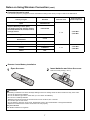
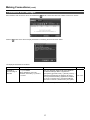
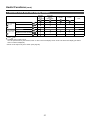
Channels that can be used
The channels (frequency range) that can be used differ according to the country or region. Refer to the table below.
Country or region
Standard
Japan
ARIB STD-T66
England, Germany, France, Spain,
Italy, Belgium, Austria, Sweden, Norway,
Denmark, Switzerland, Holland, Finland,
Portugal, Greece
ETSI 300.328
Singapore
IDA
Australia,
New Zealand
C-Tick
Malaysia
SIRIM
United States
FCC part 15
Canada
IC RSS-210
Taiwan
DGT
Channels used
Frequency band
(Center frequency)
1 - 13
2,412 MHz 2,472 MHz
1 - 11
2,412 MHz 2,462 MHz
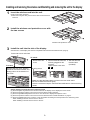
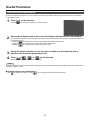
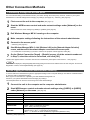
Remote Control Battery Installation
1
Open the cover.
2
Insert batteries and close the cover.
Note the correct polarity (+ and -).
Precautions
Mishandling of batteries can cause electrolyte leakage which can damage items the fluid contacts and may cause a fire.
• Do not mix old and new batteries.
• Do not use different types at the same time. (ex. zinc carbon and alkaline)
• Do not burn or breakup batteries.
Batteries must not be exposed to excessive heat such as sunshine, fire or the like.
• Do not take apart or short circuit.
• Do not attempt to recharge, short-circuit, disassemble, heat or burn used alkaline or manganese batteries.
• Replace the batteries if the remote control does not work properly.
For your reference
Use alkaline batteries for longer life.
7