1
Sun StorEdge™ 3000 Family
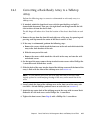
FRU Installation Guide
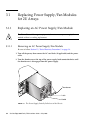
Sun Microsystems, Inc.
www.sun.com
Part No. 816-7326-22
May 2006, Revision A
Submit comments about this document at: http://www.sun.com/hwdocs/feedback
Copyright © 2002–2006 Dot Hill Systems Corporation and others, 2200 Faraday Avenue, Suite 100, Carlsbad, California 92008, USA.
All rights reserved.
Sun Microsystems, Inc. and Dot Hill Systems Corporation may have intellectual property rights relating to technology embodied in this
product or document. In particular, and without limitation, these intellectual property rights may include one or more of the U.S. patents listed
at http://www.sun.com/patents and one or more additional patents or pending patent applications in the U.S. and other countries.
This product or document is distributed under licenses restricting its use, copying distribution, and decompilation. No part of this product or
document may be reproduced in any form by any means without prior written authorization of Sun and its licensors, if any.
Third-party software is copyrighted and licensed from Sun suppliers.
Parts of the product may be derived from Berkeley BSD systems, licensed from the University of California. UNIX is a registered trademark in
the U.S. and in other countries, exclusively licensed through X/Open Company, Ltd.
Sun, Sun Microsystems, the Sun logo, Sun StorEdge, AnswerBook2, docs.sun.com, and Solaris are trademarks or registered trademarks of Sun
Microsystems, Inc. in the U.S. and in other countries.
Netscape is a trademark or registered trademark of Netscape Communications Corporation in the United States and other countries.
Mozilla is a trademark or registered trademark of Netscape Communications Corporation in the United States and other countries.
U.S. Government Rights—Commercial use. Government users are subject to the Sun Microsystems, Inc. standard license agreement and
applicable provisions of the FAR and its supplements.
DOCUMENTATION IS PROVIDED “AS IS” AND ALL EXPRESS OR IMPLIED CONDITIONS, REPRESENTATIONS AND WARRANTIES,
INCLUDING ANY IMPLIED WARRANTY OF MERCHANTABILITY, FITNESS FOR A PARTICULAR PURPOSE OR NONINFRINGEMENT,
ARE DISCLAIMED, EXCEPT TO THE EXTENT THAT SUCH DISCLAIMERS ARE HELD TO BE LEGALLY INVALID.
Copyright © 2002–2006 Dot Hill Systems Corporation et d’autres, 2200 Faraday Avenue, Suite 100, Carlsbad, Californie 92008, Etats-Unis.
Tous droits réservés.
Sun Microsystems, Inc. et Dot Hill Systems Corporation peuvent avoir les droits de propriété intellectuels relatants à la technologie incorporée
dans le produit qui est décrit dans ce document. En particulier, et sans la limitation, ces droits de propriété intellectuels peuvent inclure un ou
plus des brevets américains énumérés à http://www.sun.com/patents et un ou les brevets plus supplémentaires ou les applications de brevet
en attente dans les Etats-Unis et dans les autres pays.
Ce produit ou document est protégé par un copyright et distribué avec des licences qui en restreignent l’utilisation, la copie, la distribution, et la
décompilation. Aucune partie de ce produit ou document ne peut être reproduite sous aucune forme, par quelque moyen que ce soit, sans
l'autorisation préalable et écrite de Sun et de ses bailleurs de licence, s’il y en a.
Le logiciel détenu par des tiers, et qui comprend la technologie relative aux polices de caractères, est protégé par un copyright et licencié par des
fournisseurs de Sun.
Des parties de ce produit pourront être dérivées des systèmes Berkeley BSD licenciés par l’Université de Californie. UNIX est une marque
déposée aux Etats-Unis et dans d’autres pays et licenciée exclusivement par X/Open Company, Ltd.
Sun, Sun Microsystems, le logo Sun, Sun StorEdge, AnswerBook2, docs.sun.com, et Solaris sont des marques de fabrique ou des marques
déposées de Sun Microsystems, Inc. aux Etats-Unis et dans d’autres pays.
Netscape est une marque de Netscape Communications Corporation aux Etats-Unis et dans d’autres pays.
Mozilla est une marque de Netscape Communications Corporation aux Etats-Unis et dans d’autres pays.
LA DOCUMENTATION EST FOURNIE “EN L’ÉTAT” ET TOUTES AUTRES CONDITIONS, DECLARATIONS ET GARANTIES EXPRESSES
OU TACITES SONT FORMELLEMENT EXCLUES, DANS LA MESURE AUTORISEE PAR LA LOI APPLICABLE, Y COMPRIS
NOTAMMENT TOUTE GARANTIE IMPLICITE RELATIVE A LA QUALITE MARCHANDE, A L'APTITUDE A UNE UTILISATION
PARTICULIERE OU A L’ABSENCE DE CONTREFAÇON.
Contents
1.
2.
Sun StorEdge 3000 Family FRUs
1.1
Available FRUs
1.2
Static Electricity Precautions
1.3
Power-On Sequence
1.4
Powering Off the Array
1–1
1–2
1–8
1–8
1–9
Bezel, Disk Drive, Air Management Sled, and Tabletop Cover FRUs
2.1
2.2
Replacing the Front Bezel and Ear Caps
2–2
2.1.1
Removing the Front Bezel and Ear Caps
2.1.2
Placing the Bezel and Ear Caps Back Onto the Chassis
Replacing a Disk Drive
2–1
2–2
2–2
2–4
2.2.1
Identifying the Defective Disk Drive in a RAID Array
2–5
2.2.2
Identifying the Defective Disk Drive in a JBOD Array
2–8
2.2.3
Removing a Defective Disk Drive in a RAID or JBOD Array
2.2.4
Installing a New Disk Drive in a RAID or JBOD Array
2.2.5
Scanning the New Drive and Related Procedures for RAID
Arrays 2–11
2–9
2–10
2.2.5.1
Scanning the New Drive
2–11
2.2.5.2
Checking and Performing the Correct Power-up
Sequence 2–12
2.2.5.3
Assigning a Disk Drive as a Spare
2–13
iii
3.
2.2.5.5
Automatic Rebuild and Automatic Global Spare
Assignments After a Failed Drive is Replaced 2–14
Installing an Air Management Sled
2.4
Adding or Removing the Tabletop Cover
2–15
2–16
Converting a Rack-Ready Array to a Tabletop Array
2–17
2.4.2
Converting a Tabletop Array to a Rack-Ready Array
2–19
Power and Fan Module FRUs
3.2
2–13
2.4.1
3–1
Replacing Power Supply/Fan Modules for 2U Arrays
3–2
3.1.1
3–2
3.1.2
Replacing an AC Power Supply/Fan Module
3.1.1.1
Removing an AC Power Supply/Fan Module
3.1.1.2
Installing an AC Power Supply/Fan Module
Replacing a DC Power Supply/Fan Module
3.1.2.1
Removing a DC Power Supply/Fan Module
3.1.2.2
Installing a DC Power Supply/Fan Module
3–5
3.2.1
3–5
Battery FRUs
Replacing an AC Power Supply/Fan Module
3.2.1.1
Removing an AC Power Supply/Fan Module
3.2.1.2
Installing an AC Power Supply/Fan Module
Replacing a DC Power Supply/Fan Module
Removing a DC Power Supply/Fan Module
3.2.2.2
Installing a DC Power Supply/Fan Module
4.1
Battery Operation
4.2
Battery Status on the Initial Firmware Screen
4.3
Battery Dating on the Battery Labels
4.4
Replacing a Battery or Battery Module
4.4.1
4–2
Replacing a SCSI Battery
Sun StorEdge 3000 Family FRU Installation Guide • May 2006
4–3
4–5
4–5
4–2
3–3
3–3
3–4
3–5
3–6
3–6
3.2.2.1
4–1
3–2
3–3
Replacing Power Supply/Fan Modules for 1U Arrays
3.2.2
iv
If the Logical Drive Status is REBUILDING
2.3
3.1
4.
2.2.5.4
3–6
3–7
4.4.2
4.5
5.
5.2
4–9
FC Battery Status and In-Service Date Procedures
4–10
4.5.1
Viewing Status and Setting the In-Service Date With Sun StorEdge
CLI 4–11
4.5.2
Viewing Status and Setting the In-Service Date With Sun StorEdge
Configuration Service 4–12
4.5.3
Verifying the In-Service Date When Replacing a Battery in Sun
StorEdge Configuration Service 4–14
4.5.4
Refreshing the Battery Status With Sun StorEdge Configuration
Service 4–16
LED Module FRUs
5.1
6.
Replacing an FC Battery Module
5–1
Replacing the LED Module for 2U Arrays
5–2
5.1.1
Reviewing the Parts and Tools
5–2
5.1.2
Removing the Front Bezel and Right Ear Cap
5.1.3
Removing the LED Module
5.1.4
Installing a New LED Module
5.1.5
Replacing the Ear Cap and Front Bezel
5–2
5–3
5–5
Replacing the LED Module for 1U Arrays
5–7
5–7
5.2.1
Reviewing the Parts and Tools
5–7
5.2.2
Removing the Front Bezel and Right Ear Cap
5.2.3
Removing the LED Module
5.2.4
Installing a New LED Module
5.2.5
Replacing the Ear Cap and Front Bezel
5–7
5–8
5–11
5–12
Sun StorEdge 3510 FC and Sun StorEdge 3511 SATA Controller FRUs
6.1
Replacing an I/O Controller Module
6.2
Saving the NVRAM Configuration Settings
6.3
I/O Controller Replacement for a Dual-Controller Array
6–1
6–2
6.3.1
Removing an I/O Controller Module
6.3.2
Installing an I/O Controller Module
6–5
6–5
6–6
6–7
Contents
v
7.
8.
vi
6.3.3
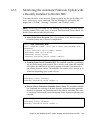
Monitoring the Automatic Firmware Update with a Recently
Installed Controller FRU 6–9
6.3.4
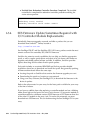
SES Firmware Update Sometimes Required with I/O Controller
Module Replacements 6–10
6.3.5
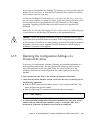
Restoring the Configuration Settings of a Powered-Off Array
11
6–
6.4
Converting a Dual-Controller Array to a Single-Controller Array
6–12
6.5
Converting a Single-Controller Array to a Dual-Controller Array
6–13
6.6
I/O Controller Replacement for a
Single-Controller Array 6–15
6.6.1
Downgrading from Controller Firmware Version 4.1x to 3.27
19
6.6.2
SES Firmware Update
6–23
Sun StorEdge 3320 SCSI Controller FRUs
7–1
7.1
Replacing a SCSI Controller Module
7–2
7.2
Saving the NVRAM Configuration Settings
7.3
SCSI Controller Replacement for a Dual-Controller Array
7–4
7–4
7.3.1
Removing a SCSI Controller Module
7.3.2
Installing a SCSI Controller Module
7.3.3
Monitoring the Automatic Firmware Update for a Recently
Installed Controller FRU 7–7
7.3.4
Restoring the Configuration Settings of a Powered-Off Array
7–5
7–5
7.4
Converting a Dual-Controller Array to a Single-Controller Array
7–9
7.5
Converting a Single-Controller Array to a Dual-Controller Array
7–9
7.6
SCSI Controller Replacement for a Single-Controller Array
Sun StorEdge 3310 SCSI Controller FRUs
8–1
8.1
Replacing a SCSI Controller Module
8–2
8.2
Saving the NVRAM Configuration Settings
8.3
SCSI Controller Replacement for a
Dual-Controller Array 8–5
Sun StorEdge 3000 Family FRU Installation Guide • May 2006
6–
8–5
7–11
7–8
8.3.1
Removing a SCSI Controller Module
8.3.2
Installing a SCSI Controller Module
8.3.3
Monitoring the Automatic Firmware Update for a Recently
Installed Controller FRU 8–8
8.3.4
Restoring the Configuration Settings of a Powered-Off Array
8–9
Converting a Dual-Controller Array to a Single-Controller Array
8–11
8.5
Converting a Single-Controller Array to a Dual-Controller Array
8–11
8.6
SCSI Controller Replacement for a Single-Controller Array
Replacing I/O Expansion Modules
9–2
9.1.1
Removing the I/O Expansion Module
9.1.2
Installing the I/O Expansion Module
9–2
9–2
Installing Small Form-Factor Pluggable Transceivers
9.3
Installing a RAID/Expansion Chassis FRU
9.4
Converting an FC JBOD Into an FC RAID Array
9–3
9–5
9–8
9.4.1
Managing an FC RAID Array Using Sun StorEdge Configuration
Service 9–15
9.4.2
Creating a Dual-Controller RAID Array
Replacing the ID Switch Module
9–16
9–17
9.5.1
Reviewing the Parts and Tools
9.5.2
Removing the Front Bezel and Left Ear Cap
9.5.3
Removing the ID Switch Module
9.5.4
Installing a New ID Switch Module
9.5.5
Replacing the Ear Cap and Front Bezel
SCSI Module FRUs
10.1
8–
9–1
9.2
9.5
8–13
Downgrading From Controller Firmware Version 3.66 to 3.25
15
FC and SATA Module FRUs
9.1
10.
8–6
8.4
8.6.1
9.
8–6
9–17
9–18
9–19
9–21
9–22
10–1
Replacing SCSI I/O Modules
10–2
Contents
vii
10.2
10.3
Installing Gaskets If Needed
10–2
10.1.2
Removing the SCSI I/O Module
10.1.3
Installing a SCSI I/O Module
10–3
Replacing the SCSI Terminator Module
10–3
10.2.1
Removing the SCSI Terminator Module
10.2.2
Installing a Terminator Module
Replacing the EMU Module
10–4
10–4
10–5
10.3.1
Removing an EMU Module
10.3.2
Installing an EMU Module
10–6
10–6
Installing a RAID/Expansion Chassis FRU
10.5
Special JBOD Usage With External Terminators
10–7
10–10
10.5.1
External Terminators for Special Split-Bus JBOD Maintenance
10
10.5.2
Older JBOD Split-Bus Configurations
Installing a Filler Panel on a SCSI Array
Sun StorEdge 3120 SCSI Array FRUs
11.1
10–
10–12
10–15
11–1
Installing an Expansion Chassis FRU
11–1
A. Inserting a 3.2x Controller Into a 4.1x Chassis
A–1
A.1
Replacing a 4.1x Controller with a 3.27 Controller (FC and SATA Only)
A–2
A.2
Replacing a 4.1x Controller with a 3.25 Controller (Sun StorEdge 3310 SCSI
Controller FRUs Only) A–6
Index
viii
10–2
10.4
10.6
11.
10.1.1
Index–1
Sun StorEdge 3000 Family FRU Installation Guide • May 2006
CHAPTER
1
Sun StorEdge 3000 Family FRUs
This document provides instructions for removing and installing field-replaceable
units (FRUs) in Sun StorEdge™ 3120 SCSI arrays, Sun StorEdge 3310 SCSI arrays,
Sun StorEdge 3320 SCSI arrays, Sun StorEdge 3510 FC arrays, and Sun StorEdge
3511 SATA arrays.
Note – FRU installation procedures for Sun StorEdge 3510 FC and Sun StorEdge
3511 SATA arrays are identical except where differences are identified in this
manual.
Instructions are also included for FRUs which are common to all five arrays. FRU
components can be replaced by customers or by Sun service representatives.
This chapter covers the following topics:
■
■
■
■
Section 1.1,
Section 1.2,
Section 1.3,
Section 1.4,
“Available FRUs” on page 1-2
“Static Electricity Precautions” on page 1-8
“Power-On Sequence” on page 1-8
“Powering Off the Array” on page 1-9
Removal and installation instructions are provided for the following FRUs:
■
■
■
■
Disk drives
Power and fan modules
Card modules
Special-Use FRUs, such as batteries
1-1
1.1
Available FRUs
Most FRUs are hot-swappable. Hot-swappable means that a live upgrade can be
performed—the FRU can be removed and replaced while the RAID array is powered
on and operational.
Caution – Follow the FRU procedures carefully to ensure successful FRU
replacement.
The following tables list the FRUs that are currently available. For additional FRUs
and X-options, consult your sales representative or the latest Release Notes for Sun
StorEdge 3000 Family products on Sun web sites.
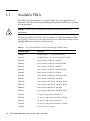
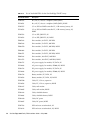
TABLE 1-1
1-2
List of Available FRUs for the Sun StorEdge 3120 SCSI Array
FRU Model Number
Description
F370-6195
1U JBOD chassis + I/O board with SAF-TE
F371-0537
1U JBOD chassis + I/O board with SAF-TE, ROHS
F540-6055
Drive module, 36-GB LVD, 15K RPM
F540-6447
Drive module, 36-GB LVD, 15K RPM, ROHS
F540-6056
Drive module, 73-GB LVD, 10K RPM
F540-6448
Drive module, 73-GB LVD, 10K RPM, ROHS
F540-6057
Drive module, 73-GB LVD, 15K RPM
F540-6449
Drive module, 73-GB LVD, 15K RPM, ROHS
F540-6058
Drive module, 146-GB LVD, 10K RPM
F540-6450
Drive module, 146-GB LVD, 10K RPM, ROHS
F540-6494
Drive module, 146-GB LVD, 15K RPM, ROHS
F540-6366
Drive module, 300-GB LVD, 10K RPM
F540-6132
Drive module, 300-GB LVD, 10K RPM, ROHS
F370-6193
AC power supply and fan module, 1U
F371-0536
AC power supply and fan module, 1U, ROHS
F370-6192
DC power supply and fan module, 1U
F371-0535
DC power supply and fan module, 1U, ROHS
F370-5405
Cable, LVD, 1-foot, jumper
Sun StorEdge 3000 Family FRU Installation Guide • May 2006
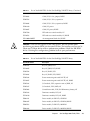
TABLE 1-1
List of Available FRUs for the Sun StorEdge 3120 SCSI Array (Continued)
FRU Model Number
Description
F371-0303
Cable, LVD, 1-foot, jumper, ROHS
F370-5528
Cable, LVD, 1.5-foot, expansion
F371-0304
Cable, LVD, 1.5-foot, expansion, ROHS
F370-6630
Cable, DC power
F371-0307
Cable, DC power, ROHS
F370-7590
LED and reset switch module, 1U
F371-0538
LED and reset switch module, 1U, ROHS
XTA-3000-AMBSZ
Air management blank sled, ROHS
Caution – You can mix capacity in the same chassis, but not spindle speed
revolutions per minute (RPM) on the same SCSI bus. For instance, you can use 36Gbyte and 73-Gbyte drives with no performance problems if both are 10K RPM
drives. Violating this configuration guideline leads to poor performance.
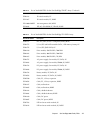
TABLE 1-2
List of Available FRUs for the Sun StorEdge 3310 SCSI Array
FRU Model Number
Description
F370-5393
Box, 2U, JBOD, LVD
F371-0105
Box, 2U, JBOD, LVD, ROHS
F370-5524
Box, 2U, RAID, LVD
F371-0106
Box, 2U, RAID, LVD, ROHS
F370-5394
Event monitoring unit with SAF-TE, 2U
F371-0107
Event monitoring unit with SAF-TE, 2U, ROHS
F370-5396
I/O module, LVD, expansion unit or JBOD, 2U
F370-5397
I/O module, LVD, RAID, 2U
F370-5403
Controller module, LVD, 512 MB memory, battery, 2U
F370-5399
Terminator module, LVD, 2U
F371-0110
Terminator module, LVD, 2U, ROHS
F540-6121
Drive module, 36-GB LVD, 15K RPM
F540-6447
Drive module, 36-GB LVD, 15K RPM, ROHS
F540-5563
Drive module, 73-GB LVD, 10K RPM
F540-6448
Drive module, 73-GB LVD, 10K RPM, ROHS
Chapter 1
Sun StorEdge 3000 Family FRUs
1-3
TABLE 1-2
1-4
List of Available FRUs for the Sun StorEdge 3310 SCSI Array (Continued)
FRU Model Number
Description
F540-6097
Drive module, 73-GB LVD, 15K RPM
F540-6449
Drive module, 73-GB LVD, 15K RPM, ROHS
F540-5735
Drive module, 146-GB LVD, 10K RPM
F540-6550
Drive module, 146-GB LVD, 10K RPM, ROHS
F540-6494
Drive module, 146-GB LVD, 15K RPM, ROHS
F540-6366
Drive module, 300-GB LVD, 10K RPM
F540-6132
Drive module, 300-GB LVD, 10K RPM, ROHS
F370-6776
AC power and fan module, 2U
F371-0108
AC power and fan module, 2U, ROHS
F370-6798
DC power and fan module, 2U
F371-0109
DC power and fan module, 2U, ROHS
F370-5533
Battery, LVD
F371-0111
Battery, LVD, ROHS
F370-5405
Cable, LVD, 1-foot, jumper
F371-0303
Cable, LVD, 1-foot, jumper, ROHS
F370-5528
Cable, LVD, 1.5-foot, expansion
F371-0304
Cable, LVD, 1.5-foot, expansion, ROHS
F370-6627
Cable, null modem
F371-0305
Cable, null modem, ROHS
F370-6629
Cable, shielded ethernet
F371-0306
Cable, shielded ethernet, ROHS
F370-6630
Cable, DC power
F371-0307
Cable, DC power, ROHS
F370-7589
LED and reset switch module, 2U
F371-0112
LED and reset switch module, 2U, ROHS
XTA-3000-AMBSZ
Air management blank sled, ROHS
Sun StorEdge 3000 Family FRU Installation Guide • May 2006
TABLE 1-3
List of Available FRUs for the Sun StorEdge 3320 SCSI Array
FRU Model Number
Description
F371-0105
Box, 2U, JBOD, LVD, ROHS
F371-0106
Box, 2U, RAID, LVD, ROHS
F371-0107
Event monitoring unit with SAF-TE, 2U, ROHS
F370-7713
I/O module, expansion unit or JBOD, 2U, ROHS
F370-7655
I/O module, LVD, RAID, 2U, ROHS
F370-7714
Controller module, 512 MB memory, battery, 2U, ROHS
F371-0110
Terminator module, LVD, 2U, ROHS
F540-6447
Drive module, 36-GB LVD, 15K RPM, ROHS
F540-6448
Drive module, 73-GB LVD, 10K RPM, ROHS
F540-6449
Drive module, 73-GB LVD, 15K RPM, ROHS
F540-6450
Drive module, 146-GB LVD, 10K RPM, ROHS
F540-6494
Drive module, 146-GB LVD, 15K RPM, ROHS
F540-6132
Drive module, 300-GB LVD, 10K RPM, ROHS
F371-0108
AC power and fan module, 2U, ROHS
F371-0109
DC power and fan module, 2U, ROHS
F371-0111
Battery, LVD, ROHS
F371-0303
Cable, LVD, 1-foot, jumper, ROHS
F371-0304
Cable, LVD, 1.5-foot, expansion, ROHS
F371-0305
Cable, null modem, ROHS
F371-0306
Cable, shielded ethernet, ROHS
F371-0307
Cable, DC power, ROHS
F371-0112
LED and reset switch module, 2U, ROHS
XTA-3000-AMBSZ
Air management blank sled, ROHS
Chapter 1
Sun StorEdge 3000 Family FRUs
1-5
TABLE 1-4
1-6
List of Available FRUs for the Sun StorEdge 3510 FC Array
FRU Model Number
Description
F370-5535
Box, 2U, FC, chassis + midplane (RAID/JBOD)
F371-0531
Box, 2U, FC, chassis + midplane (RAID/JBOD), ROHS
F370-5537
I/O w/SES and RAID controller FC, 1 GB memory, battery, 2U
F371-0532
I/O w/SES and RAID controller FC, 1 GB memory, battery, 2U,
ROHS
F370-5538
I/O w/SES, JBOD FC, 2U
F371-0533
I/O w/SES, JBOD FC, 2U, ROHS
F540-5628
Drive module, 36-GB FC, 15K RPM
F540-5629
Drive module, 73-GB FC, 10K RPM
F540-6570
Drive module, 73-GB FC, 10K RPM, ROHS
F540-6098
Drive module, 73-GB FC, 15K RPM
F540-6571
Drive module, 73-GB FC, 15K RPM, ROHS
F540-5626
Drive module, 146-GB FC, 10K RPM
F541-6572
Drive module, 146-GB FC, 10K RPM, ROHS
F370-6776
AC power supply/fan module, FC/SATA, 2U
F371-0108
AC power supply/fan module, SE3000, 2U, ROHS
F370-6798
DC power supply/fan module, FC/SATA, 2U
F371-0109
DC power supply/fan module, SE3000, 2U, ROHS
F370-6799
Battery module, FC/SATA, 2U
F371-0539
Battery module, FC/SATA, 2U, ROHS
F370-5540
Cable, FC, 1.5-foot, expansion
F371-0534
Cable, FC, 1.5-foot, expansion, ROHS
F370-6627
Cable, null modem
F371-0305
Cable, null modem, ROHS
F370-6629
Cable, shielded ethernet
F371-0306
Cable, shielded ethernet, ROHS
F370-6630
Cable, DC power
F371-0307
Cable, DC power, ROHS
F370-7589
LED and reset switch module, 2U
F371-0112
LED and reset switch module, 2U, ROHS
Sun StorEdge 3000 Family FRU Installation Guide • May 2006
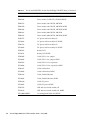
TABLE 1-4
List of Available FRUs for the Sun StorEdge 3510 FC Array (Continued)
FRU Model Number
Description
F370-6188
ID switch module, FC
F371-1967
ID switch module, FC, ROHS
XTA-3000-AMBSZ
Air management sled, ROHS
F371-0294
SFP, 4G, SW 850NM, FC, TRANS, ROHS
TABLE 1-5
List of Available FRUs for the Sun StorEdge 3511 SATA Array
FRU Model Number
Description
F370-6775
Box, 2U, SATA, chassis + backplane (RAID/JBOD)
F370-6773
I/O w/SES and RAID controller SATA, 1 GB memory, battery, 2U
F370-6774
I/O w/SES, JBOD SATA, 2U
F540-6180
Drive module, 250-GB SATA, 7200 RPM
F540-6364
Drive module, 400-GB SATA, 7200 RPM
F540-6365
Drive module, 500-GB SATA, 7K, RPM
F370-6776
AC power supply/fan module, FC/SATA, 2U
F371-0108
AC power supply/fan module, SE3000, 2U, ROHS
F370-6798
DC power supply/fan module, FC/SATA, 2U
F371-0109
DC power supply/fan module, SE3000, 2U, ROHS
F370-6799
Battery module, FC/SATA, 2U
F371-0539
Battery module, FC/SATA, 2U, ROHS
F370-5540
Cable, FC, 1.5-foot, expansion
F371-0534
Cable, FC, 1.5-foot, expansion, ROHS
F370-6627
Cable, null modem
F371-0305
Cable, null modem, ROHS
F370-6629
Cable, shielded ethernet
F371-0306
Cable, shielded ethernet, ROHS
F370-6630
Cable, DC power
F371-0307
Cable, DC power, ROHS
F370-7589
LED and reset switch module, 2U
F371-0112
LED and reset switch module, 2U, ROHS
Chapter 1
Sun StorEdge 3000 Family FRUs
1-7
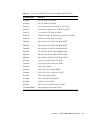
TABLE 1-5
1.2
List of Available FRUs for the Sun StorEdge 3511 SATA Array (Continued)
FRU Model Number
Description
F370-6188
ID switch module, FC
F371-1967
ID switch module, FC, ROHS
XTA-3000-AMBSZ
Air management sled, ROHS
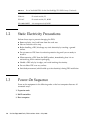
Static Electricity Precautions
Perform these steps to prevent damaging the FRUs:
1.3
■
Remove plastic, vinyl, and foam from the work area.
■
Wear an antistatic wrist strap.
■
Before handling a FRU, discharge any static electricity by touching a ground
surface.
■
Do not remove a FRU from its antistatic protective bag until you are ready to
install it.
■
When removing a FRU from the RAID product, immediately place it in an
antistatic bag and in antistatic packaging.
■
Handle a FRU only by its edges, and avoid touching the circuitry.
■
Do not slide a FRU over any surface.
■
Limit body movement (which builds up static electricity) during FRU installation.
Power-On Sequence
Power on the equipment in the following order so the host computer discovers all
connected arrays:
1. Expansion units
2. RAID controllers
3. Host computers
1-8
Sun StorEdge 3000 Family FRU Installation Guide • May 2006
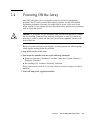
1.4
Powering Off the Array
Most FRU procedures are hot-swappable except for the chassis replacement
procedure, the ID switch module replacement procedure, and the LED module
replacement procedure. However, you might need to power off the array (both
power supplies) if you relocate the array or perform certain maintenance procedures
with its associated servers.
Caution – If controllers are not shut down from the firmware application or from
the Sun StorEdge Command-Line Interface (CLI) before an array is powered off,
data that is written to cache and data that has not been completely written to the
disks will be lost.
Before you power off both power supplies, you must perform the following steps,
which require shutting down the controller.
1. Stop all I/O activity to the array.
2. Shut down the controller with one of the following commands:
■
■
Firmware application “Shutdown Controller” command (“system Functions →
Shutdown controller”)
Sun StorEdge CLI “shutdown controller” command
These commands first halt all I/O activity, and then write the contents of cache to
the drives.
3. Power off both power supply/fan modules.
Chapter 1
Sun StorEdge 3000 Family FRUs
1-9
1-10
Sun StorEdge 3000 Family FRU Installation Guide • May 2006
CHAPTER
2
Bezel, Disk Drive, Air Management
Sled, and Tabletop Cover FRUs
This chapter provides instructions for removing and installing bezel, ear caps, disk
drives, air management sleds, and tabletop cover FRUs, and covers the following
topics:
■
■
Section 2.1, “Replacing the Front Bezel and Ear Caps” on page 2-2
■
Section 2.1.1, “Removing the Front Bezel and Ear Caps” on page 2-2
■
Section 2.1.2, “Placing the Bezel and Ear Caps Back Onto the Chassis” on
page 2-2
Section 2.2, “Replacing a Disk Drive” on page 2-4
■
Section 2.2.1, “Identifying the Defective Disk Drive in a RAID Array” on
page 2-5
■
Section 2.2.2, “Identifying the Defective Disk Drive in a JBOD Array” on
page 2-8
■
Section 2.2.3, “Removing a Defective Disk Drive in a RAID or JBOD Array” on
page 2-9
■
Section 2.2.4, “Installing a New Disk Drive in a RAID or JBOD Array” on
page 2-10
■
Section 2.2.5, “Scanning the New Drive and Related Procedures for RAID
Arrays” on page 2-11
■
Section 2.3, “Installing an Air Management Sled” on page 2-15
■
Section 2.4, “Adding or Removing the Tabletop Cover” on page 2-16
■
Section 2.4.1, “Converting a Rack-Ready Array to a Tabletop Array” on
page 2-17
■
Section 2.4.2, “Converting a Tabletop Array to a Rack-Ready Array” on
page 2-19
2-1
2.1
Replacing the Front Bezel and Ear Caps
Some procedures require that you remove the front bezel and the small vertical
plastic caps on either side of the bezel that cover the rackmount tabs. These
rackmount tabs are referred to as “ears.”
2.1.1
Removing the Front Bezel and Ear Caps
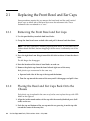
1. Use the provided key to unlock both bezel locks.
2. Grasp the front bezel cover on both sides and pull it forward and then down.
Note – For many operations, including replacing disk drives, it is not necessary to
further detach the bezel, because dropping it down moves it sufficiently out of the
way.
3. Press the right bezel arm (hinge) toward the left side to release it from the chassis
hole.
The left hinge also disengages.
4. Note the location of the chassis bezel holes on each ear.
5. Remove the plastic caps from the front left and right ears of the array.
Both plastic caps are removed in the same way.
a. Squeeze both sides of the cap at the top and the bottom.
b. Turn the cap toward the center of the array until it disengages and pull it free.
2.1.2
Placing the Bezel and Ear Caps Back Onto the
Chassis
Each plastic cap is replaced in the same way, but be sure to place the cap with LED
labels on the right ear.
1. Align the inside round notches of the cap with the round cylindrical posts (ball
studs) on the ear.
2. Push the top and bottom of the ear cap onto the ear, pressing in on the top side
toward the center of the array first.
2-2
Sun StorEdge 3000 Family FRU Installation Guide • May 2006
3. Continue pushing the top and bottom of the ear cap onto the ear, pressing on the
side toward the outside of the array.
Do not use force when placing a cap on an ear.
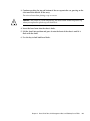
Caution – Be careful to avoid compressing the reset button under the plastic cap
when you replace the plastic cap on the chassis.
4. Insert the bezel arms into the chassis holes.
5. Lift the bezel into position and press it onto the front of the chassis until it is
flush with the front.
6. Use the key to lock both bezel locks.
Chapter 2
Bezel, Disk Drive, Air Management Sled, and Tabletop Cover FRUs
2-3
2.2
Replacing a Disk Drive
To replace a disk drive, you first remove the defective disk drive and then install a
replacement drive. The drive module is hot-swappable. It is replaced while the
RAID product is powered on.
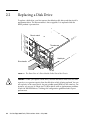
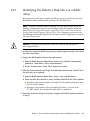
Chassis notch
Thumbscrew
Handle pin
Drive handle
FIGURE 2-1
The Front View of a Drive Module Pulled Out of the Chassis
Caution – When you replace a disk drive, the new disk drive must have the same
capacity as or a greater capacity than the disk drive which is being replaced. You can
mix capacity in the same chassis, but not spindle speed (RPM) on the same bus. For
instance, you can use 36-Gbyte and 73-Gbyte drives with no performance problems
if both are 10K-RPM drives. Violating this configuration guideline leads to poor
performance.
2-4
Sun StorEdge 3000 Family FRU Installation Guide • May 2006
2.2.1
Identifying the Defective Disk Drive in a RAID
Array
Before replacing a disk drive, perform the following steps to ensure that you have
identified the correct defective disk for removal in the RAID array.
Note – To receive automatic email notification of a disk drive failure, set up Sun
StorEdge Configuration Service or Sun StorEdge Diagnostic Reporter. For details,
refer to the Sun StorEdge 3000 Family Configuration Service User’s Guide or the Sun
StorEdge 3000 Family Diagnostic Reporter User’s Guide. Alternately, you can use the
Sun StorEdge Automated Diagnostic Environment (StorADE) application to monitor
the status of your array.
Caution – To prevent any possibility of data loss, back up the data prior to
removing disk drives.
1. Examine the back of the RAID array and any attached expansion units, and record
the cable connections.
2. Prepare the RAID product for the disk replacement:
a. From the RAID firmware Main Menu, choose “view and edit Configuration
parameters,” then choose “Drive-side Parameters.”
b. Set the “Periodic Drive Check Time” option to 5 seconds.
3. Find the Channel number and target ID combination (for instance, Chl 0 ID 4) of
the disk drive to be replaced:
a. From the RAID firmware Main Menu, choose “view and edit Drives.”
b. Locate the disk drive that has a status of BAD or FAILED in the Status column:
■
Write down the Channel number and target ID of the defective disk drive from
the Chl and ID columns.
■
Write down the number of the associated logical drive, as shown in the
LG_DRV column, that the defective disk drive is a member of.
4. Physically locate the defective disk drive using the Chl and ID numbers obtained
in Step 3.
Chapter 2
Bezel, Disk Drive, Air Management Sled, and Tabletop Cover FRUs
2-5
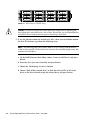
Disk 0
Disk 3
Disk 6
Disk 9
Disk 1
Disk 4
Disk 7
Disk 10
Disk 2
Disk 5
Disk 8
Disk 11
FIGURE 2-2
Front Panel of a RAID Array
Caution – Failure to identify the correct disk drive might result in replacing the
wrong disk drive and could cause a loss of data. Be sure that you have identified the
correct disk drive. Back up the data prior to removing a disk drive.
5. If you are uncertain about the location of a drive, check your installation manual
for drive ID locations or perform the following steps.
Note – The following steps only work if there is no I/O activity and the drive is
visible to the controller. Under certain fail scenarios, the controller might not be able
to detect the failed drive.
a. On the RAID firmware Main Menu, choose “view and edit Drives” and press
Return.
b. Select the drive you want to identify and press Return.
c. Choose the “Identifying scsi drive” function.
d. Choose “flash all But selected drive” to flash the activity LEDs of all of the
drives in the drive channel except the selected drive, and press Return.
2-6
Sun StorEdge 3000 Family FRU Installation Guide • May 2006
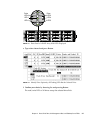
Drive
LED 3
LED 4
LED 5
Drive
LED 0
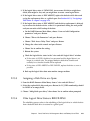
LED 1
LED 2
Disk 0
Disk 3
Disk 6
Disk 9
Disk 1
Disk 4
Disk 7
Disk 10
Disk 2
Disk 5
Disk 8
Disk 11
FIGURE 2-3
Front Panel of a RAID Array With LEDs Displayed
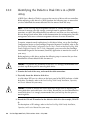
e. Type a time interval and press Return.
FIGURE 2-4
Identify Drive Option by all Flashing LEDs But the Selected Drive
f. Confirm your choice by choosing Yes and pressing Return.
The read/write LEDs of all drives except the selected drive flash.
Chapter 2
Bezel, Disk Drive, Air Management Sled, and Tabletop Cover FRUs
2-7
2.2.2
Identifying the Defective Disk Drive in a JBOD
Array
A JBOD (Just a Bunch of Disks) is an array that consists of drives with no controllers.
Before replacing a disk drive in a JBOD, perform the following steps to ensure that
you have identified the correct defective disk for removal from the array.
Note – If you are using disk management software or volume management
software to manage your disk storage, you might need to perform software
operations to take a disk offline before you remove it and after you have replaced a
drive to bring it back online. Refer to the documentation that accompanies your disk
management software or volume management software for more information.
To receive automatic email notification of a disk drive failure, set up Sun StorEdge
Configuration Service or Sun StorEdge Diagnostic Reporter. For details, refer to the
Sun StorEdge 3000 Family Configuration Service User’s Guide or the Sun StorEdge 3000
Family Diagnostic Reporter User’s Guide. Alternately, you can use the Sun StorEdge
Automated Diagnostic Environment (StorADE) application to monitor the status of
your array.
Before replacing a disk drive, perform the following steps to ensure that you have
identified the correct defective disk for removal.
Caution – To prevent any possibility of data loss, it is strongly recommended that
you back up the data prior to removing disk drives.
1. Examine the back of the array, and record the cable connections.
2. Physically locate the defective disk drive.
A solid amber LED next to a drive on the front panel of the JBOD indicates a failed
disk drive. For details, refer to the Sun StorEdge 3000 Family Installation, Operation,
and Service Manual for your array.
Caution – Failure to identify the correct disk drive might result in replacing the
wrong disk drive and could cause a loss of data. Be sure that you have identified the
correct disk drive. It is strongly recommended that you back up the data prior to
removing disks.
3. Record the Chl and ID number for the defective disk drive (for example, Chl 0 ID
4).
For descriptions of ID settings, refer to the Sun StorEdge 3000 Family Installation,
Operation, and Service Manual for your array.
2-8
Sun StorEdge 3000 Family FRU Installation Guide • May 2006
4. (Optional) In Sun StorEdge Configuration Service, a red icon
in the main
window indicates a JBOD drive failure. Review the error log to confirm the disk
drive ID for the failed drive.
For details on the Sun StorEdge Configuration Service main window, refer to the
Sun StorEdge 3000 Family Configuration Service User’s Guide.
5. (Optional) In the Sun StorEdge CLI, run the show enclosure-status command.
If the drive status is Absent the drive might have failed, or has been removed
from the chassis.
For details on the show enclosure-status command, refer to the Sun StorEdge
3000 Family CLI User’s Guide.
Note – In a split-bus configuration, only the drive status on Ch 0 will be displayed.
2.2.3
Removing a Defective Disk Drive in a RAID or
JBOD Array
Caution – Failure to identify the correct disk drive might result in replacing the
wrong disk drive and could cause a loss of data. Be sure that you have identified the
correct disk drive.
To prevent any possibility of data loss, back up the data prior to removing disk
drives.
Caution – Do not remove a defective module unless you have a replacement FRU
module to immediately replace the defective module. If you remove a module and
do not replace it, you alter the air flow inside the chassis and could overheat the
chassis as a result.
When a failed drive is replaced, the system rebuilds the logical drive by restoring
data that was on the failed drive onto a new or spare drive. If you replace more than
one drive at a time, the logical drive cannot be rebuilt. If more than one drive fails in
a logical drive (except RAID 1+0), the logical drive fails and data from the logical
drive is lost.
Remove the defective disk drive with the following steps.
1. Unlock the locks with the provided key, and gently pull the plastic front bezel
away from the front of the unit so that it drops down and is supported by the two
hinged brackets on the sides.
Chapter 2
Bezel, Disk Drive, Air Management Sled, and Tabletop Cover FRUs
2-9
2. Turn the thumbscrew of the defective disk drive counterclockwise several full
turns until the thumbscrew and drive module are loosened.
3. Gently pull the release handle upward.
4. Pull the drive module out until the drive connector has fully disconnected from
the midplane.
5. Wait 20 seconds for the drive to stop spinning and then remove it from the
chassis.
2.2.4
Installing a New Disk Drive in a RAID or JBOD
Array
To install the replacement disk drive, perform the following steps.
Caution – When you replace a disk drive, the replacement disk drive must have the
same capacity as or a greater capacity than the disk drive which is being replaced.
You can mix capacity in the same chassis, but not spindle speed (RPM) on the same
SCSI bus. For instance, you can use 36-Gbyte and 73-Gbyte drives with no
performance problems if both are 10K RPM drives. Violating this configuration
guideline leads to poor performance.
Caution – Be sure to install a disk drive that is appropriate for your array. Sun
StorEdge 3510 FC array disk drives cannot be used in a Sun StorEdge 3511 SATA
array. Similarly, Sun StorEdge 3511 SATA disk drives cannot be used in a Sun
StorEdge 3510 FC array.
1. Gently slide the drive module into the drive slot until the handle pins slip into
the chassis notch.
2. Lower the disk drive handle until it is vertical.
3. Press and hold the drive handle in while you press the thumbscrew in until it
engages the threads.
4. Turn the thumbscrew clockwise until it is finger-tight.
Note – To ensure that a thumbscrew is finger-tight, tighten it with a screwdriver
and then loosen the thumbscrew counterclockwise a quarter turn.
2-10
Sun StorEdge 3000 Family FRU Installation Guide • May 2006
5. Push the plastic front bezel onto the front of the unit until it is seated firmly, and
use the key to lock the locks.
6. Go to Section 2.2.5, “Scanning the New Drive and Related Procedures for RAID
Arrays” on page 2-11.
Note – If the replaced drive is in a JBOD array directly attached to a server, perform
any operations your host software requires to recognize the new drive and bring it
under software control.
2.2.5
Scanning the New Drive and Related Procedures
for RAID Arrays
When a SCSI array is powered on, the controller scans all physical drives that are
connected through drive channels. Unlike FC and SATA arrays, if a SCSI array has
completed initialization and then a physical drive is connected, the controller does
not recognize the new drive until the next controller reset. This difference in
behavior is due to differences between Fibre Channel and SCSI architectures and
protocols.
Neither the “Periodic Auto-Detect Failure Drive Swap Check Time” firmware
application menu option nor the “Periodic Drive Check Time” menu option force the
scanning of a SCSI drive.
2.2.5.1
Scanning the New Drive
After you have replaced a disk drive, perform the following steps.
1. From the RAID firmware Main Menu, choose “view and edit Drives.”
2. Check the status of the disk drive.
The status field will specify NEW_DRV or USED_DRV until it is assigned as a
GLOBAL or LOCAL spare with STAND-BY status.
3. Scan the replaced disk drive into the configuration with the following steps:
a. From the RAID firmware Main Menu, choose “view and edit Drives.” Select
any disk drive in the list and press Return.
b. Choose “Scan scsi drive” and press Return. Select the Channel number, then
the ID number of the replaced disk drive, and confirm Yes when prompted.
c. Verify that the message “Scanned SCSI drive successfully” is displayed.
Chapter 2
Bezel, Disk Drive, Air Management Sled, and Tabletop Cover FRUs
2-11
4. From the RAID firmware Main Menu, choose “view and edit Logical drives” and
use the following table to continue.
TABLE 2-1
Decision Table for Selecting Disk Drive Procedure
If this drive status occurs
Perform this task
If the target logical drive status is GOOD, the spare
disk has successfully protected it and is now
integrated into the logical drive, and the
replacement disk drive is available to be assigned.
Go to Section 2.2.5.3, “Assigning a Disk Drive as a Spare”
on page 2-13.
If the target logical drive status is FATAL FAIL, two
or more disk drives have failed
All data in the logical drive is lost. Rebuild the logical
drive and restore backup data.
The logical drive status of DRV ABSENT or
INCOMPLETE only occurs at chassis power up.
DRV ABSENT indicates that one drive is bad.
INCOMPLETE indicates that two or more drives
are bad.
Go to Section 2.2.5.2, “Checking and Performing the
Correct Power-up Sequence” on page 2-12.
If the target logical drive status is DRV FAILED
If this occurs after a new drive has replaced the defective
drive, it indicates a bad midplane. Replace the chassis.
If the target logical drive status is REBUILDING,
Go to Section 2.2.5.4, “If the Logical Drive Status is
REBUILDING” on page 2-13.
5. After replacing a failed drive, save the configuration settings to NVRAM as
described in Section 6.2, “Saving the NVRAM Configuration Settings” on
page 6-5. The NVRAM procedure applies to all drives.
When you save the non-volative RAM (NVRAM) to file, you save the configuration
of the array onto each of the hard drives. This step saves the current configuration
onto the new hard drive.
2.2.5.2
Checking and Performing the Correct Power-up Sequence
Review the power-up sequence which you most recently used with the RAID array.
If you are uncertain about the power-up sequence used, repeat the power-up
sequence in the following order and see if it changes the logical drive status to
GOOD.
1. Power up the RAID array and associated server as follows:
■
■
■
Expansion units first
RAID array next
Host servers last (if they had been powered down for maintenance purposes)
2. Check the logical drive status in the “view and edit Logical drive” window. If the
status is GOOD, no further steps are needed.
2-12
Sun StorEdge 3000 Family FRU Installation Guide • May 2006
3. If the logical drive status is FATAL FAIL, two or more disk drives might have
failed, data might be lost, and you might have to create a new logical drive.
4. If the logical drive status is DRV ABSENT, replace the defective disk drive and
assign the replacement drive as a global spare. See Section 2.2.5.3, “Assigning a
Disk Drive as a Spare” on page 2-13.
5. If the logical drive status is DRV ABSENT and the drive replacement is delayed,
try to recover the defective drive so that it is operational during the wait period
and you can make a full backup of the data.
a. On the RAID firmware Main Menu, choose “view and edit Configuration
parameters” and press Return.
b. Choose “Drive-side Parameters” and press Return.
c. Choose “Disk Access Delay Time” and press Return.
d. Change the value to 60 seconds and press Return.
e. Choose Yes to confirm the setting.
f. Reboot the system.
g. Check the logical drive status in the “view and edit Logical drive” window.
■
If the status is GOOD, the drive has recovered and the logical drive is no
longer in a critical state. The original defective disk drive should work
correctly for a time but should still be replaced.
■
If the status is DRV ABSENT or DRV FAILED, replace the drive as soon as
possible.
h. Back up the logical drive data onto another storage medium.
2.2.5.3
Assigning a Disk Drive as a Spare
1. From the RAID firmware Main Menu, choose “view and edit Drives.”
2. Select the replaced disk drive and press Return (its LG_DRV membership should
be NONE or an empty field).
3. Choose “Add global spare drive,” then choose Yes to confirm when prompted.
2.2.5.4
If the Logical Drive Status is REBUILDING
The rebuilding process refers to the rebuilding of the logical drive in which the data
from a defective disk drive is restored to a global spare.
Chapter 2
Bezel, Disk Drive, Air Management Sled, and Tabletop Cover FRUs
2-13
When you see the REBUILDING status, perform one of the two following
procedures.
■
Wait until the rebuild process is completed, then replace the defective disk drive.
The benefit is that the logical drive is fully restored before you replace the
defective drive. This eliminates the possibility of lost data if the wrong drive is
removed.
or
■
Replace the defective drive and make the new drive a global spare while the
rebuilding process continues.
This procedure installs the new drive and assigns it as a global spare so that
automatic rebuild of a logical drive will occur if a drive fails on any other logical
drive.
Note – If a disk drive fails on another logical drive prior to the assignment of a new
global spare, you will have to manually rebuild the logical drive.
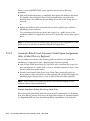
2.2.5.5
Automatic Rebuild and Automatic Global Spare Assignments
After a Failed Drive is Replaced
You can enable one or both of the following firmware features to expedite the
rebuilding of a logical drive after a defective drive has been replaced:
■
Auto-Assign Global Spare Drive (FC and SATA only): automatically assigns the
next unused drive as a global spare so that an automatic rebuild can occur when
the next failed drive event occurs)
■
Periodic Auto-Detect Failure Drive Swap Check Time: periodically polls the
drives, detects when a bad drive has been replaced, and automatically begins the
rebuilding logical drive process as soon as the bad drive has been replaced)
Note – These features are Disabled by default. These features require system
resources and can impact performance.
Periodic Auto-Detect Failure Drive Swap Check Time
This menu option periodically polls the unit to detect the replacement of a bad drive.
If no spare drive is present in the array, the logical drive begins an automatic rebuild
of a degraded RAID set when the firmware detects replacement of the bad drive.
2-14
Sun StorEdge 3000 Family FRU Installation Guide • May 2006
The drive swap check time is the interval at which the controller checks to see
whether a failed drive has been swapped. When a logical drive’s member drive fails,
the controller detects the failed drive (at the specified time interval). Once the failed
drive has been swapped with a drive that has adequate capacity to rebuild the
logical drive, the rebuild begins automatically.
To set the interval for Periodic Auto-Detect Failure Drive Swap Check Time:
1. Choose “view and edit Configuration parameters → Drive-side Parameters →
Periodic Auto-Detect Failure Drive Swap Check Time.”
A list of intervals is displayed.
2. Choose an interval.
A confirmation message is displayed.
3. Choose Yes to confirm the setting.
When you choose a time value to enable the periodic drive check time, the controller
polls all connected drives in the controller’s drive channels at the assigned interval.
Drive removal is detected even if a host does not attempt to access data on the drive.
Auto-Assign Global Spare Drive (FC and SATA Only)
This feature is Disabled by default. When you enable the “Auto-Assign Global Spare
Drive” menu option, the system automatically assigns as a global spare the unused
drive with the lowest drive ID. This enables the array to rebuild automatically
without user intervention if a drive is replaced.
To enable Auto-Assign Global Spare Drive:
● Choose “view and edit Configuration parameters → Drive-side Parameters →
Auto-Assign Global Spare Drive,” and then choose Yes to enable the global spare
to be auto-assigned.
As soon as a faulty drive is replaced, the replacement drive is identified as a global
spare drive.
2.3
Installing an Air Management Sled
An air management sled looks identical to the disk drive module; however, it is an
empty box and is used to maintain optimum airflow in a chassis.
If you remove a disk drive and do not replace it, insert an air management sled to
maintain the optimum airflow inside the chassis. You can install the air management
sled by using the same procedure as Section 2.2.4, “Installing a New Disk Drive in a
RAID or JBOD Array” on page 2-10.
Chapter 2
Bezel, Disk Drive, Air Management Sled, and Tabletop Cover FRUs
2-15
2.4
Adding or Removing the Tabletop Cover
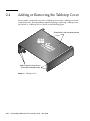
You can make a rack-ready array into a tabletop array or make a tabletop array into
a rack-ready array. These procedures require attaching or removing a tabletop cover,
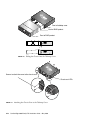
also known as a tabletop skin, as shown in the following figure.
Screw holes in the top center position
Holes to attach to chassis ears
(Front view of tabletop cover)
FIGURE 2-5
2-16
Tabletop Cover
Sun StorEdge 3000 Family FRU Installation Guide • May 2006
2.4.1
Converting a Rack-Ready Array to a Tabletop
Array
Perform the following steps to convert a rackmounted or rack-ready array to a
tabletop array.
1. If attached, unlock the front bezel cover with the provided key, and pull it
forward and downward. Then press the right bezel arm (hinge) towards the left
side to release it from the chassis hole.
The left hinge will release also. Note the location of the chassis bezel holes on each
ear.
2. Remove the caps from the front left and right ears of the array by squeezing and
pressing each cap towards the center of the chassis until it is free.
3. If the array is rackmounted, perform the following steps:
a. Remove the screws which attach the front ears to the rack and which attach the
array to the back brackets of the rack.
b. Slide the array out of the rack.
c. Remove the screws which attach the side rails to the array and store the rails
and related screws.
4. On the top of the array, remove the top two back center screws with a Phillips No.
1 screwdriver and discard these screws.
5. Slide the back of the array into the front of the tabletop cover until the front of the
array is flush with the front of the tabletop cover (see FIGURE 2-6).
Note – As you slide the array into the cover, keep the back of the array tilted
slightly upward to avoid bumping the edge of the array on the metal feet of the
cover.
6. Loosely attach the front of the tabletop cover to the front ears of the array with
two 10-32 x 1/4-inch Phillips panhead screws on each side (see FIGURE 2-7).
7. Attach the top center back of the tabletop cover to the array with two new black
flathead 4-40 x 1/4-inch screws and a Phillips No. 1 screwdriver.
8. Tighten the front screws (from Step 6) with a Phillips No. 2 screwdriver.
Chapter 2
Bezel, Disk Drive, Air Management Sled, and Tabletop Cover FRUs
2-17
Front of tabletop cover
Back of RAID product
Front of RAID product
FIGURE 2-6
Sliding the Chassis Into the Tabletop Cover
Screws to attach the cover to the chassis ears
Chassis ear LEDs
FIGURE 2-7
2-18
Attaching the Chassis Ears to the Tabletop Cover
Sun StorEdge 3000 Family FRU Installation Guide • May 2006
9. Put the caps back onto the ears:
a. Align the top and bottom edges of each cap with the top and bottom edges of
each chassis ear.
b. While holding the side of the chassis with one hand, push the cap onto the ear
with the other hand. Be sure to place the cap with LED labels on the right ear.
Caution – Do not use force when placing a cap on an ear.
10. Insert the bezel arms into the chassis holes, and then lift and push the bezel onto
the front of the chassis and use the key to lock it in place.
2.4.2
Converting a Tabletop Array to a Rack-Ready
Array
Perform the following steps to convert a tabletop array to a rack-ready array.
1. If attached, remove the bezel front cover by pulling it forward and downward.
Then press the right bezel arm (hinge) towards the left side to release it from the
chassis hole.
The left hinge will release also. Note the location of the chassis bezel holes on each
ear.
2. Remove the caps from the front left and right ears of the array by squeezing and
pressing each cap towards the center of the chassis until it is free.
3. Remove the 10-32 x 1/4-inch Phillips panhead screws which attach the tabletop
cover to the array, with a Phillips No. 2 screwdriver, and discard these screws.
4. On the top of the array, remove the top two back center black flathead 4-40 x 1/4inch screws with a Phillips No. 1 screwdriver and keep these screws.
5. Pull the front of the chassis until the chassis is completely removed from the
tabletop cover.
6. Re-insert and secure the two black screws from Step 4 into the top center back of
the rack-ready array using a Phillips No. 1 screwdriver.
7. Follow the rack kit installation instructions of the rackmount kit to install the
array into a rack. After the RAID product is mounted in the rack, you can reinstall the caps onto the ears and the bezel onto the front of the RAID product;
these steps are also included in the rack kit instructions.
Chapter 2
Bezel, Disk Drive, Air Management Sled, and Tabletop Cover FRUs
2-19
2-20
Sun StorEdge 3000 Family FRU Installation Guide • May 2006
CHAPTER
3
Power and Fan Module FRUs
Topics covered in this chapter are:
■
Section 3.1, “Replacing Power Supply/Fan Modules for 2U Arrays” on page 3-2
■
Section 3.1.1, “Replacing an AC Power Supply/Fan Module” on page 3-2
■
Section 3.1.2, “Replacing a DC Power Supply/Fan Module” on page 3-3
■
Section 3.2, “Replacing Power Supply/Fan Modules for 1U Arrays” on page 3-5
■
Section 3.2.1, “Replacing an AC Power Supply/Fan Module” on page 3-5
■
Section 3.2.2, “Replacing a DC Power Supply/Fan Module” on page 3-6
The following power specifications apply to the power supply and fan modules:
TABLE 3-1
Power Specifications
AC power:
Voltage and frequency 90 to 264 VAC, 47 to 63 Hz
Input current:
1U: 4A max
2U: 5A max
Power-supply output voltages:
+5 VDC and +12 VDC
DC power:
–48V DC (–36 VDC to –72 VDC)
3-1
3.1
Replacing Power Supply/Fan Modules
for 2U Arrays
3.1.1
Replacing an AC Power Supply/Fan Module
Caution – To avoid damage to equipment, do not remove a power supply/fan
module without a working replacement.
3.1.1.1
Removing an AC Power Supply/Fan Module
Be sure to follow Section 1.2, “Static Electricity Precautions” on page 1-8.
1. Turn off the power, then remove the AC cord locks (if applicable) and the power
cable.
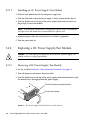
2. Turn the thumbscrew at the top of the power supply latch counterclockwise until
the thumbscrew is disengaged from the power supply.
Thumbscrew
Latch
Handle
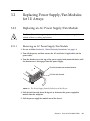
FIGURE 3-1
3-2
The Power Supply Partially Pulled out of the Chassis
Sun StorEdge 3000 Family FRU Installation Guide • May 2006
3. Pull the latch forward about 45 degrees to disconnect the power supply/fan
module from the midplane.
4. Use the power supply handle to pull the power supply/fan module out of the
chassis.
3.1.1.2
Installing an AC Power Supply/Fan Module
1. Slide the new module into the fan and power supply slot.
2. Push the latch back so that the power supply is fully inserted into the chassis.
3. Turn the thumbscrew at the top of the power supply latch clockwise until it is
finger-tight, to secure the module.
Note – To ensure that a thumbscrew is finger-tight, tighten it with a screwdriver
and then loosen the thumbscrew counterclockwise a quarter turn.
4. Attach the power cable and reinstall the AC cord locks if applicable.
5. Turn the power back on.
3.1.2
Replacing a DC Power Supply/Fan Module
Caution – To avoid damage to equipment, do not remove a power supply/fan
module without a working replacement.
3.1.2.1
Removing a DC Power Supply/Fan Module
Be sure to follow Section 1.2, “Static Electricity Precautions” on page 1-8.
1. Use a flatblade screwdriver to loosen the two screws that secure the power cable
to the power supply and then disconnect the cable from the supply.
2. Turn the thumbscrew at the top of the power supply latch counterclockwise until
the thumbscrew is disengaged from the power supply.
3. Pull the latch forward about 45 degrees to disconnect the power supply/fan
module from the midplane.
4. Use the power supply handle to pull the power supply/fan module out of the
chassis.
Chapter 3
Power and Fan Module FRUs
3-3
3.1.2.2
Installing a DC Power Supply/Fan Module
1. Slide the new module into the fan and power supply slot.
2. Push the latch back so that the power supply is fully inserted into the chassis.
3. Turn the thumbscrew at the top of the power supply latch clockwise until it is
finger-tight to secure the module.
Note – To ensure that a thumbscrew is finger-tight, tighten it with a screwdriver
and then loosen the thumbscrew counterclockwise a quarter turn.
4. Connect the DC power cable to the DC source.
Note – Use only DC power cables provided with the array.
Check the DC cable part number and wire labels carefully before connecting the
cable to the source (see the following table.) GND = Chassis Ground.
TABLE 3-2
DC Cable Wiring
Cable 35-00000156 or 35-00000306
Pin #
Voltage
Color
A3
L+
White
A2
GND
Green/Yellow
A1
L-
White
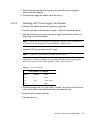
5. Extend the length of the DC power cable as needed, strip the last 1/4-inch of the
cable, insert it into a provided Panduit tube, and crimp the tube.
6. Attach the power cable to the RAID product.
7. Turn the power on.
3-4
Sun StorEdge 3000 Family FRU Installation Guide • May 2006
3.2
Replacing Power Supply/Fan Modules
for 1U Arrays
3.2.1
Replacing an AC Power Supply/Fan Module
Caution – To avoid damage to equipment, do not remove a power supply/fan
module without a working replacement.
3.2.1.1
Removing an AC Power Supply/Fan Module
1. Be sure to follow Section 1.2, “Static Electricity Precautions” on page 1-8.
2. Turn off the power, and then remove the AC cord locks (if applicable) and the
power cable.
3. Turn the thumbscrew at the top of the power supply latch counterclockwise until
the thumbscrew is disengaged from the power supply.
Turn the thumbscrew counterclockwise.
Pull the latch forward.
FIGURE 3-2
The Power Supply Partially Pulled out of the Chassis
4. Pull the latch forward about 90 degrees to disconnect the power supply/fan
module from the midplane.
5. Pull the power supply/fan module out of the chassis.
Chapter 3
Power and Fan Module FRUs
3-5
3.2.1.2
Installing an AC Power Supply/Fan Module
1. Slide the new module into the fan and power supply slot.
2. Push the latch back so that the power supply is fully inserted into the chassis.
3. Turn the thumbscrew at the top of the power supply latch clockwise until it is
finger-tight, to secure the module.
Note – To ensure that a thumbscrew is finger-tight, tighten it with a screwdriver
and then loosen the thumbscrew counterclockwise a quarter turn.
4. Attach the power cable and reinstall the AC cord locks if applicable.
5. Turn the power back on.
3.2.2
Replacing a DC Power Supply/Fan Module
Caution – To avoid damage to equipment, do not remove a power supply/fan
module without a working replacement.
3.2.2.1
Removing a DC Power Supply/Fan Module
1. Be sure to follow Section 1.2, “Static Electricity Precautions” on page 1-8.
2. Turn off the power and remove the power cable.
3. Turn the thumbscrew at the top of the power supply latch counterclockwise until
the thumbscrew is disengaged from the power supply.
Turn the thumbscrew counterclockwise.
Pull the latch forward.
FIGURE 3-3
3-6
The Power Supply Partially Pulled out of the Chassis
Sun StorEdge 3000 Family FRU Installation Guide • May 2006
4. Pull the latch forward about 90 degrees to disconnect the power supply/fan
module from the midplane.
5. Pull the power supply/fan module out of the chassis.
3.2.2.2
Installing a DC Power Supply/Fan Module
1. Slide the new module into the fan and power supply slot.
2. Push the latch back so that the power supply is fully inserted into the chassis.
3. Turn the thumbscrew at the top of the power supply latch clockwise until it is
finger-tight, to secure the module.
Note – To ensure that a thumbscrew is finger-tight, tighten it with a screwdriver
and then loosen the thumbscrew counterclockwise a quarter turn.
4. Connect the DC power cable to the DC source.
Note – Use only DC power cables provided with the array.
Check the DC cable part number and wire labels carefully before connecting the
cable to the source (see the following table.) GND = Chassis Ground.
TABLE 3-3
DC Cable Wiring
Cable 35-00000156 or 35-00000306
Pin #
Voltage
Color
A3
L+
White
A2
GND
Green/Yellow
A1
L-
White
5. Extend the length of the DC power cable as needed, strip the last 1/4-inch of the
cable, insert it into a provided Panduit tube, and crimp the tube.
6. Attach the power cable to the array.
7. Turn the power on.
Chapter 3
Power and Fan Module FRUs
3-7
3-8
Sun StorEdge 3000 Family FRU Installation Guide • May 2006
CHAPTER
4
Battery FRUs
This chapter provides instructions for removing and installing batteries and battery
modules. The FC arrays have an independent battery module located above each
I/O module. The SCSI arrays contain a battery on each controller module.
The battery dating information is the same for all batteries.
Topics covered in this chapter are:
■
Section 4.1, “Battery Operation” on page 4-2
■
Section 4.2, “Battery Status on the Initial Firmware Screen” on page 4-2
■
Section 4.3, “Battery Dating on the Battery Labels” on page 4-3
■
Section 4.4, “Replacing a Battery or Battery Module” on page 4-5
■
■
Section 4.4.1, “Replacing a SCSI Battery” on page 4-5
■
Section 4.4.2, “Replacing an FC Battery Module” on page 4-9
Section 4.5, “FC Battery Status and In-Service Date Procedures” on page 4-10
■
Section 4.5.1, “Viewing Status and Setting the In-Service Date With Sun
StorEdge CLI” on page 4-11
■
Section 4.5.2, “Viewing Status and Setting the In-Service Date With Sun
StorEdge Configuration Service” on page 4-12
■
Section 4.5.3, “Verifying the In-Service Date When Replacing a Battery in Sun
StorEdge Configuration Service” on page 4-14
■
Section 4.5.4, “Refreshing the Battery Status With Sun StorEdge Configuration
Service” on page 4-16
4-1
4.1
Battery Operation
Your lithium ion battery should be changed every two years if the unit is
continuously operated at 77°F (25°C). If the unit is continuously operated at 95°F
(35°C) or higher, it should be changed every year. The shelf life of the battery is
three years.
In the event of a power failure, the battery maintains power to the cache for 72
hours. When power is restored, the data in cache is dumped to disk.
Note – The RAID controller has a temperature sensor which shuts off battery
charging above 129°F (54°C). When this happens, the battery status might be
reported as BAD, but no alarm is written to the event log since no actual battery
failure has occurred. This behavior is normal. As soon as the temperature returns to
the normal range, battery charging resumes and the battery status is reported
correctly. It is not necessary to replace or otherwise interfere with the battery in this
situation.
The battery LED (on the far right side of the controller module) is amber if the
battery is bad or missing. The LED blinks green if the battery is charging, and is
solid green when the battery is fully charged.
Note – The batteries in controller FRUs experience discharge during shipment and
might require an extended charging cycle upon initial power-up. Nominal battery
operation is achieved when the battery status LED changes from amber to flashing
green within 25 minutes after the initial power cycle. If the battery status LED
remains amber for more than 25 minutes after the initial power-up, then the unit
must be power cycled to initiate the extended charging cycle. If the battery status
LED remains amber for more than 30 minutes after initiating the extended charging
cycle, contact Sun service personnel for additional instructions.
4.2
Battery Status on the Initial Firmware
Screen
The initial firmware screen displays the battery status at the top where BAT: status
displays somewhere in the range from BAD to ----- (charging) or +++++ (fully
charged).
4-2
Sun StorEdge 3000 Family FRU Installation Guide • May 2006
For maximum life, lithium ion batteries are not recharged until the charge level is
very low, indicated by a status of -----. Automatic recharging at this point takes very
little time.
A battery module whose status shows one or more + signs can support cache
memory for 72 hours. As long as one or more + signs are displayed, your battery is
performing correctly.
TABLE 4-1
4.3
Battery Status Indicators
Battery Display
Description
-----
Discharged; the battery is automatically recharged when it reaches this
state.
+----
Adequately charged to maintain cache memory for 72 hours or more in case
of power loss. Automatic recharging occurs when the battery status drops
below this level.
++---
Over 90% charged; adequate to maintain cache memory for 72 hours or
more in case of power loss.
+++--
Over 92% charged; adequate to maintain cache memory for 72 hours or
more in case of power loss.
++++-
Over 95% charged; adequate to maintain cache memory for 72 hours or
more in case of power loss.
+++++
Over 97% charged; adequate to maintain cache memory for 72 hours or
more in case of power loss.
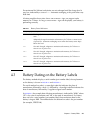
Battery Dating on the Battery Labels
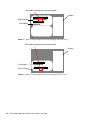
The battery modules display a serial number/part number label, whose placement
on the battery is shown in FIGURE 4-1 and FIGURE 4-2.
The serial number bar code is a seven-digit code that indicates the place of
manufacture, followed by a dash (–), followed by a four-digit code that indicates the
date of manufacture, followed by a supplier-assigned serial number.
In FIGURE 4-1, the example date of battery manufacture is indicated by “0240,” where
“02” is the year of manufacture and “40” is the week of manufacture. If a battery
does not have a serial number/part number label, the manufacture date for the
battery is August 2002. The number below the bottom bar code is the part number
(for example, 3705555–04).
Chapter 4
Battery FRUs
4-3
Date code of manufacture (yyww=year+week)
Battery
Serial Number
Part Number
FIGURE 4-1
0000044-02403000001
3705555-04
Battery Label Example for the Sun StorEdge 3310 SCSI Array
Date code of manufacture (yyww=year+week)
Battery
Part number
66-00000057/50
Serial number
0000043-0303000274
FIGURE 4-2
4-4
Battery Label Example for the Sun StorEdge 3510 FC Array
Sun StorEdge 3000 Family FRU Installation Guide • May 2006
4.4
Replacing a Battery or Battery Module
This section explains how to remove an existing battery or battery module and
install a new one. The following procedures are guidelines for replacing battery
FRUs in SCSI and FC arrays.
Note – The batteries in controller FRUs experience discharge during shipment and
might require an extended charging cycle upon initial power-up. Nominal battery
operation is achieved when the battery status LED changes from amber to flashing
green within 25 minutes after the initial power cycle. If the battery status LED
remains amber for more than 25 minutes after the initial power-up, then the unit
must be power cycled to initiate the extended charging cycle. If the battery status
LED remains amber for more than 30 minutes after initiating the extended charging
cycle, contact Sun service personnel for additional instructions.
4.4.1
Replacing a SCSI Battery
Caution – In a single controller array, you must power off the array before
replacing the battery. For instructions on powering off the array, see Section 1.4,
“Powering Off the Array” on page 1-9.
Caution – In a dual controller array, if you plan to replace the batteries in both
controllers, you must complete all the following steps for the first controller and
battery before performing the steps for the second controller; otherwise, the array
disconnects and goes offline.
When replacing the battery in a dual controller array, you should first force-fail the
controller.
To force-fail a primary controller:
● From the RAID firmware Main Menu, choose “view and edit Peripheral devices
→ Set Peripheral Device Entry → Redundant Controller → force Primary
controller failure,” and then choose Yes to confirm your choice.
The primary controller is disabled and the array fails over to the secondary
controller.
To force-fail a secondary controller:
Chapter 4
Battery FRUs
4-5
1. From the RAID firmware Main Menu, choose “view and edit Peripheral devices
→ Set Peripheral Device Entry → Redundant Controller → force Secondary
controller failure,” and then choose Yes to confirm your choice.
A message confirms that the controller has been failed.
2. Press Escape to clear the message.
Caution – Use extreme care while removing the controller module. The controller
module has many electrostatic discharge (ESD) sensitive components and should be
handled using ESD protection. Follow Section 1.2, “Static Electricity Precautions” on
page 1-8 for all procedures.
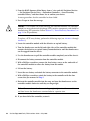
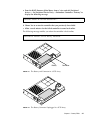
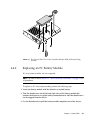
To replace a SCSI array battery, perform the following steps (see FIGURE 4-3 through
FIGURE 4-7).
1. Locate the controller module with the defective or expired battery.
2. Turn the thumbscrews on the left and right sides of the controller module that
contains the defective or expired battery counterclockwise until the thumbscrews
are disengaged from the chassis.
3. Use the thumbscrews to pull the controller module completely out of the chassis.
4. Disconnect the battery connector from the controller module.
5. With a Phillips screwdriver, remove the four battery screws on the underside of
the controller module to release the battery from the module.
6. Lift out the battery.
7. Insert the new battery and attach the battery connector to the controller module.
8. With a Phillips screwdriver, attach the battery to the controller with the four
screws that you removed in Step 5.
9. Reinsert the controller module into the array and turn the thumbscrews on the
controller module clockwise until they are finger-tight.
Note – To ensure that a thumbscrew is finger-tight, tighten it with a screwdriver
and then loosen the thumbscrew counterclockwise a quarter turn.
10. If you force-failed the controller, restore it.
4-6
Sun StorEdge 3000 Family FRU Installation Guide • May 2006
a. From the RAID firmware Main Menu, choose “view and edit Peripheral
devices → Set Peripheral Device Entry → Redundant Controller - Primary” to
display the following message.
Deassert Reset on Failed Controller ?
b. Choose Yes to restore the controller that you previously force-failed.
c. Allow several minutes for the failed controller to come back online.
The following message notifies you when the controller is back online:
Controller Default Write Policy Restored
Battery
Connector
FIGURE 4-3
The Battery and Connector in a SCSI Array
FIGURE 4-4
The Battery Connector Unplugged in a SCSI Array
Chapter 4
Battery FRUs
4-7
4-8
FIGURE 4-5
The Underside of the Battery Module With Screws Being Removed
FIGURE 4-6
The Top Side of the Controller Module With the Battery Being Lifted Out and
the Connector Unplugged
Sun StorEdge 3000 Family FRU Installation Guide • May 2006
FIGURE 4-7
4.4.2
The Top and Side View of the Controller Module With the Battery Being
Inserted
Replacing an FC Battery Module
FC array battery modules are hot-swappable.
Note – Be sure to follow Section 1.2, “Static Electricity Precautions” on page 1-8 for
all procedures.
To replace an FC array battery module, perform the following steps.
1. Locate the battery module with the defective or expired battery.
2. Turn the thumbscrews on the left and right sides of the battery module that
contains the defective or expired battery counterclockwise until the thumbscrews
are disengaged from the chassis.
3. Use the thumbscrews to pull the battery module completely out of the chassis.
Chapter 4
Battery FRUs
4-9
FIGURE 4-8
Battery Module Removed From the Chassis
4. Insert the new battery module into the array and turn the thumbscrews on the
battery module clockwise until they are finger-tight.
Note – To ensure that a thumbscrew is finger-tight, tighten it with a screwdriver
and then loosen the thumbscrew counterclockwise a quarter turn.
5. Set the in-service dates for the new FC battery replacement with the Sun StorEdge
CLI or Sun StorEdge Configuration Service program procedures described under
Section 4.5, “FC Battery Status and In-Service Date Procedures” on page 4-10.
Note – To successfully execute scripts using the Sun StorEdge CLI, the battery inservice date must be set. For details, see Section 4.5, “FC Battery Status and InService Date Procedures” on page 4-10.
4.5
FC Battery Status and In-Service Date
Procedures
The Sun StorEdge CLI and Sun StorEdge Configuration Service programs offer the
following features for FC battery modules:
■
■
Setting the In-Service Date
Monitoring the FC battery status
Note – If you do not reset and verify the in-service date, Sun StorEdge
Configuration Service and the Sun StorEdge CLI cannot accurately calculate the
battery expiration date.
4-10
Sun StorEdge 3000 Family FRU Installation Guide • May 2006
4.5.1
Viewing Status and Setting the In-Service Date
With Sun StorEdge CLI
The show battery-status command displays the status of the battery modules,
which preserve the contents of the write cache in each RAID controller. For
redundant controllers, status for both batteries is shown. Status values include:
Warning, Not present, Bad, N/A, Expired, and OK. A status of Warning indicates
that the battery will expire within 21 days.
If you run the show battery-status command and the battery in-service date is
not set, run the show battery-status -u command. Early model battery boards
were not programmed with an in-service date. The show battery-status -u
command sets the in-service date to the battery board manufacturing date and
prompts the user to verify the date.
Note – If the battery type is an early board module (FRU ID 370-5545 REVB), then
battery expiration monitoring is not supported. In this case, a message displays,
“battery board type is not supported.” If your configuration requires the battery
expiration feature, consult your sales representative to obtain a new battery.
The following example shows one good battery and one expired battery.
sccli>
Upper
Upper
Upper
Upper
Upper
Lower
Lower
Lower
Lower
Lower
show battery-status
Battery Type: 1
Battery Manufacturing Date: Fri Oct 17 15:59:08 2003
Battery Placed In Service: Fri Oct 17 15:59:08 2003
Battery Expiration Date:
Sun Oct 16 15:59:08 2005
Battery Status: OK
Battery
Battery
Battery
Battery
Battery
Type: 1
Manufacturing Date: Fri Oct 17 19:29:20 2003
Placed In Service: Fri Oct 17 19:29:20 2003
Expiration Date:
Sun Oct 6 19:29:20 2004
Status: Expired
Chapter 4
Battery FRUs
4-11
The following example uses the -u option, which prompts the user to verify the
battery date if the battery in-service date has not been set previously.
sccli>
Upper
Upper
Upper
Upper
Upper
show battery-status -u
Battery Type: 1
Battery Manufacturing Date: Mon Feb 2 08:00:00 2004
Battery Placed In Service: Wed Aug 11 20:18:02 2004
Battery Expiration Date:
Fri Aug 11 20:18:02 2006
Battery Status: good
The date 2004/ 9/29 will be stored as the In-Service Date of Lower Battery.
Are you sure that this date is correct? y
Lower
Lower
Lower
Lower
Lower
Battery
Battery
Battery
Battery
Battery
Type: 1
Manufacturing Date: Tue Mar 30 14:32:26 2004
Placed In Service: Wed Sep 29 21:04:39 2004
Expiration Date:
Fri Sep 29 21:04:39 2006
Status: good
Note – To successfully execute scripts using the Sun StorEdge CLI, the battery inservice date must be set. Newer battery boards are programmed with the in-service
date. If you are not sure that the in-service date is correct, consult your sales
representative.
4.5.2
Viewing Status and Setting the In-Service Date
With Sun StorEdge Configuration Service
Sun StorEdge Configuration Service monitors the usable life of the FC battery and
displays its status in the Battery Information window. The program calculates the
battery expiration date using the battery type, manufacture date, and in-service date,
which have been programmed at the factory.
Note – For an FC battery FRU, you must verify the in-service date so that Sun
StorEdge Configuration Service can set it as explained in Section 4.5.3, “Verifying the
In-Service Date When Replacing a Battery in Sun StorEdge Configuration Service”
on page 4-14.
The enclosure icon on the main window displays a degraded (yellow) status 21 days
before the battery is going to expire. The enclosure icon also displays a warning
(yellow) status if the in-service date has not been set for a battery FRU. A critical
(red) status is displayed when a battery has expired.
4-12
Sun StorEdge 3000 Family FRU Installation Guide • May 2006
To view the battery status, choose View → View Enclosure or double-click the
enclosure. The View Enclosure window is displayed, showing the battery status in
the Summary box.
To view battery information, including type, status, manufacture date, in-service
date, and expiration date, click Battery. The Battery Information window is
displayed.
Chapter 4
Battery FRUs
4-13
Note – If a battery FRU is replaced and Sun StorEdge Configuration Service does
not show the updated battery information, perform a rescan. For details, see
Section 4.5.4, “Refreshing the Battery Status With Sun StorEdge Configuration
Service” on page 4-16.
4.5.3
Verifying the In-Service Date When Replacing a
Battery in Sun StorEdge Configuration Service
When Sun StorEdge Configuration Service detects a battery FRU, the enclosure icon
displays a degraded (yellow) status symbol as shown in the following example.
Note – If you do not reset and verify the in-service date, Sun StorEdge
Configuration Service cannot accurately calculate the battery expiration date.
4-14
Sun StorEdge 3000 Family FRU Installation Guide • May 2006
To verify the in-service date, perform the following steps.
1. Double-click the enclosure icon.
Sun StorEdge Configuration Service calculates the battery expiration date using the
in-service date (date that the battery is put into service), which is based on the host
clock. The program prompts you to verify the date by displaying the following
message:
2. If the host clock is correct, click Yes.
The following confirmation message is displayed. Click OK.
Sun StorEdge Configuration Service sets the in-service date and displays the date in
the In-Service Date field in the Battery Information window.
3. If the host clock is incorrect, click No and reset the clock so that Sun StorEdge
Configuration Service can prompt you to verify it again and set the in-service
date.
Chapter 4
Battery FRUs
4-15
4.5.4
Refreshing the Battery Status With Sun StorEdge
Configuration Service
Sun StorEdge Configuration Service does not automatically detect the status of a
battery when it is replaced. To force Sun StorEdge Configuration Service to show the
new battery status, you must perform a manual rescan.
To manually scan the battery FRU and view the updated status, perform the
following steps.
1. Double-click the server icon or select the server icon and choose View → View
Server.
2. Click Rescan.
3. Click OK.
The server scans the existing server inventory and refreshes the console.
4. To view the new battery information, double-click the enclosure or select the
enclosure and choose View → View Enclosure.
5. Click Battery.
The Battery Information window displays the updated battery status.
4-16
Sun StorEdge 3000 Family FRU Installation Guide • May 2006
CHAPTER
5
LED Module FRUs
This chapter provides instructions for replacing the LED and reset switch module.
For convenience, this module will be called the LED module.
Topics covered in this chapter are:
■
■
Section 5.1, “Replacing the LED Module for 2U Arrays” on page 5-2
■
Section 5.1.1, “Reviewing the Parts and Tools” on page 5-2
■
Section 5.1.2, “Removing the Front Bezel and Right Ear Cap” on page 5-2
■
Section 5.1.3, “Removing the LED Module” on page 5-3
■
Section 5.1.4, “Installing a New LED Module” on page 5-5
■
Section 5.1.5, “Replacing the Ear Cap and Front Bezel” on page 5-7
Section 5.2, “Replacing the LED Module for 1U Arrays” on page 5-7
■
Section 5.2.1, “Reviewing the Parts and Tools” on page 5-7
■
Section 5.2.2, “Removing the Front Bezel and Right Ear Cap” on page 5-7
■
Section 5.2.3, “Removing the LED Module” on page 5-8
■
Section 5.2.4, “Installing a New LED Module” on page 5-11
■
Section 5.2.5, “Replacing the Ear Cap and Front Bezel” on page 5-12
5-1
5.1
Replacing the LED Module for 2U
Arrays
5.1.1
Reviewing the Parts and Tools
The following parts are included in the LED module replacement kit:
■
■
one LED/reset switch board, 2U
two #4-40 x 1/4-inch flathead, magnetic SS, Phillips, 100 degree screws
The following tools are required to complete this procedure:
■
5.1.2
Phillips No. 1 screwdriver
Removing the Front Bezel and Right Ear Cap
1. Power off both RAID controllers.
2. If attached, unlock the front bezel cover with the provided key.
3. Grasp the front bezel cover on both sides and pull it forward and then down.
4. Press the right bezel arm (hinge) toward the left side to release it from the chassis
hole.
The left bezel arm also disengages.
5. Note the location of the chassis bezel holes on each ear.
6. Remove the plastic cap from the right ear of the array.
a. Squeeze both sides of the cap at the top and the bottom.
b. Turn the cap toward the center of the array until it disengages and pull it free.
5-2
Sun StorEdge 3000 Family FRU Installation Guide • May 2006
FIGURE 5-1
5.1.3
Removing the Right Ear Cap
Removing the LED Module
Be sure to follow Section 1.2, “Static Electricity Precautions” on page 1-8
1. Remove the two panhead screws (B in FIGURE 5-2) holding the LED module to the
bracket.
Chapter 5
LED Module FRUs
5-3
A
B
FIGURE 5-2
Detaching the LED Module From the Chassis
Note – If the bracket screws (A in FIGURE 5-2) obstruct the LED module screws (B in
FIGURE 5-2), the chassis will have to be removed from the rack (if it is a rackmounted
array) or the case (if it is a tabletop array) to gain access to the bracket screws and
remove them. Two #4-40 x 1/4-inch flathead screws are provided to replace the
bracket screws, should they become damaged when removed. For details on
removing the cover from a tabletop array, see Section 2.4, “Adding or Removing the
Tabletop Cover” on page 2-16.
5-4
Sun StorEdge 3000 Family FRU Installation Guide • May 2006
FIGURE 5-3
Removing the LED Module
2. Carefully detach the LED module from the ribbon cable by pulling out the tiny
cable lock drawer and sliding the LED module free.
FIGURE 5-4
Disengaging the Ribbon Cable From the Cable Lock Drawer
Caution – Do not pull the ribbon cable too far out from the chassis. If you pull it too
far, you might have difficulty sliding it back inside the box or even detach the
connection at the other end. If this happens, you will have to remove the top of the
chassis and reattach the cable inside.
5.1.4
Installing a New LED Module
Be sure to follow Section 1.2, “Static Electricity Precautions” on page 1-8.
1. Pull out the cable lock drawer on the new LED module.
2. Place the new LED module against the bracket and carefully slide the ribbon
cable into the cable lock drawer.
3. Close the cable lock drawer to reconnect the cable to the LED module.
Chapter 5
LED Module FRUs
5-5
FIGURE 5-5
Inserting the Ribbon Cable Into the Cable Lock Drawer
Note – The blue side of the ribbon cable must face towards the LED module and the
ribbon contact area must be completely inserted into the LED module before the lock
drawer is closed.
4. Insert the panhead screws through the LED module and attach the LED module to
the chassis.
FIGURE 5-6
Installing the New LED Module
5. If the flathead screws (A in FIGURE 5-2) were removed, reattach these screws
through the chassis flange into the bracket.
Replacement screws are provided in the ship kit in case the original screws were
damaged during removal.
6. If it was removed in Step 1 in Section 5.1.3, restore the chassis to its case or rack.
5-6
Sun StorEdge 3000 Family FRU Installation Guide • May 2006
5.1.5
Replacing the Ear Cap and Front Bezel
1. Push the top and bottom of the ear cap onto the ear, pressing in on the top side
toward the center of the array until the ear cap snaps into place.
2. Insert the bezel arms into the chassis holes.
3. Lift the bezel into position and press it onto the front of the chassis until it is
flush with the front.
4. Lock the bezel in the closed position with the keys.
5. Remove the keys if they were not initially inserted into the chassis.
6. Power on both power supply modules.
5.2
Replacing the LED Module for 1U
Arrays
5.2.1
Reviewing the Parts and Tools
The following parts are included in the LED module replacement kit:
■
■
one LED/reset switch board, 1U
two #4-40 x 1/4-inch flathead, magnetic SS, Phillips, 100 degree screws
The following tools are required to complete this procedure:
■
■
5.2.2
Phillips No. 1 screwdriver
3/16” wrench
Removing the Front Bezel and Right Ear Cap
1. Power off both RAID controllers.
2. If attached, unlock the front bezel cover with the provided key.
3. Grasp the front bezel cover on both sides and pull it forward and then down.
Chapter 5
LED Module FRUs
5-7
4. Press the right bezel arm (hinge) toward the left side to release it from the chassis
hole.
The left bezel arm also disengages.
5. Note the location of the chassis bezel holes on each ear.
6. Remove the plastic cap from the right ear of the array.
a. Squeeze both sides of the cap at the top and the bottom.
b. Turn the cap toward the center of the array until it disengages and pull it free.
FIGURE 5-7
5.2.3
Removing the Right Ear Cap
Removing the LED Module
Be sure to follow Section 1.2, “Static Electricity Precautions” on page 1-8.
1. Remove the ball studs holding the LED module to the chassis.
5-8
Sun StorEdge 3000 Family FRU Installation Guide • May 2006
FIGURE 5-8
Removing the ball studs
Note – Older models of the 1U array have two flathead screws driven through from
the back side of the bracket. Two #4-40 x 1/4-inch flathead screws are provided to
replace the screws, should they become damaged when removed. On newer models,
the studs are embedded in the chassis ear and no screws are required. You will need
a 3/16” wrench to remove the ball studs.
Note – If you cannot access the ball studs to remove them, the chassis will have to
be removed from the rack.
2. Unfold the ribbon cable and detach it from the LED module by pulling out the
tiny cable lock drawer and sliding the LED module free.
Chapter 5
LED Module FRUs
5-9
FIGURE 5-9
Removing the LED Module From the Chassis
FIGURE 5-10
Detaching the Ribbon Cable From the LED Module
3. Remove the two panhead screws holding the LED module to the bracket.
5-10
Sun StorEdge 3000 Family FRU Installation Guide • May 2006
5.2.4
FIGURE 5-11
Removing the Screws Holding the LED Module
FIGURE 5-12
Detaching the LED Module From the Bracket
Installing a New LED Module
1. Attach the new LED module to the bracket using the two screws from Step 3 in
Section 5.2.3.
2. Pull out the cable lock drawer on the new LED module.
3. Insert the ribbon cable into the new LED module and close the cable lock drawer
to reconnect the cable to the LED module.
Chapter 5
LED Module FRUs
5-11
FIGURE 5-13
Inserting the Ribbon Cable Into the Cable Lock Drawer
Note – The blue side of the ribbon cable must face towards the LED module and the
ribbon contact area must be completely inserted into the LED module before the lock
drawer is closed.
4. Fold the ribbon to lay flat against the back of the LED module and attach the LED
module to the chassis with the ball studs from Step 1 in Section 5.2.3, “Removing
the LED Module” on page 5-8.
5. If the ball studs were attached to flathead screws, reattach these screws through
the bracket to the ball studs.
Replacement screws are provided in the ship kit in case the original screws were
damaged during removal.
6. If it was removed in Step 1 in Section 5.2.3, restore the chassis to its rack.
5.2.5
Replacing the Ear Cap and Front Bezel
1. Push the top and bottom of the ear cap onto the ear, pressing in on the top side
toward the center of the array until the ear cap snaps into place.
2. Insert the bezel arms into the chassis holes.
3. Lift the bezel into position and press it onto the front of the chassis until it is
flush with the front.
4. Lock the bezel in the closed position with the keys.
5. Remove the keys if they were not initially inserted into the chassis.
6. Power on both power supply modules.
5-12
Sun StorEdge 3000 Family FRU Installation Guide • May 2006
CHAPTER
6
Sun StorEdge 3510 FC and Sun
StorEdge 3511 SATA Controller
FRUs
This chapter provides instructions for removing and installing controller module
FRUs in Sun StorEdge 3510 FC and Sun StorEdge 3511 SATA arrays.
Topics covered in this chapter are:
■
Section 6.1, “Replacing an I/O Controller Module” on page 6-2
■
Section 6.2, “Saving the NVRAM Configuration Settings” on page 6-5
■
Section 6.3, “I/O Controller Replacement for a Dual-Controller Array” on
page 6-5
■
Section 6.3.1, “Removing an I/O Controller Module” on page 6-6
■
Section 6.3.2, “Installing an I/O Controller Module” on page 6-7
■
Section 6.3.3, “Monitoring the Automatic Firmware Update with a Recently
Installed Controller FRU” on page 6-9
■
Section 6.3.4, “SES Firmware Update Sometimes Required with I/O Controller
Module Replacements” on page 6-10
■
Section 6.3.5, “Restoring the Configuration Settings of a Powered-Off Array”
on page 6-11
■
Section 6.4, “Converting a Dual-Controller Array to a Single-Controller Array” on
page 6-12
■
Section 6.5, “Converting a Single-Controller Array to a Dual-Controller Array” on
page 6-13
■
Section 6.6, “I/O Controller Replacement for a Single-Controller Array” on
page 6-15
■
Section 6.6.1, “Downgrading from Controller Firmware Version 4.1x to 3.27” on
page 6-19
■
Section 6.6.2, “SES Firmware Update” on page 6-23
6-1
6.1
Replacing an I/O Controller Module
Be sure to follow the Section 1.2, “Static Electricity Precautions” on page 1-8.
Note – On Sun StorEdge 3510 FC arrays and Sun StorEdge 3511 SATA arrays, the
RAID controller is an integral part of the I/O controller module. To replace an FC or
SATA RAID controller, you must replace the entire I/O controller module. For
simplicity, the I/O controller module is sometimes referred to as the controller.
I/O controller modules are hot-swappable. In the event that it is impossible or
impractical to halt I/O from hosts to the array, a controller can be replaced while the
surviving controller is active and servicing I/O.
However, if your configuration enables you to halt I/O during the controller
replacement procedure without disruption, it is a good idea to do so. With
write-back cache enabled under heavy I/O, cache synchronization can take three
hours or more to complete. During this time, your controller will display “preparing
failback” status and the LED remains amber.
Note – Under firmware version 4.1x, a failed controller forces write-through cache
mode by default and is only subject to the 10 minute cross-load time. However, if
the default event trigger for a failed controller has been set to DISABLED, cache
synchronization could take over three hours. For details regarding write policy and
event triggers, refer to the Sun StorEdge 3000 Family RAID Firmware User’s Guide.
It is also possible that hardware errors or configuration errors may be present but
undetected, resulting in an unserviceable condition that will only be revealed when
the hot-swap is underway. For instance, it is possible that a hardware module might
be improperly seated.
It is good practice before replacing a controller FRU to try to verify your system's
health. Do not replace a working controller on a channel that is offline.
When a controller fails in a dual-controller configuration, the remaining controller
automatically becomes the primary controller, if it is not already. If you replace a
controller that has not failed, force-fail the controller to be replaced via one of the
following methods.
6-2
Sun StorEdge 3000 Family FRU Installation Guide • May 2006
■
From the RAID firmware Main Menu:
■
■
■
To fail the primary controller, choose “view and edit Peripheral devices → Set
Peripheral Device Entry → Redundant Controller – Primary → force Primary
controller failure”.
To fail the secondary controller, choose “view and edit Peripheral devices →
Set Peripheral Device Entry → Redundant Controller – Primary → force
Secondary controller failure”.
From the CLI:
■
To fail the primary controller, type:
sccli> fail primary
■
To fail the secondary controller, type:
sccli> fail secondary
Note – If you are running version 2.0 or greater of the Sun StorEdge CLI, before
issuing the fail command perform a show redundancy command to check the
status of the redundant pair. This command will also display the position of the
primary controller. Also perform a show events command for each controller to
view any error messages. The dual-controller array is healthy if the Redundancy
mode is Active-Active and the status is Enabled. The single-controller array is
healthy if the Redundancy mode is Active-Active and the status is Scanning.
For details on the fail, show redundancy, and show events commands, refer to
the Sun StorEdge 3000 Family CLI User’s Guide.
When a controller is replaced in a dual-controller configuration, the controller
firmware of the remaining functional controller automatically overwrites the
firmware of the new replacement controller to maintain compatibility. This is
referred to as cross-loading. Cross-loading uses the NVRAM configuration settings to
synchronize the firmware version of the newly installed controller to match the
firmware version of the running controller.
In a dual-controller configuration, if the controller replacement FRU has a higher
SES firmware version than the surviving controller, there will be an SES mismatch
with alarms and an amber LED. You must correct the SES mismatch and download
the newer SES firmware. For details, see Section 6.3.4, “SES Firmware Update
Sometimes Required with I/O Controller Module Replacements” on page 6-10.
Chapter 6
Sun StorEdge 3510 FC and Sun StorEdge 3511 SATA Controller FRUs
6-3
Caution – For any firmware upgrade, be sure to follow the upgrade instructions in
the patch README file for your array with great care to download and install
correctly. If the wrong firmware is installed, or the firmware is installed on the
wrong device, your controller might be rendered inoperable. Always be sure to
upgrade your SES firmware before trying to determine if you need a PLD upgrade.
In a single-controller configuration, you cannot restore the NVRAM configuration
settings from disk if you replace a version 3.27 controller with a version 4.1x
controller. See Section 6.6, “I/O Controller Replacement for a Single-Controller
Array” on page 6-15 for single controller replacement instructions.
Caution – For single-controller FRU replacements, be sure to follow the instructions
in Section 6.6, “I/O Controller Replacement for a Single-Controller Array” on
page 6-15 and where necessary, downgrade to firmware version 3.27. See
Section 6.6.1, “Downgrading from Controller Firmware Version 4.1x to 3.27” on
page 6-19 for downgrade instructions.
Note – When a controller is installed and initialized or when configuration settings
are changed, you are strongly advised to make a record of the new configuration
settings and firmware version. This is particularly important in a single controller
configuration for re-establishing your configuration settings when a controller is
replaced. You can record this information in the “Record of Settings” appendix in
the Sun StorEdge 3000 Family RAID Firmware User’s Guide.
Note – The batteries in controller FRUs experience discharge during shipment and
might require an extended charging cycle upon initial power-up. Nominal battery
operation is achieved when the battery status LED changes from amber to flashing
green within 25 minutes after the initial power cycle. If the battery status LED
remains amber for more than 25 minutes after the initial power-up, then the unit
must be power cycled to initiate the extended charging cycle. If the battery status
LED remains amber for more than 30 minutes after initiating the extended charging
cycle, contact Sun service personnel for additional instructions.
6-4
Sun StorEdge 3000 Family FRU Installation Guide • May 2006
6.2
Saving the NVRAM Configuration
Settings
Before replacing a controller, save the NVRAM configuration settings to disk. The
saved NVRAM file can be used to restore configuration settings only if the
replacement controller has the same firmware version as the defective controller.
1. From the RAID firmware Main Menu, choose “system Functions → controller
maintenance → Save nvram to disks.”
2. Choose Yes to confirm.
A message informs you that NVRAM information has been successfully saved.
Caution – Do not restore the 3.27 NVRAM settings from disk onto a 4.1x controller
FRU, or vice versa. The NVRAM structures are incompatible.
6.3
I/O Controller Replacement for a DualController Array
To determine the firmware version of your I/O controller, check the model number.
TABLE 6-1 shows the model numbers for FC and SATA I/O controllers.
I/O Controller Model Numbers
TABLE 6-1
I/O Controller
FRU Model Number
X-Option
3.27 FC controller
370-5537-06
595-6578-05
4.11G FC controller *
370-5537-07
595-6578-06
4.11I or later FC controller
370-5537-08 (or higher)
595-6578-07 (or higher)
4.1x FC controller (RoHS)
371-0532-01
594-3339-01
3.27 SATA controller
370-6773-01
595-7419-01
4.11G SATA controller *
370-6773-02
595-7419-02
4.11I or later SATA controller
370-6773-03 (or higher)
595-7419-03 (or higher)
* In a single-controller configuration, the 4.11G firmware must be upgraded to 4.11I or later, or downgraded to
3.27.
Chapter 6
Sun StorEdge 3510 FC and Sun StorEdge 3511 SATA Controller FRUs
6-5
It is a recommended practice to always check the SunSolve Download Center
located on http://sunsolve.sun.com for the latest available firmware
upgrades.
If you keep the controller firmware 3.27 version, be sure to upgrade the SES
firmware to the latest version in the latest 3.27 patch:
■
■
FC 3.27R patch ID 113723-09 for the Sun StorEdge 3510 FC array
SATA 3.27R patch ID 113724-03 for the Sun StorEdge 3511 SATA array
To replace a 4.1x I/O controller module with a 3.27 I/O controller module, see
Section A.1, “Replacing a 4.1x Controller with a 3.27 Controller (FC and SATA
Only)” on page A-2. For all other dual-controller configurations, perform the
following steps.
Caution – Cross-loading does not work when you replace a 4.1x I/O controller
with a 3.27 I/O controller in a dual-controller chassis. If you replace a 4.1x controller
with a 3.27 controller in this configuration without upgrading the 3.27 controller, the
replacement controller will not be recognized. See Section A.1, “Replacing a 4.1x
Controller with a 3.27 Controller (FC and SATA Only)” on page A-2.
6.3.1
Removing an I/O Controller Module
1. Keep the array powered on and make sure that the connected hosts are inactive.
Note – Most users who have multiple host connections between the two controllers
use multipathing software to manage them. If multipathing software and
connectivity are not possible, one alternative is to power off the array and
discontinue all host I/O until the replacement is completed and the array is powered
on. See Section 1.4, “Powering Off the Array” on page 1-9 for important instructions
about powering off an array.
2. Write down the cabling configuration for the controller-to-host connections and
expansion unit connections so that you can reconnect the cables correctly with the
new I/O controller module.
3. Remove all cables and SFPs from the I/O controller module.
4. Turn the thumbscrews on the left and right sides of the I/O controller module
counterclockwise until the thumbscrews are disengaged from the chassis.
5. Grasp the handle and carefully pull out the I/O controller module.
6-6
Sun StorEdge 3000 Family FRU Installation Guide • May 2006
6.3.2
Installing an I/O Controller Module
1. Keep the array powered on.
Caution – DO NOT POWER OFF the chassis when you replace a controller module.
Multiple problems can occur. If you power off the array and replace a controller
module in a dual-controller configuration, the replacement controller could become
the primary controller and overwrite any configuration settings previously set.
Additionally, if the array is powered off incorrectly, data that is written to cache and
that has not been completely written to the disks will be lost.
2. Gently slide the I/O controller module into the array.
Caution – Be sure that the module is properly inserted in the guide rails of the
array and that you keep the power on. If you power off and then replace the
module, you will have to continue with additional steps. See Section 6.3.5,
“Restoring the Configuration Settings of a Powered-Off Array” on page 6-11.
a. Insert the controller FRU into the slot, and push forward until you begin to feel
resistance as the connecting pins engage.
b. Push the controller FRU until the connecting pins are fully seated and the
RAID controller fits flush against the back plate of the RAID array.
Failure to insert the controller carefully as described above can cause one of the
following problems:
■
The surviving controller might reset, causing both controllers to go offline, or
the replacement controller might become primary and the surviving controller
might become secondary which can cause the controllers to go offline.
Recovery: Wait until both RAID controllers initialize and come up in
redundant mode with no intervention required.
■
If the controller status LED is blinking green on both controllers, then both
controllers are primary controllers. Recovery: Take out the replacement
controller and reinsert it, carefully following the instructions above. If this does
not remedy the problem, power-cycle the array.
3. Turn the thumbscrews on the left and right sides of the I/O controller module
clockwise until they are finger-tight, to secure the module and to make the
module’s front panel flush with the chassis.
Chapter 6
Sun StorEdge 3510 FC and Sun StorEdge 3511 SATA Controller FRUs
6-7
Note – To ensure that a thumbscrew is finger-tight, tighten it with a screwdriver
and then loosen the thumbscrew counterclockwise a quarter turn.
The new controller automatically becomes the secondary controller.
In a redundant-controller configuration where a new controller FRU is installed, the
controller status LED will remain amber until the controllers complete the
redundant controller process, which can take more than 10 minutes. The same
firmware versions must be installed on both controllers for proper redundantcontroller operation.
The redundant-controller process automatically cross-loads the firmware version of
the newly installed FRU to match the firmware version of the other running
controller. For example, if the running controller has firmware 4.13C and the new
controller has 4.15, the new controller will be cross-loaded with the 4.13C firmware
of the running controller. To monitor this process, see Section 6.3.3, “Monitoring the
Automatic Firmware Update with a Recently Installed Controller FRU” on page 6-9.
Caution – Wait a minimum of 10 minutes for the firmware cross-load to be
completed. If the newly installed controller is removed for any reason during the
period when the status LED is amber (for 10 minutes or more), the controller can be
rendered inoperable and must be returned for repair.
If you hear an audible alarm after the firmware cross-load and see a blinking amber
Event light on the front of your array, the SCSI Enclosure Services (SES) firmware or
its associated Programmable Logic Device (PLD) code in the new controller has a
version that is different from the code in the other I/O controller in your array. To
solve this mismatch, see to Section 6.3.4, “SES Firmware Update Sometimes
Required with I/O Controller Module Replacements” on page 6-10.
Note – The beep code that identifies an SES or PLD firmware mismatch is the
repeating Morse code letter “R” (dot dash dot).
4. If you want the most current version of firmware on your controllers, download
the latest firmware patch as described in the release notes for your array.
5. Reconnect the original cables to the new I/O controller module.
Caution – You must connect the hosts to the correct host channels on the I/O
controller module or your configuration will not work correctly.
6-8
Sun StorEdge 3000 Family FRU Installation Guide • May 2006
6.3.3
Monitoring the Automatic Firmware Update with
a Recently Installed Controller FRU
To monitor the status of the automatic firmware update, use the Sun StorEdge CLI
show redundancy-mode command. The Sun StorEdge CLI will display the
progression of “Failed,” “Scanning,” “Detected,” and “Enabled” states.
Note – If you have not installed the Sun StorEdge CLI software, you must install it
from the product CD for your array, or from the Sun Download Center website. For
details, see the release notes for your array.
■
Initial Failed Status Response: This is the response to the command upon a
controller failure and is shown for completeness.
sccli> show redundancy-mode
sccli: selected se3000://210.7.180.17:58632 [SUN StorEdge 3510
SN#0043E6]
Primary controller serial number: 8008583
Redundancy mode: Active-Active
Redundancy status: Failed
Secondary controller serial number: 8002663
■
Scanning Status: Install Controller FRU. The installed controller is performing
self-test and scanning disk channels. This is also the state where the controller
will update the firmware on the newly installed controller if not identical to
the running firmware version. The controllers can remain in this state for up to
10 minutes depending upon system activity.
...
Redundancy status: Scanning
Secondary controller serial number: 0
■
Detected Status: Redundant Controller Process Starts. The installed controller
has completed the scanning of the disk channels, updated installed controller
firmware as required, and communicated to the primary controller. This status
is transitional and normally cannot be detected unless repetitive operations are
executed.
...
Redundancy status: Detected
Secondary controller serial number: 0
Chapter 6
Sun StorEdge 3510 FC and Sun StorEdge 3511 SATA Controller FRUs
6-9
■
Enabled State: Redundant Controller Procedure Completed. The installed
controller has completed the redundant controller procedure enabling the
active-active operation.
...
Redundancy status: Enabled
Secondary controller serial number: 8006511
6.3.4
SES Firmware Update Sometimes Required with
I/O Controller Module Replacements
Periodically, firmware upgrades are made available as patches that you can
download from SunSolve™ Online, located at:
http://sunsolve.sun.com
Sun StorEdge 3510 FC and Sun StorEdge 3511 SATA array patches contain the most
current version of the controller, SES, and PLD firmware.
SunSolve has extensive search capabilities that can help you find the appropriate
patch, as well as regular patch reports and alerts to let you know when firmware
upgrades and related patches become available. In addition, SunSolve provides
reports about bugs that have been fixed in patch updates.
Each patch includes an associated README text file that provides detailed
instructions about how to download and install that patch. But, generally speaking,
all firmware downloads follow the same steps:
■
Locating the patch on SunSolve that contains the firmware upgrade you want.
■
Downloading the patch to a location on your network.
■
Using your array software (Sun StorEdge CLI) to download the firmware to the
device it updates.
Refer to the release notes for your array for the latest patch available for your array
at the time of release.
If you hear an audible alarm after replacing a controller module and see a blinking
amber Event light on the front of the array/unit, the new I/O expansion module or
controller module has a different version of SES firmware or PLD firmware than that
of the other I/O module in the array/unit. To resolve this mismatch you must
download new SES firmware. This can be done using the Sun StorEdge CLI for your
array.
6-10
Sun StorEdge 3000 Family FRU Installation Guide • May 2006
If you have not installed the Sun StorEdge CLI software, you must install it from the
product CD for your array, or from the Sun Download Center website. For details,
see the release notes for your array.
Use the Sun StorEdge CLI commands show ses-devices and show events to
see what error condition is causing the alarms. If the error message indicates a PLD
firmware mismatch, it might be because your SES firmware has not yet been
upgraded. Upgrading your SES firmware usually resolves any apparent PLD
mismatch.
Refer to the Sun StorEdge 3000 Family CLI User’s Guide or the sccli(1M) man pages
for instructions on downloading SES firmware to the appropriate device.
Caution – Follow the upgrade instructions in the patch README file with great
care to download and install firmware correctly. If the wrong firmware is installed,
or the firmware is installed on the wrong device, your controller might be rendered
inoperable. Always be sure to upgrade your SES firmware first before trying to
determine if you need a PLD upgrade.
6.3.5
Restoring the Configuration Settings of a
Powered-Off Array
If the array was inadvertently powered off during the controller replacement in a
dual-controller configuration, you must perform the following steps to ensure
successful completion of the cross-load. When you power on the array, the
automatic firmware cross-load will perform the correct operation but must be
checked.
1. Power on the array and allow a few minutes to complete initialization.
2. Check that the correct firmware version is active on the array by entering one of
the following commands:
■
From the RAID firmware Main Menu, choose “view system Information” and
check the Firmware Version number.
■
Enter the following CLI command and check the Revision number.
sccli> show inquiry
3. In a dual-controller configuration where both controllers have the same version
number and two different letter identifiers (such as 4.14A and 4.14B), wait a
minimum of 10 minutes for firmware cross-load to be completed.
Chapter 6
Sun StorEdge 3510 FC and Sun StorEdge 3511 SATA Controller FRUs
6-11
4. In a dual-controller configuration where the controller modules have different
firmware versions (such as 4.13 and 4.15), the 4.13 firmware will cross-load to the
4.15 controller.
Caution – Wait a minimum of 10 minutes for the firmware cross-load to be
completed. If the newly installed controller is removed for any reason during the
period when the status LED is amber (for 10 minutes or more), the controller can be
rendered inoperable and must be returned for repair.
5. Check that the secondary controller is active on the array by entering one of the
following commands.
■
From the RAID firmware Main Menu, choose “view and edit Peripheral devices
→ View Peripheral Device Status.”
The Redundant Controller: Enabled status indicates an initialized
secondary redundant controller.
■
Enter the following CLI command.
sccli> show redundancy-mode
The Redundancy Status: Enabled indicates an initialized secondary
redundant controller.
6.4
Converting a Dual-Controller Array to a
Single-Controller Array
If you convert a dual-controller array into a single-controller array, the Sun StorEdge
Configuration Service software does not automatically recognize the change and
reports that the SES and battery board from the removed controller are failed or not
present.
If you are running Sun StorEdge Configuration Service software and want to avoid
this message, follow the steps in the chapter titled “Maintaining the Array,” in the
Sun StorEdge 3000 Family Configuration Service User’s Guide. The section containing
the instructions is titled, “To Convert a Dual Controller Array to a Single Controller
Array.”
6-12
Sun StorEdge 3000 Family FRU Installation Guide • May 2006
6.5
Converting a Single-Controller Array to
a Dual-Controller Array
Note – FC and SATA single-controller arrays ship with a JBOD I/O module in the
secondary controller slot. This must be removed in order to install a secondary
controller.
1. Keep the array powered on and make sure that the connected hosts are inactive.
2. Turn the thumbscrews on the left and right sides of the JBOD I/O module
counterclockwise until the thumbscrews are disengaged from the chassis.
3. Grasp the handle and carefully pull out the JBOD I/O module.
4. Gently slide the I/O controller module into the array.
Caution – Be sure that the module is properly inserted in the guide rails of the
array and that you keep the power on.
a. Insert the controller FRU into the slot, and push forward until you begin to feel
resistance as the connecting pins engage.
b. Push the controller FRU until the connecting pins are fully seated and the
RAID controller fits flush against the back plate of the RAID array.
Failure to insert the controller carefully as described above can cause one of the
following problems:
■
The original controller might reset, causing both controllers to go offline, or the
new controller might become primary and the original controller might
become secondary which can cause the controllers to go offline. Recovery:
Wait until both RAID controllers initialize and come up in redundant mode
with no intervention required.
■
If the controller status LED is blinking green on both controllers, then both
controllers are primary controllers. Recovery: Take out the new controller and
reinsert it, carefully following the instructions above. If this does not remedy
the problem, power-cycle the array.
5. Turn the thumbscrews on the left and right sides of the I/O controller module
clockwise until they are finger-tight, to secure the module and to make the
module’s front panel flush with the chassis.
Chapter 6
Sun StorEdge 3510 FC and Sun StorEdge 3511 SATA Controller FRUs
6-13
Note – To ensure that a thumbscrew is finger-tight, tighten it with a screwdriver
and then loosen the thumbscrew counterclockwise a quarter turn.
The new controller automatically becomes the secondary controller.
When the new controller FRU is installed, the controller status LED will remain
amber until the controllers complete the redundant controller process, which can
take more than 10 minutes. The same firmware versions must be installed on both
controllers for proper redundant-controller operation.
The redundant-controller process automatically cross-loads the firmware version of
the newly installed FRU to match the firmware version of the other running
controller. For example, if the running controller has firmware 4.13C and the new
controller has 4.15, the new controller will be cross-loaded with the 4.13C firmware
of the running controller. To monitor this process, see Section 6.3.3, “Monitoring the
Automatic Firmware Update with a Recently Installed Controller FRU” on page 6-9.
Caution – Wait a minimum of 10 minutes for the firmware cross-load to be
completed. If the newly installed controller is removed for any reason during the
period when the status LED is amber (for 10 minutes or more), the controller can be
rendered inoperable and must be returned for repair.
If you hear an audible alarm after the firmware cross-load and see a blinking amber
Event light on the front of your array, the SCSI Enclosure Services (SES) firmware or
its associated Programmable Logic Device (PLD) code in the new controller has a
version that is different from the code in the other I/O controller in your array. To
solve this mismatch, see to Section 6.3.4, “SES Firmware Update Sometimes
Required with I/O Controller Module Replacements” on page 6-10.
Note – The beep code that identifies an SES or PLD firmware mismatch is the
repeating Morse code letter “R” (dot dash dot).
6. If you want the most current version of firmware on your controllers, download
the latest firmware patch as described in the release notes for your array.
7. Connect the cables to the new I/O controller module.
8. Set up the host channels for the new I/O controller module.
For cabling and host channel set up information, refer to the “Connecting Your
Array” chapter in the Sun StorEdge 3000 Family Installation, Operation, and Service
Manual for your array.
Caution – You must connect the hosts to the correct host channels on the I/O
controller module or your configuration will not work correctly.
6-14
Sun StorEdge 3000 Family FRU Installation Guide • May 2006
6.6
I/O Controller Replacement for a
Single-Controller Array
The 4.1x firmware upgrade requires Sun StorEdge CLI 2.x which is available on the
Sun Download Center.
Note – The 4.11G controller firmware must be replaced with a released firmware
version in a single-controller configuration.
In a single-controller chassis with 4.11G firmware, you need to perform one of the
following downgrades or upgrades.
■
Downgrade the 4.11G controller firmware to firmware version 3.27R:
■
■
FC 3.27R patch ID 113723-09 for the Sun StorEdge 3510 FC array
SATA 3.27R patch ID 113724-03 for the Sun StorEdge 3511 SATA array
For 3.27 downgrade instructions, refer to Section 6.6.1, “Downgrading from
Controller Firmware Version 4.1x to 3.27” on page 6-19.
■
Upgrade the 4.11G firmware to the latest 4.1x firmware. Be sure that you have
upgraded to the 2.x software for Sun StorEdge Configuration Service, Diagnostic
Reporter, and the CLI.
For 4.1x upgrade instructions, refer to the README file in the 4.1x patch.
Note – For information on the version 4.1x upgrade and new 2.x software, refer to
the latest release notes.
To determine the firmware version of your I/O controller, check the model number.
TABLE 6-2 shows the model numbers for FC and SATA I/O controllers.
I/O Controller Model Numbers
TABLE 6-2
I/O Controller
FRU Model Number
X-Option
3.27 FC controller
370-5537-06
595-6578-05
4.11G FC controller *
370-5537-07
595-6578-06
4.11I or later FC controller
370-5537-08 (or higher)
595-6578-07 (or higher)
4.1x FC controller (RoHS)
371-0532-01
594-3339-01
Chapter 6
Sun StorEdge 3510 FC and Sun StorEdge 3511 SATA Controller FRUs
6-15
TABLE 6-2
I/O Controller Model Numbers (Continued)
I/O Controller
FRU Model Number
X-Option
3.27 SATA controller
370-6773-01
595-7419-01
4.11G SATA controller *
370-6773-02
595-7419-02
4.11I or later SATA controller
370-6773-03 (or higher)
595-7419-03 (or higher)
* In a single-controller configuration, the 4.11G firmware must be upgraded to 4.11I or later, or downgraded to
3.27.
To replace an I/O controller module in a single-controller configuration, perform the
following steps.
1. If possible, make a record of the firmware version and configuration settings
before replacing the controller.
Use the show configuration CLI command to output the configuration settings
to a file.
■
At the sccli> command prompt, type the following command:
sccli> show configuration filename.txt
where filename.txt is a text file, or
sccli> show configuration --xml filename.xml
where filename.xml is an xml file.
Note – These commands may take several minutes to complete.
2. From the RAID firmware Main Menu, choose “view and edit Configuration
parameters → Controller Parameters → Controller Unique Identifier <hex>.”
Record the Controller Unique Identifier which combines the serial number and MAC
address for each chassis and is used for network connections and worldwide names.
3. Save NVRAM configuration settings to disk.
■
From the RAID firmware Main Menu choose “system Functions → Controller
maintenance → Save nvram to disks,” and choose Yes to save the contents of
NVRAM to disk.
4. Write down the cabling configuration for the controller-to-host connections and
expansion unit connections so that you can reconnect the cables correctly with the
new I/O controller module.
6-16
Sun StorEdge 3000 Family FRU Installation Guide • May 2006
5. Remove the old controller.
a. Keep the array powered on and make sure that the connected hosts are inactive.
b. Remove all cables and SFPs from the I/O controller module.
c. Turn the thumbscrews on the left and right sides of the I/O controller module
counterclockwise until the thumbscrews are disengaged from the chassis.
d. Grasp the handle and carefully pull out the I/O controller module.
6. Insert the replacement controller.
a. Keep the array powered on and gently slide the controller module into the unit.
Caution – Be sure that the module is properly inserted into the guide rails of the
array.
b. Insert the controller FRU into the slot, and push forward until you begin to feel
resistance as the connecting pins engage.
c. Push the controller FRU until the connecting pins are fully seated and the
RAID controller fits flush against the back plate of the RAID array.
d. Turn the thumbscrews on the left and right sides of the I/O controller module
clockwise until they are finger-tight, to secure the module and to make the
module’s front panel flush with the chassis.
Note – To ensure that a thumbscrew is finger-tight, tighten it with a screwdriver
and then loosen the thumbscrew counterclockwise a quarter turn.
7. Reconnect the original cables to the new I/O controller module.
Caution – You must connect the hosts to the correct host channels on the I/O
controller module, or your configuration will not work correctly.
8. If the old controller and the new controller have the 4.1x firmware and you had
saved a 4.1x NVRAM file, from the RAID firmware Main Menu, choose “system
Functions → Controller maintenance → Restore NVRAM from disks,” and choose
Yes to confirm.
Chapter 6
Sun StorEdge 3510 FC and Sun StorEdge 3511 SATA Controller FRUs
6-17
9. If you have a 4.11G replacement controller which requires an upgrade or a
downgrade, or want to downgrade to 3.27 firmware, download the desired
firmware into the replacement controller.
You must upgrade or downgrade a 4.11G controller.
If you have a 4.11I or later replacement controller module, you can downgrade it to
3.27 firmware.
Note – Firmware version 4.1x supports a maximum of 32 partitions per logical
drive. Firmware version 3.27 supports as many as 128 partitions per logical drive on
Sun StorEdge 3510 FC arrays and Sun StorEdge 3511 SATA arrays. You cannot
upgrade to version 4.1x from version 3.27 if you have more than 32 partitions.
■
To upgrade controller firmware, refer to the latest patch README file for your
array.
■
For the Sun StorEdge 3510 FC array, use firmware 4.1x FC patch ID 113723-10
or later.
■
For the Sun StorEdge 3511 SATA array, use firmware 4.1x SATA patch ID
113724-04 or later.
Note – When the old controller and the new controller have different firmware
version numbers (e.g. 3.27 and 4.15), you cannot restore the NVRAM configuration
settings from disk. You must edit the configuration settings manually.
■
To downgrade from the 4.1x firmware to 3.27 firmware, see Section 6.6.1,
“Downgrading from Controller Firmware Version 4.1x to 3.27” on page 6-19.
10. If the old controller and the new controller have the 4.11I or later firmware and
you had saved a 4.1x NVRAM file, from the RAID firmware Main Menu, choose
“system Functions → Controller maintenance → Restore NVRAM from disks,”
and choose Yes to confirm. Confirm that all configuration parameters are correctly
set.
11. Confirm that the “Controller Unique Identifier” parameter is set to the value
recorded in Step 2.
From the RAID firmware Main Menu, choose “view and edit Configuration
parameters → Controller Parameters → Controller Unique Identifier <hex>.”
12. If the “Controller Unique Identifier” is not set to the value recorded in Step 2,
type the value 0 (to automatically read the chassis serial number from the
midplane) or type the hex value for the original serial number of the chassis (used
when the midplane has been replaced).
The Controller Unique Identifier is used to create Ethernet MAC addresses and
worldwide names. The value 0 is immediately replaced with the hex value of the
chassis serial number. A nonzero value should be specified only if the chassis has
6-18
Sun StorEdge 3000 Family FRU Installation Guide • May 2006
been replaced, but the original chassis serial number must be retained; this feature is
especially important in a Sun Cluster environment to maintain the same disk device
names in a cluster.
Caution – If the “Controller Unique Identifier” parameter has the wrong value,
network connections will not work correctly and the worldwide name will be
incorrect which will cause problems accessing the array.
13. To implement the revised configuration settings, choose “system Functions →
Reset controller” from the RAID firmware Main Menu, then choose Yes to
confirm.
6.6.1
Downgrading from Controller Firmware Version
4.1x to 3.27
If you have a 4.11G replacement controller module for a single-controller
configuration (see TABLE 6-2 for part numbers), you must downgrade the controller
firmware to the released 3.27 firmware version or upgrade to a released 4.1x
firmware version.
If you have a 4.1x replacement controller module and need to downgrade to 3.27
firmware, follow these procedures as well.
Caution – Do not downgrade from controller version 4.1x to 3.27 unless you are
performing a FRU replacement or in an emergency with Technical Support
assistance. If you upgrade an array to 4.1x controller firmware, change one or more
parameters, and then downgrade back to 3.27, you can lose all data. You can lose or
corrupt all data from all logical drives due to conflicting parameters between
firmware versions, such as optimization and stripe size settings which have different
NVRAM structures and different defaults.
Earlier versions of the controller firmware work with the latest SES, PLD, SAF-TE,
and software versions. There is no need to downgrade any of these components if
you downgrade the controller version. For instance, CLI version 2.3 is compatible
with controller version 3.27. CLI 1.6.2 can be used to downgrade to 3.27 controller
firmware but cannot be used to upgrade to 4.1x controller firmware.
Note – While an upgrade script exists for upgrading from controller firmware
version 3.27 to version 4.1x, the script is not backwards compatible. You cannot use
the script to downgrade from controller version 4.1x to version 3.27.
Chapter 6
Sun StorEdge 3510 FC and Sun StorEdge 3511 SATA Controller FRUs
6-19
The CLI download controller-firmware command restores factory defaults
with downgrades and does not restore:
■
Controller IP address – You must have a serial connection to restore the IP
address, and the serial connection must be set to 38400.
■
Net mask and gateway settings and baud rate for the serial port.
■
Host LUN filter settings – type, access mode, and name.
■
Channel data rate – FC and SATA arrays: If the channel data rate was set to 1
GHz or 2 GHz, after the download command is run, the channel speed is set to
auto (auto-negotiation). Since a FC channel communicates at a rate of either 1
GHz or 2 GHz, the “Auto” setting uses the best rate for communications at the
time.
■
More than 8 logical drives.
■
Customized parameter settings – Record all custom settings prior to the
downgrade. The CLI show configuration command does not include all
firmware parameters. Be sure to record settings that are in the firmware only,
namely sector/head/cylinder parameters and host LUN filter parameters.
To downgrade from controller firmware 4.1x to 3.27 firmware, perform the
following steps.
1. Change your working directory to the directory in which the patch was unpacked
and confirm that the 3.27 controller firmware file is present using the ls
command. The file must be one of the following:
■
■
SUN327R-3510.bin for the 3510 FC array (in patch 113723-09)
SUN327R-3511.bin for the 3511 SATA array (in patch 113724-03)
2. Invoke the Sun StorEdge CLI.
3. Verify that you are running CLI version 1.6.2 or 2.x with the version command.
4. Verify the product and revision of the array by typing the following command:
sccli> show inquiry
Confirm that the correct product name is displayed. Otherwise, this patch does not
apply. Select a different device or discontinue installation of this patch. If the
firmware version reported is 411G or later, continue with Step 5.
5. Version 3.27 only supports 8 logical drives. To confirm that the array has no more
than 8 logical drives, at the sccli> prompt, type:
sccli> show logical-drive
6-20
Sun StorEdge 3000 Family FRU Installation Guide • May 2006
Caution – If you have more than 8 logical drives, do not perform this downgrade.
You will lose all data above the 8 logical drive limit.
6. If feasible, save the configuration in a separate location.
If you are unable to restore the 3.27 configuration, you can reference this file.
■
At the sccli> command prompt, type the following command:
sccli> show configuration filename.txt
where filename.txt is a text file, or
sccli> show configuration --xml filename.xml
where filename.xml is an xml file.
Note – These commands may take several minutes to complete.
7. Stop all I/O to the array before beginning the controller firmware downgrade and
unmount any filesystems or volumes mounted from the array.
Since the Sun StorEdge Configuration Service agent may interfere with firmware
downloads, it is necessary to stop any agent that may be running on any host
connected to the array controller. To stop the Sun StorEdge Configuration Service
agent, log in as root on each host connected to the array and on which the
SUNWsscs package has been installed, and issue the following shell command:
# /etc/init.d/ ssagent stop
If the Sun StorEdge Configuration Service agent is running on a Microsoft Windows
system connected to the array, use the Services application to stop the agent service.
StorADE, or any other application which monitors the status of the enclosure, may
also interfere with controller or SAF-TE firmware downloads. Stop the StorADE
agent software, or any other software that monitors the array, following the
procedures described in the documentation for that application.
Chapter 6
Sun StorEdge 3510 FC and Sun StorEdge 3511 SATA Controller FRUs
6-21
8. At the sccli> prompt, type:
sccli> download controller-firmware -r filename
where filename is SUN327R-3510.bin for the 3510 FC array or SUN327R-3511.bin
for the 3511 SATA array.
Note – Disregard the CLI message that a script is available to automate the
download; the script is only for upgrades.
The download controller-firmware command will display messages
indicating that it is downloading the firmware, programming the controller's flash
memory, and “engaging” the new firmware. Wait until the sccli> prompt appears
again before proceeding. This might take 10 minutes or more.
9. To re-establish communication with the array, use the serial connection to restore
the IP address, netmask, and gateway.
10. To complete the downgrade, access the CLI and enter the following commands:
sccli> reset nvram
sccli> reset controller
11. To re-establish communication with the array, use the serial connection to restore
the IP address, netmask, and gateway.
12. To verify the revision of the array, type the following command:
sccli> show inquiry
Confirm that the firmware revision is now reported as 327R for FC and SATA
arrays.
13. Reconfigure your array to the desired configuration.
a. If you saved a 3.27 configuration file to restore, type:
sccli> download nvram filename
where filename is the name of the file that contains the 3.27 configuration.
b. Otherwise, configure the array using the CLI or the firmware application.
6-22
Sun StorEdge 3000 Family FRU Installation Guide • May 2006
Caution – Do not restore a 4.1x configuration on a 3.27 controller. This may cause
data loss.
14. Confirm that the Controller Unique Identifier parameter value is correct.
From the RAID firmware Main Menu, choose “view and edit Configuration
parameters → Controller Parameters → Controller Unique Identifier <hex>.”
15. If the “Controller Unique Identifier” is not set, type the value 0 (to automatically
read the chassis serial number from the midplane) or type the hex value for the
original serial number of the chassis (used when the midplane has been replaced).
The Controller Unique Identifier is used to create Ethernet MAC addresses and
worldwide names. The value 0 is immediately replaced with the hex value of the
chassis serial number. A nonzero value should be specified only if the chassis has
been replaced, but the original chassis serial number must be retained; this feature is
especially important in a Sun Cluster environment to maintain the same disk device
names in a cluster.
Caution – If the “Controller Unique Identifier” parameter has the wrong value,
network connections will not work correctly and the worldwide name will be
incorrect which will cause problems accessing the array.
16. To implement the revised configuration settings, choose “system Functions →
Reset controller” from the RAID firmware Main Menu, then choose Yes to
confirm.
6.6.2
SES Firmware Update
Periodically, firmware upgrades are made available as patches that you can
download from SunSolve™ Online, located at:
http://sunsolve.sun.com
Sun StorEdge 3510 FC and Sun StorEdge 3511 SATA array patches contain the most
current version of the controller, SES, and PLD firmware.
SunSolve has extensive search capabilities that can help you find the appropriate
patch, as well as regular patch reports and alerts to let you know when firmware
upgrades and related patches become available. In addition, SunSolve provides
reports about bugs that have been fixed in patch updates.
Chapter 6
Sun StorEdge 3510 FC and Sun StorEdge 3511 SATA Controller FRUs
6-23
Each patch includes an associated README text file that provides detailed
instructions about how to download and install that patch. But, generally speaking,
all firmware downloads follow the same steps:
■
Locating the patch on SunSolve that contains the firmware upgrade you want.
■
Downloading the patch to a location on your network.
■
Using your array software (Sun StorEdge CLI) to download the firmware to the
device it updates.
Refer to the release notes for your array for the latest patch available for your array
at the time of release.
Caution – Follow the upgrade instructions in the patch README file with great
care to download and install firmware correctly. If the wrong firmware is installed,
or the firmware is installed on the wrong device, your controller might be rendered
inoperable. Always be sure to upgrade your SES firmware first before trying to
determine if you need a PLD upgrade.
6-24
Sun StorEdge 3000 Family FRU Installation Guide • May 2006
CHAPTER
7
Sun StorEdge 3320 SCSI Controller
FRUs
This chapter provides instructions for removing and installing SCSI controller
modules in Sun StorEdge 3320 SCSI arrays.
Topics covered in this chapter are:
■
Section 7.1, “Replacing a SCSI Controller Module” on page 7-2
■
Section 7.2, “Saving the NVRAM Configuration Settings” on page 7-4
■
Section 7.3, “SCSI Controller Replacement for a Dual-Controller Array” on
page 7-4
■
Section 7.3.1, “Removing a SCSI Controller Module” on page 7-5
■
Section 7.3.2, “Installing a SCSI Controller Module” on page 7-5
■
Section 7.3.3, “Monitoring the Automatic Firmware Update for a Recently
Installed Controller FRU” on page 7-7
■
Section 7.3.4, “Restoring the Configuration Settings of a Powered-Off Array”
on page 7-8
■
Section 7.4, “Converting a Dual-Controller Array to a Single-Controller Array” on
page 7-9
■
Section 7.5, “Converting a Single-Controller Array to a Dual-Controller Array” on
page 7-9
■
Section 7.6, “SCSI Controller Replacement for a Single-Controller Array” on
page 7-11
Note – Be sure to follow Section 1.2, “Static Electricity Precautions” on page 1-8 for
all procedures.
7-1
7.1
Replacing a SCSI Controller Module
SCSI controller modules are hot-swappable. In the event that it is impossible or
impractical to halt I/O from hosts to the array, a controller can be replaced while the
surviving controller is active and servicing I/O.
However, if your configuration enables you to halt I/O during the controller
replacement procedure without disruption, it is a good idea to do so. With
write-back cache enabled under heavy I/O, cache synchronization can take three
hours or more to complete. During this time, your controller will display “preparing
failback” status and the LED remains amber.
Note – Under firmware version 4.1x, a failed controller forces write-through cache
mode by default and is only subject to the 10 minute cross-load time. However, if
the default event trigger for a failed controller has been set to DISABLED, cache
synchronization could take over three hours. For details regarding write policy and
event triggers, refer to the Sun StorEdge 3000 Family RAID Firmware User’s Guide.
It is also possible that hardware errors or configuration errors may be present but
undetected, resulting in an unserviceable condition that will only be revealed when
the hot-swap is underway. For instance, it is possible that a hardware module might
be improperly seated.
It is good practice before replacing a controller FRU to try to verify your system's
health. Do not replace a working controller on a channel that is offline.
When a controller fails in a dual-controller configuration, the remaining controller
automatically becomes the primary controller, if it is not already. If you replace a
controller that has not failed, force-fail the controller to be replaced via one of the
following methods.
■
From the RAID firmware Main Menu:
■
■
7-2
To fail the primary controller, choose “view and edit Peripheral devices → Set
Peripheral Device Entry → Redundant Controller – Primary → force Primary
controller failure”.
To fail the secondary controller, choose “view and edit Peripheral devices →
Set Peripheral Device Entry → Redundant Controller – Primary → force
Secondary controller failure”.
Sun StorEdge 3000 Family FRU Installation Guide • May 2006
■
From the CLI:
■
To fail the primary controller, type:
sccli> fail primary
■
To fail the secondary controller, type:
sccli> fail secondary
Note – If you are running version 2.0 or greater of the Sun StorEdge CLI, before
issuing the fail command, perform a show redundancy command to check the
status of the redundant pair. This command will also display the position of the
primary controller. Also perform a show events command for each controller to
view any error messages. The dual-controller array is healthy if the Redundancy
mode is Active-Active and the status is Enabled. The single-controller array is
healthy if the Redundancy mode is Active-Active and the status is Scanning.
For details on the fail, show redundancy, and show events commands, refer to
the Sun StorEdge 3000 Family CLI User’s Guide.
When replacing a controller FRU in a single-controller chassis, be sure to follow the
instructions in Section 7.6, “SCSI Controller Replacement for a Single-Controller
Array” on page 7-11.
It is a recommended practice to always check the SunSolve Download Center
located on http://sunsolve.sun.com for the latest available firmware
upgrades.
Note – Be sure to check and update SAF-TE firmware in all configurations to
provide the best performance. The latest SAF-TE firmware is included in each
controller firmware patch.
Note – When a controller is installed and initialized or when configuration settings
are changed, you are strongly advised to make a record of the new configuration
settings and firmware version. This is particularly important in a single controller
configuration for re-establishing your configuration settings when a controller is
replaced. You can record this information in the “Record of Settings” appendix in
the Sun StorEdge 3000 Family RAID Firmware User’s Guide.
Chapter 7
Sun StorEdge 3320 SCSI Controller FRUs
7-3
Note – The batteries in controller FRUs experience discharge during shipment and
might require an extended charging cycle upon initial power-up. Nominal battery
operation is achieved when the battery status LED changes from amber to flashing
green within 25 minutes after the initial power cycle. If the battery status LED
remains amber for more than 25 minutes after the initial power-up, then the unit
must be power cycled to initiate the extended charging cycle. If the battery status
LED remains amber for more than 30 minutes after initiating the extended charging
cycle, contact Sun service personnel for additional instructions.
7.2
Saving the NVRAM Configuration
Settings
Before replacing a controller module, save the NVRAM configuration settings to
disk. The saved NVRAM file can be used to restore configuration settings only if the
replacement controller has the same firmware version as the defective controller.
1. From the RAID firmware Main Menu, choose “system Functions → controller
maintenance → save NVRAM to disks.”
2. Choose Yes to confirm.
A message informs you that NVRAM information has been successfully saved.
7.3
SCSI Controller Replacement for a DualController Array
When a controller is replaced in a dual-controller configuration, the controller
firmware of the remaining functional controller automatically overwrites the
firmware of the new replacement controller to maintain compatibility. This is
referred to as cross-loading. Cross-loading uses the NVRAM configuration settings to
synchronize the firmware version of the newly installed controller to match the
firmware version of the running controller.
7-4
Sun StorEdge 3000 Family FRU Installation Guide • May 2006
7.3.1
Removing a SCSI Controller Module
1. Keep the array powered on.
2. Remove all cables from the controller module.
3. Turn the thumbscrews on the left and right sides of the controller module
counterclockwise until the thumbscrews are disengaged from the chassis.
4. Hold the thumbscrews, and pull out the controller module.
7.3.2
Installing a SCSI Controller Module
1. Keep the array powered on.
Caution – DO NOT POWER OFF the chassis when you replace a controller module.
Multiple problems can occur. If you power off the array and replace a controller
module in a dual-controller configuration, the replacement controller could become
the primary controller and overwrite any configuration settings previously set.
Additionally, if the array is powered off incorrectly, data that is written to cache and
that has not been completely written to the disks will be lost. If you powered off the
array during replacement, see Section 7.3.4, “Restoring the Configuration Settings of
a Powered-Off Array” on page 7-8.
2. Gently slide the replacement controller module into the array.
Caution – Be sure that the module is properly inserted into the guide rails of the
array and that you keep the power on. If you power off and then replace the
module, you will have to continue with additional steps. See Section 7.3.4,
“Restoring the Configuration Settings of a Powered-Off Array” on page 7-8.
a. Insert the controller FRU into the slot, and push forward until you begin to feel
resistance as the connecting pins engage.
b. Push the controller FRU until the connecting pins are fully seated and the
RAID controller fits flush against the back plate of the RAID array.
Failure to insert the controller carefully as described above can cause one of the
following problems:
■
The surviving controller might reset, causing both controllers to go offline, or
the replacement controller might become primary and the surviving controller
might become secondary which can cause the controllers to go offline.
Recovery: Wait until both RAID controllers initialize and come up in
redundant mode with no intervention required.
Chapter 7
Sun StorEdge 3320 SCSI Controller FRUs
7-5
■
If the controller status LED is blinking green on both controllers, then both
controllers are primary controllers. Recovery: Take out the replacement
controller and reinsert it, carefully following the instructions above. If this does
not remedy the problem, power-cycle the array.
3. Turn the thumbscrews on the left and right sides of the controller module
clockwise until they are finger-tight, to secure the module and to make the
module’s front panel flush with the chassis.
To ensure that a thumbscrew is finger-tight, tighten it with a screwdriver and then
loosen the thumbscrew counterclockwise a quarter turn.
The new controller automatically becomes the secondary controller.
In a redundant controller configuration where a new controller FRU is installed, the
controller status LED will remain amber until the controllers complete the
redundant controller process, which can take more than 10 minutes. Identical
firmware versions on both controllers is required for proper redundant controller
operation.
The redundant controller process automatically cross-loads the firmware version of
the newly installed controller FRU to match the firmware version of the other
running controller. For example, if the running controller has firmware 4.12B and
the new controller has 4.12E, the new controller will be cross-loaded with the 4.12B
firmware of the running controller.
Caution – Wait a minimum of 10 minutes for the firmware cross-load to be
completed. If the newly installed controller is removed for any reason during the
period when the status LED is amber (for 10 minutes or more), the controller can be
rendered inoperable and must be returned for repair.
To monitor this process, see Section 7.3.3, “Monitoring the Automatic Firmware
Update for a Recently Installed Controller FRU” on page 7-7.
4. If you want the most current version of firmware on your controllers, download
the latest firmware patch as described in the release notes for your array.
Caution – Follow the upgrade instructions in the patch README file or the
downgrade instructions in this document with great care. If the wrong firmware is
installed, or the firmware is installed on the wrong device, your controller might be
rendered inoperable.
5. Reconnect the original cables to the new controller module.
Caution – You must connect the hosts to the correct host channels on the controller
module or your configuration will not work correctly.
7-6
Sun StorEdge 3000 Family FRU Installation Guide • May 2006
7.3.3
Monitoring the Automatic Firmware Update for a
Recently Installed Controller FRU
To monitor the status of the automatic firmware update, use the Sun StorEdge CLI
show redundancy command. The Sun StorEdge CLI will display the progression of
“Failed,” “Scanning,” “Detected” and “Enabled” states.
Note – If you have not installed the Sun StorEdge CLI software, you must install it
from the product CD for your array, or from the Sun Download Center website. For
details, see the release notes for your array.
■
Initial Failed Status Response: This is the response to the command upon a
controller failure and is shown for completeness.
sccli> show redundancy
sccli: selected se3000://210.7.180.17:58632 [SUN StorEdge 3320
SN#0043E6]
Primary controller serial number: 8008583
Redundancy mode: Active-Active
Redundancy status: Failed
Secondary controller serial number: 8002663
■
Scanning Status: Install Controller FRU. The installed controller is performing
self-test and scanning disk channels. This is also the state where the controller
will update the firmware on the newly installed controller if not identical to
the running firmware revision. The controllers can remain in this state for up
to 10 minutes depending upon system activity.
...
Redundancy status: Scanning
Secondary controller serial number: 0
■
Detected Status: Redundant Controller Process Starts. The installed controller
has completed the scanning of the disk channels, updated installed controller
firmware as required, and communicated to the primary controller. This status
is transitional and normally cannot be detected unless repetitive operations are
executed.
...
Redundancy status: Detected
Secondary controller serial number: 0
Chapter 7
Sun StorEdge 3320 SCSI Controller FRUs
7-7
■
Enabled State: Redundant Controller Procedure Completed. The installed
controller has completed the redundant controller procedure enabling the
active-active operation.
...
Redundancy status: Enabled
Secondary controller serial number: 8006511
7.3.4
Restoring the Configuration Settings of a
Powered-Off Array
If the array was inadvertently powered off during the controller replacement in a
dual-controller configuration, you must perform the following steps to ensure
successful operation of your array.
1. In a dual-controller configuration where both controllers have the same version
number (such as 4.12B), power on the array and wait a minimum of 10 minutes for
firmware cross-load to occur.
Caution – If the newly installed controller is removed for any reason during the
period when the status LED is amber (for 10 minutes or more), the controller can be
rendered inoperable and must be returned for repair.
2. Confirm that the secondary controller is active on the array by entering one of the
following commands.
■
Using the serial port connection to the firmware application, from the RAID
firmware Main Menu, choose “view and edit Peripheral devices → View
Peripheral Device Status.”
The Redundant Controller: Enabled status indicates an initialized
secondary redundant controller.
■
Enter the following CLI command.
sccli> show redundancy-mode
The Redundancy Status: Enabled indicates an initialized secondary
redundant controller.
7-8
Sun StorEdge 3000 Family FRU Installation Guide • May 2006
7.4
Converting a Dual-Controller Array to a
Single-Controller Array
If one controller fails in a dual-controller configuration, you might want to run a
single controller for an extended period of time so that the array does not display as
degraded.
For instructions on converting a dual-controller configuration to a single-controller
configuration, refer to the section titled “To Convert a Dual Controller Array to a
Single Controller Array” in the Sun StorEdge 3000 Family Configuration Service User’s
Guide.
7.5
Converting a Single-Controller Array to
a Dual-Controller Array
Note – SCSI single-controller arrays ship with a blanking panel covering the
secondary controller slot. This must be removed in order to install a secondary
controller.
1. Keep the array powered on and make sure that the connected hosts are inactive.
2. Turn the thumbscrews on the left and right sides of the blanking panel and
remove it.
3. Gently slide the new controller module into the array.
Caution – Be sure that the module is properly inserted in the guide rails of the
array and that you keep the power on.
a. Insert the controller FRU into the slot, and push forward until you begin to feel
resistance as the connecting pins engage.
b. Push the controller FRU until the connecting pins are fully seated and the
RAID controller fits flush against the back plate of the RAID array.
Failure to insert the controller carefully as described above can cause one of the
following problems:
Chapter 7
Sun StorEdge 3320 SCSI Controller FRUs
7-9
■
The original controller might reset, causing both controllers to go offline, or the
new controller might become primary and the original controller might
become secondary which can cause the controllers to go offline. Recovery:
Wait until both RAID controllers initialize and come up in redundant mode
with no intervention required.
■
If the controller status LED is blinking green on both controllers, then both
controllers are primary controllers. Recovery: Take out the new controller and
reinsert it, carefully following the instructions above. If this does not remedy
the problem, power-cycle the array.
4. Turn the thumbscrews on the left and right sides of the controller module
clockwise until they are finger-tight to secure the module and to make the
module’s front panel flush with the chassis.
To ensure that a thumbscrew is finger-tight, tighten it with a screwdriver and then
loosen the thumbscrew counterclockwise a quarter turn.
The new controller automatically becomes the secondary controller.
When the new controller FRU is installed, the controller status LED will remain
amber until the controllers complete the redundant controller process, which can
take more than 10 minutes. The same firmware versions must be installed on both
controllers for proper redundant-controller operation.
The redundant-controller process automatically cross-loads the firmware version of
the newly installed controller FRU to match the firmware version of the other
running controller. For example, if the running controller has firmware 4.12B and
the new controller has 4.15, the new controller will be cross-loaded with the 4.12B
firmware of the running controller. To monitor this process, see Section 7.3.3,
“Monitoring the Automatic Firmware Update for a Recently Installed Controller
FRU” on page 7-7.
Caution – Wait a minimum of 10 minutes for the firmware cross-load to be
completed. If the newly installed controller is removed for any reason during the
period when the status LED is amber (for 10 minutes or more), the controller can be
rendered inoperable and must be returned for repair.
5. If you want the most current version of firmware on your controllers, download
the latest firmware patch as described in the release notes for your array.
6. Set up the host channels for the new controller module.
For host channel set up information, refer to the “Connecting Your Array” chapter in
the Sun StorEdge 3000 Family Installation, Operation, and Service Manual for your array.
Caution – You must set the hosts to the correct host channels on the controller
module or your configuration will not work correctly.
7-10
Sun StorEdge 3000 Family FRU Installation Guide • May 2006
7.6
SCSI Controller Replacement for a
Single-Controller Array
To replace a SCSI controller module in a single-controller configuration, perform the
following steps.
1. If possible, make a record of the firmware version and configuration settings
before replacing the controller.
a. Use the show configuration CLI command to output the configuration
settings to a file. Refer to the Sun StorEdge 3000 Family CLI User’s Guide for more
information.
b. Save NVRAM configuration settings to disk.
From the RAID firmware Main Menu choose “system Functions → Controller
maintenance → Save nvram to disks,” and choose Yes to save the contents of
NVRAM to disk.
c. Record the Controller Unique Identifier which combines the serial number and
MAC address for each chassis and is used for network connections.
From the RAID firmware Main Menu, choose “view and edit Configuration
parameters → Controller Parameters → Controller Unique Identifier <hex>.”
2. Remove the old controller.
a. Keep the array powered on and make sure that the connected hosts are inactive.
b. Remove all cables from the controller module.
c. Turn the thumbscrews on the left and right sides of the controller module
counterclockwise until the thumbscrews are disengaged from the chassis.
d. Hold the thumbscrews, and carefully pull out the controller module.
3. Insert the replacement controller.
a. Keep the array powered on.
b. Insert the controller FRU into the slot, and push forward until you begin to feel
resistance as the connecting pins engage.
c. Push the controller FRU until the connecting pins are fully seated and the
RAID controller fits flush against the back plate of the RAID array.
Chapter 7
Sun StorEdge 3320 SCSI Controller FRUs
7-11
Caution – Be sure that the module is properly inserted into the guide rails of the
array.
d. Turn the thumbscrews on the left and right sides of the controller module
clockwise until they are finger-tight, to secure the module and to make the
module’s front panel flush with the chassis.
To ensure that a thumbscrew is finger-tight, tighten it with a screwdriver and
then loosen the thumbscrew counterclockwise a quarter turn.
4. Reconnect the original cables to the new controller module.
5. Download the desired firmware version from SunSolve.
a. To upgrade the firmware to version 4.1x, refer to the patch README file
supplied with the firmware.
6. Confirm that the “Controller Unique Identifier” parameter is set to the value
recorded in Step 1c.
a. From the RAID firmware Main Menu, choose “view and edit Configuration
parameters → Controller Parameters → Controller Unique Identifier <hex>.”
b. If the “Controller Unique Identifier” is not set to the value recorded in step 1c,
type the value 0 (to automatically read the chassis serial number from the
midplane) or type the hex value for the original serial number of the chassis
(used when the midplane has been replaced).
The Controller Unique Identifier is used to create Ethernet MAC addresses and
worldwide names. The value 0 is immediately replaced with the hex value of the
chassis serial number. A nonzero value should be specified only if the chassis has
been replaced, but the original chassis serial number must be retained; this
feature is especially important in a Sun Cluster environment, to maintain the
same disk device names in a cluster.
c. To implement the revised configuration settings, choose “system Functions →
Reset controller” from the RAID firmware Main Menu, then choose Yes to
confirm.
7. If the Sun StorEdge Configuration Service agent was stopped, restart it.
■
On Solaris and other UNIX systems, use the following command:
# /etc/init.d/ssagent start
■
On Microsoft Windows systems, use the “Services” utility to start the agent.
If other software such as StorADE was stopped, restart it following the
procedures in the documentation for that software.
7-12
Sun StorEdge 3000 Family FRU Installation Guide • May 2006
CHAPTER
8
Sun StorEdge 3310 SCSI Controller
FRUs
This chapter provides instructions for removing and installing SCSI controller
modules in Sun StorEdge 3310 SCSI arrays.
Topics covered in this chapter are:
■
Section 8.1, “Replacing a SCSI Controller Module” on page 8-2
■
Section 8.2, “Saving the NVRAM Configuration Settings” on page 8-5
■
Section 8.3, “SCSI Controller Replacement for a Dual-Controller Array” on
page 8-5
■
Section 8.3.1, “Removing a SCSI Controller Module” on page 8-6
■
Section 8.3.2, “Installing a SCSI Controller Module” on page 8-6
■
Section 8.3.3, “Monitoring the Automatic Firmware Update for a Recently
Installed Controller FRU” on page 8-8
■
Section 8.3.4, “Restoring the Configuration Settings of a Powered-Off Array”
on page 8-9
■
Section 8.4, “Converting a Dual-Controller Array to a Single-Controller Array” on
page 8-11
■
Section 8.5, “Converting a Single-Controller Array to a Dual-Controller Array” on
page 8-11
■
Section 8.6, “SCSI Controller Replacement for a Single-Controller Array” on
page 8-13
■
Section 8.6.1, “Downgrading From Controller Firmware Version 3.66 to 3.25”
on page 8-15
Note – Be sure to follow Section 1.2, “Static Electricity Precautions” on page 1-8 for
all procedures.
8-1
8.1
Replacing a SCSI Controller Module
SCSI controller modules are hot-swappable. In the event that it is impossible or
impractical to halt I/O from hosts to the array, a controller can be replaced while the
surviving controller is active and servicing I/O.
However, if your configuration enables you to halt I/O during the controller
replacement procedure without disruption, it is a good idea to do so. With
write-back cache enabled under heavy I/O, cache synchronization can take three
hours or more to complete. During this time, your controller will display “preparing
failback” status and the LED remains amber.
Note – Under firmware version 4.1x, a failed controller forces write-through cache
mode by default and is only subject to the 10 minute cross-load time. However, if
the default event trigger for a failed controller has been set to DISABLED, cache
synchronization could take over three hours. For details regarding write policy and
event triggers, refer to the Sun StorEdge 3000 Family RAID Firmware User’s Guide.
It is also possible that hardware errors or configuration errors may be present but
undetected, resulting in an unserviceable condition that will only be revealed when
the hot-swap is underway. For instance, it is possible that a hardware module might
be improperly seated.
It is good practice before replacing a controller FRU to try to verify your system's
health. Do not replace a working controller on a channel that is offline.
When a controller fails in a dual-controller configuration, the remaining controller
automatically becomes the primary controller, if it is not already. If you replace a
controller that has not failed, force-fail the controller to be replaced via one of the
following methods.
■
From the RAID firmware Main Menu:
■
■
8-2
To fail the primary controller, choose “view and edit Peripheral devices → Set
Peripheral Device Entry → Redundant Controller – Primary → force Primary
controller failure”.
To fail the secondary controller, choose “view and edit Peripheral devices →
Set Peripheral Device Entry → Redundant Controller – Primary → force
Secondary controller failure”.
Sun StorEdge 3000 Family FRU Installation Guide • May 2006
■
From the CLI:
■
To fail the primary controller, type:
sccli> fail primary
■
To fail the secondary controller, type:
sccli> fail secondary
Note – If you are running version 2.0 or greater of the Sun StorEdge CLI, before
issuing the fail command, perform a show redundancy command to check the
status of the redundant pair. This command will also display the position of the
primary controller. Also perform a show events command for each controller to
view any error messages. The dual-controller array is healthy if the Redundancy
mode is Active-Active and the status is Enabled. The single-controller array is
healthy if the Redundancy mode is Active-Active and the status is Scanning.
For details on the fail, show redundancy, and show events commands, refer to
the Sun StorEdge 3000 Family CLI User’s Guide.
To provide maximum usability, the Sun StorEdge 3310 SCSI array controller module
has controller firmware version 3.66 which is only available in SCSI FRUs and
which provides the following functions:
■
In a dual-controller chassis, the firmware in the active controller will
automatically be loaded to this FRU. The 3.66 firmware provides this cross-load
functionality.
When a controller is replaced in a dual-controller configuration, the controller
firmware of the remaining functional controller automatically overwrites the
firmware of the new replacement controller to maintain compatibility. This is
referred to as cross-loading. Cross-loading uses the NVRAM configuration settings
to synchronize the firmware version of the newly installed controller to match the
firmware version of the running controller.
■
In a single-controller chassis, the 3.66 firmware cannot be used by itself and
must have a released version of 3.25 or 4.1x firmware downloaded to the
controller FRU. The SCSI firmware patches available on SunSolve for the singlecontroller FRU configurations will be:
■
■
SCSI patch ID 113722-09 for 3.25W firmware
SCSI patch ID 113722-10 for 4.13B or later firmware
To upgrade the 3.66 firmware to 4.1x firmware for a single-controller
configuration, refer to the patch README instructions.
Chapter 8
Sun StorEdge 3310 SCSI Controller FRUs
8-3
To downgrade the 3.66 firmware to 3.25 firmware for a single-controller
configuration, refer to Section 8.6.1, “Downgrading From Controller Firmware
Version 3.66 to 3.25” on page 8-15.
When replacing a controller FRU in a single-controller chassis, be sure to follow
the instructions in Section 8.6, “SCSI Controller Replacement for a SingleController Array” on page 8-13.
It is a recommended practice to always check the SunSolve Download Center
located on http://sunsolve.sun.com for the latest available firmware
upgrades.
Note – Be sure to check and update SAF-TE firmware in all configurations to
provide the best performance. The latest SAF-TE firmware is included in each
controller firmware patch.
Note – When a controller is installed and initialized or when configuration settings
are changed, you are strongly advised to make a record of the new configuration
settings and firmware version. This is particularly important in a single controller
configuration for re-establishing your configuration settings when a controller is
replaced. You can record this information in the “Record of Settings” appendix in
the Sun StorEdge 3000 Family RAID Firmware User’s Guide.
Note – The batteries in controller FRUs experience discharge during shipment and
might require an extended charging cycle upon initial power-up. Nominal battery
operation is achieved when the battery status LED changes from amber to flashing
green within 25 minutes after the initial power cycle. If the battery status LED
remains amber for more than 25 minutes after the initial power-up, then the unit
must be power cycled to initiate the extended charging cycle. If the battery status
LED remains amber for more than 30 minutes after initiating the extended charging
cycle, contact Sun service personnel for additional instructions.
This section includes the following topics:
8-4
■
Section 8.2, “Saving the NVRAM Configuration Settings” on page 8-5
■
Section 8.3, “SCSI Controller Replacement for a Dual-Controller Array” on
page 8-5
■
Section 8.3.1, “Removing a SCSI Controller Module” on page 8-6
■
Section 8.3.2, “Installing a SCSI Controller Module” on page 8-6
■
Section 8.3.3, “Monitoring the Automatic Firmware Update for a Recently
Installed Controller FRU” on page 8-8
Sun StorEdge 3000 Family FRU Installation Guide • May 2006
■
■
Section 8.6, “SCSI Controller Replacement for a Single-Controller Array” on
page 8-13
■
8.2
Section 8.3.4, “Restoring the Configuration Settings of a Powered-Off Array”
on page 8-9
Section 8.6.1, “Downgrading From Controller Firmware Version 3.66 to 3.25”
on page 8-15
Saving the NVRAM Configuration
Settings
Before replacing a controller module, save the NVRAM configuration settings to
disk. The saved NVRAM file can be used to restore configuration settings only if the
replacement controller has the same firmware version as the defective controller.
1. From the RAID firmware Main Menu, choose “system Functions → controller
maintenance → save NVRAM to disks.”
2. Choose Yes to confirm.
A message informs you that NVRAM information has been successfully saved.
8.3
SCSI Controller Replacement for a
Dual-Controller Array
To determine the firmware version of your SCSI controller, check the model number.
TABLE 8-1 shows the model numbers for SCSI controllers.
TABLE 8-1
SCSI Controller Model Numbers
SCSI Controller
FRU Model Number
X-Option
3.25 SCSI controller (discontinued)
370-5403-03
595-6572-03
3.66 SCSI controller
370-5403-05
595-6572-05
To replace a 4.1x SCSI controller module with a 3.25 SCSI controller module, see
Section A.2, “Replacing a 4.1x Controller with a 3.25 Controller (Sun StorEdge 3310
SCSI Controller FRUs Only)” on page A-6.
Chapter 8
Sun StorEdge 3310 SCSI Controller FRUs
8-5
Caution – Cross-loading does not work when you replace a 4.1x SCSI controller
with a 3.25 SCSI controller in a dual-controller chassis. If you replace a 4.1x
controller with a 3.25 controller in this configuration without upgrading the 3.25
controller, the replacement controller will not be recognized.
For all other dual-controller configurations, perform the following procedures.
8.3.1
Removing a SCSI Controller Module
1. Keep the array powered on.
2. Remove all cables from the controller module.
3. Turn the thumbscrews on the left and right sides of the controller module
counterclockwise until the thumbscrews are disengaged from the chassis.
4. Hold the thumbscrews, and pull out the controller module.
8.3.2
Installing a SCSI Controller Module
1. Keep the array powered on.
Caution – DO NOT POWER OFF the chassis when you replace a controller module.
Multiple problems can occur. If you power off the array and replace a controller
module in a dual-controller configuration, the replacement controller could become
the primary controller and overwrite any configuration settings previously set.
Additionally, if the array is powered off incorrectly, data that is written to cache and
that has not been completely written to the disks will be lost. If you powered off the
array during replacement, see Section 8.3.4, “Restoring the Configuration Settings of
a Powered-Off Array” on page 8-9.
2. Gently slide the replacement controller module into the array.
Caution – Be sure that the module is properly inserted into the guide rails of the
array and that you keep the power on. If you power off and then replace the
module, you will have to continue with additional steps. See Section 8.3.4,
“Restoring the Configuration Settings of a Powered-Off Array” on page 8-9.
a. Insert the controller FRU into the slot, and push forward until you begin to feel
resistance as the connecting pins engage.
8-6
Sun StorEdge 3000 Family FRU Installation Guide • May 2006
b. Push the controller FRU until the connecting pins are fully seated and the
RAID controller fits flush against the back plate of the RAID array.
Failure to insert the controller carefully as described above can cause one of the
following problems:
■
The surviving controller might reset, causing both controllers to go offline, or
the replacement controller might become primary and the surviving controller
might become secondary which can cause the controllers to go offline.
Recovery: Wait until both RAID controllers initialize and come up in
redundant mode with no intervention required.
■
If the controller status LED is blinking green on both controllers, then both
controllers are primary controllers. Recovery: Take out the replacement
controller and reinsert it, carefully following the instructions above. If this does
not remedy the problem, power-cycle the array.
3. Turn the thumbscrews on the left and right sides of the controller module
clockwise until they are finger-tight, to secure the module and to make the
module’s front panel flush with the chassis.
To ensure that a thumbscrew is finger-tight, tighten it with a screwdriver and then
loosen the thumbscrew counterclockwise a quarter turn.
The new controller automatically becomes the secondary controller.
In a redundant controller configuration where a new controller FRU is installed, the
controller status LED will remain amber until the controllers complete the
redundant controller process, which can take more than 10 minutes. Identical
firmware versions on both controllers is required for proper redundant controller
operation.
The redundant controller process automatically cross-loads the firmware version of
the newly installed controller FRU to match the firmware version of the other
running controller. For example, if the running controller has firmware 4.15C and
the new controller has 4.15E, the new controller will be cross-loaded with the 4.15C
firmware of the running controller.
Caution – Wait a minimum of 10 minutes for the firmware cross-load to be
completed. If the newly installed controller is removed for any reason during the
period when the status LED is amber (for 10 minutes or more), the controller can be
rendered inoperable and must be returned for repair.
To monitor this process, see Section 8.3.3, “Monitoring the Automatic Firmware
Update for a Recently Installed Controller FRU” on page 8-8.
4. If you want the most current version of firmware on your controllers, download
the latest firmware patch as described in the release notes for your array.
Chapter 8
Sun StorEdge 3310 SCSI Controller FRUs
8-7
Caution – Follow the upgrade instructions in the patch README file or the
downgrade instructions in this document with great care. If the wrong firmware is
installed, or the firmware is installed on the wrong device, your controller might be
rendered inoperable.
Note – If you are using 3.25W or earlier controller firmware and do not want to
upgrade to version 4.1x, you can download the most recent 3.25W firmware patch
113722-09 for the Sun StorEdge 3310 SCSI array from sunsolve.sun.com.
5. Reconnect the original cables to the new controller module.
Caution – You must connect the hosts to the correct host channels on the controller
module or your configuration will not work correctly.
8.3.3
Monitoring the Automatic Firmware Update for a
Recently Installed Controller FRU
To monitor the status of the automatic firmware update, use the Sun StorEdge CLI
show redundancy command. The Sun StorEdge CLI will display the progression of
“Failed,” “Scanning,” “Detected” and “Enabled” states.
Note – If you have not installed the Sun StorEdge CLI software, you must install it
from the product CD for your array, or from the Sun Download Center website. For
details, see the release notes for your array.
■
Initial Failed Status Response: This is the response to the command upon a
controller failure and is shown for completeness.
sccli> show redundancy
sccli: selected se3000://210.7.180.17:58632 [SUN StorEdge 3310
SN#0043E6]
Primary controller serial number: 8008583
Redundancy mode: Active-Active
Redundancy status: Failed
Secondary controller serial number: 8002663
8-8
Sun StorEdge 3000 Family FRU Installation Guide • May 2006
■
Scanning Status: Install Controller FRU. The installed controller is performing
self-test and scanning disk channels. This is also the state where the controller
will update the firmware on the newly installed controller if not identical to
the running firmware revision. The controllers can remain in this state for up
to 10 minutes depending upon system activity.
...
Redundancy status: Scanning
Secondary controller serial number: 0
■
Detected Status: Redundant Controller Process Starts. The installed controller
has completed the scanning of the disk channels, updated installed controller
firmware as required, and communicated to the primary controller. This status
is transitional and normally cannot be detected unless repetitive operations are
executed.
...
Redundancy status: Detected
Secondary controller serial number: 0
■
Enabled State: Redundant Controller Procedure Completed. The installed
controller has completed the redundant controller procedure enabling the
active-active operation.
...
Redundancy status: Enabled
Secondary controller serial number: 8006511
8.3.4
Restoring the Configuration Settings of a
Powered-Off Array
If the array was inadvertently powered off during the controller replacement in a
dual-controller configuration, you must perform the following steps to ensure
successful operation of your array.
1. In a dual-controller configuration where both controllers have the same version
number (such as 4.15C and 4.15E), power on the array and wait a minimum of 10
minutes for firmware cross-load to occur.
2. In a dual-controller configuration where the controller modules have different
firmware versions (such as 3.25 and 3.66), perform the following steps:
Chapter 8
Sun StorEdge 3310 SCSI Controller FRUs
8-9
a. Power OFF the array.
b. Remove the 3.66 controller module. See Section 8.3.1, “Removing a SCSI
Controller Module” on page 8-6 for instructions.
c. Power up the array with the 3.25 controller module still in the array and allow
a few minutes to complete the initialization.
d. Confirm that controller version 3.25 is active by entering one of the following
commands.
■
Using the serial port connection to the firmware application, from the RAID
firmware Main Menu, choose “view system Information” and check the
Firmware Version number.
■
Enter the following CLI command.
sccli> show inquiry
The firmware version is the Revision number.
e. Re-insert the 3.66 controller module. See Section 8.3.2, “Installing a SCSI
Controller Module” on page 8-6 for instructions.
f. Wait a minimum of 10 minutes for the firmware cross-load to be completed.
Caution – If the newly installed controller is removed for any reason during the
period when the status LED is amber (for 10 minutes or more), the controller can be
rendered inoperable and must be returned for repair.
3. Confirm that the secondary controller is active on the array by entering one of the
following commands.
■
Using the serial port connection to the firmware application, from the RAID
firmware Main Menu, choose “view and edit Peripheral devices → View
Peripheral Device Status.”
The Redundant Controller: Enabled status indicates an initialized
secondary redundant controller.
■
Enter the following CLI command.
sccli> show redundancy-mode
The Redundancy Status: Enabled indicates an initialized secondary
redundant controller.
8-10
Sun StorEdge 3000 Family FRU Installation Guide • May 2006
8.4
Converting a Dual-Controller Array to a
Single-Controller Array
If one controller fails in a dual-controller configuration, you might want to run a
single controller for an extended period of time so that the array does not display as
degraded.
For instructions on converting a dual-controller configuration to a single-controller
configuration, refer to the section titled “To Convert a Dual Controller Array to a
Single Controller Array” in the Sun StorEdge 3000 Family Configuration Service User’s
Guide.
8.5
Converting a Single-Controller Array to
a Dual-Controller Array
Note – SCSI single-controller arrays ship with a blanking panel covering the
secondary controller slot. This must be removed in order to install a secondary
controller.
1. Keep the array powered on and make sure that the connected hosts are inactive.
2. Turn the thumbscrews on the left and right sides of the blanking panel and
remove it.
3. Gently slide the new controller module into the array.
Caution – Be sure that the module is properly inserted in the guide rails of the
array and that you keep the power on.
a. Insert the controller FRU into the slot, and push forward until you begin to feel
resistance as the connecting pins engage.
b. Push the controller FRU until the connecting pins are fully seated and the
RAID controller fits flush against the back plate of the RAID array.
Failure to insert the controller carefully as described above can cause one of the
following problems:
Chapter 8
Sun StorEdge 3310 SCSI Controller FRUs
8-11
■
The original controller might reset, causing both controllers to go offline, or the
new controller might become primary and the original controller might
become secondary which can cause the controllers to go offline. Recovery:
Wait until both RAID controllers initialize and come up in redundant mode
with no intervention required.
■
If the controller status LED is blinking green on both controllers, then both
controllers are primary controllers. Recovery: Take out the new controller and
reinsert it, carefully following the instructions above. If this does not remedy
the problem, power-cycle the array.
4. Turn the thumbscrews on the left and right sides of the controller module
clockwise until they are finger-tight to secure the module and to make the
module’s front panel flush with the chassis.
To ensure that a thumbscrew is finger-tight, tighten it with a screwdriver and then
loosen the thumbscrew counterclockwise a quarter turn.
The new controller automatically becomes the secondary controller.
When the new controller FRU is installed, the controller status LED will remain
amber until the controllers complete the redundant controller process, which can
take more than 10 minutes. The same firmware versions must be installed on both
controllers for proper redundant-controller operation.
The redundant-controller process automatically cross-loads the firmware version of
the newly installed controller FRU to match the firmware version of the other
running controller. For example, if the running controller has firmware 4.12B and
the new controller has 4.15, the new controller will be cross-loaded with the 4.12B
firmware of the running controller. To monitor this process, see Section 8.3.3,
“Monitoring the Automatic Firmware Update for a Recently Installed Controller
FRU” on page 8-8.
Caution – Wait a minimum of 10 minutes for the firmware cross-load to be
completed. If the newly installed controller is removed for any reason during the
period when the status LED is amber (for 10 minutes or more), the controller can be
rendered inoperable and must be returned for repair.
5. If you want the most current version of firmware on your controllers, download
the latest firmware patch as described in the release notes for your array.
6. Set up the host channels for the new controller module.
For host channel set up information, refer to the “Connecting Your Array” chapter in
the Sun StorEdge 3000 Family Installation, Operation, and Service Manual for your array.
Caution – You must set the hosts to the correct host channels on the controller
module or your configuration will not work correctly.
8-12
Sun StorEdge 3000 Family FRU Installation Guide • May 2006
8.6
SCSI Controller Replacement for a
Single-Controller Array
To replace a SCSI controller module in a single-controller configuration, perform the
following steps.
1. If possible, make a record of the firmware version and configuration settings
before replacing the controller.
a. Use the show configuration CLI command to output the configuration
settings to a file. Refer to the Sun StorEdge 3000 Family CLI User’s Guide for more
information.
b. Save NVRAM configuration settings to disk.
From the RAID firmware Main Menu choose “system Functions → Controller
maintenance → Save nvram to disks,” and choose Yes to save the contents of
NVRAM to disk.
c. Record the Controller Unique Identifier which combines the serial number and
MAC address for each chassis and is used for network connections.
From the RAID firmware Main Menu, choose “view and edit Configuration
parameters → Controller Parameters → Controller Unique Identifier <hex>.”
2. Remove the old controller.
a. Keep the array powered on and make sure that the connected hosts are inactive.
b. Remove all cables from the controller module.
c. Turn the thumbscrews on the left and right sides of the controller module
counterclockwise until the thumbscrews are disengaged from the chassis.
d. Hold the thumbscrews, and carefully pull out the controller module.
3. Insert the replacement controller.
a. Keep the array powered on.
b. Insert the controller FRU into the slot, and push forward until you begin to feel
resistance as the connecting pins engage.
c. Push the controller FRU until the connecting pins are fully seated and the
RAID controller fits flush against the back plate of the RAID array.
Chapter 8
Sun StorEdge 3310 SCSI Controller FRUs
8-13
Caution – Be sure that the module is properly inserted into the guide rails of the
array.
d. Turn the thumbscrews on the left and right sides of the controller module
clockwise until they are finger-tight, to secure the module and to make the
module’s front panel flush with the chassis.
To ensure that a thumbscrew is finger-tight, tighten it with a screwdriver and
then loosen the thumbscrew counterclockwise a quarter turn.
4. Reconnect the original cables to the new controller module.
5. Download the desired firmware version from SunSolve.
Note – Firmware version 3.66 is a special bridge firmware that allows cross-loading
from 3.25 or 4.1x firmware modules in a dual-controller configuration. In a singlecontroller configuration, you must download the latest released firmware version
3.25 or 4.1x into the new controller after installing it.
a. To downgrade from firmware 3.66 to firmware 3.25, follow the instructions in
Section 8.6.1, “Downgrading From Controller Firmware Version 3.66 to 3.25” on
page 8-15.
b. To upgrade from firmware 3.66 to firmware 4.1x, refer to the patch README
file supplied with the firmware.
6. Confirm that the “Controller Unique Identifier” parameter is set to the value
recorded in Step 1c.
a. From the RAID firmware Main Menu, choose “view and edit Configuration
parameters → Controller Parameters → Controller Unique Identifier <hex>.”
b. If the “Controller Unique Identifier” is not set to the value recorded in step 1c,
type the value 0 (to automatically read the chassis serial number from the
midplane) or type the hex value for the original serial number of the chassis
(used when the midplane has been replaced).
The Controller Unique Identifier is used to create Ethernet MAC addresses and
worldwide names. The value 0 is immediately replaced with the hex value of the
chassis serial number. A nonzero value should be specified only if the chassis has
been replaced, but the original chassis serial number must be retained; this
feature is especially important in a Sun Cluster environment, to maintain the
same disk device names in a cluster.
c. To implement the revised configuration settings, choose “system Functions →
Reset controller” from the RAID firmware Main Menu, then choose Yes to
confirm.
8-14
Sun StorEdge 3000 Family FRU Installation Guide • May 2006
7. If the Sun StorEdge Configuration Service agent was stopped, restart it.
■
On Solaris and other UNIX systems, use the following command:
# /etc/init.d/ssagent start
■
On Microsoft Windows systems, use the “Services” utility to start the agent.
If other software such as StorADE was stopped, restart it following the
procedures in the documentation for that software.
8.6.1
Downgrading From Controller Firmware Version
3.66 to 3.25
If you have a 3.66 SCSI replacement controller module for a single-controller
configuration (see TABLE 8-1 for controller part numbers), you must downgrade the
controller firmware to the released 3.25 firmware version or upgrade to a released
4.1x firmware version.
The 3.25 firmware works with the latest SAF-TE, PLD, and software versions. There
is no need to downgrade any of these components if you downgrade the controller
version. For instance, CLI version 2.0 is compatible with controller version 3.27. CLI
1.6.2 can be used to downgrade to 3.25 controller firmware but cannot be used to
upgrade to 4.1x controller firmware.
The CLI download controller-firmware command restores factory defaults
with downgrades and does not restore:
■
Controller IP address – You must have a serial connection to restore the IP
address, and the serial connection must be set to 38400.
■
Net mask, gateway settings and baud rate for the serial port
■
Customized parameter settings – Record all custom settings prior to the
downgrade. The CLI show configuration command does not include all firmware
parameters. Be sure to record settings that are in the firmware only, namely
sector/head/cylinder parameters and host LUN filter parameters.
1. Change your working directory to the directory in which the patch was unpacked
and confirm that the SUN325W-3310.bin file is present using the ls command.
2. Invoke the Sun StorEdge CLI.
3. Verify that you are running CLI version 1.6.2 or 2.x with the version command.
Chapter 8
Sun StorEdge 3310 SCSI Controller FRUs
8-15
4. Verify the product and revision of the array by typing the following command:
sccli> show inquiry
Confirm that the correct product name is displayed. Otherwise, this patch does not
apply. Select a different device or discontinue installation of this patch. If the
firmware version reported is 3.66, continue with Step 5.
5. If feasible, save the configuration in a separate location.
If you are unable to restore the 3.25 configuration, you can reference this file.
■
At the sccli> command prompt, type the following command:
sccli> show configuration filename.txt
where filename.txt is a text file, or
sccli> show configuration --xml filename.xml
where filename.xml is an xml file.
Note – These commands may take several minutes to complete.
6. Stop all I/O to the array before beginning the controller firmware downgrade and
unmount any filesystems or volumes mounted from the array.
7. At the sccli> prompt, type:
sccli> download controller-firmware -r filename
where filename is SUN325W-3310.bin for the Sun StorEdge 3310 SCSI array.
Note – Disregard the CLI message that a script is available to automate the
download; the script is only for upgrades.
The download controller-firmware command will display messages
indicating that it is downloading the firmware, programming the controller's flash
memory, and “engaging” the new firmware. Wait until the sccli> prompt appears
again before proceeding. This might take 10 minutes or more.
8-16
Sun StorEdge 3000 Family FRU Installation Guide • May 2006
Caution – DO NOT POWER OFF the array or remove a controller FRU within 10
minutes of performing a controller firmware upgrade, or the controller may be
rendered inoperable.
8. To re-establish communication with the array, use the serial connection to restore
the IP address, netmask, and gateway.
9. To complete the downgrade, access the CLI and enter the following commands:
sccli> reset nvram
sccli> reset controller
10. To re-establish communication with the array, use the serial connection to restore
the IP address, netmask, and gateway.
11. Verify the firmware revision of the array by typing the following command:
sccli> show inquiry
Confirm that the firmware revision is now reported as 325W for the SCSI array.
12. Reconfigure your array to the desired configuration.
a. If you saved a 3.25 configuration file to restore, type:
sccli> download nvram filename
where filename is the name of the file that contains the configuration.
b. Otherwise, configure the array using the CLI or the firmware application.
Caution – Do not restore a 4.1x configuration on a 3.25 controller. This may cause
data loss.
13. Confirm that the Controller Unique Identifier parameter value is correct.
From the RAID firmware Main Menu, choose “view and edit Configuration
parameters → Controller Parameters → Controller Unique Identifier <hex>.”
14. If the “Controller Unique Identifier” is not set correctly, perform the following
steps.
Chapter 8
Sun StorEdge 3310 SCSI Controller FRUs
8-17
a. Type the value 0 (to automatically read the chassis serial number from the
midplane) or type the hex value for the original serial number of the chassis
(used when the midplane has been replaced).
The Controller Unique Identifier is used to create Ethernet MAC addresses and
worldwide names. The value 0 is immediately replaced with the hex value of the
chassis serial number. A nonzero value should be specified only if the chassis has
been replaced, but the original chassis serial number must be retained; this
feature is especially important in a Sun Cluster environment to maintain the same
disk device names in a cluster.
Caution – If the “Controller Unique Identifier” parameter has the wrong value,
network connections will not work correctly and the worldwide name will be
incorrect which will cause problems accessing the array.
b. To implement the revised configuration settings, choose “system Functions →
Reset controller” from the RAID firmware Main Menu, then choose Yes to
confirm.
15. If the Sun StorEdge Configuration Service agent was stopped, restart it.
■
On Solaris and other UNIX systems, use the following command:
# /etc/init.d/ssagent start
■
On Microsoft Windows systems, use the “Services” utility to stop the agent.
If other software such as StorADE was stopped, restart it following the procedures
in the documentation for that software.
8-18
Sun StorEdge 3000 Family FRU Installation Guide • May 2006
CHAPTER
9
FC and SATA Module FRUs
This chapter provides instructions for removing and installing field-replaceable units
(FRUs) in Sun StorEdge 3510 FC and Sun StorEdge 3511 SATA arrays.
Topics covered in this chapter are:
■
Section 9.1, “Replacing I/O Expansion Modules” on page 9-2
■
Section 9.1.1, “Removing the I/O Expansion Module” on page 9-2
■
Section 9.1.2, “Installing the I/O Expansion Module” on page 9-2
■
Section 9.2, “Installing Small Form-Factor Pluggable Transceivers” on page 9-3
■
Section 9.3, “Installing a RAID/Expansion Chassis FRU” on page 9-5
■
Section 9.4, “Converting an FC JBOD Into an FC RAID Array” on page 9-8
■
■
Section 9.4.1, “Managing an FC RAID Array Using Sun StorEdge Configuration
Service” on page 9-15
■
Section 9.4.2, “Creating a Dual-Controller RAID Array” on page 9-16
Section 9.5, “Replacing the ID Switch Module” on page 9-17
■
Section 9.5.1, “Reviewing the Parts and Tools” on page 9-17
■
Section 9.5.2, “Removing the Front Bezel and Left Ear Cap” on page 9-18
■
Section 9.5.3, “Removing the ID Switch Module” on page 9-19
■
Section 9.5.4, “Installing a New ID Switch Module” on page 9-21
■
Section 9.5.5, “Replacing the Ear Cap and Front Bezel” on page 9-22
9-1
9.1
Replacing I/O Expansion Modules
Be sure to follow Section 1.2, “Static Electricity Precautions” on page 1-8.
Caution – When you replace an I/O expansion module, the connected hosts must
be inactive during the replacement procedure.
9.1.1
Removing the I/O Expansion Module
Keep the array powered on, and be sure that the connected hosts are inactive during
this procedure.
1. Turn the thumbscrews on the left and right sides of an I/O expansion module
counterclockwise until the thumbscrews are disengaged from the chassis.
2. Grasp the handle and pull out the I/O expansion module.
9.1.2
Installing the I/O Expansion Module
Keep the array powered on, and be sure that the connected hosts are inactive during
this procedure.
1. Slide the I/O expansion module into the chassis until the module is firmly seated
in the backplane, and the module’s front panel is flush with the chassis.
Caution – Be sure that the I/O expansion module is properly inserted in the guide
rails of the array.
2. Turn the thumbscrews on the left and right sides of the I/O expansion module
clockwise until the thumbscrews are finger-tight to secure the module.
Note – To ensure that a thumbscrew is finger-tight, tighten it with a screwdriver
and then loosen the thumbscrew counterclockwise a quarter turn.
When you power on your array, if you hear an audible alarm and see a blinking
amber Event light on the front of your array, the SES firmware or its associated PLD
code in the new controller has a version that is different from the code in the other
9-2
Sun StorEdge 3000 Family FRU Installation Guide • May 2006
I/O controller in your array. To solve this mismatch, see Section 6.3.4, “SES
Firmware Update Sometimes Required with I/O Controller Module Replacements”
on page 6-10.
Note – The beep code that identifies an SES or PLD firmware mismatch is the
repeating Morse code letter “R” (dot dash dot).
9.2
Installing Small Form-Factor Pluggable
Transceivers
Fibre Channel arrays use small form-factor (SFP) transceivers to attach the array to
hosts and expansion units.
Sun StorEdge 3510 FC array I/O controller modules have six SFP ports, as shown in
the lower row of ports in FIGURE 9-1. These ports are labeled FC0 through FC5. Sun
StorEdge 3511 SATA array I/O controller modules have eight SFP ports, as shown in
FIGURE 9-2. SFP ports on the Sun StorEdge 3511 SATA array are also labeled FC0
through FC5.
SFP ports
FIGURE 9-1
Six SFP Ports on a Sun StorEdge 3510 FC Array I/O Controller Module
Chapter 9
FC and SATA Module FRUs
9-3
H/D/RCC
SFP ports
FIGURE 9-2
Eight SFP Ports on a Sun StorEdge 3511 SATA Array I/O Controller Module
Each Sun StorEdge 3510 FC I/O expansion module has two SFP ports. Sun StorEdge
3511 SATA I/O expansion modules have four SFP ports. On both Sun StorEdge 3510
FC and Sun StorEdge 3511 SATA I/O expansion modules, these ports are labeled
Loop A or Loop B.
To install an SFP in an SFP port:
1. Slide the SFP into the SFP port until it locks into place.
FIGURE 9-3
Typical SFP Used to Connect Cables to SFP Ports
2. Plug one end of a Fibre Channel cable into the duplex jack at the end of the SFP,
as shown in FIGURE 9-4.
3. Plug the other end of the Fibre Channel cable into a server or into an FC
expansion unit.
9-4
Sun StorEdge 3000 Family FRU Installation Guide • May 2006
FIGURE 9-4
Duplex Jack at the End of an SFP
Note – To remove an SFP, make sure that no cable is connected to it and then slide
it out from the port.
9.3
Installing a RAID/Expansion Chassis
FRU
The chassis (box) FRU for the Sun StorEdge 3510 FC and Sun StorEdge 3511 SATA
arrays includes a chassis, its drive midplane, and its backplane. This product is
ordered to replace a box that has been damaged or whose midplane or backplane
has been damaged.
To make a fully functional array, you must add the following parts from the replaced
array:
■
■
■
■
Drive modules
Two power supply/fan modules
One or two JBOD I/O modules (for an expansion unit or JBOD)
One or two I/O controller modules (for a RAID array)
To install the individual modules, use the replacement instructions provided in this
guide.
To configure the array, refer to the installation manual for your array. The
installation manuals are located on the Sun StorEdge 3000 Family Documentation
CD. Manuals for both the Sun StorEdge 3510 FC and Sun StorEdge 3511 SATA arrays
are also located on the product web sites.
To replace the chassis frame of an existing RAID array or expansion unit, perform
the following steps.
Chapter 9
FC and SATA Module FRUs
9-5
Caution – Connected hosts must be inactive during this replacement procedure.
Note – Be sure to follow Section 1.2, “Static Electricity Precautions” on page 1-8 for
all procedures.
1. Connect to the firmware application via the serial interface (tip for Solaris/Linux)
or via telnet.
2. If the defective array is a RAID array:
a. From the RAID firmware Main Menu, choose “view and edit Configuration
parameters → Controller Parameters.”
b. Write down the Controller Unique Identifier (hex) - value.
3. If the defective array is a RAID array, stop all I/O activity and shut down the
RAID controller:
■
From the RAID firmware Main Menu, choose “system Functions → Shutdown
Controller.” Then choose Yes to confirm.
4. Power off both power supply modules on the defective array.
5. Clearly label all FC cables attached to the I/O controller module.
6. Write down the defective array’s cabling configuration.
7. Remove all FC cables attached to the I/O controller module.
8. If the defective array is a RAID array, remove all serial, Ethernet, and power
cables connected to the I/O controller modules.
9. Label each disk drive with its disk slot position in the array.
10. Remove the I/O controller modules, power supply modules, and disk drives from
the defective array.
Make sure you place the component on a flat surface that is not susceptible to
electrostatic discharge.
11. Remove the defective chassis.
12. Obtain the replacement chassis.
13. Reinstall all previously removed FRUs in their original positions in the
replacement chassis.
14. Reinstall all FC, serial, Ethernet, and power cables in their original positions.
15. Power on both power supply modules.
9-6
Sun StorEdge 3000 Family FRU Installation Guide • May 2006
16. If the replacement chassis is an expansion unit or JBOD, refer to your installation
manual to configure it.
17. If the replacement chassis is a RAID array, proceed with the following steps:
a. Connect to the array console menu interface via the serial interface (tip for
Solaris/Linux) or via telnet.
b. From the RAID firmware Main Menu, choose “view and edit Configuration
parameters → Controller Parameters → Controller Unique Identifier (hex).”
18. If this array is being used by clustered hosts, or for any other reason its attached
hosts require that their Device IDs remain consistent, perform these steps:
a. Set Controller Unique Identifier (hex) to the value you wrote down in Step 2.
b. Reset the RAID Controllers.
From the RAID firmware Main Menu, choose “system Functions → Reset
controller.” Confirm Yes when prompted.
19. If this array is NOT being used by clustered hosts, perform these steps:
a. On the RAID firmware Main Menu, choose “view and edit Configuration
parameters → Controller Parameters → Controller Unique Identifier <hex>.”
Chapter 9
FC and SATA Module FRUs
9-7
b. Type in the value 0 and press Return (to automatically read the chassis serial
number from the midplane).
The value 0 is immediately replaced with the hex value of the chassis serial
number.
c. To implement the revised parameter value, on the RAID firmware Main Menu,
choose system Functions → Reset controller.”
Confirm Yes when prompted.
9.4
Converting an FC JBOD Into an FC RAID
Array
You can convert a Sun StorEdge 3510 FC JBOD (or expansion unit) into a singlecontroller or dual-controller Sun StorEdge 3510 FC RAID array by performing the
following procedure.
Note – It is not possible to convert a Sun StorEdge 3310 SCSI JBOD or expansion
unit to a Sun StorEdge 3310 SCSI RAID array.
Components required for this conversion are:
9-8
■
An FC JBOD
■
An FC I/O controller module (two modules for a dual-controller array)
■
Additional SFPs as needed
■
A serial null modem cable for initial configuration of the RAID array
■
Ethernet cables for network access (one for each I/O controller module)
■
Sun StorEdge 3000 Family Installation, Operation, and Service Manual for your array
Sun StorEdge 3000 Family FRU Installation Guide • May 2006
■
Sun StorEdge 3000 Family Configuration Service User’s Guide (if Configuration
Service is used to manage and monitor Sun StorEdge 3000 Family products)
Note – If you do not have the required cables, consult your sales representative to
obtain them.
1. If you have data on the JBOD drives, be sure to back up the data to the network or
to another array prior to the conversion of the JBOD to a RAID array.
Caution – The data on the drives of a JBOD will not be accessible after the JBOD is
converted to a RAID array. Therefore, it is essential that you back up the JBOD data
to another storage device prior to converting the JBOD to a RAID array.
Note – You must use a tool within Solaris, or an external software package to
perform the data backup function. The firmware, software, and Sun StorEdge CLI
provided with the Sun StorEdge 3510 FC and Sun StorEdge 3511 SATA arrays do not
have backup functions for data.
2. If you use Sun StorEdge Configuration Service to monitor your arrays and JBODs,
stop the sscs daemon and close the console.
Note – When you disconnect the JBOD from the host, the JBOD drives will appear
as failed drives in Sun StorEdge Configuration Service. To remove the failed drive
entries, stop the daemon, remove the JBOD, and restart the daemon.
3. To convert the JBOD to a RAID array, power off the JBOD.
4. Remove all cables connected to the JBOD I/O expansion modules which will be
replaced by I/O controller modules.
5. Remove the top I/O expansion module with the following steps.
a. Turn the thumbscrews on the left and right sides of an I/O expansion module
counterclockwise until the thumbscrews are disengaged from the chassis.
b. Grasp the handle and pull out the I/O expansion module.
c. To remove an SFP, make sure no cable is connected to it and then slide it out
from the port.
Each I/O expansion module has one SFP which can be inserted into the new I/O
controller module and reused.
Chapter 9
FC and SATA Module FRUs
9-9
6. Insert the SFP from Step c above into the new I/O controller module.
Slide the single end of the SFP into an empty port until it locks into place.
Note – I/O controller module FRUs do not have any SFPs; the SFPs must be
ordered separately. The I/O controller module X-Option includes two SFPs, an
Ethernet cable, and a serial cable.
In a dual-controller Sun StorEdge 3510 FC array (FIGURE 9-5), the recommended
configuration is SFPs plugged into the following ports:
■
The upper I/O controller module with SFPs in the FC0, FC2, and FC4 ports
■
The lower I/O controller module with SFPs in the FC1, FC3, and FC5 ports
This configuration provides connections to all four host channels as well as to both
drive channels, and prevents a single point of failure.
Host port FC0
Drive port FC2
Host port FC1
FIGURE 9-5
Host port FC4
Drive port FC3 Host port FC5
Recommended Sun StorEdge 3510 FC Array Dual-Controller SFP Placement
In a dual-controller Sun StorEdge 3511 SATA array (FIGURE 9-6), the recommended
configuration is SFPs plugged into the following ports:
■
The upper I/O controller module with SFPs in the left-most FC0 port, the FC2,
and FC4 ports
■
The lower I/O controller module with SFPs in the left-most FC1 port, the FC3,
and FC5 ports
This configuration provides connections to all four host channels as well as to both
drive channels, and prevents a single point of failure.
9-10
Sun StorEdge 3000 Family FRU Installation Guide • May 2006
Drive port FC2
Host port FC4
Host port FC0
H/D/RCC
H/D/RCC
Host port FC1
Host port FC5
Drive port FC3
FIGURE 9-6
Recommended Sun StorEdge 3511 SATA Array Dual-Controller SFP Placement
In a single-controller Sun StorEdge 3510 FC array, SFPs are usually plugged into
FC0, FC1, FC4, and FC5. No SFPs are plugged into the drive channels. This
configuration is appropriate for connecting to up to four hosts or fibre switches, with
no connection to expansion units.
Host port FC0
FIGURE 9-7
Host port FC1
Host port FC4 Host port FC5
Sun StorEdge 3510 FC Array Single-Controller SFP Placement
In a single-controller Sun StorEdge 3511 SATA array, SFPs are usually plugged into
the left-most port of FC0, the left-most port of FC1, port FC4, and port FC5. No SFPs
are plugged into the drive channels. This configuration is appropriate for connecting
to up to four hosts or fibre switches, with no connection to expansion units.
H/D/RCC
Host port FC0
FIGURE 9-8
Host port FC1
Host port FC4
Host port FC5
Sun StorEdge 3511 SATA Array Single-Controller SFP Placement
Chapter 9
FC and SATA Module FRUs
9-11
7. Insert additional SFPs into the new I/O controller module as needed.
8. Install an I/O controller module into the top slot with the following steps.
a. Gently slide the I/O controller module into the unit until it clicks and is seated
in the backplane.
Caution – Be sure that the module is properly inserted in the guide rails of the
array.
b. Turn the thumbscrews on the left and right sides of the I/O controller module
clockwise until they are finger-tight to secure the module and to make the
module’s front panel flush with the chassis.
Note – To ensure that a thumbscrew is finger-tight, tighten it with a screwdriver
and then loosen the thumbscrew counterclockwise a quarter turn.
9. Repeat Step 4 and Step 5 to remove the I/O module in the lower slot and repeat
Step 6 through Step 8 to install a second I/O controller module if you want to
create a dual-controller RAID array.
10. Power on the array.
11. Print or locate the Sun StorEdge 3000 Family Installation, Operation, and Service Manual
for the Sun StorEdge 3510 FC and the Sun StorEdge 3511 SATA arrays to use for
the remainder of this procedure.
12. Connect the new RAID array to a terminal emulation program or workstation
through its serial port.
For information on how to connect to the serial port, refer to section 4.7, Configuring
a COM Port to Connect to a RAID Array, in the installation manual.
On a Solaris system, use the tip command to access the array locally.
# tip -38400 /dev/ttyn
where n is the COM port identifier. For instance, if you have connected the array to
the COM port identified as ttyb, use this command:
# tip -38400 /dev/ttyb
Refresh your screen by holding down the Control key on your keyboard and
pressing the letter L key on your keyboard.
9-12
Sun StorEdge 3000 Family FRU Installation Guide • May 2006
13. Set up an IP address for the chassis.
Refer to section 4.8, Setting an IP Address, in the installation manual.
Note – You can access the firmware application program directly through the serial
port, or over Ethernet after you have set up the IP address.
To connect by telnet to the chassis and access the firmware application, refer to
section 4.9, Setting Up Out-of-Band Management Over Ethernet, in the installation
manual.
14. Set the Controller Unique Identifier for each I/O controller module to 0 so that it
adopts the chassis serial number with the Reset controller command.
The Controller Unique Identifier is used to create Ethernet MAC addresses and
worldwide names. Perform the following steps to ensure that the Controller Unique
Identifier is set to zero.
a. From the RAID firmware Main Menu, choose “view and edit Configuration
parameters → Controller Parameters → Controller Unique Identifier <hex>.”
b. Type in the value 0 (to automatically read the chassis serial number from the
midplane) and press Return.
The value 0 is immediately replaced with the hex value of the chassis serial
number.
Chapter 9
FC and SATA Module FRUs
9-13
c. To implement the revised parameter value, on the RAID firmware Main Menu,
choose “system Functions → Reset Controller.” Confirm Yes when prompted.
15. On the RAID firmware Main Menu, choose “view system Information,” and
record the serial number of the array. You will use this number later.
Serial Number
16. For cabling and configuration instructions, refer to the Sun StorEdge 3000 Family
Installation, Operation, and Service Manual for your array.
The new RAID array requires new cabling and first-time configuration.
Each operating system has additional procedures or requirements for seeing a new
device. For instructions related to each operating system, refer to the appropriate
appendix in the Sun StorEdge 3000 Family Installation, Operation, and Service Manual
for your array.
Note – In some operating systems, you will also have obsolete files or paths
associated with the removed JBOD unit; for example in Solaris operating systems,
ses files are created for each JBOD drive under /dev/es. Consult your operating
system documentation for information on how to remove or modify appropriate
files and paths.
17. After you create RAID logical drives on the new RAID array, restore the data onto
the drives.
Note – You must use a tool within Solaris, or an external software package to
perform the data restore function. The firmware, software, and Sun StorEdge CLI
provided with the Sun StorEdge 3510 FC and Sun StorEdge 3511 SATA arrays do not
have restore functions for data.
9-14
Sun StorEdge 3000 Family FRU Installation Guide • May 2006
9.4.1
Managing an FC RAID Array Using Sun StorEdge
Configuration Service
If you plan to use Sun StorEdge Configuration Service to manage and monitor the
RAID array, perform the following additional steps.
Note – For first time configuration of a new RAID array, refer to the Sun StorEdge
3000 Family RAID Firmware User’s Guide.
1. Restart the Sun StorEdge Configuration Service agent and the console.
2. From the Sun StorEdge Configuration Service main window in the console, click
View → Agent Options Management, and uncheck the box labeled Enable JBOD
support.
You must disable the JBOD support temporarily in order to remove the old JBOD
drive assignments.
3. Click View → View Server.
4. Double-click on the server which had the JBOD array connected to it. Click the
Probe button.
The JBOD connections are removed now.
5. Click Array Administration → Controller Assignment.
The Assign Server to Manage a RAID Controller window is displayed.
6. Check that the RAID array serial number recorded in Step 15 is displayed.
If the serial number is not displayed, check the operating system information in the
Sun StorEdge 3000 Family Installation, Operation, and Service Manual for your array
and your operating system documentation to complete the configuration. You will
need to stop and restart the Sun StorEdge Configuration Service agent and console
to see the revised configuration.
7. Select a server from the “Server to manage this controller” list and click Apply.
This enables the selected server to manage an array controller. It also disables all
other servers listed from managing the same array.
8. To provide monitoring of other JBODs, click View → Agent Options
Management, and check the box labeled Enable JBOD support.
Your initial configuration of the RAID array is now complete. Refer to the Sun
StorEdge Configuration Service User’s Guide for additional information.
Chapter 9
FC and SATA Module FRUs
9-15
9.4.2
Creating a Dual-Controller RAID Array
If you are creating a dual-controller RAID array, perform the following steps with
the firmware application, to ensure compatibility.
Note – For first time configuration of a new RAID array, refer to the Sun StorEdge
3000 Family RAID Firmware User’s Guide.
1. To check the controller firmware version of each module:
a. Remove one I/O controller module so that only one I/O controller module
remains in the array.
b. Maintain a serial port connection to a terminal or workstation as described in
Step 12.
c. In the firmware application, choose “view system Information” and record the
Firmware Version.
d. Insert the second I/O controller module, remove the first module, and choose
“view system Information” to record the Firmware Version of the second
module.
Firmware version
e. To check that you have the latest firmware, go to:
http://sunsolve.sun.com
and select Patch Portal. Browse in the Sun Alert Patch Report, or check the release
notes for your array for firmware patch information.
9-16
Sun StorEdge 3000 Family FRU Installation Guide • May 2006
2. Check the number on each I/O controller module faceplate where there is a fourdigit number such as 03/50 or 04/50.
Both I/O controller modules must have the same first two digits which represent a
SES/PLD firmware level in the module. If the two modules have two different
numbers, for example 03 and 04, you must upgrade one I/O controller module to
the higher level or both modules to the latest SES/PLD level. For more information,
see Section 6.3.4, “SES Firmware Update Sometimes Required with I/O Controller
Module Replacements” on page 6-10.
3. If the firmware versions of the two I/O controller modules do not match,
download the latest firmware to each I/O controller module to ensure that they
have the latest firmware and the same firmware.
To download new versions of controller firmware, disk drive firmware, or SES/PLD
firmware, use one of the following tools and check the release notes for your array,
or Sun Solve for the latest firmware patch:
9.5
■
Sun StorEdge 3000 Family CLI (with an in-band connection, for Linux and
Windows hosts, and for servers running the Solaris operating system)
■
Sun StorEdge 3000 Family Configuration Service program (with an in-band
connection, for Solaris and Windows hosts)
■
Firmware application (only for downloading controller firmware from a Windows
host with an out-of-band serial port connection)
Replacing the ID Switch Module
This procedure replaces a defective FC or SATA switch module with a new switch
module.
9.5.1
Reviewing the Parts and Tools
The following parts are included in the ID switch module replacement kit:
■
■
one ID switch board
two #4-40 x 1/4-inch flathead, magnetic SS, Phillips, 100 degree screws
The following tool is required to complete this procedure:
■
Phillips No. 1 screwdriver
Chapter 9
FC and SATA Module FRUs
9-17
9.5.2
Removing the Front Bezel and Left Ear Cap
1. Power off both RAID controllers.
2. If attached, unlock the front bezel cover with the provided key.
3. Grasp the front bezel cover on both sides and pull it forward and then down.
4. Press the right bezel arm (hinge) toward the left side to release it from the chassis
hole.
The left bezel arm also disengages.
5. Note the location of the chassis bezel holes on each ear.
6. Remove the plastic cap from the left ear of the array.
a. Squeeze both sides of the cap at the top and the bottom.
b. Turn the cap toward the center of the array until it disengages and pull it free.
FIGURE 9-9
9-18
Removing the Left Ear Cap
Sun StorEdge 3000 Family FRU Installation Guide • May 2006
9.5.3
Removing the ID Switch Module
Be sure to follow Section 1.2, “Static Electricity Precautions” on page 1-8.
1. Record the ID switch setting on the switch module currently attached to the
chassis.
You must set the same switch setting on the new switch module before you install it.
2. Remove the one panhead screw (B in FIGURE 9-10) attaching the switch module to
the chassis.
A
B
FIGURE 9-10
Detaching the ID Switch Module From the Chassis
Chapter 9
FC and SATA Module FRUs
9-19
Note – If the lower bracket screw obstructs the ID switch module screw (B in
FIGURE 9-10), the chassis will have to be removed from the rack (if it is a
rackmounted array) or the case (if it is a tabletop array) to gain access to the bracket
screws (A in FIGURE 9-10) and remove them. Two #4-40 x 1/4-inch flathead screws are
provided to replace the bracket screws, should they become damaged when
removed. For details on removing the cover from a tabletop array, see Section 2.4.2,
“Converting a Tabletop Array to a Rack-Ready Array” on page 2-19.
3. Carefully pull the switch module out a short distance from the chassis.
FIGURE 9-11
Removing the ID Switch Module
4. Detach the switch module from the ribbon cable by pulling out the tiny cable lock
drawer and sliding the switch module free.
FIGURE 9-12
9-20
Disengaging the Ribbon Cable From the Cable Lock Drawer
Sun StorEdge 3000 Family FRU Installation Guide • May 2006
9.5.4
Installing a New ID Switch Module
1. Before installing the new switch module, set the ID switch on the new module to
the same switch setting recorded in Step 1 in Section 9.5.3, “Removing the ID
Switch Module” on page 9-19.
Caution – Be sure that the ID switch has the correct setting. If it does not have the
correct setting, the configuration might be invalid.
2. Pull out the cable lock drawer on the new switch module.
3. Insert the ribbon cable into the cable lock drawer and close the cable lock drawer
to reconnect the cable to the switch module.
FIGURE 9-13
Inserting the Ribbon Cable Into the Cable Lock Drawer
Note – The blue side of the ribbon cable must face towards the switch module and
the ribbon contact area must be completely inserted into the switch module before
the lock drawer is closed.
4. Insert the panhead screw through the switch module and reattach the module to
the chassis.
Chapter 9
FC and SATA Module FRUs
9-21
FIGURE 9-14
Installing the New ID Switch Module
5. If the flathead screws (A in FIGURE 9-10) were removed, reattach these screws
through the chassis flange into the bracket.
Replacement screws are provided in the ship kit in case the original screws were
damaged during removal.
6. If it was removed in Step 2 in Section 6.6.3, restore the chassis to its case or rack.
7. Confirm that the switch setting is still the same value as that recorded in Step 1 in
Section 9.5.3, “Removing the ID Switch Module” on page 9-19.
9.5.5
Replacing the Ear Cap and Front Bezel
1. Push the top and bottom of the ear cap onto the ear, pressing in on the top side
toward the center of the array until the ear cap snaps into place.
2. Insert the bezel arms into the chassis holes.
3. Lift the bezel into position and press it onto the front of the chassis until it is
flush with the front.
4. Lock the bezel in the closed position with the keys.
5. Remove the keys if they were not initially inserted into the chassis.
6. Power on both power supply modules.
9-22
Sun StorEdge 3000 Family FRU Installation Guide • May 2006
CHAPTER
10
SCSI Module FRUs
This chapter provides instructions for removing and installing field-replaceable
units (FRUs) in Sun StorEdge 3310 SCSI arrays and Sun StorEdge 3320 SCSI arrays.
Topics covered in this chapter are:
■
■
■
Section 10.1, “Replacing SCSI I/O Modules” on page 10-2
■
Section 10.1.1, “Installing Gaskets If Needed” on page 10-2
■
Section 10.1.2, “Removing the SCSI I/O Module” on page 10-2
■
Section 10.1.3, “Installing a SCSI I/O Module” on page 10-3
Section 10.2, “Replacing the SCSI Terminator Module” on page 10-3
■
Section 10.2.1, “Removing the SCSI Terminator Module” on page 10-4
■
Section 10.2.2, “Installing a Terminator Module” on page 10-4
Section 10.3, “Replacing the EMU Module” on page 10-5
■
Section 10.3.1, “Removing an EMU Module” on page 10-6
■
Section 10.3.2, “Installing an EMU Module” on page 10-6
■
Section 10.4, “Installing a RAID/Expansion Chassis FRU” on page 10-7
■
Section 10.5, “Special JBOD Usage With External Terminators” on page 10-10
■
■
Section 10.5.1, “External Terminators for Special Split-Bus JBOD Maintenance”
on page 10-10
■
Section 10.5.2, “Older JBOD Split-Bus Configurations” on page 10-12
Section 10.6, “Installing a Filler Panel on a SCSI Array” on page 10-15
Note – Be sure to follow Section 1.2, “Static Electricity Precautions” on page 1-8 for
all procedures.
10-1
10.1
Replacing SCSI I/O Modules
Be sure to follow Section 1.2, “Static Electricity Precautions” on page 1-8.
10.1.1
Installing Gaskets If Needed
Prior to installing the I/O module, check to see if there is a 1/4-inch thin gasket on
the top inside edge of the I/O module slot on the chassis.
If the gasket is on that edge, do not use the gasket provided with the I/O module
FRU.
If there is no gasket on the top inside edge of the I/O module slot, install the
enclosed gasket as follows:
1. Remove the plastic white backing on the back of the gasket.
2. Attach the adhesive side of the gasket to the top inside edge of the I/O module
faceplate. This will look identical to the gasket already on the bottom inside edge
of the I/O module faceplate.
10.1.2
Removing the SCSI I/O Module
Caution – Connected hosts must be inactive during this replacement procedure.
1. Write down the cabling configuration for the SCSI I/O module and expansion
unit connections so that you can reconnect the cables correctly with the new SCSI
I/O module.
2. Power off both power supply modules on the array.
3. Remove all cables from the SCSI I/O module.
4. Write down the bus configuration (split-bus or single-bus configuration).
5. Ensure that all SCSI cables attached to the I/O module are labeled clearly, then
remove all SCSI cables attached to the I/O module.
10-2
Sun StorEdge 3000 Family FRU Installation Guide • May 2006
Caution – The I/O module offers resistance when you remove it from the chassis
backplane. When unseating the module from the chassis, check that you do not bend
backwards the ERROR LED mounted on the module.
6. Turn the thumbscrews on the left and right sides of an I/O module
counterclockwise until the thumbscrews are disengaged from the chassis.
7. Hold the thumbscrews, and using a slight downward pressure, pull evenly on the
screws to disengage the I/O module.
10.1.3
Installing a SCSI I/O Module
1. With the power still off, slide the I/O module into the chassis far enough to
engage the thumbscrews.
Caution – Be sure that the I/O module is properly inserted into the guide rails.
2. Turn the thumbscrews on the left and right sides of the I/O module clockwise as
tight as possible without using a screwdriver. Then push firmly with a single
firm, two-handed push which should move the module about 1 cm.
3. Tighten the thumbscrews again. Then push firmly again with a single firm, twohanded push. Tighten the thumbscrews again until finger-tight.
Note – An improperly seated I/O module commonly causes SCSI channel errors.
4. Reinstall all SCSI cables in their original positions.
Caution – You must connect the hosts to the correct host channels on the SCSI I/O
module or your configuration will not work correctly.
5. Power on both power supply modules.
10.2
Replacing the SCSI Terminator Module
Be sure to follow Section 1.2, “Static Electricity Precautions” on page 1-8.
Chapter 10
SCSI Module FRUs
10-3
10.2.1
Removing the SCSI Terminator Module
1. Power off both power supply modules on the array.
Although the terminator module is technically hot-swappable, most users power off
the array because the procedure requires that you will be removing and reinserting
three modules during the procedure.
Caution – Connected hosts must be inactive during this replacement procedure.
2. Remove all serial and Ethernet cables connected to the controller modules.
3. Remove both controller modules:
a. Turn the thumbscrews on the left and right sides of each controller module
counterclockwise until the thumbscrews are disengaged from the chassis.
b. Hold the thumbscrews and pull out the controller module.
4. Hold the terminator module by the front edges, and pull it out of the chassis.
FIGURE 10-1
10.2.2
The Terminator Module Partially Pulled Out of the Chassis
Installing a Terminator Module
1. Keep the array powered off.
10-4
Sun StorEdge 3000 Family FRU Installation Guide • May 2006
2. Slide the terminator module into the chassis until it is seated in the backplane.
Caution – Be sure that the terminator module is properly inserted into the guide
rails of the array.
3. Reinstall both controller modules:
a. Gently slide each controller module into the unit until the module is seated in
the backplane.
b. Turn the thumbscrews on the left and right side of the controller module
clockwise until they are finger-tight, to secure the module.
Note – To ensure that a thumbscrew is finger-tight, tighten it with a screwdriver
and then loosen the thumbscrew counterclockwise a quarter turn.
4. Reinstall the serial and Ethernet cables in their original positions.
5. Power on both power supply modules of the array.
10.3
Replacing the EMU Module
Be sure to follow Section 1.2, “Static Electricity Precautions” on page 1-8. The Event
Monitoring Unit (EMU) module is hot-swappable and can be replaced with the array
powered on.
Chapter 10
SCSI Module FRUs
10-5
FIGURE 10-2
10.3.1
The EMU Module Partially Pulled out of the Chassis
Removing an EMU Module
1. With the power on, and turn the thumbscrews on the top and bottom of an EMU
module counterclockwise until the thumbscrews are disengaged from the chassis.
2. Hold the thumbscrews, and pull out the EMU module.
10.3.2
Installing an EMU Module
1. With the power on, slide the new EMU module into the chassis until it is firmly
seated in the backplane and the module’s front panel is flush with the chassis.
Caution – Be sure that the EMU module is properly inserted into the guide rails of
the array.
10-6
Sun StorEdge 3000 Family FRU Installation Guide • May 2006
2. Turn the thumbscrews on the top and bottom of the EMU module clockwise until
they are finger-tight, to secure the module.
Note – To ensure that a thumbscrew is finger-tight, tighten it with a screwdriver
and then loosen the thumbscrew counterclockwise a quarter turn.
10.4
Installing a RAID/Expansion Chassis
FRU
The Sun StorEdge 3310 SCSI array and the Sun StorEdge 3320 SCSI array box FRU
includes a chassis, its drive midplane, and its backplane. This product is ordered to
replace a box that has been damaged or whose midplane or backplane has been
damaged.
To make a fully functional array, you must add the following parts from the
replaced array:
■
■
■
■
■
■
■
Drive modules
Two power supply/fan modules
Two EMU modules
One or two JBOD I/O modules (for an expansion unit or JBOD)
One or two RAID I/O modules (for a RAID array)
One or two RAID controllers (for a RAID array)
One terminator module
To install the individual modules, use the replacement instructions provided in this
guide.
To configure the array, refer to the installation manual for your array, located on
your Sun StorEdge 3000 Family Documentation CD.
To replace the chassis frame of an existing RAID array or expansion unit, perform
the following steps.
1. Connect to the firmware application via the serial interface (tip for Solaris/Linux)
or via telnet.
Caution – Connected hosts must be inactive during this replacement procedure.
Chapter 10
SCSI Module FRUs
10-7
2. If the defective array is a RAID array:
From the RAID firmware Main Menu, choose “view and edit Configuration
parameters → Controller Parameters.”
Write down the Controller Unique Identifier (hex) - value.
3. Power off both power supply modules on the defective array.
4. Ensure all SCSI cables attached to the I/O module are labeled clearly.
5. Write down the defective array's cabling configuration.
6. Remove all SCSI cables attached to the I/O module.
7. If the defective array is a RAID array, remove all serial and Ethernet cables
connected to the RAID controllers.
8. Label each disk drive with its disk slot position in the array.
9. Remove the RAID controllers (if applicable), terminator board (if applicable), I/O
modules, EMUs, power supply modules, and disk drives from the defective array.
10. Remove the defective chassis.
11. Obtain the replacement chassis.
12. Re-install all previously removed modules in their original positions in the
replacement array.
13. Reinstall all SCSI, serial, Ethernet, and power cables in their original positions.
14. Power on both power supply modules on the replacement array.
15. If the replacement array is an expansion unit or JBOD, refer to your installation
manual to configure it.
16. If the replacement chassis is a RAID array, proceed with the following steps:
a. Connect to the array console menu interface via the serial interface (tip for
Solaris/Linux) or via telnet.
b. From the RAID firmware Main Menu, choose “view and edit Configuration
parameters → Controller Parameters → Controller Unique Identifier (hex).”
10-8
Sun StorEdge 3000 Family FRU Installation Guide • May 2006
17. If this array is being used by clustered hosts, or for any other reason its attached
hosts require that their Device IDs remaining consistent, perform these steps:
a. Set Controller Unique Identifier (hex) to the value you wrote down in Step 2.
b. Reset the RAID Controllers: From the RAID firmware Main Menu, choose
“system Functions → Reset controller.” Confirm Yes when prompted.
c. Proceed with Step 19.
18. If this array is NOT being used by clustered hosts, perform these steps:
a. On the RAID firmware Main Menu, choose “view and edit Configuration
parameters → Controller Parameters → Controller Unique Identifier <hex>.”
b. Type in the value 0 (to automatically read the chassis serial number from the
midplane).
The value 0 is immediately replaced with the hex value of the chassis serial
number.
c. To implement the revised parameter value, choose “system Functions → Reset
Controller.” Confirm Yes when prompted.
Chapter 10
SCSI Module FRUs
10-9
19. Connect the array to hosts according to the configuration identified in Step 4 and
Step 5.
The chassis replacement is now complete.
10.5
Special JBOD Usage With External
Terminators
The external terminator is necessary only during certain maintenance tasks
performed with a Sun StorEdge 3310 SCSI JBOD or a Sun StorEdge 3320 SCSI JBOD
split-bus configuration, which is connected directly to multiple servers in a
clustering environment (most often, the Sun Cluster environment). With many
maintenance tasks, you remove a failed or outdated part and replace it immediately;
this is standard procedure.
However, if you have an unusual situation and need to remove a host connection
from the JBOD for a prolonged period, you might need to preserve the other host
connections and activity on the JBOD.
The Sun SCSI LVD/MSE external terminator is part number XTA-3310-SC-TERM
(595-6750-01).
10.5.1
External Terminators for Special Split-Bus JBOD
Maintenance
If you have JBOD I/O modules, part number 370-5396-02/50 or higher, use this
information.
Note – This new I/O module supports both single-initiator and multi-initiator splitbus configurations. The older I/O module supports only single-initiator split-bus
configurations.
If you have earlier I/O modules and do not have JBOD I/O modules, part number
370-5396-02/50 or higher, see Section 10.5.2, “Older JBOD Split-Bus Configurations”
on page 10-12.
10-10
Sun StorEdge 3000 Family FRU Installation Guide • May 2006
To preserve all original SCSI IDs and correct termination on a split-bus JBOD in a
cluster environment, insert an external terminator in all cases where a SCSI port
becomes empty that was not empty in the original configuration. This maintains the
SCSI drive IDs for the active host connections. For an example of two removed
cables and two inserted terminators, see FIGURE 10-3.
In a split-bus configuration, the SCSI IDs change according to the termination on the
SCSI ports. If your original configuration has both SCSI ports connected on a bus
connected to hosts, the SCSI IDs are 0 to 5. If only the bottom port is connected to a
host, the SCSI drive IDs are 8 to 13.
FIGURE 10-3
Two Terminators for Two Cables That Have Been Removed in a Split-Bus
Configuration
Caution – SCSI IDs are based on the cabling of the array when the array is powered
up. If you are removing host connections from a dual-host split-bus multi-initiator
configuration, use terminators to preserve the existing SCSI ID assignments (as well
as the termination on the bottom SCSI ports).
To keep other host connections operational while one host connection is temporarily
removed, perform the following steps.
1. Stop all host I/O activity on the host bus where the removal of a cable will occur.
2. Disconnect the array from the host SCSI cable of the server that requires the
maintenance work from the array.
3. Insert the external terminator into the empty SCSI port on the array.
The external terminator preserves the original SCSI IDs.
4. Resume host I/O activity on the remaining hosts.
Chapter 10
SCSI Module FRUs
10-11
10.5.2
Older JBOD Split-Bus Configurations
If you have earlier I/O modules and do not have JBOD I/O modules part number
370-5396-02/50 or higher, use the information in this section.
Note – The older I/O modules only supported single-initiator split-bus
configurations.
In a split-bus configuration, the SCSI IDs change according to the termination on the
SCSI ports. If your original configuration has both SCSI ports connected on a bus
connected to hosts, the SCSI IDs are 0 to 5. If only the bottom port is connected to a
host, the SCSI IDs are 8 to 15. To preserve all original SCSI IDs and correct
termination on a split-bus JBOD in a cluster environment, insert an external
terminator in all cases where a top SCSI port is empty but was not empty in the
original configuration.
Note – As a general rule, external terminators are necessary in JBOD configurations
(for JBOD configuration information, refer to the Sun StorEdge 3000 Family
Installation, Operation, and Service Manual for your array). The two bottom SCSI ports
on the JBOD are typically terminated with a host bust adapter (HBA) host
connection or a SCSI jumper cable. The upper I/O SCSI connectors are
autoterminated. Single-bus JBOD cabling does not require an external terminator at
any time; only the split-bus JBOD cabling in the cluster environment has a condition
where external terminators are required.
Caution – In a cluster configuration, adding a separate host connection that was not
originally planned for the array will cause a change in SCSI IDs and therefore loses
access to data stored under the original SCSI IDs.
To keep other host connections operational while one host connection is temporarily
removed, perform the following steps.
1. Stop all host I/O activity on the host bus where the removal of a cable will occur.
2. Disconnect the array from the host SCSI cable of the server that requires the
maintenance work from the array.
3. In a split-bus configuration, if two hosts are connected to one bus, and the host
cable to the bottom port of the array is disconnected, move the cable of the top
port to the bottom port.
The moved cable provides termination to the bottom port.
10-12
Sun StorEdge 3000 Family FRU Installation Guide • May 2006
4. Insert the external terminator into the empty top SCSI port on the array.
The external terminator preserves the original SCSI IDs, which are 0 to 5 on each bus
that has two host connections established.
5. Resume host I/O activity on the remaining hosts.
You can have situations in which one or two SCSI cables are temporarily removed
from a standard SCSI array configuration.
FIGURE 10-4
Example of a SCSI Array Configuration
In each of the four scenarios in FIGURE 10-5 and FIGURE 10-6, a single cable was
removed from the original configuration shown in FIGURE 10-4. In each of these
scenarios, one external terminator was required.
Note – The bottom input ports support only host SCSI connections and do not
support external terminators.
Chapter 10
SCSI Module FRUs
10-13
Scenario #1
Disconnect 1 cable from A-IN port:
1. Disconnect Host 1 cable from port A-IN.
2. Unplug cable from port A-OUT and move it to port A-IN.
3. Install a terminator in port A-OUT.
Scenario #2
Disconnect 1 cable from B-IN port:
1. Disconnect Host 1 cable from port B-IN.
2. Unplug cable from port B-OUT and move it to port B-IN.
3. Install a terminator in port B-OUT.
FIGURE 10-5
Removing a Single Cable From an IN Port in a Two-Host Configuration
Scenario #3
Disconnect 1 cable from A-OUT port:
1. Disconnect Host 1 cable from port A-OUT.
2. Install a terminator in port A-OUT.
FIGURE 10-6
10-14
Scenario #4
Disconnect 1 cable from B-OUT port:
1. Disconnect Host 1 cable from port B-OUT.
2. Install a terminator in port B-OUT.
Removing a Single Cable From an OUT Port in a Two-Host Configuration
Sun StorEdge 3000 Family FRU Installation Guide • May 2006
10.6
Installing a Filler Panel on a SCSI Array
The filler panel FRU is a single metal panel used to cover an empty controller
module slot on the rear of a Sun StorEdge 3310 SCSI array or a Sun StorEdge 3320
SCSI array. Most often, this occurs when you want to remove a controller module
and change a dual-controller array to a single-controller array. The filler panel
protects the interior of the array.
To install a filler panel, perform the following steps.
1. Remove the controller module according to Section 7.3.1, “Removing a SCSI
Controller Module” on page 7-5.
2. Position the filler panel so that it covers the empty slot and the thumbscrews
overlay the thumbscrew holes.
3. Turn the thumbscrews on the left and right sides of the filler panel clockwise
until the thumbscrews are finger-tight, to secure the panel on the array.
Chapter 10
SCSI Module FRUs
10-15
10-16
Sun StorEdge 3000 Family FRU Installation Guide • May 2006
CHAPTER
11
Sun StorEdge 3120 SCSI Array FRUs
This chapter provides instructions for removing and installing field-replaceable
units (FRUs) which are specific to the Sun StorEdge 3120 SCSI array. FRU
components can be replaced by customers or by Sun service representatives.
At this time, there is only one FRU procedure which is unique to the Sun StorEdge
3120 SCSI array.
11.1
Installing an Expansion Chassis FRU
The Sun StorEdge 3120 SCSI array box FRU includes a chassis, its drive midplane,
and its backplane. This product is ordered to replace a box that has been damaged or
whose midplane, backplane, or terminator module has been damaged.
To make a fully functional array, you must add the following parts from the
replaced array:
■
■
Drive modules
Two power supply/fan modules
To install the individual modules, use the replacement instructions provided in this
guide.
To configure the array, refer to the installation manual for your array, located on the
Sun StorEdge 3000 Family Documentation CD and on the Sun website.
To replace the chassis frame of an existing JBOD, perform the following steps.
Caution – Connected hosts must be inactive during this replacement procedure.
11-1
Note – Be sure to follow Section 1.2, “Static Electricity Precautions” on page 1-8 for
all procedures.
1. Power off both power supply modules on the defective array.
2. Ensure all SCSI cables attached to the I/O module are labeled clearly.
3. Write down the defective array's cabling configuration.
4. Write down the SCSI ID switch setting, right or left.
The IDs assigned for disks 1 through 4 depend on the switch settings on the array.
The right switch setting uses IDs 8, 9, 10, and 11. The left switch setting uses IDs 12,
13, 14, and 15.
5. Remove all SCSI cables attached to the I/O module.
6. Label each disk drive with its disk slot position in the array.
7. Remove the power supply modules and disk drives from the defective array.
8. Remove the defective chassis.
9. Obtain the replacement chassis.
10. Re-install all previously removed modules in their original positions into the
replacement array.
11. Re-install all SCSI and power cables in their original positions.
12. Set the SCSI ID switch to right or left depending on your previous configuration.
Note – SCSI IDs are set based on the switch setting on the array when it is powered
on. If you change the switch setting, the SCSI IDs will change after you power off,
and then power on.
13. Power on both power supply modules.
14. Refer to your installation manual to configure the JBOD.
11-2
Sun StorEdge 3000 Family FRU Installation Guide • May 2006
APPENDIX
A
Inserting a 3.2x Controller Into a
4.1x Chassis
When you replace a controller in a dual-controller configuration with a new
controller with compatible firmware, the firmware of the remaining functional
controller automatically overwrites the firmware of the new replacement controller
to maintain compatibility. This is referred to as cross-loading.
Cross-loading works in the following situations:
■
Replacing a 4.1x controller with another 4.1x controller
■
Replacing a 4.1x controller with a 3.66 controller (Sun StorEdge 3310 SCSI
controller FRUs only)
■
Replacing a 3.25 controller with a 3.66 controller (Sun StorEdge 3310 SCSI
controller FRUs only)
■
Replacing a 3.2x controller with another 3.2x controller
■
Replacing a 3.2x controller with a 4.1x controller
Cross-loading does not work when you replace a 4.1x controller with a 3.2x
controller. If you replace a 4.1x controller with a 3.2x controller in a dual
configuration without upgrading the 3.2x controller, the replacement controller will
not be recognized.
The following procedures show how to perform a controller replacement with a 3.2x
controller in a dual-controller configuration. For all other controller replacement
procedures, see Chapter 6, Chapter 7, and Chapter 8 in this guide.
A-1
A.1
Replacing a 4.1x Controller with a 3.27
Controller (FC and SATA Only)
Note – This procedure only applies if you are replacing a 4.1x I/O controller with a
3.27 I/O controller in a dual-controller FC or SATA configuration. For all other FC
and SATA controller replacement procedures, see Chapter 6 in this guide.
The 3.27 controller FRU part numbers are:
■
■
370-5537-06 (X-Option 595-6578-05) for the Sun StorEdge 3510 FC array
370-6773-01 (X-Option 595-7419-01) for the Sun StorEdge 3511 SATA array
If you have a 4.1x dual-controller configuration where one controller fails and you
have a 3.27 replacement controller module FRU, perform the following steps.
1. Keep the array powered on and make sure that the connected hosts are inactive.
2. Save the NVRAM configuration settings to disk.
a. From the RAID firmware Main Menu, choose “system Functions → controller
maintenance → Save nvram to disks.”
b. Choose Yes to confirm.
A message informs you that NVRAM information has been successfully saved.
3. Power off the array.
4. Write down the cabling configuration for the controller-to-host connections for
both controllers.
5. Remove all cables and SFPs from the failed controller module.
For clarity, the failed 4.1x controller module will be referred to as controller module A
for the remainder of this procedure. The working 4.1x controller module will be
referred to as controller module B.
6. Turn the thumbscrews on the left and right sides of controller module A
counterclockwise until the thumbscrews are disengaged from the chassis.
7. Grasp the handle and carefully pull out controller module A.
Set aside controller module A.
8. Remove all cables from controller module B.
9. Turn the thumbscrews on the left and right sides of controller module B
counterclockwise until the thumbscrews are disengaged from the chassis.
A-2
Sun StorEdge 3000 Family FRU Installation Guide • May 2006
10. Grasp the handle and carefully pull out controller module B.
Note – Use care not to confuse the failed controller module A with the working
controller module B.
11. Insert the 3.27 replacement controller.
a. Gently slide the controller module into the unit.
Caution – Be sure that the module is properly inserted into the guide rails of the
array.
b. Insert the controller FRU into the slot, and push forward until you begin to feel
resistance as the connecting pins engage.
c. Push the controller FRU until the connecting pins are fully seated and the
RAID controller fits flush against the back plate of the RAID array.
Failure to insert the controller carefully as described above can cause one of the
following problems:
■
The surviving controller might reset, causing the storage to go offline since
neither controller is operational. Recovery: Wait until both RAID controllers
initialize and come up in redundant mode with no intervention required.
■
The replacement controller might become primary and the surviving controller
might become secondary. This causes storage to go offline. Recovery: Wait while
both RAID controllers initialize and come up in redundant mode with no
intervention required.
■
If the controller status LED is blinking green on both controllers, then both
controllers are primary controllers. Recovery: Take out the replacement controller
and reinsert it, carefully following the instructions above. If this does not remedy
the problem, power-cycle the array.
12. Turn the thumbscrews on the left and right sides of the new 3.27 controller
module clockwise until they are finger-tight, to secure the module and to make
the module’s front panel flush with the chassis.
Note – To ensure that a thumbscrew is finger-tight, tighten it with a screwdriver
and then loosen the thumbscrew counterclockwise a quarter turn.
13. Power on the array.
14. Upgrade the firmware on the replacement controller to version 4.1x.
Refer to the patch README file for your array for specific instructions on loading
firmware onto your new controller.
Appendix A
Inserting a 3.2x Controller Into a 4.1x Chassis
A-3
15. Reconnect the original cables to the new I/O controller module.
Caution – You must connect the hosts to the correct host channels on the I/O
controller module, or your configuration will not work correctly.
16. Check the “Controller Unique Identifier” parameter to ensure that it is set to the
correct value.
From the RAID firmware Main Menu, choose “view and edit Configuration
parameters → Controller Parameters → Controller Unique Identifier <hex>.”
17. If the “Controller Unique Identifier” is not set, type the value 0 (to automatically
read the chassis serial number from the midplane) or type the hex value for the
original serial number of the chassis (used when the midplane has been replaced).
The Controller Unique Identifier is used to create Ethernet MAC addresses and
worldwide names. The value 0 is immediately replaced with the hex value of the
chassis serial number. A nonzero value should be specified only if the chassis has
been replaced, but the original chassis serial number must be retained; this feature is
especially important in a Sun Cluster environment to maintain the same disk device
names in a cluster.
18. Insert controller module B into the unit.
a. Keep the array powered on and gently slide the controller module into the unit.
Caution – Be sure that the module is properly inserted into the guide rails of the
array.
b. Insert the controller FRU into the slot, and push forward until you begin to feel
resistance as the connecting pins engage.
c. Push the controller FRU until the connecting pins are fully seated and the
RAID controller fits flush against the back plate of the RAID array.
Failure to insert the controller carefully as described above can cause one of the
following problems:
A-4
■
The surviving controller might reset, causing the storage to go offline since
neither controller is operational. Recovery: Wait until both RAID controllers
initialize and come up in redundant mode with no intervention required.
■
The replacement controller might become primary and the surviving controller
might become secondary. This causes storage to go offline. Recovery: Wait while
both RAID controllers initialize and come up in redundant mode with no
intervention required.
Sun StorEdge 3000 Family FRU Installation Guide • May 2006
■
If the controller status LED is blinking green on both controllers, then both
controllers are primary controllers. Recovery: Take out the replacement controller
and reinsert it, carefully following the instructions above. If this does not remedy
the problem, power-cycle the array.
19. Turn the thumbscrews on the left and right sides of controller module B clockwise
until they are finger-tight.
20. Reconnect the original cables to controller module B.
Controller module B automatically becomes the secondary controller.
Caution – Wait a minimum of 10 minutes for the firmware cross-load to be
completed. If controller module B is removed for any reason during the period when
the status LED is amber (for 10 minutes or more), the controller can be rendered
inoperable and must be returned for repair.
To monitor this process, see Section 6.3.3, “Monitoring the Automatic Firmware
Update with a Recently Installed Controller FRU” on page 6-9.
If after the firmware cross-load you hear an audible alarm and see a blinking amber
Event light on the front of your array, the SCSI Enclosure Services (SES) firmware or
its associated Programmable Logic Device (PLD) code in the new controller has a
version that is different from the code in the other I/O controller in your array. To
solve this mismatch, see Section 6.3.4, “SES Firmware Update Sometimes Required
with I/O Controller Module Replacements” on page 6-10.
Note – The beep code that identifies an SES or PLD firmware mismatch is the
repeating Morse code letter “R” (dot dash dot).
Appendix A
Inserting a 3.2x Controller Into a 4.1x Chassis
A-5
21. Check that the secondary controller is active on the array by entering one of the
following commands:
■
From the RAID firmware Main Menu, choose “view and edit Peripheral devices
→ View Peripheral Device Status.”
The “Redundant Controller: Enabled” status indicates an initialized secondary
redundant controller.
■
Enter the following CLI command.
sccli> show redundancy-mode
The “Redundancy Status: Enabled” indicates an initialized secondary redundant
controller.
A.2
Replacing a 4.1x Controller with a 3.25
Controller (Sun StorEdge 3310 SCSI
Controller FRUs Only)
Note – This procedure only applies if you are replacing a 4.1x SCSI controller with
a 3.25 SCSI controller in a dual-controller SCSI configuration. For all other SCSI
controller replacement procedures, see Chapter 7 and Chapter 8 in this guide.
The 3.25 SCSI controller FRU part numbers are:
■
■
370-5403-03 (X-Option 595-6572-03) for the 3.25 controller firmware model
370-5403-04 (X-Option 595-6572-04) for the 3.66 controller firmware model
If you have a 4.1x dual-controller configuration where one controller fails and you
have a 3.25 replacement controller module FRU, perform the following steps.
1. Keep the array powered on.
2. Save the NVRAM configuration settings to disk.
a. From the RAID firmware Main Menu, choose “system Functions → controller
maintenance → Save nvram to disks.”
b. Choose Yes to confirm.
A message informs you that NVRAM information has been successfully saved.
A-6
Sun StorEdge 3000 Family FRU Installation Guide • May 2006
3. Power off the array.
For clarity, the failed 4.1x controller module will be referred to as controller module
A for the remainder of this procedure. The working 4.1x controller module will be
referred to as controller module B.
4. Turn the thumbscrews on the left and right sides of controller module A
counterclockwise until the thumbscrews are disengaged from the chassis.
5. Grasp the handle and carefully pull out controller module A.
Set aside controller module A.
6. Turn the thumbscrews on the left and right sides of controller module B
counterclockwise until the thumbscrews are disengaged from the chassis.
7. Grasp the handle and carefully pull out controller module B.
Note – Use care not to confuse the failed controller module A with the working
controller module B.
8. Insert the 3.25 replacement controller.
a. Gently slide the controller module into the unit.
Caution – Be sure that the module is properly inserted into the guide rails of the
array.
b. Insert the controller FRU into the slot, and push forward until you begin to feel
resistance as the connecting pins engage.
c. Push the controller FRU until the connecting pins are fully seated and the
RAID controller fits flush against the back plate of the RAID array.
Failure to insert the controller carefully as described above can cause one of the
following problems:
■
The surviving controller might reset, causing the storage to go offline since
neither controller is operational. Recovery: Wait until both RAID controllers
initialize and come up in redundant mode with no intervention required.
■
The replacement controller might become primary and the surviving controller
might become secondary. This causes storage to go offline. Recovery: Wait while
both RAID controllers initialize and come up in redundant mode with no
intervention required.
■
If the controller status LED is blinking green on both controllers, then both
controllers are primary controllers. Recovery: Take out the replacement controller
and reinsert it, carefully following the instructions above. If this does not remedy
the problem, power-cycle the array.
Appendix A
Inserting a 3.2x Controller Into a 4.1x Chassis
A-7
9. Turn the thumbscrews on the left and right sides of the new 3.25 controller
module clockwise until they are finger-tight, to secure the module and to make
the module’s front panel flush with the chassis.
Note – To ensure that a thumbscrew is finger-tight, tighten it with a screwdriver
and then loosen the thumbscrew counterclockwise a quarter turn.
10. Power on the array.
11. Upgrade the firmware on the replacement controller to version 4.1x.
Refer to the patch README for your array for specific instructions on loading
firmware onto your new controller.
Caution – You must connect the hosts to the correct host channels on the SCSI
controller module, or your configuration will not work correctly.
12. Check the “Controller Unique Identifier” parameter to ensure that it is set to the
correct value.
From the RAID firmware Main Menu, choose “view and edit Configuration
parameters → Controller Parameters → Controller Unique Identifier <hex>.”
13. If the “Controller Unique Identifier” is not set, type the value 0 (to automatically
read the chassis serial number from the midplane) or type the hex value for the
original serial number of the chassis (used when the midplane has been replaced).
The Controller Unique Identifier is used to create Ethernet MAC addresses and
worldwide names. The value 0 is immediately replaced with the hex value of the
chassis serial number. A nonzero value should be specified only if the chassis has
been replaced, but the original chassis serial number must be retained; this feature is
especially important in a Sun Cluster environment to maintain the same disk device
names in a cluster.
14. Insert controller module B into the unit.
a. Keep the array powered on and gently slide the controller module into the unit.
Caution – Be sure that the module is properly inserted into the guide rails of the
array.
b. Insert the controller FRU into the slot, and push forward until you begin to feel
resistance as the connecting pins engage.
A-8
Sun StorEdge 3000 Family FRU Installation Guide • May 2006
c. Push the controller FRU until the connecting pins are fully seated and the
RAID controller fits flush against the back plate of the RAID array.
Failure to insert the controller carefully as described above can cause one of the
following problems:
■
The surviving controller might reset, causing the storage to go offline since
neither controller is operational. Recovery: Wait until both RAID controllers
initialize and come up in redundant mode with no intervention required.
■
The replacement controller might become primary and the surviving controller
might become secondary. This causes storage to go offline. Recovery: Wait while
both RAID controllers initialize and come up in redundant mode with no
intervention required.
■
If the controller status LED is blinking green on both controllers, then both
controllers are primary controllers. Recovery: Take out the replacement controller
and reinsert it, carefully following the instructions above. If this does not remedy
the problem, power-cycle the array.
15. Turn the thumbscrews on the left and right sides of controller module B clockwise
until they are finger-tight.
Controller module B automatically becomes the secondary controller.
Caution – Wait a minimum of 10 minutes for the firmware cross-load to be
completed. If controller module B is removed for any reason during the period when
the status LED is amber (for 10 minutes or more), the controller can be rendered
inoperable and must be returned for repair.
To monitor this process, see Section 8.3.3, “Monitoring the Automatic Firmware
Update for a Recently Installed Controller FRU” on page 8-8.
16. Check that the secondary controller is active on the array by entering one of the
following commands:
■
From the RAID firmware Main Menu, choose “view and edit Peripheral devices
→ View Peripheral Device Status.”
The “Redundant Controller: Enabled” status indicates an initialized secondary
redundant controller.
■
Enter the following CLI command.
sccli> show redundancy-mode
The “Redundancy Status: Enabled” indicates an initialized secondary redundant
controller.
Appendix A
Inserting a 3.2x Controller Into a 4.1x Chassis
A-9
A-10
Sun StorEdge 3000 Family FRU Installation Guide • May 2006
Index
A
AC power supply/fan module, 1U
installing, 3-6
removing, 3-5
AC power supply/fan module, 2U
installing, 3-3
removing, 3-2
air management sled
installing, 2-15
auto-assign global spare drive, 2-14
auto-detect drive swap check time, 2-14
automatic rebuild, 2-14
B
battery
expiration information, 4-12
in-service date
setting, 4-14
labels, 4-3
operation, 4-2
status
critical, 4-12
degraded, 4-12
status indicators, 4-3
battery (SCSI)
replacing, 4-5
battery module (FC)
replacing, 4-9
C
chassis FRU (SCSI), installing, 10-7, 11-1
chassis FRU replacement
for Sun StorEdge 3510 FC arrays, 9-5
configuration settings, saving NVRAM
configuration settings, 6-5
controller module (FC)
convert a single controller to dual-controller
array, 6-13
controller module (FC), See I/O controller module
controller module (SCSI)
convert a dual-controller to single controller
array, 7-9, 8-11
convert a single controller to dual-controller
array, 7-9, 8-11
dual-controller array replacement, 7-4, 8-5
installing, 7-5, 8-6
removing, 7-5, 8-6
replacing, 7-2, 8-2
replacing 4.1x with 3.25, A-6
replacing with power off, 7-8, 8-9
single-controller array replacement, 7-11, 8-13
converting rack-ready to tabletop array, 2-17
converting tabletop to rack-ready array, 2-19
D
DC power supply/fan module, 1U
installing, 3-7
removing, 3-6
DC power supply/fan module, 2U
installing, 3-4
removing, 3-3
disk drives
assigning as spare, 2-13
defective drives in a JBOD array, 2-8
Index-1
defective drives in a RAID array, 2-5
identifying defective drives, 2-8
installing, 2-10
removing defective drives, 2-9
replacing, 2-4
scanning, 2-11
drive swap check time, 2-15
dual controller RAID array, 9-16
E
EMU module (SCSI)
installing, 10-6
removing, 10-6
replacing, 10-5
F
fan module, 1U, 3-5
fan module, 2U, 3-2
FC JBOD
converting to an FC RAID array, 9-8
FC RAID array
managing, 9-15
monitoring, 9-15
filler panel (SCSI), installing, 10-15
firmware
upgrade instructions, 6-11, 6-24
firmware update
automatic, 6-9
firmware update (SCSI), 7-7, 8-8
flash all But selected drives command, 2-6
FRUs
installing, 1-2
FRUs, listing of
for Sun StorEdge 3120 SCSI arrays, 1-2
for Sun StorEdge 3310 SCSI arrays, 1-3
for Sun StorEdge 3320 SCSI arrays, 1-5
for Sun StorEdge 3510 FC arrays, 1-6
for Sun StorEdge 3511 SATA arrays, 1-7
G
global spare drive, 2-15
J
JBOD (FC)
convert to a RAID array, 9-8
JBOD (SCSI)
dual-bus config maintenance, 10-10
older dual-bus maintenance, 10-12
using external terminators, 10-10
L
LED module, 1U
installing, 5-11
removing, 5-8
LED module, 2U
installing, 5-5
removing, 5-3
logical drive status
REBUILDING, 2-13
N
I
I/O controller module (FC)
convert a dual-controller to single controller
array, 6-12
Index-2
dual-controller array replacement, 6-5
installing, 6-7
removing, 6-6
replacing, 6-2
replacing 4.1x with 3.27, A-2
SES firmware update, 6-10, 6-23
single-controller array replacement, 6-15
I/O expansion modules (FC)
installing, 9-2
removing, 9-2
replacing, 9-2
I/O modules (SCSI)
installing, 10-3
installing gaskets, 10-2
removing, 10-2
replacing, 10-2
ID switch module
installing, 9-21
removing, 9-19
Identifying SCSI drive command, 2-6
installing
FRUs, 1-2
spares, 1-2
NVRAM configuration settings, 6-5, 7-4, 8-5
P
performance problems, 1-3, 2-4, 2-10
Sun StorEdge 3000 Family FRU Installation Guide • May 2006
power specifications, 3-1
power supply, 1U, 3-5
DC, 3-7
power supply, 2U, 3-2
AC, 3-2
DC, 3-4
power-up sequence, 2-12
R
REBUILDING, 2-13
S
saving NVRAM configuration, 7-4, 8-5
SFP transceivers
installing, 9-3
SFPs, installing, 9-3
show battery status command, 4-11
show redundancy-mode command, 6-9
spares
assigning, 2-13
installing, 1-2
T
tabletop cover
adding, 2-16
removing, 2-16
terminator module (SCSI)
installing, 10-4
removing, 10-4
replacing, 10-3
Index-3
Index-4
Sun StorEdge 3000 Family FRU Installation Guide • May 2006