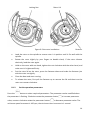
1
Press select button , return to the preparation interface and displays setting parameters. Press again the select button flashing, rotate parameter button , once the parameter symbol is to modify parameters. Release button after 5 seconds, centrifuge will return to normal operation mode and run process according to the new parameters. After the time parameter has been modified, the operation time is not cleared and will continue to be accumulated. (3) Alarm display If anything is wrong in processing, the centrifuge will brake to stop automatically, and display the error code on the time area. You can find out the malfunction causes by checking the table 10-1, and make correct actions accordingly. 8.1.3 End the operation (1) The centrifuge will break when it reaches the setting time or button is pressed. When the rotor stops rotating, centrifuge will start beeping to alarm the operation was over. (2) Open the door The door can be released automatically when the operation was over. After door closed, you are able to press the After ending the operation, the program will store the setting parameters of this button to open it. operation, and will recall these parameters when restart the program. (3) Open the door and take out the rotor and sample. 8.2 RFC Operation Turn on the POWER switch. Set a RCF value. Press the select button parameter input status. , choose speed unit ×g, the speed symbol will flash into RCF 16