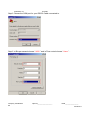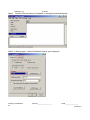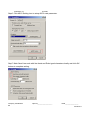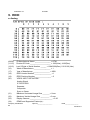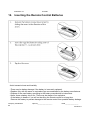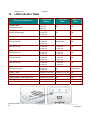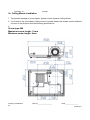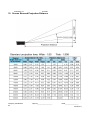
1
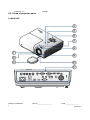
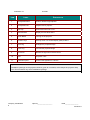
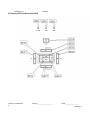
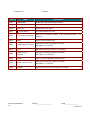
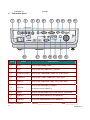
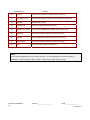
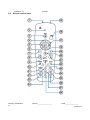
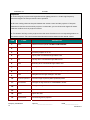
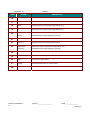
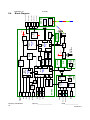
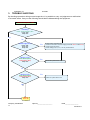
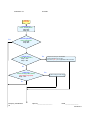
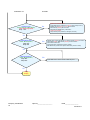
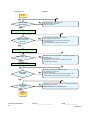
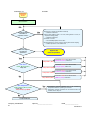
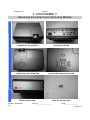
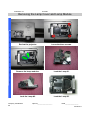
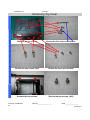
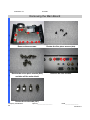
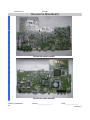
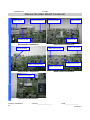
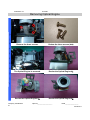
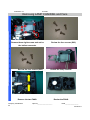
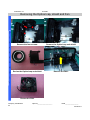
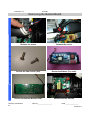
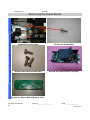
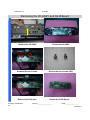
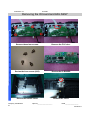
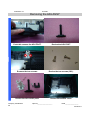
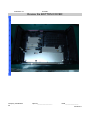
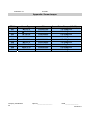
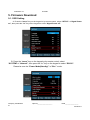
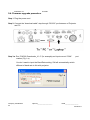
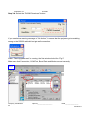
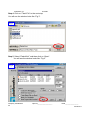
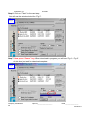
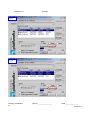
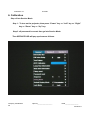
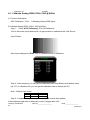
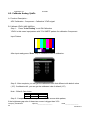
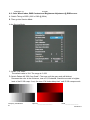
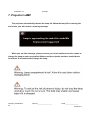
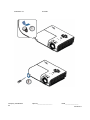
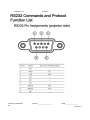
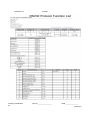
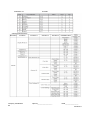
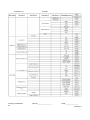
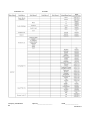
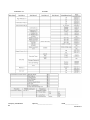
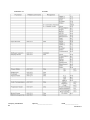
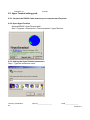
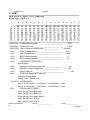
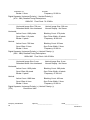
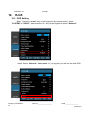
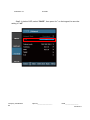
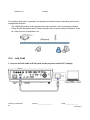
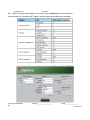
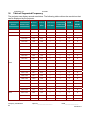
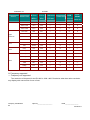
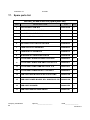
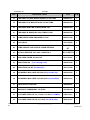
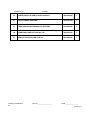
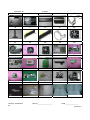
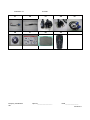
Delta Elec. Inc. EH1060 PROJECTOR EH1060_DP486-57A SERVICE MANUAL Company Confidential 1 Optoma__________________ Delta________________ 2010/03/17 Delta Elec. Inc. EH1060 CONTENTS 1.COMPLIANCE OF SAFE REPAIR........................................................................................4 1-1.Caution During Disassembling And Assembling.............................................................4 1-2.Lamp.............................................................................................................................. 4 1-3.Lens................................................................................................................................4 2.SPECIFICATIONS.................................................................................................................5 2-1.Summary Specifications................................................................................................. 5 2-2.Views of projector parts……..…………………………………….…………………………..7 2-3.Remote control parts………….......................................................................................13 2-4.Block Diagram……………………………………………………………………………...…16 3.TROUBLE SHOOTING........................................................................................................17 4.DISASSEMBLY AND ASSEMBLY......................................................................................25 5.Firmware Download...........................................................................................................41 5-1. OSD Setting…………………………………………………………………………………..41 5-2. Projector RS-232 Drivers Installation Guide……………………………………….……..42 5-3. Start with the FlashUpgrader to PC………………………………………………….….…42 5-4. Firmware upgrade procedure………………………………………………………………43 6. Calibration….……………………………………….………………………………..…..…..…..48 6-1.Calibrate Analog RGB (1920 x 1080 @ 60Hz)..............................................................49 6-2.Calibrate Analog Ypbpr……………………………..………………………….………….…50 6-3.Color Wheel Index, DMD Contrast and Brightness Adjustment @ RGB source……...51 7. Projection Lamp……………………………………………………………………………..…..52 8.How To Program By RS232……………………………..………………………………..…….56 8-1. OSD Setting……………………………………………………………………………………56 8-2. RS-232 Hardware Connection……………………………………………………………….57 8-3. Hyper Terminal setting guide…………………………………………………………………65 9. EDID…………………………………………………………………………………………..……69 10.RJ45…………………………………………………………………………………………...….79 11.SERVICE NOTE……………………………………………………………..…………………...87 12.Inserting the Remote Control Batteries…………………………...…………………...…...90 13. LED Indicator Table……………………………………………………………………..……..91 14. Ceiling Mount Installation…………………………………………………………………….92 15.Screen size and projector…………………………………………………………..….……..93 Company Confidential 2 Optoma__________________ Delta________________ 2010/03/17 Delta Elec. Inc. EH1060 16.Table of supported Frequency .................................................................................…. 94 17.Spare parts list…………………………………………………………………………..….…..96 Revised History Date Description 2010-03-08 Draft Edit 2010-03-17 Preliminary Company Confidential 3 Optoma__________________ Delta________________ 2010/03/17 Delta Elec. Inc. EH1060 1. COMPLIANCE OF SAFE REPAIR Be sure to read this Service Manual before providing services. In the projector, full consideration is taken to ensure safety for fire, electric shock, injury, harmful radiation, and substance. Therefore, observe the notice described in this Service Manual so that safety is kept when providing services. Moreover, be sure to observe the notice described in the Instruction Manual. Pay attention to the following items during service inspection. 1-1 Cautions during disassembling and assembling 1. This equipment contains parts under high voltage. When making repairs, etc. Be sure to pull out the power plug beforehand to insure safety. 2. Parts may be very hot immediately after use. Make sure the equipment has cooled off sufficiently before carrying out repairs. 3. Make sure that parts and screws and wiring, etc. are returned to their original positions. Tube, tape and other insulation materials have been used for safety reasons. The internal wiring has been designed to avoid direct contact with hot parts or parts under high voltage when using clamps or other tools. 4. The parts used in this device have special safety features such as flame-resistance and anti-voltage properties. When replacing parts, always use parts supplied from the factory. 5. After finishing operations make sure that all parts and wires have been returned to their original position and that there has been no deterioration of the area around the location that was worked on. 6. Be sure to use a grounding strap (wrist band) during repair and inspection. 1-2 Lamp During current conduction, the lamp is in the high-temperature state. In this case, pay careful attention because a high voltage is used. When replacing a lamp, replace it after confirming that the lamp has gotten cold sufficiently. 1-3 Lens Do not look into a lens during projection. This damages your eyes. Company Confidential 4 Optoma__________________ Delta________________ 2010/03/17 Delta Elec. Inc. EH1060 2. SPECIFICATIONS 2-1. Summary Specifications Model EH1060 Display type “TI” DMD 12∘, 0.65” 1080P, Type A, Dark Chip 2 Resolution 1920x1080 Native (1080P) Weight <8.1 lbs Projection distance 1 meters ~ 10 meters Projection screen size 30”~280” Projection lens Manual Focus/Manual Zoom x 1.2 Throw ratio 1.59-1.908 Vertical keystone correction +/- 15 degrees Projection methods Front, Rear, Desktop/Ceiling (Rear, Front) Data compatibility IBM PC or compatibles (VGA, SVGA, XGA, SXGA, UXGA), Mac SDTV/EDTV/ HDTV 480i, 576i, 480p, 576p, 720p, 1080i, 1080p Video compatibility NTSC, PAL , SECAM H-Sync 15, 31 – 90 kHz V-Sync 50 – 85 Hz Color Wheel RYGCWB 2x Operation temperature 5° ~ 35°C Dimensions 326.22 mm (W) x 106.20 mm (H) x 243.73 mm (D) AC Input AC Universal 100 ~ 240, Typical @ 110VAC (100~240)/+-10% Power consumption 370W (max) Stand By <1watt Lamp 280W Brightness Normal: 2600(Min)-3000(Max) ; Audio speaker 3W mono speaker Input Terminals VGA IN x 1 ECO: 1950(Min)-2400(Max) Component video(3 RCA) S-Video x 1 Company Confidential 5 Optoma__________________ Delta________________ 2010/03/17 Delta Elec. Inc. EH1060 Composite Video x 1 HDMI IN-1 / HDMI IN-2 AUDIO IN x 1 ( L& R) RCA jack AUDIO IN x 1 (3.5mm mini jack) Output Terminals VGA x 1 AUDIO OUT x 1 RS-232C Control Terminals RJ45(LAN) USB (type B) 12V DC Security Company Confidential 6 Kensington lock Optoma__________________ Delta________________ 2010/03/17 Delta Elec. Inc. EH1060 2-2. Views of projector parts A. MAIN UNIT Company Confidential 7 Optoma__________________ Delta________________ 2010/03/17 Delta Elec. Inc. ITEM EH1060 LABEL DESCRIPTION 1. Tilt-Adjuster Button Push to release height adjuster 2. Tilt-Adjuster Feet Adjusts level of projector 3. Lens cap Protect lens when not in use 4. LED Indicators Display the LED blink status 5. Power Button Turning on the projector. 6. Function Keys See Top view—On-screen Display (OSD) buttons. 7. Zoom ring Enlarges the projected image 8. Focus ring Focuses the projected image 9. IR receiver Receive IR signal from remote control 10. Lens Projection Lens 11. Connection ports Connect the signals from a device Important: Ventilation openings on the projector allow for good air circulation, which keeps the projector lamp cool. Do not obstruct any of the ventilation openings. Company Confidential 8 Optoma__________________ Delta________________ 2010/03/17 Delta Elec. Inc. EH1060 B. Display (OSD) buttons and LEDS Company Confidential 9 Optoma__________________ Delta________________ 2010/03/17 Delta Elec. Inc. ITEM EH1060 LABEL DESCRIPTION LED0 POWER LED Display the power on/off sequence status LED1 LAMP LED Display the the lamp status LED2 TEMP LED Display the thermal status KEY0 Turns the projector On or Off. (Power button) Navigates and changes settings in the OSD Quick Menu – For KEY1 ▲ (Up cursor) / Keystone+ KEY2 MENU KEY3 ► (Right cursor) / Volume KEY4 AUTO Optimizes image size, position, and resolution ▼ (Down cursor) Navigates and changes settings in the OSD /Keystone- Quick Menu – For Keystone KEY6 ENTER Enter or confirm highlighted OSD menu item KEY7 ◄ (Left cursor) / Volume KEY8 SOURCE KEY5 Company Confidential 10 Keystone Opens and exits OSD menus Navigates and changes settings in the OSD Quick Menu – For Volume Navigates and changes settings in the OSD Quick Menu – For Volume Enter the Source menu ( Not available on TW30x ) Optoma__________________ Delta________________ 2010/03/17 Delta Elec. Inc. EH1060 C. Connection ports ITEM LABEL DESCRIPTION 1. AC IN Connect the POWER CABLE 2. USB Connect the USB CABLE from a computer 3. Component VIDEO Connect the COMPONENT CABLE from a video device 4. S-VIDEO IN Connect the S-VIDEO CABLE from a video device 5. VIDEO IN Connect the COMPOSITE CABLE from a video device 6. VGA OUT 7. VGA IN Connect the RGB CABLE from a computer and components 8. HDMI IN-1 Connect an HDMI CABLE from an HDMI device 9. HDMI IN-2 Connect an HDMI CABLE from an HDMI device Company Confidential 11 Connect the RGB CABLE to a display (Loop Thru only for VGA IN-1) Optoma__________________ Delta________________ 2010/03/17 Delta Elec. Inc. EH1060 10. DC OUT Output 12Vdc(200ma) for display screen motor use 11. Kensington Lock Secure to permanent object with a Kensington® Lock system 12. Speaker Outputs audio sound 13. IR RECEIVE Receive IR signal from remote control 14. AUDIO IN (L and R) Connect the COMPOSITE CABLES from a video device 15. AUDIO IN Connect an AUDIO CABLE from the input device. 16. RS-232 Connect RS-232 serial port cable for remote control 17. AUDIO OUT Connect an AUDIO CABLE for audio loop through 18. LAN Connect a LAN CABLE from Ethernet Note: If your video equipment has various input sources, it is recommended to connect in priority of HDMI/DVI, component (thru VGA), S-Video, Composite for better picture quality. Company Confidential 12 Optoma__________________ Delta________________ 2010/03/17 Delta Elec. Inc. 2-3. EH1060 Remote control parts. Company Confidential 13 Optoma__________________ Delta________________ 2010/03/17 Delta Elec. Inc. EH1060 Important: 1. Avoid using the projector with bright fluorescent lighting turned on. Certain high-frequency fluorescent lights can disrupt remote control operation. 2. Be sure nothing obstructs the path between the remote control and the projector. If the path between the remote control and the projector is obstructed, you can bounce the signal off certain reflective surfaces such as projector screens. 3. The buttons and keys on the projector have the same functions as the corresponding buttons on the remote control. This user’s manual describes the functions based on the remote control. ITEM LABEL DESCRIPTION 1. Laser Use as on-screen pointer. DO NOT POINT IN EYES. 2. Status LED Lights when the remote control is used 3. Power Turns the projector on or off 4. Up Up key when connected through USB to a PC 5. Left Left key when connected through USB to a PC 6. Enter Enter key when connected through USB to a PC 7. L Left key when connected through USB to a PC 8. Source/Left key Detects the input device/Navigates and changes settings in the OSD. 9. Enter Navigates and changes settings in the OSD 10. Keystone top/bottom Corrects image-trapezoid (wider top/bottom) effect 11. DVI-D/YPbPr Changes the signal device to COMPONENT VIDEO. 12. HDMI Changes the signal device to HDMI 13. S-VIDEO Input source select S-Video 14. MENU Opens the OSD 15. IR transmitter Transmits signals to projector Company Confidential 14 Optoma__________________ Delta________________ 2010/03/17 Delta Elec. Inc. ITEM EH1060 LABEL DESCRIPTION 16. Laser Press to operate the on-screen pointer 17. Right Right key when connected through USB to a PC 18. Down Down key when connected through USB to a PC 19. R Right key when connected through USB to a PC 20. Page up/ Page up when connected through USB to a PC Up Key Navigates and changes settings in the OSD 21. Re-Sync/Right Key Navigates and changes settings in the OSD 22. Volume +/- Speaker volume decrement and increment 23. Page down/ Page down when connected through USB to a PC Down Key Navigates and changes settings in the OSD 24. ZOOM Zoom in/out 25. AV MUTE Display blank and mute audio 26. Video Input source select Video 27. Freeze Freeze/unfreezes the on-screen picture 28. VGA Input source select VGA Company Confidential 15 Optoma__________________ Delta________________ 2010/03/17 Company Confidential 16 Optoma__________________ CN2002 22 CN2004 MiniJack OUT 21 ICL3232 U2001 TX/RX NJW1141M U2004 Audio Processor CS4344 U502 CN2005 RS232 Audio AMP IO BD IR 22 TPA3101 U2005 11 I2S Decoder 6 9 ADXL345(MXC6202) U207(U206) MiniJack IN RCA IN CN2006 MAIN BD SCART 5 4 AutoKeyston 5 ISL59830 U006 Analog Buffer CN007 VGA OUT Video CN004 VGA IN CN006 CN003 HDMI2 S-Video CN002 CN005 CN001 HDMI1 YPbPr CN206 11 PW392C U500 Scaler 10 7 MST336 U400 7 HDMI Receiver IR RJ45 KEYPAD 380V 19 15 P12V Ballast 17 DDP3021 U700 ASIC 20 1 PMD1000 U100 Motor 25MHz ICS650GI-44LFT U709 Spectrum clock 392_I2C 8 G794 U200 Fan Controller P12V_F INDEX BD 50MHz 2 MCU LAMP 18 15 Power & Motor Driver AC IN 90V~264V Power BD P12V_F JS28F320C3BD70 U714 MX29LV640EBTI-70G U503 MT49H8M36BM U712 RLDRAM FLASH CN500 FLASH HY5DU561622ETP-5 U601 DDR RAM HY5DU561622ETP-5 U600 DDR RAM 3 Front End Power TTL OUT Front IR BD 12 13 10 14 9 PQ20WZ1UJ00H U205 Regulator (Blower FAN) (LAMP FAN) (Power FAN) (Engine FAN) (Reserve FAN) 0.65 1080p DMD TPS65145 Power DMD BD FAN1 FAN2 FAN3 FAN4 FAN5 2-4. SCREEN CONTROL Delta Elec. Inc. EH1060 Block Diagram Delta________________ 2010/03/17 Delta Elec. Inc. 3. EH1060 TROUBLE SHOOTING By checking operations during normal usage time, it is possible to carry out judgments on malfunction to a certain extent. Carry out the following checks before disassembling the equipment. Connect the power cord < Stand-by > Power: Flashing (Green) 2Sec Lamp : OFF Temp :OFF Yes No < Power supply error > Power: OFF Lamp: OFF Temp: OFF Yes • Power Supply Unit malfunction • Check the connection of Power Supply (Power BD CN201 to MB CN100) • Check keypad connection • Check voltage (12v, 5v, 3.3v, 1.8v etc) on Main Board. No < Sensor 1 error > Power: Blink3 (Green) Lamp: Blink 1 (Red) Temp: OFF Yes • Check the system Sensor 1 IC No < Sensor 2 error > Power: Blink3 (Green) Lamp: Blink 2 (Red) Temp: OFF Yes • Check the system Sensor 2 IC No Waiting Power On Company Confidential 17 Optoma__________________ Delta________________ 2010/03/17 Delta Elec. Inc. EH1060 Turn the power ON < Powering up > Power: Flashing Green Lamp: OFF Temp: OFF Yes < Normal operation > Power: Light Green Lamp: OFF Temp: OFF < System error > Power: Blink 4 (Green) Lamp: OFF Temp: OFF Yes • Lamp Cover A’ssy is not attached • Thermal break sensor is open. • Connector (CN11) on Keypad Board disconnected. No < Lamp Error > Power: Flashing 0.5Sec (Green) Lamp: Steady Light (Red) Temp: OFF Yes System Change a new Lamp No Company Confidential 18 Optoma__________________ Delta________________ 2010/03/17 Delta Elec. Inc. EH1060 < Lamp-Lit error > Power: Flashing 0.5Sec (Green) Lamp: Steady Light (Red) Temp: OFF Yes Ignition sound doesn’t exist. • Power Board Ass’y malfunction (CN102 doesn’t output 370 V) • Ballast Connector (CJ4) or (CJ1) disconnected • Main Board (CN705) disconnected • Main Board or Ballast Ass’y malfunction Ignition sound exists. • Lamp failure (Lamp is broken, damaged, or burst) No < Color Wheel error > Power: Blink 9 (Green) Lamp: OFF Temp: OFF Yes • Flexible cable of Color Wheel Ass’y is disconnected (CN703) or broken. • Index Board (CN8) / Main Board (CN706) is disconnected • Index Board malfunction • Color Wheel Ass’y malfunction (doesn’t rotate). • Main Board Ass’y malfunction (Color Wheel Ass’y doesn’t rotate). No < Normal operation > Power: Blink 8 (Green) Lamp: OFF Temp: OFF Yes Check DMD board is disconnected or DMD chip error No Image Display Company Confidential 19 Optoma__________________ Delta________________ 2010/03/17 Delta Elec. Inc. EH1060 Image Display No Yes No Projector logo screen display • CW Sensor Board Ass’y malfunction • Main Board Ass’y malfunction • DMD Set malfunction Yes Confirmation with none-signal state No Yes Still dark after the lamp is on for more than 1min • Lamp deterioration (malfunction/usage time) • Power Supply Unit malfunction (No change occurs even after lamp replacement.) • DMD Set malfunction (No change occurs even after lamp replacement.) Yes “No signal” Message display No No Press “Menu” key No Yes • Remote controller set malfunction, Low battery, and outside operation rang • Main Board Ass’y malfunction • Connector (CN210)、(CN9 of IR PWB) disconnected • IR PWB Ass’y malfunction Input each signal No Yes Image display normally No • Check the pattern generator setting is wrong • Main Board Ass’y malfunction • DMD Set malfunction • Setting on PC side(external output setting, resolution, etc.) • Cable malfunction (disconnection and pins broken) Yes Speaker work normally No No • Connector (CN211 or CN2001/CN2007 of IO BD) disconnected • Speaker Ass’y malfunction • Main Board Ass’y malfunction Yes Check the projection Screen Company Confidential 20 Optoma__________________ Delta________________ 2010/03/17 Delta Elec. Inc. EH1060 Check the projection Screen Check using all black/white screens with PC connection Yes Are abnormalities noticeable on projection screen? Yes • Black lines on screen (horizontal and vertical) → DMD Set malfunction • Missing pixels (Missing white: 1 or more, missing black: 5 or more, or sequence missing pixels) → DMD Set malfunction • Shadows on screen → Dirt on DMD/projection lens surface • Bluish shadows on corners of screen (during white screen display) → Shifted optical axis of Lens Base Unit Does the lamp go off during operation? System OK Normal operation Yes Lamp: Blink 1 (Red) < Fan error > Power: Blink 6 (Green) Lamp: OFF YLamp: Blink 2 (Red) Lamp: Blink 3 (Red) No <Over temperature > Power: Flashing (Green) 0.5Sec Lamp: OFF Temp: Steady Light (RED) Lamp: Blink 4 (Red) Yes • Connector CN201 of Fan disconnected • Blower fan (Fan1) malfunction • Connector CN202 of Fan disconnected • Lamp fan (Fan2) malfunction • Connector CN203 of Fan disconnected • Power fan (Fan3) malfunction • Connector CN204 of Fan disconnected • DMD fan (Fan4) malfunction • Temperature protector operated due to the increase in temperature based on operating environment • Temperature protector operated due to blocked suction and exhaust holes or dirty fan No SYSTEM OK Company Confidential 21 Optoma__________________ Delta________________ 2010/03/17 Delta Elec. Inc. EH1060 Common problems and solutions These guidelines provide tips to deal with problems you may encounter while using the projector. If the problem remains unsolved, contact your dealer for assistance. Often after time spent troubleshooting, the problem is traced to something as simple as a loose connection. Check the following before proceeding to the problem-specific solutions. • Use some other electrical device to confirm that the electrical outlet is working. • Ensure the projector is turned on. • Ensure all connections are securely attached. • Ensure the attached device is turned on. • Ensure a connected PC is not in suspending mode. Ensure a connected notebook computer is configured for an external display. (This is usually done by pressing an Fn-key combination on the notebook.) Image Problems Problem: No image appears on the screen 1. Verify the settings on your notebook or desktop PC. 2. Turn off all equipment and power up again in the correct order. Problem: The image is blurred 1. Adjust the Focus on the projector. 2. Press the Re-sync button on the remote control or projector. 3. Ensure the projector-to-screen distance is within the 10-meter (33-feet) specified range. 4. Check that the projector lens is clean. Problem: The image is wider at the top or bottom (trapezoid effect) 1. Position the projector so it is as perpendicular to the screen as possible. 2. Use the Keystone button on the remote control or projector to correct the problem. Problem: The image is reversed Check the Projection setting on the Setup menu of the OSD. Company Confidential 22 Optoma__________________ Delta________________ 2010/03/17 Delta Elec. Inc. EH1060 Problem: The image is streaked 1. Set the Frequency and Phase settings on the Computer menu of the OSD to the default settings. 2. To ensure the problem is not caused by a connected PC’s video card, connect to another computer. Problem: The image is flat with no contrast Adjust the Contrast setting on the Image menu of the OSD. Problem: The color of the projected image does not match the source image. Adjust the Color Temperature and Gamma settings on the Image menu of the OSD. Lamp Problems Problem: There is no light from the projector 1. Check that the power cable is securely connected. 2. Ensure the power source is good by testing with another electrical device. 3. Restart the projector in the correct order and check that the Power LED is still green. 4. If you have replaced the lamp recently, try resetting the lamp connections. 5. Replace the lamp module. 6. Put the old lamp back in the projector and have the projector serviced. Problem: The lamp goes off 1. Power surges can cause the lamp to turn off. Re-plug power cord. When the Ready LED is on, press the power button. 2. Replace the lamp module. 3. Put the old lamp back in the projector and have the projector serviced. Company Confidential 23 Optoma__________________ Delta________________ 2010/03/17 Delta Elec. Inc. EH1060 Remote Control Problems Problem: The projector does not respond to the remote control 1. Direct the remote control towards remote sensor on the projector. 2. Ensure the path between remote and sensor is not obstructed. 3. Turn off any fluorescent lights in the room. 4. Check the battery polarity. 5. Replace the batteries. 6. Turn off other Infrared-enabled devices in the vicinity. 7. Have the remote control serviced. Audio Problems Problem: There is no sound 1. Adjust the volume on the remote control. 2. Adjust the volume of the audio source. 3. Check the audio cable connection. 4. Test the source audio output with other speakers. 5. Have the projector serviced. Problem: The sound is distorted 1. Check the audio cable connection. 2. Test the source audio output with other speakers. 3. Have the projector serviced. Company Confidential 24 Optoma__________________ Delta________________ 2010/03/17 Delta Elec. Inc. EH1060 4. DISASSEMBLY Removing the Lamp Cover and Lamp Module D I S Look the full set projector. Look at the IO side. Look at the case of top side. Look at the keypad of top side. Remove this screw. Look the screws (S01). A S S E M B L Y Company Confidential 25 Optoma__________________ Delta________________ 2010/03/17 Delta Elec. Inc. EH1060 Removing the Lamp Cover and Lamp Module D I S Review the projector Loose the three screws. Remove the lamp modules. Look the Lamp #1. Look the Lamp #2. Look the Lamp #3. A S S E M B L Y Company Confidential 26 Optoma__________________ Delta________________ 2010/03/17 Delta Elec. Inc. EH1060 Removing Top Cover D I S Remove the ten screws. Review the five screws (S02)&(S03). Review the two screws (S03). Review the three screws (S04). Remove the two screws. Review the two screws. (S05) A S S E M B L Y Company Confidential 27 Optoma__________________ Delta________________ 2010/03/17 Delta Elec. Inc. EH1060 Removing the Main Board D I S Remove these screws. Review the five piece screws (S06). Review the seven piece screws (S05) Remove the four screws. A S S E M B and take off the main shield. L Y Review the six screws (S07). Company Confidential 28 Optoma__________________ Delta________________ 2010/03/17 Delta Elec. Inc. EH1060 Review the Main Board D I S A S S Review the main board#1. E M B L Y Review the main board#2. Company Confidential 29 Optoma__________________ Delta________________ 2010/03/17 Delta Elec. Inc. EH1060 Review the Main Board Connector CN207 (RJ45) CN204 (Engine Fan) CN201 (Front IR) CN703 (Index) D CN200 (Keypad) CN706 (C/W) I Remove the Connectors. Remove the Connectors. S CN705 (Ballast) CN201 (Blower Fan1) CN211 (IO CONN) A SS E CN203 (Power Fan3) CN209 (Thermal Breaker) M B L CN202 (Lamp Fan2) Remove the Connectors. Remove the Connectors. CN100 (Power Supply) Y Remove the Connector. Company Confidential 30 Optoma__________________ Delta________________ 2010/03/17 Delta Elec. Inc. EH1060 Removing Optical Engine D I S Remove the three screws. Review the three screws (S08). The Optical Engine is removed. Review the Optical Engine #1. Review the Optical Engine #2. Review the Optical Engine #3. A S S E M B L Y Company Confidential 31 Optoma__________________ Delta________________ 2010/03/17 Delta Elec. Inc. EH1060 Removing LAMP CHANNEL and Fans D I S Remove these eight screws and notice Review the four screws (S03). the ballast connector A S S E M Review the four screws (S03). Review the lamp channel. B L Y Remove the two FANS. Company Confidential 32 Optoma__________________ Review the FANS. Delta________________ 2010/03/17 Delta Elec. Inc. EH1060 Removing the Optical cap, shield and Fan D I S Remove the four screws. Remove the Optical cap and shield. Review the Optical cap and shield. Remove the FAN.. A S S E M B L Y Review the FAN. Company Confidential 33 Optoma__________________ Delta________________ 2010/03/17 Delta Elec. Inc. EH1060 Removing the Ballast Board D I Remove the screw. Remove the screw. Review the two screws (S03). Review the Ballast (Top side). Review the Ballast (Bottom side). Remove the two screws. S A SS E M B L Y Company Confidential 34 Optoma__________________ Delta________________ 2010/03/17 Delta Elec. Inc. EH1060 Removing the Power Board D I S Remove the two screws. Review the screw (S09). Review other three screws (S03). Review the Power Board (Top Side). A SS E M B L Y Review the Power Board (Bottom Side). Company Confidential 35 Optoma__________________ Delta________________ 2010/03/17 Delta Elec. Inc. EH1060 Removing the I/O ASSY and RJ45 Board Remove the I/O ASSY. Review the I/0 ASSY. Remove the two screws. Review the two screws (S05). Remove the RJ45 wire. Company Confidential 36 Review the RJ45 Board. Optoma__________________ Delta________________ 2010/03/17 Delta Elec. Inc. EH1060 Removing the IO board and ADJ ASSY D I S Remove these four screws. Remove the FCC wire . Review the four screws (S05). Review the IO BOARD Review the bottom cover. Remove the screw. A S S E M B L Y Company Confidential 37 Optoma__________________ Delta________________ 2010/03/17 Delta Elec. Inc. EH1060 Removing the ADJ ASSY Push this remove the ADJ FOOT. Review the ADJ FOOT. Remove the two screws. Review the two screws (S03). Review the ADJ ASSY parts. Review the bottom cover. Company Confidential 38 Optoma__________________ Delta________________ 2010/03/17 Delta Elec. Inc. EH1060 Review the BOTTOM COVER D I S A S S E M B L Y Company Confidential 39 Optoma__________________ Delta________________ 2010/03/17 Delta Elec. Inc. EH1060 Appendix. Screw torque ITEM-S Screw Type P/N S01 3105221300 1.5-2.0kgf.cm S02 M3*0.5*5 φ3*0.5*34 3109183300 5.5-6.5kgf.cm S03 M 3*0.5*8 3106160400 5.5-6.5kgf.cm S04 M 2*0.2*4 3105040800 1.5-2.0kgf.cm S05 M3*0.5*6 3100320600 5.5-6.5kgf.cm S06 M2*0.3*3 3105134900 1.5-2.0kgf.cm S07 HEX 4.7*4 3461431703 4-5kgf.cm S08 M3*0.5*10 3100301000 5.5-6.5kgf.cm S09 M3*0.5*8 3100300800 5.5-6.5kgf.cm Company Confidential 40 Screw Driver Torque (KG-CM) Optoma__________________ Delta________________ 2010/03/17 Delta Elec. Inc. EH1060 5. Firmware Download 5-1. OSD Setting A. Press the “menu” key on the keypad or by remote control, select “SETUP”-->“Signal Power on”, then press the “►” key on the keypad to select “Signal Power off”. B. Press the “menu” key on the keypad or by remote control, select “SYSTEM”->“ Network”, then press the “►” key on the keypad to select “RS232”. Please be sure the “Power Mode(Standby)” is “Eco.” mode. Company Confidential 41 Optoma__________________ Delta________________ 2010/03/17 Delta Elec. Inc. EH1060 5-2. Projector RS-232 Drivers Installation Guide The document is to describe a Windows application Pixelworks software “FlashUpgrader” for projector firmware. Its main purpose is to provide a detailed procedure of upgrading the application software of a DLP projector. The system requirement and the installation procedure of “FlashUpgrader” are also included in the document. System Requirement IBM compatible PC. Windows XP-SP2 operating system. Power ON and Into Stand-By Mode 1. Make sure that the RS-232 cable is firmly connected between projector and computer 2. Connect the power cord to the projector, and move the power switch in its ON position (if available) so that projector is in the STAND-BY mode. 5-3. Start with the FlashUpgrader to PC The section is to illustrate the procedure to upgrade the application software of a DLP projector. Run the “FlashUpgrader.exe”, that will automatically launch the RS-232 drivers update. The following pictures are illustrating the process of the RS-232 Driver installation. Company Confidential 42 Optoma__________________ Delta________________ 2010/03/17 Delta Elec. Inc. EH1060 5-4. Firmware upgrade procedure. Step 1. Plug the power cord. Step 2. Connect the “download cable” step through “RS-232” port between of Projector and PC. Step 3-a. Run “PW392 Downloader_V1.6” (for example),and input correct “COM:” number (Fig 1-a). port You don’t need to input the Baud Rate setting, SW will automatically switch different of baud rate to link with projector. Company Confidential 43 Optoma__________________ Delta________________ 2010/03/17 Delta Elec. Inc. EH1060 Step 3-b. Select the “PW392 Download” button. If you see below warning message of “No Action”, it means that the projector got something wrong or the RS232 cable did not get well connection. When “FlashUpgrader.exe” is running, the first window looks like “Fig 2” Make sure that Connection, COM Port, Baud Rate and Modes are set correctly. Fig 2 Company Confidential 44 Optoma__________________ Delta________________ 2010/03/17 Delta Elec. Inc. EH1060 Step 4. Click on “Flash File” to the next step. You will see the window looks like “Fig 3”. Fig 3 Step 5. Select “FlashAll.inf” and then click on “Open”. You will see the window looks like “Fig 4”. Fig 4 Company Confidential 45 Optoma__________________ Delta________________ 2010/03/17 Delta Elec. Inc. EH1060 Step 6. Click on “Flash” to the next step. You will see the window looks like “Fig 5”. Fig 5 Step 7. Now press “Power” key. When download in progress you will see “Fig 6 ~ Fig 8”. At this time just wait for download complete. Fig 6 Company Confidential 46 Optoma__________________ Delta________________ 2010/03/17 Delta Elec. Inc. EH1060 Fig 7 Fig 8 Company Confidential 47 Optoma__________________ Delta________________ 2010/03/17 Delta Elec. Inc. EH1060 6. Calibration Step of into Service Mode Step 1 : To turn on the projector, then press “Power” key => “Left” key => “Right” key => “Down” key => “Up” key. Step 2:If password is correct then go into Service Mode. Then SERVICE OSD will pop up shows as follows: Company Confidential 48 Optoma__________________ Delta________________ 2010/03/17 Delta Elec. Inc. EH1060 6-1. Calibrate Analog RGB (1920x 1080 @ 60Hz): A. Function Description: ADC Calibration - VGA :Calibrating Analog RGB signal B. Calibrate Analog RGB (1920 x 1080 @ 60Hz): Step 1: Press “ADC Calibrating” to do DA Calibration VGA In this menu input pattern with 16-grays scalar for calibration the VGA Source. Input Pattern After input ready press “Enter” key on Calibration item to calibration. Step 2 : After complete, you can get the calibrated value that different with default value (all 127). if calibration fail, you can get the calibrated vale of default (all 127) Note : Offset & Gain Value Offset Gain Default 127 127 After ADC Step 3 : Compare internal white pattern and RGB source white pattern, if the brightness gap ratio of these two source is bigger than 3.5%. Company Confidential 49 Optoma__________________ Delta________________ 2010/03/17 Delta Elec. Inc. EH1060 6-2. Calibrate Analog YpbPr: A. Function Description: ADC Calibration - Component : Calibration YPbPr signal B. Calibrate YPbPr (480i @60Hz): Step 1: Press “Color Setting” to do DA Calibration YPbPr In this menu input pattern with 75% SMPTE pattern for calibration Component. Input Pattern After input ready press “Enter” key on Calibration item to calibration. Step 2 : After complete, you can get the calibrated value that different with default value (127). if calibration fail, you can get the calibrated vale of default (127) Note : Offset & Gain Value Offset Gain Default 127 127 After ADC Step 3 : Compare internal white pattern and RGB source white pattern, if the brightness gap ratio of these two source is bigger than 3.5%. Company Confidential 50 Optoma__________________ Delta________________ 2010/03/17 Delta Elec. Inc. EH1060 6-3. Color Wheel Index, DMD Contrast and Brightness Adjustment @ RGB source A. Switch Timing to RGB (1920 x 1080 @ 60Hz) B. Then go into Service Mode. In the Service Mode. C. Select “CW Index”. The default value is 324. The range is 0~359 D. Switch Pattern 49 “256 Gray Scale”. Fine-tune until the gray scale still distinct. Decrease the color to the minimum, tune off G, B channel, check the smooth in brighter level of the R 256 ramp. If not, fine tune “CW Index delay time” until R 256 ramp smooth. Company Confidential 51 Optoma__________________ Delta________________ 2010/03/17 Delta Elec. Inc. EH1060 7. Projector LAMP The projector automatically detects the lamp life. When the lamp life is nearing the end of use, you will receive a warning message. When you see this message, please connect your local reseller or service center to change the lamp as soon as possible. Make sure the projector has been cooled down for at least 30 minutes before change the lamp. Company Confidential 52 Optoma__________________ Delta________________ 2010/03/17 Delta Elec. Inc. Company Confidential 53 EH1060 Optoma__________________ Delta________________ 2010/03/17 Delta Elec. Inc. Company Confidential 54 EH1060 Optoma__________________ Delta________________ 2010/03/17 Delta Elec. Inc. Company Confidential 55 EH1060 Optoma__________________ Delta________________ 2010/03/17 Delta Elec. Inc. 8. EH1060 How to program by RS232 8-1. OSD Setting Press the “menu” key on the keypad or by remote control, select “SYSTEM”->“ Network”, then press the “►” key on the keypad to select “RS232”. Please be sure the “Power Mode(Standby)” is “Eco.” mode. Company Confidential 56 Optoma__________________ Delta________________ 2010/03/17 Delta Elec. Inc. 8-2. EH1060 RS-232 HARDWARE CONNECTION PC RS-232 pin alignment Company Confidential 57 Optoma__________________ Delta________________ 2010/03/17 Delta Elec. Inc. Company Confidential 58 EH1060 Optoma__________________ Delta________________ 2010/03/17 Delta Elec. Inc. Company Confidential 59 EH1060 Optoma__________________ Delta________________ 2010/03/17 Delta Elec. Inc. Company Confidential 60 EH1060 Optoma__________________ Delta________________ 2010/03/17 Delta Elec. Inc. Company Confidential 61 EH1060 Optoma__________________ Delta________________ 2010/03/17 Delta Elec. Inc. Company Confidential 62 EH1060 Optoma__________________ Delta________________ 2010/03/17 Delta Elec. Inc. Company Confidential 63 EH1060 Optoma__________________ Delta________________ 2010/03/17 Delta Elec. Inc. Company Confidential 64 EH1060 Optoma__________________ Delta________________ 2010/03/17 Delta Elec. Inc. EH1060 8-3. Hyper Terminal setting guide 8-3-1 Connect the RS232 Cable between your computer and Projector. 8-3-2 Open HyperTerminal Window2000/XP HyperTerminal path: Start \ Programs \ Accessories \ Communications \ HyperTerminal。 8-3-3 Setting the HyperTerminal parameter: Step 1. Type the connection name . Company Confidential 65 Optoma__________________ Delta________________ 2010/03/17 Delta Elec. Inc. EH1060 Step2. Choose the COM port for your RS232 Cable connected to. Step3. In Bits per second choose “ 9600 ” and in Flow control choose “ None ”。 Company Confidential 66 Optoma__________________ Delta________________ 2010/03/17 Delta Elec. Inc. Step4. EH1060 Click the File and choose Properties to setting Keyboard parameter。 Step5. In Setting page , choose Emulation type for your keyboard. Company Confidential 67 Optoma__________________ Delta________________ 2010/03/17 Delta Elec. Inc. EH1060 Step6. Click ASCII Setting icon to setup ASCII code parameter. Step7. Mark Send Line ends with line feeds and Echo typed characters locally and click OK bottom to complete setting. Company Confidential 68 Optoma__________________ Delta________________ 2010/03/17 Delta Elec. Inc. EH1060 9. EDID a. Analog (08-09) ID Manufacturer Name ________________ = OTM (11-10) Product ID Code _____________________ = 1060(Hex), 4192(Dec) (12-15) (16) Last 5 Digits of Serial Number ______ = 16843009(Dec), 01010101(Hex) Week of Manufacture _________________ = 1 (17) Year of Manufacture _________________ = 2009 (18) EDID Version Number _________________ = 1 (19) (20) EDID Revision Number ________________ = 3 VIDEO INPUT DEFINITION : Analog Signal 0.700V/0.300V Separate Composite Sync on Green (21) Maximum Horizontal Image Size _______ = 0 mm (22) (23) Maximum Vertical Image Size _________ = 0 mm Display Gamma _______________________ = 2.20 (24) DPMS and Supported Feature(s) : Company Confidential 69 Optoma__________________ Delta________________ 2010/03/17 Delta Elec. Inc. EH1060 Preferred Timing Mode (25-34) RGB Color Display CHROMA INFO : RedX : 0.649 RedY : 0.338 GreenX : 0.318 GreenY : 0.626 BlueX : 0.144 BlueY : 0.065 WhiteX : 0.305 WhiteY : 0.349 (35) ESTABLISHED TIMING I : 720 X 400 @ 70Hz (IBM,VGA) 640 X 480 @ 60Hz (IBM,VGA) 640 X 480 @ 67Hz (Apple,Mac II) 640 X 480 @ 72Hz (VESA) 640 X 480 @ 75Hz (VESA) 800 X 600 @ 56Hz (VESA) 800 X 600 @ 60Hz (VESA) (36) ESTABLISHED TIMING II : 800 X 600 @ 72Hz (VESA) 800 X 600 @ 75Hz (VESA) 832 X 624 @ 75Hz (Apple, Mac II) 1024 X 768 @ 60Hz (VESA) 1024 X 768 @ 70Hz (VESA) 1024 X 768 @ 75Hz (VESA) 1280 X 1024 @ 75Hz (VESA) (37) Manufacturer's Reserved Timing : 1152 X 870 @ 75Hz (Apple, Mac II) (38-53) Standard Timing Identification : 1680 X 1050 @ 60Hz 1280 X 720 @ 85Hz 1280 X 800 @ 85Hz 1280 X 1024 @ 85Hz 1400 X 1050 @ 60Hz 1440 X 900 @ 60Hz Company Confidential 70 Optoma__________________ Delta________________ 2010/03/17 Delta Elec. Inc. EH1060 1600 X 1200 @ 60Hz 1920 X 1200 @ 60Hz ( 54- 71) Detailed Timing / Descriptor Block 1 : 1920 X 1080 : Pixel Clock : 148 MHz Horizontal Image Size : 0 mm Vertical Image Size : 0 mm Refreshed Mode : Non-Interlaced Horizontal : Active Time : 1920 pixels Sync Offset : 88 pixels Border Vertical : : : Sync Pulse Width : 280 pixels 44 pixels 0 pixels Active Time : 1080 lines Sync Offset : 4 lines Border : None(Normal) Blanking Time Blanking Time : Sync Pulse Width : 45 lines 5 lines 0 lines Digital Separate, Horizontal Polarity (-) Vertical Polarity (-) ( 72- 89) Detailed Timing / Descriptor Block 2 : 1280 X 720 : Pixel Clock : 130 MHz Horizontal Image Size : 0 mm Vertical Image Size : 0 mm Refreshed Mode : Non-Interlaced Horizontal : Active Time : Sync Offset : Border 1280 pixels 48 pixels : Blanking Time : Sync Pulse Width : 160 pixels 32 pixels Blanking Time : Sync Pulse Width : 30 lines 5 lines 0 pixels Vertical : Active Time : Sync Offset : Border 720 lines 5 lines : 0 lines None(Normal) Digital Separate, Horizontal Polarity (-) Vertical Polarity (-) ( 90-107) Detailed Timing / Descriptor Block 3 : Monitor Range Limits : Horizontal Freq. : 15-90 kHz Vertical Freq. Pixel Clock Company Confidential 71 : 50-85 Hz : 170 MHz Optoma__________________ Delta________________ 2010/03/17 Delta Elec. Inc. EH1060 (108-125) Detailed Timing / Descriptor Block 4 : Monitor Name : EH1060 (126) No Extension EDID Block(s) (127) CheckSum is OK Company Confidential 72 Optoma__________________ Delta________________ 2010/03/17 Delta Elec. Inc. EH1060 b. HDMI (08H-09H) ID Manufacturer Name _________________________ = OTM (0AH-0BH) Product ID Code ______________________________ = 1060 (0CH-0FH) Last 5 Digits of Serial Number _______________ = UNUSE (10H) Week of Manufacture __________________________ (11H) Year of Manufacture __________________________ (12H) (13H) EDID Version Number __________________________ EDID Revision Number _________________________ (14H) VIDEO INPUT DEFINITION: = 01 = 2009 =1 =3 Digital Signal (15H) (16H) Maximum Horizontal Image Size ________________ Maximum Vertical Image Size __________________ = = (17H) Display Gamma ________________________________ (18H) DPMS and Supported Feature(s): mm mm = 2.20 Preferred Timing Mode Display Type = R/G/B Color (19H-22H) CHROMA INFO: Red x - 0.649 Green x - 0.318 Blue x - 0.144 White x - 0.305 (23H) Red y - 0.338 Green y - 0.626 Blue y - 0.065 White y - 0.349 ESTABLISHED TIMING I: 720 x 400 @ 70Hz (IBM,VGA) 640 x 480 @ 60Hz (IBM,VGA) 640 x 480 @ 67Hz (Apple,Mac II) 640 x 480 @ 72Hz (VESA) 640 x 480 @ 75Hz (VESA) Company Confidential 73 Optoma__________________ Delta________________ 2010/03/17 Delta Elec. Inc. EH1060 800 x 600 @ 56Hz (VESA) (24H) 800 x 600 @ 60Hz (VESA) ESTABLISHED TIMING II: 800 x 600 @ 72Hz (VESA) 800 x 600 @ 75Hz (VESA) 832 x 624 @ 75Hz (Apple,Mac II) 1024 x 768 @ 60Hz (VESA) 1024 x 768 @ 70Hz (VESA) 1024 x 768 @ 75Hz (VESA) (25H) 1280 x 1024 @ 75Hz (VESA) Manufacturer's Reserved Timing: 1152 x 870 @ 75Hz (Apple,Mac II) (38-53) Standard Timing Identification: Standard Timing ID 1: 1680 x 1050 @60Hz Standard Timing ID 2: 1280 x 720 @85Hz Standard Timing ID 3: 1280 x 800 @60Hz Standard Timing ID 4: 1280 x 1024 @60Hz Standard Timing ID 5: 1400 x 1050 @60Hz Standard Timing ID 6: 1440 x 900 @60Hz Standard Timing ID 7: 1600 x 1200 @60Hz Standard Timing ID 8: 1920 x 1200 @60Hz ______________________________________________________________________ (36H-47H) Detailed Timing / Descriptor Block 1: 1920x1080 Pixel Clock: 148.50 MHz ______________________________________________________________________ Horizontal Image Size: 0 mm Refreshed Mode: Non-Interlaced Vertical Image Size: 0 mm Normal Display - No Stereo Horizontal: Active Count: 1920 pixels Blanking Count: 280 pixels Sync Offset: 88 pixels Border: 0 pixels Sync Pulse Width: 44 pixels Frequency: 67.50 kHz Active Count: 1080 lines Blanking Count: 45 lines Sync Offset: 4 lines Border: 0 lines Sync Pulse Width: 5 lines Frequency: 60.00 Hz Vertical: Digital Separate, Horizontal Polarity (-) Vertical Polarity (-) Company Confidential 74 Optoma__________________ Delta________________ 2010/03/17 Delta Elec. Inc. EH1060 ______________________________________________________________________ (48H-59H) Detailed Timing / Descriptor Block 2: 1280x720 Pixel Clock: 130.00 MHz ______________________________________________________________________ Horizontal Image Size: 0 mm Refreshed Mode: Non-Interlaced Horizontal: Vertical Image Size: 0 mm Normal Display - No Stereo Active Count: 1280 pixels Blanking Count: 160 pixels Sync Offset: 48 pixels Sync Pulse Width: 32 pixels Border: 0 pixels Frequency: 90.28 kHz Active Count: 720 lines Blanking Count: 30 lines Sync Offset: 5 lines Sync Pulse Width: 5 lines Vertical: Border: 0 lines Frequency: 120.37 Hz Digital Separate, Horizontal Polarity (-) Vertical Polarity (-) ______________________________________________________________________ (5AH-6BH) Detailed Timing / Descriptor Block 3: Monitor Range Limits: Min Vertical Freq - 50 Hz Max Vertical Freq - 85 Hz Min Horiz. Freq - 31 kHz Max Horiz. Freq - 90 kHz Pixel Clock - 170 MHz GTF - Not Used ______________________________________________________________________ (6CH-7DH) Detailed Timing / Descriptor Block 4: Monitor Name: EH1060 (7EH) Block No: (01) Extension EDID Block(s) (7FH) Company Confidential 75 CheckSum OK Optoma__________________ Delta________________ 2010/03/17 Delta Elec. Inc. EH1060 Extended Block Type: CEA 861B Detailed Timing Blocks start at Byte:(23H) Native Format: (0x1) (03H) DTV (Basic Audio) (03H) YCbCr (4:4:4) (03H) YCbCr (4:2:2) Video Short Block Description: (05H) 640 x 480 P 59.94/60Hz 4:3 (06H) 720 x 480 P 59.94/60Hz 4:3 (07H) 720 x 480 P 59.94/60Hz 16:9 (08H) (09H) 720 x 576 P 50Hz 4:3 720 x 576 P 50Hz 16:9 (0AH) 1280 x 720 (0BH) 1920 x 1080 I 59.94/60Hz 16:9 (0CH) (0DH) 1280 x 720 P 50Hz 16:9 1920 x 1080 I 50Hz 16:9 (0EH) 1920 x 1080 P 59.94/60Hz 16:9 P 59.94/60Hz 16:9 Native Mode (0FH) 720(1440) x 480 I 59.94/60Hz 4:3 (10H) 720(1440) x 576 I 50Hz 4:3 (11H) 1920 x 1080 P 23.97/24Hz 16.9 (12H) 1920 x 1080 P 25Hz 16.9 (13H) 1920 x 1080 P 29.97/30Hz 16.9 (14H) 1920 x 1080 P 50Hz 16.9 Audio Short Block Description: Numbers of Audio Channels (2) Company Confidential 76 Optoma__________________ Delta________________ 2010/03/17 Delta Elec. Inc. EH1060 (16H) Linear PCM(IEC60958) Audio Supported: Audio Bit Rate: 32kHz, 44.1kHz, 48kHz 24Bit Speaker Short Block Description: Playload(3 bytes 1AH-1CH) Speakers (1AH): 1BH: FL/FR Reserved 1CH: Reserved Vendor Specific Short Block Description: Bytes: 03H, 0CH, 00H, 10H, 00H (23H - 35H) Detailed Timing Descriptions: 720x480 Pixel Clock: 27.00 MHz ______________________________________________________________________ Horizontal Image Size: 531 mm Refreshed Mode: Non-Interlaced Vertical Image Size: 398 mm Normal Display - No Stereo Horizontal: Active Count: 720 pixels Blanking Count: 138 pixels Sync Offset: 16 pixels Border: 0 pixels Sync Pulse Width: 62 pixels Frequency: 31.47 kHz Active Count: 480 lines Blanking Count: 45 lines Sync Offset: 9 lines Border: 0 lines Sync Pulse Width: 6 lines Frequency: 59.94 Hz Vertical: Digital Separate, Horizontal Polarity (-) Vertical Polarity (-) (35H - 47H) Detailed Timing Descriptions: 720x576 Pixel Clock: 27.00 MHz ______________________________________________________________________ Horizontal Image Size: 708 mm Vertical Image Size: 398 mm Refreshed Mode: Non-Interlaced Normal Display - No Stereo Horizontal: Active Count: 720 pixels Sync Offset: 12 pixels Blanking Count: 144 pixels Sync Pulse Width: 64 pixels Border: 0 pixels Frequency: 31.25 kHz Active Count: 576 lines Blanking Count: 49 lines Sync Offset: 5 lines Sync Pulse Width: 5 lines Vertical: Company Confidential 77 Optoma__________________ Delta________________ 2010/03/17 Delta Elec. Inc. EH1060 Border: 0 lines Frequency: 50.00 Hz Digital Separate, Horizontal Polarity (-) Vertical Polarity (-) (47H - 59H) Detailed Timing Descriptions: 1280x720 Pixel Clock: 74.25 MHz ______________________________________________________________________ Horizontal Image Size: 708 mm Refreshed Mode: Non-Interlaced Vertical Image Size: 398 mm Normal Display - No Stereo Horizontal: Active Count: 1280 pixels Blanking Count: 370 pixels Sync Offset: 110 pixels Border: 0 pixels Sync Pulse Width: 40 pixels Frequency: 45.00 kHz Active Count: 720 lines Blanking Count: 30 lines Sync Offset: 5 lines Border: 0 lines Sync Pulse Width: 5 lines Frequency: 60.00 Hz Vertical: Digital Separate, Horizontal Polarity (+) Vertical Polarity (+) (59H - 6BH) Detailed Timing Descriptions: 1920x1080 Pixel Clock: 148.50 MHz ______________________________________________________________________ Horizontal Image Size: 0 mm Vertical Image Size: 0 mm Refreshed Mode: Non-Interlaced Normal Display - No Stereo Horizontal: Active Count: 1920 pixels Sync Offset: 88 pixels Blanking Count: 280 pixels Sync Pulse Width: 44 pixels Border: 0 pixels Frequency: 67.50 kHz Active Count: 1080 lines Blanking Count: 45 lines Sync Offset: 4 lines Sync Pulse Width: 5 lines Vertical: Border: 0 lines Frequency: 60.00 Hz Digital Separate, Horizontal Polarity (+) Vertical Polarity (+) (7FH) CheckSum Valid Company Confidential 78 Optoma__________________ Delta________________ 2010/03/17 Delta Elec. Inc. 10. EH1060 RJ45 10-1. OSD Setting Step1. Press the “menu” key on the keypad or by remote control, select “SYSTEM”->“ RS232”, then press the “►” key on the keypad to select “Network”. Step2. Select “Network”, then press “►” on keypad, you will into the next OSD Company Confidential 79 Optoma__________________ Delta________________ 2010/03/17 Delta Elec. Inc. EH1060 Step3. In below OSD, select “DHCP”, then press “►” on the keypad, be sure the setting is “off” Company Confidential 80 Optoma__________________ Delta________________ 2010/03/17 Delta Elec. Inc. EH1060 For simplicity and ease of operation, the projector provides diverse networking and remote management features. The LAN/RJ45 function of the projector through a network, such as remotely manage: Power On/Off, Brightness and Contrast settings. Also, projector status information, such as: Video-Source, Sound-Mute, etc. 10-2. LAN_RJ45 1. Connect an RJ45 cable to RJ45 ports on the projector and the PC (Laptop) Company Confidential 81 Optoma__________________ Delta________________ 2010/03/17 Delta Elec. Inc. 2. 3. EH1060 On the PC (Laptop), select Start ->Control Panel-> Network Connections. Right-click on Local Area Connection, and select Properties. Company Confidential 82 Optoma__________________ Delta________________ 2010/03/17 Delta Elec. Inc. EH1060 4. In the Properties window, select the General tab, and select Internet Protocol (TCP/IP). 5. Click Properties. Company Confidential 83 Optoma__________________ Delta________________ 2010/03/17 Delta Elec. Inc. EH1060 6. Click Use the following IP address and fill in the IP address and Subnet mask, then click OK. 7. Press the Menu button on the projector. 8. Select Installation II Advanced Network. 9. After getting into Network, input the following: ` DHCP: Off ` IP Address: 10.10.10.10 ` Subnet Mask: 255.255.255.0 ` Gateway: 0.0.0.0 ` DNS Server: 0.0.0.0 10. Press 11. (Enter) / ► to confirm settings. Open a web browser (for example, Microsoft Internet Explorer). Company Confidential 84 Optoma__________________ Delta________________ 2010/03/17 Delta Elec. Inc. EH1060 12. In the address bar, input the IP address: 10.10.10.10 13. Press (Enter) / ►. The projector is setup for remote management. The NETWORK function displays as follows. Company Confidential 85 Optoma__________________ Delta________________ 2010/03/17 Delta Elec. Inc. EH1060 14. Base on network web-page for the input-string in [tools] tab, the limitation for input-Length is in the below list (“space” and the other punctuation key included): Company Confidential 86 Optoma__________________ Delta________________ 2010/03/17 Delta Elec. Inc. EH1060 11. SERVICE NOTE Cleaning the projector to remove dust and grime will help ensure trouble-free operation. a. Be sure to turn off and unplug the projector at least 30 minutes before cleaning. Failure to do so could result in a severe burn. b. Use only a dampened cloth when cleaning. Do not allow water to enter the ventilation openings on the projector. c. If a little water gets into the projector interior while cleaning, leave unplugged in a well-ventilated room for several hours before using. d. If a lot of water gets into the projector interior when cleaning, have the projector serviced. 1. Cleaning the Lens You can purchase optic lens cleaner from most camera stores. Refer to the following to clean the projector lens. 1. Apply a little optic lens cleaner to a clean soft cloth. (Do not apply the cleaner directly to the lens.) 2. Lightly wipe the lens in a circular motion. Caution: A. Do not use abrasive cleaners or solvents. B. To prevent discoloration or fading, avoid getting cleaner on the projector case 2. Cleaning the Case Refer to the following to clean the projector case. 1. Wipe off dust with a clean dampened cloth. 2. Moisten the cloth with warm water and mild detergent (such as used to wash dishes), and then wipe the case. 3. Rinse all detergent from the cloth and wipe the projector again Caution: To prevent discoloration or fading of the case, do not use abrasive alcohol-based cleaners. Company Confidential 87 Optoma__________________ Delta________________ 2010/03/17 Delta Elec. Inc. EH1060 3. Cleaning the Color Wheel Assy 1. The color filter is made of thin glass. Be very careful when handing the filter. 2. In case of fingerprints, etc. on the surface, clean in the same way as the projection lens unit. Do not use detergents as this could cause peeling of the color filter. 4. Cleaning the DMD 1. The DMD surface is glass and can be cleaned. However, avoid scratches as these can have a direct influence on the image. 2. In case of dust on the DMD surface use an air cleaner (with a device to prevent static, if possible) to clean off the surface. 3. In case of fingerprints, etc., add a small amount of water to the designated glass cleaner and wipe off in one direction. Then use the designated dry glass cleaner to wipe off in the same direction. 4. Do not use absolute alcohol or other substances that could leave streaks after drying. 5. Cleaning the Reflecting Mirror 1. Be careful not to touch the reflecting mirror. The surface is composed of vapor deposition silver and touching it directly with the hands can lead to burnishing. 2. Do not clean other than with air. Company Confidential 88 Optoma__________________ Delta________________ 2010/03/17 Delta Elec. Inc. EH1060 6. Cleaning a Soiled Projector Main Unit. (1). Wipe with a lint-free, soft, dry cloth. When very dirty, wipe with a cloth that has been moistened with a diluted neutral detergent, then finish with a dry cloth. If a chemically-treated cloth is going to be used, please follow any written warnings. (2). Do not wipe with thinner, benzene, or other solvents. Doing so could cause them to undergo qualitative changes or the coatings may peel, etc. (3).When removing the dust of the outflow and intake holes, use the brush attachment on a vacuum cleaner to clean out thedust. Avoid using the vacuum directly without attaching the adapter as well as the use of a nozzle adapter. (4).Do not scratch or otherwise hit the projector body with your nails or other hard object, since this will cause scratches. 7. Dust of the Intake and Outflow Holes Dust that collects in the intake and outflow holes will obstruct the ventilation and cause the internal temperature to rise which could cause damage. Clean this area carefully. As a guideline, clean at least every 100 hours of usage. a. Turn off the power and check that the indicator of the POWER/STANDBY has changed so that it is lit in orange, and then disconnect the power cable. b. Vacuum from the outside with an electric vacuum cleaner. Use a brush-tipped adapter with the vacuum cleaner. Note that use of a vacuum without an adapter, or use of an adapter without a brush should be avoided. 8. Cleaning the Inside of the Projector Cleaning of the inside of the projector is required about once a year. Failure to clean over a long period while dust has collected inside the projector could cause a fire or breakdown. Do not clean the inside of the projector by yourself. Please be sure to contact your dealer. Company Confidential 89 Optoma__________________ Delta________________ 2010/03/17 Delta Elec. Inc. EH1060 12. Inserting the Remote Control Batteries Avoid excessive heat and humidity. • There may be battery damage if the battery is incorrectly replaced. • Replace only with the same or equivalent type recommended by the battery manufacturer. • Dispose of the used battery according to the battery manufacturer’s instructions. • Never throw a battery into a fire. There may be danger of an explosion. • If the battery is dead or if you will not be using the remote control for a long time, Remove the battery to prevent damage to the remote control from possible battery leakage. Company Confidential 90 Optoma__________________ Delta________________ 2010/03/17 Delta Elec. Inc. EH1060 13. LED Indicator Table ERROR CODE MESSAGES POWER LED LAMP LED TEMP LED (GREEN) (RED) (RED) Flashing 2 sec off 2 sec on Off Off Power on (Warming) Flashing 0.5 sec off 0.5 sec on Off Off Power on & Lamp lighting Steady light Off Off Steady light Off Standby State (Input power cord) Off Steady light Sensor 1 Error Flashing 0.5 sec off 0.5 sec on Flashing 6 0.5 sec off 0.5 sec on Flashing 6 0.5 sec off 0.5 sec on Flashing 6 0.5 sec off 0.5 sec on Flashing 6 0.5 sec off 0.5 sec on Flashing 0.5 sec off 0.5 sec on Flashing 3 (0.5 sec) Flashing 1 (0.5 sec) Off Sensor 2 Error Flashing 3 (0.5 sec) Flashing 2 (0.5 sec) Off Thermal Break / Case Open Error Flashing 4 (0.5 sec) Off Off DMD Error Flashing 8 (0.5 sec) Off Off Color Wheel Error Flashing 9 (0.5 sec) Off Off Error (Lamp fail) Error (Fan1 fail) Error (Fan2 fail) Error (Fan3 fail) Error (Fan4 fail) Error (Over Temp) Company Confidential 91 Optoma__________________ Flashing 1 0.5 sec off 0.5 sec on Flashing 2 0.5 sec off 0.5 sec on Flashing 3 0.5 sec off 0.5 sec on Flashing 4 0.5 sec off 0.5 sec on Off Off Off Off Delta________________ 2010/03/17 Delta Elec. Inc. EH1060 14. Ceiling Mount Installation 1. Top prevent damage to your projector, please use the Optoma Ceiling Mount. 2. If you wish to use a third party Ceiling mount kit, please ensure the screws used to attached a mount to the projector met the following specifications. 3. Screw type: M4 Maximum screw length: 11mm Minimum screw length: 9mm Company Confidential 92 Optoma__________________ Delta________________ 2010/03/17 Delta Elec. Inc. EH1060 15. Screen Size and Projection Distance Company Confidential 93 Optoma__________________ Delta________________ 2010/03/17 Delta Elec. Inc. 16. EH1060 Table of Supported Frequency The projector can display several resolutions. The following table outlines the resolutions that can be displayed by the projector. SIGNAL RESOLUTION H-SYNC (KHZ) V-SYNC COMPOSITE RGB COMPONENT (HZ) / S-VIDEO (ANALOG) DVI/ HDMI (DIGITAL) NTSC — 15.734 60.0 O — - - PAL/SECAM — 15.625 50.0 O — - - 720 x 400 37.9 85.0 — — O O 640 x 480 31.5 60.0 — — O O 640 x 480 37.9 72.8 — — O O 640 x 480 37.5 75.0 — — O O 640 x 480 43.3 85.0 — — O O 800 x 600 35.2 56.3 — — O O 800 x 600 37.9 60.3 — — O O 800 x 600 46.9 75.0 — — O O 800 x 600 48.1 72.2 — — O O 800 x 600 53.7 85.1 — — O O 1024 x 768 48.4 60.0 — — O O 1024 x 768 56.5 70.1 — — O O 1024 x 768 60.0 75.0 — — O O 1024 x 768 68.7 85.0 — — O O 1280 x 800 49.7 59.8 — — O O 1280 x 800 62.8 74.9 — — O O 1280 x 800 71.6 84.8 — — O O 1280 x 1024 64.0 60.0 — — O O 1280 x 1024 80.0 75.0 — — O O 1280 x 1024 91.1 85.0 — — O O 1280 x 1024 80.0 75.0 — — O O 1280 x 1024 91.1 85.0 — — O O 1400 x 1050 65.3 60.0 — — O O VESA VESA Company Confidential 94 Optoma__________________ Delta________________ 2010/03/17 Delta Elec. Inc. SIGNAL RESOLUTION EH1060 H-SYNC (KHZ) V-SYNC COMPOSITE RGB COMPONENT (HZ) / S-VIDEO (ANALOG) DVI/ HDMI (DIGITAL) 1400 x 900 55.9 60.0 — — O O 1600 x 1200 75.0 60.0 — — O O 1920 x 1080 67.2 60.0 — — O O 640 x 480 35.0 66.7 — — O O Apple 832 x 624 49.7 74.5 — — O O Macintosh 1024 x 768 60.2 74.9 — — O O 1152 x 870 68.7 75.1 — — O O 480i 15.734 60.0 — O — — 576i 15.625 50.0 — O — — 576p 31.3 50.0 — O — — 480p 31.5 60.0 — O — — 720p 37.5 50.0 — O — — 720p 45.0 60.0 — O — — 1080i 33.8 60.0 — O — — 1080i 28.1 50.0 — O — — 1080p 67.5 60.0 — O — — 1080p 56.3 50.0 — O — — SDTV EDTV HDTV O: Frequency supported —: Frequency not supported The resolution of the panel for the EH1060 is 1280 x 800. Resolution other than native resolution may display with uneven size of text or lines. Company Confidential 95 Optoma__________________ Delta________________ 2010/03/17 Delta Elec. Inc. EH1060 17. Spare parts list EH1060_DP486-57AOTxA (Spare parts list) NO DESCRIPTION P/N Q'ty 1 TOP COVER PC 5VB BLK 3392141800 1 2 CASE BOTTOM PC 945VB BLK 3392102000 1 3 IO COVER PC 946VB BLK 3392142100 1 4 LAMP COVER PPS 94V0 BLK 3392108900 1 5 LENS CAP 3392144800 1 6 ADJ FRONT FOOT LEG PC 94V0 BLK 3392026001 1 7 CASE OUTLET PC 945VB BLK 3392085601 1 8 CASE INLET PC 945VB BLK 3392085701 1 9 IR WINDOW PC 94HB DRAK PURPLE 3392086300 1 10 DC FAN ASSY NFB08512H-SE00 L80/50 85 B 3620850011 1 11 DC FAN ASSY BUB0612HB-SM03 L300/195 60 S 3622608211 1 12 DC FAN ASSY AUB0712MB-R00 L50/20 70 S 3622701811 1 13 DC FAN ASSY AUB0812H-SE17 L35/10 80 S 3622843011 1 14 PWB ASSY MAIN BOARD DP486-57A OPTOMA 5600601409 1 15 PWB ASSY POWER BOARD J4P+ 280W DP437-570 5600601408 1 16 PWB ASSY IO BOARD 5600601158 1 17 PWB ASSY DMD BD 1080P SINGLE 5600601161 1 Company Confidential 96 Optoma__________________ Delta________________ 2010/03/17 Delta Elec. Inc. NO EH1060 DESCRIPTION P/N Q'ty 18 PWB ASSY KEYPAD BOARD DP486-57A OPTOMA 5600601411 1 19 PWB ASSY RJ45 BOARD DP486-57A OPTOMA 5600601412 1 20 PWB ASSY INDEX BD HT-8600 BENQ J4P+ 5600601162 1 21 PWB ASSY IR BOARD DP-3636 LENOVO J4P+ 5600601060 1 22 LAMP DRIVER 280W UNISHAPE O3 TOP 0990077900 1 23 Color Wheel 3797724800 1 24 LAMP SERVICE J4P+J4P-E20.9-280W OPTOMA 5811116519-S OT 1 25 OPTICAL SERVICE J4P+ 0.65" 1080P E20.9 5811116537-S 1 26 BOX CRGD PAPER 453*383*192 3513723201 1 27 BAG PE 660*490 3500910900 1 28 BAG PE 450*370 WT (For Machine) 3501372500 1 29 AIR BUBBLE BAG LDPE 850*520 CLR (Cushion Top) 3505016000 1 30 AIR BUBBLE BAG LDPE 1160*300 CLR (Cushion Btm) 3505016101 1 31 SWITCH ASSY J5P5.6LB 3606008901 1 32 WIRE WITH THERMOBKT J4P PLUS 3791040100 1 33 AC POWER CORD 3P 3G* 0.75mm^2 L1800 (For EMEA) 3090116101 1 34 AC POWER CORD 3P #18*3C L1800 (For TW & USA) 3090107601 1 Company Confidential 97 (For Carrying Case) Optoma__________________ Delta________________ 2010/03/17 Delta Elec. Inc. EH1060 35 CABLE SIGNAL D-SUB D-SUB L1800 BLK 3081405002 1 36 CD SOFTWARE PACKING 3534130100 1 37 CARD QUICK START DP486-57A OPTOMA 5010092400 1 38 CARRYING CASE PLE 345*300*145 3523501500 1 39 REMOTE CONTROLLER 27KEYS 5041820600 1 Company Confidential 98 Optoma__________________ Delta________________ 2010/03/17 Delta Elec. Inc. EH1060 1 2 3 4 5 6 7 8 9 10 11 12 13 14 15 16 17 18 19 20 21 22 23 24 25 26 27 28 29 30 Company Confidential 99 Optoma__________________ Delta________________ 2010/03/17 Delta Elec. Inc. EH1060 31 32 33 34 36 37 38 39 Company Confidential 100 Optoma__________________ 35 Delta________________ 2010/03/17