1
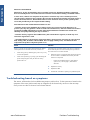
Power
blue
LED
Power
green
LED
Formatter
I LED
Formatter
II LED
Formatter
III LED
Front
panel
status
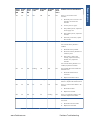
Problem and recommendations
Off
On
Off
Off
Off
Off
Off
There is a power failure in the
Formatter.
Off
On
Off
On
Off
Off
Off
1.
Reseat the power connector in the
Formatter, and remove the
Formatter.
2.
Turn the printer on again.
3.
If the problem persists, replace the
Power Supply Unit.
4.
If the problem persists, replace the
Formatter.
5.
If the boot process starts, replace
the Formatter.
Troubleshooting
Power
amber
LED
The Formatter BIOS is unable to start.
If an external Memory Module is
installed:
1.
Reseat the Memory Module.
2.
Remove the Memory Module and
restart the printer.
3.
If the printer is able to start
normally, replace the Memory
Module. If not, replace the
Formatter.
If an external Memory Module is not
installed, replace the Formatter.
Off
On
Off
Flashing
Off
Off
Off
The Formatter BIOS cannot detect the
Hard Disk Drive.
1.
Reseat the Hard Disk Drive
connectors.
2.
Replace the Hard Disk Drive.
Off
On
Off
On
Flashing
Off
Off
The operating system has experienced a
fatal error. Replace the Hard Disk Drive.
Off
On
Off
On
On
Off
Off
There is a communication failure in the
Formatter.
1.
Reseat the Formatter.
2.
Replace the Formatter.
Off
On
Off
On
On
Flashing
Off
There is an initialization failure in the
Formatter. Replace the Formatter.
Off
On
Off
On
On
On
Off
There is an initialization failure in the
Front Panel.
ENWW
www.Partshere.com
1.
Reseat the Front Panel cable.
2.
Replace the Front Panel.
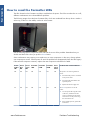
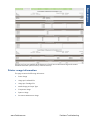
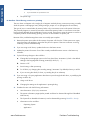
How to read the Formatter LEDs
Partshere Troubleshooting
15