1
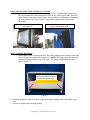
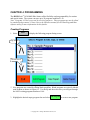
program by selecting
Clear All
. Type in the desired name of the program and select
Accept
to save.
Edit Step
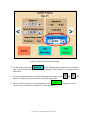
5. To edit a process, highlight the desired step number and select
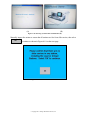
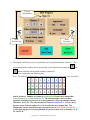
. The
“Editing Program Steps Screen” as shown in Figure 0-3 will be displayed. Change the
appropriate settings by following Steps 8-13 of the Creating Programs section. Once all
Finish
desired steps have been edited, select
to return to the previous screen.
6. To insert a process prior to an existing step, navigate through the list of programmed
steps using the up and down arrow keys. Highlight the step that occurs after the one to be
added and select
Insert New
Step
to add and edit the new step. Once all desired settings
Finish
have been programmed, select
to return to the previous screen.
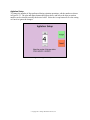
7. To add a process after a programmed step, navigate through the list of programmed steps
using the up and down arrow keys. Highlight the step that occurs before the one to be
added and select
Add New
Step
to add and edit the new step. Once all the desired
Finish
settings have been programmed, select
to return to previous screen.
8. To delete a process, navigate through the list of programmed steps using the up and down
Delete
Step
arrow keys. Highlight the step to be deleted and select
to be asked to
confirm the permanent step removal.
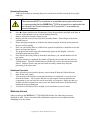
9. After making all the necessary changes, review the Program Steps Summary Screen to
ensure the entire program definition is correct.
10. Select
Save
and
Exit
to save changes and return to Main Menu.
Exit
Without
Saving
11. Select
to discard changes and return to Main Menu. You will receive a
discard changes confirmation message to verify the request to exit without saving.
Note: Programs numbered 41-50 cannot be edited using the SHUR/Stain™ 3030 H&E Slide
Stainer
software. They can only be viewed in the editor and not modified. These programs are
created and edited by using the HistoProgramEditor Windows application software. See the
section on Importing and Exporting Programs for additional information.
© Copyright 2013 Triangle Biomedical Sciences, Inc.